“f:validateRequired” is a new validator tag in JSF 2.0, which is used to make sure the input field is not empty. For example,
<h:inputSecret id="password" value="#{user.password}">
    <f:validateRequired />
</h:inputSecret>
Alternatively, you can use the “required” attribute also, both are doing the same empty value validation.
<h:inputSecret id="password" value="#{user.password}" required="true" />
“f:validateRequired” example
A JSF 2.0 example to show the use of “f:validateRequired” tag to make sure the “password” field is not empty.
1. Managed Bean
An user managed bean.
package com.mkyong;

import java.io.Serializable;
import javax.faces.bean.ManagedBean;
import javax.faces.bean.SessionScoped;

@ManagedBean(name="user")
@SessionScoped
public class UserBean implements Serializable{

	String password;
	String confPassword;

	//getter and setter methods
}
2. JSF Page
JSF XHTML page, show the use of “f:validateRequired” tag to make sure both “password” and “confirm password” fields are not empty.
<?xml version="1.0" encoding="UTF-8"?>
<!DOCTYPE html PUBLIC "-//W3C//DTD XHTML 1.0 Transitional//EN"
"http://www.w3.org/TR/xhtml1/DTD/xhtml1-transitional.dtd">
<html xmlns="http://www.w3.org/1999/xhtml"
      xmlns:h="http://java.sun.com/jsf/html"
      xmlns:f="http://java.sun.com/jsf/core"
      >
    <h:body>

    	<h1>JSF 2 validateRequired example</h1>

	<h:form>

		<h:panelGrid columns="3">

			Enter your password :

			<h:inputSecret id="password" value="#{user.password}"
				size="20" required="true"
				label="Password" />

			<h:message for="password" style="color:red" />

			Enter your password again :

			<h:inputSecret id="confPassword" value="#{user.confPassword}"
				size="20" label="Confirm Password">
				<f:validateRequired />
			</h:inputSecret>

			<h:message for="confPassword" style="color:red" />

		</h:panelGrid>

		<h:commandButton value="Submit" action="result" />

	</h:form>

    </h:body>
</html>
3. Demo
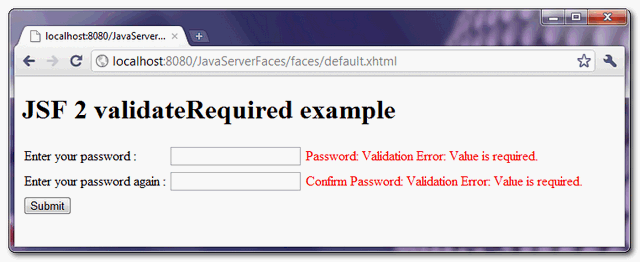
If “password” or “confirm password” fields are empty, display the error message.
Download Source Code
Download It – JSF-2-ValidateRequired-Example.zip (9KB)

Hi Mkyong, Thanks for such a great tutorials always 🙂
I am in a scenario in which I’m making ajax call upon
h:selectBooleanCheckbox, I’m facing if myh:selectOneMenuit throws validation exception.. while my checBox is checked now but it didn’t call backing.where we write the error msg like password required
if there is another button near the ‘submit’ like a sign up button.
it also gives validation errors if it clicked.
How can I correct it?
If I want to click another button, just use immediate=”true” That should get you past the validation.
The problem with JSF seems to be that Validators will not fire on empty fields. Maybe this is becuase it will run into the validation caused by the required=”true”.
Another thing that would be nice is if you could post a general message globally and field specific message on the offending data input field.
I’ve not figured out a way to do that. Something like this
Error: Errors exist on this page
.
.
.
Name: Name: Validation Error: Name must start uppercase
What you get instead is…
Name: Validation Error: Name must start uppercase
.
.
.
Name: Name: Validation Error: Name must start uppercase
The same error both places. Anyone know a way around this?
naturally like your website but you need to check the
spelling on quite a few of your posts. Several of them are rife
with spelling issues
and I find it very bothersome to tell the truth nevertheless I_ll
certainly come
back again.
won’t work as expected!!!
h:inputSecret tag in the sample source code cotains ‘required’ attribute that should not exist