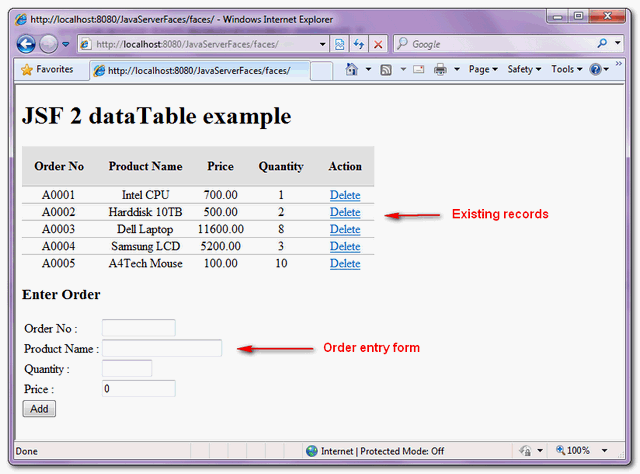
This example is enhancing previous delete dataTable row example, by adding a “add” function to add a row in dataTable.
Here’s a JSF 2.0 example to show you how to add a row in dataTable.
1. Managed Bean
A managed bean named “order”, self-explanatory.
package com.mkyong;

import java.io.Serializable;
import java.math.BigDecimal;
import java.util.ArrayList;
import java.util.Arrays;
import javax.faces.bean.ManagedBean;
import javax.faces.bean.SessionScoped;

@ManagedBean(name="order")
@SessionScoped
public class OrderBean implements Serializable{

	private static final long serialVersionUID = 1L;

	String orderNo;
	String productName;
	BigDecimal price;
	int qty;

	//getter and setter methods

	private static final ArrayList<Order> orderList =
		new ArrayList<Order>(Arrays.asList(

		new Order("A0001", "Intel CPU",
				new BigDecimal("700.00"), 1),
		new Order("A0002", "Harddisk 10TB",
				new BigDecimal("500.00"), 2),
		new Order("A0003", "Dell Laptop",
				new BigDecimal("11600.00"), 8),
		new Order("A0004", "Samsung LCD",
				new BigDecimal("5200.00"), 3),
		new Order("A0005", "A4Tech Mouse",
				new BigDecimal("100.00"), 10)
	));

	public ArrayList<Order> getOrderList() {

		return orderList;

	}

	public String addAction() {

		Order order = new Order(this.orderNo, this.productName,
			this.price, this.qty);

		orderList.add(order);
		return null;
	}

	public String deleteAction(Order order) {

		orderList.remove(order);
		return null;
	}

	public static class Order{

		String orderNo;
		String productName;
		BigDecimal price;
		int qty;

		public Order(String orderNo, String productName,
				BigDecimal price, int qty) {
			this.orderNo = orderNo;
			this.productName = productName;
			this.price = price;
			this.qty = qty;
		}

		//getter and setter methods
	}
}
2. JSF page
JSF page to display the data with dataTable tag, and a entry form to key in the order data.
<?xml version="1.0" encoding="UTF-8"?>
<!DOCTYPE html PUBLIC "-//W3C//DTD XHTML 1.0 Transitional//EN"
"http://www.w3.org/TR/xhtml1/DTD/xhtml1-transitional.dtd">
<html xmlns="http://www.w3.org/1999/xhtml"
      xmlns:h="http://java.sun.com/jsf/html"
      xmlns:f="http://java.sun.com/jsf/core"
      xmlns:ui="http://java.sun.com/jsf/facelets"
      >
    <h:head>
    	<h:outputStylesheet library="css" name="table-style.css"  />
    </h:head>
    <h:body>

    	<h1>JSF 2 dataTable example</h1>
    	<h:form>
    		<h:dataTable value="#{order.orderList}" var="o"
    			styleClass="order-table"
    			headerClass="order-table-header"
    			rowClasses="order-table-odd-row,order-table-even-row"
    		>

    		<h:column>

    			<f:facet name="header">Order No</f:facet>
    			#{o.orderNo}

    		</h:column>

    		<h:column>

    			<f:facet name="header">Product Name</f:facet>
    			#{o.productName}

    		</h:column>

    		<h:column>

    			<f:facet name="header">Price</f:facet>
    			#{o.price}

    		</h:column>

    		<h:column>

    			<f:facet name="header">Quantity</f:facet>
    			#{o.qty}

    		</h:column>

    		<h:column>

    			<f:facet name="header">Action</f:facet>

    			<h:commandLink value="Delete"
                                   action="#{order.deleteAction(o)}" />

    		</h:column>

    		</h:dataTable>

    		<h2>Enter Order</h2>
    		<table>
    		<tr>
    			<td>Order No :</td>
    			<td><h:inputText size="10" value="#{order.orderNo}" /></td>
    		</tr>
    		<tr>
    			<td>Product Name :</td>
    			<td><h:inputText size="20" value="#{order.productName}" /></td>
    		</tr>
    		<tr>
    			<td>Quantity :</td>
    			<td><h:inputText size="5" value="#{order.price}" /></td>
    		</tr>
    		<tr>
    			<td>Price :</td>
    			<td><h:inputText size="10" value="#{order.qty}" /></td>
    		</tr>
    		</table>

    		<h:commandButton value="Add" action="#{order.addAction}" />

    	</h:form>
    </h:body>
</html>
3. Demo
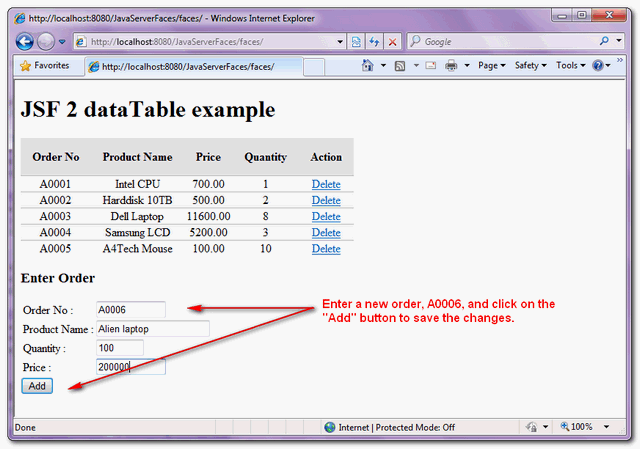
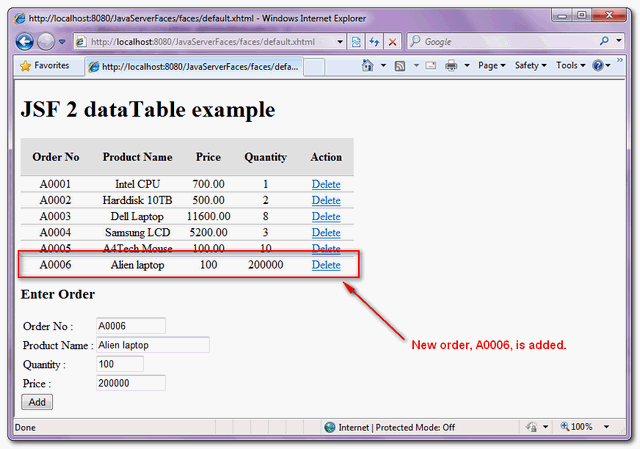
From top to bottom, shows a row record being added.
Download Source Code
Download It – JSF-2-DataTable-Add-Example.zip (10KB)

thanks
hello sir, when we take info from database .how can we display datas instead of these “private static final ArrayList orderList =
new ArrayList(Arrays.asList(
new Order(“A0001”, “Intel CPU”,
new BigDecimal(“700.00”), 1),
new Order(“A0002”, “Harddisk 10TB”,
new BigDecimal(“500.00”), 2),
new Order(“A0003”, “Dell Laptop”,
new BigDecimal(“11600.00”), 8),
new Order(“A0004”, “Samsung LCD”,
new BigDecimal(“5200.00”), 3),
new Order(“A0005”, “A4Tech Mouse”,
new BigDecimal(“100.00″), 10)
));”
Hello why function returns string null
thank for all
iam getting list from databse on to h:datatable, but the thing is when i deleted one row in the datatable it is deleted ,problem is when i referesh the browser then the values are adding again those values are deleted on database .please help me anybody..
Currently I’m using servlets 2.5 version and unable to call the method with input parameters.
This feature is available from servlets 3.
Please provide me an alternative for this problem.
Application was not properly initialized at startup, could not find Factory: javax.faces.context.FacesContextFact
I am getting these exception please tell me solution
look at this page
http://www.tutorialspoint.com/jsf/jsf_add_datatable.htm
i want to create a datatable depending on user input. i.e if the user input 4 in a textbox then 4 row will be created,if 10 then 10 row will be created. can you plz provide me the solution.
i am using jsf2.0
Thanks for your tutorial! I’ve learn a lot from you.
I want to ask, is there any way to put the data into this tutorial dataTable from oracle using hibernate ? and at same time, keep the adding row function
I’ve try for many days.
Thanks for this wonderful site
how to make the above program run in multi user environment. when i execute the same code in different machine i get the same data shared
Thanks in advance
remove the static to the list and all executions will have their own list of data
Thanks 🙂
i have made a few modifications to the form of adding a row i hope someone encounter its util
i used this in the orderBean Class
public Order nuevo;
public Order getnuevo()
{
return nuevo;
}
public orderBean()
{
nuevo=new Order(“”,””,new BigDecimal(“0.0”) ,0);
}
public String addAction() {
orderList.add(new Order(nuevo));
nuevo.price=new BigDecimal(“0.0″);
nuevo.qty=0;
nuevo.productName=””;
nuevo.orderNo=””;
return null;
}
instead of this in the orderBean Class
String orderNo;
String productName;
BigDecimal price;
int qty;
public String addAction() {
Order order = new Order(this.orderNo, this.productName,
this.price, this.qty);
orderList.add(order);
return null;
}
//getter and setter methods
added this to the Order class
public Order(Order replica) {
this.orderNo = replica.orderNo;
this.productName = replica.productName;
this.price = replica.price;
this.qty = replica.qty;
}
and when you access to the bean change a few
for example
#{order.nuevo.orderNo}
instead of this
#{order.orderNo}
i think this could be helpfull cause madesmore simple the clases cause you are reutiliating code and if you change the Order class you hasnt have to change the OrderBean class much only reconfigure the constructor instead of changing the atributes,get,set
i hope it helps to someone
sorry for my bad english(inst my native language)
Great article!
One question. Why orderList has to be ‘static’? I?ve noticed that if ‘static’ is removed from the array declaration, the array is re-created every time a new order is added (ant the orders’ list contains always 1 element).
I will appreciate your help.
i think(im a noob in jsf so dont trust me totaly i started 1 week ago) its cause the bean is recreated every time a sesion experies cause of the scope(@SessionScoped), and if you remove the static well the list will be created anytime the bean is created cause isnt shared anymore for al the beans, this could be good or bad depending of what are you developing
i hope it helps to you(maybe its a few late the response)
sorry for my bad english(inst my native language)
It’s possible make this on JSP and Spring? if it’s how?? is there any tutorial or something?
help me please.
Hii i need a static arrraylist which i need to pass to bean class and than after i need to search username frm that arraylist and displaying in a page using Jsf please help me out
Thanks in advance..
Great article. I need to add a new row to the datatable but at the beginning of it, displacing the existing rows one position downwards. Could you make a sugestion for doing this? (using JSF 2.0)
I’d like to add a row, but display it as a new row in the existing table, rather than as a separate webform below the table.
I have an error in: h:commandLink value=”Delete” action=”#{order.deleteAction(o)}” />
The error message is: “Method must have signature “String method(), String method(), String method(String), ……” but has signature “String method(Order)””
I’m using a .jsp not .xhtml
This a correction abut my previous post :
1) For OrderBean, you can start with empty list, and clear the fields after adding an item in the datatable in the “addAction()” method :
import java.io.Serializable;
import java.math.BigDecimal;
import java.util.ArrayList;
//import java.util.Arrays;
import javax.faces.bean.ManagedBean;
import javax.faces.bean.SessionScoped;

@ManagedBean(name = "order")
@SessionScoped
public class OrderBean implements Serializable {

    private static final long serialVersionUID = 1L;
    String orderNo;
    String productName;
    BigDecimal price;
    int qty;

    public String getOrderNo() {
        return orderNo;
    }

    public void setOrderNo(final String orderNo) {
        this.orderNo = orderNo;
    }

    public String getProductName() {
        return productName;
    }

    public void setProductName(final String productName) {
        this.productName = productName;
    }

    public BigDecimal getPrice() {
        return price;
    }

    public void setPrice(final BigDecimal price) {
        this.price = price;
    }

    public int getQty() {
        return qty;
    }

    public void setQty(final int qty) {
        this.qty = qty;
    }
    private static final ArrayList<Order> orderList =
            //            new ArrayList<Order>(Arrays.asList(
            //            new Order("A0001", "Intel CPU",
            //            new BigDecimal("700.00"), 1),
            //            new Order("A0002", "Harddisk 10TB",
            //            new BigDecimal("500.00"), 2),
            //            new Order("A0003", "Dell Laptop",
            //            new BigDecimal("11600.00"), 8),
            //            new Order("A0004", "Samsung LCD",
            //            new BigDecimal("5200.00"), 3),
            //            new Order("A0005", "A4Tech Mouse",
            //            new BigDecimal("100.00"), 10)));
            new ArrayList<Order>();

    public ArrayList<Order> getOrderList() {

        return orderList;

    }

    public String addAction() {

        final Order order = new Order(this.orderNo, this.productName,
                this.price, this.qty);

        orderList.add(order);
        setOrderNo(null);
        setProductName(null);
        setPrice(null);
        setQty(0);
        return null;
    }

    public String deleteAction(final Order order) {

        orderList.remove(order);
        return null;
    }

    public static class Order {

        String orderNo;
        String productName;
        BigDecimal price;
        int qty;

        public Order(final String orderNo, final String productName,
                final BigDecimal price, final int qty) {
            this.orderNo = orderNo;
            this.productName = productName;
            this.price = price;
            this.qty = qty;
        }

        public String getOrderNo() {
            return orderNo;
        }

        public void setOrderNo(final String orderNo) {
            this.orderNo = orderNo;
        }

        public String getProductName() {
            return productName;
        }

        public void setProductName(final String productName) {
            this.productName = productName;
        }

        public BigDecimal getPrice() {
            return price;
        }

        public void setPrice(final BigDecimal price) {
            this.price = price;
        }

        public int getQty() {
            return qty;
        }

        public void setQty(final int qty) {
            this.qty = qty;
        }
    }
}
The CSS file has an error at “.order-table-odd-row” : “#FFFFFF” and not “#FFFFFFF”
.order-table{
border-collapse:collapse;
}
.order-table-header{
text-align:center;
background:none repeat scroll 0 0 #E5E5E5;
border-bottom:1px solid #BBBBBB;
padding:16px;
}
.order-table-odd-row{
text-align:center;
background:none repeat scroll 0 0 #FFFFFFF;
border-top:1px solid #BBBBBB;
}
.order-table-even-row{
text-align:center;
background:none repeat scroll 0 0 #F9F9F9;
border-top:1px solid #BBBBBB;
}
There is a BIG error in the default.xhtml page :
    		<tr>
    			<td>Quantity :</td>
    			<td><h:inputText size="5" value="#{order.price}" /></td>
    		</tr>
    		<tr>
    			<td>Price :</td>
    			<td><h:inputText size="10" value="#{order.qty}" /></td>
The “price” property has the “Quantity” label
The “qty” property has the “Price” label
in your code (to add row in datatable) the datatable don’t gets refreshed we refresh the page.Can you help me for how to refresh the datatable when the page is refreshed.
Thank You.
Everything works fine for me : did you have a correct web.xml file ? I don’t use Maven, but Ant, NetBeans 7.11 and not Eclipse, GlassFish 3.12 and not TomCat 7.x.
Superb MK Yong…good example
If we create a SeesionScoped manged bean, one adds/updates a record in db, then it won’t be visible to another session in progress…What is the solution on it?
Most cases don’t need real-time data. If you insists, add ajax or thread check within every specified seconds, or implements the observer design pattern – http://en.wikipedia.org/wiki/Observer_pattern
THanks so much for your nice work.
I have a question.
Why didn’t you divide your classes ?
Because your writing twice Order Class. Or else it wouldn’t be working.
Isn’t another way to add rows ?
I have been working but doesn’t work T_T.
here it is:
============
index.xhtml
============
#{msgs.windowTitle}
============
com.mkyong.TableData.java
============
package com.mkyong;
import java.io.Serializable;
import java.util.ArrayList;
import java.util.Arrays;
import javax.faces.bean.ManagedBean;
// or import javax.inject.Named;
import javax.faces.bean.SessionScoped;
// or import javax.enterprise.context.SessionScoped;
@ManagedBean // or @Named(“user”)
@SessionScoped
public class TableData implements Serializable {
private Name name;
private ArrayList names = new ArrayList(Arrays.asList(
new Name(“Anna”, “Keeney”),
new Name(“John”, “Wilson”),
new Name(“Mariko”, “Randor”),
new Name(“William”, “Dupont”)
));
public void setName(Name name) {
this.name = name;
}
public Name getName() {
return this.name;
}
public void setNames(ArrayList names) {
this.names = names;
}
public ArrayList getNames() {
return names;
}
public String deleteRow(Name nameToDelete) {
names.remove(nameToDelete);
return null;
}
public String save() {
for (Name name : names) name.setEditable(false);
return null;
}
public String addRow() {
names.add(new Name(this.name.getFirst(), this.name.getLast()));
return null;
}
}
============
com.mkyong.Name.java
============
package com.mkyong;
import java.io.Serializable;
public class Name implements Serializable {
private String first;
private String last;
private boolean editable;
public Name(String first, String last) {
this.first = first;
this.last = last;
}
public void setFirst(String newValue) { first = newValue; }
public String getFirst() { return first; }
public void setLast(String newValue) { last = newValue; }
public String getLast() { return last; }
public void setEditable(boolean editable) { this.editable = editable; }
public boolean isEditable() { return editable; }
}
I get the following message:
=============================
/index.xhtml @60,58 value=”#{tableData.name.first}”: Target Unreachable, ‘null’ returned null
===============================
I will be waiting for an answer.
THANK YOU so much 😀
Another try with html entities
<!DOCTYPE html PUBLIC “-//W3C//DTD XHTML 1.0 Transitional//EN”
“http://www.w3.org/TR/xhtml1/DTD/xhtml1-transitional.dtd”>
<html xmlns=”http://www.w3.org/1999/xhtml”
xmlns:f=”http://java.sun.com/jsf/core”
xmlns:h=”http://java.sun.com/jsf/html”
xmlns:ui=”http://java.sun.com/jsf/facelets”>
<h:head>
<title>JSF 2.0: Example dynamic form</title>
<link href=”./css/styles.css” rel=”stylesheet” type=”text/css”/>
</h:head>
<h:body>
<fieldset>
<legend>Example of a dynamic form</legend>
<h:form id=”classForm”>
<h:dataTable var=”field” value=”#{formBean.fields}” border=”0″ id=”outerdatatable”>
<h:column>
<h:outputText value=”#{field.descr}” rendered=”#{field.type != 'MULTIFIELD2'}”/>
</h:column>
<h:column>
<h:inputText value=”#{field.value}” size=”100″/>
</h:column>
<h:column>
<h:commandButton value=”+” action=”#{formBean.addField(field)}” rendered=”#{field.type == 'MULTIFIELD'}”>
<f:ajax execute=”@form” render=”@form”/>
</h:commandButton>
</h:column>
</h:dataTable>
<h:commandButton value=”submit” action=”#{formBean.submit}”>
<f:ajax execute=”@form” render=”classForm”/>
</h:commandButton>
</h:form>
</fieldset>
</h:body></html>
it doesn’t work to include the xhtml code, please contact me to get the source
The contents of the form disappeared, don’t know why. Here it is again.
JSF 2.0: Example dynamic form
Example of a dynamic form
I solved it, creating a complete dynamic form where it is possible to add fields using JSF 2.0 / datatable. Necessary requirement: use of JUEL 2.2, see also http://weblogs.java.net/blog/cayhorstmann/archive/2009/12/29/jsf-20-and-tomcat.
I have a dynamic form with fields consisting of one field, and some with more, where the user can add fields when needed.
contents of dynamic_form.xhtml:
JSF 2.0: Example dynamic form
Example of a dynamic form
Contents of my bean:
package coreservlets;
import java.io.Serializable;
import java.util.logging.Logger;
import javax.faces.bean.*;
import java.util.ArrayList;
import java.util.Iterator;
import javax.faces.bean.ViewScoped;
@ManagedBean
@ViewScoped
public class FormBean implements Serializable {
private static final long serialVersionUID = 1L;
private static final Logger logger = Logger.getLogger(FormBean.class.getName());
private ArrayList fields = new ArrayList();
//constructor
public FormBean() {
fields.add(new Field(Field.FieldType.SINGLEFIELD, “Name”));
fields.add(new Field(Field.FieldType.SINGLEFIELD, “Family name”));
fields.add(new Field(Field.FieldType.MULTIFIELD, “Brothers”));
fields.add(new Field(Field.FieldType.MULTIFIELD, “Sisters”));
}
//getters and setters
public ArrayList getFields() {
return fields;
}
public void setFields(ArrayList fields) {
this.fields = fields;
}
//others
public void addField(Field field) {
logger.info(“adding Field. Fields content below. “);
this.logFields();
int fieldnr = fields.indexOf(field);
//add a field after current row, with same description, and of type MULTIFIELD2
fields.add(fieldnr+1,new Field(Field.FieldType.MULTIFIELD2, fields.get(fieldnr).getDescr()));
}
public void submit() {
this.logFields();
}
private void logFields() {
Iterator entries = fields.iterator();
while (entries.hasNext()) {
Field field = entries.next();
logger.info(“field – ” + field.getDescr() + “: ” + field.getValue());
} //while
}
} //class
and contents of Field:
package coreservlets;
public class Field {
public enum FieldType {SINGLEFIELD, MULTIFIELD, MULTIFIELD2};
private FieldType type;
private String descr;
private String value;
public Field(FieldType type, String descr) {
super();
this.type = type;
this.descr = descr;
}
public Field(FieldType type, String descr, String value) {
super();
this.type = type;
this.descr = descr;
this.value = value;
}
//getters and setters
public FieldType getType() {
return type;
}
public void setType(FieldType type) {
this.type = type;
}
public String getDescr() {
return descr;
}
public void setDescr(String descr) {
this.descr = descr;
}
public String getValue() {
return value;
}
public void setValue(String value) {
this.value = value;
}
}
Can you also add a row after each field by adding a commandlink at each row?
Sorry, don’t get you, mind to elaborate in detail?
hi
how to insert all these row data into the database.plz help me with example only