This example is enhancing the previous JSF 2 dataTable example, by adding a “update” function to update row in dataTable.
Update Concept
The overall concept is quite simple :
1. Add a “ediatble” property to keep track the row edit status.
//...
public class Order{

	String orderNo;
	String productName;
	BigDecimal price;
	int qty;

	boolean editable;

	public boolean isEditable() {
		return editable;
	}
	public void setEditable(boolean editable) {
		this.editable = editable;
	}
2. Assign a “Edit” link to the end of each row, if clicked, set “ediatble” = true. In JSF 2.0, you can provide the parameter values in the method expression directly, see the edit action below :
//...
<h:dataTable value="#{order.orderList}" var="o">

<h:column>

    	<f:facet name="header">Action</f:facet>

    	<h:commandLink value="Edit" action="#{order.editAction(o)}" rendered="#{not o.editable}" />

</h:column>
//...
public String editAction(Order order) {

	order.setEditable(true);
	return null;
}
3. In JSF page, if “ediatble” = true, display the input text box for edit; Otherwise just display the normal output text. A simple trick to simulate the update effect 🙂
//...
<h:dataTable value="#{order.orderList}" var="o">

<h:column>

    <f:facet name="header">Order No</f:facet>

    <h:inputText value="#{o.orderNo}" size="10" rendered="#{o.editable}" />

    <h:outputText value="#{o.orderNo}" rendered="#{not o.editable}" />

</h:column>
4. Finally, provide a button to save your changes. When you make changes in the input text box and save it, all values will bind to the associated backing bean automatically.
//...
<h:commandButton value="Save Changes" action="#{order.saveAction}" />
</h:column>
Example
A JSF 2.0 example to implement the above concept to update row in dataTable.
1. Managed Bean
A managed bean named “order”, self-explanatory.
package com.mkyong;

import java.io.Serializable;
import java.math.BigDecimal;
import java.util.ArrayList;
import java.util.Arrays;
import javax.faces.bean.ManagedBean;
import javax.faces.bean.SessionScoped;

@ManagedBean(name="order")
@SessionScoped
public class OrderBean implements Serializable{

	private static final long serialVersionUID = 1L;

	private static final ArrayList<Order> orderList =
		new ArrayList<Order>(Arrays.asList(

		new Order("A0001", "Intel CPU",
				new BigDecimal("700.00"), 1),
		new Order("A0002", "Harddisk 10TB",
				new BigDecimal("500.00"), 2),
		new Order("A0003", "Dell Laptop",
				new BigDecimal("11600.00"), 8),
		new Order("A0004", "Samsung LCD",
				new BigDecimal("5200.00"), 3),
		new Order("A0005", "A4Tech Mouse",
				new BigDecimal("100.00"), 10)
	));

	public ArrayList<Order> getOrderList() {
		return orderList;
	}

	public String saveAction() {

		//get all existing value but set "editable" to false
		for (Order order : orderList){
			order.setEditable(false);
		}
		//return to current page
		return null;

	}

	public String editAction(Order order) {

		order.setEditable(true);
		return null;
	}

	public static class Order{

		String orderNo;
		String productName;
		BigDecimal price;
		int qty;
		boolean editable;

		public Order(String orderNo, String productName, BigDecimal price, int qty) {
			this.orderNo = orderNo;
			this.productName = productName;
			this.price = price;
			this.qty = qty;
		}

		//getter and setter methods
	}
}
2. JSF page
JSF page to display the data with dataTable tag, and create a “edit” link to update the row record.
<?xml version="1.0" encoding="UTF-8"?>
<!DOCTYPE html PUBLIC "-//W3C//DTD XHTML 1.0 Transitional//EN"
"http://www.w3.org/TR/xhtml1/DTD/xhtml1-transitional.dtd">
<html xmlns="http://www.w3.org/1999/xhtml"
      xmlns:h="http://java.sun.com/jsf/html"
      xmlns:f="http://java.sun.com/jsf/core"
      xmlns:ui="http://java.sun.com/jsf/facelets"
      >
    <h:head>
    	<h:outputStylesheet library="css" name="table-style.css"  />
    </h:head>
    <h:body>

    	<h1>JSF 2 dataTable example</h1>
    	<h:form>
    	   <h:dataTable value="#{order.orderList}" var="o"
    		styleClass="order-table"
    		headerClass="order-table-header"
    		rowClasses="order-table-odd-row,order-table-even-row"
    	   >

    	     <h:column>

                <f:facet name="header">Order No</f:facet>

    		<h:inputText value="#{o.orderNo}" size="10" rendered="#{o.editable}" />

    		<h:outputText value="#{o.orderNo}" rendered="#{not o.editable}" />

    	     </h:column>

    	     <h:column>

    		<f:facet name="header">Product Name</f:facet>

    		<h:inputText value="#{o.productName}" size="20" rendered="#{o.editable}" />

    		<h:outputText value="#{o.productName}" rendered="#{not o.editable}" />

    	     </h:column>

    	     <h:column>

    		<f:facet name="header">Price</f:facet>

    		<h:inputText value="#{o.price}" size="10" rendered="#{o.editable}" />

    		<h:outputText value="#{o.price}" rendered="#{not o.editable}" />

    	     </h:column>

    	     <h:column>

    		<f:facet name="header">Quantity</f:facet>

    		<h:inputText value="#{o.qty}" size="5" rendered="#{o.editable}" />

    		<h:outputText value="#{o.qty}" rendered="#{not o.editable}" />

    	     </h:column>

    	     <h:column>

    		<f:facet name="header">Action</f:facet>

    		<h:commandLink value="Edit" action="#{order.editAction(o)}"
                                       rendered="#{not o.editable}" />

    	     </h:column>

    	  </h:dataTable>

    	  <h:commandButton value="Save Changes" action="#{order.saveAction}" />

      </h:form>
    </h:body>
</html>
3. Demo
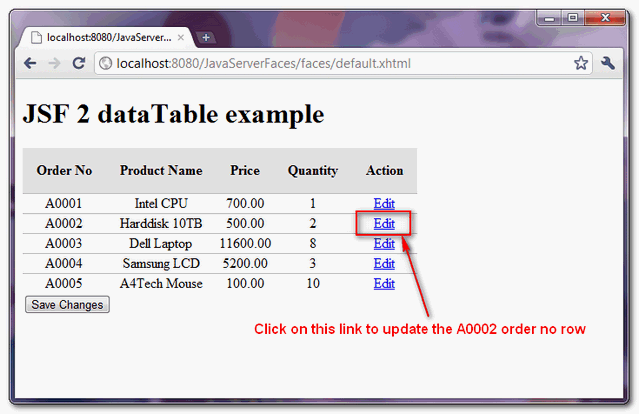
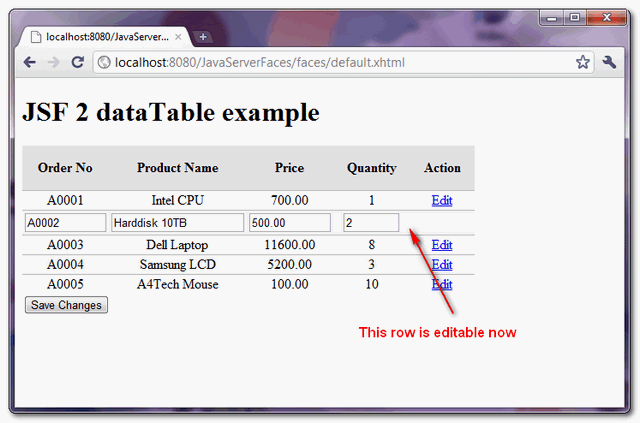
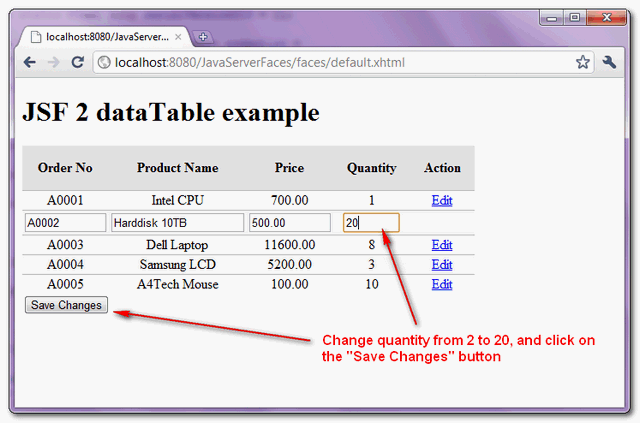
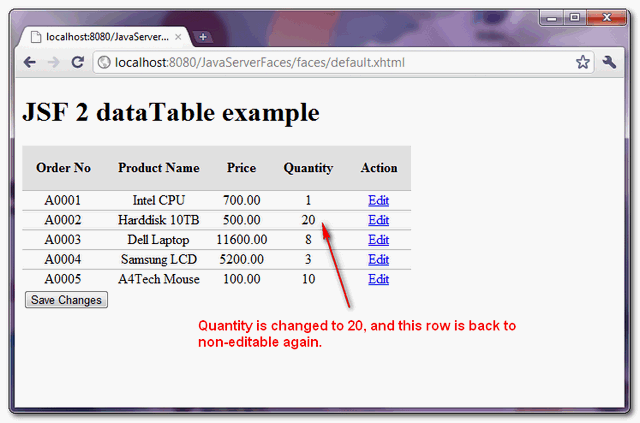
From top to bottom, shows a row record being updated.

Hello!
I follow your tutorial, but when ‘Edit’ link is pressed – iput fields are not displayed, how to fix it?
Hi Mkyong, this is very good example and it helped a lot .I want to edit only first row. Is it possible to edit only first row not others?. Edit option should be enabled only for 1st row
Is it possible to write that code with checkbox for each row and only one edit button at last, Instead of edit button for each row . In check box we will click on it and then edit with edit button at last
This is worst thing and post. … i can not say in words. …. every body can do this type of baby tasks. . you think and try to do with databases with mybatis and hibernate . overall flow is going on a wrong direction. and you DON’T KNOW ANYTHING…. MIND IT. OK… :-@ . just go and learn something form college/L.K.G students. . don’t go institutes ok . L.K.G STUDENTS is better then YOU. just you think your self and upgrade understood. that much of angry i am getting because of your worst posts. if really you have talent then dont follow other sites .. just try to do something different tasks as like i said above.
The thing is, this example is all over the internet and is nt even working…
Can this be done using requestscoped?
Thanks for the tutorial. When I tried the code, I am seeing the warning “editAction cannot be resolved as a member of order” and “saveAction cannot be resolved as a member of order”. When I run the application, I se the message “” on the screen. I am using JSF 2.0 (Mojarra 2.1.1), apache-tomcat-7.0.55, eclipse Juno Service Release 2. Any idea why?
I recreated the project from ground up. This time I did not see the warning. However when I tried to edit the record I am getting the below listed message. Any idea why?
javax.el.MethodNotFoundException: /default.xhtml @54,100 action=”#{order.editAction(o)}”: Method not found: [email protected](com.suraj.datatable.bean.OrderBean$Order)
javax.faces.FacesException: #{order.editAction(o)}: javax.el.MethodNotFoundException: /default.xhtml @54,100 action=”#{order.editAction(o)}”: Method not found: [email protected](com.suraj.datatable.bean.OrderBean$Order)
at com.sun.faces.application.ActionListenerImpl.processAction(ActionListenerImpl.java:110)
hey can you help me updating the values from database, in above code u r just fetching the array list and editing it. i tried the same logic to edit database but it not working
very good , thanks
hey nice one but I can’t mind how to update those datas in a mysql db! could you make a 3th part explain it? also giving a beter understanding how these “for ” works, it’s blowing my mind!
value=”#{e.orderNo}”: The class ‘java.lang.String’ does not have the property ‘orderNo’.
Hi Mkyong,
I write my owner code with separated classes. The edit button isn’t working.
How I can do.
Thanks.
Thank you.,
Thanks mkyong. I am referring to this code for my application and when I click the edit link it says the following error ” Cannot cast from java.lang.string to java.lang.Integer”. Here is the stack trace for your reference.
java.lang.ClassCastException: java.lang.String cannot be cast to java.lang.Integer
at com.sun.faces.renderkit.html_basic.MenuRenderer.renderSelect(MenuRenderer.java:843)
at com.sun.faces.renderkit.html_basic.MenuRenderer.encodeEnd(MenuRenderer.java:294)
at javax.faces.component.UIComponentBase.encodeEnd(UIComponentBase.java:879)
at com.sun.faces.renderkit.html_basic.HtmlBasicRenderer.encodeRecursive(HtmlBasicRenderer.java:308)
at com.sun.faces.renderkit.html_basic.TableRenderer.renderRow(TableRenderer.java:376)
at com.sun.faces.renderkit.html_basic.TableRenderer.encodeChildren(TableRenderer.java:157)
at javax.faces.component.UIComponentBase.encodeChildren(UIComponentBase.java:849)
at javax.faces.component.UIComponent.encodeAll(UIComponent.java:1663)
at javax.faces.render.Renderer.encodeChildren(Renderer.java:164)
at javax.faces.component.UIComponentBase.encodeChildren(UIComponentBase.java:849)
at javax.faces.component.UIComponent.encodeAll(UIComponent.java:1663)
at javax.faces.component.UIComponent.encodeAll(UIComponent.java:1666)
at javax.faces.component.UIComponent.encodeAll(UIComponent.java:1666)
at com.sun.faces.application.view.FaceletViewHandlingStrategy.renderView(FaceletViewHandlingStrategy.java:389)
at com.sun.faces.application.view.MultiViewHandler.renderView(MultiViewHandler.java:127)
at com.sun.faces.lifecycle.RenderResponsePhase.execute(RenderResponsePhase.java:117)
at com.sun.faces.lifecycle.Phase.doPhase(Phase.java:97)
at com.sun.faces.lifecycle.LifecycleImpl.render(LifecycleImpl.java:135)
at javax.faces.webapp.FacesServlet.service(FacesServlet.java:335)
at org.apache.catalina.core.ApplicationFilterChain.internalDoFilter(ApplicationFilterChain.java:305)
at org.apache.catalina.core.ApplicationFilterChain.doFilter(ApplicationFilterChain.java:210)
at org.apache.catalina.core.StandardWrapperValve.invoke(StandardWrapperValve.java:222)
at org.apache.catalina.core.StandardContextValve.invoke(StandardContextValve.java:123)
at org.apache.catalina.authenticator.AuthenticatorBase.invoke(AuthenticatorBase.java:472)
at org.apache.catalina.core.StandardHostValve.invoke(StandardHostValve.java:171)
at org.apache.catalina.valves.ErrorReportValve.invoke(ErrorReportValve.java:99)
at org.apache.catalina.valves.AccessLogValve.invoke(AccessLogValve.java:947)
at org.apache.catalina.core.StandardEngineValve.invoke(StandardEngineValve.java:118)
at org.apache.catalina.connector.CoyoteAdapter.service(CoyoteAdapter.java:408)
at org.apache.coyote.http11.AbstractHttp11Processor.process(AbstractHttp11Processor.java:1009)
at org.apache.coyote.AbstractProtocol$AbstractConnectionHandler.process(AbstractProtocol.java:589)
at org.apache.tomcat.util.net.JIoEndpoint$SocketProcessor.run(JIoEndpoint.java:312)
at java.util.concurrent.ThreadPoolExecutor$Worker.runTask(Unknown Source)
at java.util.concurrent.ThreadPoolExecutor$Worker.run(Unknown Source)
at java.lang.Thread.run(Unknown Source)
I’d like to open a modal form dialog when clicking in the “Edit” command link of the datatable. What have I to do to do it?
Great tutorial 🙂
Is there a way to do this but with JSF 1.2? As I can see u use the View socope for the bean, but how can u do this with a Request bean and conecting to DB. I’ve read some solutions using and preserveDataModel, but none of this works, at least with this example and using request bean with JSF 1.2
Thanks in advance
How to affect update operation directly on database
Hi,
How to do it same thing and insert and update in database
Hi,
I can’t make the arrayList static final as I need to get data data from database and save edited datatable to database. It is not working without static final. Please suggest
Hi Young,
Could you please tell me how to access the updated “orderList” in my action or action listener method if the Bean scope is in “request”..
Thanks,
Ravi.
I have an application which uses a database in the backside. All the data in the application come from the database. Some data in database are continuesly updated every 20 seconds and I want to display these new data in the application ( within ) without refreshing the entire page. How could it be possible without any action or event handling mechanisim from within the main page. any help will really be appreciated….
hi you. How to add the cancel button in this example. This mean that when user click on edit button, then type something on the textboxes, and then click on cancel button which the data is not updated? thanks.
How could we do the same using JSF 1.2?
Update for the table-style.css :
.order-table{
border-collapse:collapse;
}
.order-table-header{
text-align:center;
background:none repeat scroll 0 0 #E5E5E5;
border-bottom:1px solid #BBBBBB;
padding:16px;
}
.order-table-odd-row{
background:none repeat scroll 0 0 #FFFFFF;
border-top:1px solid #BBBBBB;
}
.order-table-even-row{
background:none repeat scroll 0 0 #F9F9F9;
border-top:1px solid #BBBBBB;
}
.evenRow {
background-color: #F5F5DC;
}
.oddRow {
background-color: #FFE4C4;
}
.celluleLeft {
font-family:verdana,arial,helvetica,sans-serif;
font-size:13px;
text-align: left;
text-transform: uppercase;
}
.celluleRight {
font-family:verdana,arial,helvetica,sans-serif;
font-size:13px;
text-align: right;
}
.celluleCenter {
font-family:verdana,arial,helvetica,sans-serif;
font-size:13px;
text-align: center;
text-transform: uppercase;
}
I merged the three examples in one : ADD, UPDATE, DELETE in one XHTML page and one Java Bean, with many improvements :
<?xml version="1.0" encoding="UTF-8"?>
<!DOCTYPE html PUBLIC "-//W3C//DTD XHTML 1.0 Transitional//EN"
    "http://www.w3.org/TR/xhtml1/DTD/xhtml1-transitional.dtd">
<html xmlns="http://www.w3.org/1999/xhtml"
      xmlns:h="http://java.sun.com/jsf/html"
      xmlns:f="http://java.sun.com/jsf/core">
    <h:head>
        <h:outputStylesheet library="css" name="table-style.css"  />
    </h:head>
    <h:body>

        <h1>JSF 2 dataTable example (modified by Jacques Piotrowski, France)</h1>
        <h:outputText id="nbOrder" value=" Number of orders : #{order.nbOrder}" />

        <h:form id="addOrder">
            <h:dataTable value="#{order.orderList}" var="o"
                         styleClass="order-table"
                         headerClass="order-table-header"
                         rowClasses="order-table-odd-row,order-table-even-row">

                <h:column>
                    <f:facet name="header">Order No</f:facet>
                    <h:inputText value="#{o.orderNo}" size="10" maxlength="10" rendered="#{o.editable}" />
                    <h:outputText value="#{o.orderNo}" rendered="#{not o.editable}" />
                </h:column>

                <h:column>
                    <f:facet name="header">Product Name</f:facet>
                    <h:inputText value="#{o.productName}" size="20" maxlength="20" rendered="#{o.editable}" />
                    <h:outputText value="#{o.productName}" rendered="#{not o.editable}" />
                </h:column>

                <h:column>
                    <f:facet name="header">Price</f:facet>
                    <h:inputText value="#{o.price}" size="10" maxlength="10" rendered="#{o.editable}" />
                    <h:outputText value="#{o.price}" rendered="#{not o.editable}" />
                </h:column>

                <h:column>
                    <f:facet name="header">Quantity</f:facet>
                    <h:inputText value="#{o.qty}" size="5" maxlength="5" rendered="#{o.editable}" />
                    <h:outputText value="#{o.qty}" rendered="#{not o.editable}" />
                </h:column>

                <h:column>
                    <f:facet name="header">Edit</f:facet>
                    <h:commandLink value="Edit" immediate="true" action="#{order.editAction(o)}" rendered="#{not o.editable}" />
                    <h:commandLink value="Save Changes" immediate="true" action="#{order.saveAction}" rendered="#{o.editable}" />
                </h:column>

                <h:column>
                    <f:facet name="header">Delete</f:facet>
                    <h:commandLink value="Delete" immediate="true" action="#{order.deleteAction(o)}" rendered="#{not o.editable}" />
                </h:column>

            </h:dataTable>

            <h3>Enter Order</h3>
            <table>
                <tr>
                    <td styleClass="celluleLeft">Order No :</td>
                    <td><h:inputText id="orderNo" size="10" maxlength="10" value="#{order.orderNo}" required="true" /></td>
                </tr>
                <tr>
                    <td styleClass="celluleLeft">Product Name :</td>
                    <td><h:inputText id="productName" size="20" maxlength="20" value="#{order.productName}" required="true" /></td>
                </tr>
                <tr>
                    <td styleClass="celluleLeft">Quantity :</td>
                    <td><h:inputText id="qty" size="5" maxlength="5" value="#{order.qty}" required="true" /></td>
                </tr>
                <tr>
                    <td styleClass="celluleLeft">Price :</td>
                    <td><h:inputText id="price" size="10" maxlength="10" value="#{order.price}" required="true" /></td>
                </tr>
            </table>
            <h:commandButton value="Add New Order" action="#{order.addAction}" rendered="#{not order.editable}" />

        </h:form>
    </h:body>

</html>
package org.jpiotrowski; import java.io.Serializable; import java.math.BigDecimal; import java.util.ArrayList; import java.util.Arrays; import javax.faces.bean.ManagedBean; import javax.faces.bean.ViewScoped; @ManagedBean(name = "order") @ViewScoped public class OrderBean implements Serializable { private static final long serialVersionUID = 1L; transient int i; transient int nbOrder; String orderNo; String productName; BigDecimal price; int qty; boolean editable = false; private static final ArrayList<Order> orderList = new ArrayList<Order>(); public ArrayList<Order> getOrderList() { return orderList; } public final int getNbOrder() { nbOrder = orderList.size(); return nbOrder; } public String getOrderNo() { return orderNo; } public void setOrderNo(final String orderNo) { this.orderNo = orderNo; } public String getProductName() { return productName; } public void setProductName(final String productName) { this.productName = productName; } public BigDecimal getPrice() { return price; } public void setPrice(final BigDecimal price) { this.price = price; } public int getQty() { return qty; } public void setQty(final int qty) { this.qty = qty; } public boolean isEditable() { return editable; } public void setEditable(final boolean editable) { this.editable = editable; } public String saveAction() { //get all existing value but set "editable" to false for (Order order : orderList) { order.setEditable(false); } //return to current page return null; } public String editAction(final Order order) { order.setEditable(true); return null; } public String addAction() { final Order order = new Order(this.orderNo, this.productName, this.price, this.qty); orderList.add(order); setEditable(false); setOrderNo(null); setProductName(null); setPrice(null); setQty(0); return null; } public String deleteAction(final Order order) { orderList.remove(order); return null; } public static class Order { String orderNo; String productName; BigDecimal price; int qty; boolean editable; public Order(final String orderNo, final String productName, final BigDecimal price, final int qty) { this.orderNo = orderNo; this.productName = productName; this.price = price; this.qty = qty; } public boolean isEditable() { return editable; } public void setEditable(final boolean editable) { this.editable = editable; } public String getOrderNo() { return orderNo; } public void setOrderNo(final String orderNo) { this.orderNo = orderNo; } public String getProductName() { return productName; } public void setProductName(final String productName) { this.productName = productName; } public BigDecimal getPrice() { return price; } public void setPrice(final BigDecimal price) { this.price = price; } public int getQty() { return qty; } public void setQty(final int qty) { this.qty = qty; } } }Hi, I am new in java,how can I do this but with a database? Excuse my English
AJ.. AJ.. AJEY.. Hey yavrum hey..
44 > 23
Androidceee seni nas?l sevdi?imi… androidceeee rüyalarda gördü?ümü androidce uykusuz gecelerimi
SAYGI
thanks
Hi Mkyong,
can you give tutor, how can implementation in database jsf-mysql about “Update Concept”.
what the mean :
”
for (Order order : orderList){
order.setEditable(false);
}
”
thank you before.
when you click to save , all command click(edit) must be disable for hiding all input and show edit
Hey Mkyong,
This is very helpful example. But i have make a separate class for Order,so i cant get update the inputText from outputText when i m click on edit button. So,what should be the problem? Because i make a separate class for Order that;s why i m not able to change the textbox? Thanks in advance
Hello, first of all thanks for this amazing example!
How can I do to keep non editable one of the registries of the row and the others editables when I press the “edit” button?
Thanks a lot!
Andrew
Sorry, i didn’t implement in JSF before, but jQuery. Hope someone can help you.
Hello,
First, thanks a lot for this helpful tutorial.
I’m running the above over Google App Engine with Java 1.6 and I get the following when loading the page.
I realize it is probably related to the fact of passing a parameter via JSF when calling order.editAction(o). MAybe related to the Google environment.
Please advise.
Thanks,
Hagay.
Problem accessing /orderForm.jsf. Reason:
/orderForm.xhtml @67,71 action=”#{order.editAction(o)}” Error Parsing: #{order.editAction(o)}
Caused by:
javax.faces.view.facelets.TagAttributeException: /orderForm.xhtml @67,71 action=”#{order.editAction(o)}” Error Parsing: #{order.editAction(o)}
at com.sun.faces.facelets.tag.TagAttributeImpl.getMethodExpression(TagAttributeImpl.java:232)
……
Caused by: javax.el.ELException: Error Parsing: #{order.editAction(o)}
at org.apache.el.lang.ExpressionBuilder.createNodeInternal(ExpressionBuilder.java:125)
……
Caused by: org.apache.el.parser.ParseException: Encountered ” “(” “( “” at line 1, column 19.
Was expecting one of:
“}” …
Make sure your environment is using >= JSF2.0 , to support parameter passing in EL method. The common mistake is using old JSF jars and try to use the new EL implementation.
Lovely tutorial. Clean and great explanation.
Unfortunately it’s not working when I’m implementing it with my own code.
Do you know about any know programmering errors with this approach?
How can action attribut take an argument of type order?Kindly reply soon
Oh this is awesome article. Maybe once we could tackle lazy loading (on demand loading). I had run some examples, it’s tough but possible…
Do you mind to share your examples?
I am getting same problem as Hagay… what should i do??? i tried with updating my project with latest jsf..but still its not working.