In this tutorial, we will show you how to perform database authentication (using both XML and Annotations) in Spring Security.
Technologies used :
- Spring 3.2.8.RELEASE
- Spring Security 3.2.3.RELEASE
- Spring JDBC 3.2.3.RELEASE
- Eclipse 4.2
- JDK 1.6
- Maven 3
- Tomcat 6 or 7 (Servlet 3.x)
- MySQL Server 5.6
Previous login-form in-memory authentication will be reused, enhance to support the following features :
- Database authentication, using Spring-JDBC and MySQL.
- Spring Security, JSP TagLib,
sec:authorize access="hasRole('ROLE_USER') - Customize a 403 access denied page.
1. Project Demo
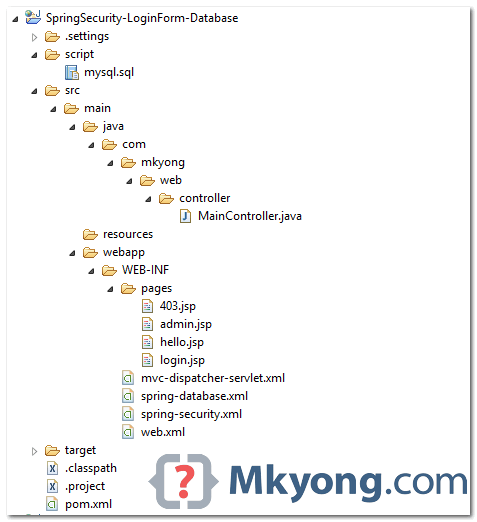
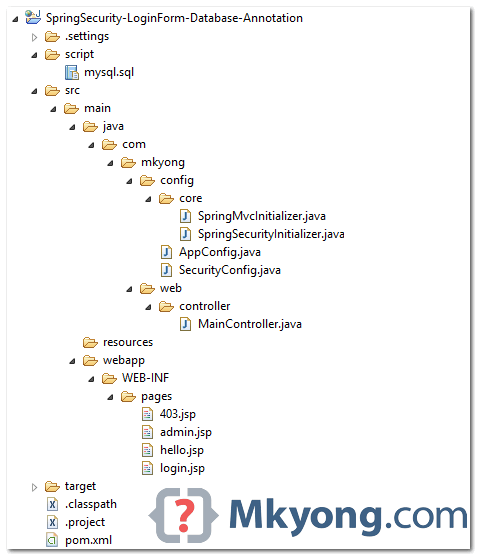
2. Project Directory
Review the final project structure (XML-based) :
Review the final project structure (Annotation-based):
3. Project Dependencies
Get dependency for Spring, Spring Security, JDBC, Taglib and MySQL
	<properties>
		<jdk.version>1.6</jdk.version>
		<spring.version>3.2.8.RELEASE</spring.version>
		<spring.security.version>3.2.3.RELEASE</spring.security.version>
		<jstl.version>1.2</jstl.version>
		<mysql.connector.version>5.1.30</mysql.connector.version>
	</properties>

	<dependencies>

		<!-- Spring 3 dependencies -->
		<dependency>
			<groupId>org.springframework</groupId>
			<artifactId>spring-core</artifactId>
			<version>${spring.version}</version>
		</dependency>

		<dependency>
			<groupId>org.springframework</groupId>
			<artifactId>spring-web</artifactId>
			<version>${spring.version}</version>
		</dependency>

		<dependency>
			<groupId>org.springframework</groupId>
			<artifactId>spring-webmvc</artifactId>
			<version>${spring.version}</version>
		</dependency>

		<dependency>
			<groupId>org.springframework</groupId>
			<artifactId>spring-jdbc</artifactId>
			<version>${spring.version}</version>
		</dependency>

		<!-- Spring Security -->
		<dependency>
			<groupId>org.springframework.security</groupId>
			<artifactId>spring-security-web</artifactId>
			<version>${spring.security.version}</version>
		</dependency>

		<dependency>
			<groupId>org.springframework.security</groupId>
			<artifactId>spring-security-config</artifactId>
			<version>${spring.security.version}</version>
		</dependency>

		<!-- Spring Security JSP Taglib -->
		<dependency>
			<groupId>org.springframework.security</groupId>
			<artifactId>spring-security-taglibs</artifactId>
			<version>${spring.security.version}</version>
		</dependency>

		<!-- jstl for jsp page -->
		<dependency>
			<groupId>jstl</groupId>
			<artifactId>jstl</artifactId>
			<version>${jstl.version}</version>
		</dependency>

                <!-- connect to mysql -->
		<dependency>
			<groupId>mysql</groupId>
			<artifactId>mysql-connector-java</artifactId>
			<version>${mysql.connector.version}</version>
		</dependency>

	</dependencies>

</project>
4. Database
To perform database authentication, you have to create tables to store the users and roles detail. Please refer to this Spring Security user-schema reference. Here are the MySQL scripts to create users and user_roles tables.
4.1 Create a “users” table.
CREATE  TABLE users (
  username VARCHAR(45) NOT NULL ,
  password VARCHAR(45) NOT NULL ,
  enabled TINYINT NOT NULL DEFAULT 1 ,
  PRIMARY KEY (username));
4.2 Create a “user_roles” table.
CREATE TABLE user_roles (
  user_role_id int(11) NOT NULL AUTO_INCREMENT,
  username varchar(45) NOT NULL,
  role varchar(45) NOT NULL,
  PRIMARY KEY (user_role_id),
  UNIQUE KEY uni_username_role (role,username),
  KEY fk_username_idx (username),
  CONSTRAINT fk_username FOREIGN KEY (username) REFERENCES users (username));
4.3 Inserts some records for testing.
INSERT INTO users(username,password,enabled)
VALUES ('mkyong','123456', true);
INSERT INTO users(username,password,enabled)
VALUES ('alex','123456', true);

INSERT INTO user_roles (username, role)
VALUES ('mkyong', 'ROLE_USER');
INSERT INTO user_roles (username, role)
VALUES ('mkyong', 'ROLE_ADMIN');
INSERT INTO user_roles (username, role)
VALUES ('alex', 'ROLE_USER');
- Username “mkyong”, with role_user and role_admin.
- Username “alexa”, with role_user.
5. Spring Security Configuration
Spring Security in both XML and annotations.
5.1 Create a DataSource to connect MySQL.
<beans xmlns="http://www.springframework.org/schema/beans"
	xmlns:xsi="http://www.w3.org/2001/XMLSchema-instance"
	xsi:schemaLocation="http://www.springframework.org/schema/beans
	http://www.springframework.org/schema/beans/spring-beans-3.0.xsd">

	<bean id="dataSource"
		class="org.springframework.jdbc.datasource.DriverManagerDataSource">

		<property name="driverClassName" value="com.mysql.jdbc.Driver" />
		<property name="url" value="jdbc:mysql://localhost:3306/test" />
		<property name="username" value="root" />
		<property name="password" value="password" />
	</bean>

</beans>
The equivalent of the Spring annotations :
package com.mkyong.config;

import org.springframework.context.annotation.Bean;
import org.springframework.context.annotation.ComponentScan;
import org.springframework.context.annotation.Configuration;
import org.springframework.context.annotation.Import;
import org.springframework.jdbc.datasource.DriverManagerDataSource;
import org.springframework.web.servlet.config.annotation.EnableWebMvc;
import org.springframework.web.servlet.view.InternalResourceViewResolver;
import org.springframework.web.servlet.view.JstlView;

@EnableWebMvc
@Configuration
@ComponentScan({ "com.mkyong.web.*" })
@Import({ SecurityConfig.class })
public class AppConfig {

	@Bean(name = "dataSource")
	public DriverManagerDataSource dataSource() {
	    DriverManagerDataSource driverManagerDataSource = new DriverManagerDataSource();
	    driverManagerDataSource.setDriverClassName("com.mysql.jdbc.Driver");
	    driverManagerDataSource.setUrl("jdbc:mysql://localhost:3306/test");
	    driverManagerDataSource.setUsername("root");
	    driverManagerDataSource.setPassword("password");
	    return driverManagerDataSource;
	}

	@Bean
	public InternalResourceViewResolver viewResolver() {
	    InternalResourceViewResolver viewResolver = new InternalResourceViewResolver();
	    viewResolver.setViewClass(JstlView.class);
	    viewResolver.setPrefix("/WEB-INF/pages/");
	    viewResolver.setSuffix(".jsp");
	    return viewResolver;
	}

}
5.2 Use jdbc-user-service to define a query to perform database authentication.
<beans:beans xmlns="http://www.springframework.org/schema/security"
	xmlns:beans="http://www.springframework.org/schema/beans"
	xmlns:xsi="http://www.w3.org/2001/XMLSchema-instance"
	xsi:schemaLocation="http://www.springframework.org/schema/beans
	http://www.springframework.org/schema/beans/spring-beans-3.0.xsd
	http://www.springframework.org/schema/security
	http://www.springframework.org/schema/security/spring-security-3.2.xsd">

    <!-- enable use-expressions -->
	<http auto-config="true" use-expressions="true">

		<intercept-url pattern="/admin**" access="hasRole('ROLE_ADMIN')" />

		<!-- access denied page -->
		<access-denied-handler error-page="/403" />

		<form-login
		    login-page="/login"
		    default-target-url="/welcome"
			authentication-failure-url="/login?error"
			username-parameter="username"
			password-parameter="password" />
		<logout logout-success-url="/login?logout"  />
		<!-- enable csrf protection -->
		<csrf/>
	</http>

	<!-- Select users and user_roles from database -->
	<authentication-manager>
	  <authentication-provider>
		<jdbc-user-service data-source-ref="dataSource"
		  users-by-username-query=
		    "select username,password, enabled from users where username=?"
		  authorities-by-username-query=
		    "select username, role from user_roles where username =?  " />
	  </authentication-provider>
	</authentication-manager>

</beans:beans>
The equivalent of the Spring Security annotations :
package com.mkyong.config;

import javax.sql.DataSource;
import org.springframework.beans.factory.annotation.Autowired;
import org.springframework.context.annotation.Configuration;
import org.springframework.security.config.annotation.authentication.builders.AuthenticationManagerBuilder;
import org.springframework.security.config.annotation.web.builders.HttpSecurity;
import org.springframework.security.config.annotation.web.configuration.EnableWebSecurity;
import org.springframework.security.config.annotation.web.configuration.WebSecurityConfigurerAdapter;

@Configuration
@EnableWebSecurity
public class SecurityConfig extends WebSecurityConfigurerAdapter {

	@Autowired
	DataSource dataSource;

	@Autowired
	public void configAuthentication(AuthenticationManagerBuilder auth) throws Exception {

	  auth.jdbcAuthentication().dataSource(dataSource)
		.usersByUsernameQuery(
			"select username,password, enabled from users where username=?")
		.authoritiesByUsernameQuery(
			"select username, role from user_roles where username=?");
	}

	@Override
	protected void configure(HttpSecurity http) throws Exception {

	  http.authorizeRequests()
		.antMatchers("/admin/**").access("hasRole('ROLE_ADMIN')")
		.and()
		  .formLogin().loginPage("/login").failureUrl("/login?error")
		  .usernameParameter("username").passwordParameter("password")
		.and()
		  .logout().logoutSuccessUrl("/login?logout")
		.and()
		  .exceptionHandling().accessDeniedPage("/403")
		.and()
		  .csrf();
	}
}
6. JSP Pages
JSP pages for custom login page.
6.1 Default page, show the use of Spring Security JSP taglib sec:authorize to display content to users who have “ROLE_USER” authority.
<%@taglib prefix="sec"
	uri="http://www.springframework.org/security/tags"%>
<%@taglib prefix="c" uri="http://java.sun.com/jsp/jstl/core"%>
<html>
<body>
	<h1>Title : ${title}</h1>
	<h1>Message : ${message}</h1>

	<sec:authorize access="hasRole('ROLE_USER')">
		<!-- For login user -->
		<c:url value="/j_spring_security_logout" var="logoutUrl" />
		<form action="${logoutUrl}" method="post" id="logoutForm">
			<input type="hidden" name="${_csrf.parameterName}"
				value="${_csrf.token}" />
		</form>
		<script>
			function formSubmit() {
				document.getElementById("logoutForm").submit();
			}
		</script>

		<c:if test="${pageContext.request.userPrincipal.name != null}">
			<h2>
				User : ${pageContext.request.userPrincipal.name} | <a
					href="javascript:formSubmit()"> Logout</a>
			</h2>
		</c:if>


	</sec:authorize>
</body>
</html>
6.2 Page to display the custom login form.
<%@ taglib prefix="c" uri="http://java.sun.com/jsp/jstl/core"%>
<%@page session="true"%>
<html>
<head>
<title>Login Page</title>
<style>
.error {
	padding: 15px;
	margin-bottom: 20px;
	border: 1px solid transparent;
	border-radius: 4px;
	color: #a94442;
	background-color: #f2dede;
	border-color: #ebccd1;
}

.msg {
	padding: 15px;
	margin-bottom: 20px;
	border: 1px solid transparent;
	border-radius: 4px;
	color: #31708f;
	background-color: #d9edf7;
	border-color: #bce8f1;
}

#login-box {
	width: 300px;
	padding: 20px;
	margin: 100px auto;
	background: #fff;
	-webkit-border-radius: 2px;
	-moz-border-radius: 2px;
	border: 1px solid #000;
}
</style>
</head>
<body onload='document.loginForm.username.focus();'>

	<h1>Spring Security Login Form (Database Authentication)</h1>

	<div id="login-box">

		<h2>Login with Username and Password</h2>

		<c:if test="${not empty error}">
			<div class="error">${error}</div>
		</c:if>
		<c:if test="${not empty msg}">
			<div class="msg">${msg}</div>
		</c:if>

		<form name='loginForm'
		  action="<c:url value='/j_spring_security_check' />" method='POST'>

		<table>
			<tr>
				<td>User:</td>
				<td><input type='text' name='username'></td>
			</tr>
			<tr>
				<td>Password:</td>
				<td><input type='password' name='password' /></td>
			</tr>
			<tr>
				<td colspan='2'><input name="submit" type="submit"
				  value="submit" /></td>
			</tr>
		  </table>

		  <input type="hidden" name="${_csrf.parameterName}"
			value="${_csrf.token}" />

		</form>
	</div>

</body>
</html>
6.3 This page is password protected, only authenticated user “ROLE_ADMIN” is allowed to access.
<%@taglib prefix="c" uri="http://java.sun.com/jsp/jstl/core"%>
<%@page session="true"%>
<html>
<body>
	<h1>Title : ${title}</h1>
	<h1>Message : ${message}</h1>

	<c:url value="/j_spring_security_logout" var="logoutUrl" />
	<form action="${logoutUrl}" method="post" id="logoutForm">
		<input type="hidden" name="${_csrf.parameterName}"
			value="${_csrf.token}" />
	</form>
	<script>
		function formSubmit() {
			document.getElementById("logoutForm").submit();
		}
	</script>

	<c:if test="${pageContext.request.userPrincipal.name != null}">
		<h2>
			Welcome : ${pageContext.request.userPrincipal.name} | <a
				href="javascript:formSubmit()"> Logout</a>
		</h2>
	</c:if>

</body>
</html>
6.4 Custom 403 access denied page.
<%@taglib prefix="c" uri="http://java.sun.com/jsp/jstl/core"%>
<html>
<body>
	<h1>HTTP Status 403 - Access is denied</h1>

	<c:choose>
		<c:when test="${empty username}">
		  <h2>You do not have permission to access this page!</h2>
		</c:when>
		<c:otherwise>
		  <h2>Username : ${username} <br/>
                    You do not have permission to access this page!</h2>
		</c:otherwise>
	</c:choose>

</body>
</html>
7. Spring MVC Controller
A simple controller.
package com.mkyong.web.controller;

import org.springframework.security.authentication.AnonymousAuthenticationToken;
import org.springframework.security.core.Authentication;
import org.springframework.security.core.context.SecurityContextHolder;
import org.springframework.security.core.userdetails.UserDetails;
import org.springframework.stereotype.Controller;
import org.springframework.web.bind.annotation.RequestMapping;
import org.springframework.web.bind.annotation.RequestMethod;
import org.springframework.web.bind.annotation.RequestParam;
import org.springframework.web.servlet.ModelAndView;

@Controller
public class MainController {

	@RequestMapping(value = { "/", "/welcome**" }, method = RequestMethod.GET)
	public ModelAndView defaultPage() {

	  ModelAndView model = new ModelAndView();
	  model.addObject("title", "Spring Security Login Form - Database Authentication");
	  model.addObject("message", "This is default page!");
	  model.setViewName("hello");
	  return model;

	}

	@RequestMapping(value = "/admin**", method = RequestMethod.GET)
	public ModelAndView adminPage() {

	  ModelAndView model = new ModelAndView();
	  model.addObject("title", "Spring Security Login Form - Database Authentication");
	  model.addObject("message", "This page is for ROLE_ADMIN only!");
	  model.setViewName("admin");
	  return model;

	}

	@RequestMapping(value = "/login", method = RequestMethod.GET)
	public ModelAndView login(@RequestParam(value = "error", required = false) String error,
		@RequestParam(value = "logout", required = false) String logout) {

	  ModelAndView model = new ModelAndView();
	  if (error != null) {
		model.addObject("error", "Invalid username and password!");
	  }

	  if (logout != null) {
		model.addObject("msg", "You've been logged out successfully.");
	  }
	  model.setViewName("login");

	  return model;

	}

	//for 403 access denied page
	@RequestMapping(value = "/403", method = RequestMethod.GET)
	public ModelAndView accesssDenied() {

	  ModelAndView model = new ModelAndView();

	  //check if user is login
	  Authentication auth = SecurityContextHolder.getContext().getAuthentication();
	  if (!(auth instanceof AnonymousAuthenticationToken)) {
		UserDetails userDetail = (UserDetails) auth.getPrincipal();
		model.addObject("username", userDetail.getUsername());
	  }

	  model.setViewName("403");
	  return model;

	}

}
8. Demo
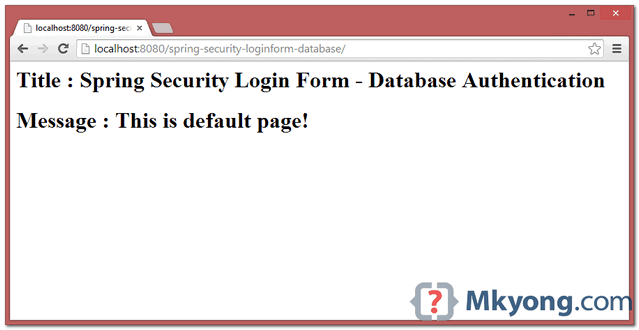
8.1. Default Page
XML – http://localhost:8080/spring-security-loginform-database/
Annotation – http://localhost:8080/spring-security-loginform-database-annotation/
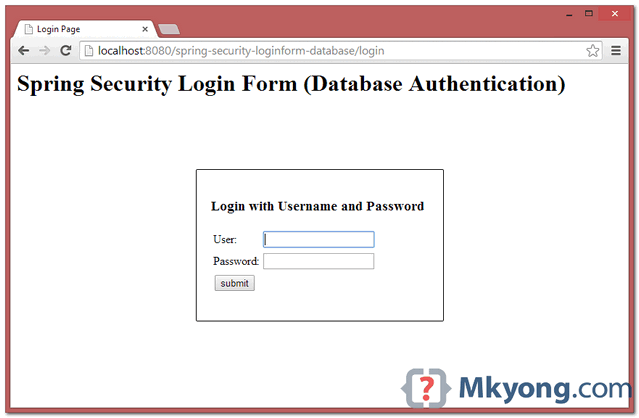
8.2 Try to access /admin page, only “mkyong” ROLE_ADMIN is allowed to access.
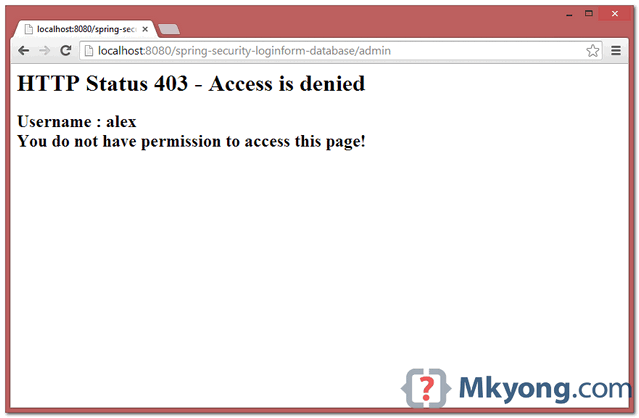
8.3. If “alex” is try to access /admin, 403 access denied page is displayed.
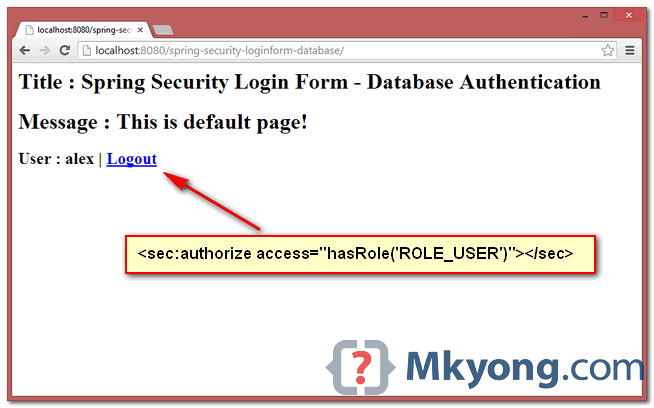
8.3 “alex” in default page, show the use of sec:authorize
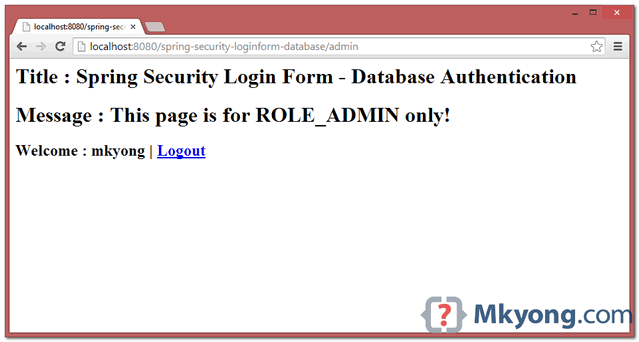
8.4. If “mkyong” is try to access /admin, admin page is displayed.

It helped me. Thanks
I’ve used .hasRole(“USER”) instead of .access(“hasRole(‘ROLE_ADMIN’)”)
hi Mkyong
please you can help me. I would like to use spring security with AES256. Is it possible and how to use?
the best shit code
You’re trying to add true to column enabled. It should be 0 or 1. Right?
perfect ! i love you
Hope after this time someone will replay. I got problem with your example. In controller you only use method=GET, but in jsp you use method=POST. How this even work. In my application it does not work: Method POST not supported
Hello sir ,what we are use django type admin panel in spring boot for managing the database and user post . please suggest me.
The origin server did not find a current representation for the target resource or is not willing to disclose that one exists
😛
http status 403 – access is deniedtype status reportmessage access is denieddescription access to the specified resource has been forbidden.
error occurred after givening right email and password
any help highly acceptable
can anyone just tell me the initial set up, like
new->maven project->then what do I select
Error: Invalid CSRF Token ‘null’ was found on the request parameter ‘_csrf’ or header ‘X-CSRF-TOKEN’.
I am getting above error,
I have the csrf enable and also hidden input tag as given in above example
can anyone solve this error
include this line in security.xml between http tag
csrf disabled=”true”
Hi Mkyong after pressing logout link It is logging out successfully but if press back button still allow us to access home page.
this code is not working can any one tell me what i need to do after importing
Your code doesn’t work; I downloaded the project and also tried to copy/paste the code from this page, but the result was the same. I’d better look for another tutorial somewhere else.
Any solution?
Invalid username and password! all the time. Database is alright, done with the script provided, populated with the data provided. I’m using the annotation app.
Have you found any solution?
hi,mkyong iam not getting how connect to the oracle database for this code.plz can to help me out,Thanks in advance
support ssl connect postgresql?
For both the users, when I use http://localhost:8080/admin** it provides me access to Logout Link.
How can we differentiate on the basis of user’s right.
Mkyong and Alex both users have got the ability to view the page when its /admin** and also /logout can be accessed when we hit the url directly in the browser.
For all those who faced 405 Post not allowed in this example – just add POST to request methods annotation of 403 mapping in controller.
Hey, this tutorial worked perfectly for me except for the logout part. I even get redirected to the login page with the logout message but when I try to accessing the restricted URL (/admin in this case), I was still able to see the page. Shouldn’t the session be destroyed and the 403 page be displayed?
Its working on Windows7 but on WindowsServer 2012R2, it says invalid login, when the database , jdk and tomcat are same on both machines. What could cause this?
sorry something went wrong i wanted to to ask the question in this way:
HI Mkyong, can you please explain me <form name='f' action="” method=’POST’>
and why we declare method=post here because In controller class we declare
@requestmapping(value=”/login”,method=RequestMethod.GET) then what is the use of this ‘j_spring_security_check’ url.
The whole program is showing one error Classs listener not found
Hi MkYong , do we have same tutorial but with angularjs ? please suggest. thanks
hi yogesh , me too i need the same tutorial with angulrajs?? can you help me??
*****************IMPORTANT*****************************
For those who are trying to use this tutorial …be aware.. the screenshot is misleading .. download the source code and then try to use that only.
Source code has different code and it run successfully.
*****************IMPORTANT*****************************
No bean named ‘dataSource’ is defined..I got this error
Create a database name with “test” and create tables there.Refer 4.1 and 4.2 in this page.
i already did that but still geting same error. Please suggest.
i got this exception in annotation example do you know what is my mistake…? java.lang.IllegalStateException: No WebApplicationContext found: no ContextLoaderListener registered?
Can you please help to create database table structure with Oracle database as it does not have
TINYINT type datatype.
Hi Yong,
how to navigate to user page and Admin page though the login page itself. Not accessing the Admin page, then enter the credentials and the Admin page is displayed. How can we directly navigate from login page to the respective pages based on the role assigned in the database table.
Hi,
How to provide url encoding spring mvc application
i need your help please.
Hi,
how to provide http to https in spring mvc application
hi Mkyong,
thank for the source code, its working for me but the other POST METHOD is not Allowed by SpringSecurityFilterChain like i want to add user the console said 405 method not allowed, all the POST METHOD has error 405 after i add spring security.
can you solved it?
Thanks.
hi Mkyong, I tried all of your examples of Spring Security both in Windows and Linux server, except this one with MySql worked, this one works in Windows, but not in Linux. I saw someone else had the same problem but there were no reply. Would you please tell us something. Thank you for this post.
Hello there. I found the solution, in Linux environment localhost should be written as 127.0.0.1. Thank you again for this post.
how to integrate user sessions with this, as per my requirement i have 4 different pages like Dashboard, Live data, Historic data and notifications page.
this is how spring-security has been configured
and loginController as shown below
@Controller
@SessionScoped
public class LoginController {
@RequestMapping(value = “/dashboard**”, method = RequestMethod.GET)
public ModelAndView dashboardPage() {
ModelAndView model = new ModelAndView();
model.setViewName(“dashboard”);
return model;
}
@RequestMapping(value = “/historical**”, method = RequestMethod.GET)
public ModelAndView livePage() {
ModelAndView model = new ModelAndView();
model.setViewName(“history”);
return model;
}
@RequestMapping(value = “/live**”, method = RequestMethod.GET)
public ModelAndView historyPage() {
ModelAndView model = new ModelAndView();
model.setViewName(“live”);
return model;
}
@RequestMapping(value = “/notifications**”, method = RequestMethod.GET)
public ModelAndView notificationsPage() {
ModelAndView model = new ModelAndView();
model.setViewName(“notifications”);
return model;
}
@RequestMapping(value = “/login”, method = RequestMethod.GET)
public ModelAndView login(@RequestParam(value = “error”, required = false) String error,
@RequestParam(value = “logout”, required = false) String logout) {
ModelAndView model = new ModelAndView();
if (error != null) {
model.addObject(“error”, “Invalid username and password!”);
}
if (logout != null) {
model.addObject(“msg”, “You’ve been logged out successfully.”);
}
model.setViewName(“login”);
return model;
}
//for 403 access denied page
@RequestMapping(value = “/403”, method = RequestMethod.GET)
public ModelAndView accesssDenied() {
ModelAndView model = new ModelAndView();
//check if user is login
Authentication auth = SecurityContextHolder.getContext().getAuthentication();
if (!(auth instanceof AnonymousAuthenticationToken)) {
UserDetails userDetail = (UserDetails) auth.getPrincipal();
model.addObject(“username”, userDetail.getUsername());
}
model.setViewName(“403”);
return model;
}
}
So with this configuration, only first time on on deploying the app irrespection of the req i make appname/dashborad, appname/historical, appname/live, appname/notifications , it is rediecting to login page as i have mapped /login in rediect page, after that i can directly access other pages say once i login and logout 🙁
How to make it secured, i mean i dont want other pages to be accessed unless it is authenticated 🙁
Hi!
I think that in your first SecurityConfig.java you want to say AppConfig.
Good tut!
Thanks
Hi MkYong, I am stuck at configuring spring security with Spring Boot.
Actually my problem is that i want to build secured application with my custom login form and user should authenticated after successful login. also i want to enable csrf protection for REST url’s. If you have already developed this then please guide me. Thank you for appreciating.
Hi mkyong,
Nice tutorial. sir.. i download that code(” spring-security-login-form-database-xml “) i configured on my local mechain i am using Eclipse+tomcate7+maven + Database(Oracle 11c)+jave7 now i able to open the login page sir but i am using login page. when i try to login (mkyong/123456) but it was showing invalid usename and password. but i am inserted values on database as well. can u plz tell me sir.
Thanks & regards,
Prasad.
same here! did u resolve the problem please ? (already tried to update my database password)
Same here…
you need to run the sql file
did you get the solution for this, i tried 1 as enabled with oracle didn’t worked
manage to get the solution ?
Thank you, this tutorials of yours are always clear, simple to follow and very useful.
I like your examples!
I simply downloaded your project, opened it in Spring Tool Suite, and ran it on tomcat server.
But no matter what (right or wrong) “username” and “password” i type, it shows “invalid username and password”.
Is there a problem with the jdbc properties? (spring-database.xml) or what else could be wrong…
cause the same probleme, i modify in my spring-database.xml the password.
I delete it in the code cause i don’t have on root access on my base. and now it’s work really properly.
Probably you need to add your password in md5 format to database.
Hey,
I got an exception (dataSource not found) I think in spring-security.xml you have to add import tag:
Http 405,Request method POST not supported.
change accesssDenied methods request mapping attribute to method = RequestMethod.POST
Hi Mkyong,
can you help me?
How to create a maven project in eclipse.Please tell me the step by step procedure.
If you can’t find such simple information on the internet that means you aren’t ready to do web developing because there will be problems and a lot of questions at almost every step.
geting error–>BeanFactory not initialized or already closed – call ‘refresh’ before accessing beans via the ApplicationContext………..
Gr8 Tutorial. Could u pls update for Spring boot.
Awesome tutorial but I tried running it on Maven 4, Spring 4.x, Java 1.8 and get the following:
Element ${logoutUrl} not found..
Element /j_spring_security_check’ / not found
The problem (after 8 hrs of search) is that, in Spring Security 4.X they change the logic for that /j_spring_security_check
For a tutorial with version 4.x please check,
http://websystique.com/spring-security/spring-security-4-custom-login-form-annotation-example/
I know this can be a little rough but is for the sake of knowledge and better understanding of the Spring Security.
But honestly, i like this series of tutorial, after reading all of them i learn a lot of this framework, just that little bug from the change of versions.
Jesus, thanks. By the way, Jesus saves 🙂
I will check it out. I still have to search for where to get examples on how to add roles assignment from a superuser, with such admin or superuser having the ability to add and delete other users from the site completely. He will have the right to view all users, with other users only able to have rights assigned to them by the super user. I do not know where someone can get some info on this., in case you have any ideas, I would be grateful.
Spring Security Application
mvc-dispatcher
org.springframework.web.servlet.DispatcherServlet
1
mvc-dispatcher
/
org.springframework.web.context.ContextLoaderListener
contextConfigLocation
/WEB-INF/spring-security.xml,
/WEB-INF/spring-database.xml
springSecurityFilterChain
org.springframework.web.filter.DelegatingFilterProxy
springSecurityFilterChain
/*
Great tutorial, thanks!
But I suppose that the servlet api dependecy is missing in the provided pom.xml.
javax.servlet
servlet-api
2.5
provided
Hi,
Thanks for sharing your very helpful tutorials. Can you please share a tutorial in which you can use spring mvc + security (registration + login/out + database base authentication ) + hibernate + simple CRUD operation of any object.
regards
atif hussain
That would be so amazing…
i want that also … if u have a tutorial like this plz give me a link
thanks ,mkyong,this website is greate.
hi,
on imprting in eclipse Juno..error popup comes-
An internal error occurred during: “Importing Maven projects”.
Unsupported IClasspathEntry kind=4
I have build failure for annotation based code and error is “Error assembling WAR: webxml attribute is required”, so web.xml is not in code, how to compile and run the code?
[INFO] BUILD FAILURE
[INFO] ————————————————————————
[INFO] Total time: 2.633s
[INFO] Finished at: Fri Jul 18 22:05:41 CDT 2014
[INFO] Final Memory: 5M/122M
[INFO] ————————————————————————
[ERROR] Failed to execute goal org.apache.maven.plugins:maven-war-plugin:2.1.1:war (default-war) on project spring-security-loginform-database-annotation:
Error assembling WAR: webxml attribute is required (or pre-existing WEB-INF/web.xml if executing in update mode) -> [Help 1]
[ERROR]
use web.xml from one of the zip package provided. since it is a war project that is must for compilation
Thanks,
It worked for me , at once…. Never thought Spring Security can be implemented so easily.
i am getting error over jsp pages what i need to do
thanks for mkyong already sharing his knowledge because it really helped me in the final work in college.
Hi, i download your project
Download XML version – spring-security-login-form-database-xml.zip (16 KB).
my project pointer to local mysql program on windows 7 ,it ‘s OK.
But
my project pointer to server mysql program on cent os linux , It ‘s not work.
Help me. Please tell me config problem solving.
Hi…
I execute the code and its working.
And I try to make an another request only for admin like
@RequestMapping(value = “/admin/approveUser”, method = RequestMethod.GET)
public ModelAndView newForOnlyAdmin() {
ModelAndView model = new ModelAndView();
model.addObject(“title”, “Spring Security Login Form – Database Authentication”);
model.addObject(“message”, “This page is for ROLE_ADMIN only!”);
model.setViewName(“approveUser”);
return model;
}
the above request mapping should only work only for admin. But it was accessible even without admin login.
Please tell me how to make a another new request for admin.
thanks sir , great tutorial finnaly I got it
org.springframework.beans.factory.CannotLoadBeanClassException: Cannot find class [org.springframework.jdbc.datasource.DriverManagerDataSource]
need spring-jdbc dependency
i have query which is having username = ? more than once, it is
throwing exception while login…where i can mention number of
parameters of preparedstatement?
Hi, do you know how to do this example with remebering form data when exception occured?
thanks for good information ^^
very interesting but, in the desing of the relation between the two tables seems strange, because the users
should have a reference to user role and not the other, unless a user can have more than one role and do not want to complicate putting a middle table
very good tutorial, just what I was looking for
Hi
Mykong
Very Gud to have a e-publisher like u i love this article to learn Easily Either i dont know the Technology Can u please Solve the Problem that i have faced
SEVERE: Context initialization failed
org.springframework.beans.factory.BeanDefinitionStoreException: Unexpected exception parsing XML document from ServletContext resource [/WEB-INF/spring-security.xml]; nested exception is org.springframework.beans.FatalBeanException: NamespaceHandler class [org.springframework.security.config.SecurityNamespaceHandler] for namespace [http://www.springframework.org/schema/security] not found; nested exception is java.lang.ClassNotFoundException: org.springframework.security.config.SecurityNamespaceHandler
Hello sir,
I just have a query tat where are we comparing the database password and password given in JSP..??
We are using jdbc user service :
JDBC user service implementation provide these two attributes to match username with password and then username with granted role or authority.
users-by-username-query
authorities-by-username-query
reference:
http://howtodoinjava.com/2013/04/16/jdbc-user-service-based-spring-security-example/
Hi,
I’ve got a problem.
When I am running this database example I got the HTTP404.
When running the XML tutorial it works fine. Do you possibly know the reason? I have created the spring-database.xml a.o.
When I am trying to run your source code I face the same issue. Can you help?
Source code is updated, please get the latest, thanks.
As always simple and “PERFECT”
thanks ben
thanks,this is very useful example of spring security. I have one problem if user have multiple role in his role column(e.g USER,ADMIN,TESTUSER) then how spring can check for multiple roles.
You could have a unique composite key in the database which would solve that problem.
In this code(below)
I want to give authorities to users who is login user whose data in database.
And below query sentence is good working in database
but through this security.xml file I conduct index.jsp not working.
(I think below query sentence is not working in index.jsp)
I’m so curious about giving authorities users.
I need your help.
below code;
–>
thx for ur help
i am working with spring security 2.0.1 and i am trying to add MD5 hash in order to hash my password , i have tried so many codes tell now put still didnt get how to tell spring to read encoded password from my database ? could anyone plz give me the configuration step by step in order to add MD5 hash into spring security ?
Hi Mkyong, here I got a small doubt.
In Spring Security I observed that by default they are using Cookies for Session Management.
My question is, if my browser is not supporting cookies then how to achieve it…?
Please let me know, and correct me if I’m wrong.
Thanks in advance. 🙂
Awesome, helps a lot.
Appreciate your help, Thank you…. 🙂
thank you very much…. it helps a lot to me
hi i am using jsp,spring,hibernat,mysql and eclipse juno in my project,i dont know mavin ,how can i use your code, how i delete,mavin files from ur attachment code,pls help me…
or pther wise pls provide in attachment same code with out mavin…..pls,pls,pls
Very simple and easy to understand. Good work. Keep it up.
It will be great if you put your Examples on Github and share its link at the end of blog.
That is really interesting, You’re an excessively skilled blogger. I have joined your rss feed and look forward to looking for extra of your fantastic post. Additionally, I’ve shared your
site in my social networks
Hmm it appears like your blog ate my first comment (it was extremely long) so I guess I’ll just sum it up what I wrote and say, I’m thoroughly enjoying your blog.
I too am an aspiring blog writer but I’m still new to the whole thing. Do you have any tips and hints for novice blog writers? I’d really
appreciate it.
This is a topic that is near to my heart… Best wishes!
Where are your contact details though?
Everyone loves what you guys are usually up too. This sort of
clever work and coverage! Keep up the good works guys I’ve incorporated you guys to my blogroll.
It’s enormous that you are getting ideas from this piece of writing as well as from our dialogue made here.
Excellent weblog here! Also your site a lot up fast! What host are you using?
Can I get your associate hyperlink on your host? I wish my
website loaded up as fast as yours lol
Aw, this was an exceptionally good post. Taking a few minutes and actual effort to create a great
article_ but what can I say_ I put things off a whole lot and
don’t manage to get anything done.
It’s going to be ending of mine day, but before end I am reading this wonderful piece of writing to increase my knowledge.
Mkyong, you rule. Thanks for the great tutorial.
Interesting blog! Is your theme custom made or did you download it from somewhere?
A theme like yours with a few simple tweeks would really make my blog stand out.
Please let me know where you got your theme. Cheers
HI mkyong,
i followed above steps to Spring security Login Form but in that flow i want to add remember-me functionality but i am not able to proceed ,can you please guide me how to fix my issue.
Thanks in advance
Here’s an example, for remember me
http://www.cavalr.com/blog/Spring_MVC_-_Spring_Security_Remember_Me_-_Persistent_Token_Approach
HI mkyong,
i followed above steps to Spring security Login Form but in that flow i want to add ” “functionality but i am not able to proceed ,can you please guide me how to fix my issue.
Thanks in advance
Good respond in return of this issue with firm arguments and
explaining all about that.
Have you ever thought about including a little bit more
than just your articles? I mean, what you say is important and all.
Nevertheless think of if you added some great pictures or video clips to give your posts more,
“pop”! Your content is excellent but with images and videos, this website could certainly
be one of the greatest in its field. Great blog!
You should take part in a contest for one of the greatest blogs online.
I am going to recommend this web site!
Here is another good one.
http://www.cavalr.com/blog/Spring_MVC_-_Spring_Security
Hi mkyoung.. i need ur help.. i have a project for multi user application.. how to create login form.. but in case have administrator, teacher and student in 1 login form.. so if login succed.. that have different succes view for admin, teacher and student.. thx 4 read my question.. 🙂
Hi mykong im getting this info and controller is not called
INFO: No authentication manager set. Reauthentication of users when changing passwords will not be performed.
Hello mykong thanks for the tutorial.While implementing i get
INFO: No authentication manager set. Reauthentication of users when changing passwords will not be performed.
wana !
thank MyKyOng for tutorial !
It’s really a exciting article!
at present, i’m using JPA to data access, i don’t how I can use it in tag.
Thank you so much !
at present, i’m using JPA to data access, i don’t how I can use it in authentication-provider
tag.
Thanks for your help, it was very useful.
Hi,
Can we use Spring Security in non-spring based application. If yes, pls. help me how does it work.
Thanks
Hi, That was nice article, please tell me that how to add more than one “Role” in the spring-security.xml??
Hi!
I’m having this error:
Cannot resolve reference to bean ‘dataSource’ while setting bean property ‘dataSource’; nested exception is org.springframework.beans.factory.NoSuchBeanDefinitionException: No bean named ‘dataSource’ is defined.
Someone can tell me what’s wrong 🙁 ?
Good! All work`s!
Usefull =)
Please upload the same example using Spring and Hibernate.
i am great fan of your work,i am trying to learn Spring so please suggest me a good book from that i can start learning Spring ,keep in mind that i am beginner for spring framework.
Just goto Ameerpet Naresh Institure(Hyderabad) their, you should learn whatever courses you want for less cost and less time period… and belive me or not you sholud will become Master In Spring and Hibernate.
Very good example. But you should also explain the code. I didnt understand where the control go after user click on submit button.I think first it should goes in spring-security.xml. If it goes then in which tag. Uff i m really confused. Can somebody help me…
Hi!
I’ve one query here… I want to authenticate my application using username or email from database. Please tell me the provision how could i achieve the same through the following spring security code.
I tried the same using custom user service also … following is the snippet of my code:
I’ve written the CustomUserDetailsService.java and trying to authenticate using hibernate session factory. But I’m getting error: Error in retrieving user org.hibernate.HibernateException: No Hibernate Session bound to thread, and configuration does not allow creation of non-transactional one here.
I understand by this that no session has established since the application has not been login that’s why this error is, I tried put @Transactional and by hibernateDaoImpl also but no use. Can u please tell me a way how could I authenticate using email and username both instead of username only.
Thanks
Regards,
Jitender Saini
Please get my query again as code was not pasted properly:
Hi!
I’ve one query here… I want to authenticate my application using username or email from database. Please tell me the provision how could i achieve the same through the following spring security code.
I tried the same using custom user service also. following is the snippet of my code:
I’ve written the CustomUserDetailsService.java and trying to authenticate using hibernate session factory. But I’m getting error: Error in retrieving user org.hibernate.HibernateException: No Hibernate Session bound to thread, and configuration does not allow creation of non-transactional one here.
I understand by this that no session has established since the application has not been login that’s why this error is, I tried put @Transactional at hibernateDaoImpl class also but still the error persists. Can u please tell me a way how could I authenticate using email and username both instead of username only.
Thanks
Regards,
Jitender Saini
Hi Mkyong
I am working on project in that we are using password encrytion with key and cipher.
you can see here..
http://www.digizol.org/2009/10/java-encrypt-decrypt-jce-salt.html
i don’t understand how spring security can be used in my project, need help.
or tell me some other way to do it..
Thanks in advance
I want to know how to implement spring security with JCE Encryption – Data Encryption Standard (DES).. please provide example. thanks
Correction to posted url, http://www.digizol.com/2009/10/java-encrypt-decrypt-jce-salt.html
dear,
is it necessary to add ROLE_USER to all users in the database in order to make the authentication successful? coz now it doesn’t work
Have this error:
No mapping found for HTTP request with URI [/SpringMVC/] in DispatcherServlet with name ‘mvc-dispatcher’
someone can resolve this problem!!!
avr. 29, 2012 1:34:33 PM org.springframework.web.servlet.DispatcherServlet noHandlerFound
Avertissement: No mapping found for HTTP request with URI [/SpringMVC/] in DispatcherServlet with name ‘mvc-dispatcher’
what’s happen!!I have this problem, help please
very good example. I liked and its very easy to understand. Thanks a ton mkyong. Anand singh. Nagpur
I thought that the “password” would be required in the query as well, but it’s in the “select” part of the query, and since the username has to be unique, the spring framework must be comparing it after they get the resultset…. I tried it without “password = ?” and it works fine, as stated in the original article.
Great tutorial as usual! Practical and easy to follow. Would be great to have a best practice example for securing a spring rest service.
SEVERE: Context initialization failed
org.springframework.beans.factory.BeanCreationException: Error creating bean with name ‘dataSource’ defined in ServletContext resource [/WEB-INF/spring-database.xml]: Error setting property values; nested exception is org.springframework.beans.PropertyBatchUpdateException; nested PropertyAccessExceptions (1) are:
PropertyAccessException 1: org.springframework.beans.MethodInvocationException: Property ‘driverClassName’ threw exception; nested exception is java.lang.IllegalStateException: Could not load JDBC driver class [com.mysql.jdbc.Driver]
I have this problem, help me please…
Hi;
I have always got a problem that dispatcher name.
it is that;
WARNING: No mapping found for HTTP request with URI [/SpringExam/welcome] in DispatcherServlet with name ‘mvc-dispatcher’
What is happen?
Thanks,
i facing an issue . when i logout and after that when i paste the welcome page url in browser . it is not going to login page instead of that it is going to welcome directly.
Very nice, up in running in about 10 minutes, worked perfectly. Thank you for the simple (and working) example. Greg
users-by-username-query=”select email, password from user where email = ?”
authorities-by-username-query=”select email, password from user where u.email = ? and u.password = ?” />
or something like that
I dont’t know why it doesn’t add the XML , i’ll try again , sorry for the mass
Mistake , please fix :
Hi , I’m getting an error
Reason: PreparedStatementCallback; SQL [select email, password from user where email = ?]; Column Index out of range, 3 > 2. ; nested exception is java.sql.SQLException: Column Index out of range, 3 > 2.
* Can’t I have the check from only 1 table? user table? 2 tables is a must? I wanna to check email & password from my User table.
* What’s ENABLE for?
* Can I make “user_role” as en enum variable in User? enum.Rule ( ADMIN/USER) and check with that?
Thanks!
I got the same error but adding enable column fixed the issue field
http://forum.springsource.org/showthread.php?54246-where-is-the-quot-standard-Spring-Security-user-data-tables-quot
The data is the same as used by the JdbcDaoImpl class: Code: public static final String DEF_USERS_BY_USERNAME_QUERY = "SELECT username,password,enabled " + "FROM users " + "WHERE username = ?"; public static final String DEF_AUTHORITIES_BY_USERNAME_QUERY = "SELECT username,authority " + "FROM authorities " + "WHERE username = ?";i am a chinese ,but,thank you !