In Spring MVC, you can use <form:input /> tag to render a HTML textbox field. For example,
<form:input path="userName" />
It will renders following HTML code
<input id="userName" name="userName" type="text" value=""/>
In this tutorial, we show you how to use Spring’s form tag “input” to render a HTML textbox to store the “userName“. Additionally, add an empty check validator to make sure the textbox value is not empty.
1. Controller
A SimpleFormController to handle the form value, and link the form value to the Customer object.
File : TextBoxController.java
package com.mkyong.customer.controller;

import javax.servlet.http.HttpServletRequest;
import javax.servlet.http.HttpServletResponse;
import org.springframework.validation.BindException;
import org.springframework.web.servlet.ModelAndView;
import org.springframework.web.servlet.mvc.SimpleFormController;
import com.mkyong.customer.model.Customer;

public class TextBoxController extends SimpleFormController{

	public TextBoxController(){
		setCommandClass(Customer.class);
		setCommandName("customerForm");
	}

	@Override
	protected ModelAndView onSubmit(HttpServletRequest request,
		HttpServletResponse response, Object command, BindException errors)
		throws Exception {

		Customer customer = (Customer)command;
		return new ModelAndView("CustomerSuccess","customer",customer);

	}
}
2. Model
A Customer object to store the text box value.
File : Customer.java
package com.mkyong.customer.model;

public class Customer{

	String userName;
	//getter and setter methods
}
3. Form Validator
Create a form validator class and use the ValidationUtils class to make sure the “userName” is not empty, Otherwise, get the “required.userName” message from the corresponds resource bundle (properties file).
File : CustomerValidator.java
package com.mkyong.customer.validator;

import org.springframework.validation.Errors;
import org.springframework.validation.ValidationUtils;
import org.springframework.validation.Validator;
import com.mkyong.customer.model.Customer;

public class CustomerValidator implements Validator{

	@Override
	public boolean supports(Class clazz) {
		//just validate the Customer instances
		return Customer.class.isAssignableFrom(clazz);
	}

	@Override
	public void validate(Object target, Errors errors) {

		ValidationUtils.rejectIfEmptyOrWhitespace(errors, "userName",
			"required.userName", "Field name is required.");

	}

}
File : message.properties
required.userName = username is required!
4. View
A JSP page to use the Spring’s form tag “input” to render a HTML textbox, and put some CSS styles to highlight the error message.
File : CustomerForm.jsp
<%@ taglib prefix="form" uri="http://www.springframework.org/tags/form"%>
<html>
<head>
<style>
.error {
	color: #ff0000;
}

.errorblock {
	color: #000;
	background-color: #ffEEEE;
	border: 3px solid #ff0000;
	padding: 8px;
	margin: 16px;
}
</style>
</head>

<body>
	<h2>Spring's form textbox example</h2>

	<form:form method="POST" commandName="customerForm">
		<form:errors path="*" cssClass="errorblock" element="div" />
		<table>
			<tr>
				<td>Username :</td>
				<td><form:input path="userName" />
				</td>
				<td><form:errors path="userName" cssClass="error" />
				</td>
			</tr>
			<tr>
				<td colspan="3"><input type="submit" />
				</td>
			</tr>
		</table>
	</form:form>

</body>
</html>
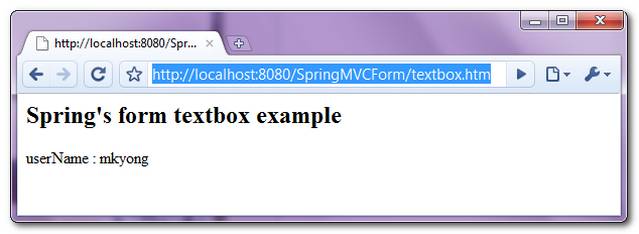
If the form is submitted, render the successful page and display the submitted textbox value.
File : CustomerSuccess.jsp
<html>
<body>
	<h2>Spring's form textbox example</h2>

	userName : ${customer.userName}

</body>
</html>
5. Spring Bean Configuration
Link it all ~
<beans xmlns="http://www.springframework.org/schema/beans"
	xmlns:xsi="http://www.w3.org/2001/XMLSchema-instance"
	xsi:schemaLocation="http://www.springframework.org/schema/beans
	http://www.springframework.org/schema/beans/spring-beans-2.5.xsd">

  <bean
  class="org.springframework.web.servlet.mvc.support.ControllerClassNameHandlerMapping" />

	<bean class="com.mkyong.customer.controller.TextBoxController">
		<property name="formView" value="CustomerForm" />
		<property name="successView" value="CustomerSuccess" />

		<!-- Map a validator -->
		<property name="validator">
			<bean class="com.mkyong.customer.validator.CustomerValidator" />
		</property>
	</bean>

	<!-- Register the Customer.properties -->
	<bean id="messageSource"
		class="org.springframework.context.support.ResourceBundleMessageSource">
		<property name="basename" value="message" />
	</bean>

	<bean id="viewResolver"
		class="org.springframework.web.servlet.view.InternalResourceViewResolver">
		<property name="prefix">
			<value>/WEB-INF/pages/</value>
		</property>
		<property name="suffix">
			<value>.jsp</value>
		</property>
	</bean>

</beans>
6. Demo
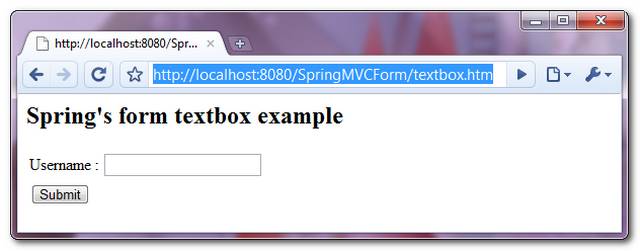
Access the page – http://localhost:8080/SpringMVCForm/textbox.htm
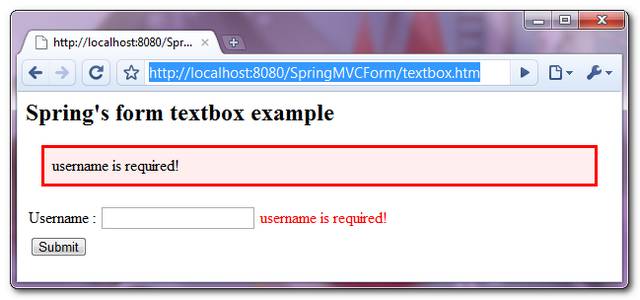
If the textbox value is empty while submitting the form, display and highlight the error message.
If the form is submitted successfully, just display the submitted textbox value.

Hi,
Can you help me?
I am suing NetBeans 8.2 and I got the error: package org.springframework.validation does not exist.
I have doing a Maven project.
Hi, Can we apply pattern on spring form elements like to accept only numbers ??
Hey
please explain more clearly where is described that only accept textbox.htm?
If you try the code you find out that it also accepts textbox+everything+.htm
Indeed, it supports textbox*.htm not *.htm
Hello Mkyong,
Thanks. I’m trying to put UserName=NewUser-1, its giving me the O/P(output) = NewUser-1 . Could you please suggest me a code which will performed escape html tags function and will show only O/P as NewUser-1.
Your earliest inputs is much appreciated. Many thanks.
Thanks,
Prateek
Hi,
I have form which has object in it. that object has a list of object (which has variables on form view) so something like this:
Form
-> Obj1
-> List
and Obj2 has fields like title, firstname, lastname etc.
Now I want to assign textbox value to field in Obj2 (say to title).
I tried using obj1.obj[0].title however this does not work.
Could you please comment.
Hey, i tried your code without validation am getting this error on my tomcat console log4j:Warn no appenders could be found for logger(org.
springframework.web.context.ContextLoader
log4j:WARN Please initialize thr log4j system properly
Your Explaination :
It will renders following HTML code
Mine :
I believe will result in
therefore it will also consider value=”userName” if we expect our textbox to be prefilled.
I’m new to Spring, the example is already set in STS, but when I call locally to: http://localhost:8080/SpringMVCForm/textbox.htm, the browser gives the following error “Estate HTTP 404 – /SpringMVCForm/textbox.htm”
Could you please tell me why this happens?
Thanks
You should run the example first,when it’s running ,you can access the url.
Why did you use textbox.htm link to access CustomerForm.jsp? Where is it described in your code?
Hello Kirill,
Please refer code snippet of web.xml file
mvc-dispatcher
*.htm
This shows that requestDispatcher (Front Controller) will be only accept any request that ends with .htm extension. The below code (present at controller) will be call the customerForm.jsp
public TextBoxController(){
setCommandClass(Customer.class);
setCommandName(“customerForm”);
}
please explain more clearly where is described that only accept textbox.htm?
If you try the code you find out that it also accepts textbox+everything+.htm
Indeed, it supports textbox*.htm not *.htm
excellent example… works great… thanks.