In Spring MVC, the field error messages are generated by validators associated with the controller, and you can use the <form:errors /> tag to render those field error messages in an default HTML “span” tag. For example,
1. Validator
A validator to check the “username” field, if empty, return the “required.username” error message from the resource bundle to controller.
//...
public class TextBoxValidator implements Validator{
	@Override
	public void validate(Object target, Errors errors) {
		ValidationUtils.rejectIfEmptyOrWhitespace(
			errors, "username", "required.username");
	}
}
/*** required.username = username is required! ***/
2. Display field error
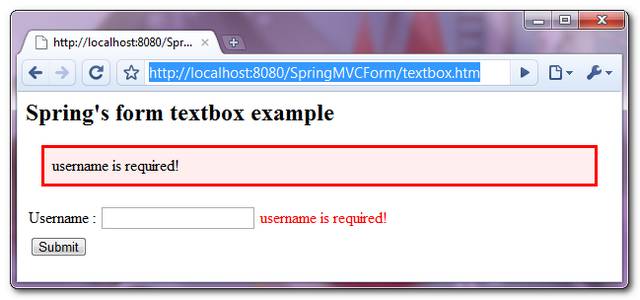
And then, you can use the <form:errors /> to render the error messages that are associated with the “username” field.
<form:errors path="userName" cssClass="error" />
It will renders and enclose the error messages with a default “span” element, which contains a CSS class of “error“.
<span id="username.errors" class="error">username is required!</span>
- path=”*” – display all error messages associated with any fields.
- path=”username” – display error messages associated with the “username” field only.
3. Custom the output element
For some reasons, like CSS formatting purpose, you may need to enclose the error messages with different element instead of the default “span” tag. To do this, just specify the prefer element inside the “element” attribute :
<form:errors path="userName" cssClass="error" element="div" />
Now, it renders and enclose the error messages with a “div” element, which contains a CSS class of “error“.
<div id="username.errors" class="error">username is required!</div>
4. Demo

it’s used only predefined method with custom message how to compare filed with proper input
Ovver the course of the initial period, they began tto form grooup dddgccedeededbbd
Could you please guide on http://stackoverflow.com/questions/32958845/send-error-in-header-for-angularjs-using-spring-validator-code?
HI .. how do i customise so as to include tags in the error message,like putting a link to the element so that on click i redirect to the element..
Hi Yong,
Am using the spring2.x version, and i have written a custom validator. This is working fine, if there are any errors. But the errors are not going even after entering the correct field value. Could you please tell me how to clear the error messages if the validations passes.