Spring MVC comes with AbstractExcelView class to export data to Excel file via Apache POI library. In this tutorial, it show the use of AbstractExcelView class in Spring MVC application to export data to Excel file for download.
1. Apache POI
Get the Apache POI library to create the excel file.
   <!-- Excel library -->
   <dependency>
	<groupId>org.apache.poi</groupId>
	<artifactId>poi</artifactId>
	<version>3.6</version>
   </dependency>
2. Controller
A controller class, generate dummy data for demonstration, and get the request parameter to determine which view to return. If the request parameter is equal to “EXCEL”, then return an Excel view (AbstractExcelView).
File : RevenueReportController.java
package com.mkyong.common.controller;

import java.util.HashMap;
import java.util.Map;
import javax.servlet.http.HttpServletRequest;
import javax.servlet.http.HttpServletResponse;
import org.springframework.web.bind.ServletRequestUtils;
import org.springframework.web.servlet.ModelAndView;
import org.springframework.web.servlet.mvc.AbstractController;

public class RevenueReportController extends AbstractController{

	@Override
	protected ModelAndView handleRequestInternal(HttpServletRequest request,
		HttpServletResponse response) throws Exception {

		String output =
			ServletRequestUtils.getStringParameter(request, "output");

		//dummy data
		Map<String,String> revenueData = new HashMap<String,String>();
		revenueData.put("Jan-2010", "$100,000,000");
		revenueData.put("Feb-2010", "$110,000,000");
		revenueData.put("Mar-2010", "$130,000,000");
		revenueData.put("Apr-2010", "$140,000,000");
		revenueData.put("May-2010", "$200,000,000");

		if(output ==null || "".equals(output)){
			//return normal view
			return new ModelAndView("RevenueSummary","revenueData",revenueData);

		}else if("EXCEL".equals(output.toUpperCase())){
			//return excel view
			return new ModelAndView("ExcelRevenueSummary","revenueData",revenueData);

		}else{
			//return normal view
			return new ModelAndView("RevenueSummary","revenueData",revenueData);

		}
	}
}
3. AbstractExcelView
Create an Excel view by extends the AbstractExcelView class, and override the buildExcelDocument() method to populate the data to Excel file. The AbstractExcelView is using the Apache POI API to create the Excel file detail.
For detail about how to use the Apache POI , please refer to Apache POI documentation
File : ExcelRevenueReportView.java
package com.mkyong.common.view;

import java.util.Map;
import javax.servlet.http.HttpServletRequest;
import javax.servlet.http.HttpServletResponse;
import org.apache.poi.hssf.usermodel.HSSFRow;
import org.apache.poi.hssf.usermodel.HSSFSheet;
import org.apache.poi.hssf.usermodel.HSSFWorkbook;
import org.springframework.web.servlet.view.document.AbstractExcelView;

public class ExcelRevenueReportView extends AbstractExcelView{

	@Override
	protected void buildExcelDocument(Map model, HSSFWorkbook workbook,
		HttpServletRequest request, HttpServletResponse response)
		throws Exception {

		Map<String,String> revenueData = (Map<String,String>) model.get("revenueData");
		//create a wordsheet
		HSSFSheet sheet = workbook.createSheet("Revenue Report");

		HSSFRow header = sheet.createRow(0);
		header.createCell(0).setCellValue("Month");
		header.createCell(1).setCellValue("Revenue");

		int rowNum = 1;
		for (Map.Entry<String, String> entry : revenueData.entrySet()) {
			//create the row data
			HSSFRow row = sheet.createRow(rowNum++);
			row.createCell(0).setCellValue(entry.getKey());
			row.createCell(1).setCellValue(entry.getValue());
                }
	}
}
Alternatively, you can use the AbstractJExcelView, which is using the JExcelAPI to create the same Excel view, see this AbstractJExcelView example.
4. Spring Configuration
Create a XmlViewResolver for the Excel view.
<beans ...>

  <bean
  class="org.springframework.web.servlet.mvc.support.ControllerClassNameHandlerMapping" />

	<bean class="com.mkyong.common.controller.RevenueReportController" />

	<bean class="org.springframework.web.servlet.view.XmlViewResolver">
		<property name="location">
			<value>/WEB-INF/spring-excel-views.xml</value>
		</property>
	</bean>

</beans>
File : spring-excel-views.xml
   <bean id="ExcelRevenueSummary"
   	class="com.mkyong.common.view.ExcelRevenueReportView">
   </bean>
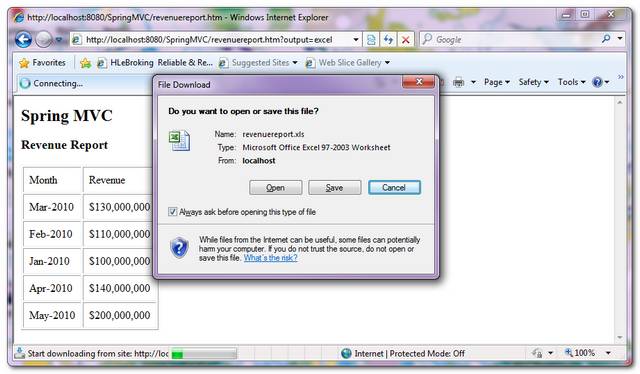
5. Demo
URL : http://localhost:8080/SpringMVC/revenuereport.htm?output=excel
It generates an Excel file for user to download.

I have the same method above using Apache POI
it seems to be running through the code to create the Excel but doesn’t seem to trigger any download of the file.
Need you help
Hi sir,I am geeting response as response header in browser development tools(after pressing F12 button)….no excel file is downloading…but same data is printing on browser response header in the Network console…Please reply me as early as possible….i am in work now
Can you please help with Excel download functionality with Spring 4 as AbstractExcelView is deprecated in spring 4
Hi mkyong, when I try to practise to create sample like you I cannot return to ExcelRevenueReportView class. it’s always return to ExcelRevenuSummary.jsp. have any I forgot or ..?
Hi can you please tell me how to remove warning in excel Number store as text i am using AbstractJExcelView
public class ExcelLIb {
public static String filePath;
public String getExcelData(String sheetName , String testID , String columnHeader) throws InvalidFormatException, IOException{
String userDir = System.getProperty(“user.dir”);
filePath = userDir+”\testdata\Test_Data.xlsx”;
String data = null;
FileInputStream fis = new FileInputStream(filePath);
Workbook wb = WorkbookFactory.create(fis);
Sheet sh = wb.getSheet(sheetName);
int rowcount =getRowCount(sheetName);
for(int r=0 ; r<rowcount; r++){
Row row = sh.getRow(r);
if(row.getCell(0).getStringCellValue().toLowerCase().equals(testID.toLowerCase())){
int col = row.getLastCellNum();
for(int c=0; c<col ; c++){
if(row.getCell(c).getStringCellValue().toLowerCase().equals(columnHeader.toLowerCase())){
row = sh.getRow(r+1);
data = row.getCell(c).getStringCellValue();
break;
}
}
}
}
return data;
}
For annotation example please look here http://stackoverflow.com/questions/29081155/spring-tutorial-example-apache-excel-poi-export-using-java-config
hello sir I am following you and you hava provided very good material. I want a one help. How to download a file if we send post request rather than simple link. I want to make ajax call for downloading the file. Thank in advance.
It is probably a stupid question, but any help would be appreciated.
The set up works fine, xls is also created and sent as a response to the browser(visible in Firebug) but there is no popup to save the file – i.e. the browser is kind of ignoring the response.
can you please give me example or some hint for group by and subtotal in excel.
Very helpful, thank you!
Great job! Works brilliant! Thank you!
How to get the Apache POI library?
Hi MkYong
Great explication.
I see also your paper about “Exception Handling” here : https://mkyong.com/spring-mvc/spring-mvc-exception-handling-example/
But SimpleMappingExceptionResolver seem not working especially if an exception is throwing during buildExcelDocument of my class who extends AbstractExcelView
How can I put AbstractExcelView’s exception in my JSP form ?
can you give an exemple with annotation ?
hello there and thank you for your info _ I’ve certainly picked up something new from right here. I did however expertise several technical points using this site, as I experienced to reload the website a lot of times previous to I could get it to load properly. I had been wondering if your web hosting is OK? Not that I’m complaining,
but sluggish loading instances times will often affect your placement in google and can damage your quality score if ads and marketing
with Adwords. Well I am adding this RSS to my e-mail and can look out
for a lot more of your respective intriguing content. Make
sure you update this again very soon.
Ahaa, its nice discussion regarding this article at this place at this webpage, I
have read all that, so now me also commenting here.
Thanks on your marvelous posting! I actually enjoyed reading it,
you can be a great author.I will make certain to bookmark your
blog and will come back down the road. I want to encourage
you to definitely continue your great job, have a nice evening!
I really like your blog.. very nice colors & theme. Did you create this website yourself or did you hire someone to do it for you?
Plz reply as I’m looking to design my own blog and would like to know where u got this from. thank you
This design is wicked! You most certainly know how to keep a reader amused.
Between your wit and your videos, I was almost moved to start my own
blog (well, almost…HaHa!) Great job. I really enjoyed what you had to say, and more than that, how you presented
it. Too cool!
This is really interesting, You are a very skilled blogger.
I’ve joined your feed and look forward to seeking more of your wonderful post. Also, I have shared your web site in my social networks!
hi i use spring mvc annotation configure project , Can now access the controller layer but cannot call AbstractExcelView extends classes, can you help me,
I encounter result “Could not resolve view with name ‘AbstractExcelView extends bean id’ in servlet with name projectName”
If you are going for best contents like myself, simply pay a visit this website every day as it offers feature contents, thanks
man u r simply the great!!!
Hi, did you try to implement XSLT and JSP at the same time?
Hi Kong,
Very nice example, i was able to implement this.
But is there a way to zip the contents of the excel and download as a zip file?
The excel i am generaiting is 15 MB and manually compressing it the size reduced to 700KB
So wanted to check if there is a way to compress the file which is being downloaded
cool . . . Tnx a lot
How to use Apache POI in Tiles?
Great tutorial, thanks!
I don’t mind saying It gave me some trouble trying to do this in Spring 3. I made a couple small changes, but aside from that this was invaluable. It also helped me understand Spring a little better – thanks for putting it out there!
i want generate excel spread sheet using springweb flow using jasperserver pls urgent help me
pls help me.
import java.util.HashMap;
import java.util.Map;
import javax.servlet.http.HttpServletRequest;
import javax.servlet.http.HttpServletResponse;

import org.springframework.stereotype.Controller;

import org.springframework.web.bind.annotation.RequestMapping;
import org.springframework.web.bind.annotation.RequestMethod;
import org.springframework.web.servlet.ModelAndView;
import org.springframework.web.servlet.mvc.AbstractController;


public class RevenueReportController extends AbstractController {

	@Override
	protected ModelAndView handleRequestInternal(HttpServletRequest request,
		HttpServletResponse response) throws Exception {
		//dummy data
		Map revenueData = new HashMap();
		revenueData.put("Jan-2010", "$100,000,000");
		revenueData.put("Feb-2010", "$110,000,000");
		revenueData.put("Mar-2010", "$130,000,000");
		revenueData.put("Apr-2010", "$140,000,000");
		revenueData.put("May-2010", "$200,000,000");
           System.out.println("revenueData="+revenueData.size());
			return new ModelAndView("ExcelCustodianSummary","revenueData",revenueData);

	}
}
public class LhnExcelView extends AbstractExcelView { @Override protected void buildExcelDocument(Map model, HSSFWorkbook workbook, HttpServletRequest request, HttpServletResponse response) throws Exception { Map revenueData = (Map) model.get("revenueData"); //create a wordsheet System.out.println("revenueData LhnExcelView="+revenueData.size()); HSSFSheet sheet = workbook.createSheet("Revenue Report"); response.setContentType("application/vnd.ms-excel"); response.setHeader("Content-disposition", "attachment; filename=Report.xls"); OutputStream outSteram = response.getOutputStream(); HSSFRow header = sheet.createRow(0); header.createCell((short)0).setCellValue("Month"); header.createCell((short)1).setCellValue("Revenue"); int rowNum = 1; for (Map.Entry entry : revenueData.entrySet()) { //create the row data HSSFRow row = sheet.createRow(rowNum++); row.createCell((short)0).setCellValue(entry.getKey()); row.createCell((short)1).setCellValue(entry.getValue()); } System.out.print(">>>>>>>>>>"+workbook.getActiveSheetIndex()); workbook.write(outSteram); outSteram.close(); } }i am not getting download excel can any please help what i am missing here.
Extends AbstractExcelView and configured the bean, it should works, make sure you configured the bean in xml file properly.
thanks mkyong.
I have configured it properly the main problem here is that i am making ajax call
Ext.Ajax.request({
url : ‘exportLHNCustodianw.lhn’,
params : {
sCase_ID : sCase_ID
},
method : ‘GET’,
success : function(result, request) {
alert(“export”);
return true;
},
failure : function(result, request) {
showLHNErrorMassage(“Unable to retrive notifcation message”);
return false;
}
});
response is success but download promt is not open how should i handle this,I found that in ajax response is string not binary, but help me please.
Any idea? Can we use the response (the excel workbook AbstractExcelView) in ajax in some way and save the file?
I think the only way to get your file is to make the request to open in new tab.
window.open("your GET request string", "_blank", "");That’s how i’ve did than using GWT.
i want generate excel spread sheet using springweb flow
pls give me reply disply excel shhet using spring web flow…….pls help me.
Nice document… Very useful
Thank you for this article. I implemented this in my workspace and when debugging, I can get to buildExcelDocument (it breaks here) and try to return excel ModelAndView but nothing happens on browser side. I don’t get download prompt for excel file. There are no errors too. I am using spring version 2.5.6. It must be some configuration I am missing. One difference is that we use @Controller instead of controller implementing AbstractController/ ControllerClassNameHandlerMapping in XML (should be same internally). Please help!
I tried with the above example and it prints only hardcoded dummy values in a table format and i’m not getting the option to download as excel?
I tried controllerclass handler mapping but it doesn’t works so instead of that i used SimpleUrlHandlerMapping. So here i’m getting only the value in response page in a table format and not getting option to download as excel.
Could someone help me.
puts a breakpoint on your AbstractExcelView, make sure you are returning the correct view.
I am getting a file with the extension .htm.xls, not as .xls……..what to do?
I am not able to understand this:
where is the line:
bean name=/revenuereport.htm class=com.mkyong.common.controller.RevenueReportController
Can you please answer this?
Thanks for making this great tutorial site. The solution you shared is applicable only to old Spring versions (2 or 2.5). Do you know how to implement this now using the latest Spring 3?
Good explanation
well written article. I tried to configure this and will able do in 30 min. Thanks for the posting.
A great tutorial. But, how do you get the file extension xls?
AbstractExcelView will assign a “.xls” file extension automatically.
Hi,
Can you please tell me , if it’s not in sorted order and i want the columns to be sorted in a particular order. How to do it?
Thanks for the example.
AbstractExcelView is adding “.xls” extension in IE and showing revenuereport.xls, but in Firefox and Chrome it is showing revenuereport.htm and not adding .xls extension.
Is there any fix for this?
Fixed.
Added the following 2 lines of code
response.setContentType(“application/vnd.ms-excel”);
response.setHeader(“Content-disposition”, “attachment; filename=Report.xls”);
—————————
protected void buildExcelDocument(Map model, HSSFWorkbook workbook,
HttpServletRequest request, HttpServletResponse response) throws Exception {
response.setContentType(“application/vnd.ms-excel”);
response.setHeader(“Content-disposition”, “attachment; filename=Report.xls”);
—————————
Thanks for the example. i want how to upload excel. could you please send the code to me .
thanks in advance