In Spring Boot, it picks .properties or .yaml files in the following sequences :
application-{profile}.propertiesand YAML variantsapplication.propertiesand YAML variants
Note
For detail, sequence and order, please refer to this official Externalized Configuration documentation.
For detail, sequence and order, please refer to this official Externalized Configuration documentation.
Tested :
- Spring Boot 2.1.2.RELEASE
- Maven 3
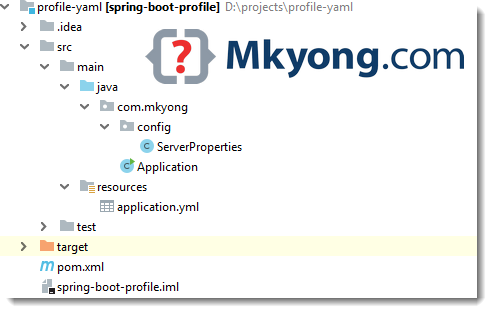
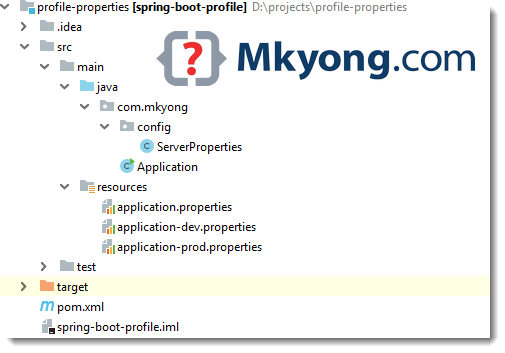
1. Project Structure
A standard Maven project structure.
2. @ConfigurationProperties
Read the properties or yaml files later.
ServerProperties.java
package com.mkyong.config;

import org.springframework.boot.context.properties.ConfigurationProperties;
import org.springframework.stereotype.Component;

import java.util.ArrayList;
import java.util.List;

@Component
@ConfigurationProperties("server")
public class ServerProperties {

    private String email;
    private List<Cluster> cluster = new ArrayList<>();

    public static class Cluster {
        private String ip;
        private String path;

        public String getIp() {
            return ip;
        }

        public void setIp(String ip) {
            this.ip = ip;
        }

        public String getPath() {
            return path;
        }

        public void setPath(String path) {
            this.path = path;
        }

        @Override
        public String toString() {
            return "Cluster{" +
                    "ip='" + ip + '\'' +
                    ", path='" + path + '\'' +
                    '}';
        }
    }

    public String getEmail() {
        return email;
    }

    public void setEmail(String email) {
        this.email = email;
    }

    public List<Cluster> getCluster() {
        return cluster;
    }

    public void setCluster(List<Cluster> cluster) {
        this.cluster = cluster;
    }

    @Override
    public String toString() {
        return "ServerProperties{" +
                "email='" + email + '\'' +
                ", cluster=" + cluster +
                '}';
    }
}
3. Profile based Properties
Multiple profiles .properties example.
application.properties
#Logging
logging.level.org.springframework.web=ERROR
logging.level.com.mkyong=ERROR
logging.level.=error

#spring
spring.main.banner-mode=off
spring.profiles.active=dev
application-dev.properties
#dev environment
server.email: [email protected]
server.cluster[0].ip=127.0.0.1
server.cluster[0].path=/dev1
server.cluster[1].ip=127.0.0.2
server.cluster[1].path=/dev2
server.cluster[2].ip=127.0.0.3
server.cluster[2].path=/dev3
application-prod.properties
#production environment
server.email: [email protected]
server.cluster[0].ip=192.168.0.1
server.cluster[0].path=/app1
server.cluster[1].ip=192.168.0.2
server.cluster[1].path=/app2
server.cluster[2].ip=192.168.0.3
server.cluster[2].path=/app3
4. Profile based YAML
Multiple profiles .yml example. In YAML, we can create multiple profiles by using a “—” separator.
application.yml
logging:
  level:
    .: error
    org.springframework: ERROR
    com.mkyong: ERROR

spring:
  profiles:
    active: "dev"
  main:
    banner-mode: "off"

server:
  email: [email protected]

---

spring:
  profiles: dev
server:
  email: [email protected]
  cluster:
    - ip: 127.0.0.1
      path: /dev1
    - ip: 127.0.0.2
      path: /dev2
    - ip: 127.0.0.3
      path: /dev3

---

spring:
  profiles: prod
server:
  email: [email protected]
  cluster:
    - ip: 192.168.0.1
      path: /app1
    - ip: 192.168.0.2
      path: /app2
    - ip: 192.168.0.3
      path: /app3
5. DEMO
5.1 Spring Boot application.
Application.java
package com.mkyong;

import com.mkyong.config.ServerProperties;
import org.springframework.beans.factory.annotation.Autowired;
import org.springframework.boot.CommandLineRunner;
import org.springframework.boot.SpringApplication;
import org.springframework.boot.autoconfigure.SpringBootApplication;

@SpringBootApplication
public class Application implements CommandLineRunner {

    @Autowired
    private ServerProperties serverProperties;

    @Override
    public void run(String... args) {
        System.out.println(serverProperties);
    }

    public static void main(String[] args) {
        SpringApplication.run(Application.class, args);
    }

}
5.2 Package and run it.
$ mvn package

# The 'dev' profile is configured in application.properties

# Profile : dev , picks application-dev.properties or YAML
$ java -jar target/spring-boot-profile-1.0.jar

ServerProperties{email='[email protected]', cluster=[
	Cluster{ip='127.0.0.1', path='/dev1'},
	Cluster{ip='127.0.0.2', path='/dev2'},
	Cluster{ip='127.0.0.3', path='/dev3'}
]}

# Profile : prod, picks application-prod.properties or YAML
$ java -jar -Dspring.profiles.active=prod target/spring-boot-profile-1.0.jar

ServerProperties{email='[email protected]', cluster=[
	Cluster{ip='192.168.0.1', path='/app1'},
	Cluster{ip='192.168.0.2', path='/app2'},
	Cluster{ip='192.168.0.3', path='/app3'}
]}

# Profile : abc, a non-exists profile
$ java -jar -Dspring.profiles.active=abc target/spring-boot-profile-1.0.jar
ServerProperties{email='null', cluster=[]}
Note
Spring Boot, the default profile is
Spring Boot, the default profile is
default, we can set the profile via spring.profiles.active property.
Download Source Code
$ git clone https://github.com/mkyong/spring-boot.git
properties example
$ cd profile-properties
$ mvn package
YAML example
$ cd profile-yaml
$mvn package

mkyong – Thanks for the article, however while testing properties for my project I found that they were loaded in below order. I’m using spring 2.7 version:-
application.yml
application-{profile}.yml
Hi Mkyong, Thanks for this article.. I am facing an issue now, may be you have some solution for that..
The issue is :
I am having one profile named “local”. So I have two files like : application.yml and application-local.yml
I am running the Spring Boot application in tomcat.
I have tried to override properties of application.yml file and it is working fine. But I am not able to override properties of application-local.yml file.
Please share the solution for this.. Thanks..
Hi, just as an update, the issue is resolved with spring environment properties.. like : spring.config.additional-location, spring.config.location, spring.config.name in tomcat Context
Awesome article. Thanks mate.
Sir, How to configure properties other than spring,hibernate,jpa and logging in yaml file. For example i need to configure some url’s ,How to add those properties in yaml file.
Read this Spring Boot common application properties
https://docs.spring.io/spring-boot/docs/current/reference/html/common-application-properties.html
how to convert the application.properties to application.yml?
How to use application-bk.yml file in our ServerProperties class?
P.S The application.yml is renamed to application-bk.yml to avoid conflicts. If you want to test the YAML file, please rename it back to application.yml and delete all the .properties files.
Article is updated, for YAML , please refer to project ‘profile-yaml’
Thanks
ad.servers[reg1].urls=testurl,
ad.servers[reg1].base=DC=reg1,DC=1bank,DC=dbs,DC=com
ad.servers[reg3].urls=testurl2,
ad.servers[reg3].base=DC=reg3,DC=1bank,DC=dbs,DC=com
How to convert above to yml?
it’s not an array
Interesting… I hope someone is able to answer this 🙂
Hi @pritish I think it can be
ad:
servers[reg1]:
base: DC=reg1,DC=1bank,DC=dbs,DC=com
urls: testurl,
servers[reg3]:
base: DC=reg3,DC=1bank,DC=dbs,DC=com
urls: testurl2,
Getting exceptions when executing the code
java.lang.IllegalStateException: ApplicationEventMulticaster not initialized – call ‘refresh’ before multicasting events via the context: org.springframework.boot.context.embedded.AnnotationConfigEmbeddedWebApplicationContext@638b5d4b: startup date [Wed Nov 08 13:21:20 IST 2017]; root of context hierarchy
at org.springframework.context.support.AbstractApplicationContext.getApplicationEventMulticaster(AbstractApplicationContext.java:404) [spring-context-4.3.8.RELEASE.jar:4.3.8.RELEASE]
at org.springframework.context.support.ApplicationListenerDetector.postProcessBeforeDestruction(ApplicationListenerDetector.java:97) ~[spring-context-4.3.8.RELEASE.jar:4.3.8.RELEASE]
at org.springframework.beans.factory.support.DisposableBeanAdapter.destroy(DisposableBeanAdapter.java:253) ~[spring-beans-4.3.8.RELEASE.jar:4.3.8.RELEASE]
at org.springframework.beans.factory.support.DefaultSingletonBeanRegistry.destroyBean(DefaultSingletonBeanRegistry.java:578) [spring-beans-4.3.8.RELEASE.jar:4.3.8.RELEASE]
at org.springframework.beans.factory.support.DefaultSingletonBeanRegistry.destroySingleton(DefaultSingletonBeanRegistry.java:554) [spring-beans-4.3.8.RELEASE.jar:4.3.8.RELEASE]
at org.springframework.beans.factory.support.DefaultListableBeanFactory.destroySingleton(DefaultListableBeanFactory.java:961) [spring-beans-4.3.8.RELEASE.jar:4.3.8.RELEASE]
at org.springframework.beans.factory.support.DefaultSingletonBeanRegistry.destroySingletons(DefaultSingletonBeanRegistry.java:523) [spring-beans-4.3.8.RELEASE.jar:4.3.8.RELEASE]
at org.springframework.beans.factory.support.DefaultListableBeanFactory.destroySingletons(DefaultListableBeanFactory.java:968) [spring-beans-4.3.8.RELEASE.jar:4.3.8.RELEASE]
at org.springframework.context.support.AbstractApplicationContext.destroyBeans(AbstractApplicationContext.java:1033) [spring-context-4.3.8.RELEASE.jar:4.3.8.RELEASE]
at org.springframework.context.support.AbstractApplicationContext.refresh(AbstractApplicationContext.java:555) [spring-context-4.3.8.RELEASE.jar:4.3.8.RELEASE]
at org.springframework.boot.context.embedded.EmbeddedWebApplicationContext.refresh(EmbeddedWebApplicationContext.java:122) [spring-boot-1.5.3.RELEASE.jar:1.5.3.RELEASE]
at org.springframework.boot.SpringApplication.refresh(SpringApplication.java:737) [spring-boot-1.5.3.RELEASE.jar:1.5.3.RELEASE]
at org.springframework.boot.SpringApplication.refreshContext(SpringApplication.java:370) [spring-boot-1.5.3.RELEASE.jar:1.5.3.RELEASE]
at org.springframework.boot.SpringApplication.run(SpringApplication.java:314) [spring-boot-1.5.3.RELEASE.jar:1.5.3.RELEASE]
at org.springframework.boot.SpringApplication.run(SpringApplication.java:1162) [spring-boot-1.5.3.RELEASE.jar:1.5.3.RELEASE]
at org.springframework.boot.SpringApplication.run(SpringApplication.java:1151) [spring-boot-1.5.3.RELEASE.jar:1.5.3.RELEASE]
at Application.main(Application.java:20) [classes/:na]
at sun.reflect.NativeMethodAccessorImpl.invoke0(Native Method) ~[na:1.8.0_121]
at sun.reflect.NativeMethodAccessorImpl.invoke(NativeMethodAccessorImpl.java:62) ~[na:1.8.0_121]
at sun.reflect.DelegatingMethodAccessorImpl.invoke(DelegatingMethodAccessorImpl.java:43) ~[na:1.8.0_121]
at java.lang.reflect.Method.invoke(Method.java:498) ~[na:1.8.0_121]
at org.springframework.boot.maven.AbstractRunMojo$LaunchRunner.run(AbstractRunMojo.java:527) [spring-boot-maven-plugin-1.5.3.RELEASE.jar:1.5.3.RELEASE]
at java.lang.Thread.run(Thread.java:745) [na:1.8.0_121]
2017-11-08 13:21:42.586 ERROR 8320 — [ main] o.s.boot.SpringApplication : Application startup failed
org.springframework.beans.factory.BeanDefinitionStoreException: Failed to parse configuration class [Application]; nested exception is java.io.FileNotFoundException: class path resource [org/springframework/social/config/annotation/SocialConfigurerAdapter.class] cannot be opened because it does not exist
at org.springframework.context.annotation.ConfigurationClassParser.parse(ConfigurationClassParser.java:181) ~[spring-context-4.3.8.RELEASE.jar:4.3.8.RELEASE]
at org.springframework.context.annotation.ConfigurationClassPostProcessor.processConfigBeanDefinitions(ConfigurationClassPostProcessor.java:308) ~[spring-context-4.3.8.RELEASE.jar:4.3.8.RELEASE]
at org.springframework.context.annotation.ConfigurationClassPostProcessor.postProcessBeanDefinitionRegistry(ConfigurationClassPostProcessor.java:228) ~[spring-context-4.3.8.RELEASE.jar:4.3.8.RELEASE]
at org.springframework.context.support.PostProcessorRegistrationDelegate.invokeBeanDefinitionRegistryPostProcessors(PostProcessorRegistrationDelegate.java:270) ~[spring-context-4.3.8.RELEASE.jar:4.3.8.RELEASE]
at org.springframework.context.support.PostProcessorRegistrationDelegate.invokeBeanFactoryPostProcessors(PostProcessorRegistrationDelegate.java:93) ~[spring-context-4.3.8.RELEASE.jar:4.3.8.RELEASE]
at org.springframework.context.support.AbstractApplicationContext.invokeBeanFactoryPostProcessors(AbstractApplicationContext.java:686) ~[spring-context-4.3.8.RELEASE.jar:4.3.8.RELEASE]
at org.springframework.context.support.AbstractApplicationContext.refresh(AbstractApplicationContext.java:524) ~[spring-context-4.3.8.RELEASE.jar:4.3.8.RELEASE]
at org.springframework.boot.context.embedded.EmbeddedWebApplicationContext.refresh(EmbeddedWebApplicationContext.java:122) ~[spring-boot-1.5.3.RELEASE.jar:1.5.3.RELEASE]
at org.springframework.boot.SpringApplication.refresh(SpringApplication.java:737) [spring-boot-1.5.3.RELEASE.jar:1.5.3.RELEASE]
at org.springframework.boot.SpringApplication.refreshContext(SpringApplication.java:370) [spring-boot-1.5.3.RELEASE.jar:1.5.3.RELEASE]
at org.springframework.boot.SpringApplication.run(SpringApplication.java:314) [spring-boot-1.5.3.RELEASE.jar:1.5.3.RELEASE]
at org.springframework.boot.SpringApplication.run(SpringApplication.java:1162) [spring-boot-1.5.3.RELEASE.jar:1.5.3.RELEASE]
at org.springframework.boot.SpringApplication.run(SpringApplication.java:1151) [spring-boot-1.5.3.RELEASE.jar:1.5.3.RELEASE]
at Application.main(Application.java:20) [classes/:na]
at sun.reflect.NativeMethodAccessorImpl.invoke0(Native Method) ~[na:1.8.0_121]
at sun.reflect.NativeMethodAccessorImpl.invoke(NativeMethodAccessorImpl.java:62) ~[na:1.8.0_121]
at sun.reflect.DelegatingMethodAccessorImpl.invoke(DelegatingMethodAccessorImpl.java:43) ~[na:1.8.0_121]
Look like by default spring boot picks only application.properties, not both application.properties and application-dev.properties.
Read this link for the order
https://docs.spring.io/spring-boot/docs/current/reference/html/boot-features-external-config.html
why dev is the default ??
in application.properties “spring.profiles.active=dev”, you can define default profile name here
This article is quite helpful! Though, I have to extends org.springframework.boot.autoconfigure.web.ServerProperties to make things worked. Otherwise, bean instance spring autowired exception is thrown.
I am having the same issue. However , extending the ServerProperties class isn’t the right way. Do anyone know the solution ?
Life Saver bro!
Spring Boot should configured everything for you. Do you mean @ConfigurationProperties