
In this article, we will show you how to develop a Spring Boot web application, using Thymeleaf view, embedded Tomcat and package it as an executable JAR file.
Technologies used :
- Spring Boot 2.1.2.RELEASE
- Spring 5.1.4.RELEASE
- Thymeleaf 3.0.11.RELEASE
- Tomcat embed 9.0.14
- JUnit 4.12
- Maven 3
- Java 8
1. Project Directory
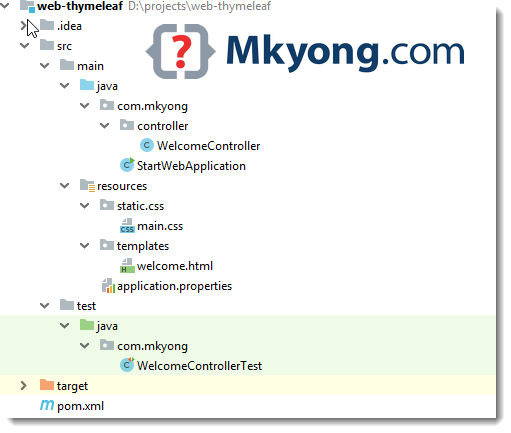
2. Maven
Put spring-boot-starter-web and spring-boot-starter-thymeleaf, it will get anything we need to develop a Spring MVC + Thymeleaf web application, including the embedded Tomcat server.
<?xml version="1.0" encoding="UTF-8"?>
<project xmlns="http://maven.apache.org/POM/4.0.0"
		 xmlns:xsi="http://www.w3.org/2001/XMLSchema-instance"
         xsi:schemaLocation="http://maven.apache.org/POM/4.0.0
		 http://maven.apache.org/xsd/maven-4.0.0.xsd">
    <modelVersion>4.0.0</modelVersion>

    <artifactId>web-thymeleaf</artifactId>
    <packaging>jar</packaging>
    <name>Spring Boot Web Thymeleaf Example</name>
    <description>Spring Boot Web Thymeleaf Example</description>
    <version>1.0</version>

    <parent>
        <groupId>org.springframework.boot</groupId>
        <artifactId>spring-boot-starter-parent</artifactId>
        <version>2.1.2.RELEASE</version>
    </parent>

    <properties>
        <java.version>1.8</java.version>
        <bootstrap.version>4.2.1</bootstrap.version>
    </properties>

    <dependencies>

        <!-- web mvc -->
        <dependency>
            <groupId>org.springframework.boot</groupId>
            <artifactId>spring-boot-starter-web</artifactId>
        </dependency>

        <!-- thymeleaf -->
        <dependency>
            <groupId>org.springframework.boot</groupId>
            <artifactId>spring-boot-starter-thymeleaf</artifactId>
        </dependency>

        <!-- test -->
        <dependency>
            <groupId>org.springframework.boot</groupId>
            <artifactId>spring-boot-starter-test</artifactId>
            <scope>test</scope>
        </dependency>

        <!-- hot swapping, disable cache for template, enable live reload -->
        <dependency>
            <groupId>org.springframework.boot</groupId>
            <artifactId>spring-boot-devtools</artifactId>
            <optional>true</optional>
        </dependency>

        <!-- Optional, for bootstrap -->
        <dependency>
            <groupId>org.webjars</groupId>
            <artifactId>bootstrap</artifactId>
            <version>${bootstrap.version}</version>
        </dependency>

    </dependencies>
    <build>
        <plugins>

            <!-- Package as an executable jar/war -->
            <plugin>
                <groupId>org.springframework.boot</groupId>
                <artifactId>spring-boot-maven-plugin</artifactId>
                <configuration>
                    <addResources>true</addResources>
                </configuration>
            </plugin>

            <plugin>
                <groupId>org.apache.maven.plugins</groupId>
                <artifactId>maven-surefire-plugin</artifactId>
                <version>2.22.0</version>
            </plugin>

        </plugins>

    </build>
</project>
Display the project dependencies.
$ mvn dependency:tree

[INFO] org.springframework.boot:web-thymeleaf:jar:1.0
[INFO] +- org.springframework.boot:spring-boot-starter-web:jar:2.1.2.RELEASE:compile
[INFO] |  +- org.springframework.boot:spring-boot-starter:jar:2.1.2.RELEASE:compile
[INFO] |  |  +- org.springframework.boot:spring-boot-starter-logging:jar:2.1.2.RELEASE:compile
[INFO] |  |  |  +- ch.qos.logback:logback-classic:jar:1.2.3:compile
[INFO] |  |  |  |  \- ch.qos.logback:logback-core:jar:1.2.3:compile
[INFO] |  |  |  +- org.apache.logging.log4j:log4j-to-slf4j:jar:2.11.1:compile
[INFO] |  |  |  |  \- org.apache.logging.log4j:log4j-api:jar:2.11.1:compile
[INFO] |  |  |  \- org.slf4j:jul-to-slf4j:jar:1.7.25:compile
[INFO] |  |  +- javax.annotation:javax.annotation-api:jar:1.3.2:compile
[INFO] |  |  \- org.yaml:snakeyaml:jar:1.23:runtime
[INFO] |  +- org.springframework.boot:spring-boot-starter-json:jar:2.1.2.RELEASE:compile
[INFO] |  |  +- com.fasterxml.jackson.core:jackson-databind:jar:2.9.8:compile
[INFO] |  |  |  +- com.fasterxml.jackson.core:jackson-annotations:jar:2.9.0:compile
[INFO] |  |  |  \- com.fasterxml.jackson.core:jackson-core:jar:2.9.8:compile
[INFO] |  |  +- com.fasterxml.jackson.datatype:jackson-datatype-jdk8:jar:2.9.8:compile
[INFO] |  |  +- com.fasterxml.jackson.datatype:jackson-datatype-jsr310:jar:2.9.8:compile
[INFO] |  |  \- com.fasterxml.jackson.module:jackson-module-parameter-names:jar:2.9.8:compile
[INFO] |  +- org.springframework.boot:spring-boot-starter-tomcat:jar:2.1.2.RELEASE:compile
[INFO] |  |  +- org.apache.tomcat.embed:tomcat-embed-core:jar:9.0.14:compile
[INFO] |  |  +- org.apache.tomcat.embed:tomcat-embed-el:jar:9.0.14:compile
[INFO] |  |  \- org.apache.tomcat.embed:tomcat-embed-websocket:jar:9.0.14:compile
[INFO] |  +- org.hibernate.validator:hibernate-validator:jar:6.0.14.Final:compile
[INFO] |  |  +- javax.validation:validation-api:jar:2.0.1.Final:compile
[INFO] |  |  +- org.jboss.logging:jboss-logging:jar:3.3.2.Final:compile
[INFO] |  |  \- com.fasterxml:classmate:jar:1.4.0:compile
[INFO] |  +- org.springframework:spring-web:jar:5.1.4.RELEASE:compile
[INFO] |  |  \- org.springframework:spring-beans:jar:5.1.4.RELEASE:compile
[INFO] |  \- org.springframework:spring-webmvc:jar:5.1.4.RELEASE:compile
[INFO] |     +- org.springframework:spring-aop:jar:5.1.4.RELEASE:compile
[INFO] |     +- org.springframework:spring-context:jar:5.1.4.RELEASE:compile
[INFO] |     \- org.springframework:spring-expression:jar:5.1.4.RELEASE:compile
[INFO] +- org.springframework.boot:spring-boot-starter-thymeleaf:jar:2.1.2.RELEASE:compile
[INFO] |  +- org.thymeleaf:thymeleaf-spring5:jar:3.0.11.RELEASE:compile
[INFO] |  |  +- org.thymeleaf:thymeleaf:jar:3.0.11.RELEASE:compile
[INFO] |  |  |  +- org.attoparser:attoparser:jar:2.0.5.RELEASE:compile
[INFO] |  |  |  \- org.unbescape:unbescape:jar:1.1.6.RELEASE:compile
[INFO] |  |  \- org.slf4j:slf4j-api:jar:1.7.25:compile
[INFO] |  \- org.thymeleaf.extras:thymeleaf-extras-java8time:jar:3.0.2.RELEASE:compile
[INFO] +- org.springframework.boot:spring-boot-starter-test:jar:2.1.2.RELEASE:test
[INFO] |  +- org.springframework.boot:spring-boot-test:jar:2.1.2.RELEASE:test
[INFO] |  +- org.springframework.boot:spring-boot-test-autoconfigure:jar:2.1.2.RELEASE:test
[INFO] |  +- com.jayway.jsonpath:json-path:jar:2.4.0:test
[INFO] |  |  \- net.minidev:json-smart:jar:2.3:test
[INFO] |  |     \- net.minidev:accessors-smart:jar:1.2:test
[INFO] |  |        \- org.ow2.asm:asm:jar:5.0.4:test
[INFO] |  +- junit:junit:jar:4.12:test
[INFO] |  +- org.assertj:assertj-core:jar:3.11.1:test
[INFO] |  +- org.mockito:mockito-core:jar:2.23.4:test
[INFO] |  |  +- net.bytebuddy:byte-buddy:jar:1.9.7:test
[INFO] |  |  +- net.bytebuddy:byte-buddy-agent:jar:1.9.7:test
[INFO] |  |  \- org.objenesis:objenesis:jar:2.6:test
[INFO] |  +- org.hamcrest:hamcrest-core:jar:1.3:test
[INFO] |  +- org.hamcrest:hamcrest-library:jar:1.3:test
[INFO] |  +- org.skyscreamer:jsonassert:jar:1.5.0:test
[INFO] |  |  \- com.vaadin.external.google:android-json:jar:0.0.20131108.vaadin1:test
[INFO] |  +- org.springframework:spring-core:jar:5.1.4.RELEASE:compile
[INFO] |  |  \- org.springframework:spring-jcl:jar:5.1.4.RELEASE:compile
[INFO] |  +- org.springframework:spring-test:jar:5.1.4.RELEASE:test
[INFO] |  \- org.xmlunit:xmlunit-core:jar:2.6.2:test
[INFO] |     \- javax.xml.bind:jaxb-api:jar:2.3.1:test
[INFO] |        \- javax.activation:javax.activation-api:jar:1.2.0:test
[INFO] +- org.springframework.boot:spring-boot-devtools:jar:2.1.2.RELEASE:compile (optional)
[INFO] |  +- org.springframework.boot:spring-boot:jar:2.1.2.RELEASE:compile
[INFO] |  \- org.springframework.boot:spring-boot-autoconfigure:jar:2.1.2.RELEASE:compile
[INFO] \- org.webjars:bootstrap:jar:4.2.1:compile
[INFO]    +- org.webjars:jquery:jar:3.0.0:compile
[INFO]    \- org.webjars:popper.js:jar:1.14.3:compile
3. Developer Tools
	<dependency>
		<groupId>org.springframework.boot</groupId>
		<artifactId>spring-boot-devtools</artifactId>
		<optional>true</optional>
	</dependency>
This spring-boot-devtools helps to disable the caches and enable hot swapping so that developers will always see the last changes. Good for development. Read this – Spring Boot – Developer tools Try to modify the Thymeleaf templates or properties files, refresh the browser to see the changes take effect immediately.
- For Eclipse IDE, it is integrated well with
spring-boot-devtools. - For Intellij IDEA, extra steps are required, read this reload static file is not working
4. Spring Boot + MVC
4.1 A simple controller.
package com.mkyong.controller;

import org.springframework.beans.factory.annotation.Value;
import org.springframework.stereotype.Controller;
import org.springframework.ui.Model;
import org.springframework.web.bind.annotation.GetMapping;
import org.springframework.web.bind.annotation.RequestParam;

import java.util.Arrays;
import java.util.List;

@Controller
public class WelcomeController {

    // inject via application.properties
    @Value("${welcome.message}")
    private String message;

    private List<String> tasks = Arrays.asList("a", "b", "c", "d", "e", "f", "g");

    @GetMapping("/")
    public String main(Model model) {
        model.addAttribute("message", message);
        model.addAttribute("tasks", tasks);

        return "welcome"; //view
    }

    // /hello?name=kotlin
    @GetMapping("/hello")
    public String mainWithParam(
            @RequestParam(name = "name", required = false, defaultValue = "")
			String name, Model model) {

        model.addAttribute("message", name);

        return "welcome"; //view
    }

}
4.2 Create a class and annotate with @SpringBootApplication. In IDE, run this class to start the entire web application.
package com.mkyong;

import org.springframework.boot.SpringApplication;
import org.springframework.boot.autoconfigure.SpringBootApplication;

@SpringBootApplication
public class StartWebApplication {

    public static void main(String[] args) {
        SpringApplication.run(StartWebApplication.class, args);
    }

}
5. Thymeleaf + Static files
Read this Spring Boot Serving static content to understand the resource mapping.
5.1 For Thymeleaf template files, put in src/main/resources/templates/
<!DOCTYPE HTML>
<html lang="en" xmlns:th="http://www.thymeleaf.org">
<head>
    <meta charset="utf-8">
    <meta name="viewport" content="width=device-width, initial-scale=1, shrink-to-fit=no">

    <title>Spring Boot Thymeleaf Hello World Example</title>

    <link rel="stylesheet" th:href="@{webjars/bootstrap/4.2.1/css/bootstrap.min.css}"/>
    <link rel="stylesheet" th:href="@{/css/main.css}"/>

</head>

<body>

<nav class="navbar navbar-expand-md navbar-dark bg-dark fixed-top">
    <a class="navbar-brand" href="#">Mkyong.com</a>
</nav>

<main role="main" class="container">

    <div class="starter-template">
        <h1>Spring Boot Web Thymeleaf Example</h1>
        <h2>
            <span th:text="'Hello, ' + ${message}"></span>
        </h2>
    </div>

    <ol>
        <li th:each="task : ${tasks}" th:text="${task}"></li>
    </ol>

</main>
<!-- /.container -->

<script type="text/javascript" th:src="@{webjars/bootstrap/4.2.1/js/bootstrap.min.js}"></script>
</body>
</html>
5.2 Spring Boot common application properties
welcome.message: Mkyong

spring.thymeleaf.cache=false
5.3 For Static files like CSS or JS, put in src/main/resources/static/
body {
  padding-top: 5rem;
}
.starter-template {
  padding: 3rem 1.5rem;
  text-align: center;
}

h1{
	color:#0000FF;
}

h2{
	color:#FF0000;
}
6. Unit Test
MockMvc to test the Spring MVC controller.
package com.mkyong;

import com.mkyong.controller.WelcomeController;
import org.junit.Test;
import org.junit.runner.RunWith;
import org.springframework.beans.factory.annotation.Autowired;
import org.springframework.boot.test.autoconfigure.web.servlet.WebMvcTest;
import org.springframework.test.context.junit4.SpringRunner;
import org.springframework.test.web.servlet.MockMvc;
import org.springframework.test.web.servlet.MvcResult;
import org.springframework.test.web.servlet.ResultActions;
import org.springframework.web.servlet.ModelAndView;

import java.util.Arrays;
import java.util.List;

import static org.hamcrest.Matchers.containsString;
import static org.hamcrest.Matchers.is;
import static org.hamcrest.core.IsEqual.equalTo;
import static org.springframework.test.web.servlet.request.MockMvcRequestBuilders.get;
import static org.springframework.test.web.servlet.result.MockMvcResultMatchers.*;

@RunWith(SpringRunner.class)
@WebMvcTest(controllers = WelcomeController.class)
public class WelcomeControllerTest {

    @Autowired
    private MockMvc mockMvc;

    List<String> expectedList = Arrays.asList("a", "b", "c", "d", "e", "f", "g");

    @Test
    public void main() throws Exception {
        ResultActions resultActions = mockMvc.perform(get("/"))
                .andExpect(status().isOk())
                .andExpect(view().name("welcome"))
                .andExpect(model().attribute("message", equalTo("Mkyong")))
                .andExpect(model().attribute("tasks", is(expectedList)))
                .andExpect(content().string(containsString("Hello, Mkyong")));

        MvcResult mvcResult = resultActions.andReturn();
        ModelAndView mv = mvcResult.getModelAndView();
        //
    }

    // Get request with Param
    @Test
    public void hello() throws Exception {
        mockMvc.perform(get("/hello").param("name", "I Love Kotlin!"))
                .andExpect(status().isOk())
                .andExpect(view().name("welcome"))
                .andExpect(model().attribute("message", equalTo("I Love Kotlin!")))
                .andExpect(content().string(containsString("Hello, I Love Kotlin!")));
    }


}
7. Demo
$ mvn spring-boot:run

: Tomcat initialized with port(s): 8080 (http)
: Starting service [Tomcat]
: Starting Servlet engine: [Apache Tomcat/9.0.14]

: Tomcat started on port(s): 8080 (http) with context path ''
 Started StartWebApplication in 1.858 seconds (JVM running for 2.222)
URL = http://localhost:8080
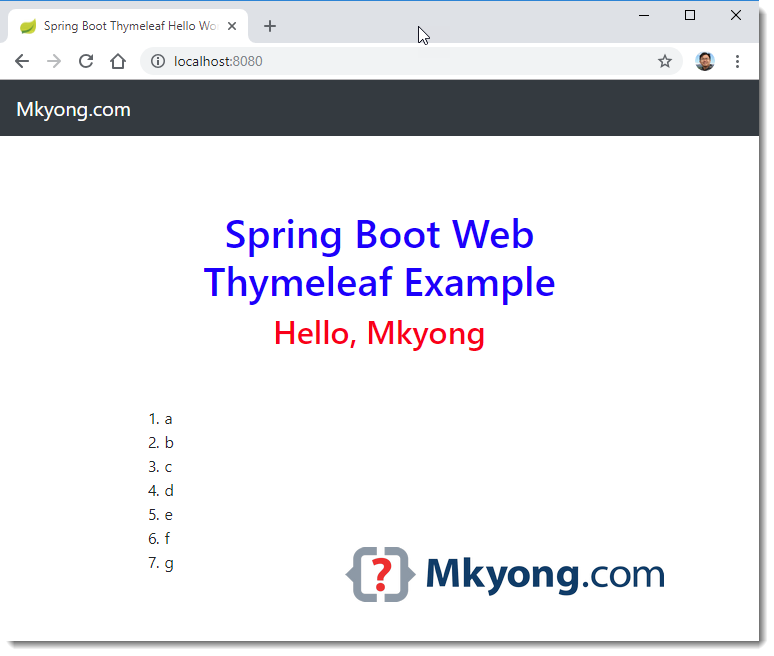
URL = http://localhost:8080/hello?name=abc
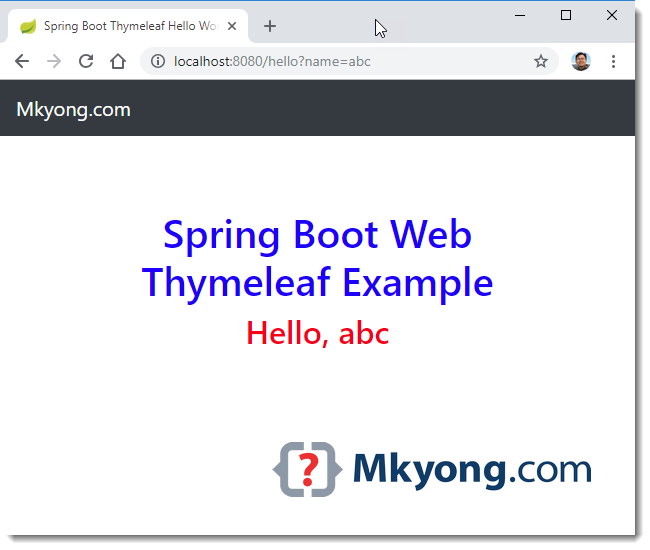
8. Create an executable JAR
For deployment, just normal Maven package to create an executable JAR file.
$ mvn clean package

$ java -jar target\web-thymeleaf-1.0.jar
Download Source Code
References
- Serving Web Content with Spring MVC
- JUnit – How to test a List
- Spring Boot + JUnit 5 + Mockito
- common application properties
- Intellij IDEA – Spring boot reload static file is not working
- Thymeleaf official website
- Spring Boot – Static content
- Spring Boot – Developer tools
- Deploying Spring Boot Applications
- Spring MVC – Inlucde CSS file
- Spring Boot Hello World Example – JSP

Is there any way to serve HTML, CSS, and JavaScript files outside of the WAR file instead of being in the resources directory?
Hi.
hello, help with the following topic.
i am working with spring boot+thymeleaf+mysql+jpa
I have 2 drop down lists, one depends on the other.
1.- “BRAND” dropdown.
2.- dropdown “Products”
the help I need is that when selecting the “BRAND” dropdown, it returns the products associated with the selected brand.
can you help me please.
Controller.
@GetMapping(“/entrada”)
public String showEntrada(Model model) {
model.addAttribute(“entradaVo”, new EntradaVo());
model.addAttribute(“listEntradas”, entradaService.listAllEntradaVoByStatusFlag(true));
model.addAttribute(“listProveedores”, proveedorService.listAllProveedorVoByStatusFlag(true));
model.addAttribute(“listMarcas”, marcaService.listAllMarcaVoByStatusFlag(true));
model.addAttribute(“listAnimales”, animalService.listAllAnimalVoByStatusFlag(true));
model.addAttribute(“listPresentaciones”, presentacionService.listAllPresentacionVoByStatusFlag(true));
//model.addAttribute(“listProductos”, productoService.listAllProductoVoByStatusFlag(true));
model.addAttribute(“listProductos”, new ArrayList<ProductoVo>());
model.addAttribute(“fechaActual”, DateUtils.dateToString());
model.addAttribute(“flag”, true);
return “pages/entrada”;
}
JPA
MARCAS
@Entity(name = “MarcaVo”)
@Table(name = “CAT_MARCAS”)
public class MarcaVo extends GenericoVo implements Serializable {
@Id
@Column(name = “ID”)
@GeneratedValue(strategy = GenerationType.IDENTITY)
private int id;
@Column(name = “MARCA”)
private String marca;
@OneToMany(mappedBy = “marcaVo”, cascade = CascadeType.ALL, fetch = FetchType.LAZY, orphanRemoval = true)
@Fetch(FetchMode.SUBSELECT)
@LazyCollection(LazyCollectionOption.FALSE)
private List<ProductoVo> listProductoVo;
PRODUCTOS
@Entity(name = “ProductoVo”)
@Table(name = “CAT_PRODUCTOS”)
public class ProductoVo extends GenericoVo implements Serializable {
@Id
@Column(name = “ID”)
@GeneratedValue(strategy = GenerationType.IDENTITY)
private int id;
@Column(name = “PRODUCTO”)
private String producto;
@Column(name = “ID_MARCA”)
private int idMarca;
@Column(name = “ID_ANIMAL”)
private int idAnimal;
@Column(name = “ID_PRESENTACION”)
private int idPresentacion;
@ManyToOne()
@JoinColumn(name = “ID_MARCA”, insertable = false, updatable = false)
@JsonIgnore
private MarcaVo marcaVo;
Cheers
Hello
I am using spring boot 2 (v2.5.1) with thymeleaf maven.
When I am using server.servlet.context-path in application.properties, redirected pages are giving 404.
When i try to implement this I am getting below error.
org.thymeleaf.exceptions.TemplateProcessingException: Link base “/css/test-styles.css” cannot be context relative (/) or page relative unless you implement the org.thymeleaf.context.IWebContext interface (context is of class: org.thymeleaf.context.Context)
Your code is good but code description(Theory ) is not understandable…
Is there a way generate the rendered html output in a OutputStream or File instead for rendering in Browser.
thank you for good posting!
don’t we have to return a model and view from controller method, so that Html file will get picked up ?
Hi!
Why, at the added dependence spring-boot-starter-mvc in an example “webflux-thymeleaf” there is mistake?
How to overcome it?
org.thymeleaf.exceptions.TemplateInputException: An error happened during template parsing (template: “class path resource [templates/index.html]”)
…
Caused by: org.springframework.expression.spel.SpelEvaluationException: EL1008E: Property or field ‘name’ cannot be found on object of type ‘org.thymeleaf.spring5.context.webflux.ReactiveDataDriverContextVariable’ – maybe not public or not valid?
at org.springframework.expression.spel.ast.PropertyOrFieldReference.readProperty(PropertyOrFieldReference.java:217)
Why can it be used without importing the jQuery.js file?
org.webjars:bootstrap:jar:4.2.1:compile
[INFO] +- org.webjars:jquery:jar:3.0.0:compile
[INFO] \- org.webjars:popper.js:jar:1.14.3:compile
be careful not to place directly :
– WelcomeController.java
– StartWebApplication.java
under the folder java directly.
You must put the controller and the main class at least in a package (or many subpackages) with the name of your choice, otherwise the application will not launch.
The command mvn dependancy:tree may not work with windows.
I met 404 error first, then i use spring boot version 2.0.5.RELEASE instead and get success.
This example is tested with
Spring Boot 2.1.2.RELEASE, for those who hits errors, the first try is upgrade your Spring Boot to latest.To those having errors with this example, simple comment out this line of code from your pom.xml
Then, build and Run your application.
org.springframework.boot
spring-boot-devtools
true
Hey mkyong/others,
Please help me. I am getting this error in pom.xml on importing the package.
Project build error: Non-resolvable parent POM for org.springframework.boot:spring-boot-web-thymeleaf:1.0: Failure to transfer
org.springframework.boot:spring-boot-starter-parent:pom:1.4.2.RELEASE from https://repo.maven.apache.org/maven2 was cached
in the local repository, resolution will not be reattempted until the update interval of central has elapsed or updates are forced.
Original error: Could not transfer artifact org.springframework.boot:spring-boot-starter-parent:pom:1.4.2.RELEASE from/to central
(https://repo.maven.apache.org/maven2): sun.security.validator.ValidatorException: PKIX path building failed:
sun.security.provider.certpath.SunCertPathBuilderException: unable to find valid certification path to requested target and
‘parent.relativePath’ points at wrong local POM
Thank You
Did u get the solution for this?
Thanks!
Hi , I Want to load css and js into my jsp page but it is not loaded only the html contenet is displayed ,
where is the mistake,what i have missed, Anybody know post your answers.
Here my web.xml
Spring MVC Static Resources
spring
org.springframework.web.servlet.DispatcherServlet
contextConfigLocation
/WEB-INF/spring-servlet.xml
1
spring
/
<!–
org.springframework.web.context.ContextLoaderListener
contextConfigLocation
/WEB-INF/spring-core-servlet.xml
–>
Servlet.xml
/WEB-INF/pages/
.jsp
only Return…. welcome message not welcome.html page….
Use @Controller and not @RestController
I built my project exactly same as explained here. but I keep getting the whitelabel error page 404.
same here…
To those having errors with this example, simple comment out this dependency line of code from your “pom.xml” file
Then, build and Run your application.
org.springframework.boot
spring-boot-devtools
true
Change @Controller to @RestController in the controller file.
Only correct answer
Why I am getting 404 error
article is updated, try again with
mvn spring-boot:runwhats the use of thymeleaf in spring boot
I have an issue in deploying the war file deployed in tomcat 8.5. i log the issue in https://stackoverflow.com/questions/47294386/issues-in-spring-boot-war-file-deployment-in-tomcat-server
Let me know if you have any solution
Can you suggest me that how can I con configure jsp views in Spring Boot. I have also used thymeleaf worked perfectly but there is some issues in jsp. Please help me as soon as possible.
Thank you,
Banti kumar
please help me, i have error for build spring boot using maven for deploy to apache tomcat 7, my css file success to load like , but my javascript file and has error message Failed to load resource: the server responded with a status of 404 (Not Found). how to config maven or tomcat for show /cms for js file?
css href=”/cms/webjars/bootstrap/3.3.6/css/bootstrap.min.css” and js src=”/webjars/bootstrap/3.3.6/js/bootstrap.min.js”
css files couldn’t include. I did like your sample but I got this error “NetworkError: 404 Not Found – http://localhost:8080/static/css/main.css“. How can I solve this?
Brother, you can’t be looking directly, cause it’s Spring Boot. You @RequestMapping (“/”) it mean http://localhost:8080/
1. add
org.webjars
webjars-locator
2. remove /static/ , only href=/css/main.css
” org.springframework.boot spring-boot-starter-web “
Hey, I got the error message: “Error resolving template “welcome”, template might not exist or might not be accessible by any of the configured Template Resolvers”.
Then I found this thread on StackOverflow ( https://stackoverflow.com/questions/44361064/error-resolving-template-welcome-template-might-not-exist-or-might-not-be-acc )
I just added the following dependency and it worked:
org.springframework.boot spring-boot-starter-web
Hi, what is the correct way to change the .html files path? I want them inside webapp/WEB-INF/templates. I’ve tried with the templateResolver setPrefix official thymeleaf doc, adding at my application.yml the spring:thymeleaf:prefix: classpath:WEB-INF/templates (without classpath…) with another @bean definitios in stackoverflow but not working in any way… Any idea or advice?
did you try
spring.mvc.view.prefixhttps://docs.spring.io/spring-boot/docs/current/reference/html/common-application-properties.html