A Spring Boot web application example, using embedded Tomcat + JSP template, and package as an executable WAR file.
Technologies used :
- Spring Boot 1.4.2.RELEASE
- Spring 4.3.4.RELEASE
- Tomcat Embed 8.5.6
- Maven 3
- Java 8
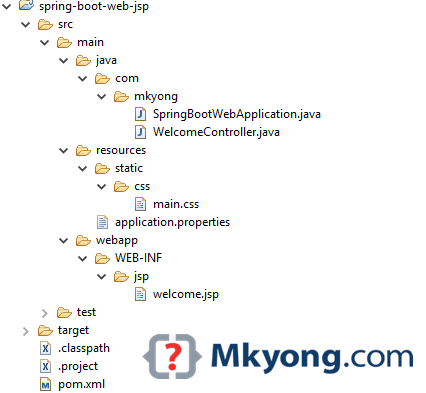
1. Project Directory
Create the following folders manually :
2. Project Dependencies
Maven example. Read comments for self-explanatory.
<?xml version="1.0" encoding="UTF-8"?>
<project xmlns="http://maven.apache.org/POM/4.0.0"
	xmlns:xsi="http://www.w3.org/2001/XMLSchema-instance"
	xsi:schemaLocation="http://maven.apache.org/POM/4.0.0
	http://maven.apache.org/xsd/maven-4.0.0.xsd">
	<modelVersion>4.0.0</modelVersion>

	<artifactId>spring-boot-web-jsp</artifactId>
	<packaging>war</packaging>
	<name>Spring Boot Web JSP Example</name>
	<description>Spring Boot Web JSP Example</description>
	<url>https://www.mkyong.com</url>
	<version>1.0</version>

	<parent>
		<groupId>org.springframework.boot</groupId>
		<artifactId>spring-boot-starter-parent</artifactId>
		<version>1.4.2.RELEASE</version>
	</parent>

	<properties>
		<java.version>1.8</java.version>
	</properties>

	<dependencies>

		<!-- This is a web application -->
		<dependency>
			<groupId>org.springframework.boot</groupId>
			<artifactId>spring-boot-starter-web</artifactId>
		</dependency>

		<!-- Tomcat embedded container-->
		<dependency>
			<groupId>org.springframework.boot</groupId>
			<artifactId>spring-boot-starter-tomcat</artifactId>
			<scope>provided</scope>
		</dependency>

		<!-- JSTL for JSP -->
		<dependency>
			<groupId>javax.servlet</groupId>
			<artifactId>jstl</artifactId>
		</dependency>

		<!-- Need this to compile JSP -->
		<dependency>
			<groupId>org.apache.tomcat.embed</groupId>
			<artifactId>tomcat-embed-jasper</artifactId>
			<scope>provided</scope>
		</dependency>

		<!-- Need this to compile JSP,
			tomcat-embed-jasper version is not working, no idea why -->
		<dependency>
			<groupId>org.eclipse.jdt.core.compiler</groupId>
			<artifactId>ecj</artifactId>
			<version>4.6.1</version>
			<scope>provided</scope>
		</dependency>

		<!-- Optional, test for static content, bootstrap CSS-->
		<dependency>
			<groupId>org.webjars</groupId>
			<artifactId>bootstrap</artifactId>
			<version>3.3.7</version>
		</dependency>

	</dependencies>
	<build>
		<plugins>
			<!-- Package as an executable jar/war -->
			<plugin>
				<groupId>org.springframework.boot</groupId>
				<artifactId>spring-boot-maven-plugin</artifactId>
			</plugin>
		</plugins>
	</build>
</project>
Display project depdencies :
$ mvn dependency:tree

[INFO] Scanning for projects...
[INFO]
[INFO] ------------------------------------------------------------------------
[INFO] Building Spring Boot Web JSP Example 1.0
[INFO] ------------------------------------------------------------------------
[INFO]
[INFO] --- maven-dependency-plugin:2.10:tree (default-cli) @ spring-boot-web-jsp ---
[INFO] org.springframework.boot:spring-boot-web-jsp:war:1.0
[INFO] +- org.springframework.boot:spring-boot-starter-web:jar:1.4.2.RELEASE:compile
[INFO] |  +- org.springframework.boot:spring-boot-starter:jar:1.4.2.RELEASE:compile
[INFO] |  |  +- org.springframework.boot:spring-boot:jar:1.4.2.RELEASE:compile
[INFO] |  |  +- org.springframework.boot:spring-boot-autoconfigure:jar:1.4.2.RELEASE:compile
[INFO] |  |  +- org.springframework.boot:spring-boot-starter-logging:jar:1.4.2.RELEASE:compile
[INFO] |  |  |  +- ch.qos.logback:logback-classic:jar:1.1.7:compile
[INFO] |  |  |  |  +- ch.qos.logback:logback-core:jar:1.1.7:compile
[INFO] |  |  |  |  \- org.slf4j:slf4j-api:jar:1.7.21:compile
[INFO] |  |  |  +- org.slf4j:jcl-over-slf4j:jar:1.7.21:compile
[INFO] |  |  |  +- org.slf4j:jul-to-slf4j:jar:1.7.21:compile
[INFO] |  |  |  \- org.slf4j:log4j-over-slf4j:jar:1.7.21:compile
[INFO] |  |  +- org.springframework:spring-core:jar:4.3.4.RELEASE:compile
[INFO] |  |  \- org.yaml:snakeyaml:jar:1.17:runtime
[INFO] |  +- org.hibernate:hibernate-validator:jar:5.2.4.Final:compile
[INFO] |  |  +- javax.validation:validation-api:jar:1.1.0.Final:compile
[INFO] |  |  +- org.jboss.logging:jboss-logging:jar:3.3.0.Final:compile
[INFO] |  |  \- com.fasterxml:classmate:jar:1.3.3:compile
[INFO] |  +- com.fasterxml.jackson.core:jackson-databind:jar:2.8.4:compile
[INFO] |  |  +- com.fasterxml.jackson.core:jackson-annotations:jar:2.8.4:compile
[INFO] |  |  \- com.fasterxml.jackson.core:jackson-core:jar:2.8.4:compile
[INFO] |  +- org.springframework:spring-web:jar:4.3.4.RELEASE:compile
[INFO] |  |  +- org.springframework:spring-aop:jar:4.3.4.RELEASE:compile
[INFO] |  |  +- org.springframework:spring-beans:jar:4.3.4.RELEASE:compile
[INFO] |  |  \- org.springframework:spring-context:jar:4.3.4.RELEASE:compile
[INFO] |  \- org.springframework:spring-webmvc:jar:4.3.4.RELEASE:compile
[INFO] |     \- org.springframework:spring-expression:jar:4.3.4.RELEASE:compile
[INFO] +- org.springframework.boot:spring-boot-starter-tomcat:jar:1.4.2.RELEASE:provided
[INFO] |  +- org.apache.tomcat.embed:tomcat-embed-core:jar:8.5.6:provided
[INFO] |  +- org.apache.tomcat.embed:tomcat-embed-el:jar:8.5.6:provided
[INFO] |  \- org.apache.tomcat.embed:tomcat-embed-websocket:jar:8.5.6:provided
[INFO] +- javax.servlet:jstl:jar:1.2:compile
[INFO] +- org.apache.tomcat.embed:tomcat-embed-jasper:jar:8.5.6:provided
[INFO] +- org.eclipse.jdt.core.compiler:ecj:jar:4.6.1:provided
[INFO] \- org.webjars:bootstrap:jar:3.3.7:compile
[INFO]    \- org.webjars:jquery:jar:1.11.1:compile
[INFO] ------------------------------------------------------------------------
[INFO] BUILD SUCCESS
[INFO] ------------------------------------------------------------------------
[INFO] Total time: 1.327 s
[INFO] Finished at: 2016-11-28T16:57:00+08:00
[INFO] Final Memory: 20M/309M
[INFO] ------------------------------------------------------------------------
3. Spring Spring
3.1 This SpringBootServletInitializer run a SpringApplication from a traditional WAR deployment
package com.mkyong;

import org.springframework.boot.SpringApplication;
import org.springframework.boot.autoconfigure.SpringBootApplication;
import org.springframework.boot.builder.SpringApplicationBuilder;
import org.springframework.boot.web.support.SpringBootServletInitializer;

@SpringBootApplication
public class SpringBootWebApplication extends SpringBootServletInitializer {

	@Override
	protected SpringApplicationBuilder configure(SpringApplicationBuilder application) {
		return application.sources(SpringBootWebApplication.class);
	}

	public static void main(String[] args) throws Exception {
		SpringApplication.run(SpringBootWebApplication.class, args);
	}

}
3.2 A simple Spring controller class.
package com.mkyong;

import java.util.Map;

import org.springframework.beans.factory.annotation.Value;
import org.springframework.stereotype.Controller;
import org.springframework.web.bind.annotation.RequestMapping;

@Controller
public class WelcomeController {

	// inject via application.properties
	@Value("${welcome.message:test}")
	private String message = "Hello World";

	@RequestMapping("/")
	public String welcome(Map<String, Object> model) {
		model.put("message", this.message);
		return "welcome";
	}

}
4. JSP + Resources + Static files
4.1 For JSP files, put in src/main/webapp/WEB-INF/jsp/
<!DOCTYPE html>
<%@ taglib prefix="spring" uri="http://www.springframework.org/tags"%>
<%@ taglib prefix="c" uri="http://java.sun.com/jsp/jstl/core"%>
<html lang="en">
<head>

	<!-- Access the bootstrap Css like this,
		Spring boot will handle the resource mapping automcatically -->
	<link rel="stylesheet" type="text/css" href="webjars/bootstrap/3.3.7/css/bootstrap.min.css" />

	<!--
	<spring:url value="/css/main.css" var="springCss" />
	<link href="${springCss}" rel="stylesheet" />
	 -->
	<c:url value="/css/main.css" var="jstlCss" />
	<link href="${jstlCss}" rel="stylesheet" />

</head>
<body>

	<nav class="navbar navbar-inverse">
		<div class="container">
			<div class="navbar-header">
				<a class="navbar-brand" href="#">Spring Boot</a>
			</div>
			<div id="navbar" class="collapse navbar-collapse">
				<ul class="nav navbar-nav">
					<li class="active"><a href="#">Home</a></li>
					<li><a href="#about">About</a></li>
				</ul>
			</div>
		</div>
	</nav>

	<div class="container">

		<div class="starter-template">
			<h1>Spring Boot Web JSP Example</h1>
			<h2>Message: ${message}</h2>
		</div>

	</div>

	<script type="text/javascript" src="webjars/bootstrap/3.3.7/js/bootstrap.min.js"></script>

</body>

</html>
4.2 For static files like CSS or Javascript, put in /src/main/resources/static/
h1{
	color:#0000FF;
}

h2{
	color:#FF0000;
}
4.3 For properties files, put in /src/main/resources/
spring.mvc.view.prefix: /WEB-INF/jsp/
spring.mvc.view.suffix: .jsp

welcome.message: Hello Mkyong
Spring Boot, convention over configuration, no need to declare the resource mapping like this. The resource mapping just handles automatically – Read this article – Spring Boot Serving static content
5. Demo
5.1 Start the Spring Boot web app.
project$ mvn spring-boot:run

//...
  .   ____          _            __ _ _
 /\\ / ___'_ __ _ _(_)_ __  __ _ \ \ \ \
( ( )\___ | '_ | '_| | '_ \/ _` | \ \ \ \
 \\/  ___)| |_)| | | | | || (_| |  ) ) ) )
  '  |____| .__|_| |_|_| |_\__, | / / / /
 =========|_|==============|___/=/_/_/_/
 :: Spring Boot ::        (v1.4.2.RELEASE)

2016-11-28 17:25:24.809  INFO 4696 --- [           main] com.mkyong.SpringBootWebApplication      : Starting SpringBootWebApplication on MKYONG-WIN10 with PID 4696 (C:\spring-boot\spring-boot-examples\spring-boot-web-jsp\target\classes started by mkyong in C:\spring-boot\spring-boot-examples\spring-boot-web-jsp)
2016-11-28 17:25:24.812  INFO 4696 --- [           main] com.mkyong.SpringBootWebApplication      : No active profile set, falling back to default profiles: default
2016-11-28 17:25:24.861  INFO 4696 --- [           main] ationConfigEmbeddedWebApplicationContext : Refreshing org.springframework.boot.context.embedded.AnnotationConfigEmbeddedWebApplicationContext@69410cd3: startup date [Mon Nov 28 17:25:24 SGT 2016]; root of context hierarchy
2016-11-28 17:25:25.950  INFO 4696 --- [           main] s.b.c.e.t.TomcatEmbeddedServletContainer : Tomcat initialized with port(s): 8080 (http)
2016-11-28 17:25:25.965  INFO 4696 --- [           main] o.apache.catalina.core.StandardService   : Starting service Tomcat
2016-11-28 17:25:25.966  INFO 4696 --- [           main] org.apache.catalina.core.StandardEngine  : Starting Servlet Engine: Apache Tomcat/8.5.6
2016-11-28 17:25:26.171  INFO 4696 --- [ost-startStop-1] org.apache.jasper.servlet.TldScanner     : At least one JAR was scanned for TLDs yet contained no TLDs. Enable debug logging for this logger for a complete list of JARs that were scanned but no TLDs were found in them. Skipping unneeded JARs during scanning can improve startup time and JSP compilation time.
2016-11-28 17:25:26.180  INFO 4696 --- [ost-startStop-1] o.a.c.c.C.[Tomcat].[localhost].[/]       : Initializing Spring embedded WebApplicationContext
2016-11-28 17:25:26.180  INFO 4696 --- [ost-startStop-1] o.s.web.context.ContextLoader            : Root WebApplicationContext: initialization completed in 1322 ms
2016-11-28 17:25:26.304  INFO 4696 --- [ost-startStop-1] o.s.b.w.servlet.ServletRegistrationBean  : Mapping servlet: 'dispatcherServlet' to [/]
2016-11-28 17:25:26.312  INFO 4696 --- [ost-startStop-1] o.s.b.w.servlet.FilterRegistrationBean   : Mapping filter: 'characterEncodingFilter' to: [/*]
2016-11-28 17:25:26.313  INFO 4696 --- [ost-startStop-1] o.s.b.w.servlet.FilterRegistrationBean   : Mapping filter: 'hiddenHttpMethodFilter' to: [/*]
2016-11-28 17:25:26.313  INFO 4696 --- [ost-startStop-1] o.s.b.w.servlet.FilterRegistrationBean   : Mapping filter: 'httpPutFormContentFilter' to: [/*]
2016-11-28 17:25:26.314  INFO 4696 --- [ost-startStop-1] o.s.b.w.servlet.FilterRegistrationBean   : Mapping filter: 'requestContextFilter' to: [/*]

//...

2016-11-28 17:25:26.841  INFO 4696 --- [           main] s.b.c.e.t.TomcatEmbeddedServletContainer : Tomcat started on port(s): 8080 (http)
2016-11-28 17:25:26.846  INFO 4696 --- [           main] com.mkyong.SpringBootWebApplication      : Started SpringBootWebApplication in 2.403 seconds (JVM running for 5.08)
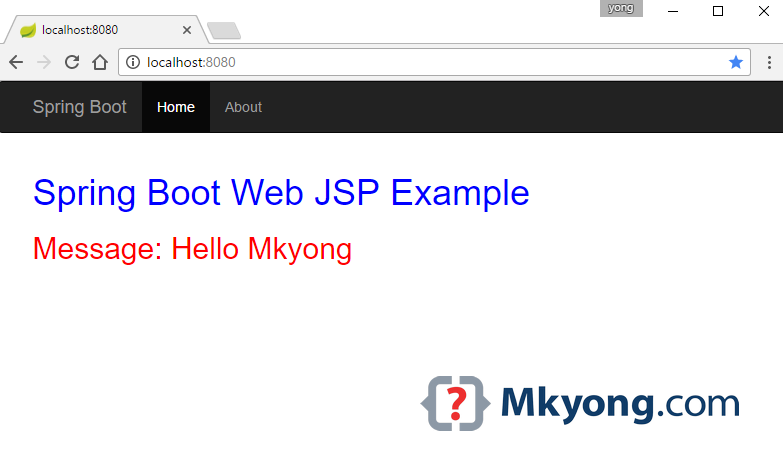
5.2 Access http://localhost:8080
5.3 Maven package the project as an executable WAR file. A 18M++ WAR file will be generated in the target folder.
project$ mvn clean package

...
[INFO] Building war: ...\spring-boot-web-jsp\target\spring-boot-web-jsp-1.0.war
[INFO]
[INFO] --- spring-boot-maven-plugin:1.4.2.RELEASE:repackage (default) @ spring-boot-web-jsp ---
[INFO] ------------------------------------------------------------------------
[INFO] BUILD SUCCESS
[INFO] ------------------------------------------------------------------------
Run It, access http://localhost:8080 again.
project$ java -jar target/spring-boot-web-jsp-1.0.war
You can’t create an executable
jar to run this embedded Tomcat + JSP web example, because of a hard coded file pattern in Tomcat. Read this Spring Boot – JSP limitation.

RESOLVED
ERROR: Whitelabel Error Page
This application has no explicit mapping for /error, so you are seeing this as a fallback.
Resolution: Ensure that if you create seperate packages that they all sit below the
@SpringBootApplication class
but domainThe domain name is not being called. What to do. The web is available via Localhost. my web is not going out.
great.
thank you!!!
I’m getting only the plain text as welcome with no formatting but the method should refer the jsp file welcome.jsp
HI,
Using src/main/webapp/WEB-INF/jsp/welcome.jsp is discouraged if you want to deploy via a jar package.
“Do not use the src/main/webapp folder if your application will be packaged as a jar. Although this folder is a common standard, it will only work with war packaging and it will be silently ignored by most build tools if you generate a jar.”
Reference: https://docs.spring.io/spring-boot/docs/1.1.4.RELEASE/reference/htmlsingle/#using-boot-structuring-your-code
you project as provided never done itself 100%
Your project as downloaded never 100 % success
I have imported your project and could build it with minor changes. However, I was surprised when I did not see message “Hello World” as in welcome controller file but “Hello mykong”! After removing related property from properties file, I saw message “test”! Only after removing related value annotation, did I see “Hello World”. It would have been nicer and useful to explain the flow of program and caveats. In any case, thanks for the post.
it gives e following warning and no css is applied
“No mapping found for HTTP request with URI [/css/main.css] in DispatcherServlet with name ‘dispatcherServlet’
Not able to figure out where i am going wrong.
I was having the same issue, double check that your folder structure is correct, that you have no spelling typos, etc., should be under the path “/src/main/resources/static/css/main.css”, I re-created the file too and not sure if that helped or not.
Make sure to restart the running app after changes for the webapp to pick up the changes.
it will not work until application.properties will be modified to specify jsp MVC support:
spring.mvc.view.prefix=/WEB-INF/jsp/
spring.mvc.view.suffix=.jsp
I am able to use JSP in my app – only when I run as java app – I need to deploy or even run on server locally. I finally downloaded your sample and I am getting a lot of errors…
build.gradle
plugins {
id ‘war’
id ‘application’
}
group ‘com.mkyong’
version ‘1.0-SNAPSHOT’
mainClassName = ‘com.mkyong.Application’
repositories {
mavenCentral()
}
dependencies {
compile ‘org.springframework.boot:spring-boot-starter-web:2.1.0.RELEASE’
compile ‘org.apache.tomcat.embed:tomcat-embed-jasper:9.0.12’
compile ‘javax.servlet:jstl:1.2’
testCompile group: ‘org.springframework.boot’, name: ‘spring-boot-starter-test’, version: ‘2.1.0.RELEASE’
testCompile group: ‘junit’, name: ‘junit’, version: ‘4.11’
}
I have a doubt !!
If by marking “spring-boot-starter-tomcat” dependency’s scope as “Provided”, the embedded tomcat from springboot is disabled then how did we run the war file above using java -jar command?
The h1 h2 of text color do not work. I use IntelliJ 2018. Does somebody know how to solve this problem?
Hi,
I have a multi module spring boot project.. I want to create executable jar of my 2 modules using spring-boot-maven-plugin..
When I try to repackage my module it throws me this error :
Error : [ERROR] Failed to execute goal org.springframework.boot:spring-boot-maven-plugin:2.0.5.RELEASE:repackage (default) on project projectName: Execution default of goal o rg.springframework.boot:spring-boot-maven-plugin:2.0.5.RELEASE:repackage failed: Source must refer to an existing file, got C:\GIT\projectLocation\target\classes ->
Any help would be appreciated.
Thanks for good article.
Please, clarify, why do you include the
JSTL for JSPdependency into your pom.As I can see this dependency is shipped with parent pom(spring-boot), so it will be in classpath without your
explicit declaration. Am I right ?
I have tried to carefully type in the application as above. I have read the comments and added things like @RestController. I built this as a SpringBoot, using the SpringToolSuite. Everything compiles, but when I attempt to run the application, all I get is the error page. I have had this problem with other SpringBoot applicaitons. I find this very frustrating. SpringBoot is supposed to be the most popular framework, but I don’t understand how anyone gets started. I am certainly have a lot of trouble.
Mr. Mong, just want to let you know how appreciative I am to your blogs and teachings. Over the years, your examples have become my must-read when I learning something new.
Thanks
Just a note:
in your SpringBootWebApplication.java, should the line with
import org.springframework.boot.web.support.SpringBootServletInitializer;
should there be a “servlet” between “web” and “support”?
if I create runnable jar for this project, pagenotfound(jsp pages) error is coming.
get error. fixed by this:
1. add
javax.servlet
javax.servlet-api
2. remove all the provided
Whitelabel Error Page
This application has no explicit mapping for /error, so you are seeing this as a fallback.
Fri Feb 09 11:33:19 IST 2018
There was an unexpected error (type=Not Found, status=404).
/WEB-INF/jsp/helloPage.jsp
I had the same issue but it started working when I tried going back one directory and did: java -jar target/jarfilename
Try placing
spring.mvc.view.prefix=/WEB-INF/jsp
in you application.properties
Hi,
I’m still facing the below error as:
———————————————————————————————————————–
This application has no explicit mapping for /error, so you are seeing this as a fallback.
Mon Jan 22 08:29:07 EST 2018
There was an unexpected error (type=Not Found, status=404).
No message available
———————————————————————————————————————–
I have comment the following entry in pom.xml: org.springframework.boot & spring-boot-starter-tomcat
as well run the following command: mvn clean package”, after this run the java program but still facing the above error in my browser.
I even tried to update the “/” to “/welcome” in meantime but still above error exists.
As per @Hiten suggestion removed tomcat pom.xml entry but still same error message.
BUT if I change in controller class @Controller to @RestController everything works fine and error message is gone!
with @RestController I don’t need to comment tomcat entry in pom.xml , everything works fine.
I am getting this message after running application and in browser http://localhost:8080
“This application has no explicit mapping for /error, so you are seeing this as a fallback.”
Got following error after downloaded code, imported into IntelliJ, built successfully and Ran (as shown below).
But in command line, use “mvn package” to compile successfully and “mvn spring-boot:run” to run it successfully! (thanks!)
Caused by: java.lang.IllegalStateException: Failed to introspect annotated methods on class org.springframework.boot.web.support.SpringBootServletInitializer
at org.springframework.core.type.StandardAnnotationMetadata.getAnnotatedMethods(StandardAnnotationMetadata.java:163) ~[spring-core-4.3.4.RELEASE.jar:4.3.4.RELEASE]
at org.springframework.context.annotation.ConfigurationClassParser.doProcessConfigurationClass(ConfigurationClassParser.java:294) ~[spring-context-4.3.4.RELEASE.jar:4.3.4.RELEASE]
at org.springframework.context.annotation.ConfigurationClassParser.processConfigurationClass(ConfigurationClassParser.java:230) ~[spring-context-4.3.4.RELEASE.jar:4.3.4.RELEASE]
at org.springframework.context.annotation.ConfigurationClassParser.parse(ConfigurationClassParser.java:197) ~[spring-context-4.3.4.RELEASE.jar:4.3.4.RELEASE]
at org.springframework.context.annotation.ConfigurationClassParser.parse(ConfigurationClassParser.java:166) ~[spring-context-4.3.4.RELEASE.jar:4.3.4.RELEASE]
… 12 common frames omitted
Caused by: java.lang.NoClassDefFoundError: javax/servlet/ServletContext
at java.lang.Class.getDeclaredMethods0(Native Method) ~[na:1.8.0_151]
at java.lang.Class.privateGetDeclaredMethods(Class.java:2701) ~[na:1.8.0_151]
at java.lang.Class.getDeclaredMethods(Class.java:1975) ~[na:1.8.0_151]
at org.springframework.core.type.StandardAnnotationMetadata.getAnnotatedMethods(StandardAnnotationMetadata.java:152) ~[spring-core-4.3.4.RELEASE.jar:4.3.4.RELEASE]
… 16 common frames omitted
Caused by: java.lang.ClassNotFoundException: javax.servlet.ServletContext
at java.net.URLClassLoader.findClass(URLClassLoader.java:381) ~[na:1.8.0_151]
at java.lang.ClassLoader.loadClass(ClassLoader.java:424) ~[na:1.8.0_151]
at sun.misc.Launcher$AppClassLoader.loadClass(Launcher.java:335) ~[na:1.8.0_151]
at java.lang.ClassLoader.loadClass(ClassLoader.java:357) ~[na:1.8.0_151]
… 20 common frames omitted
excuse me, can you tell me why the path is /WEB-INF/jsp? I think it should be /webapp/WEB-INF/jsp. Thank you?
This demo app is not at all working.
Hi,
I have a question. Requesting your help.
We have a spring boot application and i have written integration tests without Mocks with TestRestTemplate and @SpringbootTest.
So on local machine, when i execute the tests, they execute fine as i have given MyApplication.class inside @Springboottest
It will startup the spring application context and execute the tests.
Till here everything is fine.
But we deploy this application on different test environments like qa,e2e,staging and then on production.
So we have to execute the Jenkins Job for my integration tests against the above environments as an acceptance tests.
My Question over here is : – When i execute these tests on jenkins, the tests get executed on a Jenkins Slave machine(which is picked randomly among the available executors) and it will hit the end points (either qa or e2e or staging or production end points) and send rest requests and get the responses and validate.
But the tests start up the application context on the jenkins slave and loads on a random port and will be available on the jenkins slave machine till the tests finish though i am not at all interacting with the application context( as i am hitting external test end points). Is there any option not to load the spring application context when i am trying to run tests against real test server and to load the application context when testing on local?
In Short .. while executing tests against my local environment, spring boot application should start …. and while executing tests against already deployed application on a test environment, my tests should not start the spring boot application.
Please help.. I am kind of new to spring boot and got stuck here.
Thank you very much in advance
Thanks,
Ravi Shankar
Thanks Mkyong. Kindly update the pom.xml . dependency -> spring-boot-starter-tomcat need to be removed here, since this dependency is already getting included via spring-boot-starter-web
For this thing –
“Need this to compile JSP, tomcat-embed-jasper version is not working, no idea why”
tried to remove scope tags or comment them. And it must work.
For this thing , tried to remove tags or comment them. And it must work.
org.springframework.context.ApplicationContextException: Unable to start embedded container; nested exception is org.springframework.context.ApplicationContextException: Unable to start EmbeddedWebApplicationContext due to missing EmbeddedServletContainerFactory bean.
please provide solution
You missed to mark your Application class with “@SpringBootApplication”.
Please refer : https://stackoverflow.com/questions/21783391/spring-boot-unable-to-start-embeddedwebapplicationcontext-due-to-missing-embedd
Getting error as below:
——————————————————————————————–
This application has no explicit mapping for /error, so you are seeing this as a fallback.
There was an unexpected error (type=Not Found, status=404).
No message available
——————————————————————————————–
You have to execute the maven command like “mvn clean package”, after this run the java program
I had the same issue, my application.properties was in the wrong location.
Remove/Comment the entry ->
org.springframework.boot
spring-boot-starter-tomcat
provided
from pom.xml .. This dependency is already getting added through spring-boot-starter-web
Hello guys please be add @ResponseBody annotation on top of method .then you should get the exact output
I had the same problem. Dear Raja, Where to add @ResponseBody annotation? In which file which method?
in WelcomeController.java like below:
@ResponseBody
@Controller
public class WelcomeController {
…
}
hhh hgfh fhghg hghg
sss
Missing
@ComponentScan(“com.mkyong”)
If welcome.message: Hello Mkyong, in application.properties
then why “${welcome.message:test}”?
what is test there?
${property:default value}. ‘test’ is the default value
@mkyong It’s really very helpful to startup and error free project. As always you did great job
Changing the scope of that tomcat dependency from provided to runtime ought to do the trick.
hi
my jsp is getting downloaded
as a file when i am hitting http://localhost:8080 url.
this is because you’re not using any servlet container to store the resources in your browser, install and configure apache tomcat server and check
Could you please give a example to how to create template reuse with JSP using Spring Boot?
Thanks for all.