This article shows you how to replace the default Spring’s banner below with your custom banner.
  .   ____          _            __ _ _
 /\\ / ___'_ __ _ _(_)_ __  __ _ \ \ \ \
( ( )\___ | '_ | '_| | '_ \/ _` | \ \ \ \
 \\/  ___)| |_)| | | | | || (_| |  ) ) ) )
  '  |____| .__|_| |_|_| |_\__, | / / / /
 =========|_|==============|___/=/_/_/_/
 :: Spring Boot ::        (v1.5.1.RELEASE)
Solution
1. To add a custom banner in Spring Boot application, create a banner.txt file and put it into the resources folder.
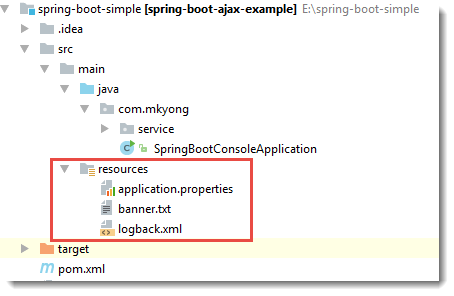
2. Review the content of banner.txt, this ASCII Art is created by this “ASCII Art Java example“, and the ANSI colors are added manually.
src/main/resources/banner.txt
${Ansi.RED}                  $$$        $$$$$      $$$$         $$$$     $$$$$
${Ansi.GREEN}                  $$$       $$$$$$$     $$$$         $$$$    $$$$$$$
${Ansi.BLUE}                  $$$       $$$$$$$     $$$$$       $$$$$    $$$$$$$
${Ansi.RED}                  $$$       $$$$$$$      $$$$       $$$$     $$$$$$$
${Ansi.GREEN}                  $$$      $$$$ $$$$     $$$$$     $$$$$    $$$$ $$$$
${Ansi.BLUE}                  $$$      $$$$ $$$$      $$$$     $$$$     $$$$ $$$$
${Ansi.RED}                  $$$     $$$$$ $$$$$     $$$$     $$$$    $$$$$ $$$$$
${Ansi.GREEN}                  $$$     $$$$   $$$$     $$$$$   $$$$$    $$$$   $$$$
${Ansi.BLUE}                  $$$     $$$$   $$$$      $$$$   $$$$     $$$$   $$$$
${Ansi.RED}                  $$$    $$$$$   $$$$$     $$$$$ $$$$$    $$$$$   $$$$$
${Ansi.GREEN}                  $$$    $$$$$$$$$$$$$      $$$$ $$$$     $$$$$$$$$$$$$
${Ansi.BLUE}          $$$$   $$$$    $$$$$$$$$$$$$      $$$$ $$$$     $$$$$$$$$$$$$
${Ansi.RED}          $$$$   $$$$   $$$$$$$$$$$$$$$      $$$$$$$     $$$$$$$$$$$$$$$
${Ansi.GREEN}          $$$$$ $$$$$   $$$$       $$$$      $$$$$$$     $$$$       $$$$
${Ansi.BLUE}          $$$$$$$$$$$  $$$$$       $$$$$     $$$$$$$    $$$$$       $$$$$
${Ansi.RED}           $$$$$$$$$   $$$$         $$$$      $$$$$     $$$$         $$$$
${Ansi.GREEN}            $$$$$$$    $$$$         $$$$      $$$$$     $$$$         $$$$

${Ansi.RED} :: Spring Boot${spring-boot.formatted-version} :: ${Ansi.DEFAULT}
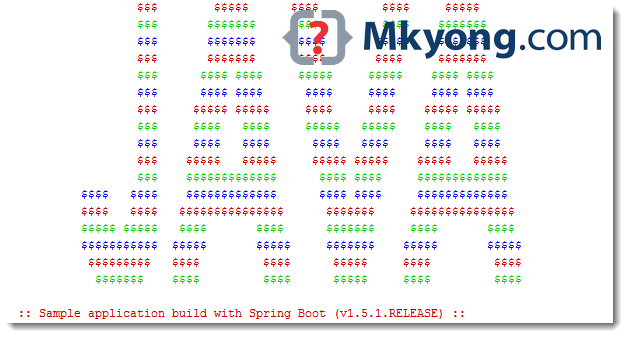
3. Start Spring Boot, the following output will be displayed :

Thanks dude
Someone put a “mkyong” logo on the ascii java text, did that require artistic protection? 😀
I tried but , ${Ansi.*ANY COLOR*} not working, there is only white texts shown on banner. Is there any dependency we need to add for ANSI ?
Try ${AnsiColor.*ANY COLOR*}
Thanks!