This article will show you how to use jQuery.ajax to send a HTML form request to a Spring REST API and return a JSON response.
Tools used :
- Spring Boot 1.5.1.RELEASE
- Spring 4.3.6.RELEASE
- Maven 3
- jQuery
- Bootstrap 3
Note
You may interest at this classic Spring MVC Ajax example
You may interest at this classic Spring MVC Ajax example
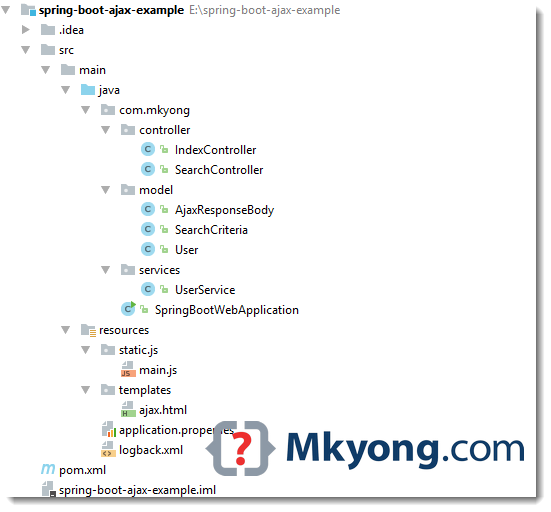
1. Project Structure
A standard Maven project structure.
2. Project Dependency
A normal Spring Boot dependency and some webjars resources.
pom.xml
<project xmlns="http://maven.apache.org/POM/4.0.0"
         xmlns:xsi="http://www.w3.org/2001/XMLSchema-instance"
         xsi:schemaLocation="http://maven.apache.org/POM/4.0.0
	http://maven.apache.org/maven-v4_0_0.xsd">
    <modelVersion>4.0.0</modelVersion>

    <groupId>com.mkyong</groupId>
    <artifactId>spring-boot-ajax-example</artifactId>
    <packaging>jar</packaging>
    <version>1.0</version>

    <parent>
        <groupId>org.springframework.boot</groupId>
        <artifactId>spring-boot-starter-parent</artifactId>
        <version>1.5.1.RELEASE</version>
    </parent>

    <properties>
        <java.version>1.8</java.version>
    </properties>

    <dependencies>

        <dependency>
            <groupId>org.springframework.boot</groupId>
            <artifactId>spring-boot-starter-thymeleaf</artifactId>
        </dependency>

        <dependency>
            <groupId>org.springframework.boot</groupId>
            <artifactId>spring-boot-devtools</artifactId>
            <optional>true</optional>
        </dependency>

        <dependency>
            <groupId>org.webjars</groupId>
            <artifactId>jquery</artifactId>
            <version>2.2.4</version>
        </dependency>

        <dependency>
            <groupId>org.webjars</groupId>
            <artifactId>bootstrap</artifactId>
            <version>3.3.7</version>
        </dependency>

    </dependencies>

    <build>
        <plugins>
            <!-- Package as an executable jar/war -->
            <plugin>
                <groupId>org.springframework.boot</groupId>
                <artifactId>spring-boot-maven-plugin</artifactId>
            </plugin>
        </plugins>
    </build>

</project>
3. Spring REST API
3.1 A REST controller, accept a SearchCriteria and return a ResponseEntity
SearchController.java
package com.mkyong.controller;

import com.mkyong.model.AjaxResponseBody;
import com.mkyong.model.SearchCriteria;
import com.mkyong.model.User;
import com.mkyong.services.UserService;
import org.springframework.beans.factory.annotation.Autowired;
import org.springframework.http.ResponseEntity;
import org.springframework.validation.Errors;
import org.springframework.web.bind.annotation.PostMapping;
import org.springframework.web.bind.annotation.RequestBody;
import org.springframework.web.bind.annotation.RestController;

import javax.validation.Valid;
import java.util.List;
import java.util.stream.Collectors;

@RestController
public class SearchController {

    UserService userService;

    @Autowired
    public void setUserService(UserService userService) {
        this.userService = userService;
    }

    @PostMapping("/api/search")
    public ResponseEntity<?> getSearchResultViaAjax(
            @Valid @RequestBody SearchCriteria search, Errors errors) {

        AjaxResponseBody result = new AjaxResponseBody();

        //If error, just return a 400 bad request, along with the error message
        if (errors.hasErrors()) {

            result.setMsg(errors.getAllErrors()
                        .stream().map(x -> x.getDefaultMessage())
                        .collect(Collectors.joining(",")));

            return ResponseEntity.badRequest().body(result);

        }

        List<User> users = userService.findByUserNameOrEmail(search.getUsername());
        if (users.isEmpty()) {
            result.setMsg("no user found!");
        } else {
            result.setMsg("success");
        }
        result.setResult(users);

        return ResponseEntity.ok(result);

    }

}
3.2 Some POJO.
AjaxResponseBody.java
package com.mkyong.model;

import java.util.List;

public class AjaxResponseBody {

    String msg;
    List<User> result;

    //getters and setters

}
User.java
package com.mkyong.model;

public class User {

    String username;
    String password;
    String email;

    public User(String username, String password, String email) {
        this.username = username;
        this.password = password;
        this.email = email;
    }

    //getters and setters
}
3.3 Validation.
SearchCriteria.java
package com.mkyong.model;

import org.hibernate.validator.constraints.NotBlank;

public class SearchCriteria {

    @NotBlank(message = "username can't empty!")
    String username;

    public String getUsername() {
        return username;
    }

    public void setUsername(String username) {
        this.username = username;
    }
}
3.4 A service to init some users for searching.
UserService.java
package com.mkyong.services;

import com.mkyong.model.User;
import org.springframework.stereotype.Service;

import javax.annotation.PostConstruct;
import java.util.ArrayList;
import java.util.List;
import java.util.stream.Collectors;

@Service
public class UserService {

    private List<User> users;

    // Love Java 8
    public List<User> findByUserNameOrEmail(String username) {

        List<User> result = users.stream()
            .filter(x -> x.getUsername().equalsIgnoreCase(username))
            .collect(Collectors.toList());

        return result;

    }

    // Init some users for testing
    @PostConstruct
    private void iniDataForTesting() {

        users = new ArrayList<User>();

        User user1 = new User("mkyong", "password111", "[email protected]");
        User user2 = new User("yflow", "password222", "[email protected]");
        User user3 = new User("laplap", "password333", "[email protected]");

        users.add(user1);
        users.add(user2);
        users.add(user3);

    }

}
3.5 Spring Boot Starter.
UserService.java
package com.mkyong;

import org.springframework.boot.SpringApplication;
import org.springframework.boot.autoconfigure.SpringBootApplication;

@SpringBootApplication
public class SpringBootWebApplication {

    public static void main(String[] args) throws Exception {
        SpringApplication.run(SpringBootWebApplication.class, args);
    }

}
4. HTML form + jQuery Ajax
4.1 A simple HTML form, decorated with bootstrap.
ajax.html
<!DOCTYPE html>
<html xmlns:th="http://www.thymeleaf.org">

<head>
    <title>Spring Boot ajax example</title>
    <meta http-equiv="Content-Type" content="text/html; charset=UTF-8"/>

    <link rel="stylesheet" type="text/css"
          href="webjars/bootstrap/3.3.7/css/bootstrap.min.css"/>
</head>
<body>

<nav class="navbar navbar-inverse">
    <div class="container">
        <div class="navbar-header">
            <a class="navbar-brand" href="#">Mkyong.com</a>
        </div>
    </div>
</nav>

<div class="container" style="min-height: 500px">

    <div class="starter-template">
        <h1>Spring Boot AJAX Example</h1>

        <div id="feedback"></div>

        <form class="form-horizontal" id="search-form">
            <div class="form-group form-group-lg">
                <label class="col-sm-2 control-label">Username</label>
                <div class="col-sm-10">
                    <input type="text" class="form-control" id="username"/>
                </div>
            </div>

            <div class="form-group">
                <div class="col-sm-offset-2 col-sm-10">
                    <button type="submit" id="bth-search"
                            class="btn btn-primary btn-lg">Search
                    </button>
                </div>
            </div>
        </form>

    </div>

</div>

<div class="container">
    <footer>
        <p>
            © <a href="https://mkyong.com">Mkyong.com</a> 2017
        </p>
    </footer>
</div>

<script type="text/javascript"
        src="webjars/jquery/2.2.4/jquery.min.js"></script>

<script type="text/javascript" src="js/main.js"></script>

</body>
</html>
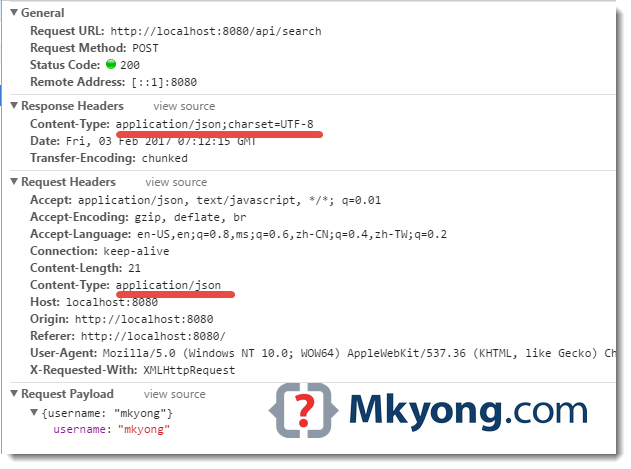
4.2 Get HTML form, convert the search criteria into JSON format via JSON.stringify, and send POST request via jQuery.ajax
main.js
$(document).ready(function () {
$("#search-form").submit(function (event) {
//stop submit the form, we will post it manually.
event.preventDefault();
fire_ajax_submit();
});
});
function fire_ajax_submit() {
var search = {}
search["username"] = $("#username").val();
$("#btn-search").prop("disabled", true);
$.ajax({
type: "POST",
contentType: "application/json",
url: "/api/search",
data: JSON.stringify(search),
dataType: 'json',
cache: false,
timeout: 600000,
success: function (data) {
var json = "<h4>Ajax Response</h4><pre>"
+ JSON.stringify(data, null, 4) + "</pre>";
$('#feedback').html(json);
console.log("SUCCESS : ", data);
$("#btn-search").prop("disabled", false);
},
error: function (e) {
var json = "<h4>Ajax Response</h4><pre>"
+ e.responseText + "</pre>";
$('#feedback').html(json);
console.log("ERROR : ", e);
$("#btn-search").prop("disabled", false);
}
});
}
Done.
5. DEMO
5.1 Start Spring Boot
Terminal
$ mvn spring-boot:run

  .   ____          _            __ _ _
 /\\ / ___'_ __ _ _(_)_ __  __ _ \ \ \ \
( ( )\___ | '_ | '_| | '_ \/ _` | \ \ \ \
 \\/  ___)| |_)| | | | | || (_| |  ) ) ) )
  '  |____| .__|_| |_|_| |_\__, | / / / /
 =========|_|==============|___/=/_/_/_/
 :: Spring Boot ::        (v1.5.1.RELEASE)

2017-02-03 14:56:36 DEBUG com.mkyong.SpringBootWebApplication - Running with Spring Boot v1.5.1.RELEASE, Spring v4.3.6.RELEASE
2017-02-03 14:56:36 INFO  com.mkyong.SpringBootWebApplication - No active profile set, falling back to default profiles: default
2017-02-03 14:56:39 INFO  com.mkyong.SpringBootWebApplication - Started SpringBootWebApplication in 2.828 seconds (JVM running for 3.295)
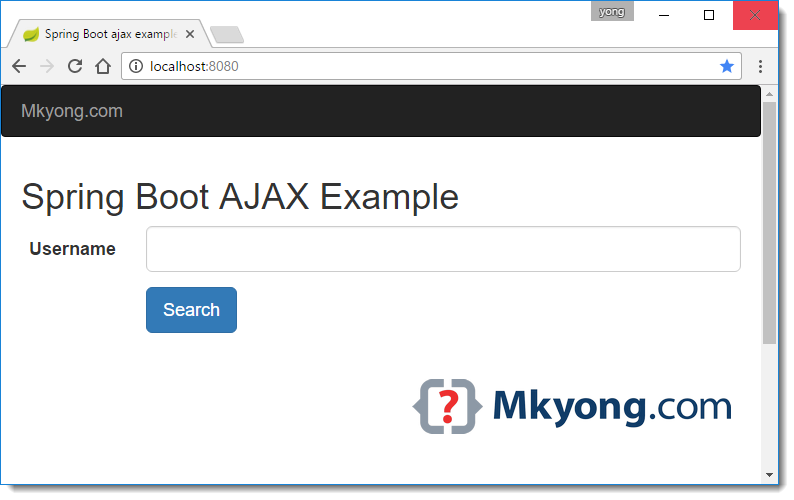
5.2 Access http://localhost:8080/
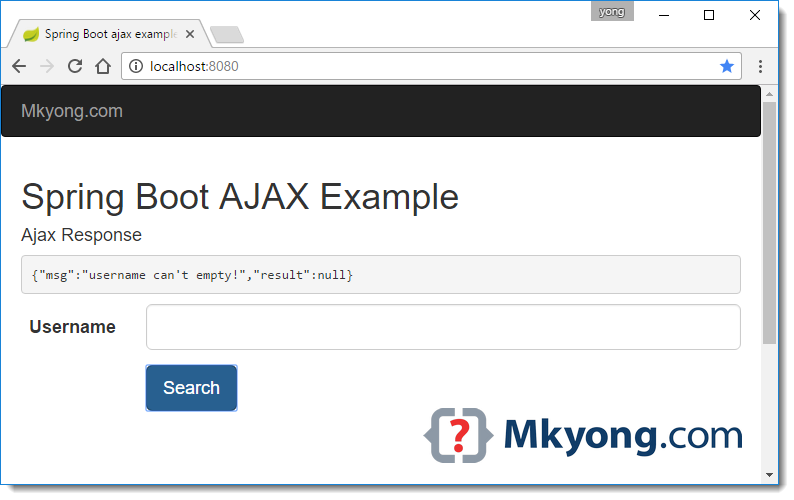
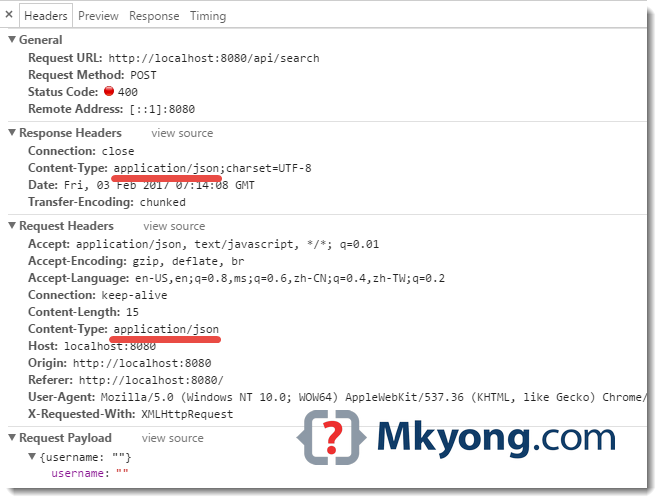
5.3 If username is empty!
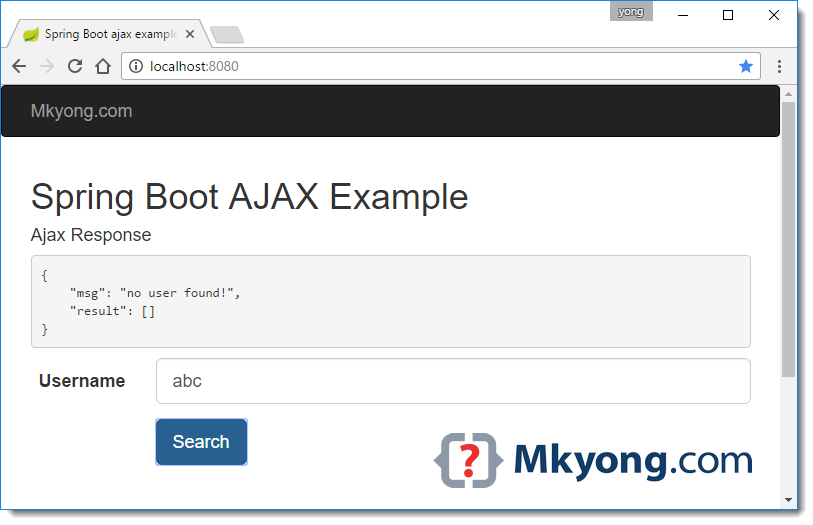
5.4 If username is not found!
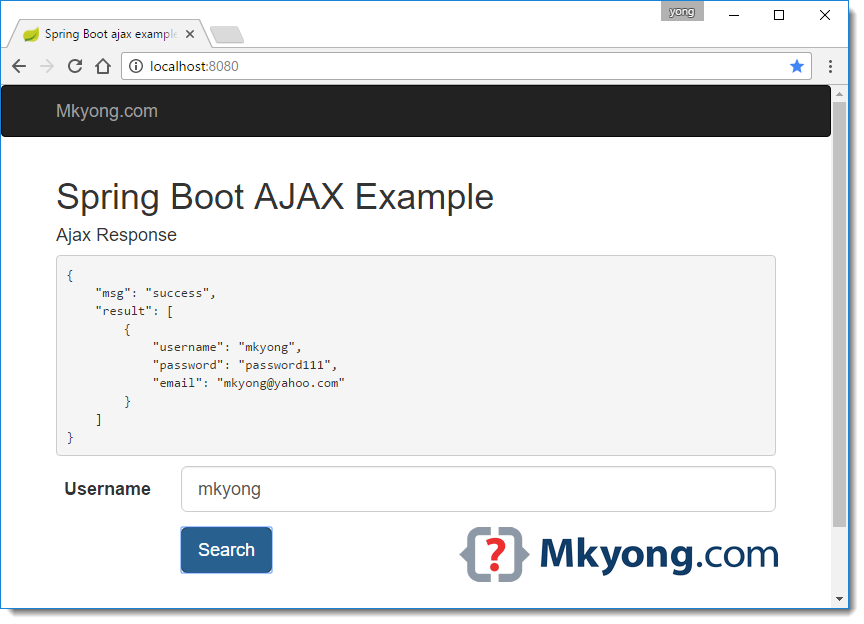
5.5 If username is found!
6. Download Source Code
Download – spring-boot-ajax-example.zip (10 KB)

Wrong path:
<script type=“text/javascript” src=“js/main.js”></script>
Thank you for your precious tutorials, I got much knowledge from such.
It will be good to add loader until response doesn’t appear
Example: $.ajax({ type: "POST", contentType: "application/json", url: "make-prediction", data: JSON.stringify(search), dataType: 'json', cache: false, timeout: 600000, beforeSend: function() { $("#loading").show(); }, success: function (data) { var json = "<h4>Ajax Response</h4><pre>" + JSON.stringify(data, null, 4) + "</pre>"; $('#feedback').html(json); console.log("SUCCESS : ", data); $("#loading").hide(); },how can i do that after I have logged in using spring security?
very good thanks
Thank you! I was able to get this up and running in IntelliJ with no errors in less than 5 minutes!!
Its really goos tutorial, but i need to consume a login api ! any idea ?
You should update some tags. According to the tags above the classes, the public class SpringBootWebApplication is inside UserService.java
Great article! Just a question regarding the Service layer. Isn’t Service a singleton? Will creating a class variable in the service layer cause thread-safety issues? And how do we avoid that?
Best,
thanks,
It does not start
Exception in thread “restartedMain” java.lang.reflect.InvocationTargetException
this is the error
what should I do
thanks!
this help me out
Thank you sincerely. Very clear
Thanks. Really helpful.
PD: I messed aroung a little until I found out that the project had to be imported as a Maven Project.
The solution does not work.
It cannot find GET http://localhost:8080/scout24/display/webjars/jquery/2.2.4/jquery.min.js net::ERR_ABORTED
home:47 GET http://localhost:8080/scout24/display/js/main.js net::ERR_ABORTED
Double quote missing from src attribute of script element
Great example
this article clear everything.
thanks
Hi all! I’m trying to search some usernames and receiving HTTP 404 Not found main.js . What I can resolve this problem?
How ajax.html is called when we launch the server ?
If you download the source code there is another class called IndexController which does not appear on this page. I believe IndexController redirects the “/” extension to ajax(.html) when the page is loaded. I do not fully understand what is going on either, that is just my understanding after exploring the code.
As i understand , IndexController is the main controller(WebMVC Controller- the other one is rest controller which returns a text,xml or json response) which route all the request with the root url to the .html page with the name of ‘ajax'( the returning string).
Once the server is startup. it looks for IndexController which returns the ajax.html page. Once you enter the value in the text box and submit it main.js /api/search post ajax is called which lookup for SearchController as you will drill down and u will go to SearchController you will find that this is a RestController which has a method getSearchResultViaAjax with two params first one takes the input which is send through main.js and second one Errors Interface from Spring Validation part.
In between very Clear Explanation mkyong Thanks!!!
Why is this project build with Thymeleaf? It is never used.
now?Thymeleaf is very popular?
I know Thymeleaf is popular. However, it is not doing anything in this program, therefore I do not think it should be included as a dependency.
It is used to render ajax.html from index controller.