In this tutorial, we will show you how to configure a Spring Batch job to read data from an XML file (XStream library) into a no SQL database (MongoDB). In additional, create a unit test case to launch and test the batch jobs.
Tools and libraries used
- Maven 3
- Eclipse 4.2
- JDK 1.6
- Spring Core 3.2.2.RELEASE
- Spring Batch 2.2.0.RELEASE
- Spring Batch Test 2.2.0.RELEASE
- Spring OXM 3.2.2.RELEASE
- MongoDB Java Driver 2.11.2
- MongoDB 2.2.3
- jUnit 4.11
- TestNG 6.8.5
P.S This example – XML file (reader) – MongoDB (writer).
1. Simple Java Project
1. Create a quick start Java Project with Maven, converts and import into Eclipse IDE.
$ mvn archetype:generate -DgroupId=com.mkyong -DartifactId=SpringBatchExample2
  -DarchetypeArtifactId=maven-archetype-quickstart -DinteractiveMode=false
$ cd SpringBatchExample/
$ mvn eclipse:eclipse
2. Project Dependencies
Declares all project dependencies in the pom.xml
<project xmlns="http://maven.apache.org/POM/4.0.0"
	xmlns:xsi="http://www.w3.org/2001/XMLSchema-instance"
	xsi:schemaLocation="http://maven.apache.org/POM/4.0.0
	http://maven.apache.org/maven-v4_0_0.xsd">
	<modelVersion>4.0.0</modelVersion>
	<groupId>com.mkyong</groupId>
	<artifactId>SpringBatchExample</artifactId>
	<packaging>jar</packaging>
	<version>1.0-SNAPSHOT</version>
	<name>SpringBatchExample</name>
	<url>http://maven.apache.org</url>

	<properties>
		<jdk.version>1.6</jdk.version>
		<spring.version>3.2.2.RELEASE</spring.version>
		<spring.batch.version>2.2.0.RELEASE</spring.batch.version>
		<spring.data.version>1.2.1.RELEASE</spring.data.version>
		<mongodb.driver.version>2.11.2</mongodb.driver.version>
	</properties>

	<dependencies>

		<!-- Spring Core -->
		<dependency>
			<groupId>org.springframework</groupId>
			<artifactId>spring-core</artifactId>
			<version>${spring.version}</version>
		</dependency>

		<!-- Spring XML to/back object -->
		<dependency>
			<groupId>org.springframework</groupId>
			<artifactId>spring-oxm</artifactId>
			<version>${spring.version}</version>
		</dependency>

		<!-- Spring Batch dependencies -->
		<dependency>
			<groupId>org.springframework.batch</groupId>
			<artifactId>spring-batch-core</artifactId>
			<version>${spring.batch.version}</version>
		</dependency>
		<dependency>
			<groupId>org.springframework.batch</groupId>
			<artifactId>spring-batch-infrastructure</artifactId>
			<version>${spring.batch.version}</version>
		</dependency>

		<!-- Spring Batch unit test -->
		<dependency>
			<groupId>org.springframework.batch</groupId>
			<artifactId>spring-batch-test</artifactId>
			<version>${spring.batch.version}</version>
		</dependency>

		<!-- MongoDB database driver -->
		<dependency>
			<groupId>org.mongodb</groupId>
			<artifactId>mongo-java-driver</artifactId>
			<version>${mongodb.driver.version}</version>
		</dependency>

		<!-- Spring data mongodb -->
		<dependency>
			<groupId>org.springframework.data</groupId>
			<artifactId>spring-data-mongodb</artifactId>
			<version>${spring.data.version}</version>
		</dependency>

		<!-- Junit -->
		<dependency>
			<groupId>junit</groupId>
			<artifactId>junit</artifactId>
			<version>4.11</version>
			<scope>test</scope>
		</dependency>

		<!-- Testng -->
		<dependency>
			<groupId>org.testng</groupId>
			<artifactId>testng</artifactId>
			<version>6.8.5</version>
			<scope>test</scope>
		</dependency>

	</dependencies>
	<build>
	    <finalName>spring-batch</finalName>
	    <plugins>
		<plugin>
			<groupId>org.apache.maven.plugins</groupId>
			<artifactId>maven-eclipse-plugin</artifactId>
			<version>2.9</version>
			<configuration>
				<downloadSources>true</downloadSources>
				<downloadJavadocs>false</downloadJavadocs>
			</configuration>
		</plugin>
		<plugin>
			<groupId>org.apache.maven.plugins</groupId>
			<artifactId>maven-compiler-plugin</artifactId>
			<version>2.3.2</version>
			<configuration>
				<source>${jdk.version}</source>
				<target>${jdk.version}</target>
			</configuration>
		</plugin>
	    </plugins>
	</build>

</project>
3. Project Directory Structure
Review the final project structure, get an overview what will going on next.
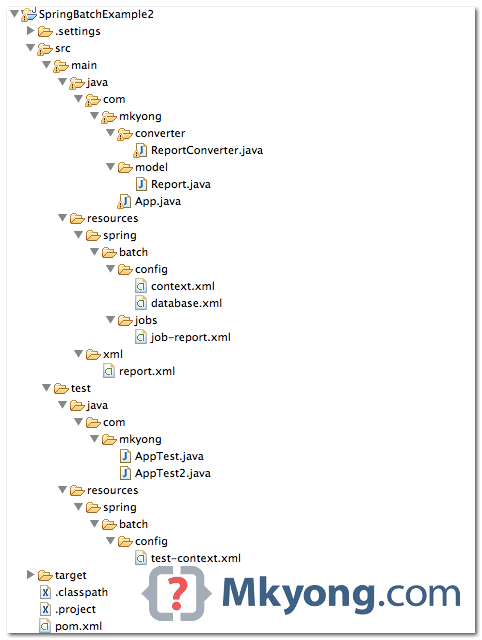
4. XML File
This is the XML file in the resource folder.
<?xml version="1.0" encoding="UTF-8" ?>
<report>
    <record id="1">
        <date>6/1/2013</date>
        <impression>139,237</impression>
        <clicks>40</clicks>
        <earning>220.90</earning>
    </record>
    <record id="2">
        <date>6/2/2013</date>
        <impression>339,100</impression>
        <clicks>60</clicks>
        <earning>320.88</earning>
    </record>
    <record id="3">
        <date>6/3/2013</date>
        <impression>431,436</impression>
        <clicks>76</clicks>
        <earning>270.80</earning>
    </record>
</report>
5. Read XML File
In Spring batch, we can use StaxEventItemReader to read XML files, and XStreamMarshaller to map XML values and attributes to an object.
    <!-- ...... -->
    <bean id="xmlItemReader"
           class="org.springframework.batch.item.xml.StaxEventItemReader">
	<property name="fragmentRootElementName" value="record" />
	<property name="resource" value="classpath:xml/report.xml" />
	<property name="unmarshaller" ref="reportUnmarshaller" />
    </bean>

    <bean id="reportUnmarshaller"
           class="org.springframework.oxm.xstream.XStreamMarshaller">

	<property name="aliases">
	    <util:map id="aliases">
		<entry key="record" value="com.mkyong.model.Report" />
	    </util:map>
	</property>
	<property name="converters">
	    <array>
		<ref bean="reportConverter" />
	    </array>
	</property>

    </bean>

    <bean id="reportConverter" class="com.mkyong.converter.ReportConverter" />
package com.mkyong.model;

import java.math.BigDecimal;
import java.text.SimpleDateFormat;
import java.util.Date;

public class Report {

	private int id;
	private Date date;
	private long impression;
	private int clicks;
	private BigDecimal earning;

	//getter and setter methods

}
To map XML value to “complex” data type like Date and BigDecimal, you need to attach a custom converter to convert and map the value manually.
package com.mkyong.converter;

import java.math.BigDecimal;
import java.text.NumberFormat;
import java.text.ParseException;
import java.text.SimpleDateFormat;
import java.util.Date;
import java.util.Locale;

import com.mkyong.model.Report;
import com.thoughtworks.xstream.converters.Converter;
import com.thoughtworks.xstream.converters.MarshallingContext;
import com.thoughtworks.xstream.converters.UnmarshallingContext;
import com.thoughtworks.xstream.io.HierarchicalStreamReader;
import com.thoughtworks.xstream.io.HierarchicalStreamWriter;

public class ReportConverter implements Converter {

	@Override
	public boolean canConvert(Class type) {
		//we only need "Report" object
		return type.equals(Report.class);
	}

	@Override
	public void marshal(Object source,
            HierarchicalStreamWriter writer, MarshallingContext context) {
	    //do nothing
	}

	@Override
	public Object unmarshal(
            HierarchicalStreamReader reader, UnmarshallingContext context) {

		Report obj = new Report();

		//get attribute
		obj.setId(Integer.valueOf(reader.getAttribute("id")));
		reader.moveDown(); //get date

		Date date = null;
		try {
			date = new SimpleDateFormat("M/d/yyyy").parse(reader.getValue());
		} catch (ParseException e) {
			e.printStackTrace();
		}
		obj.setDate(date);
		reader.moveUp();

		reader.moveDown(); //get impression

		String impression = reader.getValue();
		NumberFormat format = NumberFormat.getInstance(Locale.US);
                Number number = 0;
		try {
			number = format.parse(impression);
		} catch (ParseException e) {
			e.printStackTrace();
		}
		obj.setImpression(number.longValue());

		reader.moveUp();

		reader.moveDown(); //get click
		obj.setClicks(Integer.valueOf(reader.getValue()));
		reader.moveUp();

		reader.moveDown(); //get earning
		obj.setEarning(new BigDecimal(reader.getValue()));
                reader.moveUp();

                return obj;

	}
}
6. MongoDB Database
Define a mongodb instance, and also a mongoTemplate.
<beans xmlns="http://www.springframework.org/schema/beans"
	xmlns:mongo="http://www.springframework.org/schema/data/mongo"
	xmlns:xsi="http://www.w3.org/2001/XMLSchema-instance"
	xsi:schemaLocation="http://www.springframework.org/schema/beans
		http://www.springframework.org/schema/beans/spring-beans-3.2.xsd
		http://www.springframework.org/schema/data/mongo
        http://www.springframework.org/schema/data/mongo/spring-mongo-1.0.xsd">

        <!-- connect to mongodb -->
	<mongo:mongo host="127.0.0.1" port="27017" />
	<mongo:db-factory dbname="yourdb" />

	<bean id="mongoTemplate"
                class="org.springframework.data.mongodb.core.MongoTemplate">
		<constructor-arg name="mongoDbFactory" ref="mongoDbFactory" />
	</bean>

</beans>
7. Spring Batch Core Setting
Define jobRepository and jobLauncher.
<beans xmlns="http://www.springframework.org/schema/beans"
	xmlns:xsi="http://www.w3.org/2001/XMLSchema-instance"
	xsi:schemaLocation="
	http://www.springframework.org/schema/beans
	http://www.springframework.org/schema/beans/spring-beans-3.2.xsd">

    <!-- stored job-meta in memory -->
    <bean id="jobRepository"
	class="org.springframework.batch.core.repository.support.MapJobRepositoryFactoryBean">
	<property name="transactionManager" ref="transactionManager" />
    </bean>

    <bean id="transactionManager"
	class="org.springframework.batch.support.transaction.ResourcelessTransactionManager" />


    <bean id="jobLauncher"
	class="org.springframework.batch.core.launch.support.SimpleJobLauncher">
	<property name="jobRepository" ref="jobRepository" />
    </bean>

</beans>
8. Spring Batch Jobs
A Spring batch job, read the report.xml file, map to a Report object, and write it into the MongoDB. Read the comment, it should be self-explanatory.
<beans xmlns="http://www.springframework.org/schema/beans"
	xmlns:batch="http://www.springframework.org/schema/batch"
	xmlns:util="http://www.springframework.org/schema/util"
	xmlns:xsi="http://www.w3.org/2001/XMLSchema-instance"
	xsi:schemaLocation="http://www.springframework.org/schema/batch
		http://www.springframework.org/schema/batch/spring-batch-2.2.xsd
		http://www.springframework.org/schema/beans
		http://www.springframework.org/schema/beans/spring-beans-3.2.xsd
		http://www.springframework.org/schema/util
		http://www.springframework.org/schema/util/spring-util-3.2.xsd">

    <batch:job id="reportJob">
	<batch:step id="step1">
	  <batch:tasklet>
		<batch:chunk reader="xmlItemReader" writer="mongodbItemWriter"
			commit-interval="1">
		</batch:chunk>
	  </batch:tasklet>
	</batch:step>
    </batch:job>

    <!-- Read XML file -->
    <bean id="xmlItemReader"
        class="org.springframework.batch.item.xml.StaxEventItemReader">
	<property name="fragmentRootElementName" value="record" />
	<property name="resource" value="classpath:xml/report.xml" />
	<property name="unmarshaller" ref="reportUnmarshaller" />
    </bean>

    <!-- Maps XML values to Object -->
    <bean id="reportUnmarshaller"
        class="org.springframework.oxm.xstream.XStreamMarshaller">
	<property name="aliases">
	  <util:map id="aliases">
		<entry key="record" value="com.mkyong.model.Report" />
	  </util:map>
	</property>

        <!-- attach a custom converter -->
	<property name="converters">
	  <array>
		<ref bean="reportConverter" />
	  </array>
	</property>

    </bean>

    <bean id="reportConverter" class="com.mkyong.converter.ReportConverter" />

    //write it to MongoDB, 'report' collection (table)
    <bean id="mongodbItemWriter"
        class="org.springframework.batch.item.data.MongoItemWriter">
	<property name="template" ref="mongoTemplate" />
	<property name="collection" value="report" />
    </bean>

</beans>
9. Unit Test
Unit test it with jUnit or TestNG frameworks.First, you must declares the JobLauncherTestUtils manually.
<beans xmlns="http://www.springframework.org/schema/beans"
	xmlns:xsi="http://www.w3.org/2001/XMLSchema-instance"
	xsi:schemaLocation="
	http://www.springframework.org/schema/beans
	http://www.springframework.org/schema/beans/spring-beans-3.2.xsd">

    <!-- this bean should auto load -->
    <bean class="org.springframework.batch.test.JobLauncherTestUtils"/>

</beans>
jUnit example
package com.mkyong;

import static org.junit.Assert.assertEquals;
import org.junit.Test;
import org.junit.runner.RunWith;
import org.springframework.batch.core.BatchStatus;
import org.springframework.batch.core.JobExecution;
import org.springframework.batch.test.JobLauncherTestUtils;
import org.springframework.beans.factory.annotation.Autowired;
import org.springframework.test.context.ContextConfiguration;
import org.springframework.test.context.junit4.SpringJUnit4ClassRunner;

@RunWith(SpringJUnit4ClassRunner.class)
@ContextConfiguration(locations = {
    "classpath:spring/batch/jobs/job-report.xml",
    "classpath:spring/batch/config/context.xml",
    "classpath:spring/batch/config/database.xml",
    "classpath:spring/batch/config/test-context.xml"})
public class AppTest {

    @Autowired
    private JobLauncherTestUtils jobLauncherTestUtils;

    @Test
    public void launchJob() throws Exception {

        //JobExecution jobExecution = jobLauncherTestUtils.launchJob();

        JobExecution jobExecution = jobLauncherTestUtils.launchStep("step1");

        assertEquals(BatchStatus.COMPLETED, jobExecution.getStatus());

    }
}
TestNG example
package com.mkyong;

import org.springframework.batch.core.BatchStatus;
import org.springframework.batch.core.JobExecution;
import org.springframework.batch.test.JobLauncherTestUtils;
import org.springframework.beans.factory.annotation.Autowired;
import org.springframework.test.context.ContextConfiguration;
import org.springframework.test.context.testng.AbstractTestNGSpringContextTests;
import org.testng.Assert;
import org.testng.annotations.Test;

@ContextConfiguration(locations = {
    "classpath:spring/batch/jobs/job-report.xml",
    "classpath:spring/batch/config/context.xml",
    "classpath:spring/batch/config/database.xml",
    "classpath:spring/batch/config/test-context.xml"})
public class AppTest2 extends AbstractTestNGSpringContextTests {

    @Autowired
    private JobLauncherTestUtils jobLauncherTestUtils;

    @Test
    public void launchJob() throws Exception {

        JobExecution jobExecution = jobLauncherTestUtils.launchJob();
        Assert.assertEquals(jobExecution.getStatus(), BatchStatus.COMPLETED);

    }
}
Output. The XML values are inserted into the MongoDB.
mongo
MongoDB shell version: 2.2.3
connecting to: test

> use yourdb
switched to db yourdb
> show collections
report
system.indexes

> db.report.find()
{ "_id" : 1, "_class" : "com.mkyong.model.Report",
"date" : ISODate("2013-05-31T16:00:00Z"), "impression" : NumberLong(139237),
"clicks" : 40, "earning" : "220.90" }

{ "_id" : 2, "_class" : "com.mkyong.model.Report",
"date" : ISODate("2013-06-01T16:00:00Z"), "impression" : NumberLong(339100),
"clicks" : 60, "earning" : "320.88" }

{ "_id" : 3, "_class" : "com.mkyong.model.Report",
"date" : ISODate("2013-06-02T16:00:00Z"), "impression" : NumberLong(431436),
"clicks" : 76, "earning" : "270.80" }
>
10. How about the job-metadata?
Sorry, I have no solution for this yet. As I know, the relational database is needed for job metadata, to ensure the restartability and rollbacks of the jobs. The MongoDB has no “solid” transaction management, by design.
Solution 1 : Create another relational database to store the job-metadata, hmm… It sounds stupid, but works. Do you have any better ideas?
Solution 2 : Wait Spring’s team to come out a solution for this.

Can you tell me how to run this application?
Hello, I am getting the exit status: Unknown error even I have added the following dependencies
1.1.3
1.7.12
org.slf4j
jcl-over-slf4j
${jcl.slf4j.version}
ch.qos.logback
logback-classic
${logback.version}
can anyone please help on this ?
Could you please developed program for the Spring Batch MongoDB to XML or CSV example ?
I am not getting any desired output. Also I don’t see any collections being created under test db. Please guide me ASAP
SLF4J: Failed to load class “org.slf4j.impl.StaticLoggerBinder”.
SLF4J: Defaulting to no-operation (NOP) logger implementation
SLF4J: See http://www.slf4j.org/codes.html#StaticLoggerBinder for further details.
Exit Status : UNKNOWN
Done
Hello user,
This error doesn’t tell anything to track the issue, its better to add some loggers. Please add below in pom.xml and then see what else info you get:
1.1.3
1.7.12
org.slf4j
jcl-over-slf4j
${jcl.slf4j.version}
ch.qos.logback
logback-classic
${logback.version}
Hello, thank you for your tutorial, would you please guide me how to read from multiple XML files from a folder and insert into many tables in MySQL (using hibernate)? This is my current source code ( https://github.com/samuelwilsone/filmdata )
Hi Samuel – Are you able to resolved on your query? I’m also finding the way to load multiple XML files into NoSql. Your earliest response is much appreciated.
Hello, Can we insert into two databases like mysql + MongoDB
hello, thanks for the article. It’s very helpful.
I’ve found a problem with the array tag. I’ve used instead and it works.
Thanks for your article, very interesting!
I have just one question : how can you validate your XML with Spring Batch before the reader ?
Interesting approach. I like it!