The Selenium WebDriver is closed, but the “chromedriver.exe” process is left hanging in the system. See figure :
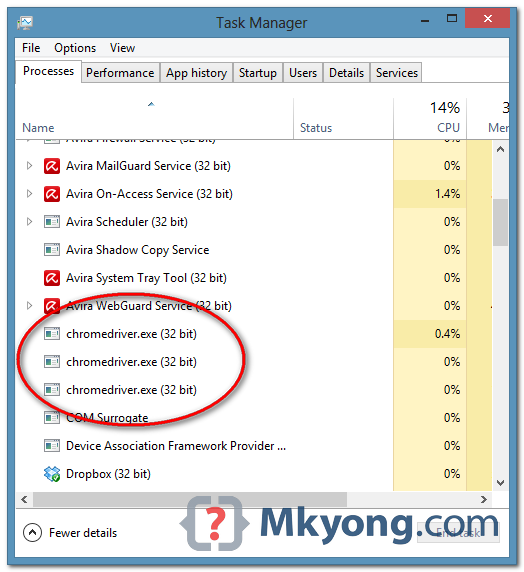
Problem
Here is the code, a simple WebDriver example to load a URL and exists, but the chromedriver.exe never get killed.
LoadWebPageExample.java
package com.mkyong.test;

import org.openqa.selenium.WebDriver;
import org.openqa.selenium.chrome.ChromeDriver;
import org.openqa.selenium.chrome.ChromeOptions;
import org.openqa.selenium.remote.DesiredCapabilities;

public class LoadWebPageExample {
	public static void main(String[] args) {

		System.setProperty("webdriver.chrome.driver", "D:\\chromedriver.exe");

		ChromeOptions options = new ChromeOptions();
		options.addArguments("window-size=800,600");

		DesiredCapabilities capabilities = DesiredCapabilities.chrome();
		capabilities.setCapability(ChromeOptions.CAPABILITY, options);
		WebDriver driver = new ChromeDriver(capabilities);

		driver.get("http://google.com/");

		driver.close();

	}
}
Solution
This is a common mistake, to solve it, uses driver.quit() to end the automated test.
LoadWebPageExample.java
package com.mkyong.test;

import org.openqa.selenium.WebDriver;
import org.openqa.selenium.chrome.ChromeDriver;
import org.openqa.selenium.chrome.ChromeOptions;
import org.openqa.selenium.remote.DesiredCapabilities;

public class LoadWebPageExample {
	public static void main(String[] args) {

		System.setProperty("webdriver.chrome.driver", "D:\\chromedriver.exe");

		ChromeOptions options = new ChromeOptions();
		options.addArguments("window-size=800,600");

		DesiredCapabilities capabilities = DesiredCapabilities.chrome();
		capabilities.setCapability(ChromeOptions.CAPABILITY, options);
		WebDriver driver = new ChromeDriver(capabilities);

		driver.get("http://google.com/");

		//driver.close();
		driver.quit();
	}
}

Is there any powershell to kill all the chromedriver.exe which can be scheduled in the task scheduler???
Additionally if you use the DriverService interface, make sure to hold onto the service object and call stop() on it when you’re done with the driver (including in all exception conditions).
I always close the WebDrivers with driver.quit(), but there are still many ChromeDriver.exe in the process list.
https://code.google.com/p/selenium/issues/detail?id=2236