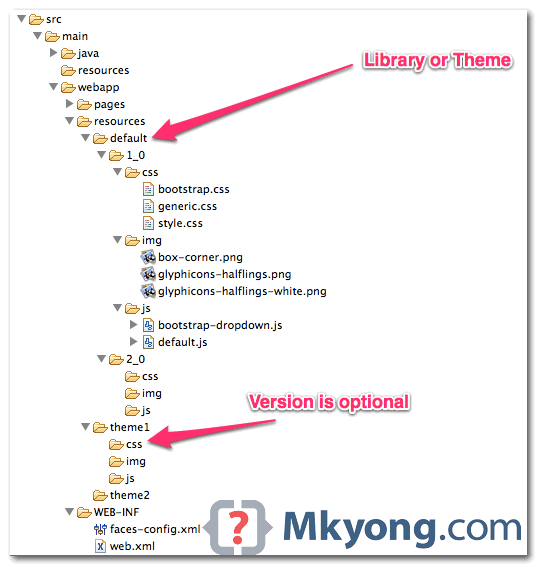
Resources (library) in JSF 2.0

In JSF 2.0, all your web resources files like css, images or JavaScript, should put in “resources” folder, under the root of your web application (same folder level with “WEB-INF“). The sub-folder under “resources” folder is consider as “library” or “project theme“, later you can reference those “resources” with library attribute. This new JSF resources …

Read more

JSF 2 outputFormat example

In JSF web application, “h:outputFormat” tag is similar with “h:outputText” tag, but with extra function to render parameterized message. For example, <h:outputFormat value="param0 : {0}, param1 : {1}" > <f:param value="Number 1" /> <f:param value="Number 2" /> </h:outputFormat> It will output the following result param0 : Number 1, param1 : Number 2 {0} match to …

Read more

JSF 2 outputText example

In JSF 2.0 web application, “h:outputText” tag is the most common used tag to display plain text, and it doesn’t generate any extra HTML elements. See example… 1. Managed Bean A managed bean, provide some text for demonstration. import javax.faces.bean.ManagedBean; import javax.faces.bean.SessionScoped; @ManagedBean(name="user") @SessionScoped public class UserBean{ public String text = "This is Text!"; public …

Read more

How to pass new hidden value to backing bean in JSF

In some cases, you may need to pass a new hidden value to a backing bean. Generally, there are two ways : 1. HTML Tag + getRequestParameterMap() Render hidden field with plain HTML input, hard-coded new hidden value and access in backing bean via getRequestParameterMap() method. JSF… <h:form id="myForm"> <input type="hidden" name="hidden1" value="this is hidden2" …

Read more

JSF 2 hidden value example

In JSF, you can use the <h:inputHidden /> tag to render a HTML hidden value field. For example, JSF tag… <h:inputHidden value="some text" /> Render this HTML code… <input type="hidden" name="random value" value="some text" /> JSF hidden field example A JSF 2 example to render a hidden field via <h:inputHidden /> tag, and access the …

Read more

How to get hidden field value in JavaScript

In JavaScript, you can use following two ways to get hidden field value in a form : document.getElementById(‘hidden field id’).value document.formName.elements[‘hidden field name’].value See an example here… <html> <body> <script type="text/javascript"> function printIt(){ alert(document.getElementById(‘abcId’).value); alert(document.formName.elements[‘abcName’].value); } </script> <h1>Access Hidden value in JavaScript</h1> <form name="formName"> <input type=hidden id="abcId" name="abcName" value="Wall Street! Money Never Sleep"/> <input type=button …

Read more

JSF 2 textarea example

In JSF, you can use the <h:inputTextarea /> tag to render a HTML textarea field. For example, JSF tag… <h:inputTextarea cols="30" rows="10" /> Render this HTML code… <textarea name="random value" cols="30" rows="10"></textarea> JSF textarea example A full JSF 2 example to render a textarea field via <h:inputTextarea /> tag. 1. Managed Bean A managed bean, …

Read more

JSF 2 password example

In JSF, you can use the <h:inputSecret /> tag to render a HTML input of type=”password”, password field. For example, JSF tag… <h:inputSecret /> Render this HTML code… <input type="password" name="j_idt6:j_idt7" /> P.S The name attribute value is randomly generated by JSF. JSF password example A full JSF 2 example to render a password input …

Read more

JSF 2 textbox example

In JSF, you can use the <h:inputText /> tag to render a HTML input of type=”text”, text box. For example, JSF tag… <h:inputText /> Render this HTML code… <input type="text" name="j_idt6:j_idt7" /> P.S The name attribute value is randomly generated by JSF. JSF textbox example A full JSF 2 example to render a textbox input …

Read more

Where is JSF 2 taglib JavaDoc?

Problem Often times, you need to know the detail attribute of a JSF HTML form tag, e.g f:inputText. The JSF 2 tag library JavaDoc is very hard to find, even Google didn’t return any result of it? Solution Actually, JavaServer(TM) Faces, both 1.x or 2.x are available at this JSF official website. Unfortunately, JSF official …

Read more

How to add a global navigation rule in JSF?

Problem A global navigation rule is a rule that applies to all pages. For example, apply a “logout” navigation rule that every pages are allow to access. Is there a way to configure it in JSF? Solution In JSF, wildcard is supported in navigation rule, you can use a “*” to specify a navigation rule …

Read more

JSF : Page Forward vs Page Redirect

By default, JSF will performs a server page forward while navigating to another page. See following example to differentiate between page forward and page redirect. A “start.xhtml” page, with a button navigate to “page1.xhtml” page. 1. Page Forward Here’s how the page forward works : Browser send a “GET” request to URL : http://localhost:8080/JavaServerFaces/faces/start.xhtml. JSF …

Read more

JSF “from-action” navigation rule example

In JSF navigation rule, you may encounter a situation where two separate actions return a same “outcome” in a single page. In this case, you can use “from-action” element to differentiate the two navigation cases. See following example : 1. Managed Bean A managed bean, with two actions which return a same outcome – “success”. …

Read more

Conditional Navigation Rule in JSF 2.0

JSF 2 comes with a very flexible conditional navigation rule to solve the complex page navigation flow, see the following conditional navigation rule example : 1. JSF Page A simple JSF page, with a button to move from this page to the payment page. start.xhtml <?xml version="1.0" encoding="UTF-8"?> <!DOCTYPE html PUBLIC "-//W3C//DTD XHTML 1.0 Transitional//EN" …

Read more

Implicit Navigation in JSF 2.0

In JSF 1.2, all the page navigation are required to declare in the “faces-config.xml” file like this : … <navigation-rule> <from-view-id>page1.xhtml</from-view-id> <navigation-case> <from-outcome>page2</from-outcome> <to-view-id>/page2.xhtml</to-view-id> </navigation-case> </navigation-rule> … In JSF 2, it treats “outcome” as the page name, for example, navigate to “page1.xhtml”, you have to put the “outcome” as “page1”. This mechanism is called “Implicit …

Read more

Injecting Managed beans in JSF 2.0

In JSF 2.0, a new @ManagedProperty annotation is used to dependency injection (DI) a managed bean into the property of another managed bean. Let see a @ManagedProperty example : MessageBean.java – A managed bean named “message“. import java.io.Serializable; import javax.faces.bean.ManagedBean; import javax.faces.bean.SessionScoped; @ManagedBean(name="message") @SessionScoped public class MessageBean implements Serializable { //business logic and whatever methods… …

Read more

JSF 2.0 : managed bean x does not exist, Check that appropriate getter and/or setter methods exist

Problem In JSF 2.0, while using the @ManagedProperty annotation to DI the bean into the field of another bean, HelloBean.java @ManagedBean @SessionScoped public class HelloBean implements Serializable { @ManagedProperty(value="#{message}") private MessageBean messageBean; MessageBean.java @ManagedBean(name="message") @SessionScoped public class MessageBean implements Serializable { It hits the following error message. An Error Occurred: Unable to create managed bean …

Read more

How to split faces-config.xml into multiple files?

Problem In JSF, the faces-config.xml file can used to includes manages beans, navigation rules or any JSF faces configurations. But, putting all the configurations into a single faces-config.xml file will cause this file become huge very fast, and causing a serious maintainability issue. Solution Actually, you can split the faces-config.xml into multiple smaller files, each …

Read more

Configure Managed Beans in JSF 2.0

In JSF 2.0, Java bean that can be accessed from JSF page is called Managed Bean. The managed bean can be a normal Java bean, which contains the getter and setter methods, business logic or even a backing bean (a bean contains all the HTML form value). There are two ways to configure the managed …

Read more

JSF 2.0 and Resource Bundles example

In this tutorial, we demonstrate the use of resource bundle to display messages in JSF 2.0. For maintainability concern, it’s always recommended to put all the messages in properties file, instead of hard-code the message in page directly. 1. Properties File Create a properties file, contains message for the page, and put it into the …

Read more

JSF 2.0 : <f:ajax> contains an unknown id

Problem A JSF’s button with Ajax support… <h:outputText id="output" value="#{helloBean.sayWelcome}" /> <h:form> <h:inputText id="name" value="#{helloBean.name}"></h:inputText> <h:commandButton value="Welcome Me"> <f:ajax execute="name" render="output" /> </h:commandButton> </h:form> When this page is displayed, it prompts the following error message javax.faces.FacesException: <f:ajax> contains an unknown id ‘output’ – cannot locate it in the context of the component j_idt8 Obviously, the …

Read more

JSF 2.0 + Ajax hello world example

In JSF 2.0, coding Ajax is just like coding a normal HTML tag, it’s extremely easy. In this tutorial, you will restructure the last JSF 2.0 hello world example, so that, when the button is clicked, it will make an Ajax request instead of submitting the whole form. 1. JSF 2.0 Page A JSF 2.0 …

Read more

How to make Eclipse IDE supports JSF 2.0

In Eclipse Ganymede (v3.4) or Galileo (v3.5), it supports until JSF 1.2 only. For JSF 2.0, upgrade your Eclipse to version Helios (v3.6) onward, it has full support of Java EE 6 support, including JSF 2.0. Here’s a quick guide to show you how to enable JSF 2.0 features like code assist and visual JSF …

Read more

JSF 2.0 hello world example

In this tutorial, we will show you how to develop a JavaServer Faces (JSF) 2.0 hello world example, shows list of JSF 2.0 dependencies, basic annotations and configurations. Project Environment This JSF 2.0 example is built with following tools and technologies JSF 2.1.7 Maven 3 Eclipse 3.6 JDK 1.6 Tomcat 6.0.26 First, review the final …

Read more

Eclipse : Web Deployment Assembly & Maven dependencies issue

Problem In Eclipse 3.5 or early version, in order to deployed the Maven dependencies to the correct “/WEB-INF/lib” folder, you have to configure the dependencies via “Java EE Module Dependencies”, and the updated “.classpath” file will look like following : File : “.classpath”, by Java EE Module Dependencies… … <classpathentry kind="var" path="M2_REPO/javax/servlet/jsp/jsp-api/2.1/jsp-api-2.1.jar" sourcepath="M2_REPO/javax/servlet/jsp/jsp-api/2.1/jsp-api-2.1-sources.jar"> <attributes> <attribute …

Read more

Eclipse : Java EE Module Dependencies is replaced by Web Deployment Assembly

In Eclipse Galileo (3.5) or Ganymede (3.4) or older version, you can control the project packaging structure via the “Java EE Module Dependencies” option, so that the project dependencies are deployed to the correct folder. However, in the latest Eclipse Helios (3.6), the “Java EE Module Dependencies” is replaced by “Web Deployment Assembly“, which provide …

Read more

How to add M2_REPO classpath variable to Eclipse IDE

Normally, when you use Maven command mvn eclipse:eclipse to convert existing Java project to support Eclipse project, Maven will create the entire dependency classpath by using the M2_REPO variable, which is not defined in Eclipse by default. Nothing special, M2_REPO is just a normal “classpath variable” in Eclipse to find your local Maven repository. Here, …

Read more

Eclipse IDE : Unsupported content type in editor

Problem Using Eclipse Ganymede (3.4) , developing JSF 2.0 web application. However when open the xhtml file with the Eclipse web page editor , it prompts a dialog box and saying … Unsupported content type in editor To associate file extension with a supported content type, please see Content Types Preference Page. P.S The .xhtml …

Read more

JSF 2.0 + Tomcat : It appears the JSP version of the container is older than 2.1…

Problem While deploying JSF 2.0 web application to Tomcat 6.0.26, hits the “JSP version of the container is older than 2.1” exception and failed to start the Tomcat server. But the JSP api v2.1 is included in the project class path, why the Tomcat is still saying that JSP version is older than 2.1? <dependency> …

Read more

java.lang.ClassNotFoundException : javax.servlet.jsp.jstl.core.Config

Problem While deploying JSF 2.0 web application to Tomcat 6.0.26, hits following jstl class not found error. java.lang.NoClassDefFoundError: javax/servlet/jsp/jstl/core/Config … Caused by: java.lang.ClassNotFoundException: javax.servlet.jsp.jstl.core.Config … 18 more Solution By default, Tomcat container doesn’t contain any jstl library. To fix it, declares jstl.jar in your Maven pom.xml file. <dependency> <groupId>javax.servlet</groupId> <artifactId>jstl</artifactId> <version>1.2</version> </dependency> Note Please refer …

Read more

java.lang.IllegalArgumentException: javax.faces.context.ExceptionHandlerFactory

Problem In Eclipse IDE, while deploying a JSF 2.0 web application to Tomcat 6.0.26, hits the following exception and failed to start the Tomcat server. P.S Both jsf-api-2.1.0-b03.jar and jsf-impl-2.1.0-b03.jar libraries are included in the project classpath. INFO: Unsanitized stacktrace from failed start… java.lang.IllegalArgumentException: javax.faces.context.ExceptionHandlerFactory at javax.faces.FactoryFinder.validateFactoryName(FactoryFinder.java:630) at javax.faces.FactoryFinder.setFactory(FactoryFinder.java:287) … SEVERE: Critical error during deployment: …

Read more

Top 8 Java People You Should Know

Here are the top 8 Java people, they’re created frameworks, products, tools or books that contributed to the Java community, and changed the way of coding Java. P.S The order is based on my personal priority. 8. Tomcat & Ant Founder James Duncan Davidson, while he was software engineer at Sun Microsystems (1997–2001), created Tomcat …

Read more

How to convert InputStream to String in Java

This article shows a few ways to convert an java.io.InputStream to a String. Table of contents 1. ByteArrayOutputStream 2. InputStream#readAllBytes (Java 9) 3. InputStreamReader + StringBuilder 4. InputStreamReader + BufferedReader (modified line breaks) 5. Java 8 BufferedReader#lines (modified line breaks) 6. Apache Commons IO 7. Download Source Code 8. References What are modified line breaks? …

Read more

How to convert String to InputStream in Java

In Java, we can use ByteArrayInputStream to convert a String to an InputStream. String str = "mkyong.com"; InputStream is = new ByteArrayInputStream(str.getBytes(StandardCharsets.UTF_8)); Table of contents 1. ByteArrayInputStream 2. Apache Commons IO – IOUtils 3. Download Source Code 4. References 1. ByteArrayInputStream This example uses ByteArrayInputStream to convert a String to an InputStream and saves it …

Read more

How to get free disk space in Java

In Java old days, it lacks of method to determine the free disk space on a partition. But this is changed since JDK 1.6 released, a few new methods – getTotalSpace(), getUsableSpace() and getFreeSpace(), are bundled with java.io.File to retrieve the partition or disk space detail. Example package com.mkyong; import java.io.File; public class DiskSpaceDetail { …

Read more