To install Apache Maven on Windows, you just need to download the Maven’s zip file, unzip it to a folder, and configure the Windows environment variables.
Tested with :
- JDK 10
- Maven 3.6
- Windows 10
- Maven 3.3+ requires JDK 1.7+
- Maven 3.2 requires JDK 1.6+
- Maven 3.0/3.1 requires JDK 1.5+
1. JDK and JAVA_HOME
Make sure JDK is installed, and JAVA_HOME environment variable is configured.
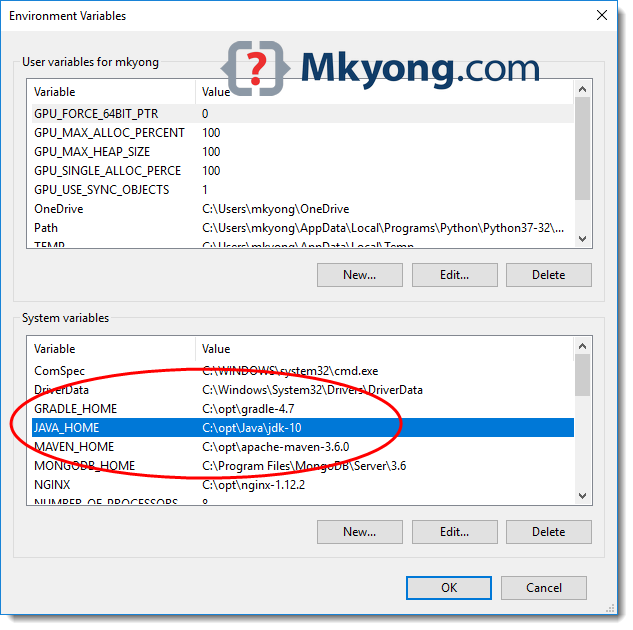
Please read this how to add JAVA_HOME on Windows 10
2. Download Apache Maven
2.1 Visit Maven official website, download the Maven zip file, for example : apache-maven-3.6.0-bin.zip.
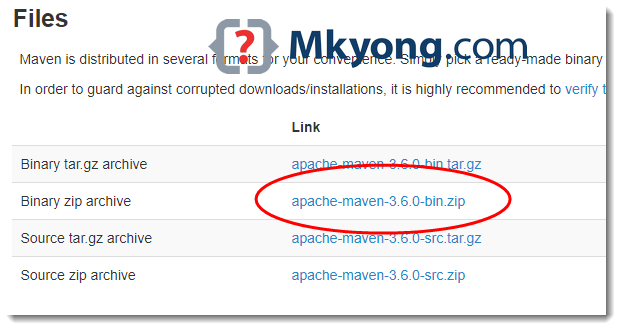
2.2 Unzip it to a folder. In this article, we are using c:\opt\apache-maven-3.6.0
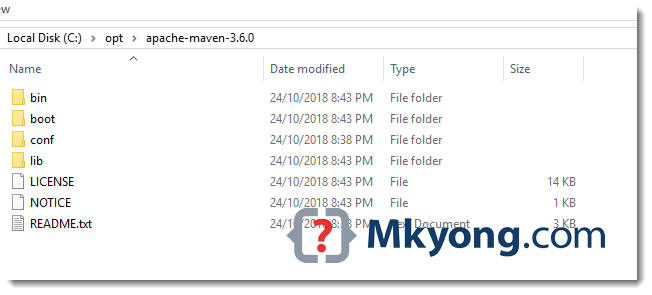
That’s all, just download and unzip, installation is NOT required.
3. Add MAVEN_HOME system variable
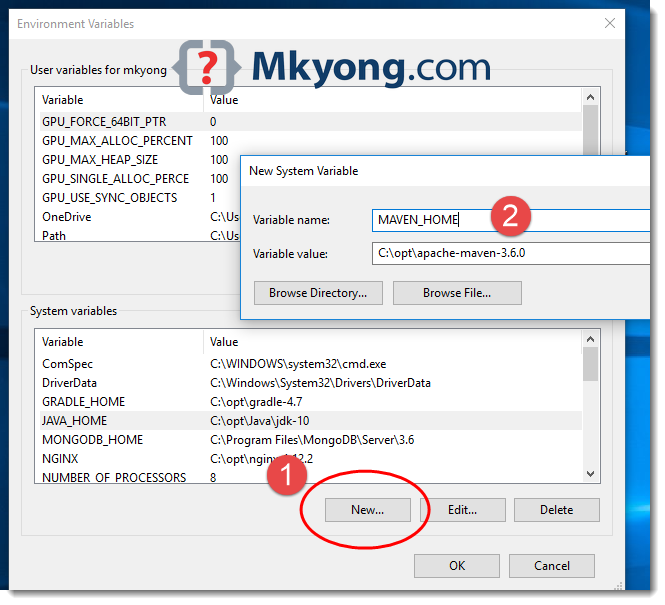
Add a MAVEN_HOME system variables, and point it to the Maven folder.
3.1 Press Windows key, type adva and clicks on the View advanced system settings
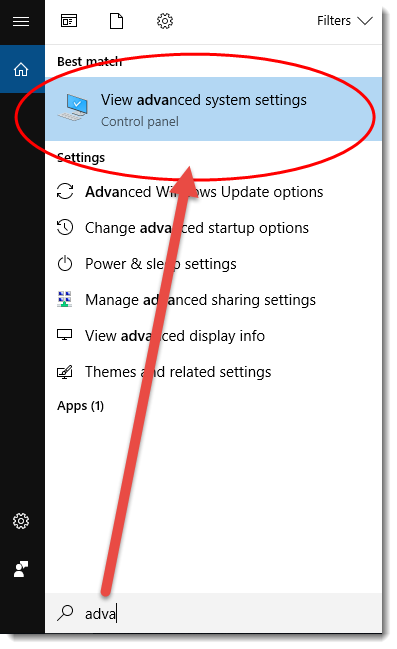
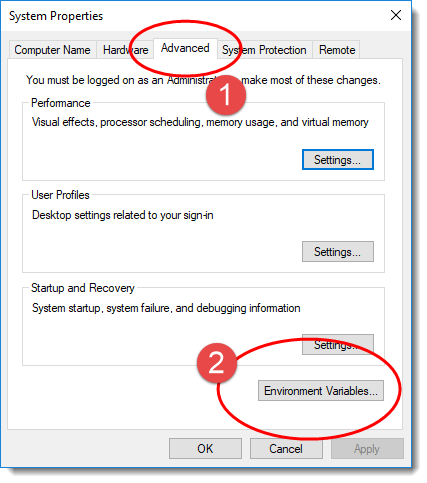
3.2 In System Properties dialog, select Advanced tab and clicks on the Environment Variables... button.
3.3 In “Environment variables” dialog, System variables, Clicks on the New... button and add a MAVEN_HOME variable and point it to c:\opt\apache-maven-3.6.0
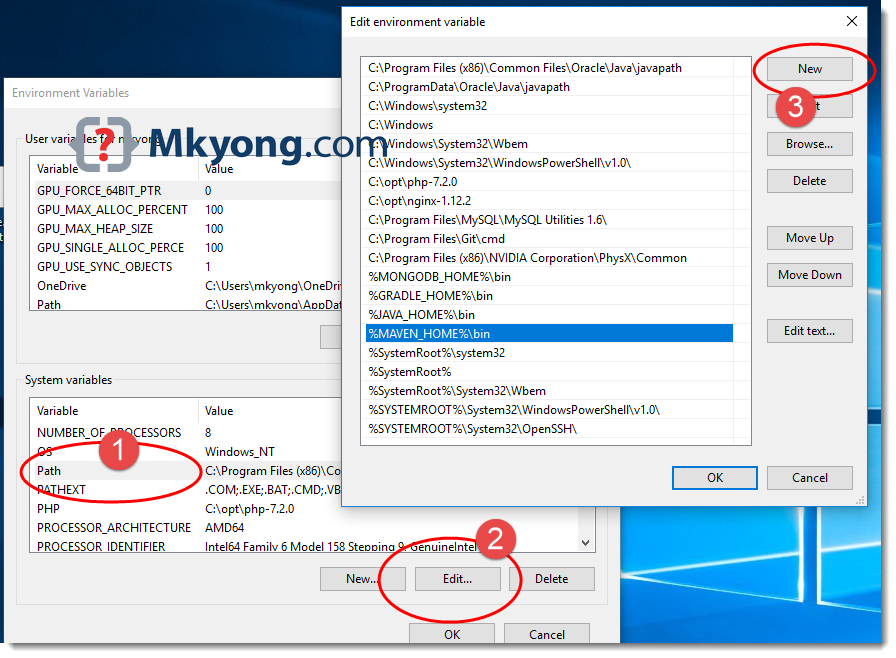
4. Add %MAVEN_HOME%\bin To PATH
In system variables, find PATH, clicks on the Edit... button. In “Edit environment variable” dialog, clicks on the New button and add this %MAVEN_HOME%\bin
5. Verification
Done, start a new command prompt, type mvn –version :
C:\Users\mkyong>mvn -version
Apache Maven 3.6.0 (97c98ec64a1fdfee7767ce5ffb20918da4f719f3; 2018-10-25T02:41:47+08:00)
Maven home: C:\opt\apache-maven-3.6.0\bin\..
Java version: 10.0.1, vendor: Oracle Corporation, runtime: C:\opt\Java\jdk-10
Default locale: en_MY, platform encoding: Cp1252
OS name: "windows 10", version: "10.0", arch: "amd64", family: "windows"

C:\Users\mkyong>echo %MAVEN_HOME%
C:\opt\apache-maven-3.6.0
The Apache Maven is installed successfully on Windows.
6. FAQs
6.1 ‘mvn’ is not recognized as an internal or external command?
> mvn -version
'mvn' is not recognized as an internal or external command,
operable program or batch file.
Answer: Refer to Step 4, make sure the %MAVEN_HOME%\bin is added to the PATH system variable.
6.2 The JAVA_HOME environment variable is not defined correctly
> mvn -version
The JAVA_HOME environment variable is not defined correctly
This environment variable is needed to run this program
NB: JAVA_HOME should point to a JDK not a JRE
Answer: Refer to Step 2, make sure JDK is installed and the JAVA_HOME system variable is configured.

Thank You !
Thank you. Super helpful documentation.
Another resource did not show me the “Path” step, so it did not work! With your step by step instruction it worked! Thx a lot 🙂
After verifying the correctly installation of Maven by running this command in the cmd prompt in Windows: mvn -version
I am still getting this error despite I made sure all is in place:
‘mvn’ is not recognized as an internal or external command,
operable program or batch file.
very helpful
I had to restart my PC after setting up Maven Environment Variables to make it work.
When unzipping the maven package, sometimes a sub-folder with same name is created (C:\opt\apache-maven-3.8.6\apache-maven-3.8.6). Same has happened in my case and was ended up with error – “‘mvn’ is not recognized as an internal or external command“. Please verify the same going to the path in your system and add the same exact path in Env. variables > System variables > New > Variable name: ‘MAVEN_HOME’; Variable value: ‘C:\opt\apache-maven-3.8.6\apache-maven-3.8.6’ > OK
Restart the Command Prompt and check ‘mvn -version’. This worked for me.
C:\opt\apache-maven-3.8.6\apache-maven-3.8.6
yes it is working
Thank You!
in my case, closed cmd window and reopened.
i have an error while running mvn -version: It is saying like not recognized command as external and internal command………so some one can fix this prblm…………..
Hello. is maven bin different for windows11 than windows10
i am facing this Error
mvn -version
The JAVA_HOME environment variable is not defined correctly,
this environment variable is needed to run this program.
Thank you so much, such easy explanation for beginners. you saved my day
Hi there, just to add to the post, on latest versions is
mvn –version
The JAVA_HOME environment variable is not defined correctly,
this environment variable is needed to run this program.
very helpful!
Thank you, worked totally fine for maven version 3.8.1 – Thank you!
Thank you man! worked perfectly
Thank you so much sir,it worked
Thank you so much!
I’m getting error “The system cannot find the path specified.”. Kindly share your suggestion
C:\Users\pdurg>mvn -version
Apache Maven 3.8.1 (05c21c65bdfed0f71a2f2ada8b84da59348c4c5d)
Maven home: C:\Users\pdurg\Downloads\apache-maven-3.8.1-bin\apache-maven-3.8.1\bin\..
Java version: 16.0.1, vendor: Oracle Corporation, runtime: C:\Program Files\Java\jdk-16.0.1
Default locale: en_US, platform encoding: Cp1252
OS name: “windows 10”, version: “10.0”, arch: “amd64”, family: “windows”
The system cannot find the path specified.
C:\Windows\system32> mvn -version
‘mvn’ não é reconhecido como um comando interno
ou externo, um programa operável ou um arquivo em lotes.
Thanks for the awesome how to document.
Wow, finally some straight-forward steps in how to do this! You wouldn’t believe how horrible most of the web dev resources I find via search engine. 👎🏼 This is the third time I’ve used your website to get “stuff done”. Thank you for this resource! ♥²
Worked perfectly well!!!
Thanks a lot!! 😀
Thanks a lot. That was very detailed and clear.
It worked, Thanks
While doing the 4th step I am facing problem
I find the Path and after clicking on edit, I am not getting the window as you got the window with options like (new, browse, delete,moveup……) Just am getting the window with variable name and variable value. Die to these problem I am not able to do the fourth step, So can you please help me to resolve this issue.
Thank you so much! Your articles have been helping me for over 8 years 🙂 Most recent time was today 🙂
Thank you! Saved my life!
I am getting could not find or load main class org.codehaus.plexus.classworlds.launcher.Launcher
I have an error while running mvn -version: Error: -classpath requires class path specification
Apache Maven 3.6.3 (cecedd343002696d0abb50b32b541b8a6ba2883f)
Maven home: C:\Program Files (x86)\apache-maven-3.6.3\bin\..
Java version: 14.0.2, vendor: Oracle Corporation, runtime: C:\Program Files\Java\jdk-14.0.2
Default locale: en_US, platform encoding: Cp1252
OS name: “windows 10”, version: “10.0”, arch: “amd64”, family: “windows”
‘cmd’ is not recognized as an internal or external command,
operable program or batch file.
Thank you so much!
This was the most highlighting explanation about adding things to the PATH I ever consulted!
Hi mkyong, mvn -version works fine for me but i have encountered the following issue in my laptop which probably due to firewall setting? Any idea?
D:\Workspace\test\maven\sample-project-maven-master>mvn clean install
[INFO] Scanning for projects…
[INFO]
[INFO] ——————————-
[INFO] Building sample-project-maven 1.0.0-SNAPSHOT
[INFO] ——————————–[ jar ]———————————
Downloading from central: https://repo.maven.apache.org/maven2/org/apache/maven/plugins/maven-clean-plugin/2.5/maven-clean-plugin-2.5.pom
[INFO] ————————————————————————
[INFO] BUILD FAILURE
[INFO] ————————————————————————
[INFO] Total time: 4.195 s
[INFO] Finished at: 2020-07-12T18:49:51+08:00
[INFO] ————————————————————————
[ERROR] Plugin org.apache.maven.plugins:maven-clean-plugin:2.5 or one of its dependencies could not be resolved: Failed to read artifact descriptor for org.apache.maven.plugins:maven-clean-plugin:jar:2.5: Could not transfer artifact org.apache.maven.plugins:maven-clean-plugin:pom:2.5 from/to central (https://repo.maven.apache.org/maven2): Transfer failed for https://repo.maven.apache.org/maven2/org/apache/maven/plugins/maven-clean-plugin/2.5/maven-clean-plugin-2.5.pom: sun.security.validator.ValidatorException: PKIX path building failed: sun.security.provider.certpath.SunCertPathBuilderException: unable to find valid certification path to requested target -> [Help 1]
[ERROR]
[ERROR] To see the full stack trace of the errors, re-run Maven with the -e switch.
[ERROR] Re-run Maven using the -X switch to enable full debug logging.
[ERROR]
[ERROR] For more information about the errors and possible solutions, please read the following articles:
[ERROR] [Help 1] http://cwiki.apache.org/confluence/display/MAVEN/PluginResolutionException
Hi,
I am having same issue, did you got any solution on this?
Thank you so much!
Thanks for this, incredibly useful. Totally new to Spring, started doing the hello world tutorial and they leave you hanging. They tell you to install AdoptOpenJDK but then assume you know everthing else!
Thank you!
You are doing good Job.
we have to include the bin in the environment like this “*\apache-maven-3.6.3\bin “
This could not be any clearer. Thank you very much.
Hi all ,
I need one doubt which version maven is suitable for java 8
thanks
Very helpful post!!
Very clear and quick
Thank you
Thank you.
6.1 ‘mvn’ is not recognized as an internal or external command?
Answer: click OK button in environment variables tab before run cmd command:)
Hi,I have done the steps which is mentioned above but still im getting the same error.Im working on windows 10. So anyone have the solutions for this ? Kindly let me know .
it did not worked for me so i added the original maven bin path to the System Variable Path (like c:\program..\maven-3…\bin)
It worked for me.
thank you so much, it is very helpful
dont follow this guide it is absoolute shitty! go youtube or search for another guide that actually works, thanks!
Hello,
Please add M2_HOME in environment variable and congigure in path like : %M2_HOME%\bin will solve issue for maven version 3.6.2
mvn -version
The JAVA_HOME environment variable is not defined correctly
This environment variable is needed to run this program
NB: JAVA_HOME should point to a JDK not a JRE
Helpful instructions!
Very useful post..Thankful to you yong..
Thanks buddy 🙂
C:\WINDOWS\system32>mvn ?version
Apache Maven 3.6.2 (40f52333136460af0dc0d7232c0dc0bcf0d9e117; 2019-08-27T08:06:16-07:00)
Maven home: D:\apache-maven-3.6.2\bin\..
Java version: 1.8.0_211, vendor: Oracle Corporation, runtime: C:\Program Files (x86)\Java\jdk1.8.0_211\jre
Default locale: en_IN, platform encoding: Cp1252
OS name: “windows 10”, version: “10.0”, arch: “x86”, family: “windows”
C:\Windows\System32>
worked for me…run cmd as a administrator it will work for all of you.
Thank you So much
thanks
Got a problem while installing Maven. Thankfully found your tutorial. 🙂
what about “M2_HOME”, you didn’t mention it.
Hi,
I don’t need to install in my system. we need to raise a ticket, then they will install whatever we need. I checked in command prompt after the completion of installation
C:\Users\u590023>mvn -version
Apache Maven 3.3.9 (bb52d8502b132ec0a5a3f4c09453c07478323dc5; 2015-11-10T11:41:47-05:00)
Maven home: C:\Program Files (x86)\Apache\Maven339\bin\..
Java version: 1.8.0_212, vendor: Oracle Corporation
Java home: C:\Program Files\Java\jdk8\jre
Default locale: en_US, platform encoding: Cp1252
OS name: “windows 10”, version: “10.0”, arch: “amd64”, family: “dos”
Could you please check whether any issue is there. Because my anyPointStudio is not able to build the application.
Note:- java home is pointed to jre, but not jdk. Is there any issue here.
Advanced Thanks
Thanks,It works 🙂
This came as a blessing. Thank you so much,
thanks
Thank you, Sr!
Thank you so much! u are amazing
Very useful. thanks for the mvn tutorial
Thank you. very useful.
Thanks dude ;).
This is really helpful mkyong,kudos!
Great job man ! Thank you 😉
Very, very, VERY helpful. This isn’t very clear on the Maven website. Thank you!
This post helped me alot…… Thanks for sharing…..
It worked for me, after adding variable we need to restart system also
Well simplified. Thank you
Thank you
This tut is super helpful
Issue while providing maven bin path
When i am double clicking on my path then instead of pop up where i can add new path, that path is getting edited (which already has jdk path). so its like if i paste that maven path then jdk path will get removed. Basically i am not able to add 2 links for same “Path” environmental variable under section system variable. But under user variable i am able to do so for path.
Please guide, i am stuck at this step
thank yoiu so much
Thank you for this!! Truly, you are awesome!!
Works for me thank you a lottt
Thanks. I had downloaded the wrong distribution. Also, for the JDK I had to echo %JAVA_HOME%. Some how “:” was part of the string.
Thanks!!!
Hi Pankaj sir,
I have encountered the issue while executing the command mvn clean package on git bash.
bash: mvn: command not found
Can you help me.
Thanks in advance.
But the same does not appear on command prompt meaning that It works well when using command prompt.
changed maven’s directory from c:\opt\apache-maven-3.6.0 (not working) to C:\Program Files\apache-maven-3.6.0 (fully working)
Thanks 🙂
now how do i create project using maven in eclipse
thank you
Simple, clear. Thanks
Thank You
Thank you! It was very helpful
Hi Guys, Its working fine…So u can follow above step to configure Maven.
Helpful. Thank you!
Error: JAVA_HOME is set to an invalid directory.
JAVA_HOME = “C:\Program Files\Java\jdk1.8.0_172\bin”
Please set the JAVA_HOME variable in your environment to match the
location of your Java installation.
i am getting this error while setting path for maven any idea how to solve it .
i remove bin from java and try still not able to solve it
works soo cool.
Thanks
Thank you very much. This is better than the original post from Apache
Thank you for your efforts. I always forget how to do that 🙂
Careful with which java version you are using!
Tried with latest JDK (jdk-10.0.2_windows-x64_bin.exe), failed.
Tried again with jdk-8u181-windows-x64.exe, worked.
Getting the following error
C:\Users\a0>mvn –version
Exception in thread “main” java.lang.UnsupportedClassVersionError: org/apache/ma
ven/cli/MavenCli : Unsupported major.minor version 51.0
at java.lang.ClassLoader.defineClass1(Native Method)
at java.lang.ClassLoader.defineClassCond(ClassLoader.java:632)
at java.lang.ClassLoader.defineClass(ClassLoader.java:616)
at java.security.SecureClassLoader.defineClass(SecureClassLoader.java:14
1)
at java.net.URLClassLoader.defineClass(URLClassLoader.java:283)
at java.net.URLClassLoader.access$000(URLClassLoader.java:58)
at java.net.URLClassLoader$1.run(URLClassLoader.java:197)
at java.security.AccessController.doPrivileged(Native Method)
at java.net.URLClassLoader.findClass(URLClassLoader.java:190)
at org.codehaus.plexus.classworlds.realm.ClassRealm.loadClassFromSelf(Cl
assRealm.java:401)
Updated jdk version and it worked
Thanks for the awesome article.
very good. thanks
Thank you
Great yong, thanks much, really appreciated, worked well
Thanks!!
Ha, this was written almost 10 years ago and it’s still useful! Thanks
Thank you.. it worked for me
Thanks. it worked perfectly.
Awesome!!
Crisp clear … Thanks for sharing this.
For anyone who has completely followed the steps outlined in the guide, and still face the message:
The JAVA_HOME environment variable is not defined correctly
This environment variable is needed to run this program
NB: JAVA_HOME should point to a JDK not a JRE
It may be due to the whitespace in the folder you’ve stored the JDK in.
I used the command line: setx -m JAVA_HOME “C:\Progra~1\Java\jdk-10.0.1”
Please feel free to use a variant of that specific to your version or location and see if it helps.
Heads up, I’m on Windows 7.
Very easy and helpfull…
thanks a lot
Hi
Actually, i am facing the problem when type command prompt mvn -version the error shows like that
C:Usersjkj>mvn -version
The JAVA_HOME environment variable is not defined correctly
This environment variable is needed to run this program
NB: JAVA_HOME should point to a JDK, not a JRE
But Java Home is already set and when enter command prompt like Java -Version
C:Usersjkj>java -version
java version “1.8.0_161”
Java(TM) SE Runtime Environment (build 1.8.0_161-b12)
Java HotSpot(TM) 64-Bit Server VM (build 25.161-b12, mixed mode)
so how to overcome this problem plz guide me asap…
JAVA_HOME variable should not contain /bin directory in its path
(example that worked for me: JAVA_HOME=C:\Program Files\Java\jdk1.7.0_76)
I am facing the same problem, can someone please help me out
I had the same error problem just this week of July 2021, I found the problem was in the syntax above, “mvn -v”, was the problem. So I tried “mvn –v”, with double hyphens on Microsoft Windows 10, and this was the cure for the problem. Also in Environment variables I set the variable as “MAVEN_HOME = C:\Program Files\apache-maven\apache-maven-3.8.1\ ” …make sure to end with a backslash on MSWindows, MAVEN_HOME needs to look for the whole Environment and not the “bin”, such as “%MAVEN_HOME%\bin” .. The path will then relat to the path set in the variable setting url . Also, DO include the “bin” url when setting the PATH. You should also have JAVA_HOME set up the same way.When I did this then, … everything worked as it should. Now running the command line syntax for versions of Java_Home & Maven_Home should work.
It didn’t work for me.
To make it work, In Path variable, instead of adding %M2_HOME%bin, I added C:Program FilesApachemavenbin.
And voila! it worked!
Great. This post helped a lot.
This post helped me. Thanks for sharing.
I like squirrels
china numbah 1!!!!
Helpful, thanks buddy
I didnt add ‘%M2_HOME%bin’ to the system environment variables! Thanks for this.
While running command using mvn -version i got error.
Microsoft Windows [Version 6.3.9600]
(c) 2013 Microsoft Corporation. All rights reserved.
C:UsersVik>mvn __V
Cannot find function ext-ms-win-cmd-util-l1-1-0.dll:CmdBatNotificationStub.
is not a valid Win32 application.
[INFO] Scanning for projects…
[INFO] ————————————————————————
[INFO] BUILD FAILURE
[INFO] ————————————————————————
[INFO] Total time: 0.100 s
[INFO] Finished at: 2018-01-25T12:35:55+05:30
[INFO] Final Memory: 10M/109M
[INFO] ————————————————————————
[ERROR] The goal you specified requires a project to execute but there is no POM
in this directory (C:UsersVik). Please verify you invoked Maven from
the correct directory. -> [Help 1]
[ERROR]
[ERROR] To see the full stack trace of the errors, re-run Maven with the -e swit
ch.
[ERROR] Re-run Maven using the -X switch to enable full debug logging.
[ERROR]
[ERROR] For more information about the errors and possible solutions, please rea
d the following articles:
[ERROR] [Help 1] http://cwiki.apache.org/confluence/display/MAVEN/MissingProject
Exception
Cannot find function ext-ms-win-cmd-util-l1-1-0.dll:CmdBatNotificationStub.
is not a valid Win32 application.
Thank you, I had to run CMD as administrator though
thanks for tutorial, it’s really great and easy to follow ur lead, thanks!
Thanks man!
very clear steps!
Hi all:
This works in Windows 10 latest with all updates as of Dec. 22, 2017.
Unzip maven zip file to any folder.
e..g c:Program Files is recommended for Windows 10. Like into c:Program FilesApacheMaven like I gave here.
Every setup given here is fine.
Just also MAKE SURE that you do the mvn variable setting (in BOTH user and system sections to make sure it catches it everywhere, to allow you to run Maven everywhere) and and in the path, i.e. %mvn%bin.
Close command terminal window and reopen a new one.
run: mvn -v or mvn –version
Output will look like this:
Apache Maven 3.5.2 (138edd61fd100ec658bfa2d307c43b76940a5d7d; 2017-10-18T02:58:13-05:00)
Maven home: C:Program FilesApachemavenapache-maven-3.5.2-binapache-maven-3.5.2bin..
Java version: 1.8.0_131, vendor: Oracle Corporation
Java home: C:Program Files (x86)Javajdk1.8.0_131jre
Default locale: en_US, platform encoding: Cp1252
OS name: “windows 10”, version: “10.0”, arch: “x86”, family: “windows”
‘cmd’ is not recognized as an internal or external command,
operable program or batch file.
I also ran the mvn command:
e..g.
mvn clean install -Dmaven.test.skip=true
and it built my project without any errors.
Please Note:
Ignore the last part it’s a false positive message, meaning nothing in this context:
i.e.
….
….
‘cmd’ is not recognized as an internal or external command,
operable program or batch file.
Cheers. Happy Holidays All.
This worked for me! Thanks much!!!
thanks a lot Lisa for the win 10 note and for detailed explanation, it worked very well ..much appreciated
Hi,
Is step #3 (Add M2_HOME and MAVEN_HOME) necessary? I tried skipping this step and adding the path directly to Path variable like this – C:apacheapache-maven-3.5.2bin and it worked.
What is the difference with directly adding to Path variable and step #3?
Thanks.
thanks worked great
thanks!
I can’t run mvn command in Git Bash but works just fine in the Windows command prompt. I assume that this has to do with my user access rights which is not system administrator level. Any workaround on this one? Or any one experience the same situation and has resolve it. I’ve done everything I’ve found from the net for the possible solution but nothing works. BTW, I am running on a Windows 10 machine. Thanks.
echo $JAVA_HOME
Hi, have you found any solution for this?
When i “mvn -version” getting the following result.
Apache Maven 3.5.0 (ff8f5e7444045639af65f6095c62210b5713f426; 2017-04-03T14:39:06-05:00)
Maven home: C:Program Filesapache-maven-3.5.0bin..
Java version: 1.8.0_144, vendor: Oracle Corporation
Java home: C:Program FilesJavajdk1.8.0_144jre
Default locale: en_US, platform encoding: Cp1252
OS name: “windows 10”, version: “10.0”, arch: “amd64”, family: “windows”
‘cmd’ is not recognized as an internal or external command,
operable program or batch file.
cmd’ is not recognized as an internal or external command,
operable program or batch file.
May be a system restart will help. I got the same.
Thank you. It helped.
Hi.. Thanks a lot for your help. Very simple and accurate. Worked fine for me on Windows 7.
Amazing tutorial, thanks a lot!
This post helped a lot. If anyone have the following issue “Error: Could not find or load main class org.codehaus.plexus.classworlds.launcher.Launcher”. Download Binary zip archive files, Instead of downloading Source zip archives.
You are correct. Binary.zip should be downloaded.
Thanks for your input, article is updated.
thanks a lot
this article work for me on windows 10, thanks.
Thanks!!
Use mvn -v
This is the most accurate tutorial about setting up maven in Windows. Working fine in Windows 10. Just need to pay attention in every step. Thank you!
perfect, thx!
Thanks as usually
THANKS!! This is the olny way that works for me with Windows 10 64bits. The normal install doesn’t worked :/
Also, had to add env variable with name ‘mvn’ and direct it to the bin folder, and then it was smooth sailing for me.
Can you explain more how did u add mvn env variable directing to bin . Cause my mvn cmd is not recognised even after adding mvn variable
Adding the variable directing to bin under Path is given above. And, then to run the mvn command successfully, you’ll have to first navigate to the folder where maven folder has been placed.
One special note. If you add MAVEN_HOME as a User defined variable and you do not add this as a SYSTEM variable then the Path will NOT see it. You need to add this as a SYSTEM Variable then the Path reference will see the MAVEN_HOME.
“User Var: MAVEN_HOME = C:\apache-maven-3.5.4 SYSTEM Var: MAVEN_HOME = C:\apache-maven-3.5.4 , AND I added this to Path = %MAVEN_HOME%\bin; ”
I added the ” ” in order for this forums settings to NOT strip out the “/”
Note: JAVA_HOME needs to be set correctly as well to the location your JDK or JRE has been installed.
Works for me.
i tried your method, did not work for me 🙁
you are absolutely right after adding on user var too , it works, Thank you so much
Refer to step 4, make sure %MAVEN_HOME%\bin is added to PATH
Thanks for such a simpler way of making understand
I added it more than once, it doesn’t work. it’s getting frustrating, I have been trying to accomplish this simple task for 2 days now.
I have added the absolute path of \bin folder at the end of PATH variable and issue related to step 4 resolved
Perfect, thanks! I love it when something actually works first time!
Thanks good tutorial,guided step by step process.
Great Tutorial…Thank you so much!!!
i am getting following erro messages
Microsoft Windows [Version 6.1.7600]
Copyright (c) 2009 Microsoft Corporation. All rights reserved.
C:Usersswami>mvn -version
Exception in thread “main” java.lang.UnsupportedClassVersionError: org/apache/ma
ven/cli/MavenCli : Unsupported major.minor version 51.0
at java.lang.ClassLoader.defineClass1(Native Method)
at java.lang.ClassLoader.defineClassCond(Unknown Source)
at java.lang.ClassLoader.defineClass(Unknown Source)
at java.security.SecureClassLoader.defineClass(Unknown Source)
at java.net.URLClassLoader.defineClass(Unknown Source)
at java.net.URLClassLoader.access$000(Unknown Source)
at java.net.URLClassLoader$1.run(Unknown Source)
at java.security.AccessController.doPrivileged(Native Method)
at java.net.URLClassLoader.findClass(Unknown Source)
at org.codehaus.plexus.classworlds.realm.ClassRealm.loadClassFromSelf(Cl
assRealm.java:401)
at org.codehaus.plexus.classworlds.strategy.SelfFirstStrategy.loadClass(
SelfFirstStrategy.java:42)
at org.codehaus.plexus.classworlds.realm.ClassRealm.unsynchronizedLoadCl
ass(ClassRealm.java:271)
at org.codehaus.plexus.classworlds.realm.ClassRealm.loadClass(ClassRealm
.java:254)
at org.codehaus.plexus.classworlds.realm.ClassRealm.loadClass(ClassRealm
.java:239)
at org.codehaus.plexus.classworlds.launcher.Launcher.getMainClass(Launch
er.java:144)
at org.codehaus.plexus.classworlds.launcher.Launcher.launchEnhanced(Laun
cher.java:266)
at org.codehaus.plexus.classworlds.launcher.Launcher.launch(Launcher.jav
a:229)
at org.codehaus.plexus.classworlds.launcher.Launcher.mainWithExitCode(La
uncher.java:415)
at org.codehaus.plexus.classworlds.launcher.Launcher.main(Launcher.java:
356)
C:Usersswami>
thank you so much. most helpful guide on the internet.
Thanks good tutorial,guided step by step process.
Thanks man !!
Thx a lot!!!
Thank you so much MKYOng God bless you. Muack 🙂
good Tutorial for begineers
Great!
This article the only of its kind on the Internet (including the Maven official site), which led me to a successful Maven installation.
Thank you so much!
Thank you very much!!!!!!!
Mykong, thanks a lot, I have a question:
Why pdfbox.jar is not transitively inherited in upper level hierarchy…?
There’s a pom.xml of project B, that has mentioned in it:
org.apache.pdfbox
pdfbox-app
org.apache.pdfbox
xmpbox
Now, project A has dependency of project B.
Project A’s dependency hierarchy show’s that pdfbox-app and xmpbox has been transitively inherited from project B.
BUT,
On changing the pdfbox-app to pdfbox (thus Project B’s pom.xml looks like):
org.apache.pdfbox
pdfbox
org.apache.pdfbox
xmpbox
On doing this , the upper level project A’s pom.xml doesn’t show pdfbox or xmpbox as it’s transitive dependencies.
Why is pdfbox not inherited by the upper level project A?
Please help.
mvn — version
not mvn -version
double minuses
thank you,
thanks for this! one thing, in command please add one more “-“. I believe it may have missed during formatting of HTML
“mvn –version”
mvn –version did not work for me. It was giving “BUILD FAILURE”. I had to use mvn –version (note double dash). Please note that I am using following environment:
Windows 7
Maven 3.3.9
Java 7
mvn –version
That’s with 2 hyphens
Please add the statement: Restart your computer.
You’re great dude!!! I wish I could pay you back what you do
Thanks Mkyong
On the latest version of maven (3.3.9), the command mvn -version doesn’t work. Use mvn -v instead.
I followed all the steps but mvn or maven doesn’t seem to work 🙁 I added M2_HOME and MAVEN_HOME under system variables.
Please check JAVA_HOME is set or not and if set then whether till the jdk only it should be and not till bin .Coz I also faced the same issue and checked there was problem with the JAVA_HOME set so I suggested .
Obrigado!
When I did the exact above steps, I got an error – M2_HOME is set to an invalid directory, whereas everything was fine. M2_HOME and MAVEN_HOME was set to the same directory where I had unzipped maven 3.3.9
But, when I updated the path, removed ‘%M2_HOME%bin’ and changed it to my maven directory – ‘C:eclipseapache-maven-3.3.9bin’, it worked perfectly fine.
Thanks!
mvn -version
then i am getting following output but that output window is disappearing…..
C:Usersmkyong>mvn -version
Apache Maven 3.2.2 (45f7c06d68e745d05611f7fd14efb6594181933e; 2014-06-17T21:51:42+08:00)
Maven home: C:Program FilesApachemaven
Java version: 1.7.0_65, vendor: Oracle Corporation
Java home: C:Program FilesJavajdk1.7.0_65jre
Default locale: en_US, platform encoding: Cp1252
OS name: “windows 8.1”, version: “6.3”, arch: “amd64”, family: “dos”
the above output i captured through printscreen option to analyze what exactly output is coming whether my maven is installed correctly or not?
THANKS!
Good job. Thank you.
I cannot find the bin directory in maven and i thinks thats why i get error message “‘mvn’ is not recognized as an internal or external command,operable program or batch file.”
i have done all the process below but it is still showing the same error
got it
worked great… Thank you 🙂
Thanks. You’re helpful… always
Help I get
[ERROR] The goal you specified requires a project to execute but there is no POM
in this directory (C:WindowsSystem32). Please verify you invoked Maven from t
he correct directory. -> [Help 1]
[ERROR]
[ERROR] To see the full stack trace of the errors, re-run Maven with the -e swit
ch.
[ERROR] Re-run Maven using the -X switch to enable full debug logging.
[ERROR]
[ERROR] For more information about the errors and possible solutions, please rea
d the following articles:
[ERROR] [Help 1] http://cwiki.apache.org/confluence/display/MAVEN/MissingProject
Exception
C:WindowsSystem32>
Hi, I was facing the below given issue… and it was resolved by following the given steps:”
http://stackoverflow.com/questions/1184056/unable-to-install-maven-on-windows-java-home-is-set-to-an-invalid-directory/27243946#27243946 “
i got below exception when i gave mvn -version
https://cwiki.apache.org/confluence/display/MAVEN/MissingProjectException
Nice tutorial on Maven Setup, Check this one also – http://www.thejavabook.com/2015/09/how-to-install-and-run-maven-on-windows/
http://www.thejavabook.com
error: M2_HOME is set to an invalid directory.
how to resolve it??
Thanks. Worked fine for me.
Thanks a lot for this tutorial! Helped me when all other steps and instructions failed…!
I thank you very much sir.
can i install maven related everything in other drive.
how i do it ??
If i do it then it will not effect in future means it will not generate problem in future
Thanks MKyong!! Quickly and simple!! 😀
Thanks so much!
Thank you MKyong 🙂 very good tutorial
For the path the end should be a semicolon not a comma.
This: – %M2_HOME%bin;
Not this: – %M2_HOME%bin,
thanks dear with the help of your tutorials i have easily setup mavan on my system
Thanks MKyong. It helped a lot.
thank you 🙂
cheers mate…
Hi,
C:Windowssystem32>mvn -v
Apache Maven 3.2.5 (12a6b3acb947671f09b81f49094c53f426d8cea1; 2014-12-14T22:59:23+05:30)
Maven home: D:automationapache-maven-3.2.5
Java version: 1.8.0_45, vendor: Oracle Corporation
Java home: C:Program FilesJavajdk1.8.0_45jre
Default locale: en_US, platform encoding: Cp1252
OS name: “windows 7”, version: “6.1”, arch: “amd64”, family: “dos”
** The system cannot find the path specified.**
i had above error “The system cannot find the path specified” after configuring maven in windows 7
Please help
Thanks!
Hi,
Any one help me in this.
I have installed maven…and configured my project folders into maven.
But i am facing a problem is that build failure..
error is..could not resolve the dependencies…
Thank you ! I had a problem with “exception in thread main unsuported
major version” but i edited JAVA_HOME variable to the recent version (jr8) and
just worked.
Thanks for sharing.I was getting the same error. I was using java 1.6 and maven 3.3.3. So i installed earlier version of maven – maven3.0.5. It worked. Either you upgrade to java 1.8 or downgrade maven version
I’m having a error.
The goal you specified requires a project to execute but there is no POM in this directory (C:WindowsSystem32). Please verify you invoked Maven from the correct directory.
What I have to do?
Thanks
thanks mkyong
BTW, I am using Maven 3.2.5 version
Let’s assume that I am not 100% idiot. What else can I do to bind maven on Windows 8?
’cause this doesn’t work for me. Maven variables (MAVEN/M2/M2_HOME/MAVEN_HOME) have already been to user and system variables, simultaneously and one per each, both names in user and system parts; dirs were copied multiple times by copy/paste from the actual Windows GUI…
any other ideas how to make this work properly?
i have an error while running mvn -version saying : notrecognized command as external or internal command ,knowing that i have added MAVEN_HOME IN the system variables …so any idea how to fix it ??…thanks
Even i faced the same problem. Create a ‘mvn’ env variable it will work fine.
Run CMD as administrator and then type command mvn -version
I tried with comma and it worked but why comma?
I had the same issue. I restarted cmd, then tried again ‘mvn -version’. It worked.
thanks a lot @Guna
I just tried the steps mentioned in the above blog (not any comments), restarted cmd and it worked fine.
This. Thank you!
yes it worked for me
Make sure MAVEN_HOME is configured and %MAVEN_HOME%bin is added to the PATH.
Refer Step 3 and Step 4.
Its working with directly adding the path , rather than setting MAVEN_HOME and then giving path in Environment varibale >> System variable > path
Thank you. This is the only thing that worked for me after some 4-5 hours of just finding a solution
anyone who still has a problem. After you do all the above things or anything you found on stackoverflow and still not working do this
Environment Vars => System Variables => path => Edit => New => C:\opt\apache-maven-3.6.2\bin
Done. Worked for me
yes this worked.Please add bin path in path
Man i owe you one. Thank youu
thank you, friend! you saved me
Thank you! It works!
thanks sanskriti, it worked for me as well
Download Binary zip archive instead of Source zip archive from https://maven.apache.org/download.cgi. it worked for me.
I LOVE YOU!
Thank you bro!!! Damn wasting time just to download this things!!
Perfect instructions. Everyone has a different opinion, but at least for me, this is the most thorough, precise, and grammatically correct set of instructions I have ever read.
Bravo & thanks
It was really helpful for me . Thanks a lot.
help me please i have error :
org.codehaus.plexus.classworlds.launcher.launcher
the reason is that You installed the src version of maven. installed the
apache-maven-{version}-bin.zip or apache-maven-{version}-bin.tar.gz.
Then maven will get installed properly.
[Source: Banu’s comment above]
Hi I created a maven project in windows.Actually for the first time it downloaded all my dependency what ever i want.Again if i created another project.Then dependency should comes from m2 right.Instead it downloaded again from maven repo can you help me to resolve this.Thanks.
Your tutorials are always my first source of research now a days, as the quality is as good as it gets. Thank you very much mkyong!!
With regard to this tutorial, just one correction i spotted … To verify that maven is installed, you run mvn –version, in the tutorial it says mvn -version (one dash) apparently it worked for you, but it didn´t for me. In another tutorial i saw it with two dashes, and by doing so, it worked.
Thanks Sir! it was very helpful!!!
Very nice, my control of the configuration is guaranteed now, thanks
Brilliant Article!
Thanks works great !
Thanks a lot.. Keep up the Good Tutorials
you are my heroe for the week!
i don’t know why this works with the variables declared on it’s own first and not set directly in de %path%, but..
it works!
thank you so, so much
After few hours spending a lot of time configuring maven, you saved my life! Thank youuu
Thank you.
Thank You Mr.Mkyong, your tutorial is helpful..
thanks Mkyong from Srilanka
YES! Very helpful!
This is very help full tutorial to install maven on window. There is also a tutorial whic tells how to install and configure mave on ubuntu
Thanks man that really really helped me !!
Thanks dude helped a lot.
That’s all I nedeed! When I read “Once you have downloaded the zip file, unzip it to your computer. Then add the bin folder to your path.” into the oficial site I didn’t understand what I have to do for add the bin folder on my path…thank you so much!
So that you can run Maven’s command everywhere 🙂 , ya, sometime they like to use short form.
Hey, thank you very much. You always make everything easier. Cheers!!!
Hi mkyong , your way of explaning these tutorials good. Super
An alternative is to install using chocolatey.org.
1. Install chocolatey
2. run: cinst jdk8
3. run: cinst maven
Voila!
Thanks for sharing this “apt-get” style on Windows!
Thanks
thanks much dude! your help us much! 🙂
Thank you……
Setting MAVEN_HOME as system variable instead of user Variable will resolve “mvn not recognized as an internal or external command”
Is this happened in the multi-users environment?
This worked for me too. Thanks!
thank you so much!!!!
Thank you sir!
Thanks a lot, It helped me
Thank you Mykong.. your directions were much better than Apache’s
thx…
Thank you for the info 🙂
Thank’s this helped a lot.
Thanks for the tutorial. It was really helpful
Had to reboot, but worked great after that.
Thank you Good Sir!
Easy, verifiable and thanks !
I have referred a lot of your blogs for code..they are extremely helpful and well structured..they state all the information from the start to end and not at all confusing.great work.keep posting ..
Thanks
Not getting the text as follows
Apache Maven 2.2.1 (r801777; 2009-08-07 03:16:01+0800)
Java version: 1.6.0_13
Java home: C:Program FilesJavajdk1.6.0_13jre
Default locale: en_US, platform encoding: Cp1252
OS name: “windows xp” version: “5.1” arch: “x86” Family: “windows”
Kept maven in D:mavenapache-maven-3.1.1 folder. Also, all my programs are saved in D: as this is my Program Files path
Thank you for detailed tutorial ))
If you are getting errors running mvn -version in command prompt (bad command or file name..etc) then you should open command prompt as administrator. (right click on command prompt icon and select run as admin)
Solved it for me.
Thanks Mkyong! I refer to your code sometimes while teaching my students J2EE.
Thanks for sharing the user right issue.
mvn -version
then i am getting following output but that output window is disappearing…..
the
following output i captured through printscreen option to analyze what
exactly output is coming whether my maven is installed correctly or not?
C:Usersmkyong>mvn -version
Apache Maven 3.2.2 (45f7c06d68e745d05611f7fd14efb6594181933e; 2014-06-17T21:51:42+08:00)
Maven home: C:Program FilesApachemaven
Java version: 1.7.0_65, vendor: Oracle Corporation
Java home: C:Program FilesJavajdk1.7.0_65jre
Default locale: en_US, platform encoding: Cp1252
OS name: “windows 8.1”, version: “6.3”, arch: “amd64”, family: “dos”
Hi Surfer,thanks a lot i had the same issue.
i had same issue.. resolved 🙂
Thanks
mvn -version did not work for me so i tried to run mvn -v..and it worked for me…the mvn -version command scan and looks for a pom file if run..
thank you so much. it works for me 🙂
Error: JAVA_HOME is not defined correctly.
We cannot execute /cygdrive/c/Program Files/Java/jdk1.7.0_10;C:/Program Files/Java/jdk1.7.0_10/bin;/bin/java
whyyyyyyyyyyyyy????
i do all steps exactly but ..
You should set JAVA_HOME variable is “C:/Program Files/Java/jdk1.7.0_10” and Path is %JAVA_HOME%\bin.
thanksss
Thankssssss
Thanks a lot for ur helps 🙂
Thanks a lot for ur helps
Thank you so much
error could not find or load main class org.codehaus.plexus.classworlds.launcher.launcher
I am getting this error when i run in cmd prompt
>mvn -version
I have set the MAVEN_HOME and JAVA_HOME (system variable) and user variables path
It got it fixed.. the reason is that i installed the src version of maven. installed the
apache-maven-{version}-bin.zip or apache-maven-{version}-bin.tar.gz.
Then maven got installed properly
Thanks for sharing this info.
When I wrote mvn -version it display an error (Build Failure error)
but it the worked when I typed:
mvn –version
Thanks Mkyong, you make everything simple and easy. Salute
Hey Mkyong,
Thanks for the article, very useful information. However, for months this article has been up, yet you’ve not replied to one of the questions that people have posted on here. Shame that.
But don’t panic!! I’ve done that for you!
Cheers
Sorry, I try my best to answer, but too many comments, and often times, I’ve missed some…
Thank u so much
🙂
That was so easy with your instructions. Thanks!!!
Niiiiiiiice thank you (y)
Thanks so much!!! Its so useful!!
Really nice 🙂 it helped me lot !!
How to actually get to the screen that you have shown in the first image? Do we need to open a software?
Yes, you need to open a software. Though I’m not sure if you’re joking or not.
However, in Win7 click Start then type in environment. Select the option that appears saying “Edit the system environment variables”. Then click the nice button that says “Environment variables…”
very helpful.
thx.. 🙂
Very helpful. thx.. 🙂
I’m getting this error at start up: An error occurred while filtering resources Employee line 1 Maven Configuration Problem
Please help.
I got to steal your ability to explain. Thanks a lot 🙂
Thank you very much.
Crystal clear step by step explanation as always.
Thanks man! It works! Very helpful
I followed this page’s instructions, but when I type in mvn -version, I get the classic:
‘mvn’ is not recognized as an internal or external command, operable program or batch file.
When looking at my environment variables, I have:
User variables for jameswe
TEMP %USERPROFILE%\AppData\Local\Temp
TEMP %USERPROFILE%\AppData\Local\Temp
System variables:
Among many other things
JAVA_HOME C:\Program Files\Java\jdk1.7.0_25
MAVEN_HOME C:\Users\jameswe\Maven
Path %SystemRoot%\system32;…lots of stuff…;%MAVEN_HOME%\bin
What’s going wrong here? I just restarted, so that’s not it. What’s wrong with my values?
Thanks!
I have the same problem. What do you do?
You need to run the mvn command from the folder that contains the batch file.
e.g. c:\maven\bin
Keep the good work going. Well done…
Hi
Thank you for your post it was really helpful
Regards
Rajesh
thanks for the information…!!!
I got success
Hello Sir,
I have set my env variables as:
JAVA_HOME=C:\Program Files\Java\jdk1.6.0_43
MAVEN_HOME=D:\Softwares\apache-maven-3.0.4
PATH=%PATH%;D:\Softwares\apache-maven-3.0.4\bin
In cmd prompt if I try mvn -version I get,
C:\Documents and Settings\xyz>mvn -version
Usage: java [-options] class [args…]
(to execute a class)
or java [-options] -jar jarfile [args…]
(to execute a jar file)
where options include:
-client to select the “client” VM
-server to select the “server” VM
-hotspot is a synonym for the “client” VM [deprecated]
The default VM is client.
-cp
-classpath
A ; separated list of directories, JAR archives,
and ZIP archives to search for class files.
-D=
set a system property
-verbose[:class|gc|jni]
enable verbose output
-version print product version and exit
-version:
require the specified version to run
-showversion print product version and continue
-jre-restrict-search | -jre-no-restrict-search
include/exclude user private JREs in the version search
-? -help print this help message
-X print help on non-standard options
-ea[:…|:]
-enableassertions[:…|:]
enable assertions
-da[:…|:]
-disableassertions[:…|:]
disable assertions
-esa | -enablesystemassertions
enable system assertions
-dsa | -disablesystemassertions
disable system assertions
-agentlib:[=]
load native agent library , e.g. -agentlib:hprof
see also, -agentlib:jdwp=help and -agentlib:hprof=help
-agentpath:[=]
load native agent library by full pathname
-javaagent:[=]
load Java programming language agent, see java.lang.instrument
-splash:
show splash screen with specified image
Please help me Sir..I’m not sure what I’m missing here.
There is no question here. You need to tell us what the actual problem is.
Though you could try running the mvn command from the folder that contains the batch file.
e.g. c:\maven\bin
I think this is among the most important info for me.
And i’m glad reading your article. But wanna remark on few general things, The web site style is ideal, the articles is really great : D. Good job, cheers
hello Mkyong , I tried your maven installation process, but when i check it using
“mvn -version” command that time it show error that
—–> c:\Document and Settings\nitesh>mcn -version
‘mvn’ is not recognized as an internal or external command,
operable program or batch file.
Nitesh, you need to restart your PC in order for the environment variables’ changes to take effect.
No you don’t.
You need to run the mvn command from the folder that contains the batch file.
e.g. c:\maven\bin
can you please give details related to environment variable how you have configure ?
i think the issue is that
Pretty section of content. I just stumbled upon your weblog and
in accession capital to assert that I acquire in fact enjoyed account your blog posts.
Any way I will be subscribing to your augment and even I achievement you access consistently fast.
Very nice post
Thanks for all your nice tips
Very useful & helping me
Thanks Mkyong u’re rock man!
Thanks!!
thanks for posting.verymuch useful.
Nice and Helpful….
Thnx…..
Thank you!
set location of M2_HOME as well
thanks a lot sir
very nicely explain
thanks
Thanks for info.
Thanks a ton.. Now I am able to set Maven in my system.. 🙂
THANKS
THANK YOU MAN!
Thanks a lot, my friend !!! \o/
Very good. Thanks a lots.
Very good article thanks a lot for your help Sir.
Awesome walkthrough! Thanks alot
Thanks a lot….
Thanks alot , short and useful
very good tutorial,
great helped a lot
Thank you so much for the post. It was very helpful and saved my time 🙂
Simple and efective, how every “how to” should be! Nice job!
Thank u !
Thank you 🙂
Very nice walkthough. Simple and effective.
Thank you sir!
Thanks a lot!! It really helps a lot for biginners.
Thanks once again!!
Really very good stuff. Thanks a lot!
Thanks. This is simple and complete.
This is a very good tutorial. It has saved me much headache. Thanks. to lengthen it a bit, maybe you could add screen-shots on how “system variables” are created. This will adequately help those who aren’t familiar with this. Thanks, once more!
Thanks! This tutorial help me to solve my problem. 🙂
Thanks Prachir & MKyong…
very nice
thanks alot sir.
Thanks, very useful.Keep up your work.
Thanks bro!!!
thik you brother
merci 🙂
simple and nice
Thanks bro. I am your follower bro.
Thanks a lot !!!
can i use the same for jdk 5? pls reply… thanks
thank you so much!
Very nice one , very simple clear instructions
Really Nice Article about open source frameworks and DB,Keep Rocking MR.Mkyong.
_How to install Maven on Windows_ was a
great article and therefore I was very happy to locate the article.
Thanks for your time,Trevor
Thanks @mkyong
Very nice. Thanks for this nice tutorial.
Thanks!!!
Thanks a lot. Very well written.
man………thanks a lot. really simple and neatly said. its workin for me……….thank u. 🙂
Thanks a lot !!
thank a lots 🙂
Thanks its working!!!
Thanks a lot…..its working
Thanks a lot Sir
Thanks a lot.
thanks
Hi mkyong and team,
Sorry if i post the request on the wrong thread..but i need help on this:
I am using CloudReport the GUI side which run on CloudSim simulator..
I managed to add 4 data centers and 40 users….my request is:
1.I want to customize everything,i mid bandwidth,connects,destinations etc how should i change the destination of customer to host?
2.what are the units used on CloudReport simulator exampe starage are they in MB or bytes?
3.before i was able to simulate 2 datacenters and 4 users but now i cant simulate 4 datacenters and 40 users..it says simulation interapted and i dont see on the log,can anyone help plz
Thank you!
Thank’s a lot!
thank you. very good
I installed maven in my windows7 in cmd mode mvn -version it is displaying the os version windows vista
For Windows 7 you should give M2_HOME instead of MAVEN_HOME.
And also create a .m2 directory in the user profile. eg( C:\Users\jaseem\.m2 )
Thanks a lot Yong
It’s very useful to me to learn new technologies .
Thank you very much. I have been trying to do this all night long until I got this post from you. I worked like waooo! This sight will be my learning platform from now on.
Thank you MKYONG
ThanQ so much.Avove steps worked for me…Thanks
I tried all the steps…frm A -Z….
stil m nt able to get my maven wrk successfully.
finaly it says dt ‘mvn’ is nt a recognized command.
plz help…
anshul..make sure you close everything after completing the steps above and reopen the cmd
it worked for me.
Hi Anshul
If u dont mind , You have to check once again and dont forget set path environment variable, If you didn’t set the path Environment variable then you can get the same error.
Lets try for me.
Thanking you………….
I’ve tried all of the above steps…the way they are given…
and as a result…(I don’t know how)…my whole system went down…I started getting blue screen on start up…finally I had to go to the service center to get it fixed(and got my c: formatted 🙁 ).
Presently I am too scared to try it again,with the apprehension of losing my data again…
🙁
please can anyone tell me what could I have missed or overdid something?
Today I tried agn…bt agn no positive result….:(
Finaly I did it…
Thnx every1 fr ur responses…
nd Mkyong Sir…thnx a ton…
🙂
Sir,
I tried all the steps…
even from various tutorials.
Urs is the last 1.
stil m nt able to get maven done.
plz help…
You just follow exactly what the yong given, definitely you can get success to build maven in your pc
Hello,
I just followed the steps detailed by MK sir, and able to do. If you need help, let me know. I can debug and fix in your env.
MK sir,
Thank you very much. You make things very simple.
I tried agn…bt no success….
Finaly I got maven…
🙂
Thnx evry1 fr ur responses…
🙂
I liked this blog but one of the steps to check validity of installation did not work for me(or I might have misread it) in the command mvn -version(it appears to be single hyphen in the middle) it should be mvn –version(double hyphen).It ate up lot of my time
yes it should be double hyphen..it ate my time as well!
I have installed JDK.
See below the message :
C:\Documents and Settings\AMITARTI>java -version
java version “1.6.0_26”
Java(TM) SE Runtime Environment (build 1.6.0_26-b03)
Java HotSpot(TM) Client VM (build 20.1-b02, mixed mode, sharing)
My maven location is ‘C:\Program Files\Apache Software Foundation’
I have done all the settings for maven also
C:\Documents and Settings\AMITARTI>mvn -version
ERROR: JAVA_HOME is set to an invalid directory.
JAVA_HOME = “C:\Program Files\Java\jdk1.6.0_20”
Please set the JAVA_HOME variable in your environment to match the
location of your Java installation
My original java location is ‘ C:\Program Files\Java\jdk1.6.0_20’
it has two folders :
jdk1.6.0_20
jre6
and jdk1.6.0_20
has two jre i.e. jre6 and jre
I do not know, what’s wrong with the configuration.
Kindly help me out.
You need to set JAVA_HOME as Windows Environment variable.
hey man. thks.. gret tutorial. saved me lots of time for research..lol
Thanks it helped me!!!
Avove steps worked for me…Thanks
Thanks for ur Post…
Carefull if you make changes to environment variables, you have to close and reopen your windows console if it was first open ! It happened to me and I couldn’t figure why my changes were not taken into account.
Above steps worked for me. Thanks !!!!
Info on this site is really helpful.
Thanks, configured in one go with your provided steps.
Sir
first time i try to install maven,
I extract my maven in C:\Program Files\apache-maven-3.0.4
and in command prompt i wrote C:\Users\test>mvn –version
but it gave
‘mvn’ is not recognized as an internal or external command,
operable program or batch file.
please tell me where i m wrong
Make sure you set the MAVEN_HOME pointing to your MAVEN home directory as system variable rather than user variable.
java_home in environment variable
thx
Thanks
when i run mkyong>mvn -version
it says …access is denied.
Hi
cmd prompt says unrecognized mvn command even after doig all steps correctly
C:\Users\ankit.a.jain>mvn -version
‘mvn’ is not recognized as an inter
operable program or batch file.
Make sure you set the MAVEN_HOME pointing to your MAVEN home directory as system variable rather than user variable.
thanks…..
M_R:
Hi,
I am new to Maven.I have JDK 1.6, and try set up Maven (on windows7). I set my environment variables and path couple of times but I get the fallowing error. Can you help me with this error.
C:\>java -version
java version “1.6.0_30”
Java(TM) SE Runtime Environment (build 1.6.0_30-b12)
Java HotSpot(TM) 64-Bit Server VM (build 20.5-b03, mixed mode)
C:\>mvn -v
Apache Maven 3.0.4 (r1232337; 2012-01-17 02:44:56-0600)
Maven home: C:\Maven\apache-maven-3.0.4
Java version: 1.6.0_30, vendor: Sun Microsystems Inc.
Java home: C:\Program Files\Java\jdk1.6.0_30\jre
Default locale: en_US, platform encoding: Cp1252
OS name: “windows 7”, version: “6.1”, arch: “amd64”, family: “windows”
‘cmd’ is not recognized as an internal or external command,
operable program or batch file.
C:\>
it is a desirable result
Saved lot of time in understanding web services, Maven, Spring and Hibernate quickly with your step-by-step explanation. Really loved it the way you explained. Thanks a lot.
Thanks a lot it is very clear and helped me a lot.
————————————————————-
[ERROR] COMPILATION ERROR :
[INFO] ————————————————————-
[ERROR] error: error reading C:\Documents and Settings\ashish\.m2\repository\com\sun\grizzly\grizzly-http\1.9.8\grizzly-http-1.9.8.jar; invalid LOC header (bad signature)
[INFO] 1 error
[INFO] ————————————————————-
[INFO] ————————————————————————
[INFO] BUILD FAILURE
[INFO] ————————————————————————
[INFO] Total time: 2.593s
[INFO] Finished at: Wed Apr 25 18:10:56 IST 2012
[INFO] Final Memory: 8M/15M
[INFO] ————————————————————————
[ERROR] Failed to execute goal org.apache.maven.plugins:maven-compiler-plugin:2.3.2:testCompile (default-testCompile) on project bookstore: Compilation failure
[ERROR] error: error reading C:\Documents and Settings\ashish\.m2\repository\com\sun\grizzly\grizzly-http\1.9.8\grizzly-http-1.9.8.jar; invalid LOC header (bad signature)
[ERROR] -> [Help 1]
[ERROR]
[ERROR] To see the full stack trace of the errors, re-run Maven with the -e switch.
[ERROR] Re-run Maven using the -X switch to enable full debug logging.
[ERROR]
[ERROR] For more information about the errors and possible solutions, please read the following articles:
[ERROR] [Help 1] http://cwiki.apache.org/confluence/display/MAVEN/MojoFailureException
plz resolve this by tomorrow
change MAVEN_HOME -> M2_HOME
It works. Thank you Peter.
MKyong ,
I downloaded maven and jdk 1.6 , I have folled all steps for setting Maven in my desktop .After install maven, I have verified in the cmd prompt and version, etc. but i could not figure out version at command line . which is not able to find out. Could you please suggest.
Thanks in Advance
when you type mvn -version : you could see the version in the first line of response..(as below)
C:\Users\Ramesh Subburaman>mvn -version
Apache Maven 3.0.4 (r1232337; 2012-01-17 08:44:56+0000)
Maven home: C:\apache-maven-3.0.4\bin\..
Java version: 1.6.0_13, vendor: Sun Microsystems Inc.
Java home: C:\Program Files\Java\jdk1.6.0_13\jre
Default locale: en_GB, platform encoding: Cp1252
OS name: “windows vista”, version: “6.0”, arch: “x86”, family: “windows”
Very very thanks to u…..
Excellent, very helpful thank you for your efforts!
C:\Documents and Settings\Mukesh>mvn –version
[INFO] Scanning for projects…
[INFO] ————————————————————————
[INFO] BUILD FAILURE
[INFO] ————————————————————————
[INFO] Total time: 0.250s
[INFO] Finished at: Thu Mar 22 01:08:50 IST 2012
[INFO] Final Memory: 1M/4M
[INFO] ————————————————————————
[ERROR] The goal you specified requires a project to execute but there is no POM in this directory (C:\Documents and Settings\Mukesh).
Please verify you invoked Maven from the correct directory. -> [Help 1]
[ERROR]
[ERROR] To see the full stack trace of the errors, re-run Maven with the -e switch.
[ERROR] Re-run Maven using the -X switch to enable full debug logging.
[ERROR]
[ERROR] For more information about the errors and possible solutions, please read the following articles:
[ERROR] [Help 1] http://cwiki.apache.org/confluence/display/MAVEN/MissingProjectException
i am getting this error
try mvn -v
Thank you! You made this a real breeze.
Thanx.
This is very clear and useful.
But after installing I get “cmd is not internal or external command”, What can I do for that?
Works fine. Thnx
step by step..Thanks…
If it’s of any interest, I’ve published a Windows Installer MSI for Apache Maven 2.2.1 at http://www.kajabity.com/2012/01/windows-installer-for-apache-maven-2/
It installs the binaries, adds an uninstall link and Apache Maven link to the start menu and deals with the environment variables M2_HOME, M2, and adding M2 to Path.
Great Tutorial exact to point.
Very useful
Thanks for putting in,
In the image the maven home is “D:\maven” but in the text extract in “C:\apache-maven-2.2.1” . It may confuse the user. Please change
Updated, sorry for the confuse
This is what it shows me…
C:\Documents and Settings\a500>java -version
java version “1.3.1_01”
Java(TM) 2 Runtime Environment, Standard Edition (build 1.3.1_01)
Java HotSpot(TM) Client VM (build 1.3.1_01, mixed mode)
C:\Documents and Settings\a500>mvn –version
Apache Maven 2.2.1 (r801777; 2009-08-06 15:16:01-0400)
Java version: 1.6.0_26
Java home: C:\Program Files\Java\jdk1.6.0_26\jre
Default locale: en_US, platform encoding: Cp1252
OS name: “windows xp” version: “5.1” arch: “x86” Family: “windows”
I downloaded maven and already had jdk 1.6 installed on my system. But once I installed maven, it did show me the verification in the cmd prompt and the version, etc. But now when I tested my java version, it showed me 1.3 instead of 1.6.. Does anybody know why it is doing that? Any help is appreciated.
Thanks!
Check your Windows “Environment Variable”, classpath variable name in system variable, Windows will find your java command in this classpath.
Hi
I have already checked it.. It had jdk1.6 itself.. When I installed jdk(version 1.6) earlier, and checked it in cmd, it showed me 1.6 only.
Apache Maven uses the JDK pointed to by the JAVA_HOME variable.
I recently had to check this for myself and found that even though there were many versions installed and referenced in the classpath, and there was a version in the Windows directory (which was picked up when I used java –version), Maven always sticks with the JAVA_HOME version.
The following article is using Symbolic link to upgrade Maven version transparently using Windows 7 http://www.java-tutorial.ch/windows-systems/maven-installation-and-configuration-for-windows
Hi
Your tutorials are awesome.
Can you please start a new tutorials on EJB?
please
i did the steps and every thing is ok
but it does not show the lines :
Java home: C:\Program Files\Java\jdk1.6.0_13\jre
Default locale: en_US, platform encoding: Cp1252
please i need to know how to make it see java home.
Article updated for prerequisite requirement. It look like you have no JDK install or doesn’t configure the JAVA_HOME environment variable in Windows.