Here’s an XML version of log4j properties file, just for sharing.
1. Output to Console
Redirect the logging to console.
log4j.xml
<?xml version="1.0" encoding="UTF-8" ?>
<!DOCTYPE log4j:configuration SYSTEM "log4j.dtd">
<log4j:configuration debug="true"
	xmlns:log4j='http://jakarta.apache.org/log4j/'>

	<appender name="console" class="org.apache.log4j.ConsoleAppender">
	    <layout class="org.apache.log4j.PatternLayout">
		<param name="ConversionPattern"
		  value="%d{yyyy-MM-dd HH:mm:ss} %-5p %c{1}:%L - %m%n" />
	    </layout>
	</appender>

	<root>
		<level value="DEBUG" />
		<appender-ref ref="console" />
	</root>

</log4j:configuration>
2. Output to File
Redirect the logging to a file..
log4j.xml
<?xml version="1.0" encoding="UTF-8" ?>
<!DOCTYPE log4j:configuration SYSTEM "log4j.dtd">
<log4j:configuration debug="true"
	xmlns:log4j='http://jakarta.apache.org/log4j/'>

	<appender name="file" class="org.apache.log4j.RollingFileAppender">
	   <param name="append" value="false" />
	   <param name="maxFileSize" value="10KB" />
	   <param name="maxBackupIndex" value="5" />
	   <!-- For Tomcat -->
	   <param name="file" value="${catalina.home}/logs/myStruts1App.log" />
	   <layout class="org.apache.log4j.PatternLayout">
		<param name="ConversionPattern"
			value="%d{yyyy-MM-dd HH:mm:ss} %-5p %c{1}:%L - %m%n" />
	   </layout>
	</appender>

	<root>
		<level value="ERROR" />
		<appender-ref ref="file" />
	</root>

</log4j:configuration>
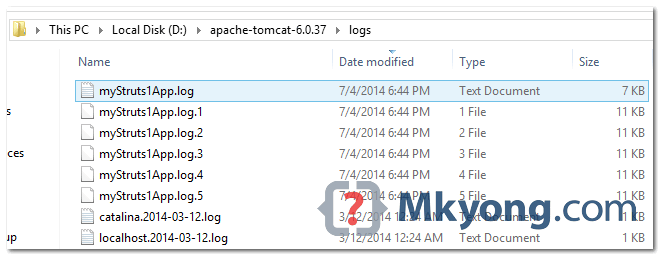
An example of log4j rolling files.
3. Output to Console and File
Full example to output the logging to both console and file.
log4j.xml
<?xml version="1.0" encoding="UTF-8" ?>
<!DOCTYPE log4j:configuration SYSTEM "log4j.dtd">
<log4j:configuration debug="true"
  xmlns:log4j='http://jakarta.apache.org/log4j/'>

	<appender name="console" class="org.apache.log4j.ConsoleAppender">
	    <layout class="org.apache.log4j.PatternLayout">
		<param name="ConversionPattern"
			value="%d{yyyy-MM-dd HH:mm:ss} %-5p %c{1}:%L - %m%n" />
	    </layout>
	</appender>

	<appender name="file" class="org.apache.log4j.RollingFileAppender">
	    <param name="append" value="false" />
	    <param name="maxFileSize" value="10MB" />
	    <param name="maxBackupIndex" value="10" />
	    <param name="file" value="${catalina.home}/logs/myStruts1App.log" />
	    <layout class="org.apache.log4j.PatternLayout">
		<param name="ConversionPattern"
			value="%d{yyyy-MM-dd HH:mm:ss} %-5p %c{1}:%L - %m%n" />
	    </layout>
	</appender>

	<root>
		<level value="DEBUG" />
		<appender-ref ref="console" />
		<appender-ref ref="file" />
	</root>

</log4j:configuration>

Hi, when trying to do this I get
20:45:23,493 FATAL [main] Main – getAssociatedStylesheets failed
org.eclipse.wst.xsl.jaxp.debug.invoker.TransformationException: getAssociatedStylesheets failed
what can I do to have it working?
I work in Eclipse..
can i have the sample of log4j.xml for HttpAppender with HTTP POST request
How do you use it? What to code in a java class to use the log4j xml file?
i have a pecular problem.
i am using log4j1.15 version. can i change the .log file based on the project name because i have multiple wars on one tomcat. and should use a common log4j.xml file.
By using what feature can i resolve this issue.
i tried with System.setProperty featured. it didnt work.
My projects or JSF and struts based application.
can you please help out .
Thanks and regard
Rnalllamothu
i have a pecular problem.
i am using log4j1.15 version. can i change the .log file based on the project name because i have multiple wars on one tomcat. and should use a common log4j.xml file.
By using what feature can i resolve this issue.
i tried with System.setProperty featured. it didnt work.
My projects or JSF and struts based application.
Thanks and regard
Rnalllamothu
I am using Toamcat with windows machine. RollingAppender doesn’t roll to create a new file. Instead it just overwrites the older one. Is it require any permission to create new backup file?
If I am configuring using Jboss will the below code works ?
will the above works if it is Jboss server
thanks for it,
in my scenario, i want to write logger.info in console and .log file, but it is writing DEBUG,ERROR,WARNING but not
INFO, anyone have any idea?
Thank you,
you need to set the start level are info=true, instead of Debug=true.
Priority levels are Info<Debug<Warn<Error<Fatal
Where to put log4j.xml file?
put it in your project root folder
hello sir ,
I am able to generate log files on windows but not able to generate it on Ubuntu ? please help me .
Is it possible to configure a date wise RollingFileAppender with this ?
Everything is working for me except the appender doesn’t roll to create a new file. Instead it just overwrites the older one.
Hi Mkyong, i have one issue, it created the file .log.1 and .log.2 but they all are deleted once maxBackupIndex is reached.
I am not getting any previous files, is there any particular config?
Thank you
Hi, I’m Spanish speaker.
The log4j.xml file, how do you charge? because until now I used the log4j.properties in each project and the idea is to use only one log4j.xml for multiple projects , I’m using Apache Tomcat as the application server . I hope you can help me .
Thanks. You made my day 🙂
Thank you , it helped me a lot as I am new to Log4j. i used “Output to console and file” . Now I am working on a project which uses hibernate , I want all hibernate related INFO logs to be stored in file how can I do that can you help me please. and Here I also get some information about Log4j , How can I hide that too.
Nothing is displaying in my log text file.
nothing about specific class logging
When multiple files are generated they do not open. We explicitly have to right click it, then select open with notepad. Is there a way to avoid this. This problem occurs because it appends 1,2…. at the end for new file
I have exactly what you have here and I only see log output to a file. Nothing appears in the console.
what is ${catalina.home} here.
I need to redirect the log file on my hosting site location
${catalina.home} is a reference to your Tomcat home directory. That line can be changed, example: he uses “${catalina.home}/logs/myStruts1App.log” but I use “d:/devstuff/logs/application.log”.