In this tutorial, we will show you how to use the classic log4j 1.2.x to log a debug or error message in a Java application.
1. Project Directory
Review the final project structure, a standard Maven style Java project.
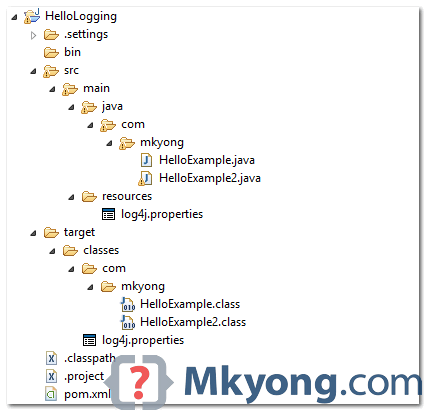
2. Get Log4j
Declares the following dependencies :
	<dependency>
		<groupId>log4j</groupId>
		<artifactId>log4j</artifactId>
		<version>1.2.17</version>
	</dependency>
For non-Maven user, visit log4j official page, download the jar and put it in the project library path manually.
3. log4j.properties
Create a log4j.properties file and put it into the resources folder. Refer to the step #1 above.
- For standalone Java app, make sure the
log4j.propertiesfile is under theproject/classesdirectory - For Java web applications, make sure the
log4j.propertiesfile is under theWEB-INF/classesdirectory
# Root logger option
log4j.rootLogger=DEBUG, stdout, file

# Redirect log messages to console
log4j.appender.stdout=org.apache.log4j.ConsoleAppender
log4j.appender.stdout.Target=System.out
log4j.appender.stdout.layout=org.apache.log4j.PatternLayout
log4j.appender.stdout.layout.ConversionPattern=%d{yyyy-MM-dd HH:mm:ss} %-5p %c{1}:%L - %m%n

# Redirect log messages to a log file, support file rolling.
log4j.appender.file=org.apache.log4j.RollingFileAppender
log4j.appender.file.File=C:\\log4j-application.log
log4j.appender.file.MaxFileSize=5MB
log4j.appender.file.MaxBackupIndex=10
log4j.appender.file.layout=org.apache.log4j.PatternLayout
log4j.appender.file.layout.ConversionPattern=%d{yyyy-MM-dd HH:mm:ss} %-5p %c{1}:%L - %m%n
To understand the symbols in the
ConversionPattern, please refer to this log4j PatternLayout guide.
Let break it down :
- %d{yyyy-MM-dd HH:mm:ss} = Date and time format, refer to SimpleDateFormat JavaDoc.
- %-5p = The logging priority, like DEBUG or ERROR. The -5 is optional, for the pretty print format.
- %c{1} = The logging name we set via getLogger(), refer to log4j PatternLayout guide.
- %L = The line number from where the logging request.
- %m%n = The message to log and line break.
Log message examples :
2014-07-02 20:52:39 DEBUG className:200 - This is debug message
2014-07-02 20:52:39 DEBUG className:201 - This is debug message2
4. Demo – How to log a Message?
To log a message, first, create a final static logger and define a name for the logger, normally, we use the full package class name.
final static Logger logger = Logger.getLogger(classname.class);
Then, logs messages with different priorities, for example, debug, info, warn, error and fatal. Normally, you just need to use debug or error.
	//logs a debug message
	if(logger.isDebugEnabled()){
	    logger.debug("This is debug");
	}

	//logs an error message with parameter
	logger.error("This is error : " + parameter);

	//logs an exception thrown from somewhere
	logger.error("This is error", exception);
4.1 Example : Logger is set to debug priority.
log4j.rootLogger=DEBUG, stdout

#...
package com.mkyong;

import org.apache.log4j.Logger;

public class HelloExample{

	final static Logger logger = Logger.getLogger(HelloExample.class);

	public static void main(String[] args) {

		HelloExample obj = new HelloExample();
		obj.runMe("mkyong");

	}

	private void runMe(String parameter){

		if(logger.isDebugEnabled()){
			logger.debug("This is debug : " + parameter);
		}

		if(logger.isInfoEnabled()){
			logger.info("This is info : " + parameter);
		}

		logger.warn("This is warn : " + parameter);
		logger.error("This is error : " + parameter);
		logger.fatal("This is fatal : " + parameter);

	}

}
Output
2014-07-02 20:52:39 DEBUG HelloExample:19 - This is debug : mkyong
2014-07-02 20:52:39 INFO  HelloExample:23 - This is info : mkyong
2014-07-02 20:52:39 WARN  HelloExample:26 - This is warn : mkyong
2014-07-02 20:52:39 ERROR HelloExample:27 - This is error : mkyong
2014-07-02 20:52:39 FATAL HelloExample:28 - This is fatal : mkyong
4.2 Example – Logger is set to error priority.
log4j.rootLogger=error, stdout

#...
Run the HelloExample again, you will get the following output
2014-07-02 20:56:02 ERROR HelloExample:27 - This is error : mkyong
2014-07-02 20:56:02 FATAL HelloExample:28 - This is fatal : mkyong
Review the log4j’s Priority class.
package org.apache.log4j;

public class Priority {

  public final static int OFF_INT = Integer.MAX_VALUE;
  public final static int FATAL_INT = 50000;
  public final static int ERROR_INT = 40000;
  public final static int WARN_INT  = 30000;
  public final static int INFO_INT  = 20000;
  public final static int DEBUG_INT = 10000;
    //public final static int FINE_INT = DEBUG_INT;
  public final static int ALL_INT = Integer.MIN_VALUE;
If priority is defined in log4j.properties, only the same or above priority message will be logged.
5. Demo – How to log an Exception
An example to show you how to use log4j to log an exception.
package com.mkyong;

import org.apache.log4j.Logger;

public class HelloExample2{

	final static Logger logger = Logger.getLogger(HelloExample2.class);

	public static void main(String[] args) {

		HelloExample2 obj = new HelloExample2();

		try{
			obj.divide();
		}catch(ArithmeticException ex){
			logger.error("Sorry, something wrong!", ex);
		}


	}

	private void divide(){

		int i = 10 /0;

	}

}
Output
2014-07-02 21:03:10 ERROR HelloExample2:16 - Sorry, something wrong!
java.lang.ArithmeticException: / by zero
	at com.mkyong.HelloExample2.divide(HelloExample2.java:24)
	at com.mkyong.HelloExample2.main(HelloExample2.java:14)
Done.

thanks for the help!!!
@ronierp2014
You are awesome!, thank you!
Can work with yml instead of properties file?
thanks. Great job
File is not working. I tried to store in D drive. Value of that key is D:\\log4j-application.log. I tried log4j and log4j2. Console is working only file is not working
You rocks bro..
if i don’t have classes file in web-inf , i need to map it in deployment assembly , right ?
great blog for starting learning.
Just wanted to say thanks! Your short code snippets helped me very often! 🙂
thanks for this posting 🙂
Thaks! Great job.
how can i save my log file as a date, by this i mean the day there is activity for that log
final static Logger logger = Logger.getLogger(Main.class);
Throw error, with dependency
org.apache.logging.log4j
log4j-core
2.6.1
Good job!
thank you
Great work ! Cheers !
Dumb question maybe: How is this expected to be run? When I export (in Eclipse) to a runnable jar, I get appenders not found error. So should I build with maven and run the resultant jar?
Doesn’t work with Windows 10! Its print message but it didnt create and write to file !
Even when I create file it doesnt append it. Have all rights for users granted.
Please help 🙁
same problem occurred for me too, It is not writing to the file!
I have solved the error by myself. Actually in log4j.properties file that is given in the zip file the parameter ‘file’ is not there. So, simply add the parameter ‘file’ in the first line i.e after stdout.
#cheers
Thanks!
Great Example.
public int getTestRowNum(String sheetName,String expectedText) throws InvalidFormatException, IOException{
int rowNum=0;
int rowCount=getRowCount(sheetName);
for(int i=0; i<rowCount; i++){
String actText = getExcelData(sheetName, i, 0);
if(actText.equals(expectedText)){
rowNum=i;
break;
}
}return rowNum;
}
public class ExcelLib {
Logger log=GetLogger.writeLog(ExcelLib.class);
/**
*
* @param sheetName
* @param rowNum
* @param colNum
* @return data(String dataType).
* @throws InvalidFormatException
* @throws IOException
*/
public String getExcelData(String sheetName,int rowNum,int colNum) throws InvalidFormatException, IOException{
log.info(“Read the data from Excel Sheet”);
FileInputStream fis=new FileInputStream(FilePath.filepath);
/* Go to the particular Excel sheet*/
Workbook wb=WorkbookFactory.create(fis);
/* Go to Sheet depends on the sheet name what we are mentioned*/
Sheet sheet=wb.getSheet(sheetName);
/*Go to particular Row what we are passing row number.*/
Row row=sheet.getRow(rowNum);
/*Go to particular column depends on row and read the data from particular column.*/
String data=row.getCell(colNum).getStringCellValue();
log.info(“Get data from excel sheet Successfully”);
return data;
}
/**
*
* @param sheetName
* @return row num(int dataTye)
* @throws InvalidFormatException
* @throws IOException
*/
public int getRowCount(String sheetName) throws InvalidFormatException, IOException{
FileInputStream fis=new FileInputStream(FilePath.filepath);
Workbook wb=WorkbookFactory.create(fis);
Sheet sheet=wb.getSheet(sheetName);
int row=sheet.getLastRowNum()+1;
log.info(“Get last row number identified successfully”);
return row;
}
/**
* here we are passing status of the test case
* @param sheetName
* @param rowNum
* @param colNum
* @param status
* @throws InvalidFormatException
* @throws IOException
*/
public void setCellValue(String sheetName,int rowNum,int colNum,String status) throws InvalidFormatException, IOException{
FileInputStream fis=new FileInputStream(FilePath.filepath);
Workbook wb=WorkbookFactory.create(fis);
Sheet sheet=wb.getSheet(sheetName);
Row row=sheet.getRow(rowNum);
Cell cell=row.createCell(colNum);
cell.setCellType(cell.CELL_TYPE_STRING);
FileOutputStream fos=new FileOutputStream(FilePath.filepath);
cell.setCellValue(status);
wb.write(fos);
}
/**
*
* @param sheetName
* @param expectedText
* @return rowNum(int dataType)
* @throws InvalidFormatException
* @throws IOException
*/
public int getTestRowNum(String sheetName,String expectedText) throws InvalidFormatException, IOException{
int rowNum=0;
int rowCount=getRowCount(sheetName);
for(int i=0;i<rowCount;i++){
String actText=getExcelData(sheetName, i, 0);
if(actText.equals(expectedText)){
rowNum=i;
break;
}
log.info("identify the Test case prasent row successfully");
}return rowNum;
}
}
public class ExcelLib {
String filePath=Constants.excelFilePath;
public String getCellData(String sheetName, int rowNum, int colNum) throws InvalidFormatException, IOException{
FileInputStream excelInput=new FileInputStream(filePath);
Workbook excelBook = WorkbookFactory.create(excelInput);
Sheet sh = excelBook.getSheet(sheetName);
Row row = sh.getRow(rowNum);
Cell cell = row.getCell(colNum);
return cell.getStringCellValue();
}
public void setCellData(String sheetName, int rowNum, int colNum, String data) throws InvalidFormatException, IOException{
FileInputStream excelInput=new FileInputStream(filePath);
FileOutputStream excelOutput=new FileOutputStream(filePath);
Workbook excelBook = WorkbookFactory.create(excelInput);
Sheet sh = excelBook.getSheet(sheetName);
Row row = sh.getRow(rowNum);
Cell cell = row.createCell(colNum);
cell.setCellType(cell.CELL_TYPE_STRING);
cell.setCellValue(data);
excelBook.write(excelOutput);
//excelOutput.close();
}
public int getRowCount(String sheetName) throws FileNotFoundException{
int rowCount=0;
FileInputStream excelInput = new FileInputStream(filePath);
try {
Workbook wb = WorkbookFactory.create(excelInput);
Sheet sh = wb.getSheet(sheetName);
rowCount = sh.getLastRowNum();
return rowCount;
} catch (InvalidFormatException e) {
e.printStackTrace();
} catch (IOException e) {
e.printStackTrace();
}
return rowCount;
}
public int getTestCaseRowNumber(String sheetName, String expectedTestCaseName) throws InvalidFormatException, IOException{
int rowNum=0;
int lastRowNum=getRowCount(sheetName);
for(int i=0;i<=lastRowNum;i++){
String actualTestCaseName=getCellData(sheetName, i, 0);
if(expectedTestCaseName.equals(actualTestCaseName)){
rowNum=i;
break;
}
}
return rowNum;
}
public int getcolumnCountForRow(String sheetName,int rowNum) throws InvalidFormatException, IOException{
int lastColumn = 0;
FileInputStream excelInput=new FileInputStream(filePath);
Workbook excelBook = WorkbookFactory.create(excelInput);
Sheet sh = excelBook.getSheet(sheetName);
lastColumn = sh.getRow(rowNum).getPhysicalNumberOfCells();
return lastColumn;
}
}
public String getExcelData(String sheetName , String testID , String columnHeader) throws InvalidFormatException, IOException{
String userDir = System.getProperty(“user.dir”);
filePath = userDir+”\testdata\Test_Data.xlsx”;
String data = null;
FileInputStream fis = new FileInputStream(filePath);
Workbook wb = WorkbookFactory.create(fis);
Sheet sh = wb.getSheet(sheetName);
int rowcount =getRowCount(sheetName);
for(int r=0 ; r<rowcount; r++){
Row row = sh.getRow(r);
if(row.getCell(0).getStringCellValue().toLowerCase().equals(testID.toLowerCase())){
int col = row.getLastCellNum();
for(int c=0; c<col ; c++){
if(row.getCell(c).getStringCellValue().toLowerCase().equals(columnHeader.toLowerCase())){
row = sh.getRow(r+1);
data = row.getCell(c).getStringCellValue();
break;
}
}
}
}
return data;
}
public String getExcelData(String sheetName , String testID , String columnHeader) throws InvalidFormatException, IOException{
String userDir = System.getProperty(“user.dir”);
filePath = userDir+”\testdata\Test_Data.xlsx”;
String data = null;
FileInputStream fis = new FileInputStream(filePath);
Workbook wb = WorkbookFactory.create(fis);
Sheet sh = wb.getSheet(sheetName);
int rowcount =getRowCount(sheetName);
for(int r=0 ; r<rowcount; r++){
Row row = sh.getRow(r);
if(row.getCell(0).getStringCellValue().toLowerCase().equals(testID.toLowerCase())){
int col = row.getLastCellNum();
for(int c=0; c<col ; c++){
if(row.getCell(c).getStringCellValue().toLowerCase().equals(columnHeader.toLowerCase())){
row = sh.getRow(r+1);
data = row.getCell(c).getStringCellValue();
break;
}
}
}
}
return data;
}
public class ExcelLIb {
public static String filePath;
public String getExcelData(String sheetName , String testID , String columnHeader) throws InvalidFormatException, IOException{
String userDir = System.getProperty(“user.dir”);
filePath = userDir+”\testdata\Test_Data.xlsx”;
String data = null;
FileInputStream fis = new FileInputStream(filePath);
Workbook wb = WorkbookFactory.create(fis);
Sheet sh = wb.getSheet(sheetName);
int rowcount =getRowCount(sheetName);
for(int r=0 ; r<rowcount; r++){
Row row = sh.getRow(r);
if(row.getCell(0).getStringCellValue().toLowerCase().equals(testID.toLowerCase())){
int col = row.getLastCellNum();
for(int c=0; c<col ; c++){
if(row.getCell(c).getStringCellValue().toLowerCase().equals(columnHeader.toLowerCase())){
row = sh.getRow(r+1);
data = row.getCell(c).getStringCellValue();
break;
}
}
}
}
return data;
}
public String getExcelData(String sheetName , int rowNum , int colNum) throws InvalidFormatException, IOException{
FileInputStream fis = new FileInputStream(filePath);
Workbook wb = WorkbookFactory.create(fis);
Sheet sh = wb.getSheet(sheetName);
Row row = sh.getRow(rowNum);
String data = row.getCell(colNum).getStringCellValue();
return data;
}
public int getRowCount(String sheetName) throws InvalidFormatException, IOException{
FileInputStream fis = new FileInputStream(filePath);
Workbook wb = WorkbookFactory.create(fis);
Sheet sh = wb.getSheet(sheetName);
int rowCount = sh.getLastRowNum()+1;
return rowCount;
}
public void setExcelData(String sheetName,int rowNum,int colNum,String data) throws InvalidFormatException, IOException{
FileInputStream fis = new FileInputStream(filePath);
Workbook wb = WorkbookFactory.create(fis);
Sheet sh = wb.getSheet(sheetName);
Row row = sh.getRow(rowNum);
Cell cel = row.createCell(colNum);
cel.setCellType(cel.CELL_TYPE_STRING);
cel.setCellValue(data);
FileOutputStream fos = new FileOutputStream(filePath);
wb.write(fos);
}
public int getcellCount(String sheetName,int rowNum) throws InvalidFormatException, IOException{
FileInputStream fis = new FileInputStream(filePath);
Workbook wb = WorkbookFactory.create(fis);
Sheet sh = wb.getSheet(sheetName);
Row row = sh.getRow(rowNum);
return row.getLastCellNum();
}
}
public void setExcelData(String sheetName,int rowNum,int colNum,String data) throws InvalidFormatException, IOException{
FileInputStream fis = new FileInputStream(filePath);
Workbook wb = WorkbookFactory.create(fis);
Sheet sh = wb.getSheet(sheetName);
Row row = sh.getRow(rowNum);
Cell cel = row.createCell(colNum);
cel.setCellType(cel.CELL_TYPE_STRING);
cel.setCellValue(data);
FileOutputStream fos = new FileOutputStream(filePath);
wb.write(fos);
}
Doesn’t work for log4j2 (no getLogger method).
public void scrolldoDownToWebelement(String wbXpath){
((JavascriptExecutor)driver).executeScript(“arguments[0].scrollIntoView();”, driver.findElement(By.xpath(wbXpath)));
}
public void scrollDownPage(){
JavascriptExecutor jse = (JavascriptExecutor)driver;
jse.executeScript(“window.scrollBy(0,500)”, “”);
}
public String expectedWindow(String epectedWindowTitle){
String requriedWindowID = null;
currentWindow = driver.getWindowHandle();
Set set = driver.getWindowHandles();
Iterator it = set.iterator();
it.next();
while(it.hasNext()){
String actWindow = it.next();
driver.switchTo().window(actWindow);
if(epectedWindowTitle.equals(driver.getTitle())){
requriedWindowID = actWindow;
System.out.println(“catch =” + requriedWindowID);
}else{
driver.close();
}
}
return requriedWindowID;
}
}
public void colseUnexpetedWindow(){
String currentWindow = driver.getWindowHandle();
Set set = driver.getWindowHandles();
Iterator it = set.iterator();
while(it.hasNext()){
String actWindow = it.next();
if(currentWindow.equals(actWindow)){
}else{
driver.switchTo().window(actWindow);
driver.close();
}
}
}
public class ExcelLIb {
public static String filePath;
public String getExcelData(String sheetName , String testID , String columnHeader) throws InvalidFormatException, IOException{
String userDir = System.getProperty(“user.dir”);
filePath = userDir+”\testdata\Test_Data.xlsx”;
String data = null;
FileInputStream fis = new FileInputStream(filePath);
Workbook wb = WorkbookFactory.create(fis);
Sheet sh = wb.getSheet(sheetName);
int rowcount =getRowCount(sheetName);
for(int r=0 ; r<rowcount; r++){
Row row = sh.getRow(r);
if(row.getCell(0).getStringCellValue().toLowerCase().equals(testID.toLowerCase())){
int col = row.getLastCellNum();
for(int c=0; c<col ; c++){
if(row.getCell(c).getStringCellValue().toLowerCase().equals(columnHeader.toLowerCase())){
row = sh.getRow(r+1);
data = row.getCell(c).getStringCellValue();
break;
}
}
}
}
return data;
}
public String getExcelData(String sheetName , int rowNum , int colNum) throws InvalidFormatException, IOException{
FileInputStream fis = new FileInputStream(filePath);
Workbook wb = WorkbookFactory.create(fis);
Sheet sh = wb.getSheet(sheetName);
Row row = sh.getRow(rowNum);
String data = row.getCell(colNum).getStringCellValue();
return data;
}
public int getRowCount(String sheetName) throws InvalidFormatException, IOException{
FileInputStream fis = new FileInputStream(filePath);
Workbook wb = WorkbookFactory.create(fis);
Sheet sh = wb.getSheet(sheetName);
int rowCount = sh.getLastRowNum()+1;
return rowCount;
}
public void setExcelData(String sheetName,int rowNum,int colNum,String data) throws InvalidFormatException, IOException{
FileInputStream fis = new FileInputStream(filePath);
Workbook wb = WorkbookFactory.create(fis);
Sheet sh = wb.getSheet(sheetName);
Row row = sh.getRow(rowNum);
Cell cel = row.createCell(colNum);
cel.setCellType(cel.CELL_TYPE_STRING);
cel.setCellValue(data);
FileOutputStream fos = new FileOutputStream(filePath);
wb.write(fos);
}
public int getcellCount(String sheetName,int rowNum) throws InvalidFormatException, IOException{
FileInputStream fis = new FileInputStream(filePath);
Workbook wb = WorkbookFactory.create(fis);
Sheet sh = wb.getSheet(sheetName);
Row row = sh.getRow(rowNum);
return row.getLastCellNum();
}
}
package com.crm.genericLibrary;
import java.util.Properties;
import org.apache.log4j.Logger;
import org.apache.log4j.PropertyConfigurator;
/**
*
* @author Krishna.M
*
*/
public class GetLogger {
public static Logger writeLog(Class className){
Logger log=Logger.getLogger(className);
Properties properties = new Properties();
properties.put(“log4j.rootLogger”, “INFO,Console,File”);
/*Properties for console*/
properties.put(“log4j.appender.Console”, “org.apache.log4j.ConsoleAppender”);
properties.put(“log4j.appender.Console.layout”, “org.apache.log4j.PatternLayout”);
properties.put(“log4j.appender.Console.layout.ConversionPattern”, “%-4r [%d] [%-5p] [%c %x] – %m%n”);
/*Properties for file*/
properties.put(“log4j.appender.File”, “org.apache.log4j.FileAppender”);
properties.put(“log4j.appender.File.file”,”logs/crm.log”);
properties.put(“log4j.appender.File.layout”,”org.apache.log4j.PatternLayout”);
properties.put(“log4j.appender.File.layout.ConversionPattern”,”%-4r [%d] [%-5p] [%c %x] – %m%n”);
PropertyConfigurator.configure(properties);
return log;
}
}
import org.openqa.selenium.WebDriver;
import org.openqa.selenium.chrome.ChromeDriver;
import org.openqa.selenium.chrome.ChromeOptions;
import org.openqa.selenium.firefox.FirefoxDriver;
import org.openqa.selenium.firefox.FirefoxProfile;
import org.openqa.selenium.ie.InternetExplorerDriver;
import org.openqa.selenium.remote.DesiredCapabilities;
/**
*
* @author krishna
*
*/
public class Driver {
public static WebDriver driver;
public static DesiredCapabilities caps;
public static String ieDriverPath=”C:\Softwares\IEDriverServer_x64_2.45.0\IEDriverServer.exe”;
public static String chromeDriverPath=”C:\Softwares\chromedriver_win32\chromedriver.exe”;
public static WebDriver getDriver(String browserName){
if(browserName.equalsIgnoreCase(“firefox”)){
FirefoxProfile profile = new FirefoxProfile();
profile.setEnableNativeEvents(true);
driver=new FirefoxDriver(profile);
}else if(browserName.equalsIgnoreCase(“ie”)){
System.setProperty(“webdriver.ie.driver”,ieDriverPath);
driver=new InternetExplorerDriver();
}else if(browserName.equalsIgnoreCase(“chrome”)){
System.setProperty(“webdriver.chrome.driver”,chromeDriverPath);
driver=new ChromeDriver();
}else{
FirefoxProfile profile = new FirefoxProfile();
profile.setEnableNativeEvents(true);
driver=new FirefoxDriver(profile);
}
return driver;
}
}
I need a example with Spring Boot
i am not able to find the log file???where it is getting saved.??? need to check the log file..
You need to add “file” in the rootLoger as shown below in the log4j.properties file
log4j.rootLogger=ERROR, stdout, file
Thanks.
Also, this is outdated. Logger has no longer any static methods: https://logging.apache.org/log4j/2.0/log4j-api/apidocs/org/apache/logging/log4j/Logger.html
How can I use different properties file depending on build (debug build vs public build)?
here is another good example
http://americanjavacoder.blogspot.com/2015/03/log4j.html
both project in this server.same configuration log4j.properties.but logs create folder are different.ddd/ff/ff.logs and ddd/gg/dd.logs
i have to project in one server. 1st project create logs and 2nd project not create logs.
Hi,
Great article.Could you please explain why you have used final static for logger(just logger seems to be working fine).
Your articles are too good ! I look for your articles first and than any other resource , as many times there is no need to look any where else. Thank you so much!
How to append timestamp to the log file name:
Here is my “log4j.properties” file :
# Log levels – Root logger option
log4j.rootLogger= trace, stdout, LOGFILE
# Rolling File Appender
log4j.appender.LOGFILE=org.apache.log4j.rolling.RollingFileAppender
log4j.appender.LOGFILE.RollingPolicy=org.apache.log4j.rolling.TimeBasedRollingPolicy
log4j.appender.LOGFILE.RollingPolicy.FileNamePattern=./logs/MHETxRx_%d{yyyy-MM-dd}_%d{HH:mm:ss}.log — TimeStamp
# Rolling File Appender layout
log4j.appender.LOGFILE.layout=org.apache.log4j.PatternLayout
log4j.appender.LOGFILE.layout.ConversionPattern=%d – %c – %p – %m%n
I’m seeing following Error. Can’t I have Time also appended? I’m able to append Date not time.
log4j:ERROR setFile(null,true) call failed.
java.io.FileNotFoundException: .logsMHETxRx_2014-11-26_17:51:08.log — TimeStamp (The filename, directory name, or volume label syntax is incorrect)
at java.io.FileOutputStream.open(Native Method)
at java.io.FileOutputStream.(Unknown Source)
at java.io.FileOutputStream.(Unknown Source)
at org.apache.log4j.FileAppender.setFile(FileAppender.java:294)
at org.apache.log4j.FileAppender.activateOptions(FileAppender.java:165)
Got it, should not use ‘:’ in filename.
Thanks alot mkyoung for detailed info on Log4j examples. God bless you.
Exception in thread “main” java.lang.NoClassDefFoundError: org/apache/log4j/Logger
at com.mkyong.HelloExample.(HelloExample.java:7)
Caused by: java.lang.ClassNotFoundException: org.apache.log4j.Logger
at java.net.URLClassLoader$1.run(URLClassLoader.java:366)
at java.net.URLClassLoader$1.run(URLClassLoader.java:355)
at java.security.AccessController.doPrivileged(Native Method)
at java.net.URLClassLoader.findClass(URLClassLoader.java:354)
at java.lang.ClassLoader.loadClass(ClassLoader.java:425)
at sun.misc.Launcher$AppClassLoader.loadClass(Launcher.java:308)
at java.lang.ClassLoader.loadClass(ClassLoader.java:358)
… 1 more
why do I get this one ?
can we customize the log4j file to track the UTF-8 Characters. In other words, can we create log4j file which supports utf8 characters also.
If logging have to be reconfigured you can use external (outside of jar/war) properties file: org.apache.log4j.PropertyConfigurator.configure(String fileName)