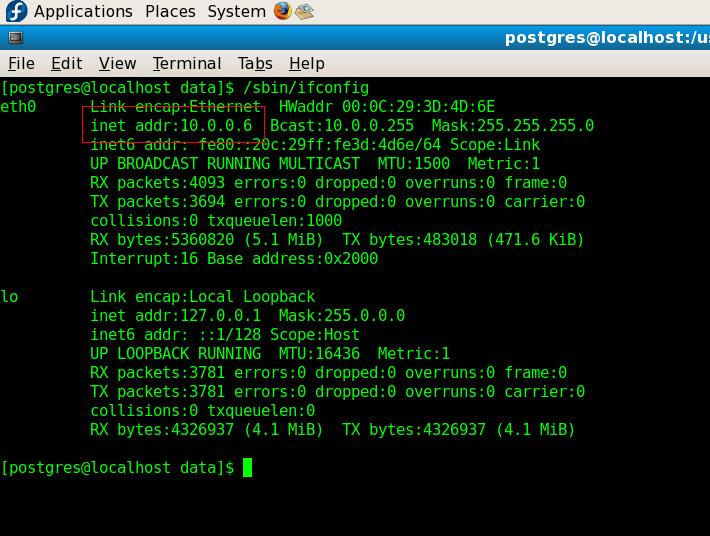
unix / linux June 24, 2008 by mkyong 17 comments How to check ip address in linux Just issue following command to check your ip address in linux /sbin/ifconfig ya, my ip address now is 10.0.0.6 Written by mkyong Founder of Mkyong.com, passionate Java and open-source technologies. If you enjoy my tutorials, consider making a donation to these charities. All posts by mkyong Website
Gregory Tanner November 15, 2019 at 9:40 am To check my public IP address I go to http://www.myiponline.net because there I can see more information about my connection Reply
tanzila July 11, 2017 at 9:18 pm Ethernet IP address in linux OS, like centsOS, Kali linux and ubuntu can be configured. https://www.youtube.com/watch?v=I1btwyqa1O0 Reply
Guest June 19, 2014 at 12:38 am For Ubuntu, and possibly other Linux/Unix versions: % hostname -I (capital I as in Idaho) 192.168.1.20 If you have multiple interfaces active, you may get multiple ip addresses back. Reply
yogeesh seralathan February 5, 2014 at 3:29 pm Is it possible to get IP only ? Because that would be very useful in automated scripts.. Reply
voyance May 3, 2013 at 4:55 am Greetings! Very useful advice in this particular article! It is the little changes that will make the biggest changes. Many thanks for sharing! Reply
yui April 15, 2013 at 12:10 pm I used to check my network IP address using the site Ip-Details.com . Reply
David June 12, 2012 at 5:02 am There’s also a neat little utility that allows tracking the IP addresses of the machine it’s installed on. You can get the IP addresses via Email or have them written to a MySQL database. Here’s the link Reply
Chris April 11, 2010 at 2:42 pm Thanks you site is really helpful, I am just starting with linux and it gives simple answers to many of my questions Reply
laura dogillo December 4, 2009 at 1:22 am your website is very helpful for my study in Linux. Thank you very much. Reply
To check my public IP address I go to http://www.myiponline.net
because there I can see more information about my connection
Thanks
Ethernet IP address in linux OS, like centsOS, Kali linux and ubuntu can be configured.
https://www.youtube.com/watch?v=I1btwyqa1O0
For Ubuntu, and possibly other Linux/Unix versions:
% hostname -I (capital I as in Idaho)
192.168.1.20
If you have multiple interfaces active, you may get multiple ip addresses back.
Is it possible to get IP only ?
Because that would be very useful in automated scripts..
Nice Article
Keep writing
Thank you !!!
Greetings! Very useful advice in this particular
article! It is the little changes that will make the biggest changes.
Many thanks for sharing!
Nice
I used to check my network IP address using the site Ip-Details.com .
Nice
Thank you
There’s also a neat little utility that allows tracking the IP addresses of the machine it’s installed on. You can get the IP addresses via Email or have them written to a MySQL database. Here’s the link
Oke, thankss, this is enogh to help me..
Thanks you site is really helpful, I am just starting with linux and it gives simple answers to many of my questions
your website is very helpful for my study in Linux. Thank you very much.
welcome…good to know it drive benefit to you
why don’t you go for –
hostname –ip
