JDBC transaction make sure a set of SQL statements is executed as a unit, either all of the statements are executed successfully, or NONE of the statements are executed (rolled back all changes).
1. Without JDBC Transaction
1.1 A JDBC example to insert two rows and update one row.
TransactionExample.java
package com.mkyong.jdbc;

import java.math.BigDecimal;
import java.sql.*;
import java.time.LocalDateTime;

public class TransactionExample {

    public static void main(String[] args) {

        try (Connection conn = DriverManager.getConnection(
                "jdbc:postgresql://127.0.0.1:5432/test", "postgres", "password");
             Statement statement = conn.createStatement();
             PreparedStatement psInsert = conn.prepareStatement(SQL_INSERT);
             PreparedStatement psUpdate = conn.prepareStatement(SQL_UPDATE)) {

            statement.execute(SQL_TABLE_DROP);
            statement.execute(SQL_TABLE_CREATE);

            // Run list of insert commands
            psInsert.setString(1, "mkyong");
            psInsert.setBigDecimal(2, new BigDecimal(10));
            psInsert.setTimestamp(3, Timestamp.valueOf(LocalDateTime.now()));
            psInsert.execute();

            psInsert.setString(1, "kungfu");
            psInsert.setBigDecimal(2, new BigDecimal(20));
            psInsert.setTimestamp(3, Timestamp.valueOf(LocalDateTime.now()));
            psInsert.execute();

            // Run list of update commands

            // below line caused error, test transaction
            // org.postgresql.util.PSQLException: No value specified for parameter 1.
            psUpdate.setBigDecimal(2, new BigDecimal(999.99));

			//psUpdate.setBigDecimal(1, new BigDecimal(999.99));
            psUpdate.setString(2, "mkyong");
            psUpdate.execute();

        } catch (Exception e) {
            e.printStackTrace();
        }

    }

    private static final String SQL_INSERT = "INSERT INTO EMPLOYEE (NAME, SALARY, CREATED_DATE) VALUES (?,?,?)";

    private static final String SQL_UPDATE = "UPDATE EMPLOYEE SET SALARY=? WHERE NAME=?";

    private static final String SQL_TABLE_CREATE = "CREATE TABLE EMPLOYEE"
            + "("
            + " ID serial,"
            + " NAME varchar(100) NOT NULL,"
            + " SALARY numeric(15, 2) NOT NULL,"
            + " CREATED_DATE timestamp with time zone NOT NULL DEFAULT CURRENT_TIMESTAMP,"
            + " PRIMARY KEY (ID)"
            + ")";

    private static final String SQL_TABLE_DROP = "DROP TABLE EMPLOYEE";

}
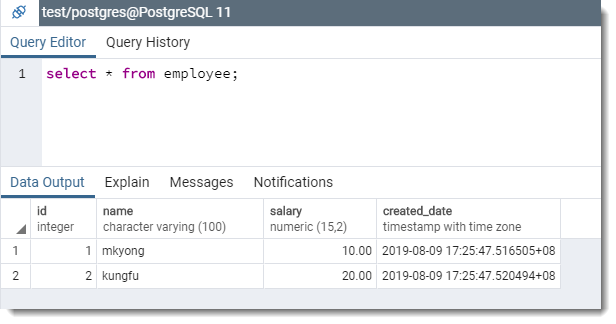
Output, the update is failed, and throwing an exception, at the end, 2 rows are inserted but the update is skipped.
org.postgresql.util.PSQLException: No value specified for parameter 1.
	at org.postgresql.core.v3.SimpleParameterList.checkAllParametersSet(SimpleParameterList.java:257)
	at org.postgresql.core.v3.QueryExecutorImpl.execute(QueryExecutorImpl.java:292)
	at org.postgresql.jdbc.PgStatement.executeInternal(PgStatement.java:441)
	at org.postgresql.jdbc.PgStatement.execute(PgStatement.java:365)
	at org.postgresql.jdbc.PgPreparedStatement.executeWithFlags(PgPreparedStatement.java:143)
	at org.postgresql.jdbc.PgPreparedStatement.execute(PgPreparedStatement.java:132)
	at com.mkyong.jdbc.TransactionExample.main(TransactionExample.java:41)
2. Using JDBC Transaction
2.1 To enable transaction, set auto commit to false.
conn.setAutoCommit(false); // default true
// start transaction block

// insert
// update
// if any errors within the start and end block,
// rolled back all changes, none of the statements are executed.

// end transaction block
conn.commit();
2.2 Same example with JDBC transaction.
TransactionExample.java
package com.mkyong.jdbc;

import java.math.BigDecimal;
import java.sql.*;
import java.time.LocalDateTime;

public class TransactionExample {

    public static void main(String[] args) {

        try (Connection conn = DriverManager.getConnection(
                "jdbc:postgresql://127.0.0.1:5432/test", "postgres", "password");
             Statement statement = conn.createStatement();
             PreparedStatement psInsert = conn.prepareStatement(SQL_INSERT);
             PreparedStatement psUpdate = conn.prepareStatement(SQL_UPDATE)) {

            statement.execute(SQL_TABLE_DROP);
            statement.execute(SQL_TABLE_CREATE);

            // start transaction block
            conn.setAutoCommit(false); // default true

            // Run list of insert commands
            psInsert.setString(1, "mkyong");
            psInsert.setBigDecimal(2, new BigDecimal(10));
            psInsert.setTimestamp(3, Timestamp.valueOf(LocalDateTime.now()));
            psInsert.execute();

            psInsert.setString(1, "kungfu");
            psInsert.setBigDecimal(2, new BigDecimal(20));
            psInsert.setTimestamp(3, Timestamp.valueOf(LocalDateTime.now()));
            psInsert.execute();

            // Run list of update commands

            // error, test roolback
            // org.postgresql.util.PSQLException: No value specified for parameter 1.
            psUpdate.setBigDecimal(2, new BigDecimal(999.99));
            //psUpdate.setBigDecimal(1, new BigDecimal(999.99));
            psUpdate.setString(2, "mkyong");
            psUpdate.execute();

            // end transaction block, commit changes
            conn.commit();

            // good practice to set it back to default true
            conn.setAutoCommit(true);

        } catch (Exception e) {
            e.printStackTrace();
        }

    }

    //...

}
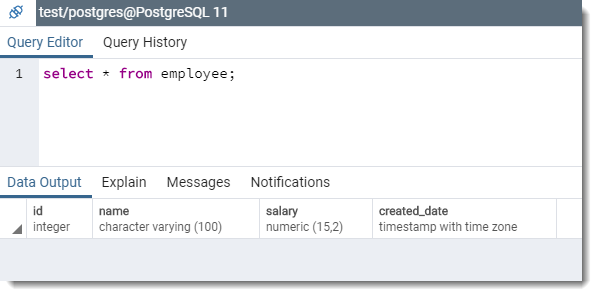
Output, none of the statements are executed, the insert statements are rolled back.
org.postgresql.util.PSQLException: No value specified for parameter 1.
	at org.postgresql.core.v3.SimpleParameterList.checkAllParametersSet(SimpleParameterList.java:257)
	at org.postgresql.core.v3.QueryExecutorImpl.execute(QueryExecutorImpl.java:292)
	at org.postgresql.jdbc.PgStatement.executeInternal(PgStatement.java:441)
	at org.postgresql.jdbc.PgStatement.execute(PgStatement.java:365)
	at org.postgresql.jdbc.PgPreparedStatement.executeWithFlags(PgPreparedStatement.java:143)
	at org.postgresql.jdbc.PgPreparedStatement.execute(PgPreparedStatement.java:132)
	at com.mkyong.jdbc.TransactionExample.main(TransactionExample.java:41)
3. Extra…
Fix the parameter 1 error and see the expected result.
	//psUpdate.setBigDecimal(2, new BigDecimal(999.99));

	psUpdate.setBigDecimal(1, new BigDecimal(999.99));
	psUpdate.setString(2, "mkyong");
	psUpdate.execute();
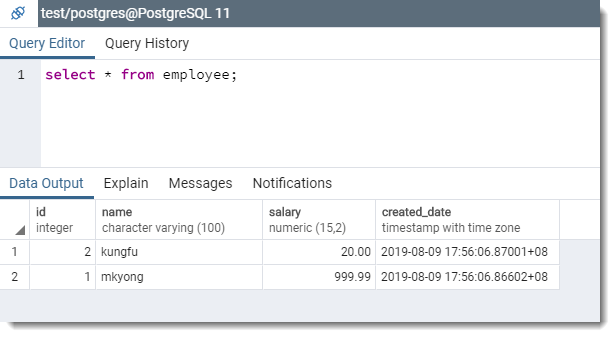
Output
2 rows are inserted and 1 row is updated.
Download Source Code
$ git clone https://github.com/mkyong/java-jdbc.git
$ cd postgresql
$ cd postgresql

Thanks for the good post, mkyong!
Please let me know why you set AutoCommit mode back to false after commit.
I’d like to know if there is any mechanism advantage.
// good practice to set it back to default true
conn.setAutoCommit(true);
You changed the commit-state from a datasource pool. When other people or threads use it, it will be considered to be autocommited, some exception will be occured.
thank you bro!! you are awesome!
You set them in autoCommit(false); but never change it back 😐
good practice, article is updated.
try {
DataBase.insert…
DataBase.update…
DataBase.connection.commit();
System.out.println(“?????????????????”);
} catch (Exception e) {
DataBase.connection.rollback();
System.out.println(“????????????????”);
}
Transaction ???????????catch?MySQLSyntaxErrorException?
You save me, thanks
Very helpful, love your website.
Wonderful clear example.
Really appreciate your work.
but how to do connection rollback in try-with-resources block (without nesting another try-block)?
Move out the connection from try-with-resources and close it in finally.
What if ” dbConnection.rollback() ” throws an Exception? .
Addition to this, engine must be InnoDB, MyISAM does not support transactions
Save my life and my time :):) Thank you so much.
As a user said… Our lives just became easier. Thanks man
Hi lokesh
The query will run because the session has been started and even if u stop the JVM the session will run until unless it is in same module
Hi,
I have a doubt, after updating the values in service level it is not getting committed into the database what may be the reason??
Hi,
i have a small doubt in jdbc. suppose i started the query execution which takes more than 5 min from jdbc.after initiating the executequery command.If i stop the jvm.what will happen to that query.
1.Will query run in db?
if yes..how?
2.Will the query execution stops?
if yes ..how?
consider oracle db here…
please reply asap
Hi Lokesh, you got the anser, if yes please share it
Do we have to add “dbConnection.setAutoCommit(true);” to finally block?
Good practice.
I think Hibernate also use this to do “session.beginTransaction()” and “session.getTransaction().commit()”.
You’re great man.
Thank you!
awesome examples, thanks a lot which is helping me a lot
Simple post even if you want to revise your fundamentals. Thanks.
Thanks, nice post
Having a second thought about the right usage finalizers (finally block) and specifically related to the closing of the database connection. I’ve wondered and researched that furthermore to the explicit call of the termination method “dbConnection.close()” within the finally block (which may be used as safety-net measure), it would be more efficient to add an extra “dbConnection.close()” at the end of the “try” block. Could someone tell me if it is worthwhile to do?
Very good example
I’m very glad that I found your blog ! My life is much easier. Thank you so much 🙂
My life is easier since I found your blogs.
Very nice blogs.
how do i execute sql trigger using jdbc connection ..
Refer below link for execute sql trigger and procedure using jdbc http://techdive.in/java/mysql-createtrigger-using-jdbc-connection