In this article, we will discuss about how to read and write an excel file using JExcel API, a simple library and widely used for simple operations which do not involve a high level of formatting and complex formulas based operations.
P.S Tested with JExcel API – 2.6.12
1. Download JExcel
Maven user.
   <dependency>
         <groupId>net.sourceforge.jexcelapi</groupId>
         <artifactId>jxl</artifactId>
         <version>2.6.12</version>
   </dependency>
Or download directly at this location
2. Write Excel file
JExcel API example to show you how to create an Excel file, and write data into it.
package com.mkyong;

import jxl.Workbook;
import jxl.write.*;
import jxl.write.Number;

import java.io.File;
import java.io.IOException;

public class ExcelWrite {

    private static final String EXCEL_FILE_LOCATION = "C:\\temp\\MyFirstExcel.xls";

    public static void main(String[] args) {

        //1. Create an Excel file
        WritableWorkbook myFirstWbook = null;
        try {

            myFirstWbook = Workbook.createWorkbook(new File(EXCEL_FILE_LOCATION));

            // create an Excel sheet
            WritableSheet excelSheet = myFirstWbook.createSheet("Sheet 1", 0);

            // add something into the Excel sheet
            Label label = new Label(0, 0, "Test Count");
            excelSheet.addCell(label);

            Number number = new Number(0, 1, 1);
            excelSheet.addCell(number);

            label = new Label(1, 0, "Result");
            excelSheet.addCell(label);

            label = new Label(1, 1, "Passed");
            excelSheet.addCell(label);

            number = new Number(0, 2, 2);
            excelSheet.addCell(number);

            label = new Label(1, 2, "Passed 2");
            excelSheet.addCell(label);

            myFirstWbook.write();


        } catch (IOException e) {
            e.printStackTrace();
        } catch (WriteException e) {
            e.printStackTrace();
        } finally {

            if (myFirstWbook != null) {
                try {
                    myFirstWbook.close();
                } catch (IOException e) {
                    e.printStackTrace();
                } catch (WriteException e) {
                    e.printStackTrace();
                }
            }


        }

    }

}
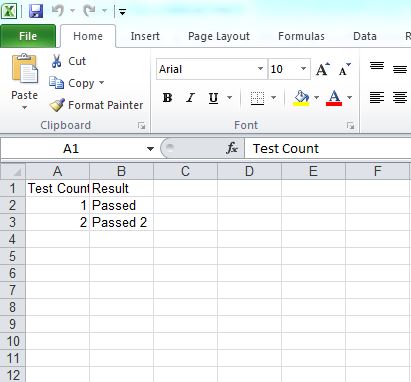
Output, an Excel file is created with the following content :
3. Read Excel file
Example to read above Excel file.
package com.mkyong;

import jxl.Cell;
import jxl.Sheet;
import jxl.Workbook;
import jxl.read.biff.BiffException;

import java.io.File;
import java.io.IOException;

public class ExcelRead {

    private static final String EXCEL_FILE_LOCATION = "C:\\temp\\MyFirstExcel.xls";

    public static void main(String[] args) {

        Workbook workbook = null;
        try {

            workbook = Workbook.getWorkbook(new File(EXCEL_FILE_LOCATION));

            Sheet sheet = workbook.getSheet(0);
            Cell cell1 = sheet.getCell(0, 0);
            System.out.print(cell1.getContents() + ":");    // Test Count + :
            Cell cell2 = sheet.getCell(0, 1);
            System.out.println(cell2.getContents());        // 1

            Cell cell3 = sheet.getCell(1, 0);
            System.out.print(cell3.getContents() + ":");    // Result + :
            Cell cell4 = sheet.getCell(1, 1);
            System.out.println(cell4.getContents());        // Passed

            System.out.print(cell1.getContents() + ":");    // Test Count + :
            cell2 = sheet.getCell(0, 2);
            System.out.println(cell2.getContents());        // 2

            System.out.print(cell3.getContents() + ":");    // Result + :
            cell4 = sheet.getCell(1, 2);
            System.out.println(cell4.getContents());        // Passed 2

        } catch (IOException e) {
            e.printStackTrace();
        } catch (BiffException e) {
            e.printStackTrace();
        } finally {

            if (workbook != null) {
                workbook.close();
            }

        }

    }

}
The above code is nearly self-understandable. Each cell or sheet is mapped as an object in Java. In the above code, we used the JExcel jar to get the worksheet written. By executing the code, the output is obtained as below:
Test Count:1
Result:Passed
Test Count:2
Result:Passed 2
4. Add formatting to Excel file
An example can be further enhanced by adding some formatting. A short code to add formatting has been shown below:
package com.mkyong;

import jxl.Workbook;
import jxl.write.*;
import jxl.write.Number;

import java.io.File;
import java.io.IOException;

public class ExcelFormat {

    private static final String EXCEL_FILE_LOCATION = "C:\\temp\\MyFormattedExcel.xls";

    public static void main(String[] args) {

        //1. Create an Excel file
        WritableWorkbook mySecondWbook = null;
        try {

            mySecondWbook = Workbook.createWorkbook(new File(EXCEL_FILE_LOCATION));
            WritableSheet myFirstSheet = mySecondWbook.createSheet("Sheet 1", 0);

            WritableCellFormat cFormat = new WritableCellFormat();
            WritableFont font = new WritableFont(WritableFont.ARIAL, 16, WritableFont.BOLD);
            cFormat.setFont(font);
            Label label = new Label(0, 0, "Test Count", cFormat);
            myFirstSheet.addCell(label);
            Number number = new Number(0, 1, 1);
            myFirstSheet.addCell(number);

            label = new Label(1, 0, "Result", cFormat);
            myFirstSheet.addCell(label);
            label = new Label(1, 1, "Passed");
            myFirstSheet.addCell(label);

            number = new Number(0, 2, 2);
            myFirstSheet.addCell(number);

            label = new Label(1, 2, "Passed 2");
            myFirstSheet.addCell(label);

            mySecondWbook.write();

        } catch (WriteException e) {
            e.printStackTrace();
        } catch (IOException e) {
            e.printStackTrace();
        } finally {

            if (mySecondWbook != null) {
                try {
                    mySecondWbook.close();
                } catch (IOException e) {
                    e.printStackTrace();
                } catch (WriteException e) {
                    e.printStackTrace();
                }
            }


        }


    }

}
Output
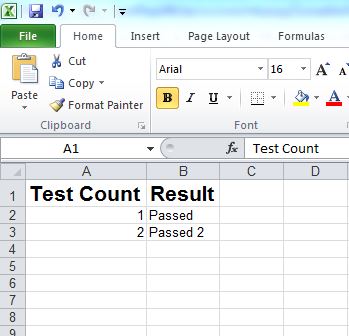
The code formats the header to Arial, 16px, Bold font. There are several other supported fonts and sizes available to explore. There are many additional features of JExcel that can be used to create an even more refined and well formatted excel. This article gives you a headstart. Refer to the following links in the references to get going faster.
It used log4j:log4j:1.2.14 which is vulnerable. It needs to be replaced with org.apache.logging.log4j:log4j-core:2.17.1
best option is apachee.poi
How to read two excel rows simultaneously ? I have a property xlsx file as :
Name | ID | FirstName| Lastname
1 | 2 | 3 | 4
I wanted to create one has map for the same like
Key–Value
Name – 1
ID – 2
like wise can some one help me I am getting error for the following code
public class ExcelReader {
public static ArrayList ar = new ArrayList();
public static ArrayList val = new ArrayList();
public static LinkedHashMap cmMappingHashMap = new
LinkedHashMap();
public static String str;
public static Row row;
public static void main(String[] args)throws IOException{
String excelFilePath = “C:\\Users\\test\\Downloads\\contacts.xlsx”;
FileInputStream inputStream = new FileInputStream(new File(excelFilePath));
Workbook workbook = new XSSFWorkbook(inputStream);
Sheet firstSheet = workbook.getSheetAt(0);
Iterator rowIterator = firstSheet.rowIterator();
while (rowIterator.hasNext()) {
Row row = rowIterator.next();
Row row2 = rowIterator.next();
row2.setRowNum(1);
System.out.println(row.getRowNum());
// Now let’s iterate over the columns of the current row
Iterator cellIterator = row.cellIterator();
Iterator cellIterator1 = row2.cellIterator();
while (cellIterator.hasNext()&&cellIterator1.hasNext()) {
Cell cell = cellIterator.next();
Cell cell1 = cellIterator1.next();
System.out.println(cell.getColumnIndex());
System.out.print(cell.getStringCellValue()+ “–“+cell1.getNumericCellValue());
}
}
}
Someone please help me, i am not able create workbook
java.io.FileNotFoundException: C:\MyFirstExcel.xls (Access is denied)
at java.io.FileOutputStream.open0(Native Method)
at java.io.FileOutputStream.open(Unknown Source)
at java.io.FileOutputStream.(Unknown Source)
at java.io.FileOutputStream.(Unknown Source)
at jxl.Workbook.createWorkbook(Workbook.java:301)
at jxl.Workbook.createWorkbook(Workbook.java:286)
at ExcelWrite_shashikumar.main(ExcelWrite_shashikumar.java:21)
am using Win10 OS and jxl jar
jxl is old api, you should try with apache poi api might be your problem solved
if I wrong please inform me
Check if you are allowed to create a file in C:\? Change the location where you are trying to save the file
your disk drive is not allowing to access the file. even i had the same, i have changed the file path to non restriction place
is jexcel used to open excel file in UI and allows simultaneous operations between excel and UI in java?
I get FileNotFoundException when I use same code to create a file. Should there be an excel file with same name already created?
I think you should try with absolute path
while writing data into file, even though file is not already available no problem. but while reading data from file pre existence of file is mandatory
yes you need to create a file before running, but it should automatically create file for write operation, but dont know why not working for me too.
Actually, i want to scan excel file on java .
can u guide me
My Requirement is make the excel file with readonly.
I want to preview the excel file using java, and then allowing option to save it. I need to show the excel file in jframe or any other way so that I could just preview it and ask the user to save that