
This article talks about reading and writing PDF using iText PDF library.
        <dependency>
            <groupId>com.itextpdf</groupId>
            <artifactId>itextpdf</artifactId>
            <version>5.5.10</version>
        </dependency>
P.S Tested with iTextPdf 5.5.10
1. iText – Write PDF
iText PdfWriter example to write content to a PDF file.
package com.mkyong;

import com.itextpdf.text.*;
import com.itextpdf.text.pdf.PdfWriter;

import java.io.File;
import java.io.FileNotFoundException;
import java.io.FileOutputStream;
import java.io.IOException;

public class PdfWriteExample {

    private static final String FILE_NAME = "/tmp/itext.pdf";

    public static void main(String[] args) {
        writeUsingIText();
    }

    private static void writeUsingIText() {

        Document document = new Document();

        try {

            PdfWriter.getInstance(document, new FileOutputStream(new File(FILE_NAME)));

            //open
            document.open();

            Paragraph p = new Paragraph();
            p.add("This is my paragraph 1");
            p.setAlignment(Element.ALIGN_CENTER);

            document.add(p);

            Paragraph p2 = new Paragraph();
            p2.add("This is my paragraph 2"); //no alignment

            document.add(p2);

            Font f = new Font();
            f.setStyle(Font.BOLD);
            f.setSize(8);

            document.add(new Paragraph("This is my paragraph 3", f));

            //close
            document.close();

            System.out.println("Done");

        } catch (FileNotFoundException | DocumentException e) {
            e.printStackTrace();
        } catch (IOException e) {
            e.printStackTrace();
        }

    }
}
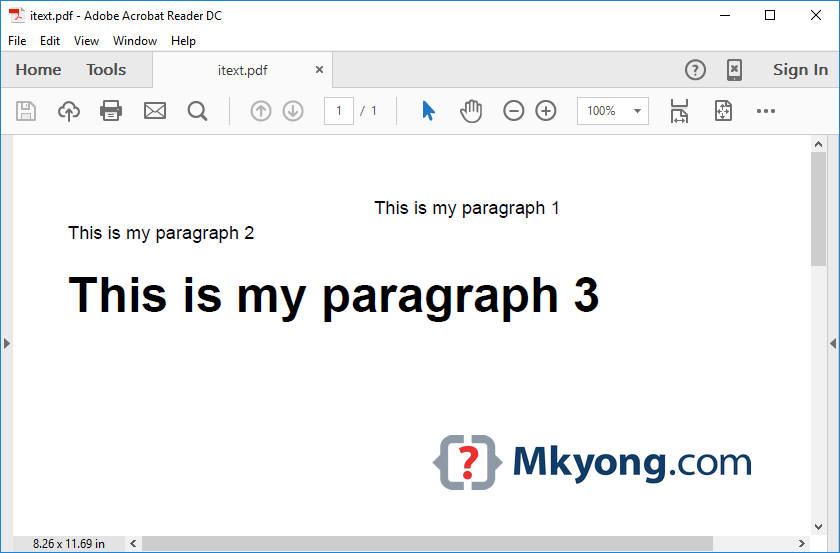
Output, a new PDF file is created – /tmp/itext.pdf
2. iText – Read PDF
iText PdfReader example to read above PDF file.
package com.mkyong;

import com.itextpdf.text.pdf.PdfReader;
import com.itextpdf.text.pdf.parser.PdfTextExtractor;

import java.io.IOException;

public class PdfReadExample {

    private static final String FILE_NAME = "/tmp/itext.pdf";

    public static void main(String[] args) {

        PdfReader reader;

        try {

            reader = new PdfReader("f:/itext.pdf");

            // pageNumber = 1
            String textFromPage = PdfTextExtractor.getTextFromPage(reader, 1);

            System.out.println(textFromPage);

            reader.close();

        } catch (IOException e) {
            e.printStackTrace();
        }

    }

}
Output
This is my paragraph 1
This is my paragraph 2
This is my paragraph 3
3. Talk
The code above uses 2 major classes – PdfWriter and PdfReader. As indicated by the name, these classes provide the base for reading and writing a pdf. Document object is basically a Pdf file which is being addressed. Paragraph is a content type that can be written to the Pdf. Other possible content types include Anchor, Chapter, Section, List, PdfPTable etc. All these classes help to create a specific type of content as per the requirement in the pdf.
iText pdf is the most convenient library with its latest version supporting HTML to Pdf, Image to Pdf as well as QR codes. The only drawback of the iText pdf library is that it is complex to work with it. The class structure is tough to understand.
More iText PDF examples
Hi,
I have to read tabular data from pdf in which one column is having tick symbol.Do you have any workaround to fetch it also as I am getting “??” this symbol while trying to exporting it to excel.
Hi, did you find any solution ? I am also looking for a similar problem
The ABOVE PROFRAM IS GOOD FOR WRITING IN PDF VIA iTEXT BUT I AM OOKING FOR IF IT WILL BE PASSED IN HINDI THEN NO OUTPUT IN PDF.LOOKING FOR URGENT SOULTION,PLEASE CAN ANYONE PROVED?
EXAMPLE=
Paragraph p2 = new Paragraph();
p2.add(“?????”); //no alignment
document.add(p2);
Do you have any solution. I am also looking for similar problem
i want to read data from word document in page wise , is there any way to do that ? i couldn’t able to find any related things
Could you please tell me how to read an inputstream and write it into pdf using itext in java ?
Is there any possibility to read the PDF from URL >? then parse it > thanks
Error: Could not find or load main class app
Thanks
Hello
I have a large number of pdf files and
I am usining pdfviewer to display the content of a pdf file on my web page
I wish to display all the pdf files on the sme web pae by selection
Is it pissible that you have a script that I can use?
Besst
Lloyd
How can we extract Arabic or Persian text? Its showing strange characters
Hi,
Can anyone give me an idea as to how we could update the text in document using iText.
just read it,modify and write to a new file