
In this example, we will show you how to login a website via standard Java HttpsURLConnection. This technique should be working in most of the login form.
Tools & Java Library used in this example
- Google Chrome Browser – Network tab to analyze HTTP request and response header fields.
- jsoup library – Extracts HTML form values.
- JDK 6.
1. Analyze Http Headers, form data.
To login a website, you need to know following values :
- Login form URL.
- Login form data.
- URL for authentication.
- Http request / response header.
Uses Google Chrome to get above data. In Chrome, right click everywhere, choose “Inspect Element” -> “Network” tab.
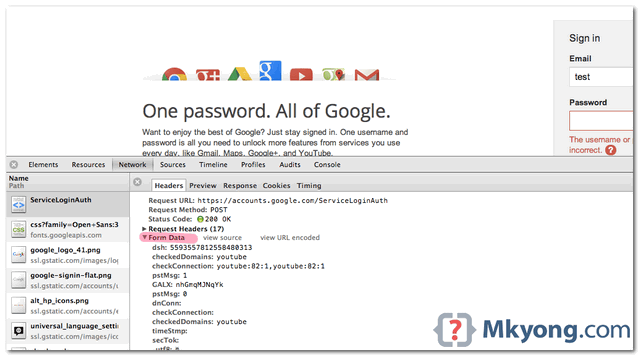
Before you code, try login via Chrome, observe how the HTTP request, response and form data works, later you need to simulate the same steps in Java.
2. HttpsURLConnection Example
In this example, we show you how to login Gmail.
Summary :
- Send an HTTP “GET” request to Google login form – https://accounts.google.com/ServiceLoginAuth
- Analyze the form data via Google Chrome’s “Network” feature. Alternatively, you can view the HTML source code.
- Use jSoup library to extract all visible and hidden form’s data, replace with your username and password.
- Send a HTTP “POST” request back to login form, along with the constructed parameters
- After user authenticated, send another HTTP “GET” request to Gmail page. https://mail.google.com/mail/
Note
This example is just to show you the capability and functionality of Java HttpURLConnection. In general, you should use the Google Gmail API to interact with Gmail.
This example is just to show you the capability and functionality of Java HttpURLConnection. In general, you should use the Google Gmail API to interact with Gmail.
HttpUrlConnectionExample.java
package com.mkyong;

import java.io.BufferedReader;
import java.io.DataOutputStream;
import java.io.InputStreamReader;
import java.io.UnsupportedEncodingException;
import java.net.CookieHandler;
import java.net.CookieManager;
import java.net.URL;
import java.net.URLEncoder;
import java.util.ArrayList;
import java.util.List;
import javax.net.ssl.HttpsURLConnection;
import org.jsoup.Jsoup;
import org.jsoup.nodes.Document;
import org.jsoup.nodes.Element;
import org.jsoup.select.Elements;

public class HttpUrlConnectionExample {

  private List<String> cookies;
  private HttpsURLConnection conn;

  private final String USER_AGENT = "Mozilla/5.0";

  public static void main(String[] args) throws Exception {

	String url = "https://accounts.google.com/ServiceLoginAuth";
	String gmail = "https://mail.google.com/mail/";

	HttpUrlConnectionExample http = new HttpUrlConnectionExample();

	// make sure cookies is turn on
	CookieHandler.setDefault(new CookieManager());

	// 1. Send a "GET" request, so that you can extract the form's data.
	String page = http.GetPageContent(url);
	String postParams = http.getFormParams(page, "[email protected]", "password");

	// 2. Construct above post's content and then send a POST request for
	// authentication
	http.sendPost(url, postParams);

	// 3. success then go to gmail.
	String result = http.GetPageContent(gmail);
	System.out.println(result);
  }

  private void sendPost(String url, String postParams) throws Exception {

	URL obj = new URL(url);
	conn = (HttpsURLConnection) obj.openConnection();

	// Acts like a browser
	conn.setUseCaches(false);
	conn.setRequestMethod("POST");
	conn.setRequestProperty("Host", "accounts.google.com");
	conn.setRequestProperty("User-Agent", USER_AGENT);
	conn.setRequestProperty("Accept",
		"text/html,application/xhtml+xml,application/xml;q=0.9,*/*;q=0.8");
	conn.setRequestProperty("Accept-Language", "en-US,en;q=0.5");
	for (String cookie : this.cookies) {
		conn.addRequestProperty("Cookie", cookie.split(";", 1)[0]);
	}
	conn.setRequestProperty("Connection", "keep-alive");
	conn.setRequestProperty("Referer", "https://accounts.google.com/ServiceLoginAuth");
	conn.setRequestProperty("Content-Type", "application/x-www-form-urlencoded");
	conn.setRequestProperty("Content-Length", Integer.toString(postParams.length()));

	conn.setDoOutput(true);
	conn.setDoInput(true);

	// Send post request
	DataOutputStream wr = new DataOutputStream(conn.getOutputStream());
	wr.writeBytes(postParams);
	wr.flush();
	wr.close();

	int responseCode = conn.getResponseCode();
	System.out.println("\nSending 'POST' request to URL : " + url);
	System.out.println("Post parameters : " + postParams);
	System.out.println("Response Code : " + responseCode);

	BufferedReader in =
             new BufferedReader(new InputStreamReader(conn.getInputStream()));
	String inputLine;
	StringBuffer response = new StringBuffer();

	while ((inputLine = in.readLine()) != null) {
		response.append(inputLine);
	}
	in.close();
	// System.out.println(response.toString());

  }

  private String GetPageContent(String url) throws Exception {

	URL obj = new URL(url);
	conn = (HttpsURLConnection) obj.openConnection();

	// default is GET
	conn.setRequestMethod("GET");

	conn.setUseCaches(false);

	// act like a browser
	conn.setRequestProperty("User-Agent", USER_AGENT);
	conn.setRequestProperty("Accept",
		"text/html,application/xhtml+xml,application/xml;q=0.9,*/*;q=0.8");
	conn.setRequestProperty("Accept-Language", "en-US,en;q=0.5");
	if (cookies != null) {
		for (String cookie : this.cookies) {
			conn.addRequestProperty("Cookie", cookie.split(";", 1)[0]);
		}
	}
	int responseCode = conn.getResponseCode();
	System.out.println("\nSending 'GET' request to URL : " + url);
	System.out.println("Response Code : " + responseCode);

	BufferedReader in =
            new BufferedReader(new InputStreamReader(conn.getInputStream()));
	String inputLine;
	StringBuffer response = new StringBuffer();

	while ((inputLine = in.readLine()) != null) {
		response.append(inputLine);
	}
	in.close();

	// Get the response cookies
	setCookies(conn.getHeaderFields().get("Set-Cookie"));

	return response.toString();

  }

  public String getFormParams(String html, String username, String password)
		throws UnsupportedEncodingException {

	System.out.println("Extracting form's data...");

	Document doc = Jsoup.parse(html);

	// Google form id
	Element loginform = doc.getElementById("gaia_loginform");
	Elements inputElements = loginform.getElementsByTag("input");
	List<String> paramList = new ArrayList<String>();
	for (Element inputElement : inputElements) {
		String key = inputElement.attr("name");
		String value = inputElement.attr("value");

		if (key.equals("Email"))
			value = username;
		else if (key.equals("Passwd"))
			value = password;
		paramList.add(key + "=" + URLEncoder.encode(value, "UTF-8"));
	}

	// build parameters list
	StringBuilder result = new StringBuilder();
	for (String param : paramList) {
		if (result.length() == 0) {
			result.append(param);
		} else {
			result.append("&" + param);
		}
	}
	return result.toString();
  }

  public List<String> getCookies() {
	return cookies;
  }

  public void setCookies(List<String> cookies) {
	this.cookies = cookies;
  }

}
Output
Sending 'GET' request to URL : https://accounts.google.com/ServiceLoginAuth
Response Code : 200
Extracting form data...

Sending 'POST' request to URL : https://accounts.google.com/ServiceLoginAuth
Post parameters : dsh=-293322094146108856&GALX=CExqdUbvEr4&timeStmp=&secTok=&_utf8=%E2%98%83
&bgresponse=js_disabled&Email=username&Passwd=password&signIn=Sign+in&PersistentCookie=yes&rmShown=1
Response Code : 200

Sending 'GET' request to URL : https://mail.google.com/mail/
Response Code : 200
<!-- gmail page content.....-->
Note
Refer to this equivalent example, but using Apache HttpClient to send HTTP request.
Refer to this equivalent example, but using Apache HttpClient to send HTTP request.

hello Great work but how would i login in to a .onion webpage
1.Type mismatch: cannot convert from org.jsoup.select.Elements to javax.lang.model.util.Elements
Elements inputElements = loginform.getElementsByTag(“input”);
2.Can only iterate over an array or an instance of java.lang.Iterable
for (Element inputElement : inputElements) {
(line # is approx 143-145
I got these two errors. I used maven dependency
<dependency>
<groupId>org.jsoup</groupId>
<artifactId>jsoup</artifactId>
<version>1.13.1</version>
</dependency>
If you like my tutorials, consider make a donation to
If you like my tutorials, consider make a donation
Exception in thread “main” java.lang.ClassCastException: class sun.net.www.protocol.http.HttpURLConnection cannot be cast to class javax.net.ssl.HttpsURLConnection (sun.net.www.protocol.http.HttpURLConnection and javax.net.ssl.HttpsURLConnection are in module java.base of loader ‘bootstrap’)
The “name” attribute for password is not present in html .Try changing the code like this
for (Element inputElement : inputElements) {
String key = inputElement.attr(“id”);
String value = inputElement.attr(“value”);
if (key.equals(“Email”))
value = username;
else if (key.equals(“Passwd-hidden”))
value = password;
paramList.add(key + “=” + URLEncoder.encode(value, “UTF-8”));
}
It works for me!
please sub to my youtube channel it is nataya quintanilla
thanks
im working in blueJ and not able to compile this code
I’m pretty sure this block of code in “GetPageContent()” is useless:
if (cookies != null) {
for (String cookie : this.cookies) {
conn.addRequestProperty(“Cookie”, cookie.split(“;”, 1)[0]);
}
}
hi
thanks for the blog,
the mistake in my code is that i not enabled cookies, and after i see your code i try it and it’s work thanks
I would like to login to amazon seller central using this code, but no success.
Below is the code that I am using:
https://stackoverflow.com/questions/44507557/login-to-amazon-seller-central-website-using-java
Please let me know what wrong I am doing:
This is great code! worked on first try. If you trying to log into a different website, you need to tweak some of the code. For example, finding the form tags is probably different, it may not even have an Id so you have to change how it finds the appropriate form element. Also, when it’s replicating what a browser does you need to change the referrer. Another one is in the form tag that gets the user and password, the value of the name tags might be different. It could be email instead of username, or it could be name, or pword instead of password. You have to check the source or inspect the form element to find out what they are specifically for that site.
Hello,
The cookie does not generate for me. I have made below changes. However, it still does not work.
Can you kindly help.
String key = inputElement.attr(“id”);
String value = inputElement.attr(“value”);
if (key.equals(“Email”))
value = username;
else if (key.equals(“Passwd-hidden”))
value = password;
thank you so much for the tutorial. i just clicked your ads to support you. 😉
lol
Hello,thanks for this tutorial. I am trying to implement this code to my android application to provide automatic login to a specific website. However I am having difficulties in seeing the output on emulator(or on my phone when I run the app) in android studio. Can you please help? I would like to get a specific data field from the page that the user have login.
Thanks in advance.
Hi MKyong!
Thanks for your tutorial!
I have tried using your code for some other site. But while reading the response, it return unknown forat like “‹” unknown format..,
Please guid me on this..,
Hello, is possible to HttpURLConnection instance from last HTTP GET (gmail content page) interpreted and show in WEB browser.
I want to use Spring MVC, but I don´t know how I can this last HttpURLConnection instance interpreted as VIEW.
Thanks for your answers.
Hi! I am trying to modify this to match login for facebook. I get everything to work, except that it doesn’t go past the login page. My best guess is that it is coded differently for the getFormParams – that the input method that I am trying to use with this code is not compatible for Facebooks loginform and inputElements.
As I do not fully understand how these element(s) work I am hoping that you could nod me in the right direction of what I need to look out for in order to properly modify the code.
Best Regards,
Nimer.
I got 200 Ok regardless if I used your fake ID/password or my own ID/password? How can you verify that I am truly logged in?
How would I be able to redirect using the browser after the authentication/validation has occurred?
Thanks, works nice for me! 🙂
Hi Mkyong,
I tried the above code. But it did not open a new browser window or open in the same browser window. It just printed in the console. I need to automatically login into a different web site from my company web site. Please let me know what could be the problem.
Thanks
Hi
In the getPageContent method, when is the connection established exactly?
How to use in android? I want to show webpage in webview. I’m begginer plz help me
After running this code i am not able see any browser with my gmail UI. My requirement is from java code open a browser with gmail UI.
Hi Navin,
My requirement is same. It didn’t work for me 2. If you have found any solution please let me know.
Thanks
Hi Guys, old post but to answer you’re question – you could either use java to launch a process like this (and you should also be able to add url to end of iexplore.exe):
Runtime rt = Runtime.getRuntime();
Process p = rt.exec(“C:/Program Files/Internet Explorer/IEXPLORE.EXE”);
System.out.println(“P:”+p);
p.waitFor();
System.out.println(“P Now:”+p);
Or this looks good from Stack Overflow:
http://stackoverflow.com/questions/5226212/how-to-open-the-default-webbrowser-using-java
java.awt.Desktop is the class you’re looking for.
import java.awt.Desktop;
import java.net.URI;
// …
if(Desktop.isDesktopSupported())
{
Desktop.getDesktop().browse(new URI(“http://www.example.com”));
}
Thanks Tim Cooper.
Hope this helps anyone
This is the bunch of error i get
at sun.reflect.NativeConstructorAccessorImpl.newInstance(Unknown Source)
at sun.reflect.DelegatingConstructorAccessorImpl.newInstance(Unknown Source)
at java.lang.reflect.Constructor.newInstance(Unknown Source)
at sun.net.www.protocol.http.HttpURLConnection$10.run(Unknown Source)
at sun.net.www.protocol.http.HttpURLConnection$10.run(Unknown Source)
at java.security.AccessController.doPrivileged(Native Method)
at sun.net.www.protocol.http.HttpURLConnection.getChainedException(Unknown Source)
at sun.net.www.protocol.http.HttpURLConnection.getInputStream0(Unknown Source)
at sun.net.www.protocol.http.HttpURLConnection.getInputStream(Unknown Source)
at sun.net.www.protocol.https.HttpsURLConnectionImpl.getInputStream(Unknown Source)
at AutomaticLogin.sendPost(AutomaticLogin.java:122)
at AutomaticLogin.main(AutomaticLogin.java:56)
Caused by: java.io.IOException: Server returned HTTP response code: 400 for URL: https://accounts.craigslist.org/login
at sun.net.www.protocol.http.HttpURLConnection.getInputStream0(Unknown Source)
at sun.net.www.protocol.http.HttpURLConnection.getInputStream(Unknown Source)
at java.net.HttpURLConnection.getResponseCode(Unknown Source)
at sun.net.www.protocol.https.HttpsURLConnectionImpl.getResponseCode(Unknown Source)
at AutomaticLogin.sendPost(AutomaticLogin.java:116)
… 1 more
Hello I am trying to do with a website which allows you to sign up at the same time so I get a Error like sun.reflect.NativeConstructorAccessorImpl.newInstance0(Native Method) and it shows error response code 400
All works great! Thanks you!
Hello
it does not work for Android 4.4.2.
java.net.protocolexception: content-length promised 232 bytes, but received 0 on conn.getResponseCode();
use the Apache version instead
sir can you please tell me how to scratch data dynamically from any website that dont have an API
i tried to user this code for http://www.naver.com
but i got a problem that “Due to security reasons, you need to enter the code in the image along with your password.”
i don’t know
can anybody help me?
I dunno if you figured it out yet or not but, the “code in the image” is literally meant to keep bots/programs from logging on. In short, you can’t do it as far as I know.
Hi,
This code works perfectly for google, so…i tried to do the same for facebook, but i can’t establish the connection. How it could be?
anyway, dude…you’re amazing!
Thanks!
this code didnt work for me!Its just shows the google login page!Can you pls help me!!
Hi, Did you finally get it work? I got the same result as showing the google login page ..
how to go to next page using this?
Thank you for your example, works very well and easy to modify for other websites.
I tried your code & it worked fine for google.
However, when I used it for different website, user-id & pwd are not getting posted though response code is 200.
The cookie is not getting generated.
The html read after posting the parameters is of original login page.
However, when I manually fill & submit the form, next page appears & cookie too gets generated.
What can be possible sources of problem?
have you figured this out yet? i’m encountering the same problem
Great! Thanks a lot for your tutorial.
With minor changes i figured out how to login to another page that did not provide any api, Thanks!!
HI amir,
Is this code working for you? If yes then please share your code with me.
my id: [email protected]
thanks in advance,
pravat kumar dash
I’m trying this with schwab’s website. There are hidden parameters…. how do I modify what I can’t see?
i get a null pointer error for cookies in line for(….,this.cookies)
Could you solve this? I am also facing the same problem
Hi
I tried to use this code but it agains ask to sign in.
Output:
HTML of gmail login page
tried to use your code
•
2 minutes ago
?
I tried to use your code
•
2 minutes ago
?
+
I tried to use your code
see more
0
0
You must sign in to down-vote this post.
•
Reply
•
Share ›
Twitter
Facebook
Link
Renato Cohen
•
2 months ago
?
+
Hello,
I tried to use your code but I got an issue about certification.
So I add part of a code to trust all certifications:
// Configure the SSLContext with a TrustManager
SSLContext ctx = SSLContext.getInstance(“SSL”);
TrustManager[] trustAllCerts = new TrustManager[] { new X509TrustManager() {
public X509Certificate[] getAcceptedIssuers(
+
I tried to use your code
I tried to use your code
hi sir,
i need to extract the data from a form dynamically created using javascript, so when i take the page source i will not find the form but when i inspect that i can see the form ,so if i need to extract that form data using jsoup how is that possible
Hello,
I tried to use your code but I got an issue about certification.
So I add part of a code to trust all certifications:
// Configure the SSLContext with a TrustManager
SSLContext ctx = SSLContext.getInstance(“SSL”);
TrustManager[] trustAllCerts = new TrustManager[] { new X509TrustManager() {
public X509Certificate[] getAcceptedIssuers() {
return null;
}
public void checkServerTrusted(X509Certificate[] chain, String authType) throws CertificateException {
}
public void checkClientTrusted(X509Certificate[] chain, String authType) throws CertificateException {
}
} };
ctx.init(null, trustAllCerts, new java.security.SecureRandom());
SSLContext.setDefault(ctx);
When I connect to Gmail it works properly, but I tried with another website and it doesn’t work.
The program didn’t return any error, just don’t do the login on the website.
Anyone can help me?
My e-mail is [email protected].
Best regards,
Renato Cohen
Great tutorial. I have it working in Netbeans 7 but I’m having trouble getting it to work on Android. The part that is not working is the line:
CookieHandler.setDefault( new CookieManager());
Any ideas on how to get this to work on Android? Thanks.
I don’t know if you still need help, but you need to import the java version of the CookieManager and Handler, and not the Android one 😉
thank you sir,
this code is worked with me but it is not login to gmail account
it is back to login form
i tired.. any help 🙂
I get this error on running the application. Any ideas ??
“We’ve detected a problem with your cookie settings. Enable cookies Make sure your cookies are enabled. To enable cookies, follow these browser-specific instructions. Clear cache and cookies If you have cookies enabled but are still having trouble, clear your browser’s cache and cookies. Adjust your privacy settings If clearing your cache and cookies doesn’t resolve the problem, try adjusting your browser’s privacy settings. If your settings are on high, manually add http://www.google.com to your list of allowed sites.”
I have the same problems, Have you sovle it ? I need some help.
Great tutorial! Thank you for sharing!
dude, you are excellent!!!
Hi i writing from turkei. Yours tutorials are awesome so I follow all of them. But i cant understanding “String postParams = http.getFormParams(page, “[email protected]”, “password”);” How to input form specific form area ?
Thanks for your tutorial!
I coded this example but I could not have an access to my account.
I just set my account and password into ‘http.getFormParams(page, …, …);’ on your source code.
After 3rd step ‘success then go to gmail’, I just got the string result below.
————-
Gmail: Email from Google <meta name="description" content="10+ GB of storage, less spam, and mobile access. Gmail is email that' ….
————-
Could you give me an any advice? I need your help. Thanks.
I have logged on to my Gmail account using your tutorial, ‘Apache HttpClient Examples’.
Thanks!:)
Hey thanks for your tutorial.
But if i had a Site with a security answer, how to implement this? How to send the answer of the security question to the validation address of the specific site?
Hello!!
I need to develop a web crawler to access a page and makes a parse inside.
But I have a problem, I’ve tried everything to get this page and I can not, I do not know what and where to look on jsoup to make the User password and enter it.
The page: http://locatepeople.com.br/pesquisa/
Could you help me, please.
Thank you!
I have run it, but can’t access to the gmail, still need login,why??
Analyze the form data via Google Chrome??s ??Network?? feature, you will find the parma
bgresponse is a very long str, but not the value js_disabled
I think how to get the bgresponse’s value, it’s very hard.
Hi I tried this and wrote the output to file, rather than get the web page I get the following “JavaScript must be enabled in order for you to use Gmail in standard view. However, it seems JavaScript is either disabled or not supported by your browser. To use standard view, enable JavaScript by changing your browser options, then try again…..”
Can you advise?
Thanks
Mike
nice tutorial
thank you,
Sending ‘GET’ request to URL : https://accounts.google.com/ServiceLoginAuth
Response Code : 200
Extracting form’s data…
java.net.ConnectException: Connection timed out: connect
at java.net.PlainSocketImpl.socketConnect(Native Method)
at java.net.PlainSocketImpl.doConnect(PlainSocketImpl.java:351)
at java.net.PlainSocketImpl.connectToAddress(PlainSocketImpl.java:213)
at java.net.PlainSocketImpl.connect(PlainSocketImpl.java:200)
at java.net.SocksSocketImpl.connect(SocksSocketImpl.java:366)
at java.net.Socket.connect(Socket.java:529)
at com.sun.net.ssl.internal.ssl.SSLSocketImpl.connect(SSLSocketImpl.java:559)
at com.sun.net.ssl.internal.ssl.BaseSSLSocketImpl.connect(BaseSSLSocketImpl.java:141)
at sun.net.NetworkClient.doConnect(NetworkClient.java:163)
at sun.net.www.http.HttpClient.openServer(HttpClient.java:394)
at sun.net.www.http.HttpClient.openServer(HttpClient.java:529)
at sun.net.www.protocol.https.HttpsClient.(HttpsClient.java:272)
at sun.net.www.protocol.https.HttpsClient.New(HttpsClient.java:329)
at sun.net.www.protocol.https.AbstractDelegateHttpsURLConnection.getNewHttpClient(AbstractDelegateHttpsURLConnection.java:172)
at sun.net.www.protocol.http.HttpURLConnection.plainConnect(HttpURLConnection.java:911)
at sun.net.www.protocol.https.AbstractDelegateHttpsURLConnection.connect(AbstractDelegateHttpsURLConnection.java:158)
at sun.net.www.protocol.http.HttpURLConnection.followRedirect(HttpURLConnection.java:2124)
at sun.net.www.protocol.http.HttpURLConnection.getInputStream(HttpURLConnection.java:1367)
at java.net.HttpURLConnection.getResponseCode(HttpURLConnection.java:379)
at sun.net.www.protocol.https.HttpsURLConnectionImpl.getResponseCode(HttpsURLConnectionImpl.java:318)
at main.HttpCilentExample.sendPost(HttpCilentExample.java:131)
at main.HttpCilentExample.main(HttpCilentExample.java:43)
Hi,
Thanks for the solution, I tried your code on Android. It is giving me Response code 400 on Post Request.
05-31 06:59:14.877: W/System.err(4274): java.io.FileNotFoundException: https://accounts.google.com/CheckCookie?chtml=LoginDoneHtml&continue=https%3A%2F%2Faccounts.google.com%2FManageAccount
Any Solution for this Problem?
Thanks for this tutorial.
I tried to follow this code. Got exception from the following line.
conn = (HttpsURLConnection) obj.openConnection();
Exception is java.lang.ClassCastException: sun.net.www.protocol.http.HttpURLConnection cannot be cast to javax.net.ssl.HttpsURLConnection.
java.net.URL obj = new URL(null, url,new sun.net.www.protocol.https.Handler());
solved the problem
watch more about this problem in http://stackoverflow.com/a/12796611
Make sure you imports the correct HttpsURLConnection.
love your tutorials man !
havnt checked this one yet, but i know it’ll work 🙂
And its something i really wanted to implement as everyday as soon as reach office first thing i do is open all my emails from like 10 accounts 😀
Thanks for your kind words, this example is just a simple http client to send and get something. To integrate with your email, better consult the email APIs.
i followed the code above but it doesn’t seem to login to a specific website I put in the url.
can you help?