This article shows you how to run or debug a web application on Tomcat server, using IntelliJ IDEA.
Note
Unlike Eclipse IDE, there is always a ‘server view’ to configure the add server, IntelliJ do things differently, you need to add an “artifact (war file)” first, then only the “server view” will be displayed at the bottom.
Unlike Eclipse IDE, there is always a ‘server view’ to configure the add server, IntelliJ do things differently, you need to add an “artifact (war file)” first, then only the “server view” will be displayed at the bottom.
1. Tomcat Plugin
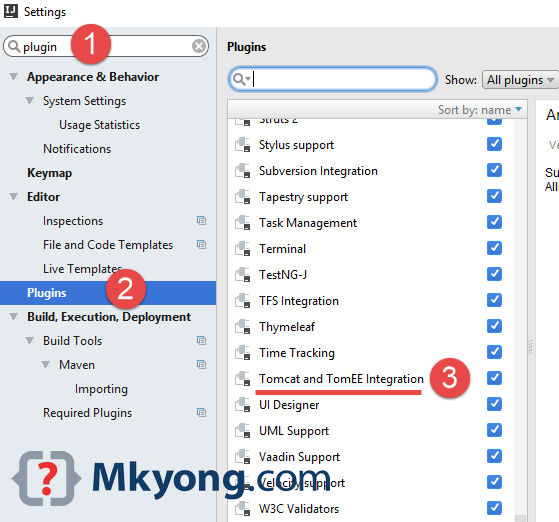
1.1 File –>> Settings –>> Type Plugin –>> Make sure Tomcat and TomEE Integration is checked.
2. Run/Debug Configuration
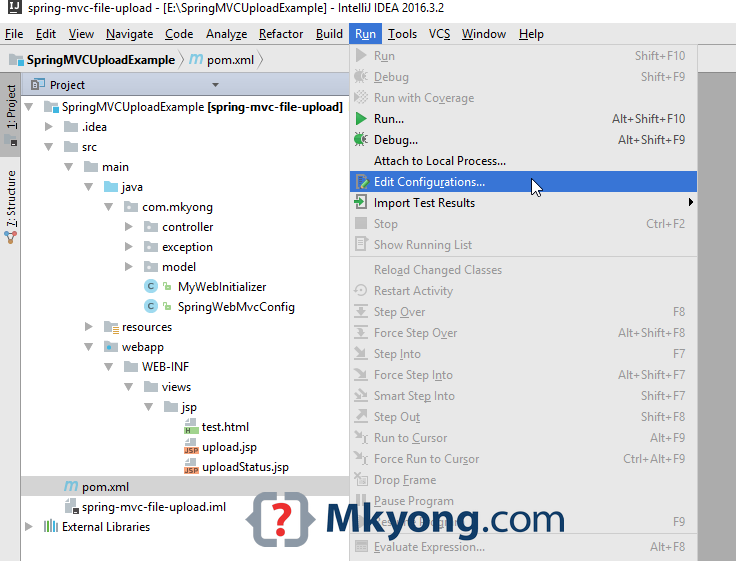
2.1 Run –>> Edit Configurations…
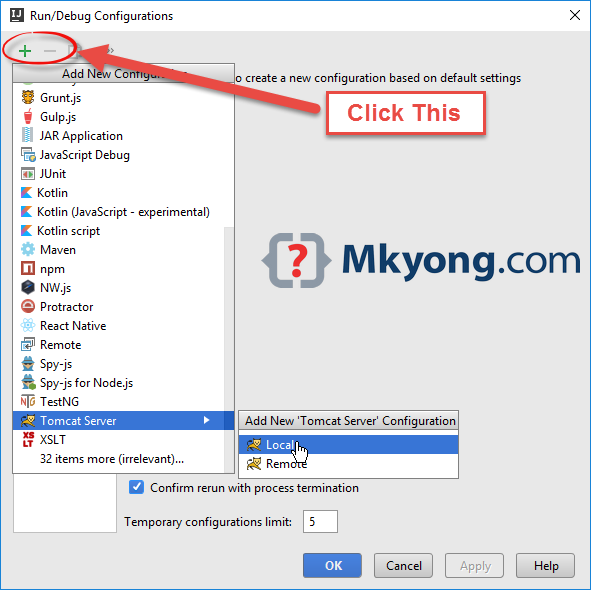
2.2 Clicks + icon, select Tomcat Server –>> Local
3. Tomcat Configuration
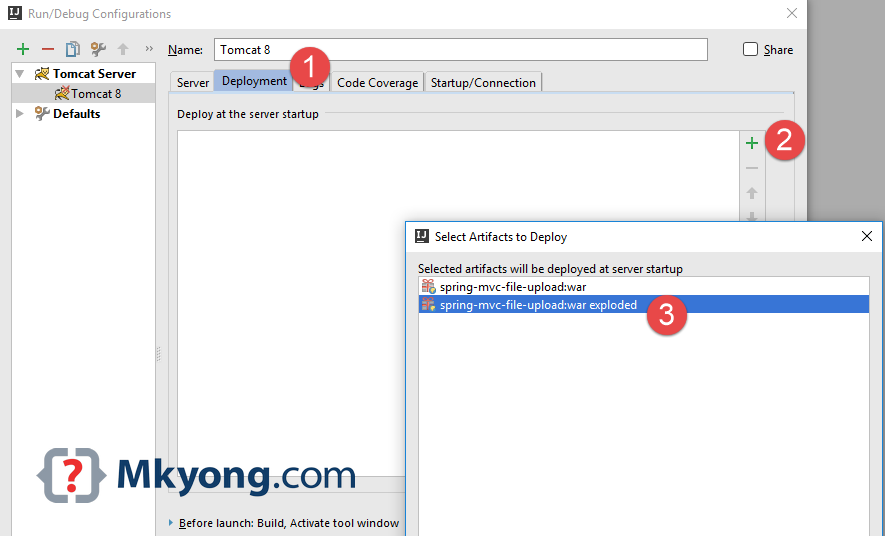
3.1 Clicks on the “Deployment” tab, + icon to select an artifact to deploy. For break point debugging, always choose the exploded war version.
3.2 Clicks on “Server” tab, select a Tomcat server, and update the on 'Update' action to “Update classes and resources” – for hot swap.
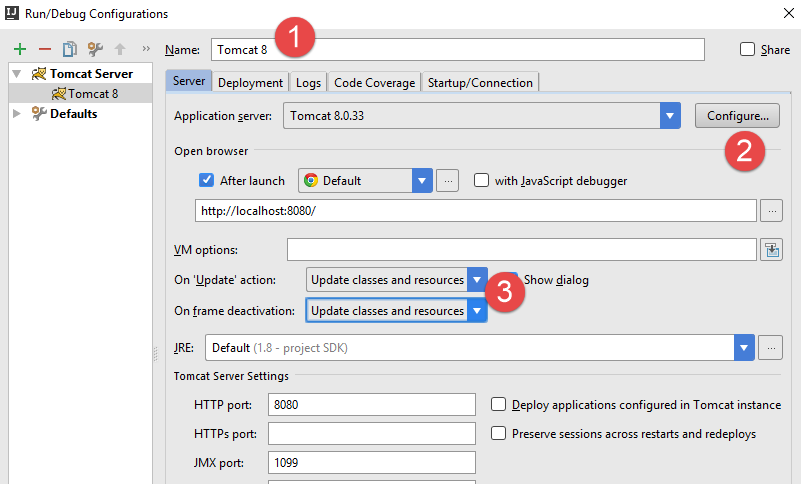
4. Application Servers
4.1 Now you can see an “Application Servers” view displayed at the bottom panel.
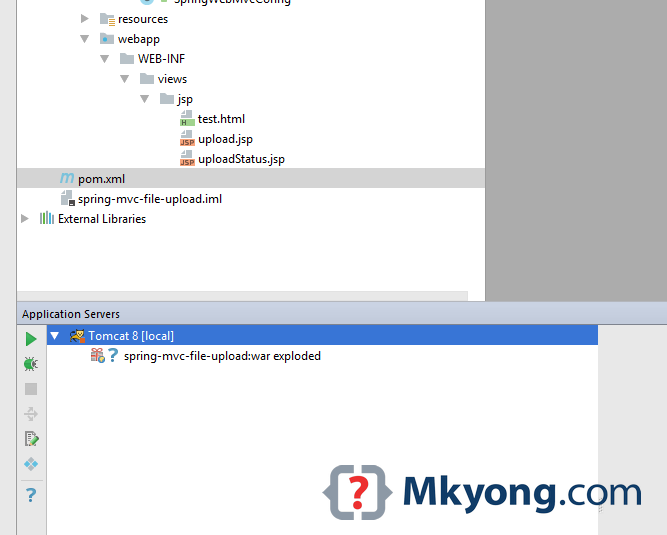
Start or debug your web application, done.

Thank admin
bullshit. Doesnt work in community edition.
thnx
please complete this post with https.
Awesome. Exactly what I needed.
I followed steps mentioned by mkyong, but its my bad luck that my tomcat server not started. Also not getting any error on tomcat log. Below result appeared in log file. Can anyone please suggest where i was wrong.
C:\ETLProduct\Tomcat-9.0.12\bin\catalina.bat run
[2020-04-10 04:27:25,096] Artifact goetldashboard:war exploded: Waiting for server connection to start artifact deployment…
Using CATALINA_BASE: “C:\Users\rmishra\.IntelliJIdea2019.1\system\tomcat\Unnamed_goetldashboard_2”
Using CATALINA_HOME: “C:\ETLProduct\Tomcat-9.0.12”
Using CATALINA_TMPDIR: “C:\ETLProduct\Tomcat-9.0.12\temp”
Using JRE_HOME: “C:\Program Files\AdoptOpenJDK\jre-8.0.242.08-hotspot”
Using CLASSPATH: “C:\ETLProduct\Tomcat-9.0.12\bin\bootstrap.jar;C:\ETLProduct\Tomcat-9.0.12\bin\tomcat-juli.jar”
INFO [main] org.apache.catalina.startup.VersionLoggerListener.log Server version: Apache Tomcat/9.0.12
INFO [main] org.apache.catalina.startup.VersionLoggerListener.log Server built: Sep 4 2018 22:13:41 UTC
INFO [main] org.apache.catalina.startup.VersionLoggerListener.log Server number: 9.0.12.0
INFO [main] org.apache.catalina.startup.VersionLoggerListener.log OS Name: Windows 10
INFO [main] org.apache.catalina.startup.VersionLoggerListener.log OS Version: 10.0
INFO [main] org.apache.catalina.startup.VersionLoggerListener.log Architecture: amd64
INFO [main] org.apache.catalina.startup.VersionLoggerListener.log Java Home: C:\Program Files\AdoptOpenJDK\jre-8.0.242.08-hotspot
INFO [main] org.apache.catalina.startup.VersionLoggerListener.log JVM Version: 1.8.0_242-b08
INFO [main] org.apache.catalina.startup.VersionLoggerListener.log JVM Vendor:
INFO [main] org.apache.catalina.startup.VersionLoggerListener.log CATALINA_BASE: C:\Users\rmishra\.IntelliJIdea2019.1\system\tomcat\Unnamed_goetldashboard_2
INFO [main] org.apache.catalina.startup.VersionLoggerListener.log CATALINA_HOME: C:\ETLProduct\Tomcat-9.0.12
INFO [main] org.apache.catalina.startup.VersionLoggerListener.log Command line argument: -agentlib:jvmhook
INFO [main] org.apache.catalina.startup.VersionLoggerListener.log Command line argument: -Djava.util.logging.config.file=C:\Users\rmishra\.IntelliJIdea2019.1\system\tomcat\Unnamed_goetldashboard_2\conf\logging.properties
INFO [main] org.apache.catalina.startup.VersionLoggerListener.log Command line argument: -Djava.util.logging.manager=org.apache.juli.ClassLoaderLogManager
INFO [main] org.apache.catalina.startup.VersionLoggerListener.log Command line argument: -Dcom.sun.management.jmxremote=
INFO [main] org.apache.catalina.startup.VersionLoggerListener.log Command line argument: -Dcom.sun.management.jmxremote.port=1099
INFO [main] org.apache.catalina.startup.VersionLoggerListener.log Command line argument: -Dcom.sun.management.jmxremote.ssl=false
INFO [main] org.apache.catalina.startup.VersionLoggerListener.log Command line argument: -Dcom.sun.management.jmxremote.password.file=C:\Users\rmishra\.IntelliJIdea2019.1\system\tomcat\Unnamed_goetldashboard_2\jmxremote.password
INFO [main] org.apache.catalina.startup.VersionLoggerListener.log Command line argument: -Dcom.sun.management.jmxremote.access.file=C:\Users\rmishra\.IntelliJIdea2019.1\system\tomcat\Unnamed_goetldashboard_2\jmxremote.access
INFO [main] org.apache.catalina.startup.VersionLoggerListener.log Command line argument: -Djava.rmi.server.hostname=127.0.0.1
INFO [main] org.apache.catalina.startup.VersionLoggerListener.log Command line argument: -Djdk.tls.ephemeralDHKeySize=2048
INFO [main] org.apache.catalina.startup.VersionLoggerListener.log Command line argument: -Djava.protocol.handler.pkgs=org.apache.catalina.webresources
INFO [main] org.apache.catalina.startup.VersionLoggerListener.log Command line argument: -Dignore.endorsed.dirs=
INFO [main] org.apache.catalina.startup.VersionLoggerListener.log Command line argument: -Dcatalina.base=C:\Users\rmishra\.IntelliJIdea2019.1\system\tomcat\Unnamed_goetldashboard_2
INFO [main] org.apache.catalina.startup.VersionLoggerListener.log Command line argument: -Dcatalina.home=C:\ETLProduct\Tomcat-9.0.12
INFO [main] org.apache.catalina.startup.VersionLoggerListener.log Command line argument: -Djava.io.tmpdir=C:\ETLProduct\Tomcat-9.0.12\temp
INFO [main] org.apache.catalina.startup.VersionLoggerListener.log Command line argument: -Xrunjvmhook
INFO [main] org.apache.catalina.startup.VersionLoggerListener.log Command line argument: -Xbootclasspath/a:C:\Program Files (x86)\Micro Focus\Unified Functional Testing\bin\java_shared\classes\jasmine.jar
INFO [main] org.apache.coyote.AbstractProtocol.init Initializing ProtocolHandler [“http-nio-8080”]
INFO [main] org.apache.tomcat.util.net.NioSelectorPool.getSharedSelector Using a shared selector for servlet write/read
INFO [main] org.apache.coyote.AbstractProtocol.init Initializing ProtocolHandler [“ajp-nio-8009”]
INFO [main] org.apache.tomcat.util.net.NioSelectorPool.getSharedSelector Using a shared selector for servlet write/read
INFO [main] org.apache.catalina.startup.Catalina.load Initialization processed in 728 ms
INFO [main] org.apache.catalina.core.StandardService.startInternal Starting service [Catalina]
INFO [main] org.apache.catalina.core.StandardEngine.startInternal Starting Servlet Engine: Apache Tomcat/9.0.12
INFO [main] org.apache.coyote.AbstractProtocol.start Starting ProtocolHandler [“http-nio-8080”]
INFO [main] org.apache.coyote.AbstractProtocol.start Starting ProtocolHandler [“ajp-nio-8009”]
INFO [main] org.apache.catalina.startup.Catalina.start Server startup in 55 ms
Thank you! Very helpful.
i don’t see Tomcat in the list Add new configuration in Intellij Ultimate 2019.2 version how can i fix this problem? Pls help me
Settings->Plugins->Tomcat-> enable
Thanks! I haven’t seen the first step on any other site, so you saved me a lot of nerves!
Hola @mkyong tengo un problema con la version 11.0.4 Community 2019, me sale este error al ejecutarlo:
Error running ‘Tomcat’: org.xml.sax.SAXParseException
Thanks, you saved my a lot of trouble finding. More clear even than the Jetbrains docs. Keep up the good work 🙂
How about run/debug using remote tomcat app server configurations instead of local??? Any help would be appreciated. Thank you.
in community edition i cant find find this tomcat and tomEE integration , can i do this via intellij idea community edition ???
Jesus fucking criest.
That’s all I have to say.
Nothing more, nothing less.
It’s been 5 days, I am trying to connect Tomcat9 server with IntelliJ Ultimate 2019.1.3 in Ubuntu 19.04,
asked everywhere, Reddit, Askubuntu, ubuntuforms, etc even in IntelliJ community.
After solving many other issues, in 5th day, a dev from IntelliJ community recommended this webpage.
Thanks to him and that’s to u for creating this article. Now I can die peacefully.
Thanks for the article, I was able to start tomcat. But when I open http://localhost:8080/ the browser redirects to https://localhost/login. Do you happen to know why this might happening? Thanks
I get this error message:
error running ‘Tomcat 8’:
port out of range:-1
Does anyone know what might be the problem?
I’ve the same problem on Ubuntu with Tomcat9 (installed by apt).
With Tomcat8 works well.
I would like know what is the origin of this problem.
Thank You very much mkyong.
Very clean and easy steps.
Great job
You are my spirit animal, thank you. Finally without any remote server involved – easy solution.
Thanks, better than Jetbrains docs.
Welcome.
Can I have free version open source IDE ?
Download the idea community edition, it’s free. Or Eclipse.
https://www.jetbrains.com/idea/download
Hey please i don’t see Tomcat in the list Add new configuration
Am experiencing the same issue. @mkyong please help.
You should install the Smart Tomcat plugin https://plugins.jetbrains.com/plugin/9492-smart-tomcat
The feature described in this blog post is not bundled in the community edition.
Is this applicable for only Ultimate Edition only?
Yes, this one only available in Ultimate edition.
https://www.jetbrains.com/idea/features/editions_comparison_matrix.html
For community edition, try install the “Smart Tomcat” plugin,
I think this plugin you used in your tutorial got removed, I don’t see it in my Ultimate IDEA.
But “Smart Tomcat” did the job just fine.
You should add that to the beginning of your article : )