This article is outdated, and some information is no longer valid in latest Hibernate development. You should refer to this latest – Maven 3 + Hibernate 3.6.3 + Oracle 11g Example (Annotation) tutorial.
This tutorial will modify the previous Maven 2 + Hibernate 3.2 + MySQL Example (XML mapping), and replace the Hibernate XML mapping file with Annotation code.
Tools & technologies used in this article :
- Maven 2.2.1
- JDK 1.6.0_13
- Hibernate 3.2.3.GA
- MySQL 5.0
1. Create project infrastructure
Create project infrastructure in Maven + Hibernate (XML mapping file) + MySQL Example
2. Add JBoss repository
JBoss repository in pom.xml is required to download the Hibernate annotation library.
 <repositories>
    <repository>
      <id>JBoss repository</id>
      <url>http://repository.jboss.com/maven2/</url>
    </repository>
  </repositories>
3. Add Hibernate annotation dependency
Add hibernate-annotations and hibernate-commons-annotations dependency in pom.xml.
	<dependency>
		<groupId>hibernate-annotations</groupId>
		<artifactId>hibernate-annotations</artifactId>
		<version>3.3.0.GA</version>
	</dependency>

	<dependency>
		<groupId>hibernate-commons-annotations</groupId>
		<artifactId>hibernate-commons-annotations</artifactId>
		<version>3.0.0.GA</version>
	</dependency>
File : pom.xml
<project xmlns="http://maven.apache.org/POM/4.0.0"
  xmlns:xsi="http://www.w3.org/2001/XMLSchema-instance"
  xsi:schemaLocation="http://maven.apache.org/POM/4.0.0
  http://maven.apache.org/maven-v4_0_0.xsd">
  <modelVersion>4.0.0</modelVersion>
  <groupId>com.mkyong.common</groupId>
  <artifactId>HibernateExample</artifactId>
  <packaging>jar</packaging>
  <version>1.0-SNAPSHOT</version>
  <name>HibernateExample</name>
  <url>http://maven.apache.org</url>

  <repositories>
    <repository>
      <id>JBoss repository</id>
      <url>http://repository.jboss.com/maven2/</url>
    </repository>
  </repositories>

  <dependencies>

    <!-- MySQL database driver -->
	<dependency>
		<groupId>mysql</groupId>
		<artifactId>mysql-connector-java</artifactId>
		<version>5.1.9</version>
	</dependency>

	<!-- Hibernate core -->
	<dependency>
		<groupId>hibernate</groupId>
		<artifactId>hibernate3</artifactId>
		<version>3.2.3.GA</version>
	</dependency>

	<!-- Hibernate annotation -->
	<dependency>
		<groupId>hibernate-annotations</groupId>
		<artifactId>hibernate-annotations</artifactId>
		<version>3.3.0.GA</version>
	</dependency>

	<dependency>
		<groupId>hibernate-commons-annotations</groupId>
		<artifactId>hibernate-commons-annotations</artifactId>
		<version>3.0.0.GA</version>
	</dependency>

	<!-- Hibernate library dependecy start -->
	<dependency>
		<groupId>dom4j</groupId>
		<artifactId>dom4j</artifactId>
		<version>1.6.1</version>
	</dependency>

	<dependency>
		<groupId>commons-logging</groupId>
		<artifactId>commons-logging</artifactId>
		<version>1.1.1</version>
	</dependency>

	<dependency>
		<groupId>commons-collections</groupId>
		<artifactId>commons-collections</artifactId>
		<version>3.2.1</version>
	</dependency>

	<dependency>
		<groupId>cglib</groupId>
		<artifactId>cglib</artifactId>
		<version>2.2</version>
	</dependency>
	<!-- Hibernate library dependecy end -->

	<dependency>
		<groupId>javax.transaction</groupId>
		<artifactId>jta</artifactId>
		<version>1.1</version>
	</dependency>

  </dependencies>
</project>
4. Update project classpath
Issue “mvn eclipse:eclipse” in command prompt to download the dependency library and update the Eclipse’s project classpath.
5. Update HibernateUtil.java
Update “HibernateUtil” to use “AnnotationConfiguration” instead of “Configuration” to build the Hibernate session factory.
Previously is using “Configuration” – For Hibernate XML mapping file
return new Configuration().configure().buildSessionFactory();
Change it to “AnnotationConfiguration” – For Hibernation annotation support
return new AnnotationConfiguration().configure().buildSessionFactory();
File : HibernateUtil.java
package com.mkyong.persistence;

import org.hibernate.SessionFactory;
import org.hibernate.cfg.AnnotationConfiguration;

public class HibernateUtil {

    private static final SessionFactory sessionFactory = buildSessionFactory();

    private static SessionFactory buildSessionFactory() {
        try {
            // Create the SessionFactory from hibernate.cfg.xml
            return new AnnotationConfiguration().configure().buildSessionFactory();

        }
        catch (Throwable ex) {
            // Make sure you log the exception, as it might be swallowed
            System.err.println("Initial SessionFactory creation failed." + ex);
            throw new ExceptionInInitializerError(ex);
        }
    }

    public static SessionFactory getSessionFactory() {
        return sessionFactory;
    }

    public static void shutdown() {
    	// Close caches and connection pools
    	getSessionFactory().close();
    }

}
6. Update Model class
Update “Stock.java” to use annotation as follow :
Stock.java
package com.mkyong.common;

import javax.persistence.Column;
import javax.persistence.Entity;
import javax.persistence.GeneratedValue;
import static javax.persistence.GenerationType.IDENTITY;
import javax.persistence.Id;
import javax.persistence.Table;
import javax.persistence.UniqueConstraint;

@Entity
@Table(name = "stock", catalog = "mkyong", uniqueConstraints = {
		@UniqueConstraint(columnNames = "STOCK_NAME"),
		@UniqueConstraint(columnNames = "STOCK_CODE") })
public class Stock implements java.io.Serializable {

	private Integer stockId;
	private String stockCode;
	private String stockName;

	public Stock() {
	}

	public Stock(String stockCode, String stockName) {
		this.stockCode = stockCode;
		this.stockName = stockName;
	}

	@Id
	@GeneratedValue(strategy = IDENTITY)
	@Column(name = "STOCK_ID", unique = true, nullable = false)
	public Integer getStockId() {
		return this.stockId;
	}

	public void setStockId(Integer stockId) {
		this.stockId = stockId;
	}

	@Column(name = "STOCK_CODE", unique = true, nullable = false, length = 10)
	public String getStockCode() {
		return this.stockCode;
	}

	public void setStockCode(String stockCode) {
		this.stockCode = stockCode;
	}

	@Column(name = "STOCK_NAME", unique = true, nullable = false, length = 20)
	public String getStockName() {
		return this.stockName;
	}

	public void setStockName(String stockName) {
		this.stockName = stockName;
	}

}
7. Delete existing Hibernate XML mapping file
Delete existing Hibernate XML mapping file – “Stock.hbm.xml”, this is no longer require.
8. Update Hibernate configuration file
Update the Hibernate configuration file – hibernate.cfg.xml.
Previously it had the Hibernate XML mapping file with “mapping resource” tag
<mapping resource="com/mkyong/common/Stock.hbm.xml"></mapping>
Change it to model class with “mapping class” tag
<mapping class="com.mkyong.common.Stock"></mapping>
File : hibernate.cfg.xml
<?xml version="1.0" encoding="utf-8"?>
<!DOCTYPE hibernate-configuration PUBLIC
"-//Hibernate/Hibernate Configuration DTD 3.0//EN"
"http://hibernate.sourceforge.net/hibernate-configuration-3.0.dtd">
<hibernate-configuration>
    <session-factory>
        <property name="hibernate.bytecode.use_reflection_optimizer">false</property>
        <property name="hibernate.connection.driver_class">com.mysql.jdbc.Driver</property>
        <property name="hibernate.connection.password">password</property>
        <property name="hibernate.connection.url">jdbc:mysql://localhost:3306/mkyong</property>
        <property name="hibernate.connection.username">root</property>
        <property name="hibernate.dialect">org.hibernate.dialect.MySQLDialect</property>
        <property name="show_sql">true</property>
        <mapping class="com.mkyong.common.Stock"></mapping>
    </session-factory>
</hibernate-configuration>
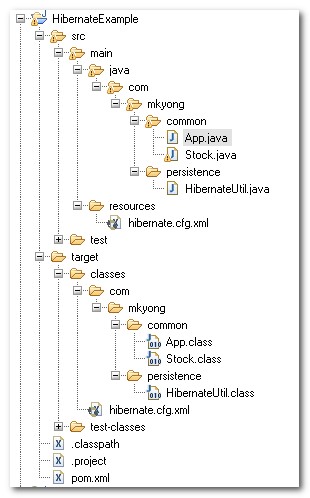
9. Review project structure
Sound like few files were modified, review it and make sure the folder structure as follow :
10. Run it and see output
Run your App.java, it will insert a new record into “Stock” table. The result should be same with previous Hibernate XML mapping file example.
Maven + Hibernate + MySQL
...
Hibernate: insert into mkyong.stock (STOCK_CODE, STOCK_NAME) values (?, ?)
Done.

This is good example for Starter.
I have simply download the Project but while import I have got some error.To fix those Simply , Add 2 Dependencies.
1. Compiler.
org.apache.maven.plugins
maven-compiler-plugin
3.5.1
1.8
1.8
2. Jra.
javax.transaction
jta
1.1
I have added to POM.
3. Change Hibernate util (username and password to connect with back end which is mysql now).
Finally , Its working…..
I just only change mysql to ojdbc7 connect to oracle. But my project don’t work.
It have error as bellow:
Exception in thread “main” java.lang.ExceptionInInitializerError
at com.linhvn.StoreStudent.buildSessionFactory(StoreStudent.java:40)
at com.linhvn.StoreStudent.(StoreStudent.java:29)
Caused by: java.lang.NoSuchMethodError: org.objectweb.asm.ClassWriter.(I)V.
Throw exception when: return new AnnotationConfiguration().configure().buildSessionFactory();
Please help me fix it.
Thanks.
I’ve successfully imported the project, but unable to run it with the jetty server. Getting a 404.
Please let me know why JPA annotaions are used instead of Hibernate annotations.
@Ade end others. If you got a ‘table does not exist’ it is because the schema catalog = “mkyong” is used in the defnition of the entity. IMHO it is unfortunate to force the name of the schema in the definition of the entity. You didn’t create the databse mkyong !Remove catalog = “mkyong” and then it will work!
THANKS!!!
great tutorial, thanks a lot!
just one thing: the jboss repository is now at http://repository.jboss.org/nexus/content/repositories/root_repository/maven2
When I execute in eclipse kepler, I found the following Error.
2014-08-25_09:57:55.356 WARN o.h.util.JDBCExceptionReporter – SQL Error: 1146, SQLState: 42S02
2014-08-25_09:57:55.359 ERROR o.h.util.JDBCExceptionReporter – Table ‘mkyongdb.stock’ doesn’t exist
Exception in thread “main” org.hibernate.exception.SQLGrammarException: could not insert: [com.mkyong.stock.Stock]
at org.hibernate.exception.SQLStateConverter.convert(SQLStateConverter.java:92)
at org.hibernate.exception.JDBCExceptionHelper.convert(JDBCExceptionHelper.java:66)
at org.hibernate.id.insert.AbstractReturningDelegate.performInsert(AbstractReturningDelegate.java:64)
at org.hibernate.persister.entity.AbstractEntityPersister.insert(AbstractEntityPersister.java:2345)
at org.hibernate.persister.entity.AbstractEntityPersister.insert(AbstractEntityPersister.java:2852)
at org.hibernate.action.EntityIdentityInsertAction.execute(EntityIdentityInsertAction.java:71)
at org.hibernate.engine.ActionQueue.execute(ActionQueue.java:273)
at org.hibernate.event.def.AbstractSaveEventListener.performSaveOrReplicate(AbstractSaveEventListener.java:320)
at org.hibernate.event.def.AbstractSaveEventListener.performSave(AbstractSaveEventListener.java:203)
at org.hibernate.event.def.AbstractSaveEventListener.saveWithGeneratedId(AbstractSaveEventListener.java:129)
at org.hibernate.event.def.DefaultSaveOrUpdateEventListener.saveWithGeneratedOrRequestedId(DefaultSaveOrUpdateEventListener.java:210)
at org.hibernate.event.def.DefaultSaveEventListener.saveWithGeneratedOrRequestedId(DefaultSaveEventListener.java:56)
at org.hibernate.event.def.DefaultSaveOrUpdateEventListener.entityIsTransient(DefaultSaveOrUpdateEventListener.java:195)
at org.hibernate.event.def.DefaultSaveEventListener.performSaveOrUpdate(DefaultSaveEventListener.java:50)
at org.hibernate.event.def.DefaultSaveOrUpdateEventListener.onSaveOrUpdate(DefaultSaveOrUpdateEventListener.java:93)
at org.hibernate.impl.SessionImpl.fireSave(SessionImpl.java:713)
at org.hibernate.impl.SessionImpl.save(SessionImpl.java:701)
at org.hibernate.impl.SessionImpl.save(SessionImpl.java:697)
at com.mkyong.App.main(App.java:21)
Caused by: com.mysql.jdbc.exceptions.jdbc4.MySQLSyntaxErrorException: Table ‘mkyongdb.stock’ doesn’t exist
at sun.reflect.NativeConstructorAccessorImpl.newInstance0(Native Method)
at sun.reflect.NativeConstructorAccessorImpl.newInstance(NativeConstructorAccessorImpl.java:57)
at sun.reflect.DelegatingConstructorAccessorImpl.newInstance(DelegatingConstructorAccessorImpl.java:45)
at java.lang.reflect.Constructor.newInstance(Constructor.java:526)
at com.mysql.jdbc.Util.handleNewInstance(Util.java:407)
at com.mysql.jdbc.Util.getInstance(Util.java:382)
at com.mysql.jdbc.SQLError.createSQLException(SQLError.java:1052)
at com.mysql.jdbc.MysqlIO.checkErrorPacket(MysqlIO.java:3603)
at com.mysql.jdbc.MysqlIO.checkErrorPacket(MysqlIO.java:3535)
at com.mysql.jdbc.MysqlIO.sendCommand(MysqlIO.java:1989)
at com.mysql.jdbc.MysqlIO.sqlQueryDirect(MysqlIO.java:2150)
at com.mysql.jdbc.ConnectionImpl.execSQL(ConnectionImpl.java:2626)
at com.mysql.jdbc.PreparedStatement.executeInternal(PreparedStatement.java:2119)
at com.mysql.jdbc.PreparedStatement.executeUpdate(PreparedStatement.java:2415)
at com.mysql.jdbc.PreparedStatement.executeUpdate(PreparedStatement.java:2333)
at com.mysql.jdbc.PreparedStatement.executeUpdate(PreparedStatement.java:2318)
at org.hibernate.id.IdentityGenerator$GetGeneratedKeysDelegate.executeAndExtract(IdentityGenerator.java:94)
at org.hibernate.id.insert.AbstractReturningDelegate.performInsert(AbstractReturningDelegate.java:57)
… 16 more
EveryTime I Import this project, I get this error “An internal error occurred during: “Importing Maven projects”.
Unsupported IClasspathEntry kind=4″
Hi Mkyong, Could you please let me know how to create a simple Maven project in Eclipse/STS?
If it still requires
mvn archetype:generate
-DgroupId={project-packaging}
-DartifactId={project-name}
-DarchetypeArtifactId=maven-archetype-quickstart
-DinteractiveMode=false
You can see the correct library here : http://mvnrepository.com/artifact/org.hibernate
Very nice and compact one.. It’s easy to learn in your site.. Thanks MK Young!!! It worked like charm for me with the following change.
changed hibernate-annotations and hibernate-commons-annotations groupId to “org.hibernate”.
The archive: C:/Users/pradeep.mulimath/.m2/repository/hibernate/hibernate3/3.2.3.GA/hibernate3-3.2.3.GA.jar which is referenced by the classpath, does not exist.
k, after lots of google, forget about ASM, javassist, and glass-fish… here is the solution:
org.hibernate
hibernate
3.2.3.ga
cglib
cglib-nodep
2.2
I know only xml mapping and struggling to find for annotation based mapping example. Yours too comprehensive and it is very useful for me
when i try this and type > mvn package
i got following issue any idea for this ?
C:\Users\Haris\temp\Maven_Hibernate_annotation_MySQL_Example\HibernateExample>mvn package
[INFO] Scanning for projects…
[INFO]
[INFO] ————————————————————————
[INFO] Building HibernateExample 1.0-SNAPSHOT
[INFO] ————————————————————————
Downloading: http://repository.jboss.com/maven2/hibernate/hibernate3/3.2.3.GA/hibernate3-3.2.3.GA.pom
Downloading: http://repository.jboss.com/maven2/hibernate-annotations/hibernate-annotations/3.3.0.GA/hibernate-annotations-3.3.0.GA.pom
Downloading: http://repository.jboss.com/maven2/hibernate-commons-annotations/hibernate-commons-annotations/3.0.0.GA/hibernate-commons-annotations-3.0
.0.GA.pom
[INFO] ————————————————————————
[INFO] BUILD FAILURE
[INFO] ————————————————————————
[INFO] Total time: 4.542s
[INFO] Finished at: Thu Mar 21 01:24:43 CST 2013
[INFO] Final Memory: 7M/119M
[INFO] ————————————————————————
[ERROR] Failed to execute goal on project HibernateExample: Could not resolve dependencies for project com.mkyong.common:HibernateExample:jar:1.0-SNAP
SHOT: Failed to collect dependencies for [junit:junit:jar:3.8.1 (test), mysql:mysql-connector-java:jar:5.1.9 (compile), hibernate:hibernate3:jar:3.2.3
.GA (compile), hibernate-annotations:hibernate-annotations:jar:3.3.0.GA (compile), hibernate-commons-annotations:hibernate-commons-annotations:jar:3.0
.0.GA (compile), dom4j:dom4j:jar:1.6.1 (compile), commons-logging:commons-logging:jar:1.1.1 (compile), commons-collections:commons-collections:jar:3.2
.1 (compile), cglib:cglib:jar:2.2 (compile)]: Failed to read artifact descriptor for hibernate:hibernate3:jar:3.2.3.GA: Could not transfer artifact hi
bernate:hibernate3:pom:3.2.3.GA from/to JBoss repository (http://repository.jboss.com/maven2/): Access denied to: http://repository.jboss.com/maven2/h
ibernate/hibernate3/3.2.3.GA/hibernate3-3.2.3.GA.pom, ReasonPhrase:Forbidden. -> [Help 1]
[ERROR]
[ERROR] To see the full stack trace of the errors, re-run Maven with the -e switch.
[ERROR] Re-run Maven using the -X switch to enable full debug logging.
[ERROR]
[ERROR] For more information about the errors and possible solutions, please read the following articles:
[ERROR] [Help 1] http://cwiki.apache.org/confluence/display/MAVEN/DependencyResolutionException
Thank you,
Try out Hibernate 4 and Spring 3 Annotation tutorial here http://www.cavalr.com/blog/Spring_3_and_Annotation_Based_Hibernate_4_Example
Hi, in App.java
the below block doen’t delete the record. could you please clarify?
session.delete(stock);
After setting stockId I could delete. Thanks.
Hi getting this error
Exception in thread “main” java.lang.ExceptionInInitializerError
at com.synechron.persistence.HibernateUtil.buildSessionFactory(HibernateUtil.java:19)
at com.synechron.persistence.HibernateUtil.(HibernateUtil.java:8)
at com.synechron.common.App.main(App.java:14)
Caused by: java.lang.NoSuchMethodError: org.objectweb.asm.ClassWriter.(I)V
at net.sf.cglib.core.DebuggingClassWriter.(DebuggingClassWriter.java:47)
at net.sf.cglib.core.DefaultGeneratorStrategy.getClassWriter(DefaultGeneratorStrategy.java:30)
at net.sf.cglib.core.DefaultGeneratorStrategy.generate(DefaultGeneratorStrategy.java:24)
at net.sf.cglib.core.AbstractClassGenerator.create(AbstractClassGenerator.java:216)
at net.sf.cglib.core.KeyFactory$Generator.create(KeyFactory.java:144)
at net.sf.cglib.core.KeyFactory.create(KeyFactory.java:116)
at net.sf.cglib.core.KeyFactory.create(KeyFactory.java:108)
at net.sf.cglib.core.KeyFactory.create(KeyFactory.java:104)
at net.sf.cglib.proxy.Enhancer.(Enhancer.java:69)
at org.hibernate.proxy.pojo.cglib.CGLIBLazyInitializer.getProxyFactory(CGLIBLazyInitializer.java:117)
at org.hibernate.proxy.pojo.cglib.CGLIBProxyFactory.postInstantiate(CGLIBProxyFactory.java:43)
at org.hibernate.tuple.entity.PojoEntityTuplizer.buildProxyFactory(PojoEntityTuplizer.java:162)
at org.hibernate.tuple.entity.AbstractEntityTuplizer.(AbstractEntityTuplizer.java:135)
at org.hibernate.tuple.entity.PojoEntityTuplizer.(PojoEntityTuplizer.java:55)
at org.hibernate.tuple.entity.EntityEntityModeToTuplizerMapping.(EntityEntityModeToTuplizerMapping.java:56)
at org.hibernate.tuple.entity.EntityMetamodel.(EntityMetamodel.java:295)
at org.hibernate.persister.entity.AbstractEntityPersister.(AbstractEntityPersister.java:434)
at org.hibernate.persister.entity.SingleTableEntityPersister.(SingleTableEntityPersister.java:109)
at org.hibernate.persister.PersisterFactory.createClassPersister(PersisterFactory.java:55)
at org.hibernate.impl.SessionFactoryImpl.(SessionFactoryImpl.java:226)
at org.hibernate.cfg.Configuration.buildSessionFactory(Configuration.java:1294)
at com.synechron.persistence.HibernateUtil.buildSessionFactory(HibernateUtil.java:13)
… 2 more
please help me out
Exception in thread “main” java.lang.ExceptionInInitializerError
at com.mkyong.persistence.HibernateUtil.buildSessionFactory(HibernateUtil.java:19)
at com.mkyong.persistence.HibernateUtil.(HibernateUtil.java:8)
at com.mkyong.common.App.main(App.java:11)
help meee plz
USE:
                 <dependency>
			<groupId>org.hibernate</groupId>
			<artifactId>hibernate</artifactId>
			<version>3.2.1.ga</version>
		</dependency>
		<dependency>
			<groupId>org.hibernate</groupId>
			<artifactId>hibernate-annotations</artifactId>
			<version>3.2.0.ga</version>
		</dependency>
		<dependency>
			<groupId>javax.persistence</groupId>
			<artifactId>persistence-api</artifactId>
			<version>1.0</version>
		</dependency>
Instead of :
<dependency> <groupId>hibernate-annotations</groupId> <artifactId>hibernate-annotations</artifactId> <version>3.3.0.GA</version> </dependency> <dependency> <groupId>hibernate-commons-annotations</groupId> <artifactId>hibernate-commons-annotations</artifactId> <version>3.0.0.GA</version> </dependency>should hibernate-commons-annotations
be org.hibernate
?
i mean this one
It is valid in old Hibernate 3.2.3. In Hibernate 3.6, it’s integrated into the core module.
Yes, you need to use org.hibernate only. That worked for me.
nice job, like it!
I can not figure out how to fix this problem:INFO: Not binding factory to JNDI, no JNDI name configured
here is the output:
Maven + Hibernate + MySQL
Jan 29, 2011 7:10:52 PM org.hibernate.cfg.annotations.Version
INFO: Hibernate Annotations 3.3.0.GA
Jan 29, 2011 7:10:52 PM org.hibernate.cfg.Environment
INFO: Hibernate 3.2.3
Jan 29, 2011 7:10:52 PM org.hibernate.cfg.Environment
INFO: hibernate.properties not found
Jan 29, 2011 7:10:52 PM org.hibernate.cfg.Environment buildBytecodeProvider
INFO: Bytecode provider name : cglib
Jan 29, 2011 7:10:52 PM org.hibernate.cfg.Environment
INFO: using JDK 1.4 java.sql.Timestamp handling
Jan 29, 2011 7:10:52 PM org.hibernate.cfg.Configuration configure
INFO: configuring from resource: /hibernate.cfg.xml
Jan 29, 2011 7:10:52 PM org.hibernate.cfg.Configuration getConfigurationInputStream
INFO: Configuration resource: /hibernate.cfg.xml
Jan 29, 2011 7:10:52 PM org.hibernate.cfg.Configuration doConfigure
INFO: Configured SessionFactory: null
Jan 29, 2011 7:10:52 PM org.hibernate.cfg.AnnotationConfiguration secondPassCompile
INFO: Hibernate Validator not found: ignoring
Jan 29, 2011 7:10:52 PM org.hibernate.connection.DriverManagerConnectionProvider configure
INFO: Using Hibernate built-in connection pool (not for production use!)
Jan 29, 2011 7:10:52 PM org.hibernate.connection.DriverManagerConnectionProvider configure
INFO: Hibernate connection pool size: 20
Jan 29, 2011 7:10:52 PM org.hibernate.connection.DriverManagerConnectionProvider configure
INFO: autocommit mode: false
Jan 29, 2011 7:10:52 PM org.hibernate.connection.DriverManagerConnectionProvider configure
INFO: using driver: com.mysql.jdbc.Driver at URL: jdbc:mysql://localhost:3306/mkyong
Jan 29, 2011 7:10:52 PM org.hibernate.connection.DriverManagerConnectionProvider configure
INFO: connection properties: {user=root, password=****}
Jan 29, 2011 7:10:53 PM org.hibernate.cfg.SettingsFactory buildSettings
INFO: RDBMS: MySQL, version: 5.5.8
Jan 29, 2011 7:10:53 PM org.hibernate.cfg.SettingsFactory buildSettings
INFO: JDBC driver: MySQL-AB JDBC Driver, version: mysql-connector-java-5.1.9 ( Revision: ${svn.Revision} )
Jan 29, 2011 7:10:53 PM org.hibernate.dialect.Dialect
INFO: Using dialect: org.hibernate.dialect.MySQLDialect
Jan 29, 2011 7:10:53 PM org.hibernate.transaction.TransactionFactoryFactory buildTransactionFactory
INFO: Using default transaction strategy (direct JDBC transactions)
Jan 29, 2011 7:10:53 PM org.hibernate.transaction.TransactionManagerLookupFactory getTransactionManagerLookup
INFO: No TransactionManagerLookup configured (in JTA environment, use of read-write or transactional second-level cache is not recommended)
Jan 29, 2011 7:10:53 PM org.hibernate.cfg.SettingsFactory buildSettings
INFO: Automatic flush during beforeCompletion(): disabled
Jan 29, 2011 7:10:53 PM org.hibernate.cfg.SettingsFactory buildSettings
INFO: Automatic session close at end of transaction: disabled
Jan 29, 2011 7:10:53 PM org.hibernate.cfg.SettingsFactory buildSettings
INFO: JDBC batch size: 15
Jan 29, 2011 7:10:53 PM org.hibernate.cfg.SettingsFactory buildSettings
INFO: JDBC batch updates for versioned data: disabled
Jan 29, 2011 7:10:53 PM org.hibernate.cfg.SettingsFactory buildSettings
INFO: Scrollable result sets: enabled
Jan 29, 2011 7:10:53 PM org.hibernate.cfg.SettingsFactory buildSettings
INFO: JDBC3 getGeneratedKeys(): enabled
Jan 29, 2011 7:10:53 PM org.hibernate.cfg.SettingsFactory buildSettings
INFO: Connection release mode: auto
Jan 29, 2011 7:10:53 PM org.hibernate.cfg.SettingsFactory buildSettings
INFO: Maximum outer join fetch depth: 2
Jan 29, 2011 7:10:53 PM org.hibernate.cfg.SettingsFactory buildSettings
INFO: Default batch fetch size: 1
Jan 29, 2011 7:10:53 PM org.hibernate.cfg.SettingsFactory buildSettings
INFO: Generate SQL with comments: disabled
Jan 29, 2011 7:10:53 PM org.hibernate.cfg.SettingsFactory buildSettings
INFO: Order SQL updates by primary key: disabled
Jan 29, 2011 7:10:53 PM org.hibernate.cfg.SettingsFactory createQueryTranslatorFactory
INFO: Query translator: org.hibernate.hql.ast.ASTQueryTranslatorFactory
Jan 29, 2011 7:10:53 PM org.hibernate.hql.ast.ASTQueryTranslatorFactory
INFO: Using ASTQueryTranslatorFactory
Jan 29, 2011 7:10:53 PM org.hibernate.cfg.SettingsFactory buildSettings
INFO: Query language substitutions: {}
Jan 29, 2011 7:10:53 PM org.hibernate.cfg.SettingsFactory buildSettings
INFO: JPA-QL strict compliance: disabled
Jan 29, 2011 7:10:53 PM org.hibernate.cfg.SettingsFactory buildSettings
INFO: Second-level cache: enabled
Jan 29, 2011 7:10:53 PM org.hibernate.cfg.SettingsFactory buildSettings
INFO: Query cache: disabled
Jan 29, 2011 7:10:53 PM org.hibernate.cfg.SettingsFactory createCacheProvider
INFO: Cache provider: org.hibernate.cache.NoCacheProvider
Jan 29, 2011 7:10:53 PM org.hibernate.cfg.SettingsFactory buildSettings
INFO: Optimize cache for minimal puts: disabled
Jan 29, 2011 7:10:53 PM org.hibernate.cfg.SettingsFactory buildSettings
INFO: Structured second-level cache entries: disabled
Jan 29, 2011 7:10:53 PM org.hibernate.cfg.SettingsFactory buildSettings
INFO: Echoing all SQL to stdout
Jan 29, 2011 7:10:53 PM org.hibernate.cfg.SettingsFactory buildSettings
INFO: Statistics: disabled
Jan 29, 2011 7:10:53 PM org.hibernate.cfg.SettingsFactory buildSettings
INFO: Deleted entity synthetic identifier rollback: disabled
Jan 29, 2011 7:10:53 PM org.hibernate.cfg.SettingsFactory buildSettings
INFO: Default entity-mode: pojo
Jan 29, 2011 7:10:53 PM org.hibernate.cfg.SettingsFactory buildSettings
INFO: Named query checking : enabled
Jan 29, 2011 7:10:53 PM org.hibernate.impl.SessionFactoryImpl
INFO: building session factory
Jan 29, 2011 7:10:53 PM org.hibernate.impl.SessionFactoryObjectFactory addInstance
INFO: Not binding factory to JNDI, no JNDI name configured
k, got this figured out.
in App.java, I was missing: session.save(stock);
Thanks for this website.
The import org.hibernate.cfg.AnnotationConfiguration cannot be resolved ..what it’s that???
i had Add the dependency in Maven’s pom.xml!!!!!
Obviously, it’s from Hibernate annotation library :), double check your Hibernate version or download this project and compare it with yours.
Hi,
When i try to run the project example in Eclipse Helios, the Stock.java class has some errors like:
– The attribute uniqueConstraints is undefined for the annotation type Table
– The attribute name is undefined for the annotation type Table
– The annotation @Table must define the attribute appliesTo
– The attribute catalog is undefined for the annotation type Table
You can help me about this?
Thanks.
Regards,
MiguelMac
@Table is belong to standard JPA javax.persistence.Table , you may be using old j2ee version, try upgrade to 1.5
How can i upgrade to 1.5? It’s with maven?
Thanks.
Regards,
MiguelMac
you need javaee.jar , from your j2ee SDK library folder.
Add this in pom,
javax.persistence
persistence-api
1.0
hello i got a problema when run the java app
INFO: building session factory
Initial SessionFactory creation failed.java.lang.NoSuchMethodError: org.objectweb.asm.ClassWriter.(I)V
Exception in thread “main” java.lang.ExceptionInInitializerError
i don’t know what it is ??
See here
https://mkyong.com/hibernate/java-lang-nosuchmethoderror-org-objectweb-asm-classwriter/
Hello, this is nice straightforward Wicket/Hibernate tutorial but it went South on me later this day. Exception snippet follows:
Exception in thread “main” java.lang.ExceptionInInitializerError
at com.mkyong.persistence.HibernateUtil.buildSessionFactory(HibernateUtil.java:18)
at com.mkyong.persistence.HibernateUtil.(HibernateUtil.java:8)
This is not a wicket example, it’s a hibernate annotation hello world project, it will be better if you can send me your project via email.
very easy to understand !
Thanks a lot.
hey i got this error…Exception in thread “main” org.hibernate.HibernateException: The database returned no natively generated identity value