A quick guide to show you how to add @Copyright comment to new and existing Java files in Eclipse IDE.
Solution 1. Eclipse Code Templates
Go to preferences -> Java -> Code Style -> Code Templates, expands Code and select “New Java Files”, edit the template to add whatever copyright messages you want.
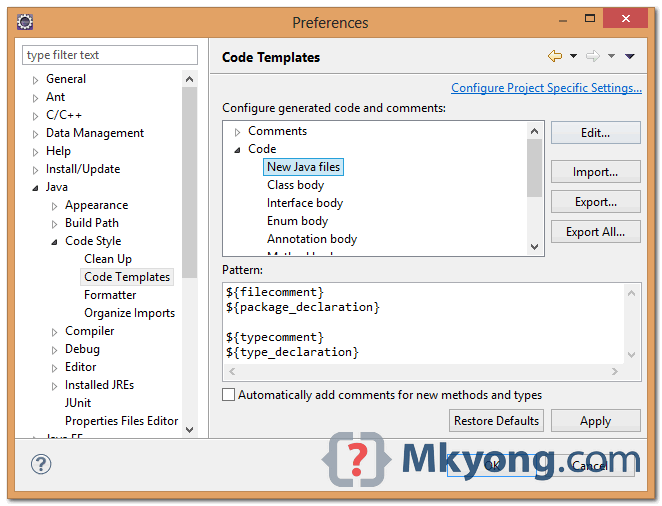
Now, that copyright message will be injected on every newly created Java class.
Solution 2. Eclipse Plugin – Copyright Wizard
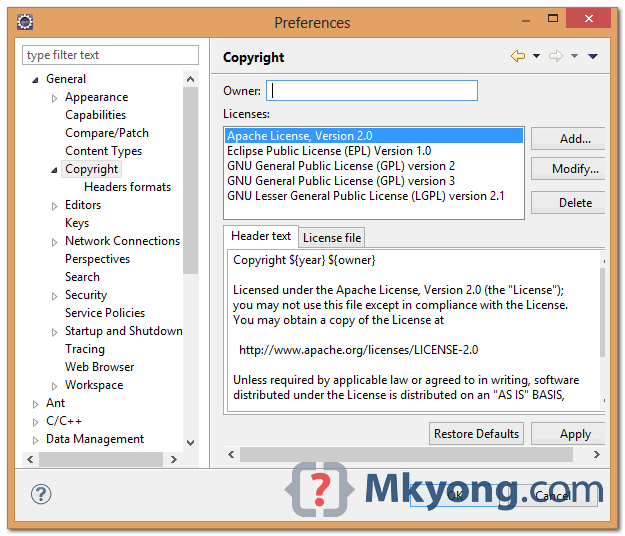
Using this Copyright Wizard plugin is recommended, it lets you select a list of common copyright templates like Apache License, EPL, GPL; and apply it to new or existing Java classes automatically. In additional, it allow to update the copyright year.
1. Download and install Copyright Wizard – http://www.wdev91.com/?p=cpw
2. To edit the copyright template – select project properties, go general -> copyright
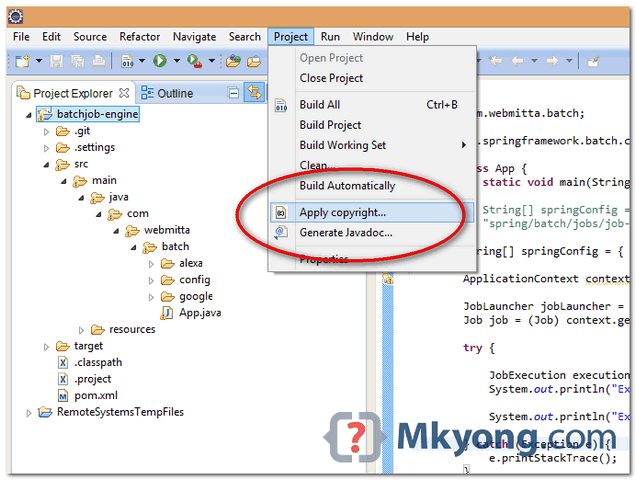
3. To apply the copyright template to all source files – select project -> apply copyright
Done.

For Eclipse version 14, the templates are in Tools => Templates => Java
For anyone who want Copyright Wizard, see this topic https://www.eclipse.org/forums/index.php/t/796282/ (download + how to)
wdev91.com does not resolve any more. Do you know any alternative? Thanks for the wonderful post!
The source appears to still be up at https://sourceforge.net/projects/eclipsecopyrigh/
But we need a update site so that we can use it inside eclipse!?
In The Name Of Allah
Hello
Your website is very good.I have a question but i haven’t your email. Please present to me an example of email validation that has entered to edit text through user in an android application with screenshots as your other examples. Thanks alot