This is a surprise for me that PostgreSQL do not have any build-in job scheduler. However It did pack into pgAdmin source but i wonder why it didnt intsall it by default? Here i provide some steps to show how to install pgAgent(Job Scheduler) on windows as services
1) Go to your PgAdim file path like below, please change to your own pgAdmin file path like “C:\Program Files\PostgreSQL\8.2\pgAdmin III”
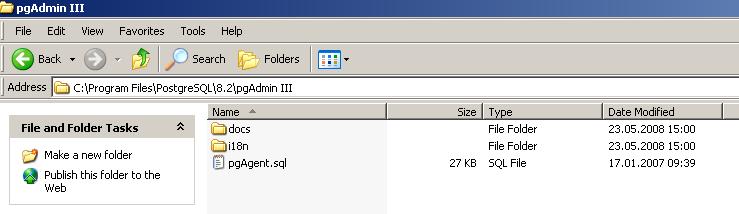
2) Get pgAgent.sql and execute the script, it will create all pgAgent core tables
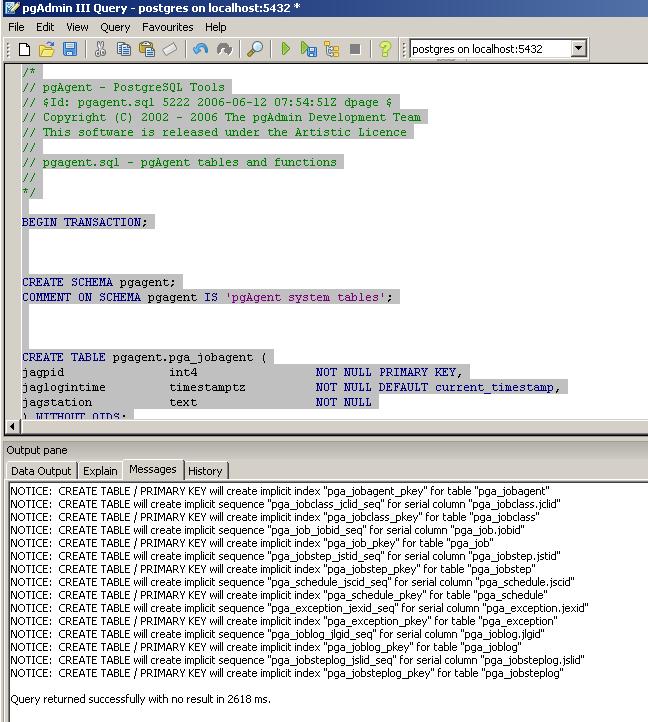
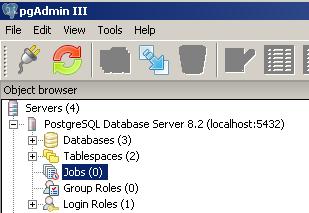
3) After executed pgAgent script, user will notice one job icon appear at pgAdmin.
4) Job scheduler is still not working yet, you have to register it as services in windows. Please issue following command on command prompt
C:\Program Files\PostgreSQL\8.2\bin\pgAgent INSTALL pgAgent -u postgres
-p secret hostaddr=127.0.0.1 dbname=newdb user=postgres password=secret
please issue C:\Program Files\PostgreSQL\8.2\bin\pgAgent to show usage of pgAgent, where
-u = username
-p = password
“hostaddr=127.0.0.1 dbname=newdb user=postgres password=secret” = connect string
P.S please notice INSTALL is all uppercase, do not type lowercase , it will not work.
5) After registered service on windows, just go windows service to start it or use net start command.
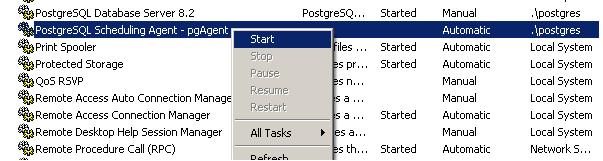
6) Done, we can start to schedule our job now.

hi, I’m Cris, from Colombia, I’m trying to install de PGAgent using the StackBuilder in a Server, but, I’m having some issues… I follow the tutorial but I don’t have good results…
shorturl.at/ahANT
Nice Article…
I was also facing problem with configuration of pgAgent in windows.
I have also asked in stackoverflow.
http://stackoverflow.com/questions/17567168/how-to-install-pgagent-service-on-windows
Now my problem is resolved.
I have also prepared one post on this.
Please visit this url:
http://www.dbrnd.com/2015/05/how-to-create-job-in-postgresql/
Sir, Thanks for the guide to install pgAgent. I followed these steps,I have successfully did till step 3 but not able to do step 4 installation. One doubt
C:\Program Files\PostgreSQL\8.2\bin\pgAgent
here “pgAgent” is one folder, which I need to place or what?? I kept pgAgent.sql file in pgAdmin 3 only. In command prompt its showing the below error:
D:\PostgreSQL\8.4\bin>pgAgent INSTALL pgAgent
‘pgAgent’ is not recognized as an internal or external command,
operable program or batch file.
Please suggest me what to do next.
Thanks
Suchismita
I have the same problem..
Not so far I have found new cool tool to work with postgresql on win – Valentina Studio. Its free edition can do things more than many commercial tools!!
I very recommend check it. http://www.valentina-db.com/en/valentina-studio-overview
I did exact same steps which are mentioned above.
When after the 4th step I am trying to start the service, I observe that service is not listed in control panel.
Any suggestions?
Respected sir,
I am working in postgreSQL 8.1.I want to know how to schedule jobs in PostgreSQL 8.1.
Please mail me as soon as possible
Hi Sir,
Please send me the script of postgres database schedule script in windows environment.
Hi,
thanks for this short tutorial. Really helped me a lot!
(although my job still does nothing – but at least the window service is installed and working)
When I face those problems, I understand, why all the world is using MySQL.
I just dont understand why one wouldnt make such things way easier to impelent so that every beginner can get it started.
The offcial available tutorial for installing pgAgent is a joke.
Greetings
ya, this is the classic problem in open source, documentation is suck. But, PostgreSQL is powerful enough to beat Oracle DB, just not much marketing and tutorials for people to master of it.
Hi,
I am trying to install the service (pgAgent) on windows vista and xp
getting the following error
D:\Program Files\PostgreSQL\8.3\bin>
pgAgent INSTALL pgAgent
18:49:18: Error: Can’t open registry key ‘HKLM\SYSTEM\CurrentControlSet\Services
\EventLog\Application\pgAgent’ (error 5: access is denied.)
18:49:18: Error: Can’t set value of ‘HKLM\SYSTEM\CurrentControlSet\Services\Even
tLog\Application\pgAgent\EventMessageFile’ (error 5: access is denied.)
18:49:18: Error: Can’t open registry key ‘HKLM\SYSTEM\CurrentControlSet\Services
\EventLog\Application\pgAgent’ (error 5: access is denied.)
18:49:18: Error: Can’t set value of ‘HKLM\SYSTEM\CurrentControlSet\Services\Even
tLog\Application\pgAgent\TypesSupported’ (error 5: access is denied.)
Please suggest/advise. Is there any simple exe file which could install this?
“Access is denied” show either your windows registry is locked or you do not have privilege to modify the value of window registry.
1) Please contact your administrator about this issue.
2) Either unlock the windows registry if you have the right or gain yourself privilege to modify the windows registry value.
Hope help.
run as administrator
I am unable to notice one job icon appear at pgAdmin.
Did you encounter any errors during executing pgAgent.sql script?
I have the same problem, I checked that the new schema “pgagent” is created but I cannot see it, I made a select of the tables and I got the results. The installation was successfull and I started the windows service. The only problem is that I dont have access to the JOBs Icon, therefore I cannot create any job to test the services. In advance, thank you for your help.
3) Error 1069: the service did not start due to a logon failure?
Look like a postgres authentication error, please make sure user you assigned had right to access the postgresDB
—————————————————————————–
hm…….
ok.. thanks a lot..
if you are using in unix environment, i will suggest you forget about pgAgent, just use cron job to implement PostgreSql job stuff.
C:\Program Files\PostgreSQL\8.2\bin\pgAgent to show usage of pgAgent, where
-u = username
-p = password
“hostaddr=127.0.0.1 dbname=newdb user=postgres password=secret” = connect string
…………….
(1)
i still confuse about
u=username ——-> user login to postgre db? or new user for pgAgent?
p=password
“hostaddr=127.0.0.1 dbname=newdb user=postgres password=secret” —> fix(cannot modification)?
(2)
i follow the step until no.5,
every i click start the pgAgent the error message show=
could not start the PostgreSQL scheduling Agent-pgagent service on local computer
Error 1069: the service did not start due to a logon failur
do you have solution about my error…
thanks
1) u=username ——-> user login to postgre db? or new user for pgAgent?
this is a valid user login to postgres db , not user for pgAgent. Make sure the user is able to login to the postgres.
2) “hostaddr=127.0.0.1 dbname=newdb user=postgres password=secret” —> fix(cannot modification)?
well, please type following command in windows command prompt to show the usage of pgAgent.
C:\(PostgreSQL-FILE-PATH)\8.2\bin\pgAgent
we can always change it , please fill in hostaddr, dbname or user base on your postgres configuration.
3) Error 1069: the service did not start due to a logon failure?
Look like a postgres authentication error, please make sure user you assigned had right to access the postgresDB
Hope help 🙂
Logon failure means windows logon failure. The initial -u and -p options are supposed to be the login account that the service should run under. I assume it should be the postgres windows user and whatever password you assigned it.
I got past that error though and now I’m getting an Error 5: Access Denied when trying to start the service…
the OS supported for the product under development is SLES 10 64bit
Does this version of postgres come with a build-in job scheduler? “PostgreSQL 8.3.3 on x86_64-unknown-linux-gnu, compiled by GCC gcc (GCC) 4.1.2 20070115 (prerelease) (SUSE Linux)”
One of the projects in our company that is being developed is using that version. I’m told that they implemented a Java Scheduler to schedule partition jobs. Assuming the version I mentioned comes with a build-in job scheduler, I’m curious to know why they must have implemented it. I mean, if at all it is there, are there any known issues with it? If it doesn’t come with a build-in job scheduler, is there anything like you mentioned above so that we can install and start using it instead? Also, it would be great if you can list out some known issues with this version.
job scheduler always come with PostgreSQL as a script, we need to manually execute the script in order to use it. However i always using unix cron job if PostgreSQL do not install job scheduler feature.