In this tutorial, we will show you how to install Apache Ant on Mac OSX.
Tools :
- Apache Ant 1.9.4
- Mac OSX Yosemite 10.10
Preinstalled Apache Ant?
In older version of Mac, Apache Ant may be already installed by default, check if Apache Ant is installed :
In older version of Mac, Apache Ant may be already installed by default, check if Apache Ant is installed :
$ ant -v
1. Get Apache Ant
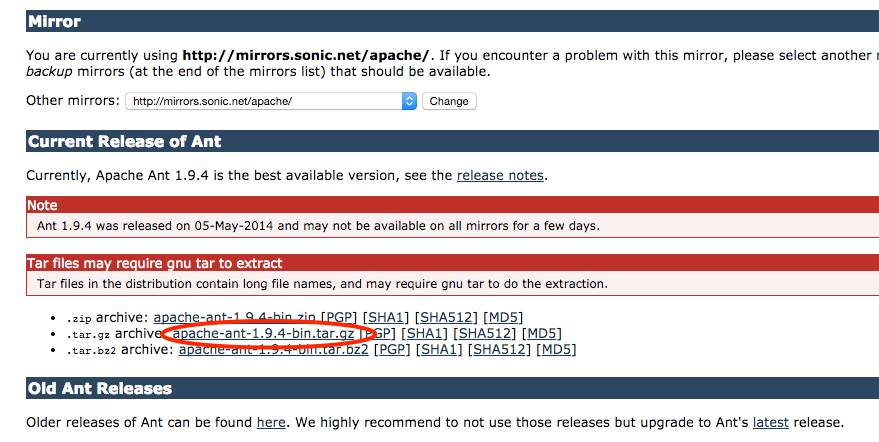
Visit Apache Ant website, and get the .tar.gz file.
2. Extracts It
Copy the downloaded gz file to your favorite location, extracts it.
$ cp ~/Downloads/apache-ant-1.9.4-bin.tar.gz .

$ cd ~
$ pwd
/Users/mkyong

$ tar vxf apache-ant-1.9.4-bin.tar.gz

x apache-ant-1.9.4/bin/ant
x apache-ant-1.9.4/bin/antRun
x apache-ant-1.9.4/bin/antRun.pl
x apache-ant-1.9.4/bin/complete-ant-cmd.pl
x apache-ant-1.9.4/bin/runant.pl
x apache-ant-1.9.4/bin/runant.py
x apache-ant-1.9.4/
x apache-ant-1.9.4/bin/
......

$ cd ~/apache-ant-1.9.4/bin
$ pwd
/Users/mkyong/apache-ant-1.9.4/bin

$ ant -v
Apache Ant(TM) version 1.9.4 compiled on April 29 2014
Trying the default build file: build.xml
Buildfile: build.xml does not exist!
Build failed
P.S The Apache Ant commands are available at folder $APACHE_ANT_FOLDER/bin.
3. Environment Variable
Set the command ant as the environment variable, so that you can “ant” build your project everywhere.
$ vim ~/.bash_profile
Exports $ANT_HOME/bin, save and restart terminal.
~/.bash_profile
export JAVA_HOME=$(/usr/libexec/java_home)
export GRADLE_HOME=/Users/mkyong/gradle
export M2_HOME=/Users/mkyong/apache-maven-3.1.1

# Apache Ant
export ANT_HOME=/Users/mkyong/apache-ant-1.9.4

# Export to PATH
export PATH=$PATH:$GRADLE_HOME/bin:$M2_HOME/bin:$ANT_HOME/bin
Test it again, now, you can access the ant command everywhere.
$ cd ~
$ pwd
/Users/mkyong

$ ant -v
Apache Ant(TM) version 1.9.4 compiled on April 29 2014
Trying the default build file: build.xml
Buildfile: build.xml does not exist!
Build failed
Done.

Still in 2021 it works like a charm for me!
Thanks @mkyong Sir.
P.S: Anyone doing this for first time must follow every step in sequence.
No need to do above.
Just run the command “brew install ant”.
All the things will be automatically configured.
How can i install apache ant for MacOS Catalina ?
THANK YOU SO MUCH!!!! I was absolutely beside myself trying to install this. Thank you for taking the time to make this!!
It shows the following error message: “Error opening archive: Failed to open ‘apache-ant-1.9.9/bin/ant'”. How should I proceed? I am a very first user
I had to create a new .bash_profile on my mac and after doing so I was getting -bash: ls: command not found
If you face problems with your command line after you do this you’ll need to restore your $PATH variable (add your bin locations back)
PATH=/usr/bin:/usr/sbin:/bin:/sbin
Thank you sir for that very good tutorial. Very straight forward. You even showed the “pwd” structures, awesome for new people.
Also, homebrew just did everything in a minute, I should have done that to start with
Oh my. Thanks for reminding me that. I also should’ve done that instead of wasting my time looking on articles
Okay, it took me a good 20min to figure out that your line “ant -v” should really be “./ant -v” since the command is not yet in your path..
thanks sir for a noob like me… you saved my life
Thank. Saved my life
Thanks for the useful info 🙂
it keeps saying:
build.xml doesn’t exist.
Build failed!
Could you please guide me towards what’s wrong!
It also means the “ANT” is installed successful, at least the command is executed, just cant find the “build.xml” file. You can start to create a Java project and build.xml.
For new project, advice you choose Maven or Gradle.
hello mkyong I have a question about the automate login to a website using java. I am trying that feature to login to http://www.craigslist.org but it shows HTTP error code like 404 and 400. Is there some problem with cookies?
Have you tried installing JQuery,
apt install jquery? I hear it works well with craigslist and other internets.You must use ant -version instead of ant -v.