In Android, ListView let you arranges components in a vertical scrollable list.
In this tutorial, we will show you 2 ListView examples :
- Normal way to display components in
ListView. - Custom array adapter to customize the item display in
ListView.
P.S This project is developed in Eclipse 3.7, and tested with Android 2.3.3.
1. Normal ListView example
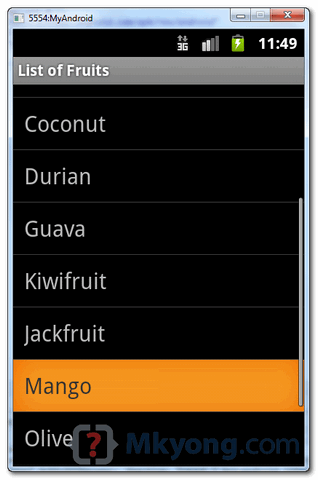
In this example, we show you how to display a list of fruit name via ListView, it should be easy and self-explanatory.
1.1 Android Layout file
File : res/layout/list_fruit.xml
<?xml version="1.0" encoding="utf-8"?>
<TextView xmlns:android="http://schemas.android.com/apk/res/android"
    android:layout_width="fill_parent"
    android:layout_height="fill_parent"
    android:padding="10dp"
    android:textSize="20sp" >
</TextView>
1.2 ListView
package com.mkyong.android;

import android.app.ListActivity;
import android.os.Bundle;
import android.view.View;
import android.widget.AdapterView;
import android.widget.ArrayAdapter;
import android.widget.ListView;
import android.widget.TextView;
import android.widget.Toast;
import android.widget.AdapterView.OnItemClickListener;

public class ListFruitActivity extends ListActivity {

	static final String[] FRUITS = new String[] { "Apple", "Avocado", "Banana",
			"Blueberry", "Coconut", "Durian", "Guava", "Kiwifruit",
			"Jackfruit", "Mango", "Olive", "Pear", "Sugar-apple" };

	@Override
	public void onCreate(Bundle savedInstanceState) {
		super.onCreate(savedInstanceState);

		// no more this
		// setContentView(R.layout.list_fruit);

		setListAdapter(new ArrayAdapter<String>(this, R.layout.list_fruit,FRUITS));

		ListView listView = getListView();
		listView.setTextFilterEnabled(true);

		listView.setOnItemClickListener(new OnItemClickListener() {
			public void onItemClick(AdapterView<?> parent, View view,
					int position, long id) {
			    // When clicked, show a toast with the TextView text
			    Toast.makeText(getApplicationContext(),
				((TextView) view).getText(), Toast.LENGTH_SHORT).show();
			}
		});

	}

}
1.3 Demo
2. Custom ArrayAdapter example
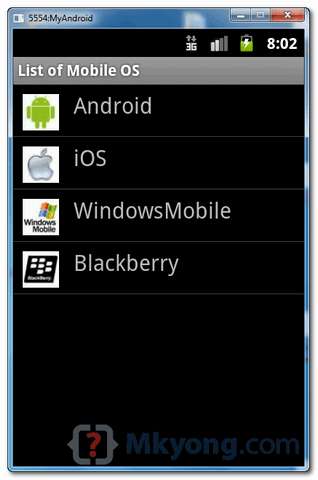
In this example, we show you how to create 4 items in the ListView, and use a custom “ArrayAdapter” to display different images base on the “item name” in the list.
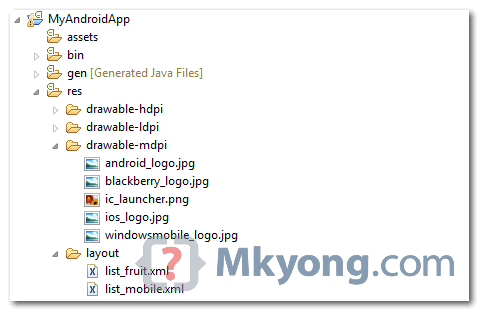
2.1 Images
Get 4 images for demonstration.
2.2 Android Layout file
File : res/layout/list_mobile.xml
<?xml version="1.0" encoding="utf-8"?>
<LinearLayout xmlns:android="http://schemas.android.com/apk/res/android"
    android:layout_width="wrap_content"
    android:layout_height="wrap_content"
    android:padding="5dp" >

    <ImageView
        android:id="@+id/logo"
        android:layout_width="50px"
        android:layout_height="50px"
        android:layout_marginLeft="5px"
        android:layout_marginRight="20px"
        android:layout_marginTop="5px"
        android:src="@drawable/windowsmobile_logo" >
    </ImageView>

    <TextView
        android:id="@+id/label"
        android:layout_width="wrap_content"
        android:layout_height="wrap_content"
        android:text="@+id/label"
        android:textSize="30px" >
    </TextView>

</LinearLayout>
2.3 Custom ArrayAdapter
Create a class extends ArrayAdapter and customize the item display in the getView() method.
package com.mkyong.android.adaptor;

import com.mkyong.android.R;

import android.content.Context;
import android.view.LayoutInflater;
import android.view.View;
import android.view.ViewGroup;
import android.widget.ArrayAdapter;
import android.widget.ImageView;
import android.widget.TextView;

public class MobileArrayAdapter extends ArrayAdapter<String> {
	private final Context context;
	private final String[] values;

	public MobileArrayAdapter(Context context, String[] values) {
		super(context, R.layout.list_mobile, values);
		this.context = context;
		this.values = values;
	}

	@Override
	public View getView(int position, View convertView, ViewGroup parent) {
		LayoutInflater inflater = (LayoutInflater) context
			.getSystemService(Context.LAYOUT_INFLATER_SERVICE);

		View rowView = inflater.inflate(R.layout.list_mobile, parent, false);
		TextView textView = (TextView) rowView.findViewById(R.id.label);
		ImageView imageView = (ImageView) rowView.findViewById(R.id.logo);
		textView.setText(values[position]);

		// Change icon based on name
		String s = values[position];

		System.out.println(s);

		if (s.equals("WindowsMobile")) {
			imageView.setImageResource(R.drawable.windowsmobile_logo);
		} else if (s.equals("iOS")) {
			imageView.setImageResource(R.drawable.ios_logo);
		} else if (s.equals("Blackberry")) {
			imageView.setImageResource(R.drawable.blackberry_logo);
		} else {
			imageView.setImageResource(R.drawable.android_logo);
		}

		return rowView;
	}
}
2.4 ListView
ListView, but use above custom adapter to display the list.
package com.mkyong.android;

import com.mkyong.android.adaptor.MobileArrayAdapter;
import android.app.ListActivity;
import android.os.Bundle;
import android.widget.ListView;
import android.widget.Toast;
import android.view.View;

public class ListMobileActivity extends ListActivity {

	static final String[] MOBILE_OS =
               new String[] { "Android", "iOS", "WindowsMobile", "Blackberry"};

	@Override
	public void onCreate(Bundle savedInstanceState) {
		super.onCreate(savedInstanceState);

		setListAdapter(new MobileArrayAdapter(this, MOBILE_OS));

	}

	@Override
	protected void onListItemClick(ListView l, View v, int position, long id) {

		//get selected items
		String selectedValue = (String) getListAdapter().getItem(position);
		Toast.makeText(this, selectedValue, Toast.LENGTH_SHORT).show();

	}

}
2.5 Demo

what is the maximum list views can we add in a activity???
how to one activty intent listview adapter using html file
Thank you for this tutorial. This solved my android problem.
any one plz tell how to develop list-view? i developed the app which scans the document..so i want to design listview accordingly..
Hello.. i have a project on android system parking management .The Requirement of my project are
1. how to write the xml code for parking slot area..
2.The total number of slot should be 8..
plzzz help me….
Hero
thanks
How can i pop up a dialog box with contents loaded from a text file when someone clicks on an item in the list view?
Hi…I am developing Quiz application, I added dynamic Radio Group with Dynamic Radio button..Each Row have Four Radio button with inside of Radio Groups But i got an issue as same as following link..https://groups.google.com/forum/#!original/vogella/oIYo9yMmKFY/fDlTWBHajZAJ..Would u like to help me?..My Mail id : [email protected]
HOW TO OPEN A NEW activity on listview click with its detail but it be from mysql database.
Naming arguments the same as private variables seems like a bad idea to me. It may work, but it just seems like bad practice.
Can someone pleasehelp me how do i add this list view in a widget to display the fuit names?
hi could you explain what means in this line of code: “setListAdapter(new ArrayAdapter(this, R.layout.list_fruit,FRUITS));”
you are using an adapter which takes string type objects.
sir plz tell me about base adapter why we use it and example
Hi
Mkyong
can we change color of List Items By Coding in Java Class.
Thanks in advance!
Can you please tell me how to set clicklistener to each listview item? I want mij each item to nagivate to different pages.
Right now I wrote the following code that all items go to the same page:
list.setOnItemClickListener(new OnItemClickListener() {
public void onItemClick(AdapterView arg0, View arg1, int position,
long arg3) {
startActivity(new Intent(Participant.this,Contact.class));
}
});
Hi, nice tutorial!
Can you please explain, how to change to color of some rows of the listview?
I can change the color of the whole listview, but I don’t know how change
the color of a specified row.
I want to have several blocks in my listview.
Every block has an integer ID.
The row between two blocks should have another color (like a separator).
Could you please help?
Thanks!
sir, I have spinner that bind with custom ArrayAdapter (id,name).
i want to set spinner position with id and display name in spinner(id is hidden).
thanks very much mkyong
your web is very good and helped me
at last I got it right… the mistake was in manifest.xml
thank you mkyoung
After successfully running the code I get “Unfortunately, the app has stopped”. Any solutions or helpful information to help me solve this?
View rowView = convertView;
if (rowView == null) {
LayoutInflater inflater = (LayoutInflater) context.getSystemService(Context.LAYOUT_INFLATER_SERVICE);
rowView = inflater.inflate(R.layout.item_menu, parent, false);
}
use this code in custom listview
no errors are there but the code is not running…
what I have to change.. help me??
package com.holy.goly;
import com.listview.lively.MainActivity;
import android.app.ListActivity;
import android.os.Bundle;
import android.widget.ListView;
import android.widget.Toast;
import android.view.View;
public class Lone extends ListActivity {
static final String[] MOBILE_OS =
new String[] { “Android”, “iOS”, “WindowsMobile”, “Blackberry”};
@Override
public void onCreate(Bundle savedInstanceState) {
super.onCreate(savedInstanceState);
setListAdapter(new MainActivity(this, MOBILE_OS));
}
@Override
protected void onListItemClick(ListView l, View v, int position, long id) {
//get selected items
String selectedValue = (String) getListAdapter().getItem(position);
Toast.makeText(this, selectedValue, Toast.LENGTH_SHORT).show();
}
}
package com.listview.lively;
import android.content.Context;
import android.view.LayoutInflater;
import android.view.View;
import android.view.ViewGroup;
import android.widget.ArrayAdapter;
import android.widget.ImageView;
import android.widget.TextView;
public class MainActivity extends ArrayAdapter {
private final Context context;
private final String[] values;
public MainActivity(Context context, String[] values) {
super(context, R.layout.activity_main, values);
this.context = context;
this.values = values;
}
@Override
public View getView(int position, View convertView, ViewGroup parent) {
LayoutInflater inflater = (LayoutInflater) context
.getSystemService(Context.LAYOUT_INFLATER_SERVICE);
View rowView = convertView;
if (rowView == null) {
inflater = (LayoutInflater)
context.getSystemService(Context.LAYOUT_INFLATER_SERVICE);
rowView = inflater.inflate(R.layout.activity_main, parent, false);
}
rowView = inflater.inflate(R.layout.activity_main, parent, false);
TextView textView = (TextView) rowView.findViewById(R.id.label);
ImageView imageView = (ImageView) rowView.findViewById(R.id.logo);
textView.setText(values[position]);
// Change icon based on name
String s = values[position];
System.out.println(s);
if (s.equals(“WindowsMobile”)) {
imageView.setImageResource(R.drawable.b);
} else if (s.equals(“iOS”)) {
imageView.setImageResource(R.drawable.c);
} else if (s.equals(“Blackberry”)) {
imageView.setImageResource(R.drawable.d);
} else {
imageView.setImageResource(R.drawable.e);
}
return rowView;
}
}
i want listview program
package com.example.mygame;
import com.example.mygame.R.id;
import android.app.ListActivity;
import android.content.Intent;
import android.os.Bundle;
import android.view.View;
import android.view.View.OnClickListener;
import android.widget.AdapterView;
import android.widget.ArrayAdapter;
import android.widget.TextView;
import android.widget.Toast;
import android.widget.Button;
import android.widget.ListView;
import android.widget.AdapterView.OnItemClickListener;
public class SecondActivity extends ListActivity implements OnClickListener
{
Button b3, shake;
/*ListView listview;
static final String[] numbers = new String[] {
“one”, “two”, “three”, “four”, “five”,
“six”, “seven”, “eight”, “nine”, “ten”,
“eleven”, “twelve”, “thirteen”, “fourteen”,
“fifteen”,”sixteen”,”seventeen”,”eighteen”,
“nineteen”,”twenty”,”twenty one”,”twenty two”
};*/
protected void onCreate(Bundle savedInstanceState) {
super.onCreate(savedInstanceState);
setContentView(R.layout.activity_second);
b3=(Button)findViewById(R.id.button3);
shake=(Button)findViewById(R.id.button7);
b3.setOnClickListener(this);
shake.setOnClickListener(this);
/*listview = (ListView) findViewById(R.id.action_settings);
ArrayAdapter adapter = new ArrayAdapter
(this,android.R.layout.simple_list_item_1, numbers);
listview.setAdapter(adapter);
listview.setOnItemClickListener(new OnItemClickListener() {
public void onItemClick(AdapterView parent, View v,
int position, long id) {
Toast.makeText(getApplicationContext(),
((TextView) v).getText(), Toast.LENGTH_SHORT).show();
}
});
*/
}
public void onClick(View v) {
switch (v.getId()) {
case R.id.button3:
Intent Home= new Intent(SecondActivity.this,FirstActivity.class);
startActivity(Home);
break;
case R.id.button7:
Intent shake= new Intent(SecondActivity.this,ThirdActivity.class);
startActivity(shake);
break;
default:
break;
}
}
}
i develop this program but i cant open the list view if you have answer reply me
tnx alot
hey! nice job!
but you should check the convertView before making a new rowView.
Nima Ahmadi you’re right. Here is the modified code:
View rowView = convertView;
if (rowView == null) {
LayoutInflater inflater = (LayoutInflater) context.getSystemService(Context.LAYOUT_INFLATER_SERVICE);
rowView = inflater.inflate(R.layout.item_menu, parent, false);
}
where to insert this code exactly??
I am new to android,this code is not running can some one help me…?
THANK YOU SO MUCH! I’ve been looking for an easy tutorial like yours for a while!! Thank you dude! Good job!
nice coding, i likes
THANK YOU
Hello There I have creat a ListView just like you listView but I want to set Onclicklistner listView can you Tell me how can I do that.?
How to make this list Fill The Screen, Make all subItems bigger enought to fill the screen as if I gave each one Equal Weight
Thank you for the simple yet useful tutorial
How to include a list under a list
i mean sublisting
thank for this helpful tutorial.
how do i set a the setOnItemClickListener method in order to open a new activity.
regards
Hey how to use that list on listfragment. i already make list with same icon in list fragment. but how to make different icon in listfragment?
Thanks. Nice job!
Thanks
In the “res/layout/list_fruit.xml” file, the “TextView” widget has no “Layout” wrapper around it. Can someone explain why. It doesn’t work when I tried to add a “Layout” wrapper around it and try to add a button or other widgets.
I don’t understand how the “TextView” widget gets turned into a “ListView” widget by the “ListFruitActivity.JAVA” activity. Can someone explain how all these magic potions work together and how can I modify the XML to add another WIDGET without using “Adapter”? Still very confusing. Thank you.
In the “res/layout/list_fruit.xml” file, the widget has no wrapper around it. Can someone explain why. It doesn’t work when I tried to add a wrapper around it to add a button or other widgets.
I don’t understand how the becomes a from the ListFruitActivity.JAVA activity. Can someone explain how all these magic potions work together and how to change the XML to add another WIDGET? Still very confusing. Thank you.
Hi, how i put a multiple listviews in one activity(layout) Example:
—————————–(Inicio pantalla)
| List1
| DATA1
| DATA2
|……
| List2
| DATA1
| DATA2
|……
| List3
| DATA1
————————(Fin de pantalla)
| DATA2
|……
| List4
| DATA1
|……
Use a Hashmap or custom Bean Class instead of a String[]
etc.
also, try filling images a cleaner way, little example:
Note
To post source code in comment, uses
tag, for examples :
majde ndjh lsjkeio
thank you very much , can you tell me where I can get tutorial to start new activity from list view?
hi i just want to know what is epub reader could u explain it briefly if possible for u is it done on androi or ios aplication could u provide solution for my problem
Where is your software getting your list titles? I can’t find “List of Fruits” or “List of Mobile OS” anywhere.
Android Manifest
thanks, it`s is very helpful at all
Great!
Although I’m not using images, but rather two different pieces of text for each item in my list (which need to have different formatting), this cleared a lot! It also taught me a fair bit about what an Adapter does and how it goes about doing that. It’s my first Android application ever, and following your example I had it working in just under half an hour (including my own modifications).
Thank you very much!
Can’t get it to work… it keeps crashing and sending this Error: “content must have a listview whose id attribute is ‘android.r.id.list'” any idea why?
Really a nice tutorial. It cleared my concepts.
If I am not wrong list_mobile is called everytime list_view is invoked. My problem is how to add a button on the bottom of list screen? When I gave try it creates the number of buttons.
Great article, to the point and clear.
I think I love you… I mean, Thank you very much!
u prove this, easy does it; nice one dude..thanx.
It really worked thanks a lot!!!
Hi
Does anyone know a good tutorial on how to populate a list with the array of objects IDs + Titles?
Thanks you
Thank you very much for this tutorial. This tutorial is very helpful. The simplest way I could find and understand to create a listView with image and text. 🙂
hello..i hv a projct on android protector.The requirements of my projct are-
1.hide contacts(if dat particulr contact is calling me. it isn’t displayng on screen)
i dnt know..what steps shud i follow..
plz help me
I like this tutorial, I found it very valuable.
Hello Sir,
me have problem in list view database like number of items in list with items price, item name and with two button ( view & Buy now) with every item in list . so that the problem arise here is that how the item insert & retrieve in list with proper both button functionality plz reply the problem solution
hi thx for your the best website
i have a edit text and a buttom and another intent i have a list view when i click on buttom open my list view and i want choose one item of list view and this set in my edittext plz help me
if you use Adatper you do it. Firstly you creare Adapter in OnCreate Method and setAdapter like below
—————————————————————————————-
But you fave 2 Layout First one exist ListView and another one is your TextView,image an wharever you want to add.
@Override public View getView(final int position, View convertView, ViewGroup parent) { rowView=convertView; if(rowView==null) { List subCategoriy=helper.findAllById((position+1)); for (BudgetSubCategory budgetSubCategory : subCategoriy) { subCategoryList+=budgetSubCategory.getSubCategoryName()+", "; } LayoutInflater inflater =((Activity)context).getLayoutInflater(); rowView = inflater.inflate(layoutResourceId, parent, false); textView = (TextView) rowView.findViewById(R.id.txtTitle); textView.setText(((BudgetCategory)values.get(position)).getCategoryName());Is it possible to implement 3 different ListViews separated by Textview??
Thanks in advance
List view with indexes like(A,B,C,D,E…..Z).please help me
I want to show a list that may contain 50 – 60 records from a remote server, Please help me in populating the list either by xml or json parsing, I have done codes and populated but the problem is that I cant populated the ratingbar which need to be show in each item of the list.
package com.example.testinformant;

import java.util.ArrayList;
import java.util.HashMap;

import org.json.JSONArray;
import org.json.JSONException;
import org.json.JSONObject;


import android.app.ListActivity;
import android.content.Intent;
import android.os.Bundle;
import android.view.View;
import android.view.Window;
import android.widget.AdapterView;
import android.widget.AdapterView.OnItemClickListener;
//import android.widget.ImageView;
import android.widget.ListAdapter;
import android.widget.ListView;

import android.widget.SimpleAdapter;
import android.widget.TextView;

public class findtips extends ListActivity {


	// URL to make request
	//private static String URL = "http://api.androidhive.info/contacts/";
	private static String url = "http://testinformant.com/ForEclipse/show_tips.php";

	// JSON Node names
	private static final String TAG_CONTACTS = "tips_details";
	private static final String TAG_ID = "tip_id";
	private static final String TAG_SUB = "subject_line";
	//private static final String TAG_DETAILS = "tip_details";
	private static final String TAG_TIPSTER = "tipster_id";
	private static final String TAG_POST = "posted_on";
	//private static final String TAG_RATING = "rating";

//	private static final String TAG_PHONE_OFFICE = "office";

	// contacts JSONArray
	JSONArray tips_details = null;

	@Override
	public void onCreate(Bundle savedInstanceState) {
		super.onCreate(savedInstanceState);


		 requestWindowFeature(Window.FEATURE_LEFT_ICON);
		 setContentView(R.layout.findtips);
	     setTitle("Find Tips");
	     getWindow().setFeatureDrawableResource(Window.FEATURE_LEFT_ICON,R.drawable.launcher);
		// here the progress dialog box appears


		// here the progress dialog box ends

		// Hash map for ListView
		ArrayList<HashMap<String, String>> contactList = new ArrayList<HashMap<String, String>>();

		// Creating JSON Parser instance
		JSONParser jParser = new JSONParser();

		// getting JSON string from URL
		JSONObject json = jParser.getJSONFromUrl(url);

		try {
			// Getting Array of Contacts
			tips_details = json.getJSONArray(TAG_CONTACTS);

			// looping through All Contacts
			for(int i = 0; i < tips_details.length(); i++){
				JSONObject c = tips_details.getJSONObject(i);

				// Storing each JSON item in variable
				String id = c.getString(TAG_ID);
				String sub = c.getString(TAG_SUB);
				//String email = c.getString(TAG_DETAILS);
				String tipster = c.getString(TAG_TIPSTER);
				String posted_on = c.getString(TAG_POST);
				//String totalRating = c.getString(TAG_RATING);

			  //  Float newRating = Float.parseFloat(totalRating);


		//		Phone number is again JSON Object
		//		JSONObject phone = c.getJSONObject(TAG_PHONE);
		//		String mobile = phone.getString(TAG_PHONE_MOBILE);
		//		String home = phone.getString(TAG_PHONE_HOME);
		//		String office = phone.getString(TAG_PHONE_OFFICE);


			//	String mobile = phone.getString(TAG_PHONE_MOBILE);
		//		String home = phone.getString(TAG_PHONE_HOME);
		//		String office = phone.getString(TAG_PHONE_OFFICE);

				// creating new HashMap
				HashMap<String, String> map = new HashMap<String, String>();

				// adding each child node to HashMap key => value
				map.put(TAG_ID, id);
				map.put(TAG_SUB, sub);
				//map.put(TAG_DETAILS, email);
				map.put(TAG_TIPSTER, tipster);
				map.put(TAG_POST, posted_on);
				//map.put(TAG_RATING, totalRating);


				// adding HashList to ArrayList
				contactList.add(map);
			}
		} catch (JSONException e) {
			e.printStackTrace();
		}


		/**
		 * Updating parsed JSON data into ListView
		 * */
		ListAdapter adapter = new SimpleAdapter(this, contactList,
				R.layout.find_tips_item,
				new String[] { TAG_SUB, TAG_TIPSTER, TAG_POST}, new int[] {
						R.id.tip_sub, R.id.tip_ster, R.id.tip_post });

		setListAdapter(adapter);

		// selecting single ListView item
		ListView lv = getListView();

		// Launching new screen on Selecting Single ListItem
		lv.setOnItemClickListener(new OnItemClickListener() {

			@Override
			public void onItemClick(AdapterView<?> parent, View view,
					int position, long id) {
				// getting values from selected ListItem
				String subject = ((TextView) view.findViewById(R.id.tip_sub)).getText().toString();
				String tipster_id = ((TextView) view.findViewById(R.id.tip_ster)).getText().toString();
				String post_date = ((TextView) view.findViewById(R.id.tip_post)).getText().toString();

				// Starting new intent
				Intent in = new Intent(getApplicationContext(), find_tip_details.class);
				in.putExtra(TAG_SUB, subject);
				//in.putExtra(TAG_DETAILS, cost);
				in.putExtra(TAG_TIPSTER, tipster_id);
				in.putExtra(TAG_POST, post_date);

				startActivity(in);

			}
		});


	}


}
<?xml version="1.0" encoding="utf-8"?> <LinearLayout xmlns:android="http://schemas.android.com/apk/res/android" android:layout_width="fill_parent" android:layout_height="wrap_content" android:orientation="vertical"> <TableRow android:layout_width="fill_parent" android:layout_marginLeft="2dip" android:layout_height="wrap_content" android:layout_marginTop="2dip"> <!-- Name Label --> <TextView android:id="@+id/tip_sub" android:layout_width="fill_parent" android:layout_height="wrap_content" android:textColor="#dc6800" android:textSize="16sp" android:textStyle="bold" android:paddingTop="6dip" android:paddingBottom="2dip" android:text="@string/sub_line" /> </TableRow> <TableRow android:layout_width="fill_parent" android:layout_marginLeft="2dip" android:layout_height="wrap_content" android:layout_marginTop="2dip"> <TextView android:layout_width="wrap_content" android:layout_height="wrap_content" android:textColor="#acacac" android:paddingBottom="2dip" android:text="@string/created_by_txt"> </TextView> <TextView android:id="@+id/tip_ster" android:layout_width="wrap_content" android:layout_height="wrap_content" android:textColor="#acacac" android:paddingBottom="2dip" android:layout_marginLeft="5dip" android:text="@string/tip_ster"> </TextView> </TableRow> <TableRow android:layout_width="fill_parent" android:layout_marginLeft="2dip" android:layout_height="wrap_content" android:layout_marginTop="2dip"> <TextView android:layout_width="wrap_content" android:layout_height="wrap_content" android:textColor="#acacac" android:paddingBottom="2dip" android:text="@string/created_on_txt"> </TextView> <TextView android:id="@+id/tip_post" android:layout_width="wrap_content" android:layout_height="wrap_content" android:textColor="#acacac" android:paddingBottom="2dip" android:text="@string/tip_post"> </TextView> <RatingBar android:id="@+id/tip_rating" android:layout_width="wrap_content" android:layout_height="wrap_content" android:numStars="5" style="?android:attr/ratingBarStyleSmall" android:stepSize="1.0" android:rating="2.0" /> </TableRow> </LinearLayout>Thankyou so much! Your tutorial helped me a lot.
sir ,any hint for creating ugly meter in android
Hi,
I have 2 string arrays.
arr[] = {“abc”,”def”,”ghi”}
brr[]= {“1″,”2″,”3”}
I want to display following format in my listview –
abc is 1
def is 2
ghi is 3
I am a beginner in Android development and if you can help me with this than that would really help me.
Thank You. This tutorial was very helpful
I create Activity that consist listView on layout so i want to add an item to ListView but only using activity class. Because When I called ListActivity from Activity it gives me an error. So I tried show a data on ListView in Activity class but I’m using ArrayAdapter and it has override getView methods and my layout only consist ListView doesn’t exists textView to show my array data for each list item’s position. Can i set an item to listItemText in GetView Method?
public class YourBudgetCategory extends Activity
{
static final String[] COUNTRIES = new String[] {
“Afghanistan”, “Albania”, “Algeria”, “American Samoa”,
“Andorra”, “Angola”, “Anguilla”, “Antarctica”,
“Antigua and Barbuda”, “Argentina”, “Armenia”, “Aruba”,
@Override
protected void onCreate(Bundle savedInstanceState)
{
super.onCreate(savedInstanceState);
setContentView(R.layout.activity_your_budget_categories);
ListView lv=(ListView)findViewById(R.id.listViewCategory);
lv.setAdapter(new ArrayAdapter(this,android.R.layout.simple_list_item_1, COUNTRIES));
lv.setTextFilterEnabled(true);
Hi everbody,
I create Activity that consist listView on layout so i want to add an item to ListView but only using activity class. Because When I called ListActivity from Activity it gives me an error. So I tried show a data on ListView in Activity class but I’m using ArrayAdapter and it has override getView methods and my layout only consist ListView doesn’t exists textView to show my array data for each list item’s position. Can i set an item to listItemText in GetView Method?
public class YourBudgetCategory extends Activity
{
static final String[] COUNTRIES = new String[] {
“Afghanistan”, “Albania”, “Algeria”, “American Samoa”,
“Andorra”, “Angola”, “Anguilla”, “Antarctica”,
“Antigua and Barbuda”, “Argentina”, “Armenia”, “Aruba”,
@Override
protected void onCreate(Bundle savedInstanceState)
{
super.onCreate(savedInstanceState);
setContentView(R.layout.activity_your_budget_categories);
ListView lv=(ListView)findViewById(R.id.listViewCategory);
lv.setAdapter(new ArrayAdapter(this,android.R.layout.simple_list_item_1, COUNTRIES));
lv.setTextFilterEnabled(true);
I want to add one footer in this listview (custom adapter e.g. mobileList) , how can i do this?
how I can agree two buttons in botom of the list , XML list_mobile
where I declare events onclick … findViewById ?
I really like this example, but i have a question, what of if i had an explorer binded with listview items of images on sd card, how do i show the thumbnail/preview or icon of those images.
Thanks
hi, you’re example is really explicit and helpful thx for posting such a tutorial!! I have a question though, what happens if i get the images using a web service so i can’t have them stored in a local folder??
Hey there,
I have one question in my mind:
protected void onListItemClick(ListView l, View v, int position, long id) {

		//get selected items
		String selectedValue = (String) getListAdapter().getItem(position);
		Toast.makeText(this, selectedValue, Toast.LENGTH_SHORT).show();
In this method i want to use switch case. So need to know can i do that? Cos i’m trying and not getting any result.
e.g switch(position) or switch(v.getId())
Most of examples/tutorials found on internet using if else and use the same code.
Thanks,
mrana
package com.tcs.fb;
import com.tcs.fb.R;
import android.app.Activity;
import android.content.Intent;
import android.os.Bundle;
import android.view.View;
import android.view.View.OnClickListener;
import android.widget.Button;
import android.widget.EditText;
import android.widget.Toast;
public class LoginActivity extends Activity implements OnClickListener{
Button loginButton, resetButton;
public void onCreate(Bundle savedInstanceState) {
super.onCreate(savedInstanceState);
setContentView(R.layout.main);
Button submit = (Button) findViewById(R.id.subbutton);
submit.setOnClickListener((OnClickListener) this);
Button reset = (Button) findViewById(R.id.resbutton);
reset.setOnClickListener((OnClickListener) this);
}
public void onClick(View v) {
// TODO Auto-generated method stub
switch (v.getId()) {
case R.id.subbutton:
EditText userEditText,
passwordEditText;
userEditText = (EditText) findViewById(R.id.userid_edtxt);
passwordEditText = (EditText) findViewById(R.id.pwdeditText);
// System.out.println(“——>”+userEditText.getText().toString().equals(“”));
if (userEditText.getText().toString()
.matches(“[a-zA-Z0-9._-]+@[a-z]+\\.+[a-z]+”)
&& passwordEditText.getText().toString().equals(“user”)) {
Toast.makeText(LoginActivity.this,
“you are authenticating, please wait”,
Toast.LENGTH_SHORT).show();
Intent i = new Intent();
i.setClass(LoginActivity.this, MainAcivityPage.class);
startActivity(i);
} else {
Toast.makeText(LoginActivity.this, “pls enter validate email “,
Toast.LENGTH_SHORT).show();
}
break;
case R.id.resbutton:
Toast.makeText(LoginActivity.this, “enrollement page”,
Toast.LENGTH_SHORT).show();
userEditText = (EditText) findViewById(R.id.userid_edtxt);
passwordEditText = (EditText) findViewById(R.id.pwdeditText);
userEditText.setText(“”);
userEditText.setFocusable(true);
passwordEditText.setText(“”);
break;
}
}
}
R.java:
======
package com.tcs.fb;
public final class R {
public static final class attr {
}
public static final class drawable {
public static final int fblogo=0x7f020000;
public static final int ic_launcher=0x7f020001;
public static final int img1=0x7f020002;
}
public static final class id {
public static final int emailaddress=0x7f050000;
public static final int linearLayout1=0x7f050004;
public static final int pwdeditText=0x7f050003;
public static final int resbutton=0x7f050006;
public static final int subbutton=0x7f050005;
public static final int textView1=0x7f050002;
public static final int userid_edtxt=0x7f050001;
}
public static final class layout {
public static final int activity_flash=0x7f030000;
public static final int activity_login=0x7f030001;
public static final int main=0x7f030002;
}
public static final class string {
public static final int app_name=0x7f040001;
public static final int hello=0x7f040000;
}
}
I have a question,
How to change the backgroud of ListView row item on Button Click, I have a array of postions, I have a button . I want to set the blue backgroud of that position which are define in array, on button click. the method getChildAt() method is return the view of visible row, becouse listview reuse the view of listview child item( row item).
Is there are any way to get the view of non-visible item in array list.
Hello, thx ! this example (listview with image) is simple and effective !
Hi Mkyong,
I like your tutorial but i have a problem that how to install android software.
Please, help me in this problem.
Thanks
Bhatti
hi , i am using Normal ListView example and i just want to add google(admob)as a header …how to do that? i tried many ways then i got confused !!
this also doesn’t work !
this is my full question :
http://stackoverflow.com/questions/10939135/admob-to-listactivity-confusing-me
i hope you can help
thank you
Hi mkyong,
I like this tutorial and I took your code as basis for my very first android app.
Going on with my app I would like to add a header view (a linear layout of a text field and a button). I stressed google for a solution, but I could not find the right place to inflate the additional view. Would you extend your tutorial or point me to the proper solution?
Thanks,
khan
how can I change the black background and put a picture
Hi,
1.I want o know how to display a tablet screen with the image and the name, when click on the listview item.Want to do for large screen and small screen tablets with two separate layouts.
2.Also want to know how to Design additional layouts for portrait and landscape versions of app for both tablet and a handset.
3.Also show thumbnails along with their names.
4.Implement navigation from one page to another without going back to the list with ” buttons
5.Implement swipe gesture support to move between the pages, too.
sonali
Sorry Could you help me to solve my trouble.
When I finish codeing, the program can’t import ?
import com.mkyong.android.R;
import com.mkyong.android.adaptor.MobileArrayAdapter;
thank you.
Hi sora,
Don’t import the project in eclipse or which your using.Try to do it.because some projects cant be import. Or you may try this deleted the import statements like
“import com.mkyong.android.R;
import com.mkyong.android.adaptor.MobileArrayAdapter;”
and then try I think it will works for you.
I have parsed a xml and set the value to list using custom adapter.now how to get the value of particular row after clicking on it.
Awesome! This is the best, cleanest implementation I’ve seen yet and I’ve been searching for awhile for this. Thanks!!
please sir,
solution my other problem,
AudioManager accept in other class but MediaPlayer is not accept in other class
please sir,
my problem is one class function call not other class.
ex.
one class…….
{
on create()…..{}
public void hello()
{
Toast.m………….;
}
}
other class…..
{
one class object;
on create(…….)
{
button.seton…….;
onclicklister(…)
{
object.hello();
}
}
}
Superb tutorial,got exact requirement which i need,but one thing …can u plz tel me how to set background image for the list View.If i set that background image for the layout itself its giving for each and every list item separately.But i need sigle image totally as background.
Hello mkyong,
its a good tutorial but how can we do this with database i have tried with database it retriving data but not the images.please give me suggestions how to do with database.
Hello mkyong,
Very good tutorial. Thanks a lot.
I have a question.
How to change the background of entire List Item?
Many Thanks
Deepak
Refer link http://stackoverflow.com/questions/2217753/changing-background-color-of-listview-items-on-android
Thanks,
Gubs
Deepak,
In the listView object call the method setBackgroundColor and pass the color you want to set for the view.
If you want to set color for ever click onItemClick method use below code :
     parent.getChildAt(position).setBackgroundColor(Color.BLUE);
	if (save != -1 && save != position) {
		parent.getChildAt(save).setBackgroundColor(Color.CYAN);
	}
     save = position;
Thanks,
Gubs