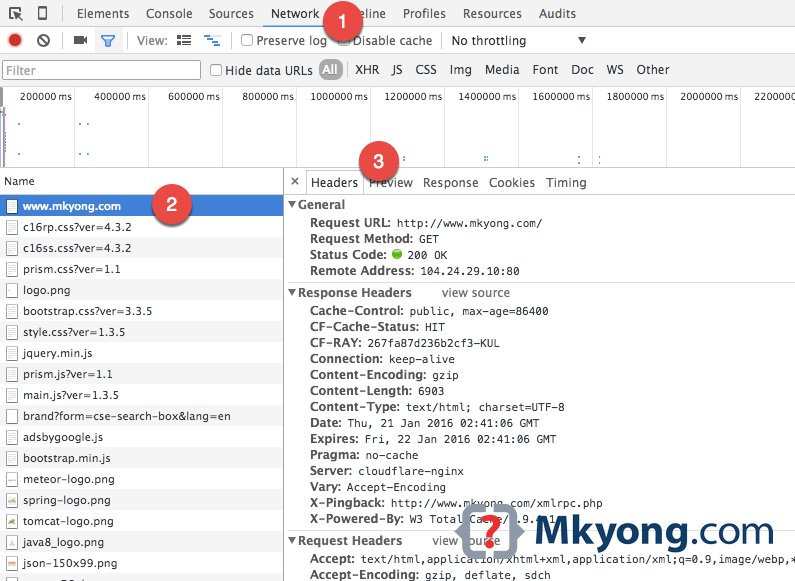
To view the request or response HTTP headers in Google Chrome, take the following steps :
- In Chrome, visit a URL,
right click, selectInspectto open the developer tools. - Select
Networktab. - Reload the page, select any HTTP request on the left panel, and the HTTP headers will be displayed on the right panel.

in My Payload not showing actual value its showing
Like This
d140e235c4d2f539f6219b0b4959cc8ecef59edbfab2192c1fa539c86515dd039cc7816721ff9e3be9011ac7e2442714acc4760ae9b369f83be29d634d3831ea0b60f1dd50843fe59bd0576615
You saved our lives Mkyong, THANK YOU SOOOO MUCH !
Request Method: POST
Thank you, sir!
You may wish to check this
This feature doesn’t work in Chrome – it used to many years ago, now it will always show “0 / X requests” (where X is the total number of HTTP requests made)
But never will you see anything load here – try Googling “chrome network tab not showing requests” and you will see the literally hundreds of threads of people saying this
For anyone who happens upon this article, the feature works in FireFox – which I’m using as an alternative
Very helpful, thank you!
how to see the duration of persistant connection??
Thanksss, simple and practical
Did API of every platform(Instagram, Discord, … ) come from here ?
Thanks mate!
Thanks. It worked for me.
Thanx for sharing this info
Thanks
And where the heck is the http version?
where can you see the http version though ?
Not seeing what you expect? Make sure the filters are set to “All” to the right of the to the “Hide Data URLs” check box.
You sir, you are my hero!
Thanks Mark.
Thank you
really this is very useful information, thanks for sharing this information with us. google extensions are very useful I also read an article on http://technicalground.webstarts.com/ but the information which is mentioned in this article is not proper don’t go there.
Hello, do you know what does mean the double dots before parameter? For example:
Request Headers
:authority: xxx.com
:method: GET
:path: /api/data/v9.0/$metadata
:scheme: https
I do not know what does mean the “:”.
Thanks
Very helpful, thank you!
Thanks mate
This Chrome extension can be very useful to view, edit and send requests: https://chrome.google.com/webstore/detail/spy/aedipmheomnpcbgmanofhaccebgapije
This post is so useful, thanks!