In this article, we show you how to integrate Maven3, Hibernate3.6 and Oracle11g together. In the end of this article, you will create a Java project with Maven, and insert a record into Oracle database via Hibernate framework.
Tools & technologies used in this article :
- Maven 3.0.3
- JDK 1.6.0_13
- Hibernate 3.6.3.final
- Oracle 11g
1. Table Creation
Oracle SQL script to create a “DBUSER” table in database.
CREATE TABLE DBUSER (
  USER_ID       NUMBER (5)    NOT NULL,
  USERNAME      VARCHAR2 (20)  NOT NULL,
  CREATED_BY    VARCHAR2 (20)  NOT NULL,
  CREATED_DATE  DATE          NOT NULL,
  PRIMARY KEY ( USER_ID )
)
2. Create Project with Maven
Use Maven to create a standard project structure.
mvn archetype:generate -DgroupId=com.mkyong -DartifactId=HibernateExample
-DarchetypeArtifactId=maven-archetype-quickstart -DinteractiveMode=false
More detail, please refer to this How to create a Java project with Maven.
3. Maven to Eclipse IDE
Convert the generated Maven based project to Eclipse project, and import it into your Eclipse IDE.
mvn eclipse:eclipse
4. Add Hibernate and Oracle Dependency
Update your pom.xml file, and add all related dependencies.
- You need declared “JBoss repository” for the latest Hibernate jar and its dependency.
- For Oracle JDBC driver, you need to install it into your local maven repository manually.
Read this guide – How to add Oracle JDBC driver in your Maven local repository
File : pom.xml
<project xmlns="http://maven.apache.org/POM/4.0.0"
    xmlns:xsi="http://www.w3.org/2001/XMLSchema-instance"
	xsi:schemaLocation="http://maven.apache.org/POM/4.0.0
	http://maven.apache.org/maven-v4_0_0.xsd">
	<modelVersion>4.0.0</modelVersion>
	<groupId>com.mkyong.common</groupId>
	<artifactId>HibernateExample</artifactId>
	<packaging>jar</packaging>
	<version>1.0</version>
	<name>HibernateExample</name>
	<url>http://maven.apache.org</url>

	<!-- JBoss repository for Hibernate -->
	<repositories>
		<repository>
			<id>JBoss repository</id>
			<url>http://repository.jboss.org/nexus/content/groups/public/</url>
		</repository>
	</repositories>

	<dependencies>

		<dependency>
			<groupId>junit</groupId>
			<artifactId>junit</artifactId>
			<version>4.8.2</version>
			<scope>test</scope>
		</dependency>

		<!-- ORACLE JDBC driver, need install yourself -->
		<dependency>
			<groupId>com.oracle</groupId>
			<artifactId>ojdbc6</artifactId>
			<version>11.2.0</version>
		</dependency>

		<dependency>
			<groupId>org.hibernate</groupId>
			<artifactId>hibernate-core</artifactId>
			<version>3.6.3.Final</version>
		</dependency>

		<dependency>
			<groupId>javassist</groupId>
			<artifactId>javassist</artifactId>
			<version>3.12.1.GA</version>
		</dependency>

	</dependencies>
</project>
5. Hibernate Mapping file (hbm) + Model
Create a Hibernate XML mapping file and Model class for table “DBUSER“.
– Create following “DBUser.hbm.xml” file and put it under “src/main/resources/com/mkyong/user“.
Create the folder if it does not exists.
File : DBUser.hbm.xml
<?xml version="1.0"?>
<!DOCTYPE hibernate-mapping PUBLIC "-//Hibernate/Hibernate Mapping DTD 3.0//EN"
"http://hibernate.sourceforge.net/hibernate-mapping-3.0.dtd">
<hibernate-mapping>
    <class name="com.mkyong.user.DBUser" table="DBUSER">
        <id name="userId" type="int">
            <column name="USER_ID" precision="5" scale="0" />
            <generator class="assigned" />
        </id>
        <property name="username" type="string">
            <column name="USERNAME" length="20" not-null="true" />
        </property>
        <property name="createdBy" type="string">
            <column name="CREATED_BY" length="20" not-null="true" />
        </property>
        <property name="createdDate" type="date">
            <column name="CREATED_DATE" length="7" not-null="true" />
        </property>
    </class>
</hibernate-mapping>
– Create a “DBUser.java” file and put it under “src/main/java/com/mkyong/user/”
File : DBUser.java
package com.mkyong.user;

import java.util.Date;

/**
 * Dbuser generated by hbm2java
 */
public class DBUser implements java.io.Serializable {

	private int userId;
	private String username;
	private String createdBy;
	private Date createdDate;

	public DBUser() {
	}

	public DBUser(int userId, String username, String createdBy,
			Date createdDate) {
		this.userId = userId;
		this.username = username;
		this.createdBy = createdBy;
		this.createdDate = createdDate;
	}

	public int getUserId() {
		return this.userId;
	}

	public void setUserId(int userId) {
		this.userId = userId;
	}

	public String getUsername() {
		return this.username;
	}

	public void setUsername(String username) {
		this.username = username;
	}

	public String getCreatedBy() {
		return this.createdBy;
	}

	public void setCreatedBy(String createdBy) {
		this.createdBy = createdBy;
	}

	public Date getCreatedDate() {
		return this.createdDate;
	}

	public void setCreatedDate(Date createdDate) {
		this.createdDate = createdDate;
	}

}
You may interest read this article – Eclipse + Hibernate tools to generate Hibernate mapping files automatically.
6. Hibernate Configuration File
Create a Hibernate configuration file “hibernate.cfg.xml” and put it under the root of resources folder, “src/main/resources/hibernate.cfg.xml“, and fill in your Oracle database details. And map to above Hibernate mapping file – “DBUser.hbm.xml“.
File : hibernate.cfg.xml
<?xml version="1.0" encoding="utf-8"?>
<!DOCTYPE hibernate-configuration PUBLIC
"-//Hibernate/Hibernate Configuration DTD 3.0//EN"
"http://hibernate.sourceforge.net/hibernate-configuration-3.0.dtd">
<hibernate-configuration>
 <session-factory>
  <property name="hibernate.connection.driver_class">oracle.jdbc.driver.OracleDriver</property>
  <property name="hibernate.connection.url">jdbc:oracle:thin:@127.0.0.1:1521:MKYONG</property>
  <property name="hibernate.connection.username">mkyong</property>
  <property name="hibernate.connection.password">password</property>
  <property name="hibernate.dialect">org.hibernate.dialect.Oracle10gDialect</property>
  <property name="hibernate.default_schema">MKYONG</property>
  <property name="show_sql">true</property>
  <mapping resource="com/mkyong/user/DBUser.hbm.xml"></mapping>
</session-factory>
</hibernate-configuration>
7. Hibernate Utility
Create a classic “HibernateUtil.java” class to take care of Hibernate session management. And put under “src/main/java/com/mkyong/util/HibernateUtil.java”
File : HibernateUtil.java
package com.mkyong.util;

import org.hibernate.SessionFactory;
import org.hibernate.cfg.Configuration;

public class HibernateUtil {

	private static final SessionFactory sessionFactory = buildSessionFactory();

	private static SessionFactory buildSessionFactory() {
		try {
			// Create the SessionFactory from hibernate.cfg.xml
			return new Configuration().configure().buildSessionFactory();
		} catch (Throwable ex) {
			// Make sure you log the exception, as it might be swallowed
			System.err.println("Initial SessionFactory creation failed." + ex);
			throw new ExceptionInInitializerError(ex);
		}
	}

	public static SessionFactory getSessionFactory() {
		return sessionFactory;
	}

	public static void shutdown() {
		// Close caches and connection pools
		getSessionFactory().close();
	}

}
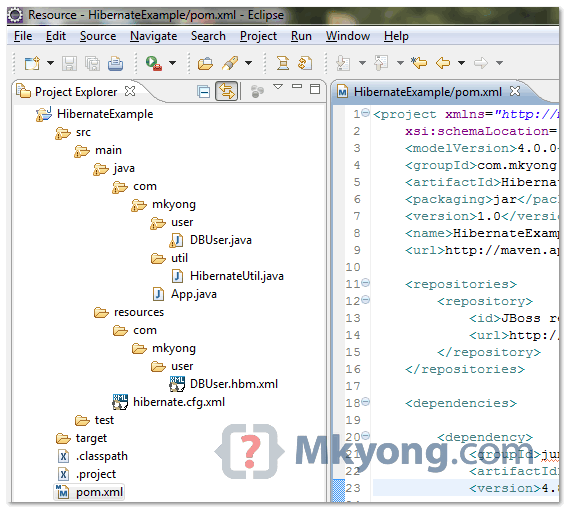
8. Review Final Project Structure
Review it, and your project structure should look like following :
9. Hibernate Coding
Update “App.java“, to code Hibernate to save a dummy user record into a table “DBUSER“.
File : App.java
package com.mkyong;

import java.util.Date;
import org.hibernate.Session;
import com.mkyong.util.HibernateUtil;
import com.mkyong.user.DBUser;

public class App {
	public static void main(String[] args) {
		System.out.println("Maven + Hibernate + Oracle");
		Session session = HibernateUtil.getSessionFactory().openSession();

		session.beginTransaction();
		DBUser user = new DBUser();

		user.setUserId(100);
		user.setUsername("superman");
		user.setCreatedBy("system");
		user.setCreatedDate(new Date());

		session.save(user);
		session.getTransaction().commit();
	}
}
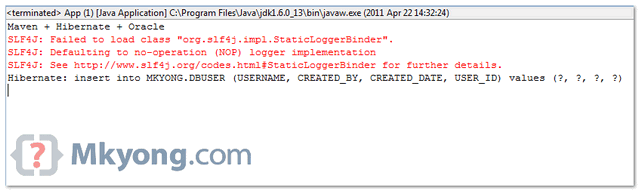
10. Run It
Run your “App.java“, and see the output in Eclipse console view :
Done.

hi
i have pull Webapplication(Springmvc+Hibernate+Oracle 11g+ jboss 7.10) from github how to setup on my local system and start application ,can you please help me
create post appreciate the basic information to get started, most other tutorials never give the simple basic to get going.
when i re run the main java file with new set of data the existing data is over ridden by the new data
org.hibernate.dialect.H2Dialect
create
true
true
com.niit
At the moment of executing your example the ide eclipse shows me the following exception:
Error in configcion.org.hibernate.MappingException: Could not get constructor for org.hibernate.persister.entity.SingleTableEntityPersister
Exception in thread “main” java.lang.ExceptionInInitializerError
at com.usuario.HibernateUtil.buildSessionFactory (HibernateUtil.java:16)
at com.usuario.HibernateUtil. (HibernateUtil.java:7)
at com.usuario.Prueba.main (Prueba.java:11)
Where are we using HibernateUtils.shutdown() method
Hi Mkyong and everyone, I follow your code and run but it has log like this:
Maven + Hibernate + Oracle
SLF4J: Failed to load class “org.slf4j.impl.StaticLoggerBinder”.
SLF4J: Defaulting to no-operation (NOP) logger implementation
SLF4J: See http://www.slf4j.org/codes.html#StaticLoggerBinder for further details.
Hibernate: insert into DB11G.DBUSER (USERNAME, CREATED_BY, CREATED_DATE, USER_ID) values (?, ?, ?, ?)
Exception in thread “main” org.hibernate.exception.SQLGrammarException: Could not execute JDBC batch update
at org.hibernate.exception.SQLStateConverter.convert(SQLStateConverter.java:92)
at org.hibernate.exception.JDBCExceptionHelper.convert(JDBCExceptionHelper.java:66)
at org.hibernate.jdbc.AbstractBatcher.executeBatch(AbstractBatcher.java:275)
at org.hibernate.engine.ActionQueue.executeActions(ActionQueue.java:268)
at org.hibernate.engine.ActionQueue.executeActions(ActionQueue.java:184)
at org.hibernate.event.def.AbstractFlushingEventListener.performExecutions(AbstractFlushingEventListener.java:321)
at org.hibernate.event.def.DefaultFlushEventListener.onFlush(DefaultFlushEventListener.java:51)
at org.hibernate.impl.SessionImpl.flush(SessionImpl.java:1216)
at org.hibernate.impl.SessionImpl.managedFlush(SessionImpl.java:383)
at org.hibernate.transaction.JDBCTransaction.commit(JDBCTransaction.java:133)
at com.mkyong.App.main(App.java:22)
Caused by: java.sql.BatchUpdateException: ORA-00942: table or view does not exist
at oracle.jdbc.driver.OraclePreparedStatement.executeBatch(OraclePreparedStatement.java:10070)
at oracle.jdbc.driver.OracleStatementWrapper.executeBatch(OracleStatementWrapper.java:213)
at org.hibernate.jdbc.BatchingBatcher.doExecuteBatch(BatchingBatcher.java:70)
at org.hibernate.jdbc.AbstractBatcher.executeBatch(AbstractBatcher.java:268)
… 8 more
I already tried to insert data from console, it’s okay, now I’m stuck when run from hibernate, I do not know why, I event import your code but it still shows log like that. Please help me, thanks you!
create
add this property in the cfg file and it should work
Great solution! Thanks from Russia!
I’ve tried this tutorial, but I’m using PostgreSQL database and Hibernate version 4.3.5.Final.
Everything work fine but I’ve got some question: after I run App.java class, my program is still running. Usually, program terminated immediately after all statement in main method executed. Is this normal?
Termination is normal, but check your database whether the data has been inserted.
Can you post you PostgreSQL modifications please 🙂
Thanks
Looks like everybody’s getting different problems…Mine’s
Exception in thread “main” java.lang.NoClassDefFoundError: org/hibernate/Session
Caused by: java.lang.ClassNotFoundException: org.hibernate.Session
you made it as a web app? or using any servlets? or else you trying to run it using a server container like tomcat>
Hi Lucy,
Have you fixed this problem yet? I got the same issue. Could you please share your solution if you fix it? Thank you.
I no longer remember sorry, but judging from the ClassNotFoundException, I think maybe you didn’t add the jar file the ‘Session’ class belongs to in dependency library.
add the hibernate jars into classpath and it should solve the issue.
Can anybody helpout me?
Caused by:
java.sql.BatchUpdateException: ORA-00942: table or view does not exist
it clearly says; table or view does not exist. So check your mapped table to see whether it’s available.
i meet the same error, delete MKYONG in hibernate.cfg.xml
Hi, I tried this example, but resulting with java.lang.ClassNotFoundException: org.hibernate.dialect.Oracle11gDialect
org.hibernate.dialect.OracleDialect
Thanks from Mexico
use the respective dialect based on the oracle db version installed i your system. you can find the dialect class names in the org.hibernate.dialect package inside the hibernate jar
i’m try to connect to hiberta and do a select HQL query and trhow me this : “Not binding factory to JNDI, no JNDI name configured” in the output,help me please
Why you want to use HQL query?
Thank you so much. I tried this in my STS workspace with some minor modification and it worked fine in the first attempt.
Thank you 😀
hi when ever i tried to generate, im unable to generate resource folder…!!!! Could u plz help me
Sorry… its my mistake
hi in IDE right click on src and select source on that tab give resources and click on finish.
It creates resources folder.
hi …
i have a problem as follows :
i create maven project and i used from Oracle and hibernateUtil class and i want to creat 2 tables in database that maintain a lot of record , actually i have some folders and a lot of file(textFile) in folders , i try to read logfiles via thread
program starts to run and work but while reading suddenly appear this error :
org.hibernate.exception.JDBCConnectionException: Cannot open connection
.
.
.
Caused by: java.sql.SQLRecoverableException: IO Error: Connection reset by peer: socket write error
.
.
.
Caused by: java.net.SocketException: Connection reset by peer: socket write error
i searched buti could`nt find appropriate solution for that
can you help me?
thanks.
Hi mona,
are you able to connect to the database using other tools like sqlplus or toad ?
Hi
yes,i can connect to database even as i said program starts to run and work but while reading suddenly appear that error…
many thanks from your answer.
So those lines of code is to just insert record into a table ? What’s wrong with people. Why people like to solve simple things in complex way ?
What if you want to move your data to another database ?… If using hibernate, u do not need to create sql statements specific to the target database.. this framework takes care of it. This is just a simple Hello World
I’m trying to apply the lessons here to a project I’m working on, and I’m receiving an unknown entity error: org.hibernate.MappingException: Unknown entity: [name of my class]. I’ve been googling this error, but I haven’t been able to figure it out yet. Any ideas?
Thanks!
I figured it out, I was missing the “mapping resource” element in the hibernate.cfg.xml document.
i want know source for ‘hibernate3.jar’. When i want to know what will be there in session factory,session object……, i want know all this information. I am using MYECLIPSE IDE ,when i am clicking on session object it will ask select(folder(or)jar(or)zip files for ‘hibernate3.jar’. Please help me where that source code available for hibernate3.jar
Try googling “download hibernate 3 jar”, it’s pretty easy to find: http://sourceforge.net/projects/hibernate/files/hibernate3
i want know source for ‘hibernate3.jar’. When i want to know what will be there in session factory,session object……, i want know all this information. I am using MYECLIPSE IDE ,when i am clicking on session object it will ask select(folder(or)jar(or)zip files for ‘hibernate3.jar’. Please help me where that source code available for hibernate3.jar
java.sql.BatchUpdateException: ORA-00942: table or view does not exist
To execute the script I have to add following in my hibernate configuration file
org.slf4j
slf4j-parent
1.6.1
org.eclipse.persistence
javax.persistence
2.0.0
and add following files in maven repository
mvn install:install-file -DgroupId=org.slf4j -DartifactId=slf4j-parent -Dversion=1.6.1 -Dpackaging=jar -Dfile=”path to file”
mvn install:install-file -DgroupId=org.eclipse.persistence -DartifactId=javax.persistence -Dversion=2.0.0 -Dpackaging=jar -Dfile=”path to file”
I am getting this exception when running the App.java
SLF4J: Failed to load class “org.slf4j.impl.StaticLoggerBinder”.
SLF4J: Defaulting to no-operation (NOP) logger implementation
SLF4J: See http://www.slf4j.org/codes.html#StaticLoggerBinder for further details.
Maven + Hibernate + Oracle
Exception in thread “main” org.hibernate.MappingException: Unknown entity: com.mkyong.user.DBUser
at org.hibernate.impl.SessionFactoryImpl.getEntityPersister(SessionFactoryImpl.java:693)
at org.hibernate.impl.SessionImpl.getEntityPersister(SessionImpl.java:1485)
at org.hibernate.event.def.AbstractSaveEventListener.saveWithGeneratedId(AbstractSaveEventListener.java:120)
at org.hibernate.event.def.DefaultSaveOrUpdateEventListener.saveWithGeneratedOrRequestedId(DefaultSaveOrUpdateEventListener.java:210)
at org.hibernate.event.def.DefaultSaveEventListener.saveWithGeneratedOrRequestedId(DefaultSaveEventListener.java:56)
at org.hibernate.event.def.DefaultSaveOrUpdateEventListener.entityIsTransient(DefaultSaveOrUpdateEventListener.java:195)
at org.hibernate.event.def.DefaultSaveEventListener.performSaveOrUpdate(DefaultSaveEventListener.java:50)
at org.hibernate.event.def.DefaultSaveOrUpdateEventListener.onSaveOrUpdate(DefaultSaveOrUpdateEventListener.java:93)
at org.hibernate.impl.SessionImpl.fireSave(SessionImpl.java:713)
at org.hibernate.impl.SessionImpl.save(SessionImpl.java:701)
at org.hibernate.impl.SessionImpl.save(SessionImpl.java:697)
at com.quintiles.hibernate.App.main(App.java:21)
Any help will be highly appreciated.
Never mind. I figured out what the problem was. I was missing this line in my hibernate.cfg.xml.
My bad.
Thank you! 🙂
When I try this example using
mvn clean package
cd target\classes
java -cp .;..\HibernateExample-1.0.jar com.mkyong.App
I always get:
Exception in thread “main” java.lang.NoClassDefFoundError: org/hibernate/Session
I suspect the classpath is wrong but I don’t really know what to set it to. As a beginner I thought Maven would download some kind of hibernate.jar file and set the classpath automatically? If I have to do this manually where do I find this file or should I use a xml tag in the pom?
Also I find it a bit difficult to find the repositories and know how the xml dependency,groupid, artifactid, version tag maps to the url?
If you are using Maven, you need to declares dependency (hibernate library) manually in pom.xml file. Then compile or build it with “
mvn compile” or “mvn package“, it will ONLY download the library in your local maven repository (your local Maven repo folder), but, your classpath is still not configure yet.For Eclipse user, you need “
mvn eclipse:eclipse” or for web project you need “mvn eclipse:eclipse -wtpversion=2.0”P.S Find out what xml beong to what library was difficult in old days, but it’s improved a lot, try this Maven search function – http://search.maven.org/#browse
Maven is a bit confuse at the beginning, however, take some time to learn it, when you know the concept, it will be a powerful and convenient build tool.
i want hibernate3.jar files source code.please help me where it available.