In this article, we show you how to use Hibernate / JBoss Tools to generate Hibernate mapping files (hbm) and annotation code from database automatically.
Tools in this article
- Eclipse v3.6 (Helios)
- JBoss / Hibernate Tools v3.2
- Oracle 11g
- JDK 1.6
Before proceed, please Install Hibernate / JBoss Tools in Eclipse IDE.
1. Hibernate Perspective
Open your “Hibernate Perspective“. In Eclipse IDE, select “Windows” >> “Open Perspective” >> “Others…” , choose “Hibernate“.
2. New Hibernate Configuration
In Hibernate Perspective, right click and select “Add Configuration…”
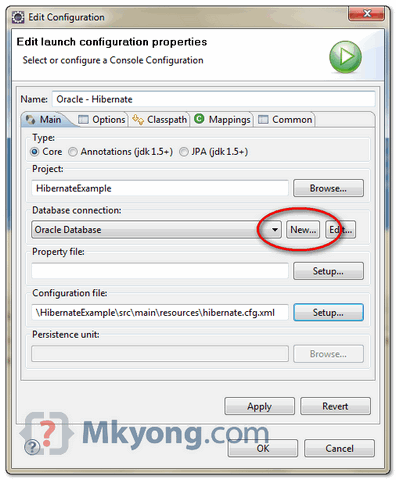
In “Edit Configuration” dialog box,
- In “Project” box, click on the “Browse..” button to select your project.
- In “Database Connection” box, click “New..” button to create your database settings.
- In “Configuration File” box, click “Setup” button to create a new or use existing “Hibernate configuration file”,
hibernate.cfg.xml.
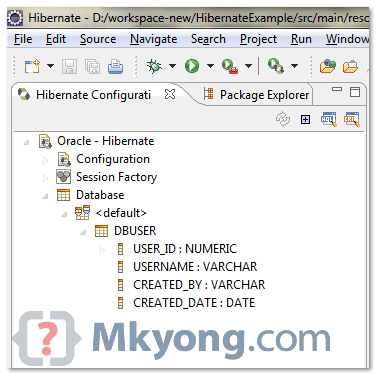
See your list of your tables in “Hibernate Perspective“.
Sample of “hibernate.cfg.xml“, connect to Oracle 11g database.
<?xml version="1.0" encoding="utf-8"?>
<!DOCTYPE hibernate-configuration PUBLIC
"-//Hibernate/Hibernate Configuration DTD 3.0//EN"
"http://hibernate.sourceforge.net/hibernate-configuration-3.0.dtd">
<hibernate-configuration>
<session-factory>
  <property name="hibernate.connection.driver_class">oracle.jdbc.driver.OracleDriver</property>
  <property name="hibernate.connection.url">jdbc:oracle:thin:@127.0.0.1:1521:MKYONG</property>
  <property name="hibernate.connection.username">mkyong</property>
  <property name="hibernate.connection.password">password</property>
  <property name="hibernate.dialect">org.hibernate.dialect.Oracle10gDialect</property>
  <property name="hibernate.default_schema">MKYONG</property>
 </session-factory>
</hibernate-configuration>
3. Hibernate Code Generation
Now, you are ready to generate the Hibernate mapping files and annotation codes.
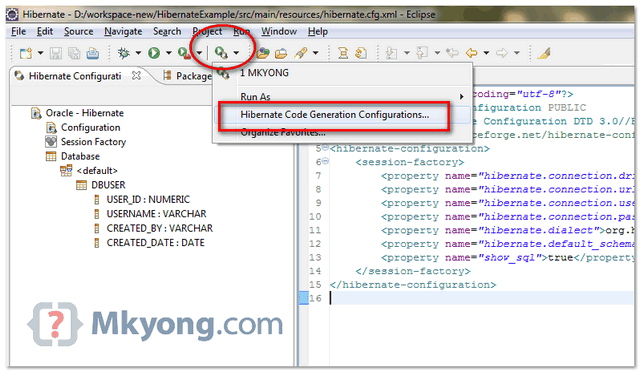
– In “Hibernate Perspective”, click “Hibernate code generation” icon (see below figure) and select “Hibernate Code Generation Configuration”
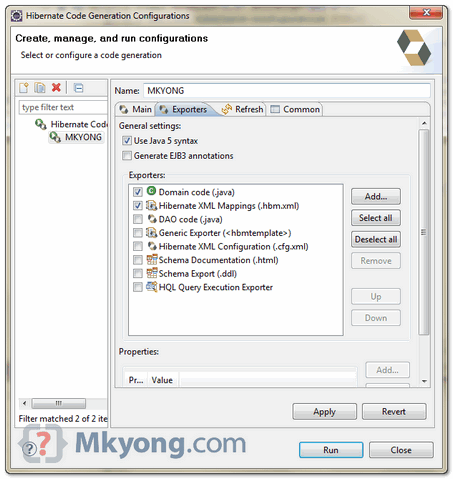
– Create a new configuration, select your “console configuration” (configured in step 2), puts your “Output directory” and checked option “Reverse engineer from JDBC Connection“.
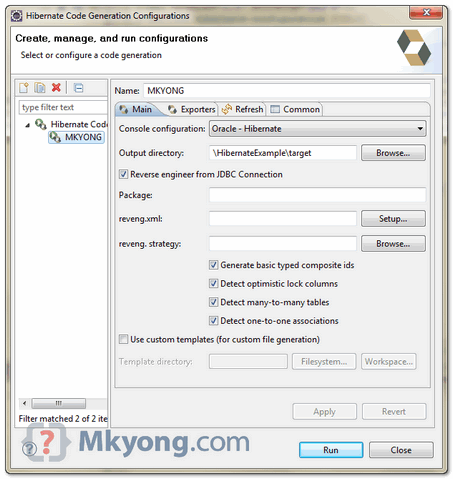
– In “Exporter” tab, select what you want to generate, Model , mapping file (hbm) , DAO, annotation code and etc.
See result
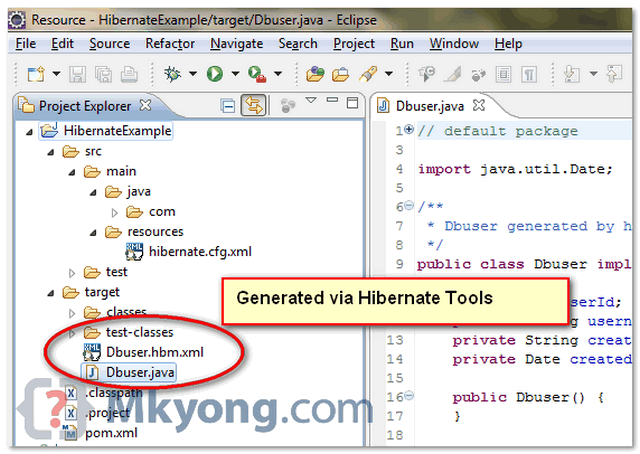
The generated Hibernate mapping file and annotations code are very clean, standard and easy to modify. Try explore more features.

When run, only hibernate.cfg.xml is generated, no POJO, mapping xml is generated.
Configuration placed outside CLASSPATH will not be available at run-time
what does this mean?
In Hibernate Perspective, right click and select “Add Configuration…”
new a java project and right click that project? but not “Add Configuration…”?
Hi Its not working with MS SQL server. Can anybody help me to do it on sql server
Hi, do you know why class is generated without annotation : “@Entity”, “@colums, etc…” ? thank you
Hey, did u face any unusual amount of time while generating entities from oracle db?
Hola, Cuando intento realizar la conexión muestra el siguiente mensaje: “org.hibernate.eclipse.console
Error
Mon Feb 26 18:13:18 CST 2018
org.jboss.tools.hibernate.runtime.spi.HibernateException: org.hibernate.mapping.Column(DUMMY) already exists in SYS.DUAL
org.jboss.tools.hibernate.runtime.spi.HibernateException: org.hibernate.mapping.Column(DUMMY) already exists in SYS.DUAL
at org.hibernate.eclipse.console.workbench.LazyDatabaseSchemaWorkbenchAdapter$2.execute(LazyDatabaseSchemaWorkbenchAdapter.java:141)
at org.hibernate.console.execution.DefaultExecutionContext.execute(DefaultExecutionContext.java:63)
at org.hibernate.console.ConsoleConfiguration.execute(ConsoleConfiguration.java:107)
at org.hibernate.eclipse.console.workbench.LazyDatabaseSchemaWorkbenchAdapter.readDatabaseSchema(LazyDatabaseSchemaWorkbenchAdapter.java:124)
at org.hibernate.eclipse.console.workbench.LazyDatabaseSchemaWorkbenchAdapter.getChildren(LazyDatabaseSchemaWorkbenchAdapter.java:64)
at org.hibernate.eclipse.console.workbench.BasicWorkbenchAdapter.fetchDeferredChildren(BasicWorkbenchAdapter.java:104)
at org.eclipse.ui.progress.DeferredTreeContentManager$1.run(DeferredTreeContentManager.java:232)
at org.eclipse.core.internal.jobs.Worker.run(Worker.java:56)”
Alguien me puede ayudar.
Saludos.
Lo pude resolver utilizando una versión de Hibernate inferior. Saludos!!
Thank so much…
i am able to generate pojo classes but, in that pojo classes annotations are not generating
I had also this problem.
To solve it, check the “Generate EJB3 annotations” in the “Exporter” tab, in the Hibernate code generation window.
After cheking also facing same issue
The same for me. The annotation are not coming in the java File. I don’t know what is wrong
I found in stackoverflow the problem, you cannot use 5.4 or 5.3 hibernate version. Try to use 5.2 version hibernate in the comebox when you create console hibernate configuration
FIX: FETCHING CHILDREN FROM DATABASE DOESN’T RETURN ANY TABLES
There are a lot of people who are complaining about not getting any tables even when hibernate doesn’t generate any error!
The first time I followed this tutorial, everything worked perfectly and I didn’t have to do anything different. Later after a month, when I started working on another project, i got this result even though i was doing everything the same way I had done before (eclipse was just being eclipse)
So, solution:
1) In the generated hibernate.cfg.xml, change:
dbname to
DBNAME
**you’ll have to write your default schema in UPPERCASE. This will work well if you’re using Oracle
2) This solution is for MySQL5 since the first one didn’t work for me
dbname to
dbname
**you’ll have to change the property from default_schema to default_catalog
Thank you Mkyong for your examples – of much help and expedite the dev process.
It really helped me, thanks a lot !
I don’t want to create .hbm files any more, I want all model classes with annotations on that. How we can do that? Please guide soonest possible.
Nice article on the Hibernate setup.
For setting hibernate without using Hibernate eclipse tool you can refer to following link.
This is just alternate if you do not have the Hibernate eclipse tool with you…
http://techpost360.blogspot.in/2015/07/configuring-hibernate-with-java.html
Just post your comments
How would you configure your reverse engineering to let hibernate know what you “CREATED_DATE” column would be automatically generated by the database. Such as in postgresql a column that has a default value of current_timestamp?
good.. worked for me smoothly
MkYong,
Using Eclipse and JBoss Hibernate tools. When I generate the POJO’s from DB (Rev. Engg), I am getting basic data types instead of Entity.
e.g. It generates the following
private Integer application;
instead of
private Application application;
All the required FK’s are in place, am using Java 5 Syntax. Note: I am also not able to see these relations in the Hibernate Configurations view.
Can you please advise???
Thanks and regards,
Shailendra
Hi.. thank you very much for this article.. it helped me a lot..
If anyone out there is using PostgreSQL and not seeing the class files generated, here is a tip.. convert your table names into all lower case. All my tables names were in upper case and when I ran it, no class files were being generated. It drove me crazy for a while and with some dumb luck, I finally realized that PostgreSQLHibernate tools requires the table names to be in lowercase.
Hello,
I’m trying to do this tutorial using Oracle 10g XE and SQL Server 2008, but I don’t get the list of tables from my database, I’m getting from all databases. When I tried with SQL Server 2008 I’m getting tree databases on Hibernate Configurations:
SQL Server – Hibernate
Configuration
Session Factory
Database
CDP.Information_Schema
CDP.dbo
CDP.sys
And this message when I execute the “Hibernate Code Generation Configuration…” > Run:
org.hibernate.cfg.JDBCBinderException: Duplicate class name ‘CheckConstraints’ generated for ‘org.hibernate.mapping.Table(CDP.sys.check_constraints)’. Same name where generated for ‘org.hibernate.mapping.Table(CDP.sys.check_constraints)’
Duplicate class name ‘CheckConstraints’ generated for ‘org.hibernate.mapping.Table(CDP.sys.check_constraints)’. Same name where generated for ‘org.hibernate.mapping.Table(CDP.sys.check_constraints)’
My question is “How do I get only the main database: “CDP.dbo” ?
Thank you!
how can u fix this program i have same
Great tutorial. Thank you!
how can we change target JDK for hibernate tool manually (without using hibernate perspective window)?
when i tried to generate annotations using reverse engineering from JDBC connection,It just keep saying “Fetching children from Database” till 57%,.it doesn’t progress further.
Can you figure out what is going wrong ?I did all the steps you mentioned but at generation part it is struck!
did you get solution for your issue? i am using Mysql and I am getting the same error
Hi,
I have a database in mssql. One of this tables is “dbo.city” and the other one is “dbo._city”. I try to generate classes but i have a duplication problem. I think it’s about name strategy.
“dbo.city” and “dbo._city” generated with same class name.
Can you help me?
Thanks
how to configure db setting? i want to use postgresql, how i can add postgresql database driver?
Hi mkyong, nice tutorial! good job, I have a question, if I have my tables with the prefix “namewebapp_” in my database, but the Hibernate Tools generates NamewebappAnybean (obviously), for example: I have a table with name “namewebapp_customers”, the Hibernate Tools generates my JavaBeans with the NamewebappCustomers class name , but I want the name for my JavaBean be only Customers, Is there any configuration to do this?
Regards!
Exception in thread “main” java.lang.Error: Unresolved compilation problem:
The method getCurrentSession() is undefined for the type SessionFactory
at com.person.testperson.main(testperson.java:18)
getting this error wht to do tel me 🙂
regards
shivarul
how i can set perspective for hibernate
because that not showing hibernate code generation configuration in my eclipse
thanks
i followed the steps you said, but while trying to generate mapping files and pojo classses it is throwing an exception org.hibernate.cfg.jdbcbinder Exception and it says Duplicate class name ‘Syscatalog’ generated for ‘org.hibernate.mapping.Table(SYS.SYSCATALOG_)’. Same name where generated for org.hibernate.mapping.Table(SYS.SYSCATALOG_)
did you get a fix?
I have the same problem, any idea?
Hi,
I am following this tutorial but the Hibernate Configuration does not open the table list in the Database item and no error is appear in console. I have tried connect to database with Database Development persitance in Eclipse and it works with my configuration and I have got the list of tables. I am using postgresql driver and create simple Java Project. Do have some advice?
very much explanatory . thanks a lot !!!
hey mkyong i like your web so much i also like your way of solving a problem… greate thumbs up!!
my Question is that.
1. if i have added new table to DB how can i create pojo class for single table ? by hibernate tool
2. if i change any column’s property or add new column to table how can i change it in POJO class automatically
THANKS 🙂
Thanks for the kind words.
1. Uses Hibernate tool.
2. If small change like add a new column, just add the annotation manually :).
The “hibernate.default_schema” value HAS to be all uppercase or else you will never be able to connect to the database and there will be no errors as to why (Even though the ‘Test Connection’ is successful). Took me a long time to find that out, so I’m posting it here in case someone needs the solution.
Thanks, before your tip I couldn’t see the table list.
Thank you very much:))
Thanks for this comment, even i spent a lot of time for this
Sir,
I am learning hibernate. I have tried your tutorial in both Eclipse and NB.
I just have two question.
Q-1. As you said NB is slow, can you tell us how?
Q-2. If I add one more column in DBUser table, will it reflect automatically in hbm file and pojo? If not then I have to change mannually.
A1 = Use Eclipse
A2 = You need to generate again. If just added a new column, you can modify the pojo manually.
Thank You sir,Your all posts very use full …
Hi sir, i am watching ur wesite,
which is helping me a lot.
thank u sir.
Hello,
I am trying to run the mapping tool using a hibernate.reveng.xml file.
The problem is that nothing gets generated and I get no error messages either.
Do you know where I can find information (logs) about what went wrong?
Thank you!
Am having the same issue. I ran the Hibernate Code Generation configurations to generate the POJO classes and the corresponding mapping files. But nothing happens. No error messages.
Sir,
I am having a common Database and I need to create annotations for only specific tables. How can I acheive this?
Need to edit reveng.xml. Greate tutorial here: http://o7planning.org/web/fe/default/en/document/7758/using-hibernate-tools-generate-entity-classes-from-tables
SIr,
Hello!
This tutorial are great, but could you do a tutorial in Netbeans?
IMHO Eclipse is crap, more configurations than fun with pure programming.
What do you think about?
Eclipse is fast, flexible and lot plugins, it’s still my favor IDE.
IMHO, Netbeans is also flexible, features rich, but it’s slow and UI is ugly, after so many years and versions, NB is still slow.
Sir ,
i got 2 kind of error after updating plugin. Actually tomcat server is giving me two error .below mentioned.
———————————————————-
Error 1 : An internal error occurred during: “Starting Tomcat v6.0 Server at localhost”.
java.lang.NoSuchMethodError: org.eclipse.wst.server.core.model.ServerBehaviourDelegate.getTempDirectory(Z)Lorg/eclipse/core/runtime/IPath;
at org.eclipse.jst.server.tomcat.core.internal.TomcatServerBehaviour.getTempDirectory(TomcatServerBehaviour.java:620)
at org.eclipse.jst.server.tomcat.core.internal.TomcatVersionHelper.getStandardBaseDirectory(TomcatVersionHelper.java:154)
at org.eclipse.jst.server.tomcat.core.internal.Tomcat60Handler.getRuntimeBaseDirectory(Tomcat60Handler.java:112)
at org.eclipse.jst.server.tomcat.core.internal.TomcatServer.getRuntimeBaseDirectory(TomcatServer.java:316)
at org.eclipse.jst.server.tomcat.core.internal.TomcatServerBehaviour.getRuntimeBaseDirectory(TomcatServerBehaviour.java:103)
at org.eclipse.jst.server.tomcat.core.internal.TomcatServerBehaviour.getRuntimeProgramArguments(TomcatServerBehaviour.java:115)
at org.eclipse.jst.server.tomcat.core.internal.TomcatServerBehaviour.setupLaunchConfiguration(TomcatServerBehaviour.java:833)
at org.eclipse.wst.server.core.internal.Server.setupLaunchConfiguration(Server.java:1440)
at org.eclipse.wst.server.core.internal.Server.getLaunchConfiguration(Server.java:1526)
at org.eclipse.wst.server.core.internal.Server.startImpl2(Server.java:3048)
at org.eclipse.wst.server.core.internal.Server.startImpl(Server.java:3001)
at org.eclipse.wst.server.core.internal.Server$StartJob.run(Server.java:300)
at org.eclipse.core.internal.jobs.Worker.run(Worker.java:55)
————————————————————————————
Error 2 :An internal error occurred during: “Publishing to Tomcat v6.0 Server at localhost…”.
java.lang.NoSuchMethodError: org.eclipse.wst.server.core.model.ServerBehaviourDelegate.getTempDirectory(Z)Lorg/eclipse/core/runtime/IPath;
at org.eclipse.jst.server.tomcat.core.internal.TomcatServerBehaviour.getTempDirectory(TomcatServerBehaviour.java:620)
at org.eclipse.jst.server.tomcat.core.internal.TomcatVersionHelper.getStandardBaseDirectory(TomcatVersionHelper.java:154)
at org.eclipse.jst.server.tomcat.core.internal.Tomcat60Handler.getRuntimeBaseDirectory(Tomcat60Handler.java:112)
at org.eclipse.jst.server.tomcat.core.internal.TomcatServer.getRuntimeBaseDirectory(TomcatServer.java:316)
at org.eclipse.jst.server.tomcat.core.internal.TomcatServerBehaviour.getRuntimeBaseDirectory(TomcatServerBehaviour.java:103)
at org.eclipse.jst.server.tomcat.core.internal.PublishOperation2.(PublishOperation2.java:50)
at org.eclipse.jst.server.tomcat.core.internal.PublishTask.getTasks(PublishTask.java:34)
at org.eclipse.wst.server.core.internal.PublishTask.getTasks(PublishTask.java:89)
at org.eclipse.wst.server.core.internal.Server.getTasks(Server.java:1186)
at org.eclipse.wst.server.core.model.ServerBehaviourDelegate.getTasks(ServerBehaviourDelegate.java:1055)
at org.eclipse.wst.server.core.model.ServerBehaviourDelegate.publish(ServerBehaviourDelegate.java:834)
at org.eclipse.wst.server.core.model.ServerBehaviourDelegate.publish(ServerBehaviourDelegate.java:708)
at org.eclipse.wst.server.core.internal.Server.publishImpl(Server.java:2731)
at org.eclipse.wst.server.core.internal.Server$PublishJob.run(Server.java:278)
at org.eclipse.core.internal.jobs.Worker.run(Worker.java:55)
————————————————————————
please sir help me what to do ..please solve my error & guide me.
Thank You.
Your website with it’s well documented steps on so many areas is very helpful.
Regards,
Mythili
Hi, i have problem with domains in my db, Hibernate dont see them, so i cant generate anything. For example i have column USER_ID : public.id
sir I m yu great fan. I learn many things from yu site.
thanks sir vo bhi bada wala…
HI,
I am currently working on a project. Which uses JSPs and stored procedure to populate the dropdown. I want to use hibernate. Ca I know what modificatioins I need to do ?
Thanks..
Nothing special, read this read stored procedure in Hibernate
How to generate annotated hibernate entities?
In Hibernate tools, clicked on the “generateejb3 annotation”. See figure above
This is exactly what i was looking for..
Thank you very much… Very neatly described…
I have a question.
How do I automatically generate tag on hibernate mapping file with hibernate tools?
sql-insert
sql-delete
sql-update
Don’t think so, Hibernate does not provide options to configure it.
can u tell me about setting up using the oracle 10g
Er…what you want to know? It should be not much different , just configure your db setting.
Thank you, it’s interesting.
Can we change the strategy of code generation for inheritance?
Not really, Hibernate tool always generate consider *best* strategy based on your tables structure, it’s quite straightforward at the moment.
Some manual works may need involve if you are not satisfied with the generated code.
Thanks for your article. I checked Annotations(jdk 1.5+) and I got java file and hbm file generated fine, but there is no annotations for java file. Did I miss something? How can I get annotations on java file.
Marvin
Hi Marvin ,
I too have same problem.. did you get it fixed ?
mkyong any solutions for this problem ?
In Hibernate tools, use “generate ejb3 annotation”.
hi I have a question regarding renaming an entity. Our tables name are like ECDS_city. when I generate entity it is generating as edcsCity. how to I create entity as City instead of edcsCity