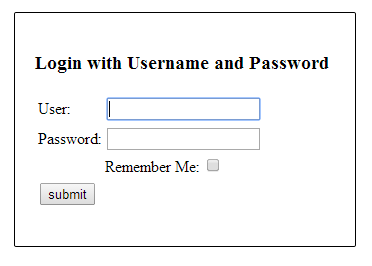
In this tutorial, we will show you how to implement “Remember Me” login feature in Spring Security, which means, the system will remember the user and perform automatic login even after the user’s session is expired.
Technologies and tools used :
- Spring 3.2.8.RELEASE
- Spring Security 3.2.3.RELEASE
- Spring JDBC 3.2.3.RELEASE
- Eclipse 4.2
- JDK 1.6
- Maven 3
- MySQL Server 5.6
- Tomcat 6 and 7 (Servlet 3.x)
- Test with Google Chrome
Some quick notes :
- In Spring Security, there are two approaches to implement “remember me” – Simple Hash-Based Token and Persistent Token Approach.
- To understand how the “remember me” works, please read these articles – Spring remember me reference, Persistent Login Cookie Best Practice, Improved Persistent Login Cookie Best Practice.
- This example is using “Persistent Token Approach”, refer to Spring’s
PersistentTokenBasedRememberMeServices. - This example is using MySQL and database authentication (via Spring JDBC).
- Table “persistent_logins” will be created to store the login token and series.
Project workflows :
- If user login with a “remember me” checked, the system will store a “remember me” cookie in the requested browser.
- If user’s browser provides a valid “remember me” cookie, the system will perform automatic login.
- If user is login via “remember me” cookies, to update the user detail, user need to type the username and password again (good practice to avoid stolen cookie to update user information.
P.S This is a very high level of how “remember me” should work, for detail, please refer to the above links in “quick notes”.
1. Project Demo
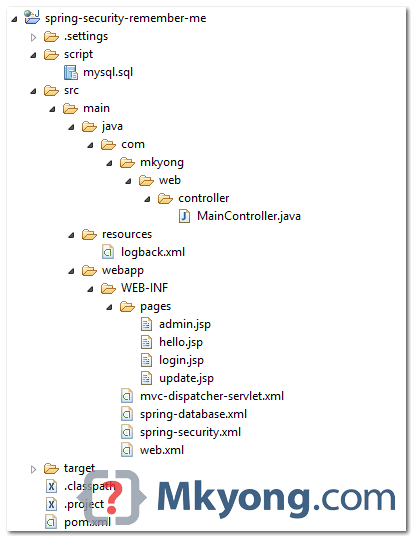
2. Project Directory
Review the project directory structure.
3. MySQL Scripts
SQL scripts to create users, user_roles and persistent_logins.
CREATE  TABLE users (
  username VARCHAR(45) NOT NULL ,
  password VARCHAR(45) NOT NULL ,
  enabled TINYINT NOT NULL DEFAULT 1 ,
  PRIMARY KEY (username));

CREATE TABLE user_roles (
  user_role_id int(11) NOT NULL AUTO_INCREMENT,
  username varchar(45) NOT NULL,
  role varchar(45) NOT NULL,
  PRIMARY KEY (user_role_id),
  UNIQUE KEY uni_username_role (role,username),
  KEY fk_username_idx (username),
  CONSTRAINT fk_username FOREIGN KEY (username) REFERENCES users (username));

INSERT INTO users(username,password,enabled)
VALUES ('mkyong','123456', true);

INSERT INTO user_roles (username, role)
VALUES ('mkyong', 'ROLE_USER');
INSERT INTO user_roles (username, role)
VALUES ('mkyong', 'ROLE_ADMIN');

CREATE TABLE persistent_logins (
    username varchar(64) not null,
    series varchar(64) not null,
    token varchar(64) not null,
    last_used timestamp not null,
    PRIMARY KEY (series)
);
4. Remember Me (XML Example)
To enable “remember me” in XML configuration, puts remember-me tag in the http like this :
  <!-- enable use-expressions -->
  <http auto-config="true" use-expressions="true">
    <intercept-url pattern="/admin**" access="hasRole('ROLE_ADMIN')" />

    <form-login login-page="/login"
	default-target-url="/welcome"
	authentication-failure-url="/login?error"
	username-parameter="username"
	password-parameter="password"
	login-processing-url="/auth/login_check"
	authentication-success-handler-ref="savedRequestAwareAuthenticationSuccessHandler" />

    <logout logout-success-url="/login?logout" delete-cookies="JSESSIONID" />
    <csrf />

    <!-- enable remember me -->
    <remember-me
        token-validity-seconds="1209600"
	remember-me-parameter="remember-me"
	data-source-ref="dataSource" />

  </http>
  <bean id="dataSource"
	class="org.springframework.jdbc.datasource.DriverManagerDataSource">

	<property name="driverClassName" value="com.mysql.jdbc.Driver" />
	<property name="url" value="jdbc:mysql://localhost:3306/test" />
	<property name="username" value="root" />
	<property name="password" value="password" />
  </bean>

  <!-- If request parameter "targetUrl" is existed, then forward to this url -->
  <!-- For update login form -->
  <bean id="savedRequestAwareAuthenticationSuccessHandler"
	class="org.springframework.security.web.authentication.SavedRequestAwareAuthenticationSuccessHandler">
	<property name="targetUrlParameter" value="targetUrl" />
  </bean>
- token-validity-seconds – The expire date of “remember-me” cookie, in seconds. For example, 1209600 = 2 weeks (14 days), 86400 = 1 day, 18000 = 5 hours.
- remember-me-parameter – The name of the “check box”. Defaults to ‘_spring_security_remember_me’.
- data-source-ref – If this is specified, “Persistent Token Approach” will be used. Defaults to “Simple Hash-Based Token Approach”.
5. Remember Me (Annotation Example)
The equivalent of annotations :
package com.mkyong.config;

import javax.sql.DataSource;
import org.springframework.beans.factory.annotation.Autowired;
import org.springframework.context.annotation.Bean;
import org.springframework.context.annotation.Configuration;
import org.springframework.security.config.annotation.authentication.builders.AuthenticationManagerBuilder;
import org.springframework.security.config.annotation.web.builders.HttpSecurity;
import org.springframework.security.config.annotation.web.configuration.EnableWebSecurity;
import org.springframework.security.config.annotation.web.configuration.WebSecurityConfigurerAdapter;
import org.springframework.security.web.authentication.SavedRequestAwareAuthenticationSuccessHandler;
import org.springframework.security.web.authentication.rememberme.JdbcTokenRepositoryImpl;
import org.springframework.security.web.authentication.rememberme.PersistentTokenRepository;

@Configuration
@EnableWebSecurity
public class SecurityConfig extends WebSecurityConfigurerAdapter {

	@Autowired
	DataSource dataSource;
	//...

	@Override
	protected void configure(HttpSecurity http) throws Exception {

	  http.authorizeRequests()
	      .antMatchers("/admin/**").access("hasRole('ROLE_ADMIN')")
	    .and()
	      .formLogin()
	        .successHandler(savedRequestAwareAuthenticationSuccessHandler())
		.loginPage("/login")
	        .failureUrl("/login?error")
		.loginProcessingUrl("/auth/login_check")
		.usernameParameter("username")
		.passwordParameter("password")
	    .and()
		.logout().logoutSuccessUrl("/login?logout")
	    .and()
	        .csrf()
	    .and()
		.rememberMe().tokenRepository(persistentTokenRepository())
		.tokenValiditySeconds(1209600);
	}

	@Bean
	public PersistentTokenRepository persistentTokenRepository() {
		JdbcTokenRepositoryImpl db = new JdbcTokenRepositoryImpl();
		db.setDataSource(dataSource);
		return db;
	}

	@Bean
	public SavedRequestAwareAuthenticationSuccessHandler
                savedRequestAwareAuthenticationSuccessHandler() {

               SavedRequestAwareAuthenticationSuccessHandler auth
                    = new SavedRequestAwareAuthenticationSuccessHandler();
		auth.setTargetUrlParameter("targetUrl");
		return auth;
	}

}
P.S In annotation configuration, the default http name for “remember me” check box is “remember-me”.
6.HTML / JSP Pages
6.1 In JSP, you can use Spring security tag sec:authorize access="isRememberMe()" to determine if this user is login by “remember me” cookies.
<%@taglib prefix="sec"
	uri="http://www.springframework.org/security/tags"%>
<%@taglib prefix="c" uri="http://java.sun.com/jsp/jstl/core"%>
<%@page session="true"%>
<html>
<body>
	<h1>Title : ${title}</h1>
	<h1>Message : ${message}</h1>

	<c:url value="/j_spring_security_logout" var="logoutUrl" />
	<form action="${logoutUrl}" method="post" id="logoutForm">
		<input type="hidden" name="${_csrf.parameterName}"
			value="${_csrf.token}" />
	</form>
	<script>
		function formSubmit() {
			document.getElementById("logoutForm").submit();
		}
	</script>

	<c:if test="${pageContext.request.userPrincipal.name != null}">
	  <h2>
		Welcome : ${pageContext.request.userPrincipal.name} | <a
			href="javascript:formSubmit()"> Logout</a>
	  </h2>
	</c:if>

	<sec:authorize access="isRememberMe()">
		<h2># This user is login by "Remember Me Cookies".</h2>
	</sec:authorize>

	<sec:authorize access="isFullyAuthenticated()">
		<h2># This user is login by username / password.</h2>
	</sec:authorize>

</body>
</html>
6.2 A simple login form with “remember me” check box.
   <form name='loginForm'
	action="<c:url value='/auth/login_check?targetUrl=${targetUrl}' />"
	method='POST'>

	<table>
	<tr>
		<td>User:</td>
		<td><input type='text' name='username'></td>
	</tr>
	<tr>
		<td>Password:</td>
		<td><input type='password' name='password' /></td>
	</tr>

	<!-- if this is login for update, ignore remember me check -->
	<c:if test="${empty loginUpdate}">
	<tr>
		<td></td>
		<td>Remember Me: <input type="checkbox" name="remember-me" /></td>
	</tr>
	</c:if>

	<tr>
	        <td colspan='2'><input name="submit" type="submit"
		value="submit" /></td>
	</tr>

	</table>

	<input type="hidden" name="${_csrf.parameterName}"
		value="${_csrf.token}" />

  </form>
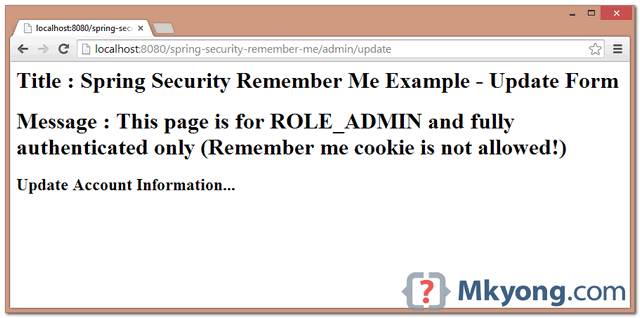
6.3 Update page. Only user login by using password is allowed to access this page.
<%@taglib prefix="c" uri="http://java.sun.com/jsp/jstl/core"%>
<%@page session="true"%>
<html>
<body>
	<h1>Title : Spring Security Remember Me Example - Update Form</h1>
	<h1>Message : This page is for ROLE_ADMIN and fully authenticated only
            (Remember me cookie is not allowed!)</h1>

	<h2>Update Account Information...</h2>
</body>
</html>
7. Controller
Spring controller class, read the comment for self-explanatory.
package com.mkyong.web.controller;

import javax.servlet.http.HttpServletRequest;
import javax.servlet.http.HttpSession;
import org.springframework.security.authentication.RememberMeAuthenticationToken;
import org.springframework.security.core.Authentication;
import org.springframework.security.core.context.SecurityContextHolder;
import org.springframework.stereotype.Controller;
import org.springframework.util.StringUtils;
import org.springframework.web.bind.annotation.RequestMapping;
import org.springframework.web.bind.annotation.RequestMethod;
import org.springframework.web.bind.annotation.RequestParam;
import org.springframework.web.servlet.ModelAndView;

@Controller
public class MainController {

	@RequestMapping(value = { "/", "/welcome**" }, method = RequestMethod.GET)
	public ModelAndView defaultPage() {

		ModelAndView model = new ModelAndView();
		model.addObject("title", "Spring Security Remember Me");
		model.addObject("message", "This is default page!");
		model.setViewName("hello");
		return model;

	}

	@RequestMapping(value = "/admin**", method = RequestMethod.GET)
	public ModelAndView adminPage() {

		ModelAndView model = new ModelAndView();
		model.addObject("title", "Spring Security Remember Me");
		model.addObject("message", "This page is for ROLE_ADMIN only!");
		model.setViewName("admin");

		return model;

	}

	/**
	 * This update page is for user login with password only.
	 * If user is login via remember me cookie, send login to ask for password again.
	 * To avoid stolen remember me cookie to update info
	 */
	@RequestMapping(value = "/admin/update**", method = RequestMethod.GET)
	public ModelAndView updatePage(HttpServletRequest request) {

		ModelAndView model = new ModelAndView();

		if (isRememberMeAuthenticated()) {
			//send login for update
			setRememberMeTargetUrlToSession(request);
			model.addObject("loginUpdate", true);
			model.setViewName("/login");

		} else {
			model.setViewName("update");
		}

		return model;

	}

	/**
	 * both "normal login" and "login for update" shared this form.
	 *
	 */
	@RequestMapping(value = "/login", method = RequestMethod.GET)
	public ModelAndView login(@RequestParam(value = "error", required = false) String error,
	  @RequestParam(value = "logout", required = false) String logout,
          HttpServletRequest request) {

		ModelAndView model = new ModelAndView();
		if (error != null) {
			model.addObject("error", "Invalid username and password!");

			//login form for update page
                        //if login error, get the targetUrl from session again.
			String targetUrl = getRememberMeTargetUrlFromSession(request);
			System.out.println(targetUrl);
			if(StringUtils.hasText(targetUrl)){
				model.addObject("targetUrl", targetUrl);
				model.addObject("loginUpdate", true);
			}

		}

		if (logout != null) {
			model.addObject("msg", "You've been logged out successfully.");
		}
		model.setViewName("login");

		return model;

	}

	/**
	 * Check if user is login by remember me cookie, refer
	 * org.springframework.security.authentication.AuthenticationTrustResolverImpl
	 */
	private boolean isRememberMeAuthenticated() {

		Authentication authentication =
                    SecurityContextHolder.getContext().getAuthentication();
		if (authentication == null) {
			return false;
		}

		return RememberMeAuthenticationToken.class.isAssignableFrom(authentication.getClass());
	}

	/**
	 * save targetURL in session
	 */
	private void setRememberMeTargetUrlToSession(HttpServletRequest request){
		HttpSession session = request.getSession(false);
		if(session!=null){
			session.setAttribute("targetUrl", "/admin/update");
		}
	}

	/**
	 * get targetURL from session
	 */
	private String getRememberMeTargetUrlFromSession(HttpServletRequest request){
		String targetUrl = "";
		HttpSession session = request.getSession(false);
		if(session!=null){
			targetUrl = session.getAttribute("targetUrl")==null?""
                             :session.getAttribute("targetUrl").toString();
		}
		return targetUrl;
	}

}
8. Demo
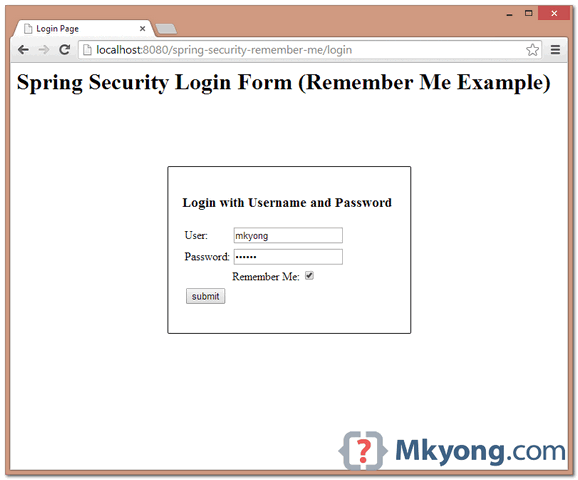
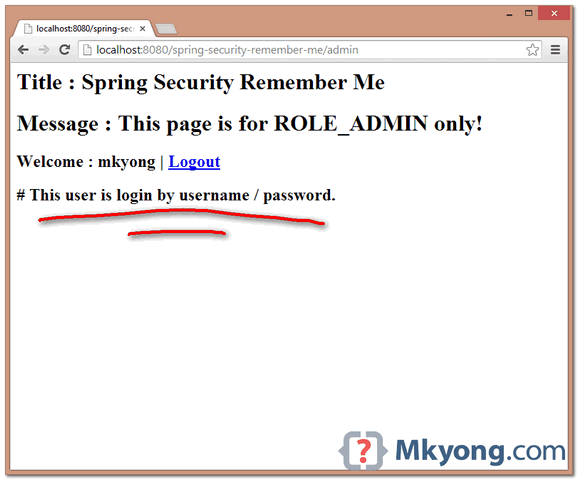
8.1 Access protected page – http://localhost:8080/spring-security-remember-me/admin, the system will redirect user to a login form. Try to login with “remember-me” checked.
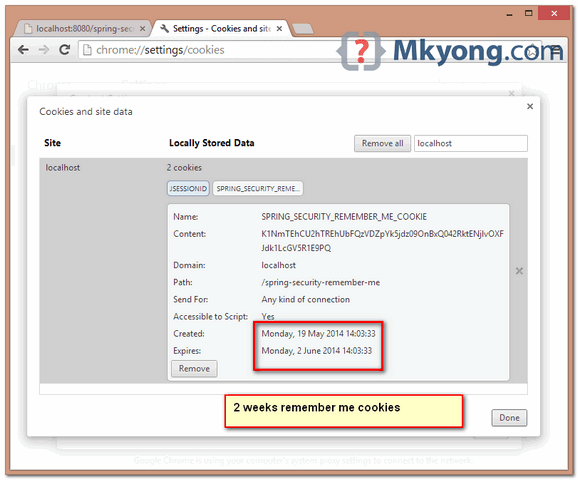
8.2 In Google Chrome, Settings -> Show advanced settings -> Privacy, Content Setting… -> “All cookies and site data” – there are two cookies for localhost, one for current session and one for “remember me” login cookies.
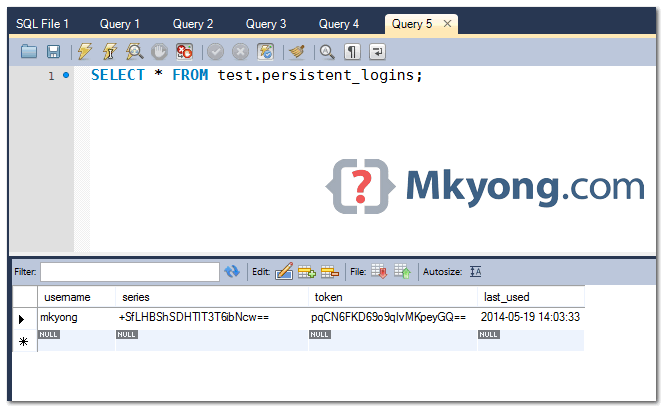
8.3 Review table “persistent_logins”, username, series and token is stored.
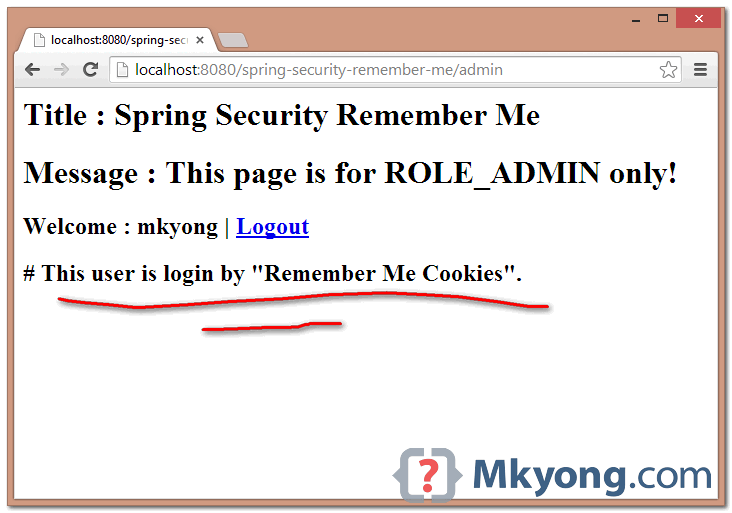
8.4 Restart the web application, go Chrome “All cookies and site data”, and remove the browser’s session “JSESSIONID”. Try to access the login page again. Now, the system will “remember you” and automatic login via the login cookies in your browser.
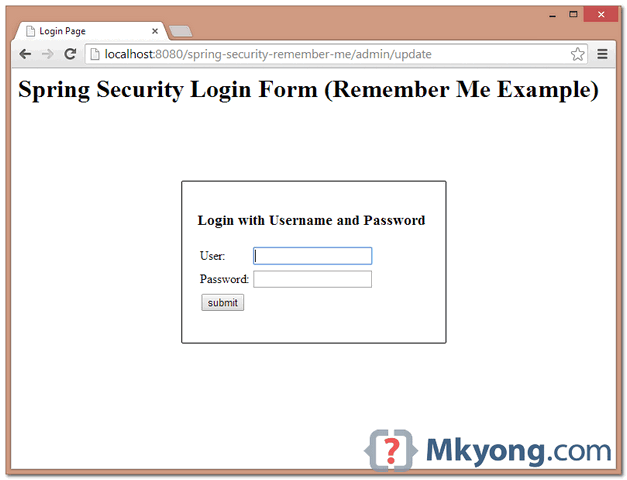
8.5 Try to access the “update” page – http://localhost:8080/spring-security-remember-me/admin/update, if user is login by remember me cookies, the system will redirect user to login form again. This is a good practice to avoid stolen cookie to update user detail.
8.6 Done.
9. Misc
Some important Spring Security classes to study :
- org.springframework.security.config.annotation.web.configurers.RememberMeConfigurer.java
- org.springframework.security.web.authentication.rememberme.AbstractRememberMeServices.java
- org.springframework.security.web.authentication.rememberme.PersistentTokenBasedRememberMeServices.java
- org.springframework.security.web.authentication.rememberme.TokenBasedRememberMeServices.java
- org.springframework.security.web.authentication.rememberme.RememberMeAuthenticationFilter

I have a user that just makes a API calls to spring secure application.
I just want to make a one time authentication to that user to access my secure application
and I don’t want to sign in again to make the subsequent calls.
How can I achieve this?
Where the loginProcessingUrl, i.e., login_check is defined in the code. How framework in handling ‘login_check’ URL?
I’m trying to add Rememeber Me to my web application. Application based on Spring and Spring Security.
After a couple of hours remember-me cookie start created. But if I close browser or stop server remember-me cookie disappear.
Maybe someone can suggest some solution or reason why this happening.
Please, help 🙂
Best regards, Alex.
Is there a working example of non persistent, token based approach ?
I tried all the application from your blog but all are showing 404 error …what should I do….
Hello Mkyong,
it’s just an amazing tuto thank you very much.
I have a question how can i make remember me feature enabled always without putting the checkbox input on login form ?
I posted a question on stackoverflow.com if you can or you have any ideas.
http://stackoverflow.com/questions/31982356/spring-security-activate-remember-me-feature-always
thanks
Hello Mkyong,
Did just what you exp?ained, but using spring-security 4.0.1.RELEASE
Implemented PersistentTokenRepository on a class, passed it as the repo, could log in, but never got a login by remember-me
When restart tomcat and the browser (to test remember-me), i can see the data being updated, but i always get a 403. Any ideas?!
Hi,
It’s good tutorial for me and very helpful for Spring beginners.
Thanks
Hi Mkyong, Am using mybatis and all the queries are written in service class. Also I have to use custom tables with custom JSP. Please advice how to do it ?
Thank you MKYong, This helped me a lot. But the “targetUrl” in always null when I try to log in for update. After login for update I am not redirected to the targetUrl .
If you are downloading the project zip please update your pom.xml scope to provided
it is provider in xml file which causes classpath error
Hi Mkyong, I have problem when implementing this to my project. That I currently have no datasource on my securityConfig.java (I use userDetailService as my dataSource on authentication system) and JdbcTokenRepositoryImpl didn’t have SetDataSource properties. Can you help me?
as I use annotation type and Neo4j as my database
Thanks 🙂
Hi Andri, I m facing the same problem here.Did you resolve it yet ?
Hi., MKyong, could you please post this example by using Simple Hash-Based Token approach.
Thanks,
balu…
Hi Mkyong, Can you please post this example in succession to your hibernate tutorial here
https://mkyong.com/spring-security/spring-security-hibernate-xml-example/
Hello Mr Mkyong
Gret job you are doing here, you help a lot of us. Thank you so much !
I encounter a litte problem, the part “8.4” doesn’t seem to work with me, when I restard the application and remove the browser’s session and I try to access the login page again, it gives me the login not like you said It will remember me and direct me to the admin page.
What’s wrong ? please help me.
What if the token is not expired & password is changed from Users table? How to validate this scenario?
Hi MKyong . I test your code,It works fine with IE 11,while not well with firefox 31.0.
With firefox ,the cookies and password is stored ,but every time I request admin url,it shows login by username / password,it seemed isRememberMe() not working with firefox . Does we have to make some adapt for different browsers ? can you please check it and help .
Is there a way I can delete only a specific series? When the user logs in from different devices then decides to log out from one of them, Spring automatically removes all of his tokens from the DB.
Hi Mkyong, great job. In which part of the code do you store a row in the persistent_logins table? and is there any code for “forgot password?” function with spring security?? thanks!
Normally, you don’t need to handle the “persistent_login” manually, review step #9, spring’s classes. In remember-me tag, if data-source-ref is specified, “Persistent Token Approach” will be used.
See Spring’s PersistentTokenBasedRememberMeServices.
In Spring Security, there’s no ready solution for “Forgot password”. But it’s easy to implement, the standard practice should be send a validation link to user email, and redirect user to a page to key in new password again.
This doesn’t work on spring 3.1.3, any pointers for that?
What is not working?
This example is tested with Spring 3.2.8.RELEASE and Spring Security 3.2.3.RELEASE
HI,
using this code i am able to create cookies but when log out it remove cookies automatically…..