In this tutorial, we’ll explore how to integrate Flyway with the Micronaut framework to manage database schema migrations. Whether we’re adding new tables, updating columns, or inserting default records, Flyway ensures everything stays in sync between the database and the application codebase.
Table of contents
- 1. Setting Up the Micronaut Project
- 2. Project Structure
- 3. Add Required Dependencies
- 4. Configure the Data Source
- 5. Create Flyway Migration Scripts
- 6. Create the Book Entity
- 7. Create the Book Repository
- 8. Create the Book Controller
- 9. Run PostgreSQL with Docker Compose
- 10. Running the Application
- 11. Access the flyway_schema_history
- 12. Testing the Book Controller
- 14. Download Source Code
- 15. References
Technologies used:
- Java 21
- Micronaut 4.7.6
- Maven 3.x
- PostgreSQL 17
- Flyway
- Docker + Docker Compose
1. Setting Up the Micronaut Project
We can create a Micronaut project using the Micronaut CLI.
mn create-app com.mkyong.flyway --build=maven --features=data-jdbc,flyway,postgres
The --features flags adds JDBC, flyway and PostgreSQL support automatically.
2. Project Structure
A standard maven project structure.
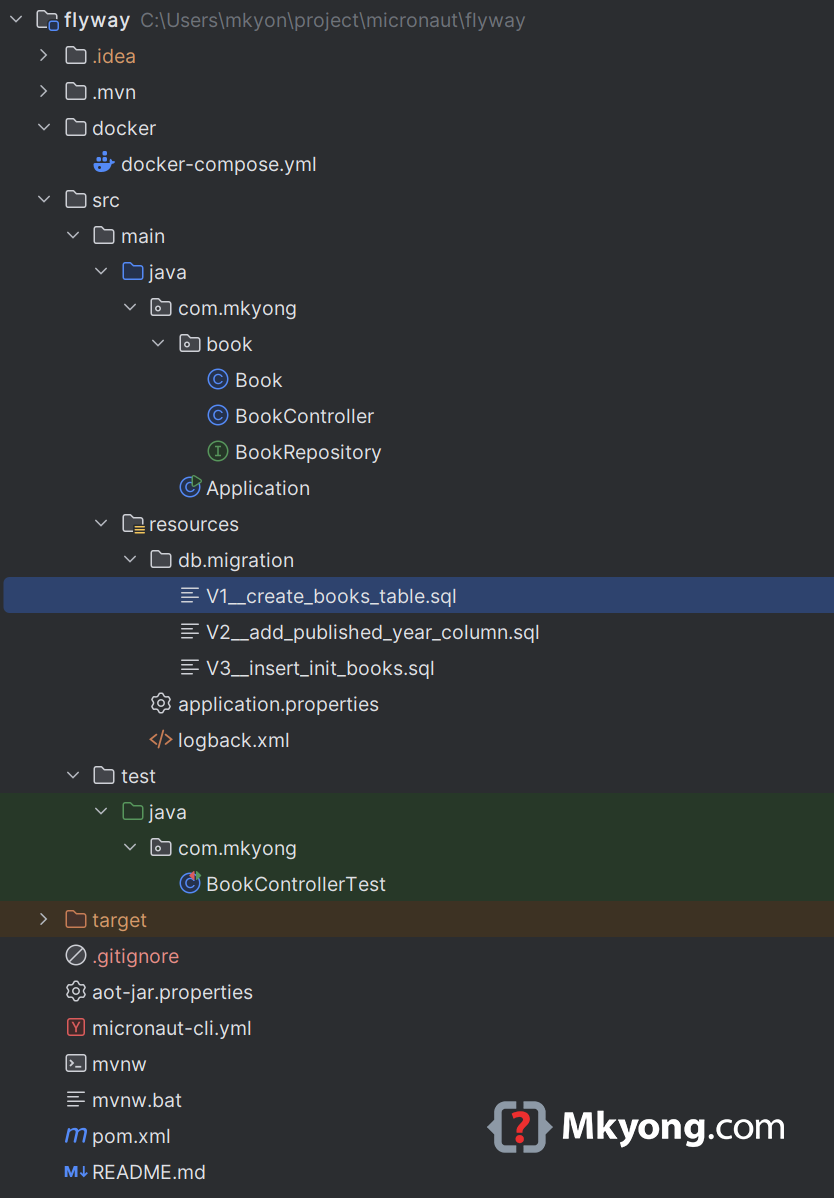
3. Add Required Dependencies
Ensures micronaut-flyway and flyway-database-postgresql are present the pom.xml.
 <dependencies>
    <!-- others dependencies -->
    <dependency>
        <groupId>io.micronaut.data</groupId>
        <artifactId>micronaut-data-jdbc</artifactId>
        <scope>compile</scope>
    </dependency>
    <dependency>
        <groupId>io.micronaut.flyway</groupId>
        <artifactId>micronaut-flyway</artifactId>
        <scope>compile</scope>
    </dependency>
    <dependency>
        <groupId>org.flywaydb</groupId>
        <artifactId>flyway-database-postgresql</artifactId>
        <scope>runtime</scope>
    </dependency>
    <dependency>
        <groupId>org.postgresql</groupId>
        <artifactId>postgresql</artifactId>
        <scope>runtime</scope>
    </dependency>
 </dependencies>
4. Configure the Data Source
Update the src/main/resources/application.properties file:
micronaut.application.name=micronaut-flyway

datasources.default.url=jdbc:postgresql://localhost:5432/testdb
datasources.default.username=mkyong
datasources.default.password=password
datasources.default.driverClassName=org.postgresql.Driver
datasources.default.schema-generate=NONE
datasources.default.dialect=POSTGRES

flyway.datasources.default.enabled=true
5. Create Flyway Migration Scripts
Flyway looks for migration scripts in src/main/resources/db/migration/. Each script must follow this format: V1__description.sql, V2__something_else.sql, etc.
Here’s a simple use case for managing a books table.
V1: Create the Books Table
CREATE TABLE books (
    id SERIAL PRIMARY KEY,
    title VARCHAR(255) NOT NULL,
    author VARCHAR(255) NOT NULL
);
V2: Add a Column
ALTER TABLE books ADD COLUMN published_year INTEGER;
V3: Insert Initial Data
INSERT INTO books (title, author, published_year) VALUES
('Clean Code', 'Robert C. Martin', 2008),
('The Pragmatic Programmer', 'Andrew Hunt', 1999),
('Head First Design Patterns', 'Eric Freeman', 2004);
On application startup, automatically detects and runs these scripts in order based on the version prefix (V1, V2).
V1__create_books_table.sqlV2__add_published_year_column.sqlV3__insert_init_books.sql
If we want to add future migrations, we simply create a new script like V4__add_new_column.sql.
6. Create the Book Entity
package com.mkyong.book;

import io.micronaut.data.annotation.GeneratedValue;
import io.micronaut.data.annotation.Id;
import io.micronaut.data.annotation.MappedEntity;
import io.micronaut.serde.annotation.Serdeable;

@MappedEntity("books")
@Serdeable
public class Book {

    @Id
    @GeneratedValue
    private Long id;

    private String title;
    private String author;
    private Integer publishedYear;

    public Book() {
    }

    // Getters and Setters

}
7. Create the Book Repository
package com.mkyong.book;

import io.micronaut.data.jdbc.annotation.JdbcRepository;
import io.micronaut.data.model.query.builder.sql.Dialect;
import io.micronaut.data.repository.CrudRepository;

@JdbcRepository(dialect = Dialect.POSTGRES)
public interface BookRepository extends CrudRepository<Book, Long> {
}
8. Create the Book Controller
package com.mkyong.book;

import io.micronaut.http.HttpResponse;
import io.micronaut.http.HttpStatus;
import io.micronaut.http.annotation.*;

import java.util.List;

@Controller("/books")
public class BookController {

    private final BookRepository repository;

    public BookController(BookRepository repository) {
        this.repository = repository;
    }

    @Post
    public HttpResponse<Book> create(@Body Book book) {
        Book saved = repository.save(book);
        return HttpResponse.created(saved);
    }

    @Get
    public List<Book> list() {
        return repository.findAll();
    }

    @Delete("/{id}")
    @Status(HttpStatus.NO_CONTENT)
    public void delete(Long id) {
        repository.deleteById(id);
    }

}
9. Run PostgreSQL with Docker Compose
services:
  postgres:
    image: postgres:latest
    container_name: my_postgres
    restart: always
    environment:
      POSTGRES_USER: mkyong
      POSTGRES_PASSWORD: password
      POSTGRES_DB: testdb
    ports:
      - "5432:5432"
    volumes:
      - postgres_data:/var/lib/postgresql/data

volumes:
  postgres_data:
    driver: local
Start PostgreSQL:
docker-compose up -d
Stop PostgreSQL:
docker-compose down
10. Running the Application
Run the app using Maven:
./mvnw mn:run
Watch as Flyway applies all migrations in order and starts the app.
./mvnw mn:run

 __  __ _                                  _
|  \/  (_) ___ _ __ ___  _ __   __ _ _   _| |_
| |\/| | |/ __| '__/ _ \| '_ \ / _` | | | | __|
| |  | | | (__| | | (_) | | | | (_| | |_| | |_
|_|  |_|_|\___|_|  \___/|_| |_|\__,_|\__,_|\__|

14:11:45.793 [main] INFO  org.flywaydb.core.FlywayExecutor - Database: jdbc:postgresql://localhost:5432/testdb (PostgreSQL 17.4)
14:11:45.832 [main] INFO  o.f.c.i.s.JdbcTableSchemaHistory - Schema history table "public"."flyway_schema_history" does not exist yet
14:11:45.836 [main] INFO  o.f.core.internal.command.DbValidate - Successfully validated 3 migrations (execution time 00:00.018s)
14:11:45.848 [main] INFO  o.f.c.i.s.JdbcTableSchemaHistory - Creating Schema History table "public"."flyway_schema_history" ...
14:11:45.876 [main] INFO  o.f.core.internal.command.DbMigrate - Current version of schema "public": << Empty Schema >>
14:11:45.883 [main] INFO  o.f.core.internal.command.DbMigrate - Migrating schema "public" to version "1 - create books table"
14:11:45.900 [main] INFO  o.f.core.internal.command.DbMigrate - Migrating schema "public" to version "2 - add published year column"
14:11:45.910 [main] INFO  o.f.core.internal.command.DbMigrate - Migrating schema "public" to version "3 - insert init books"
14:11:45.920 [main] INFO  o.f.core.internal.command.DbMigrate - Successfully applied 3 migrations to schema "public", now at version v3 (execution time 00:00.009s)
14:11:46.286 [main] INFO  io.micronaut.runtime.Micronaut - Startup completed in 1458ms. Server Running: http://localhost:8080
11. Access the flyway_schema_history
Access the my_postgres container (PostgreSQL database):
docker exec -it my_postgres psql -U mkyong -d testdb
We should see both books and flyway_schema_history tables listed; the Flyway track applied scripts in the flyway_schema_history table.
docker exec -it my_postgres psql -U mkyong -d testdb
psql (17.4 (Debian 17.4-1.pgdg120+2))
Type "help" for help.

testdb=# \dt
                List of relations
 Schema |         Name          | Type  | Owner
--------+-----------------------+-------+--------
 public | books                 | table | mkyong
 public | flyway_schema_history | table | mkyong
(2 rows)

testdb=#
12. Testing the Book Controller
package com.mkyong;

import com.mkyong.book.Book;
import io.micronaut.http.HttpRequest;
import io.micronaut.http.HttpResponse;
import io.micronaut.http.HttpStatus;
import io.micronaut.http.client.HttpClient;
import io.micronaut.http.client.annotation.Client;
import io.micronaut.test.extensions.junit5.annotation.MicronautTest;
import org.junit.jupiter.api.Test;

import jakarta.inject.Inject;

import static org.junit.jupiter.api.Assertions.assertEquals;
import static org.junit.jupiter.api.Assertions.assertNotNull;

@MicronautTest
class BookControllerTest {

    @Inject
    @Client("/")
    HttpClient client;

    @Test
    void testCreateAndListBooks() {
        Book book = new Book();
        book.setTitle("Effective Java");
        book.setAuthor("Joshua Bloch");
        book.setPublishedYear(2018);

        Book saved = client.toBlocking().retrieve(
                HttpRequest.POST("/books", book),
                Book.class);

        assertNotNull(saved.getId());
        assertEquals("Effective Java", saved.getTitle());
        assertEquals(2018, saved.getPublishedYear());

        // cleanup
        HttpResponse<Book> response = client.toBlocking().exchange(
                HttpRequest.DELETE("/books/" + saved.getId()));

        assertEquals(HttpStatus.NO_CONTENT, response.getStatus());

    }
}
