Normally, you will split a large Spring XML bean files into multiple small files, group by module or category, to make things more maintainable and modular. For example,
<beans xmlns="http://www.springframework.org/schema/beans"
	xmlns:xsi="http://www.w3.org/2001/XMLSchema-instance"
	xsi:schemaLocation="http://www.springframework.org/schema/beans
	http://www.springframework.org/schema/beans/spring-beans-2.5.xsd">

	<import resource="config/customer.xml"/>
        <import resource="config/scheduler.xml"/>

</beans>
In Spring3 JavaConfig, the equivalent functionality is @Import.
package com.mkyong.config;

import org.springframework.context.annotation.Configuration;
import org.springframework.context.annotation.Import;

@Configuration
@Import({ CustomerConfig.class, SchedulerConfig.class })
public class AppConfig {

}
@Import Example
See a full example of using JavaConfig @Import.
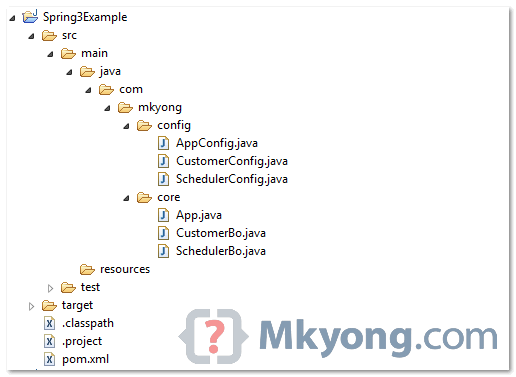
1. Directory Structure
Directory structure of this example.
2. Spring Beans
Two simple Spring beans.
File : CustomerBo.java
package com.mkyong.core;

public class CustomerBo {

	public void printMsg(String msg) {

		System.out.println("CustomerBo : " + msg);
	}

}
File : SchedulerBo.java
package com.mkyong.core;

public class SchedulerBo {

	public void printMsg(String msg) {

		System.out.println("SchedulerBo : " + msg);
	}

}
3. @Configuration example
Now, use JavaConfig @Configuration to declare above beans.
File : CustomerConfig.java
package com.mkyong.config;

import org.springframework.context.annotation.Bean;
import org.springframework.context.annotation.Configuration;

import com.mkyong.core.CustomerBo;

@Configuration
public class CustomerConfig {

	@Bean(name="customer")
	public CustomerBo customerBo(){

		return new CustomerBo();

	}
}
File : SchedulerConfig.java
package com.mkyong.config;

import org.springframework.context.annotation.Bean;
import org.springframework.context.annotation.Configuration;
import com.mkyong.core.SchedulerBo;

@Configuration
public class SchedulerConfig {

	@Bean(name="scheduler")
	public SchedulerBo suchedulerBo(){

		return new SchedulerBo();

	}

}
4. @Import example
Use @Import to load multiple configuration files.
File : AppConfig.java
package com.mkyong.config;

import org.springframework.context.annotation.Configuration;
import org.springframework.context.annotation.Import;

@Configuration
@Import({ CustomerConfig.class, SchedulerConfig.class })
public class AppConfig {

}
5. Run it
Load the main configuration file , and test it.
package com.mkyong.core;

import org.springframework.context.ApplicationContext;
import org.springframework.context.annotation.AnnotationConfigApplicationContext;
import com.mkyong.config.AppConfig;

public class App {
	public static void main(String[] args) {

		ApplicationContext context = new AnnotationConfigApplicationContext(
				AppConfig.class);

		CustomerBo customer = (CustomerBo) context.getBean("customer");
		customer.printMsg("Hello 1");

		SchedulerBo scheduler = (SchedulerBo) context.getBean("scheduler");
		scheduler.printMsg("Hello 2");

	}
}
Output
CustomerBo : Hello 1
SchedulerBo : Hello 2
Download Source Code
Download It – Spring3-JavaConfig-Import-Example.zip (7 KB)

Can we use exception handler in XML ?
http://goo.gl/P2XEv8
Exception in thread “main” java.lang.ClassCastException: com.config.SchedulerConfig cannot be cast to com.core.SchedulerBo- I m getting this error.. Plz help
i did not face any problem if you post your code on git hub or you can see mine https://github.com/shareefhiasat/mkyong
it’s simple and useful.
http://www.way2shopper.com get best deals and coupon code
Thanks!
It seems we can also extend the classes annotated with @Configuration.
I tried something like
@Configuration
public class ParentConfig{
@Bean(name=”a”)
public A getA(){…}
}
@Configuration
public class ChildConfig extends ParentConfig{
@Bean(name =”b”)
public B getB(){….}
}
ApplicationContext ctx = new AnnotationConfigApplicationContext(ChildConfig.class);
ctx.getBean(“a”) returns object of type “A”
So more or less some thing like include vs import
So define 1 file AppConfig.java which will configure every needed bean instead of bean_nameConfig.java for each bean ( 1 main config file instead many )
OR
each needed class as bean will have his configFile like in the example above?
OR
Instead of beanNameConfig.java , there is another way to declare a class as a bean , @Component , If i’m not wrong , (and another ways ? @Service ? ) , is it Spring 2.5 way? no needed for Spring 3 way?
Better practice is group related beans in in a single module file, then create a main config file to include all, centralize control.
It will make your project more modular and easy to maintain.
Of course, @Component is still supported in Spring3 :). JavaConfig is just a new way to define the configuration stuff in Spring3.