In this tutorial, we will show you how to integrate Spring Security with a Spring MVC web application to secure a URL access. After implementing Spring Security, to access the content of an “admin” page, users need to key in the correct “username” and “password”.
Technologies used :
- Spring 3.2.8.RELEASE
- Spring Security 3.2.3.RELEASE
- Eclipse 4.2
- JDK 1.6
- Maven 3
Spring Security 3.0 requires Java 5.0 Runtime Environment or higher
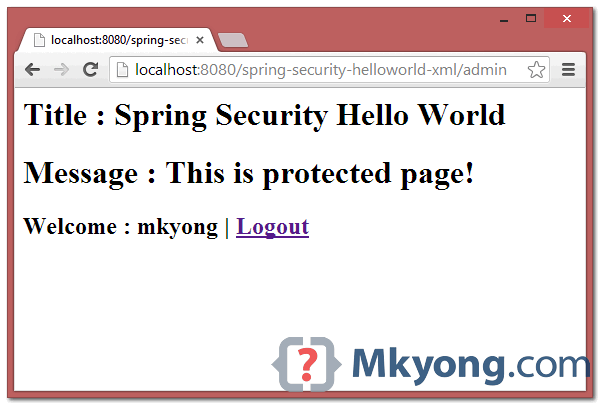
1. Project Demo
2. Directory Structure
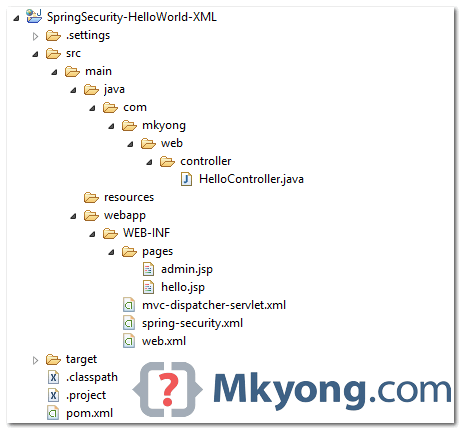
Review the final directory structure of this tutorial.
3. Spring Security Dependencies
To use Spring security, you need spring-security-web and spring-security-config.
	<properties>
		<jdk.version>1.6</jdk.version>
		<spring.version>3.2.8.RELEASE</spring.version>
		<spring.security.version>3.2.3.RELEASE</spring.security.version>
		<jstl.version>1.2</jstl.version>
	</properties>

	<dependencies>

		<!-- Spring dependencies -->
		<dependency>
			<groupId>org.springframework</groupId>
			<artifactId>spring-core</artifactId>
			<version>${spring.version}</version>
		</dependency>

		<dependency>
			<groupId>org.springframework</groupId>
			<artifactId>spring-web</artifactId>
			<version>${spring.version}</version>
		</dependency>

		<dependency>
			<groupId>org.springframework</groupId>
			<artifactId>spring-webmvc</artifactId>
			<version>${spring.version}</version>
		</dependency>

		<!-- Spring Security -->
		<dependency>
			<groupId>org.springframework.security</groupId>
			<artifactId>spring-security-web</artifactId>
			<version>${spring.security.version}</version>
		</dependency>

		<dependency>
			<groupId>org.springframework.security</groupId>
			<artifactId>spring-security-config</artifactId>
			<version>${spring.security.version}</version>
		</dependency>

		<!-- jstl for jsp page -->
		<dependency>
			<groupId>jstl</groupId>
			<artifactId>jstl</artifactId>
			<version>${jstl.version}</version>
		</dependency>

	</dependencies>
4. Spring MVC Web Application
A simple controller :
- If URL =
/welcomeor/, return hello page. - If URL =
/admin, return admin page.
Later, we will show you how to use Spring Security to secure the “/admin” URL with a user login form.
package com.mkyong.web.controller;

import org.springframework.stereotype.Controller;
import org.springframework.web.bind.annotation.RequestMapping;
import org.springframework.web.bind.annotation.RequestMethod;
import org.springframework.web.servlet.ModelAndView;

@Controller
public class HelloController {

	@RequestMapping(value = { "/", "/welcome**" }, method = RequestMethod.GET)
	public ModelAndView welcomePage() {

		ModelAndView model = new ModelAndView();
		model.addObject("title", "Spring Security Hello World");
		model.addObject("message", "This is welcome page!");
		model.setViewName("hello");
		return model;

	}

	@RequestMapping(value = "/admin**", method = RequestMethod.GET)
	public ModelAndView adminPage() {

		ModelAndView model = new ModelAndView();
		model.addObject("title", "Spring Security Hello World");
		model.addObject("message", "This is protected page!");
		model.setViewName("admin");

		return model;

	}

}
Two JSP pages.
<%@page session="false"%>
<html>
<body>
	<h1>Title : ${title}</h1>
	<h1>Message : ${message}</h1>
</body>
</html>
<%@taglib prefix="c" uri="http://java.sun.com/jsp/jstl/core"%>
<%@page session="true"%>
<html>
<body>
	<h1>Title : ${title}</h1>
	<h1>Message : ${message}</h1>

	<c:if test="${pageContext.request.userPrincipal.name != null}">
	   <h2>Welcome : ${pageContext.request.userPrincipal.name}
           | <a href="<c:url value="/j_spring_security_logout" />" > Logout</a></h2>
	</c:if>
</body>
</html>
<beans xmlns="http://www.springframework.org/schema/beans"
	xmlns:context="http://www.springframework.org/schema/context"
	xmlns:xsi="http://www.w3.org/2001/XMLSchema-instance"
	xsi:schemaLocation="
        http://www.springframework.org/schema/beans
        http://www.springframework.org/schema/beans/spring-beans-3.0.xsd
        http://www.springframework.org/schema/context
        http://www.springframework.org/schema/context/spring-context-3.0.xsd">

	<context:component-scan base-package="com.mkyong.*" />

	<bean
	  class="org.springframework.web.servlet.view.InternalResourceViewResolver">
	  <property name="prefix">
		<value>/WEB-INF/pages/</value>
	  </property>
	  <property name="suffix">
		<value>.jsp</value>
	  </property>
	</bean>

</beans>
5. Spring Security : User Authentication
Create a Spring Security XML file.
<beans:beans xmlns="http://www.springframework.org/schema/security"
	xmlns:beans="http://www.springframework.org/schema/beans"
	xmlns:xsi="http://www.w3.org/2001/XMLSchema-instance"
	xsi:schemaLocation="http://www.springframework.org/schema/beans
	http://www.springframework.org/schema/beans/spring-beans-3.0.xsd
	http://www.springframework.org/schema/security
	http://www.springframework.org/schema/security/spring-security-3.2.xsd">

	<http auto-config="true">
		<intercept-url pattern="/admin**" access="ROLE_USER" />
	</http>

	<authentication-manager>
	  <authentication-provider>
	    <user-service>
		<user name="mkyong" password="123456" authorities="ROLE_USER" />
	    </user-service>
	  </authentication-provider>
	</authentication-manager>

</beans:beans>
It tells, only user “mkyong” is allowed to access the /admin URL.
6. Integrate Spring Security
To integrate Spring security with a Spring MVC web application, just declares DelegatingFilterProxy as a servlet filter to intercept any incoming request.
<web-app id="WebApp_ID" version="2.4"
	xmlns="http://java.sun.com/xml/ns/j2ee"
	xmlns:xsi="http://www.w3.org/2001/XMLSchema-instance"
	xsi:schemaLocation="http://java.sun.com/xml/ns/j2ee
	http://java.sun.com/xml/ns/j2ee/web-app_2_4.xsd">

	<display-name>Spring MVC Application</display-name>

	<!-- Spring MVC -->
	<servlet>
		<servlet-name>mvc-dispatcher</servlet-name>
		<servlet-class>org.springframework.web.servlet.DispatcherServlet
		</servlet-class>
		<load-on-startup>1</load-on-startup>
	</servlet>
	<servlet-mapping>
		<servlet-name>mvc-dispatcher</servlet-name>
		<url-pattern>/</url-pattern>
	</servlet-mapping>

	<listener>
		<listener-class>org.springframework.web.context.ContextLoaderListener
		</listener-class>
	</listener>

        <!-- Loads Spring Security config file -->
	<context-param>
		<param-name>contextConfigLocation</param-name>
		<param-value>
			/WEB-INF/spring-security.xml
		</param-value>
	</context-param>

	<!-- Spring Security -->
	<filter>
		<filter-name>springSecurityFilterChain</filter-name>
		<filter-class>org.springframework.web.filter.DelegatingFilterProxy
		</filter-class>
	</filter>

	<filter-mapping>
		<filter-name>springSecurityFilterChain</filter-name>
		<url-pattern>/*</url-pattern>
	</filter-mapping>

</web-app>
7. Demo
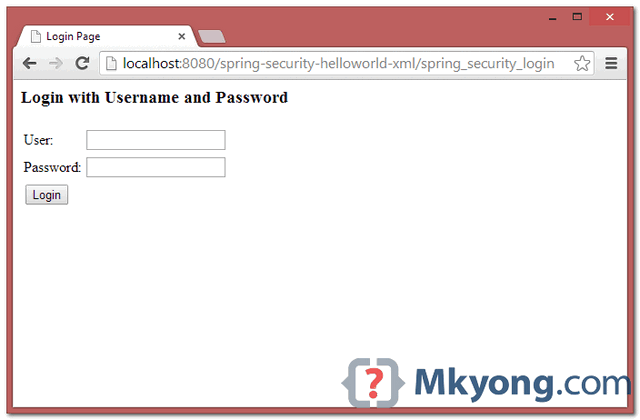
That’s all, but wait… where’s the login form? No worry, if you do not define any custom login form, Spring will create a simple login form automatically.
Read this “Spring Security form login example” to understand how to create a custom login form in Spring Security.
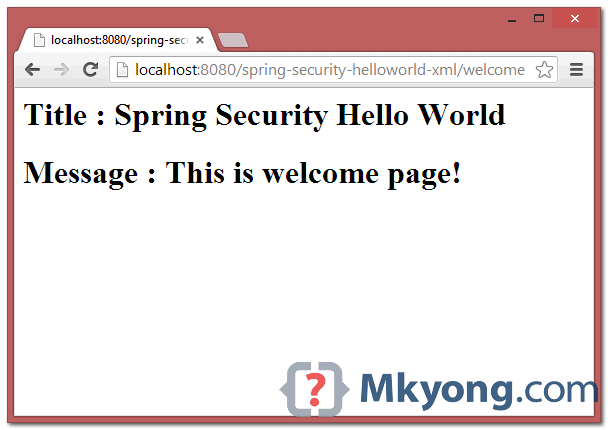
1. Welcome Page – http://localhost:8080/spring-security-helloworld-xml/welcome
2. Try to access /admin page, Spring Security will intercept the request and redirect to /spring_security_login, and a predefined login form is displayed.
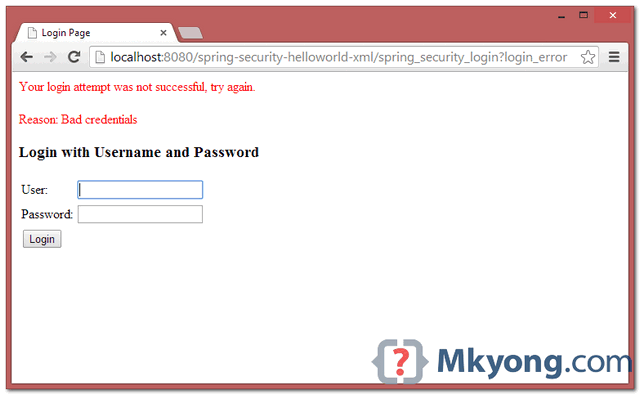
3. If username and password is incorrect, error messages will be displayed, and Spring will redirect to this URL /spring_security_login?login_error.
4. If username and password are correct, Spring will redirect the request to the original requested URL and display the page.

The demo video is excelent! Congrats!
Hello everyone
The app run correctly see your local url ‘http://localhost:8080/SpringSecurityHelloWorld/welcome’.
I can not validate the user input and password I systematically “Bad credentials”
Can this come from the Tomcat configuration? because I rigorously followed the example.
Thank you for your reply
When I follow this example and try to hit webservice in my application, I am getting 401 unauthorized. When i pass basic authorization, I dont want to validate header in spring layer but want to send authorization header to backend. Can you suggest me for this scenario?
Hi MKYong,
I just added your code in my eclipse but I am getting the security violation here because when i tried with this URL: http://localhost:8080/SpringSecurityXMLDemo/admin/
I am able to see the admin page without login attempts. It’s working fine with this URL: http://localhost:8080/SpringSecurityXMLDemo/admin
Please suggest if anything wrong.
After logout if i click browser back button then it is again taking me to restricted admin page due to cache i think even if i know that session has been invalidated and if i refresh the same url after clicking back button it is taking me to log in page . So i understand but can someone tell me how to force browser not to take me to restricted page after log out if i click back button ? if no-cache, no-pragma have to be used then describe or is there any other proper way to handle the issue? please don’t suggest me to disable browser back button through js code, can mkyoung or anybody please answer ?
I am getting 403 error on login button submit.
It is also not showing bad credential or anything, direct error on login button press.
Am using spring security 4.1.0.
Any help will be great 🙂
Hi mkyong,
Thank you for posting a beautiful tutorial, I have checked this example using
spring version 5.0.2 and spring security version 5.0.0,it is working but when i am giving correct user credentials then it is not displaying admin.jsp page and giving this error but why?
can you tell me please?
java.lang.IllegalArgumentException: There is no PasswordEncoder mapped for the id “null”
org.springframework.security.crypto.password.DelegatingPasswordEncoder$UnmappedIdPasswordEncoder.matches(DelegatingPasswordEncoder.java:236)
org.springframework.security.crypto.password.DelegatingPasswordEncoder.matches(DelegatingPasswordEncoder.java:196)
org.springframework.security.authentication.dao.DaoAuthenticationProvider.additionalAuthenticationChecks(DaoAuthenticationProvider.java:86)
org.springframework.security.authentication.dao.AbstractUserDetailsAuthenticationProvider.authenticate(AbstractUserDetailsAuthenticationProvider.java:166)
org.springframework.security.authentication.ProviderManager.authenticate(ProviderManager.java:174)
org.springframework.security.authentication.ProviderManager.authenticate(ProviderManager.java:199)
org.springframework.security.web.authentication.UsernamePasswordAuthenticationFilter.attemptAuthentication(UsernamePasswordAuthenticationFilter.java:94)
org.springframework.security.web.authentication.AbstractAuthenticationProcessingFilter.doFilter(AbstractAuthenticationProcessingFilter.java:212)
org.springframework.security.web.FilterChainProxy$VirtualFilterChain.doFilter(FilterChainProxy.java:334)
org.springframework.security.web.authentication.logout.LogoutFilter.doFilter(LogoutFilter.java:116)
org.springframework.security.web.FilterChainProxy$VirtualFilterChain.doFilter(FilterChainProxy.java:334)
org.springframework.security.web.csrf.CsrfFilter.doFilterInternal(CsrfFilter.java:124)
org.springframework.web.filter.OncePerRequestFilter.doFilter(OncePerRequestFilter.java:107)
org.springframework.security.web.FilterChainProxy$VirtualFilterChain.doFilter(FilterChainProxy.java:334)
org.springframework.security.web.header.HeaderWriterFilter.doFilterInternal(HeaderWriterFilter.java:64)
org.springframework.web.filter.OncePerRequestFilter.doFilter(OncePerRequestFilter.java:107)
org.springframework.security.web.FilterChainProxy$VirtualFilterChain.doFilter(FilterChainProxy.java:334)
org.springframework.security.web.context.request.async.WebAsyncManagerIntegrationFilter.doFilterInternal(WebAsyncManagerIntegrationFilter.java:56)
org.springframework.web.filter.OncePerRequestFilter.doFilter(OncePerRequestFilter.java:107)
org.springframework.security.web.FilterChainProxy$VirtualFilterChain.doFilter(FilterChainProxy.java:334)
org.springframework.security.web.context.SecurityContextPersistenceFilter.doFilter(SecurityContextPersistenceFilter.java:105)
org.springframework.security.web.FilterChainProxy$VirtualFilterChain.doFilter(FilterChainProxy.java:334)
org.springframework.security.web.FilterChainProxy.doFilterInternal(FilterChainProxy.java:215)
org.springframework.security.web.FilterChainProxy.doFilter(FilterChainProxy.java:178)
org.springframework.web.filter.DelegatingFilterProxy.invokeDelegate(DelegatingFilterProxy.java:357)
org.springframework.web.filter.DelegatingFilterProxy.doFilter(DelegatingFilterProxy.java:270)
https://stackoverflow.com/questions/46999940/spring-boot-passwordencoder-error
Here in above case you have to make change in spring-security.xml
Hi mkyong,
Thanks for the tutorial.
Hi mkyong, congratulations for the site, i find it very useful.
One suggestion, if you add maven jetty plugin config to pom.xml, people can just download the project sources and directly start the app with mvn package jetty:run
just add this to pom.xml
org.mortbay.jetty
jetty-maven-plugin
8.1.8.v20121106
10
<!–demo–>
8080
60000
This is very confusing , i can’t run the application , Couldn’t able to identify the where is the problem also.
Can anyone help me how exactly you created the code for this?
same here
its simple create one extra xml and add security code in it, then write in web.xml and it will work as run the project.
URL would be—- http://localhost:8080/SpringSecurityHelloWorld/welcome
Very useful. Thanks for posting.
I replaced
Welcome : ${pageContext.request.userPrincipal.name}
| <a href="” > Logout
by
I’m getting this error, any ideas ANYONE?
org.springframework.beans.factory.parsing.BeanDefinitionParsingException: Configuration problem: spring-security-web classes are not available. You need these to use
Offending resource: ServletContext resource [/WEB-INF/spring-security.xml]
Macha, full power banaya hain!
Beer pee liyo meri aur se ek-ek. Too good macha, Too-freaking-Good!
Chal, mil phir kabhi toh!
better explain the stuff
For basic token based authentication the below worked for me based on Spring Security 3.1
For a basic token based authentication use the below, This is based on Spring 3.1
Hello.
First of all I have to say thank you for yours great tutorials and complete explanations for them. Most of my recent experience with modern JAVA technologies and frameworks received from this blog.
But now I got a trouble trying to use Spring Security with Spring MVC aplication. The issue is with new versions of Spring/Spring Security. I am using Spring framework version 4.1.6.RELEASE and trying to add Security version 4.1.0.RC1. And they are conflicting wtih each other, It says that no servlet alowed together in conjunction with org.springframework.web.context.ContextLoaderListener.
Your tutorial works fine, but it is with versions 3.2.8 and 3.2.3 respectively. So my question is it possible to renew entire Security tutorial (hello world for example) or maybe some migration guide from 3 version to 4?
Thank you mkyong..!!
whats name the folder with files xml ?
Webapp –> WEB – INF ?
Hi mkyong,
I used your tutorial for spring security. It is quite nice and simple explained. The only thing is that you have an error with which i couldn’t manage for couple of hours.
in mvc-dispatcher-servlet.xml you have , but it should be
Otherwise you get errors on handler not found.
Maybe it will be a good idea to fix this to not make someone else to spent so much time for a such small thing.
What was the error, I’m struggling against it apparently?
cheers
Hi mkyong, my question is: Why the name for Spring Security XML file (spring-security.xml) can be changed, I mean I’m using security.xml and the example works fine.
Hi MkYong, I am stuck at configuring spring security with Spring Boot.
Actually my problem is that i want to build secured application with my custom login form and user should authenticated after successful login. also i want to enable csrf protection for REST url’s. If you have already developed this then please guide me. Thank you for appreciating.
You should use in spring-security.xml
I am integrating this with JSF and spring MVC. I am getting the login page and upon successful login I can click on different flows. However, when I am submitting some data though commandbutton, the ajax method is not getting invoked. Same is happening when I use the code provided in spring security reference doc for programmatic config. Any idea?
Failed to evaluate expression ‘ROLE_USER’
I have the same problem.
I’m using spring-security 4.0.0
I’m having the same issue with spring-security 4.0.1 as well.
Change this line in spring-security.xml
by
hope this helps ^^
Try this in place of ROLE_USER in intercept-url tag:
hasRole(‘ROLE_USER’)
can any1 exaplin step by step structure,. i am still confused u r creating dynamic web project or maven project.. so pls explain. every steps only
Tell me please where your loginPage.jsp???
if you do not define any custom login form, Spring will create a simple login form automatically.
Thank you. Tell me please how spring know how build this page(how spring know css and html)?
it’s preprogrammed
hi,when download the source code,it give No bean named ‘springSecurityFilterChain’ is defined ,can you help me
Thanks mkyong for this. This post helped me a lot in getting quickly started with spring security.
I do want to integrate a css file. But i got an error in this case like mentioned from abdou a year ago…
Warnung: No mapping found for HTTP request with URI [/SpringSecurityHelloWorld/css/default.css] in DispatcherServlet with name ‘mvc-dispatcher’
Am i downloading the XML version or annotated version ?
i am seeing the following code in controller @RequestMapping(value = { “/”, “/welcome**” }, method = RequestMethod.GET) .and
in dispatcher-servlet.xml
Please allow me to download xml version also . Also there is no annotated version for
Handling duplicate form submission .
Thank you
When I m entering the url http://localhost:8080/spring-security-helloworld-xml/welcome its giving resource not found. Please help on this
Still i am not able to solve “org.springframework.beans.factory.NoSuchBeanDefinitionException: No bean named ‘springSecurityFilterChain’ is defined”
my web.xml
dispatcher
org.springframework.web.servlet.DispatcherServlet
contextConfigLocation
classpath:**/*-security.xml
1
springSecurityFilterChain
org.springframework.web.filter.DelegatingFilterProxy
please specify filter mapping as
springSecurityFilterChain
/
Hi mkyong,
Is it not necessary to include mvc-dispatcher-servlet.xml into context param ?
This example is having some issue ,
This is not running also . getting http status 404 error . can anyone resolve it.
Please give ideas or solutions
How to run?
java -jar targetmy-app-1.0-SNAPSHOT.jar
no main manifest attribute, in targetmy-app-1.0-SNAPSHOT.jar
Nevermind, the official download’s pom.xml shows that it should be deployed as a WAR.
Its a war project , so deploy it into tomcat.
Your configuration is flawed, you are duplicating bean instances. Both the ContextLoaderListener and DispatcherServlet load the ‘/WEB-INF/mvc-dispatcher-servlet.xml’ configuration. Which basically leads to scanning the classpath twice, 2 InternalViewResolvers etc.
In this case it doesn’t lead to problems but for larger projects it will lead to problems.
Hi Martin,
Can you explain a bit more on the issue, you mentioned above ? and what is the solution for that ?
Thanks, article is updated.
Hello mkyong,
WARNING: No mapping found for HTTP request with URI [/SpringMVC/welcome] in DispatcherServlet with name ‘mvc-dispatcher’
After given correct credentials i am getting 4040 error and the above warning in console window. I am not able to see the hello.jsp page.
Please help me in this.
hey could you share your controller code please. I suspect you might not have mapped /welcome.
Article is updated to support default mapping.
Some issues while execution:
– url http://localhost:8080/SpringMVC/welcome doesn’t automatically redirect to /welcome after authentication. It becomes http://localhost:8080/SpringSecuritySetup/;jsessionid=D8669208493AFDE7D9E113FEDCB554CF where I need to insert /welcome manually, then it shows next page!!! Why so?
– Since this project is using old jars, I updated to 3.2.3 and spring-security jars to 3.1 Then it didn’t work. Login page came but authentication never succeed even after providing correct credentials. You can see the complete post here:
http://www.coderanch.com/t/618591/Spring/Spring-security-sample-working
Waiting for the reply. Thanks.
Please ignore the context root ‘SpringSecuritySetup’ as I renamed the project.
WARNING: No mapping found for HTTP request with URI [/SpringMVC/j_spring_security_logout] in DispatcherServlet with name ‘mvc-dispatcher’
Article is updated, please download the latest source code,
I am also getting same error now please can you help on this
Please hit URL “http://localhost:8080/SpringSecurityHelloWorld/” NOT “http://localhost:8080/spring-security-helloworld-xml/”
why “http://localhost:8080/SpringSecurityHelloWorld/”?
You forget add mvc:annotation-driven tag into mvc-dispatcher-servlet.xml file
Some organic health products have been known to boost the
immune system. Of course, if you have tried those, but nothing helps you can always go
for a psychotherapy or counselling. The most important groups of phytochemicals found in oats are: phenolics, carotenoids, vitamin E compounds,
and lignans.
I did exactly as given in tutorial.but am getting following error.
SEVERE: Context initialization failed
org.springframework.beans.factory.BeanCreationException: Error creating bean with name ‘org.springframework.security.filterChainProxy’: 1 constructor arguments specified but no matching constructor found in bean ‘org.springframework.security.filterChainProxy’ (hint: specify index/type/name arguments for simple parameters to avoid type ambiguities)
hey Nat
please check your web.xml i think you have given the wrong class.
what i think you have given
springSecurityFilterChain
org.springframework.web.filter.FilterChainProxy
what should be there
springSecurityFilterChain
org.springframework.web.filter.DelegatingFilterProxy
Great, thanks~~~~~
Hello Mykong…
Your tutorials are awesome….and gives easy start….i personally benifitted from first visiting your site to understand first here, and then study in-depth afterwards.
Thanks lot for all your efforts…
Hi, I am very new to Spring MVC. Please can you provide the good sample example about Spring Web flow with Controllers.
Thanks is Advance.
i cant run it im having this error
WARNING: No mapping found for HTTP request with URI [/Spring3MVC] in DispatcherServlet with name ‘mvc-dispatcher’
i would appreciate your help
thanks
The following annotation in the source code says that you need to type /welcome after the base url in the browser
@RequestMapping(“/welcome”)
So type
http://localhost:8080/SpringMVC/welcome
thanks for your answer. Ive tried that but Im still having the same problem:
HTTP Status 404 –
type Status report
message
descriptionThe requested resource () is not available.
GlassFish Server Open Source Edition 3.1.2.2
I got the same error. It’s likely that hello.jsp page is not under WEB-INF/pages/hello,jsp
hope it helps.
i am also got same exception But i am using hello.jsp under WEB/INF/pages
then also same 404 execption
Thanks
Hi, once again please check the log messages on console.
I hope this is not the main error/exception you are getting.
I’m assuming that you need to get ClassNotfoundException,
and as a result you are getting this 404 status code.
I hope its the problem of not placing the correct jar files;
Please check whether you are using the correct jar files
or not.
hope it helps you.
Article is updated, please download the latest source code, and also watch the video demo (at the beginning of the post).
Hi Youg,
I have one doubt regarding this post. I imported this project into my workspace, and i executed it.
Only for the first time it went through the authentication process, from second time onwards without authentication it was showing my hello.jsp.What is happening exactly?
can u please clear my doubt. thank you
After first time authentication, the credential were saved in your browser’s cookie. If you clear the cookie, the application will ask for authentication again.
Its like Spoon feeding … Excellent
Thanks mkyong.
very nice and neat tutorial.
Easy to understand and execute.
Hi,
I have a simple question. What’s happend if in my application require to hide user and password for been viewed in the request. It’s there is such a configuration in spring to enable https ?
Thanks,
Marcello.
Hi mkyong
Thank you Very much. Based on your tutorial, i created the same one with details steps
in my blog. Here is the url
http://emrpms.blogspot.in/2012/11/spring-security-hello-world-example.html
nice and easy to understand…thanx for post
Hi yong…
My English so bad… So, I am sorry…
I have a problem…
I import the project to eclipse… But I take error (about “kind4”) So, I exist the similar maven project on eclipse (eclipse juno)… I run it on server(Apache Tomcat) I take error (the following)…
No mapping found for HTTP request with URI [/com.mkyong.common_SpringMVC_war_1.0-SNAPSHOT/] in DispatcherServlet with name ‘mvc-dispatcher’
You want to add “s” to the verbs you conjugate at the 3rd person.
In your first sentence: Spring Security allowS developer to integrate security features with J2EE web application easily, it highjackS incoming HTTP request via servlet filters, and implementS “user defined” security checking.
That’s 3 you forgot in one sentence. I’ve seen that on many tutorials and thought I’d let you know 🙂
Thanks for the tutorials and keep up the good work 🙂
Thanks Adrien, for the grammar correction 🙂
Hi,
You shouldn’t add /WEB-INF/mvc-dispatcher-servlet.xml to the config for the ContextLoaderListener. It would potential lead to beans getting initialized twice since the same beans will also be initialized from the DispatcherServlet.
The best tutorial on a given topic.
Thank you !!!
Thanks for this tutorial
Can you give us examples of using annotations in spring security i.e. @secured @preauthorize etc
if you add the / at the end of the url… i.e “http://localhost:8080/SpringMVC/welcome/” …. I don’t get the login form instead it shows the hell.jsp which is protected resource.
I am also facing same problem
Thanks !!! Very nice and easily understandable tutorial. Thanks !!!
I got following exception
SEVERE: Exception starting filter springSecurityFilterChain
org.springframework.beans.factory.NoSuchBeanDefinitionException: No bean named ‘springSecurityFilterChain’ is defined
Same error
Same
I had the same problem, this fixed it: http://stackoverflow.com/a/12125135
Hi Yonng, it was great article, very simple and stright forward. i am able to run the application sucessfully. but i am having one doubt? when you type the following url
i am getting the page with username and password fields. i just wanted to know how this thing happend. we have not mentioned those things anyware in application. can u please clear my doubt if it is very basic also. thank you
Vijay,
If you dont define a custom login page,spring security will create one dynamically for you.
Regards,
Rippon
Hi Mkyong! Thanks for the superb article. One article I saw elsewhere said it would take days to figure out and use spring security in my own applications. I am very grateful to you
thanks a lot
and , if ssh2(struts2 spring3 hibernate3) project add spring security 3,some one will feel better ^!^ cause by I use ssh2 in project and learning…
Hi, thanks for your effort because this is a great post, for me appears an error:
No mapping found for HTTP request with URI [/com.mkyong.common_SpringMVC_war_1.0-SNAPSHOT] in DispatcherServlet with name ‘mvc-dispatcher’
I have checked the web.xml and it´s exactly as in your example. Then ¿why it doesn´t works for me?
Thanks in advance
Is Spring bean declared in “mvc-dispatcher-serlvet.xml” ?
You can add thw welcome property in web.xml :
/WEB-INF/pages/login.jsp
/WEB-INF/pages/login.html
this will load the right jsp
good luck
The examples are missing a @Controller annotation on the HelloController class. Add the annotation and everything should work fine.
Hi Mkyong,
Thanks for the great and simple applications.
It would be more better, if you provide jar files too, along with source code.
Regards
Sekhar
Almost all tutorial are Maven project. During compile or build phase, it will get all project dependencies automatically.
Hello Professor,
I’ve been working in an application using Stuts2 as a dispatcher, when I arrived to fix the security I heard about Spring Security, I’ve tried your tutorials and they was very interesting.
I’m now in a bad situation, cause all the tutorials are using spring as dispatcher and there is no sample using Struts2.
could you please advice me ?
Thanks you very much for you great work
Kind Regards
Please refer to Struts2 tutorials.
Thank you very much my Professor
Can you add the database connection configuration with Spring Security !!!??
Refer to this – Spring security form login using database.
Thank you very much .
My new question : if i want to use Spring applicationContext with Hibernate Template .. how can i do it ??
Please refer to this Spring tutorials, hibernate section.
You didnt understand me
i meant how to use all of them with spring security ( HibernateTimplate , Application Context )
No different, just a normal spring + hibernate integration, please refer to the Spring tutorial above.
Very nice, clean Spring Security tutorial. Much of the stuff out there is just too hard to follow. This one isn’t. Thanks!