In Android, an activity is represent a single screen. Most applications have multiple activities to represent different screens, for example, one activity to display a list of the application settings, another activity to display the application status.
Refer to this official Android activity article to understand more about Android activity.
In this tutorial, we show you how to interact with activity, when a button is clicked, navigate from current screen (current activity) to another screen (another activity).
P.S This project is developed in Eclipse 3.7, and tested with Android 2.3.3.
1. XML Layouts
Create following two XML layout files in “res/layout/” folder :
res/layout/main.xml– Represent screen 1res/layout/main2.xml– Represent screen 2
File : res/layout/main.xml
<?xml version="1.0" encoding="utf-8"?>
<LinearLayout xmlns:android="http://schemas.android.com/apk/res/android"
android:id="@+id/linearLayout1"
android:layout_width="fill_parent"
android:layout_height="fill_parent"
android:orientation="vertical" >
<TextView
android:id="@+id/textView1"
android:layout_width="wrap_content"
android:layout_height="wrap_content"
android:text="I'm screen 1 (main.xml)"
android:textAppearance="?android:attr/textAppearanceLarge" />
<Button
android:id="@+id/button1"
android:layout_width="fill_parent"
android:layout_height="wrap_content"
android:text="Click me to another screen" />
</LinearLayout>
File : res/layout/main2.xml
<?xml version="1.0" encoding="utf-8"?>
<LinearLayout xmlns:android="http://schemas.android.com/apk/res/android"
android:id="@+id/linearLayout1"
android:layout_width="fill_parent"
android:layout_height="fill_parent" >
<TextView
android:id="@+id/textView1"
android:layout_width="wrap_content"
android:layout_height="wrap_content"
android:text="I'm screen 2 (main2.xml)"
android:textAppearance="?android:attr/textAppearanceLarge" />
</LinearLayout>
2. Activities
Create two activity classes :
- AppActivity.java –> main.xml
- App2Activity.java –> main2.xml
To navigate from one screen to another screen, use following code :
    Intent intent = new Intent(context, anotherActivity.class);
    startActivity(intent);
File : AppActivity.java
package com.mkyong.android;

import android.app.Activity;
import android.content.Context;
import android.content.Intent;
import android.os.Bundle;
import android.widget.Button;
import android.view.View;
import android.view.View.OnClickListener;

public class AppActivity extends Activity {

	Button button;

	@Override
	public void onCreate(Bundle savedInstanceState) {
		super.onCreate(savedInstanceState);
		setContentView(R.layout.main);
		addListenerOnButton();
	}

	public void addListenerOnButton() {

		final Context context = this;

		button = (Button) findViewById(R.id.button1);

		button.setOnClickListener(new OnClickListener() {

			@Override
			public void onClick(View arg0) {

			    Intent intent = new Intent(context, App2Activity.class);
                            startActivity(intent);

			}

		});

	}

}
File : App2Activity.java
package com.mkyong.android;

import android.app.Activity;
import android.os.Bundle;
import android.widget.Button;

public class App2Activity extends Activity {

	Button button;

	@Override
	public void onCreate(Bundle savedInstanceState) {
		super.onCreate(savedInstanceState);
		setContentView(R.layout.main2);
	}

}
3. AndroidManifest.xml
Declares above two activity classes in AndroidManifest.xml.
File : AndroidManifest.xml
<?xml version="1.0" encoding="utf-8"?>
<manifest xmlns:android="http://schemas.android.com/apk/res/android"
    package="com.mkyong.android"
    android:versionCode="1"
    android:versionName="1.0" >

    <uses-sdk android:minSdkVersion="10" />

    <application
        android:icon="@drawable/ic_launcher"
        android:label="@string/app_name" >
        <activity
            android:label="@string/app_name"
            android:name=".AppActivity" >
            <intent-filter >
                <action android:name="android.intent.action.MAIN" />
                <category android:name="android.intent.category.LAUNCHER" />
            </intent-filter>
        </activity>
        <activity
            android:label="@string/app_name"
            android:name=".App2Activity" >
        </activity>
    </application>

</manifest>
4. Demo
Run application.
AppActivity.java (main.xml) screen is display.
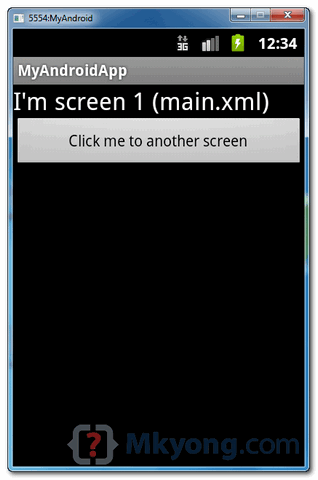
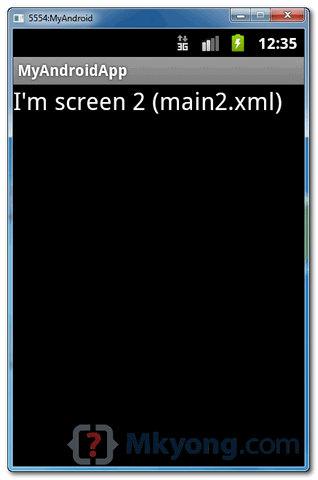
When above button is clicked, it will navigate to another screen App2Activity.java (main2.xml).

I have one doubt ,the first screen wait 5 second after move to next screen.
how do in android studio?
i have one doubt in acivity
A->B(Killed itself) -> C -> A(return value from c)
Awesome work. Thank you for help 🙂
Thanks u sir
how to perform action on multiple activities using single Button.
hello sir,
how to open a one activity in text on click and open a new activity
Thank you for the tutorials, its very clear & helpful
Can you help me this please. On a button click i want to perform activities one after other but it performs all activities simultaneously. For example I want to display next layout after completion of animation.But it directly displays layout.
hi.. i am a beginner. i want to create 20 pages. i have a button, 3 radio buttons and a textview in all the pages i want to create. do i need an activity for all pages or can i create this in a single activity as layout is same
Sure you can use only one activity for your 20 pages. When you create an intent to start the activity, you can use method putExtra on this intent to pass some data to your activity. Finally, in the activity, use getIntent() to get activity’s intent and use on it getExtra methods to obtain your data (for e.g. method getStringExtra if the expected data is a String value. You could then apply these values for objects of activity’s layout.
Very good information..thank you
i want to know how to XYZ Activity call on Main Activity by which all the data f XYX Activity show on Main
I am beginner to android,here it is getting error like Error:(25, 44) error: cannot find symbol variable button1,please provide information
Hey mkyong
I am very much Thank full to you about above showed examples.
My query is how to get alarm on full battery charge?
Please give reply as fast as possible.
from moving from main activity to activity 1 its working but when moviong from activity 1 to activity2 its not working and promting a message(unfortunately application has been stoped)
THANK YOU. VERY NICE TUTORIAL.
Hi, thanks for the tutorial, im new to android programming. How can i kill/finish/destroy a layout login. Just like facebook app prevents you from login all the time
This code worked perfectly! I had been struggling all day and using different codes but this one worked like a charm. Thank you!!
If you would like to learn how to use the following objects to write an Android application that displays a vertically upward scrolling Rainbow of colours in a FREE video, then click the link at the end of this comment:
. Activity
. LinearLayout
. View
. Canvas
. Paint
. ArrayList
http://androidprogrammeringcorner.blogspot.com/2015/06/pak-longs-android-programming-corner_24.html
getting trouble with file uploading to google blobstore using struts 2.0
Hello ,I have been watching your blog for various solutions , everything is best and clear solution.Iam a beginner for android devlopment , through this page i learnt activity and below are my questions
Please clarify
1.I have so many layouts so for each layouts should i create a activity.java file ?
2.Can we parameterize somehow?
Thanks
you can also take help from this http://themasterworld.com/in-this-lecture-we-will-see-how-to-start-a-new-activity-on-a-button-click-in-the-current-activity/
hello sir! i have a doubt will you please help me
HOW TO LAUNCH ONE APK FROM ANOTHER APK USING INTENT
very nice, your smart developer
Simple, You are one great teacher MKyong!
Thank You! I hope to be as good as you one day.
when I import R, then it shifts to main ..same error but it is with main this time… any tips?
this stupid R error… how can I get rid of it?
Hello
Thank you so much for this tutorial, it made me code 3 button link but the 4th worked.
Th
i did like this ….but my app get crash when i run it 🙁
import android.R;
import android.app.Activity;
import android.content.Intent;
import android.os.Bundle;
import android.view.View;
import android.widget.Button;
public class Activity1 extends Activity{
Button button;
protected void onCreate(Bundle savedInstanceState) {
// TODO Auto-generated method stub
super.onCreate(savedInstanceState);
button =(Button)findViewById(R.id.button1);
button.setOnClickListener(new View.OnClickListener() {
@Override
public void onClick(View v) {
Intent intent = new Intent(Activity1.this,Activity2.class);
startActivity(intent);
}
});
}
}
thankyou sir.
tahnk you and superb
Couldnt be any simpler and clearer. Thanks Yong!
Excellent, thank you!
very needed
Thanks a lot
i wanna bookmark it
Pls Also visit: http://androidtutorialsrkt.blogspot.in/
i friends this is a very useful code for android beggiers
here all the code given have very simple codes
thanks ADMIN
Hi,
I am beginner to the Java programming and android …I am trying to create an app convertor which has 4-5 conversion money convertor, kgs to pound convertor..So, when I click on one conversion button it has to take me to the page pertaining to calculating the values….
Actually before i had made an app which converts rupees to dollars..I am try use the same xml and java files here…I read tutorial and watched youtube and tried tht in my sdk but its not opening up anything so I do not which part is wrong or I made any mistakes in coding.. If any one out there can help it would be great.
My code goes like this….MainActivity.java
package com.example.converts;
import android.os.Bundle;
import android.app.Activity;
import android.content.Intent;
import android.view.View;
import android.widget.Button;
public class MainActivity extends Activity implements View.OnClickListener
{
Button button2;
@Override
public void onCreate(Bundle savedInstanceState) {
{
super.onCreate(savedInstanceState);
setContentView(R.layout.activity1);
button2=(Button)findViewById(R.id.button2);
button2.setOnClickListener(new View.OnClickListener() {
public void onClick(View v){
if(v.getId()==R.id.button2)
{
startActivity(new Intent(“com.example.converts.Main1″));
}}
});
}
}
@Override
public void onClick(View v) {
// TODO Auto-generated method stub
}}
My Main1 which I created has
package com.example.converts;
import android.os.Bundle;
import android.app.Activity;
import android.content.DialogInterface;
import android.view.View;
import android.view.View.OnClickListener;
import android.widget.*;
public class Main1 extends Activity implements OnClickListener {
TextView dollars;
TextView euros;
RadioButton dtoe;
RadioButton etod;
Button calculate;
@Override
public void onCreate(Bundle savedInstanceState) {
super.onCreate(savedInstanceState);
setContentView(R.layout.activity_main);
}
public void onClick(DialogInterface arg0, int arg1) {
// TODO Auto-generated method stub
dollars = (TextView)this.findViewById(R.id.dollars);
euros = (TextView)this.findViewById(R.id.euros);
dtoe = (RadioButton)this.findViewById(R.id.dtoe);
etod = (RadioButton)this.findViewById(R.id.etod);
calculate = (Button)this.findViewById(R.id.calculate);
calculate.setOnClickListener(this);
}
public void onClick(View v) {
if (dtoe.isChecked()) {
convertDollarsToEuros();
}
if (etod.isChecked()) {
convertEurosToDollars();
}
}
protected void convertDollarsToEuros() {
double val = Double .parseDouble(dollars.getText().toString());
// in a real app, we’d get this off the ‘net
euros.setText(Double .toString(val*0.67));
}
protected void convertEurosToDollars() {
double val = Double .parseDouble(euros.getText().toString());
// in a real app, we’d get this off the ‘net
dollars.setText(Double.toString(val/0.67));
}
}
My activity_mail.xml file has code
android:typeface=”sans”
android:textStyle=”bold”
activity1.XML has the following code
RelativeLayout xmlns:android=”http://schemas.android.com/apk/res/android”
xmlns:tools=”http://schemas.android.com/tools”
android:layout_width=”match_parent”
android:layout_height=”match_parent”
android:paddingBottom=”@dimen/activity_vertical_margin”
android:paddingLeft=”@dimen/activity_horizontal_margin”
android:paddingRight=”@dimen/activity_horizontal_margin”
android:paddingTop=”@dimen/activity_vertical_margin”
tools:context=”.MainActivity” >
So, please let me know what I am doing wrong..or what corrections I need to make to get this…
when am download codes and made existing project in my android project its working.but i made cut copy your codes its not working. can u tell me the reason please and what are the thinks i need to correct?
this is probably because of R file.
Hi,
That was a useful explanation.
I have a table in Excel. I should read the excel and create bar charts on screen.
Statically, I am able to do this with excel file added as a resource to the package.
But how do I read the Excel dynamically and I intend to update the Excel periodically.
I can not use any databases.
Instead of Excel, could the data be passed directly to all client devices using the application using XML?
Thanks in advance,
Mathan V.
Good to understand, works fine for me with 4 screen’s. Many thanks for this tutorial !!!!!
thanks frd its very simple……………
Thanks for the tutorial ! I’m a beginner and I find this lesson really interesting 🙂 But I have a question… Do you usually declare your Views in the XML document or in the Java document ? Or do we have to do it on both ? What if I want to add Views to my layout dynamically ? Do I still need to define them on the XML document ?
Good one !. Simple and easy to understand..
What is intent filter do? And you included it for main activity only. Can you explain a little more on this?
Thank you for a great site.
Needs more explanation about whats going on with the codes, especially about the 2 intents defined in the manifest file..
Thanx for cool samples!
Very helpful for beginners.
Update pelase, I Can’t wait 🙂
cool website it is very educational 🙂 it is very nice how you strip down the app to the bare minimun for the explanation , it gets rid of all the noise
thanks a lot 4 this website.
i m getting more knowledge than from android developer
thanks a lot 4 this website.
i m getting more knowledge from the web site after as an android developer
indeed, its helpful for the android beginner….. thanks
Thanks for the tutorial. It helps me to start.
Thanks for this tutorial
can anybody help me ,how to send string to microcontroller via bluetooth in android..i really need it
can anybody help me ,how to send string to microcontroller via bluetooth in android.
Thanks mkyong. This tutorial can’t be made any better. Simplicity.
All those who get forced error after clicking the button in the first activity, don’t forget to change the AndroidManifest.xml… Change it and then see the brilliant output
It looks like INTENT keeps the calling activity in the background. If an application needs to switch back and forth between two activities, is it going to create multiple instances of the activities? It looks like it is the case with the example code because if I switch back and forward between two activities 5 times and click the BACK button 10 times (5×2=10), you will see 5 instances of the two activities. How do I prevent the application from keeping an activity in the background more than once while switching between two activities? Thanks.
Peter, if an application needs to switch back and forth between two activities, you may want to consider a single activity with a tabbed UI instead. I have this for a configuration screen…instead of having three separate activities, one for editing Mass Flow Controllers, one for Robot Coordinates and the third for power supply constants, I have one configuration screen and three tabs.
Much cleaner, but it’ll depend on your situation.
Hi David,
Do you have an example on how to set up a single activity with multiple tabbed UI? Thanks.
Peter
Better tutorial on how to use INTENT than the tutorial on the Android website. You rock!
very nice tutorials…thnx to my friend who refered me this n u too ofcourse for such a nice job 🙂
Hello, Im having a hard time trying to figure this out:
I need multiple buttons that will move to different activties and the first one is working thanks to this great tutorial!
I did the third (page1english) Class and Layout.xml and they are indentical at the second one (page1portuguese)
Im using ImageButtons instead of the normal one, but the first one is working so no problem with that… can you take a look at my code? Thanks!
package com.example.panel; import android.os.Bundle; import android.app.Activity; import android.content.Context; import android.content.Intent; import android.widget.ImageButton; import android.view.View; import android.view.View.OnClickListener; public class MainActivity extends Activity { ImageButton button1; ImageButton button2; @Override protected void onCreate(Bundle savedInstanceState) { super.onCreate(savedInstanceState); setContentView(R.layout.activity_main); addListenerOnButton(); } public void addListenerOnButton() { final Context context = this; button1 = (ImageButton) findViewById(R.id.imageButton1); button1.setOnClickListener(new OnClickListener() { public void onClick(View arg0) { Intent intent = new Intent(context, Class_page1portuguese.class); startActivity(intent); } });} public void addListenerOnButton2() { final Context context = this; button2 = (ImageButton) findViewById(R.id.imageButton2); button2.setOnClickListener(new OnClickListener() { @Override public void onClick(View arg0) { Intent intent = new Intent(context, Class_page1english.class); startActivity(intent); } }); } }Wow..Thanks now i can get how the codes works! This tutorial really helps me in my project ^^
its vry useful 4 me………..thank u sir.
hi
i have a problem
package ir.example.test2;

import android.app.Activity;
import android.content.Context;
import android.content.Intent;
import android.os.Bundle;
import android.widget.Button;
import android.view.View;
import android.view.View.OnClickListener;

public class AppActivity extends Activity {

	Button button;

	@Override
	public void onCreate(Bundle savedInstanceState) {
		super.onCreate(savedInstanceState);
		setContentView(R.layout.main1);
		addListenerOnButton();
	}

	public void addListenerOnButton() {

		final Context context = this;

		button = (Button) findViewById(R.id.button1);

		button.setOnClickListener(new OnClickListener() {

			@Override

			/* in next line i have a error


			  Multiple markers at this line
	- implements android.view.View.OnClickListener.onClick
	- The method onClick(View) of type new View.OnClickListener(){} must override a superclass
	 method

			*/
			public void onClick(View arg0) {

			    Intent intent = new Intent(context, App2Activity.class);
                            startActivity(intent);

			}

		});

	}

}
thanks
Right click you project folder -> Properties -> Java Compiler -> Compiler compliance level -> from 1.5 to 1.6
That should work. I was having the same problem. Cheers!
Thanks. Just in my second assignment. was stuck with connecting 2 activities. Your page has very neatly and clearly written information.
Hello,
All your tutorials are really very helpful to the beginners. Thanks..
I performed in the same way as you have guided but unfortunately when i click the button, its getting closed forcibly i.e. it say the app appname(process com.example.appname) has stopped unexpectedly. Please try again.
Can you please figure out what has went wrong?? It’ll be of great help.
Looking forward for your reply.
Thanks
Hi,
I am having the same issue. When I click on the button in the first activity, the whole app stops with the error and closes. Have you figured out what is wrong?
Thanks!
Never mind…I had a type in my main2.xml file which was preventing it from being displayed. Now it is fixed.
cool,
what application are you developing now ?
where’re you ?
Cheers
final Context context = this;
please can u explain me this
i have a probleme with this when i click the button its say unfortunataly…. so sad i cant creat another screen in a click button i tried a lot but nothing 🙁
Have been going through the same problem. Did you find any solution to it??
same problem with my code too 🙁
Thanks its very helpful 🙂
Hi all,i’m a beginner in android programming,just wanted to ask,if i wanted to create a button in screen2 that leads me to screen3,what do i put in the following:
For the android.intent.action.MAIN,do i keep it like that for screen or do i change it to something else? Same question for the android.intent.category.LAUNCHER,much thanks will be appreciated 🙂
great thanks this tutorials
Welcome.
Thank you very much for this tutorial.
excellent !!!
I have one activity say UserList and second one is chatwindow.
UserListActivity contains events which are executed on threads to update list of available users and take care send recieve message.
when user clicks on user in list new window should open in tab.
when message recieved from server it should be shown in chat window.
I could i achive this?
How i can desing the screen and manage the single user activity can handle multiple chatwindow activities of same type.
Any help would be highly appriciated.
Amazing tutorial, pretty simple and nicely explained. It works perfect except i couldn’t run the sourcecode.zip properly, but writing it by myself helped me understand it, because I’ve been wondering why you defined and object button in App2Activity.java. Nevermind, thanks again, the best android tutorial for activity!
Thanks for such a nice article Sir. Similar activity example with brief explanation can be found here:
http://android.programmerguru.com/android-activity/
thanks a lot 4 this website.
i m getting more knowledge than from android developer
Awesome material i searched internet for abot a week and got this excellent tutorial..hats off.
Nice Tutorial Dude….. Works like a Charm….!!!
awesome tutorial but what if i want 3 pages?
package com.application.liveapps; import android.app.Activity; import android.content.Context; import android.content.Intent; import android.os.Bundle; import android.widget.Button; import android.view.View; public class launch1 extends Activity { Button button; @Override public void onCreate(Bundle savedInstanceState) { super.onCreate(savedInstanceState); setContentView(R.layout.launch); addListenerOnButton(); } public void addListenerOnButton() { final Context context = this; button = (Button)findViewById(R.id.button1); button.setOnClickListener(new View.OnClickListener() { public void onClick(View view) { Intent i = new Intent(context, Next2.class); //next2.java startActivity(i); } }); } }pre lang=”language”>
package com.application.liveapps;
import..
import..
import ..
import android.view.View.OnClickListener; (<—"Add this")
public class launch1 extends Activity {
//more code
Very useful tutorial for beginners. It is really hard to find good books/material.
How would you do this if you wanted to have multiple buttons on one page linked to separate activities?
Tutorial is great help, I downloaded code and manged to run it. I had one doubt.how this xml files get mapped to activity classes?
Basically how AppActivity.java —> main.xml
App2Activity.java —-> main2.xml
I did not notice anywhere we specifying this mappping.
check out setContentView(R.layout.main); and setContentView(R.layout.main2);
thats wer its mapped
Check it in AppActivity.java
Intent intent = new Intent(context, App2Activity.class);
startActivity(intent);
Thank you for this tutorial! Works fine on me
this will work for two screens but i
am not able to connect more then two screen?
follow the same
Thanks for the tutorial, but ‘Broken Library’ when loading from the zip file??
Les
Nice tutorial for startup guys.
thanks.
It did not work to me.Show error.Do i have to change something in my manifest?
Very, very useful to a beginner like me who is struggling with people assuming I already know more than I do. Keep it up buddy!
Thanks,
John
Thank you very much for this tutorial.
It helped me a lot.