

Spring REST Docs writes your API documentation from your tests. If the test passes, the documentation is true. If the test fails, you get no documentation at all.
Things you will use:
- Spring Boot 4.1.0
- Spring REST Docs 4.0.x (Spring Boot picks the version)
- Java 25
- Maven 3.9.6
- JUnit 6
Table of contents:
- What this delivered
- Project Directory
- Project Dependencies
- The API you will document
- Write the test
- Look inside a snippet
- Glue the snippets into a page
- Describe each field
- Watch it catch a mistake
- Document the URL parts
- Ship the docs with your app
- A trap to avoid
- Download Source Code
- References
What this delivered
A Spring REST Docs page for a Spring controller.
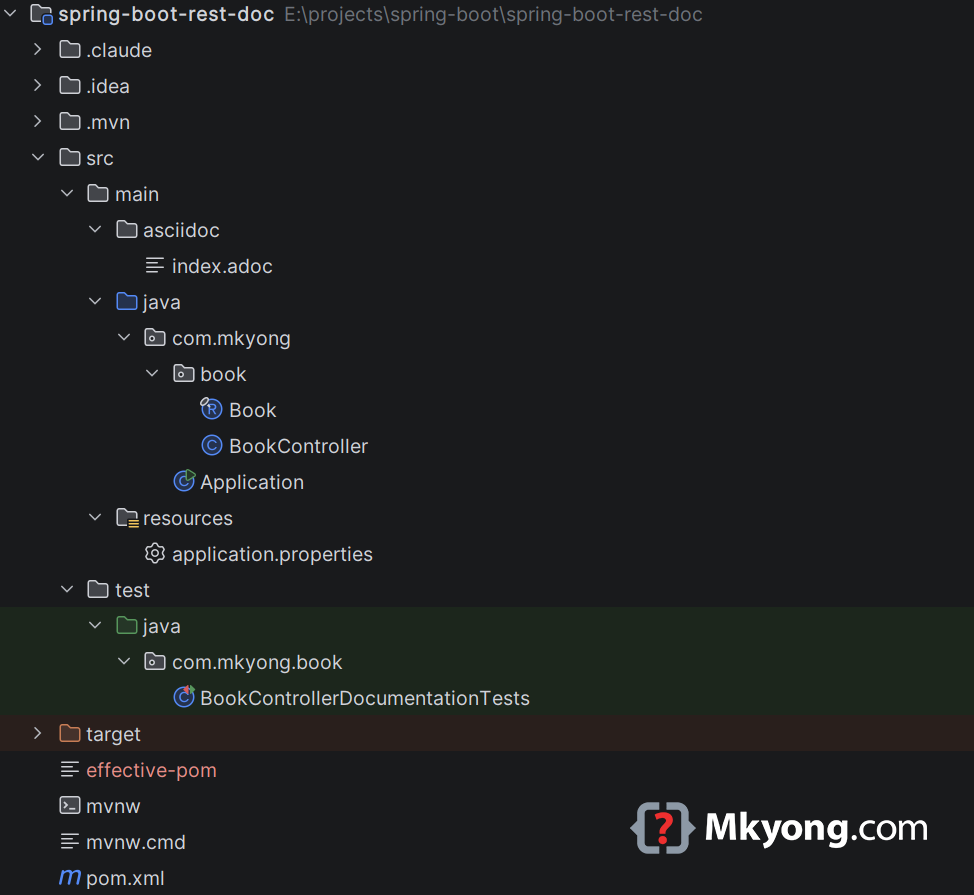
Project Directory
Project Dependencies
You need three things: the REST Docs test library, the Asciidoctor plugin that turns snippets into HTML, and the plugin’s REST Docs helper.
<?xml version="1.0" encoding="UTF-8"?>
<project xmlns="http://maven.apache.org/POM/4.0.0"
         xmlns:xsi="http://www.w3.org/2001/XMLSchema-instance"
         xsi:schemaLocation="http://maven.apache.org/POM/4.0.0
         http://maven.apache.org/xsd/maven-4.0.0.xsd">
    <modelVersion>4.0.0</modelVersion>

    <artifactId>spring-boot-rest-doc</artifactId>
    <packaging>jar</packaging>
    <name>Spring Boot REST Docs Example</name>
    <version>1.0</version>

    <parent>
        <groupId>org.springframework.boot</groupId>
        <artifactId>spring-boot-starter-parent</artifactId>
        <version>4.1.0</version>
        <relativePath/> <!-- lookup parent from repository, not local -->
    </parent>

    <properties>
        <java.version>25</java.version>
    </properties>

    <dependencies>

        <!-- In Spring Boot 4 the old spring-boot-starter-web is renamed to this -->
        <dependency>
            <groupId>org.springframework.boot</groupId>
            <artifactId>spring-boot-starter-webmvc</artifactId>
        </dependency>

        <!-- Gives you JUnit 6, MockMvc and the rest of the test tools -->
        <dependency>
            <groupId>org.springframework.boot</groupId>
            <artifactId>spring-boot-starter-test</artifactId>
            <scope>test</scope>
        </dependency>

        <!-- REST Docs itself. It only runs in tests, so scope is test -->
        <!-- No version needed, the parent picks one that works -->
        <dependency>
            <groupId>org.springframework.restdocs</groupId>
            <artifactId>spring-restdocs-mockmvc</artifactId>
            <scope>test</scope>
        </dependency>

    </dependencies>

    <build>
        <plugins>

            <plugin>
                <groupId>org.springframework.boot</groupId>
                <artifactId>spring-boot-maven-plugin</artifactId>
            </plugin>

            <!-- This turns your .adoc file into an HTML page -->
            <plugin>
                <groupId>org.asciidoctor</groupId>
                <artifactId>asciidoctor-maven-plugin</artifactId>

                <!-- Version note: the official tutorial says 2.2.1. That version bundles a JRuby
                too old to run on Java 25, and it fails at startup. 3.2.0 works.
                -->
                <version>3.2.0</version>
                <executions>
                    <execution>
                        <id>generate-docs</id>
                        <!-- Runs before the jar is packed -->
                        <phase>prepare-package</phase>
                        <goals>
                            <goal>process-asciidoc</goal>
                        </goals>
                        <configuration>
                            <backend>html</backend>
                            <doctype>book</doctype>
                        </configuration>
                    </execution>
                </executions>
                <dependencies>
                    <!-- This teaches the plugin where the snippets live -->
                    <dependency>
                        <groupId>org.springframework.restdocs</groupId>
                        <artifactId>spring-restdocs-asciidoctor</artifactId>
                        <version>4.0.0</version>
                    </dependency>
                </dependencies>
            </plugin>

            <!-- Add this AFTER the asciidoctor plugin, so the HTML exists first -->
            <plugin>
                <artifactId>maven-resources-plugin</artifactId>
                <executions>
                    <execution>
                        <id>copy-resources</id>
                        <phase>prepare-package</phase>
                        <goals>
                            <goal>copy-resources</goal>
                        </goals>
                        <configuration>
                            <!-- Anything in static/docs is served by Spring Boot -->
                            <outputDirectory>
                                ${project.build.outputDirectory}/static/docs
                            </outputDirectory>
                            <resources>
                                <resource>
                                    <directory>
                                        ${project.build.directory}/generated-docs
                                    </directory>
                                </resource>
                            </resources>
                        </configuration>
                    </execution>
                </executions>
            </plugin>

        </plugins>

    </build>

</project>
That last helper sets a shortcut called {snippets} for you. It points at target/generated-snippets.
The API you will document
A Book Manager. First the book.
package com.mkyong.book;

// A small box that holds one book
public record Book(Long id, String title, String author) {
}
Now the controller.
package com.mkyong.book;

import org.springframework.web.bind.annotation.GetMapping;
import org.springframework.web.bind.annotation.PathVariable;
import org.springframework.web.bind.annotation.RequestMapping;
import org.springframework.web.bind.annotation.RestController;

import java.util.List;

@RestController
@RequestMapping("/books")
public class BookController {

    // Two books kept in memory
    private final List<Book> books = List.of(
            new Book(1L, "Java 25 Basics", "Mkyong"),
            new Book(2L, "Spring Boot 4 Basics", "Mkyong")
    );

    // GET /books/1
    @GetMapping("/{id}")
    public Book findById(@PathVariable Long id) {
        return books.stream()
                .filter(book -> book.id().equals(id)) // keep the matching book
                .findFirst()                          // take the first one
                .orElse(null);
    }
}
And the starter class.
package com.mkyong;

import org.springframework.boot.SpringApplication;
import org.springframework.boot.autoconfigure.SpringBootApplication;

@SpringBootApplication
public class Application {

    public static void main(String[] args) {
        SpringApplication.run(Application.class, args);
    }
}
No documentation annotations anywhere. The controller stays clean.
Write the test
This is where the documentation comes from. Put this in src/test/java/com/mkyong/book/.
package com.mkyong.book;

import org.junit.jupiter.api.BeforeEach;
import org.junit.jupiter.api.Test;
import org.junit.jupiter.api.extension.ExtendWith;
import org.springframework.boot.test.context.SpringBootTest;
import org.springframework.restdocs.RestDocumentationContextProvider;
import org.springframework.restdocs.RestDocumentationExtension;
import org.springframework.test.web.servlet.MockMvc;
import org.springframework.test.web.servlet.setup.MockMvcBuilders;
import org.springframework.web.context.WebApplicationContext;

import static org.springframework.restdocs.mockmvc.MockMvcRestDocumentation.document;
import static org.springframework.restdocs.mockmvc.MockMvcRestDocumentation.documentationConfiguration;
import static org.springframework.test.web.servlet.result.MockMvcResultMatchers.status;
import static org.springframework.test.web.servlet.request.MockMvcRequestBuilders.get;

// This extension writes the snippets for you
@ExtendWith(RestDocumentationExtension.class)
@SpringBootTest
class BookControllerDocumentationTests {

    private MockMvc mockMvc;

    // Runs before every test
    @BeforeEach
    void setUp(WebApplicationContext webApplicationContext,
               RestDocumentationContextProvider restDocumentation) {

        this.mockMvc = MockMvcBuilders.webAppContextSetup(webApplicationContext)
                // This one line switches REST Docs on
                .apply(documentationConfiguration(restDocumentation))
                .build();
    }

    @Test
    void findBookById() throws Exception {

        this.mockMvc.perform(get("/books/1"))  // call the real endpoint
                .andExpect(status().isOk())    // check it worked
                .andDo(document("find-book")); // write the snippets
    }
}
Run it with mvn test.
Output:
[INFO] --- surefire:3.5.2:test (default-test) @ spring-boot-rest-doc ---
[INFO] Running com.mkyong.book.BookControllerDocumentationTests
[INFO] Tests run: 1, Failures: 0, Errors: 0, Skipped: 0
[INFO] BUILD SUCCESS
Now look inside target/generated-snippets/find-book/.
Output:
target/generated-snippets/find-book/
├── curl-request.adoc
├── http-request.adoc
├── http-response.adoc
├── httpie-request.adoc
├── request-body.adoc
└── response-body.adoc
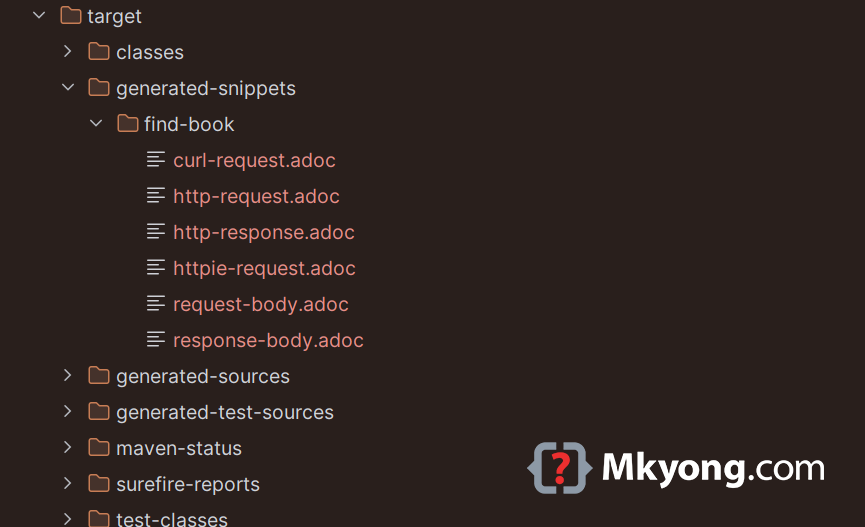
Six files, from one test. The name find-book is the folder name you passed to document().
Look inside a snippet
Open target/generated-snippets/find-book/curl-request.adoc.
Output:
[source,bash]
----
$ curl 'http://localhost:8080/books/1' -i -X GET
----
And http-request.adoc:
Output:
[source,http,options="nowrap"]
----
GET /books/1 HTTP/1.1
Host: localhost:8080

----
And http-response.adoc:
Output:
[source,http,options="nowrap"]
----
HTTP/1.1 200 OK
Content-Type: application/json
Content-Length: 51

{"id":1,"title":"Java 25 Basics","author":"Mkyong"}
----
Nobody typed the content of those files. REST Docs wrote them while the test was running.
Glue the snippets into a page
Snippets are pieces. You still write the page. Create src/main/asciidoc/index.adoc.
= Book Manager API
:toc: left

== Get one book

Ask for a book by its id.

Here is the call:

include::{snippets}/find-book/curl-request.adoc[]

And here is what comes back:

include::{snippets}/find-book/http-response.adoc[]
Build it with mvn package.
Output:
[INFO] --- asciidoctor:3.2.0:process-asciidoc (generate-docs) @ spring-boot-rest-doc ---
[INFO] sourceDirectory E:\projects\spring-boot\spring-boot-rest-doc\src\docs\asciidoc does not exist
[INFO] sourceDirectory E:\projects\spring-boot\spring-boot-rest-doc\src\asciidoc does not exist
[INFO] Converted E:\projects\spring-boot\spring-boot-rest-doc\src\main\asciidoc\index.adoc

[INFO] --- resources:3.5.0:copy-resources (copy-resources) @ spring-boot-rest-doc ---
[INFO] Copying 1 resource from target\generated-docs to target\classes\static\docs

[INFO] BUILD SUCCESS
Open target/generated-docs/index.html in your browser.
Output:
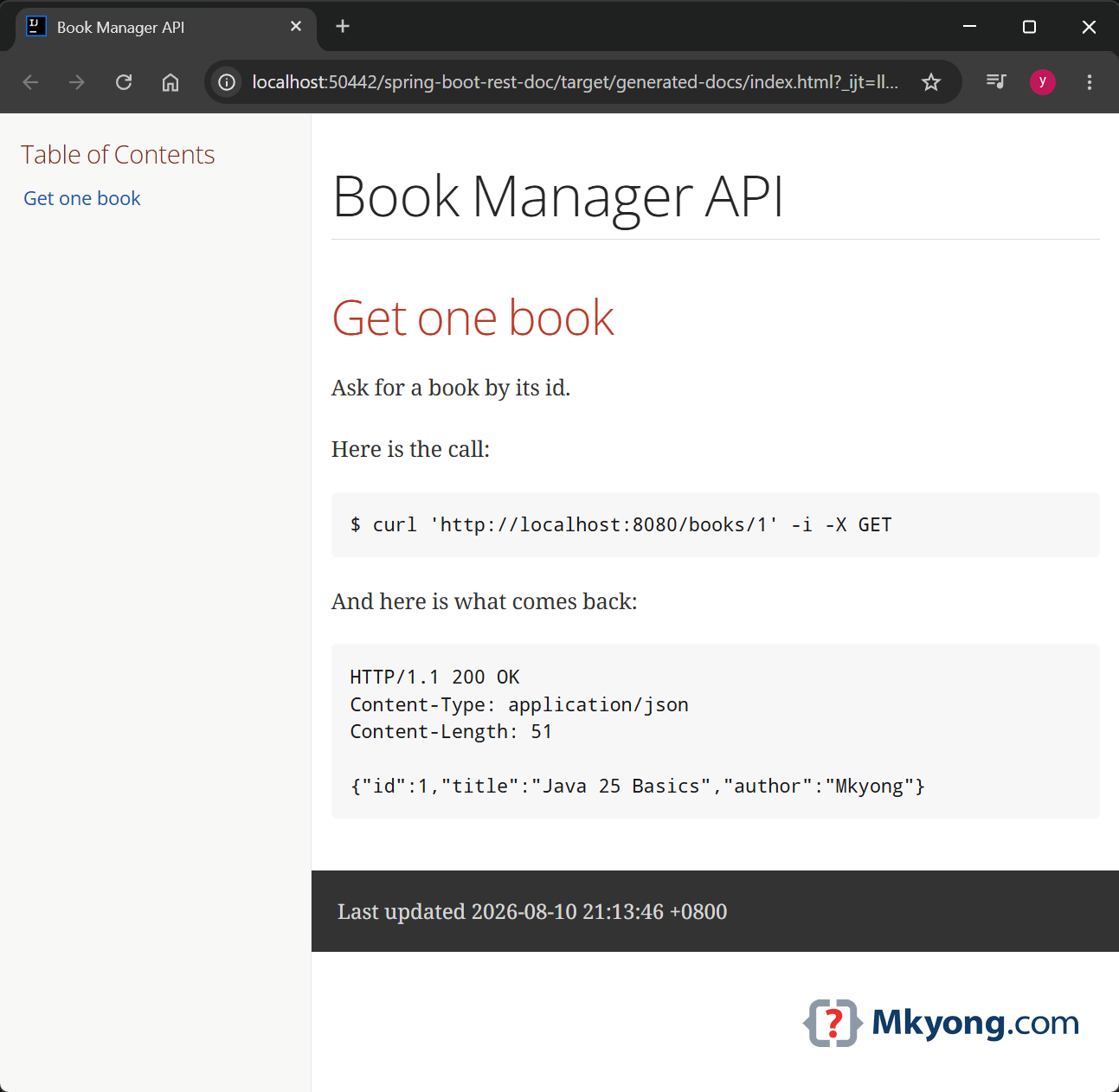
You wrote the words. The test wrote the code and the answer.
Describe each field
So far the page shows raw JSON. You can add a table that explains every field.
package com.mkyong.book;

import org.junit.jupiter.api.BeforeEach;
import org.junit.jupiter.api.Test;
import org.junit.jupiter.api.extension.ExtendWith;
import org.springframework.boot.test.context.SpringBootTest;
import org.springframework.restdocs.RestDocumentationContextProvider;
import org.springframework.restdocs.RestDocumentationExtension;
import org.springframework.test.web.servlet.MockMvc;
import org.springframework.test.web.servlet.setup.MockMvcBuilders;
import org.springframework.web.context.WebApplicationContext;

import static org.springframework.restdocs.mockmvc.MockMvcRestDocumentation.document;
import static org.springframework.restdocs.mockmvc.MockMvcRestDocumentation.documentationConfiguration;
import static org.springframework.restdocs.payload.PayloadDocumentation.fieldWithPath;
import static org.springframework.restdocs.payload.PayloadDocumentation.responseFields;
import static org.springframework.test.web.servlet.request.MockMvcRequestBuilders.get;
import static org.springframework.test.web.servlet.result.MockMvcResultMatchers.status;

// This extension writes the snippets for you
@ExtendWith(RestDocumentationExtension.class)
@SpringBootTest
class BookControllerDocumentationTests {

    private MockMvc mockMvc;

    // Runs before every test
    @BeforeEach
    void setUp(WebApplicationContext webApplicationContext,
               RestDocumentationContextProvider restDocumentation) {

        this.mockMvc = MockMvcBuilders.webAppContextSetup(webApplicationContext)
                // This one line switches REST Docs on
                .apply(documentationConfiguration(restDocumentation))
                .build();
    }

    @Test
    void findBookById() throws Exception {

        this.mockMvc.perform(get("/books/1"))  // call the real endpoint
                .andExpect(status().isOk())    // check it worked
                .andDo(document("find-book",
                        // Explain every field that comes back
                        responseFields(
                                fieldWithPath("id").description("The book id"),
                                fieldWithPath("title").description("The name of the book"),
                                fieldWithPath("author").description("Who wrote it")
                        )));

    }

}
Run mvn test again. You get a new snippet, response-fields.adoc. Append it to the end of src/main/asciidoc/index.adoc:
include::{snippets}/find-book/response-fields.adoc[]
Build it with mvn package.
Open target/generated-docs/index.html in your browser.
Output:
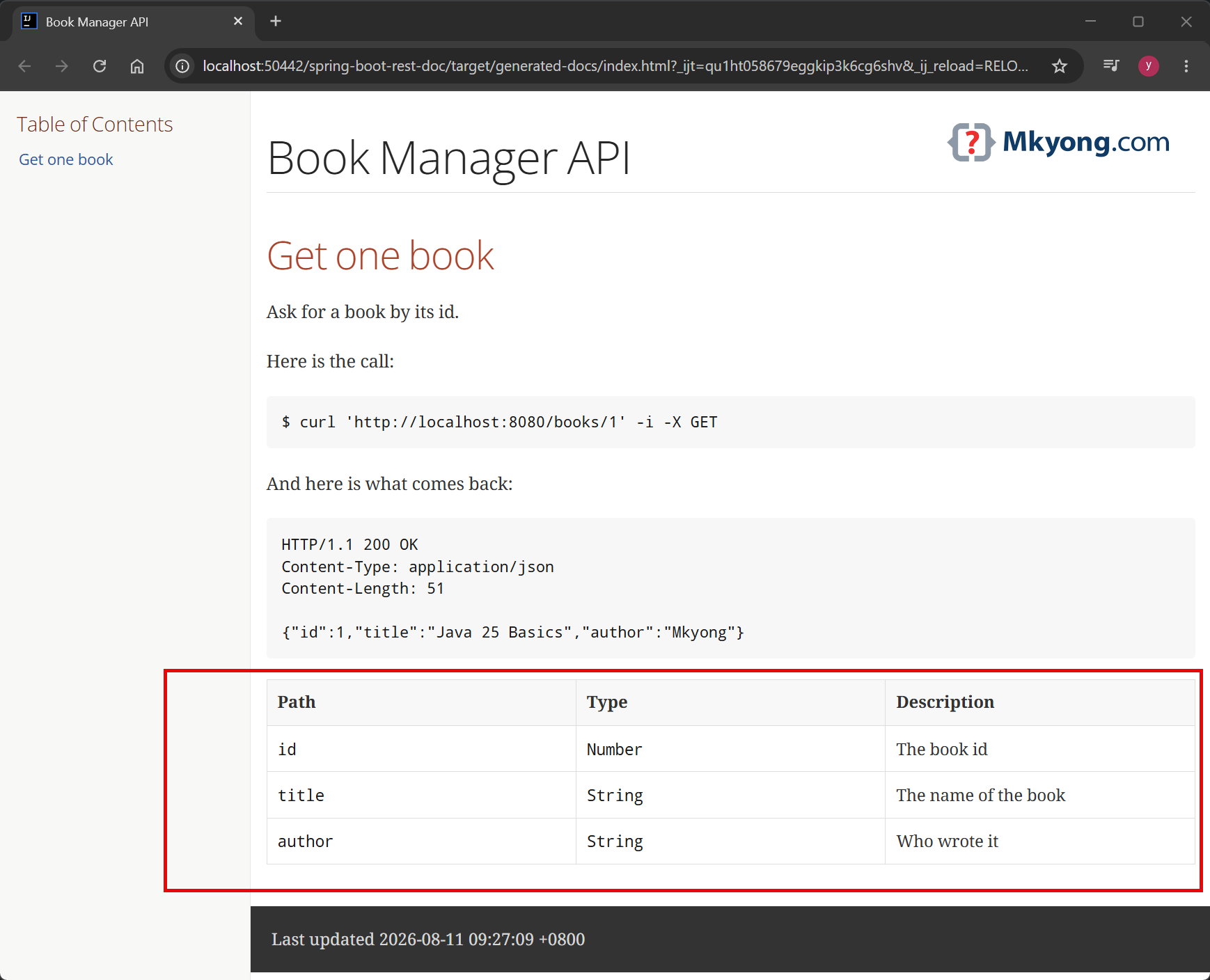
You get a neat table, and every row was checked against a real response.
Watch it catch a mistake
Add a field to Book but say nothing about it in the test.
package com.mkyong.book;

// A new "year" field, and the test does not know about it
public record Book(Long id, String title, String author, int year) {
}
Update BookController:
@RestController
@RequestMapping("/books")
public class BookController {

    // Two books kept in memory
    private final List<Book> books = List.of(
            new Book(1L, "Java 25 Basics", "Mkyong", 2026),
            new Book(2L, "Spring Boot 4 Basics", "Mkyong", 2026)
    );

    //...
}
Run mvn test.
Output:
[ERROR] BookControllerDocumentationTests.findBookById
  org.springframework.restdocs.snippet.SnippetException:
  The following parts of the payload were not documented:
  {
    "year" : 2026
  }

[INFO] BUILD FAILURE
The build stopped. Your documentation can never quietly fall behind your code, because out-of-date documentation is not documentation; it is a lie with a nice font.
Now take the year field out of Book and BookController again, so the rest of this article keeps working.
Document the URL parts
The {id} in /books/{id} deserves an explanation too.
package com.mkyong.book;

import org.junit.jupiter.api.BeforeEach;
import org.junit.jupiter.api.Test;
import org.junit.jupiter.api.extension.ExtendWith;
import org.springframework.boot.test.context.SpringBootTest;
import org.springframework.restdocs.RestDocumentationContextProvider;
import org.springframework.restdocs.RestDocumentationExtension;
import org.springframework.test.web.servlet.MockMvc;
import org.springframework.test.web.servlet.setup.MockMvcBuilders;
import org.springframework.web.context.WebApplicationContext;

import static org.springframework.restdocs.mockmvc.MockMvcRestDocumentation.document;
import static org.springframework.restdocs.mockmvc.MockMvcRestDocumentation.documentationConfiguration;
import static org.springframework.restdocs.payload.PayloadDocumentation.fieldWithPath;
import static org.springframework.restdocs.payload.PayloadDocumentation.responseFields;
import static org.springframework.restdocs.request.RequestDocumentation.parameterWithName;
import static org.springframework.restdocs.request.RequestDocumentation.pathParameters;
import static org.springframework.test.web.servlet.request.MockMvcRequestBuilders.get;
import static org.springframework.test.web.servlet.result.MockMvcResultMatchers.status;

// This extension writes the snippets for you
@ExtendWith(RestDocumentationExtension.class)
@SpringBootTest
class BookControllerDocumentationTests {

    private MockMvc mockMvc;

    // Runs before every test
    @BeforeEach
    void setUp(WebApplicationContext webApplicationContext,
               RestDocumentationContextProvider restDocumentation) {

        this.mockMvc = MockMvcBuilders.webAppContextSetup(webApplicationContext)
                // This one line switches REST Docs on
                .apply(documentationConfiguration(restDocumentation))
                .build();
    }

    @Test
    void findBookById() throws Exception {

        // Pass the template "/books/{id}" and the value 1 separately
        this.mockMvc.perform(get("/books/{id}", 1))
                .andExpect(status().isOk())
                .andDo(document("find-book",
                        pathParameters(
                                parameterWithName("id").description("The id of the book you want")
                        ),
                        responseFields(
                                fieldWithPath("id").description("The book id"),
                                fieldWithPath("title").description("The name of the book"),
                                fieldWithPath("author").description("Who wrote it")
                        )));
    }

}
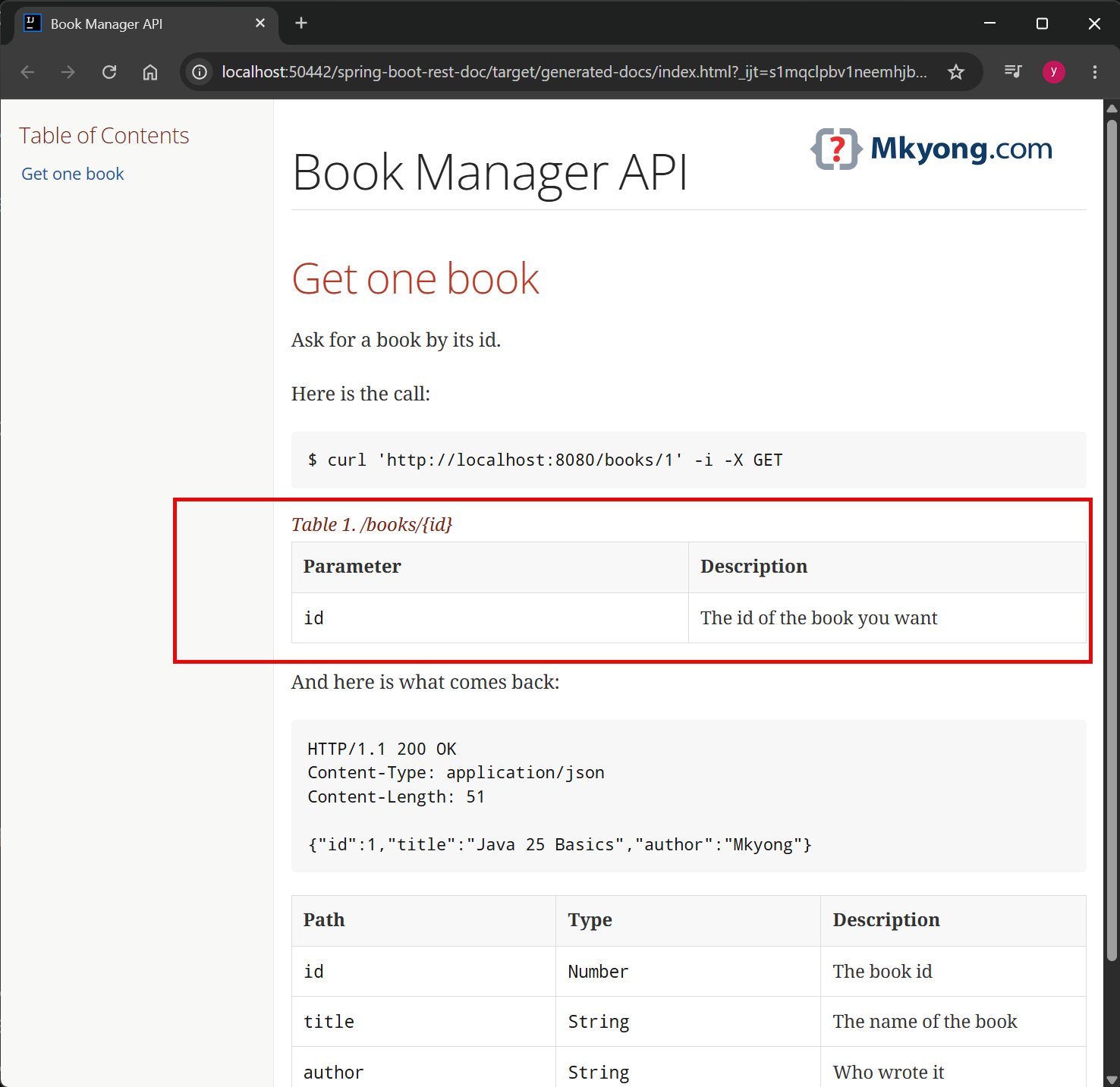
Run mvn test again. You get a new snippet, path-parameters.adoc. Add it to your src/main/asciidoc/index.adoc:
= Book Manager API
:toc: left

== Get one book

Ask for a book by its id.

Here is the call:

include::{snippets}/find-book/curl-request.adoc[]

include::{snippets}/find-book/path-parameters.adoc[]

And here is what comes back:

include::{snippets}/find-book/http-response.adoc[]

include::{snippets}/find-book/response-fields.adoc[]
Build it with mvn clean package.
Open target/generated-docs/index.html in your browser.
Output:
Further Read
Older guides tell you to swap MockMvcRequestBuilders.get for RestDocumentationRequestBuilders.get at this point. You no longer need to. Before this, the plain get threw away the {id} template and kept only the finished URL, so REST Docs could not tell that a path parameter was there. Spring Framework 6.2 made the template available from the request, and Spring REST Docs 3.0.2 started reading it. You are on Framework 7 and REST Docs 4, so the plain get works.
Ship the docs with your app
The maven-resources-plugin moves the finished HTML into your jar, and Spring Boot serves it as a normal page.
    <!-- This turns your .adoc file into an HTML page -->
    <plugin>
        <groupId>org.asciidoctor</groupId>
        <artifactId>asciidoctor-maven-plugin</artifactId>
        <!-- hide -->
    </plugin>

    <!-- Add this AFTER the asciidoctor plugin, so you always ship the latest HTML doc -->
    <plugin>
        <artifactId>maven-resources-plugin</artifactId>
        <executions>
            <execution>
                <id>copy-resources</id>
                <phase>prepare-package</phase>
                <goals>
                    <goal>copy-resources</goal>
                </goals>
                <configuration>
                    <!-- Anything in static/docs is served by Spring Boot -->
                    <outputDirectory>
                        ${project.build.outputDirectory}/static/docs
                    </outputDirectory>
                    <resources>
                        <resource>
                            <directory>
                                ${project.build.directory}/generated-docs
                            </directory>
                        </resource>
                    </resources>
                </configuration>
            </execution>
        </executions>
    </plugin>
Run mvn clean package, then mvn spring-boot:run.
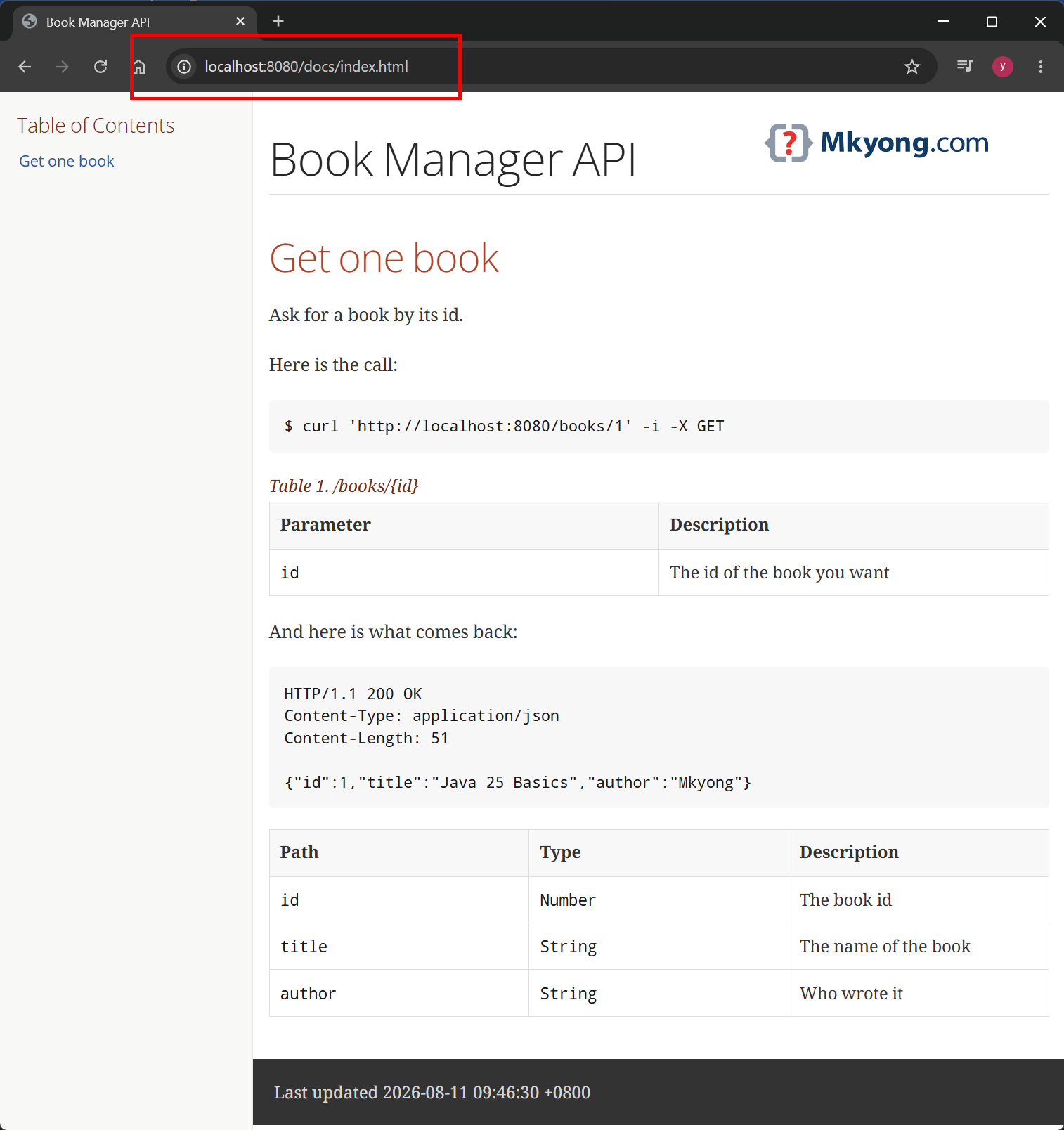
Open http://localhost:8080/docs/index.html
Output:
Your documentation now travels with your app. The version you deploy is always the version that was tested.
A trap to avoid
Both plugins run in the same prepare-package phase, and Maven runs them in the order you declare them. So maven-resources-plugin must come after asciidoctor-maven-plugin. Put it first and there is nothing to copy yet.
    <plugin>
        <groupId>org.asciidoctor</groupId>
        <artifactId>asciidoctor-maven-plugin</artifactId>
        <!-- hide -->
    </plugin>

    <!-- Add this AFTER the asciidoctor plugin, so you always ship the latest HTML doc -->
    <plugin>
        <artifactId>maven-resources-plugin</artifactId>
        <!-- hide -->
    </plugin>
Output: (the wrong order, with mvn clean package)
[INFO] --- resources:3.5.0:copy-resources (copy-resources) @ spring-boot-rest-doc ---
[INFO] skip non existing resourceDirectory target\generated-docs
The sneaky part is mvn package without clean. The folder still holds the last build’s HTML, so the copy quietly succeeds and you ship yesterday’s documentation. Always check the order of these two plugins.
Download Source Code
$ git clone https://github.com/mkyong/spring-boot.git
$ cd spring-boot/spring-boot-rest-doc
$ mvn clean package
$ mvn spring-boot:run
References
- Spring REST Docs – Getting Started
- Spring REST Docs – Request and Response Payloads
- Spring REST Docs Sample Applications
- Spring Boot Testing Documentation
- MockMvc Documentation
- Asciidoctor Documentation
P.S This article is part of the Spring Boot 4 series, tested against Spring Boot 4.1.0 GA and Java 25.
