A Spring Boot Thymeleaf example, uses Spring Security to protect path /admin and /user
Technologies used :
- Spring Boot 1.5.3.RELEASE
- Spring 4.3.8.RELEASE
- Spring Security 4.2.2
- Thymeleaf 2.1.5.RELEASE
- Thymeleaf extras Spring Security4 2.1.3
- Tomcat Embed 8.5.14
- Maven 3
- Java 8
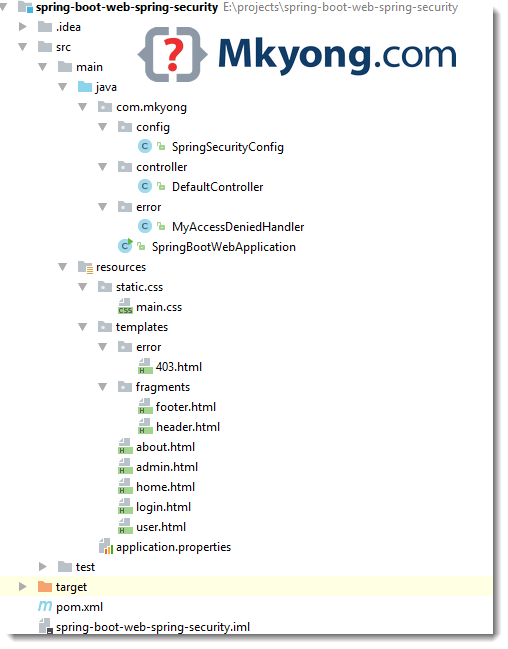
1. Project Directory
2. Project Dependencies
Declares spring-boot-starter-security, it will get anything you need to develop a Spring Boot + Spring Security web application.
<?xml version="1.0" encoding="UTF-8"?>
<project xmlns="http://maven.apache.org/POM/4.0.0"
	xmlns:xsi="http://www.w3.org/2001/XMLSchema-instance"
    xsi:schemaLocation="http://maven.apache.org/POM/4.0.0
	http://maven.apache.org/xsd/maven-4.0.0.xsd">
    <modelVersion>4.0.0</modelVersion>

    <artifactId>spring-boot-web-spring-security</artifactId>
    <packaging>jar</packaging>
    <name>Spring Boot Web Spring Security</name>
    <description>Spring Boot Web Spring Security Example</description>
    <url>https://www.mkyong.com</url>
    <version>1.0</version>

    <parent>
        <groupId>org.springframework.boot</groupId>
        <artifactId>spring-boot-starter-parent</artifactId>
        <version>1.5.3.RELEASE</version>
    </parent>

    <properties>
        <java.version>1.8</java.version>
    </properties>

    <dependencies>

        <!-- Spring Security -->
        <dependency>
            <groupId>org.springframework.boot</groupId>
            <artifactId>spring-boot-starter-security</artifactId>
        </dependency>

		<!-- do you like thymeleaf? -->
		<dependency>
            <groupId>org.springframework.boot</groupId>
            <artifactId>spring-boot-starter-thymeleaf</artifactId>
        </dependency>

		<!-- optional, it brings userful tags to display spring security stuff -->
        <dependency>
            <groupId>org.thymeleaf.extras</groupId>
            <artifactId>thymeleaf-extras-springsecurity4</artifactId>
        </dependency>

        <!-- hot swapping, disable cache for template, enable live reload -->
        <dependency>
            <groupId>org.springframework.boot</groupId>
            <artifactId>spring-boot-devtools</artifactId>
            <optional>true</optional>
        </dependency>

        <!-- Optional, for bootstrap -->
        <dependency>
            <groupId>org.webjars</groupId>
            <artifactId>bootstrap</artifactId>
            <version>3.3.7</version>
        </dependency>

    </dependencies>
    <build>
        <plugins>
            <!-- Package as an executable jar/war -->
            <plugin>
                <groupId>org.springframework.boot</groupId>
                <artifactId>spring-boot-maven-plugin</artifactId>
            </plugin>
        </plugins>
    </build>
</project>
Display project dependencies :
$ mvn dependency:tree

[INFO] Scanning for projects...
[INFO]
[INFO] ------------------------------------------------------------------------
[INFO] Building Spring Boot Web Spring Security 1.0
[INFO] ------------------------------------------------------------------------
[INFO]
[INFO] --- maven-dependency-plugin:2.10:tree (default-cli) @ spring-boot-web-spring-security ---
[INFO] org.springframework.boot:spring-boot-web-spring-security:jar:1.0
[INFO] +- org.springframework.boot:spring-boot-starter-thymeleaf:jar:1.5.3.RELEASE:compile
[INFO] |  +- org.springframework.boot:spring-boot-starter:jar:1.5.3.RELEASE:compile
[INFO] |  |  +- org.springframework.boot:spring-boot-starter-logging:jar:1.5.3.RELEASE:compile
[INFO] |  |  |  +- ch.qos.logback:logback-classic:jar:1.1.11:compile
[INFO] |  |  |  |  \- ch.qos.logback:logback-core:jar:1.1.11:compile
[INFO] |  |  |  +- org.slf4j:jcl-over-slf4j:jar:1.7.25:compile
[INFO] |  |  |  +- org.slf4j:jul-to-slf4j:jar:1.7.25:compile
[INFO] |  |  |  \- org.slf4j:log4j-over-slf4j:jar:1.7.25:compile
[INFO] |  |  +- org.springframework:spring-core:jar:4.3.8.RELEASE:compile
[INFO] |  |  \- org.yaml:snakeyaml:jar:1.17:runtime
[INFO] |  +- org.springframework.boot:spring-boot-starter-web:jar:1.5.3.RELEASE:compile
[INFO] |  |  +- org.springframework.boot:spring-boot-starter-tomcat:jar:1.5.3.RELEASE:compile
[INFO] |  |  |  +- org.apache.tomcat.embed:tomcat-embed-core:jar:8.5.14:compile
[INFO] |  |  |  +- org.apache.tomcat.embed:tomcat-embed-el:jar:8.5.14:compile
[INFO] |  |  |  \- org.apache.tomcat.embed:tomcat-embed-websocket:jar:8.5.14:compile
[INFO] |  |  +- org.hibernate:hibernate-validator:jar:5.3.5.Final:compile
[INFO] |  |  |  +- javax.validation:validation-api:jar:1.1.0.Final:compile
[INFO] |  |  |  +- org.jboss.logging:jboss-logging:jar:3.3.1.Final:compile
[INFO] |  |  |  \- com.fasterxml:classmate:jar:1.3.3:compile
[INFO] |  |  +- com.fasterxml.jackson.core:jackson-databind:jar:2.8.8:compile
[INFO] |  |  |  +- com.fasterxml.jackson.core:jackson-annotations:jar:2.8.0:compile
[INFO] |  |  |  \- com.fasterxml.jackson.core:jackson-core:jar:2.8.8:compile
[INFO] |  |  +- org.springframework:spring-web:jar:4.3.8.RELEASE:compile
[INFO] |  |  \- org.springframework:spring-webmvc:jar:4.3.8.RELEASE:compile
[INFO] |  +- org.thymeleaf:thymeleaf-spring4:jar:2.1.5.RELEASE:compile
[INFO] |  |  \- org.thymeleaf:thymeleaf:jar:2.1.5.RELEASE:compile
[INFO] |  |     +- ognl:ognl:jar:3.0.8:compile
[INFO] |  |     +- org.javassist:javassist:jar:3.21.0-GA:compile
[INFO] |  |     \- org.unbescape:unbescape:jar:1.1.0.RELEASE:compile
[INFO] |  \- nz.net.ultraq.thymeleaf:thymeleaf-layout-dialect:jar:1.4.0:compile
[INFO] |     \- org.codehaus.groovy:groovy:jar:2.4.10:compile
[INFO] +- org.springframework.boot:spring-boot-starter-security:jar:1.5.3.RELEASE:compile
[INFO] |  +- org.springframework:spring-aop:jar:4.3.8.RELEASE:compile
[INFO] |  |  \- org.springframework:spring-beans:jar:4.3.8.RELEASE:compile
[INFO] |  +- org.springframework.security:spring-security-config:jar:4.2.2.RELEASE:compile
[INFO] |  |  +- org.springframework.security:spring-security-core:jar:4.2.2.RELEASE:compile
[INFO] |  |  \- org.springframework:spring-context:jar:4.3.8.RELEASE:compile
[INFO] |  \- org.springframework.security:spring-security-web:jar:4.2.2.RELEASE:compile
[INFO] |     \- org.springframework:spring-expression:jar:4.3.8.RELEASE:compile
[INFO] +- org.thymeleaf.extras:thymeleaf-extras-springsecurity4:jar:2.1.3.RELEASE:compile
[INFO] |  \- org.slf4j:slf4j-api:jar:1.7.25:compile
[INFO] +- org.springframework.boot:spring-boot-devtools:jar:1.5.3.RELEASE:compile
[INFO] |  +- org.springframework.boot:spring-boot:jar:1.5.3.RELEASE:compile
[INFO] |  \- org.springframework.boot:spring-boot-autoconfigure:jar:1.5.3.RELEASE:compile
[INFO] \- org.webjars:bootstrap:jar:3.3.7:compile
[INFO]    \- org.webjars:jquery:jar:1.11.1:compile
[INFO] ------------------------------------------------------------------------
[INFO] BUILD SUCCESS
[INFO] ------------------------------------------------------------------------
[INFO] Total time: 2.072 s
[INFO] Finished at: 2017-05-04T10:13:05+08:00
[INFO] Final Memory: 19M/309M
[INFO] ------------------------------------------------------------------------
3. Spring Security
3.1 Extends WebSecurityConfigurerAdapter, and defined the security rules in the configure method.
For user “admin” :
- Able to access
/adminpage - Unable to access
/userpage, redirect to 403 access denied page.
For user “user” :
- able to access
/userpage - unable to access
/adminpage, redirect to 403 access denied page.
package com.mkyong.config;

import org.springframework.beans.factory.annotation.Autowired;
import org.springframework.context.annotation.Configuration;
import org.springframework.security.config.annotation.authentication.builders.AuthenticationManagerBuilder;
import org.springframework.security.config.annotation.web.builders.HttpSecurity;
import org.springframework.security.config.annotation.web.configuration.WebSecurityConfigurerAdapter;
import org.springframework.security.web.access.AccessDeniedHandler;

@Configuration
public class SpringSecurityConfig extends WebSecurityConfigurerAdapter {

    @Autowired
    private AccessDeniedHandler accessDeniedHandler;

    // roles admin allow to access /admin/**
    // roles user allow to access /user/**
    // custom 403 access denied handler
    @Override
    protected void configure(HttpSecurity http) throws Exception {

        http.csrf().disable()
                .authorizeRequests()
					.antMatchers("/", "/home", "/about").permitAll()
					.antMatchers("/admin/**").hasAnyRole("ADMIN")
					.antMatchers("/user/**").hasAnyRole("USER")
					.anyRequest().authenticated()
                .and()
                .formLogin()
					.loginPage("/login")
					.permitAll()
					.and()
                .logout()
					.permitAll()
					.and()
                .exceptionHandling().accessDeniedHandler(accessDeniedHandler);
    }

    // create two users, admin and user
    @Autowired
    public void configureGlobal(AuthenticationManagerBuilder auth) throws Exception {

        auth.inMemoryAuthentication()
                .withUser("user").password("password").roles("USER")
                .and()
                .withUser("admin").password("password").roles("ADMIN");
    }
}
3.2 Custom 403 Access denied handler, logs the request and redirect to /403
package com.mkyong.error;

import org.slf4j.Logger;
import org.slf4j.LoggerFactory;
import org.springframework.security.access.AccessDeniedException;
import org.springframework.security.core.Authentication;
import org.springframework.security.core.context.SecurityContextHolder;
import org.springframework.security.web.access.AccessDeniedHandler;
import org.springframework.stereotype.Component;

import javax.servlet.ServletException;
import javax.servlet.http.HttpServletRequest;
import javax.servlet.http.HttpServletResponse;
import java.io.IOException;

// handle 403 page
@Component
public class MyAccessDeniedHandler implements AccessDeniedHandler {

    private static Logger logger = LoggerFactory.getLogger(MyAccessDeniedHandler.class);

    @Override
    public void handle(HttpServletRequest httpServletRequest,
                       HttpServletResponse httpServletResponse,
                       AccessDeniedException e) throws IOException, ServletException {

        Authentication auth
                = SecurityContextHolder.getContext().getAuthentication();

        if (auth != null) {
            logger.info("User '" + auth.getName()
                    + "' attempted to access the protected URL: "
                    + httpServletRequest.getRequestURI());
        }

        httpServletResponse.sendRedirect(httpServletRequest.getContextPath() + "/403");

    }
}
4. Spring Boot
4.1 A controller class, to define the http request and view name.
package com.mkyong.controller;

import org.springframework.stereotype.Controller;
import org.springframework.web.bind.annotation.GetMapping;

@Controller
public class DefaultController {

    @GetMapping("/")
    public String home1() {
        return "/home";
    }

    @GetMapping("/home")
    public String home() {
        return "/home";
    }

    @GetMapping("/admin")
    public String admin() {
        return "/admin";
    }

    @GetMapping("/user")
    public String user() {
        return "/user";
    }

    @GetMapping("/about")
    public String about() {
        return "/about";
    }

    @GetMapping("/login")
    public String login() {
        return "/login";
    }

    @GetMapping("/403")
    public String error403() {
        return "/error/403";
    }

}
4.2 Start Spring Boot application.
package com.mkyong;

import org.springframework.boot.SpringApplication;
import org.springframework.boot.autoconfigure.SpringBootApplication;

@SpringBootApplication
public class SpringBootWebApplication {

	public static void main(String[] args) throws Exception {
		SpringApplication.run(SpringBootWebApplication.class, args);
	}

}
5. Thymeleaf + Resources + Static files
5.1 For Thymeleaf files, put in src/main/resources/templates/ folder.
5.2 Thymeleaf fragments, for template layout – header.
<html xmlns:th="http://www.thymeleaf.org">
<head>
    <div th:fragment="header-css">
        <!-- this is header-css -->
        <link rel="stylesheet" type="text/css"
              href="webjars/bootstrap/3.3.7/css/bootstrap.min.css" />

        <link rel="stylesheet" th:href="@{/css/main.css}"
              href="../../css/main.css" />
    </div>
</head>
<body>
<div th:fragment="header">
    <!-- this is header -->
    <nav class="navbar navbar-inverse">
        <div class="container">
            <div class="navbar-header">
                <a class="navbar-brand" th:href="@{/}">Spring Boot</a>
            </div>
            <div id="navbar" class="collapse navbar-collapse">
                <ul class="nav navbar-nav">
                    <li class="active"><a th:href="@{/}">Home</a></li>
                </ul>
            </div>
        </div>
    </nav>
</div>

</body>
</html>
5.3 Thymeleaf fragments, for template layout – footer. Review the sec tag, it is a useful tag to display the Spring Security stuff, refer to this Thymeleaf extra Spring Security for detail.
<html xmlns="http://www.w3.org/1999/xhtml"
xmlns:th="http://www.thymeleaf.org"
xmlns:sec="http://www.thymeleaf.org/thymeleaf-extras-springsecurity4">
<head>
</head>
<body>
<div th:fragment="footer">
<div class="container">
<footer>
<!-- this is footer -->
© 2017 mkyong.com
<span sec:authorize="isAuthenticated()">
| Logged user: <span sec:authentication="name"></span> |
Roles: <span sec:authentication="principal.authorities"></span> |
<a th:href="@{/logout}">Sign Out</a>
</span>
<script type="text/javascript"
src="webjars/bootstrap/3.3.7/js/bootstrap.min.js"></script>
</footer>
</div>
</div>
</body>
</html>
5.4 List of the Thymeleaf files, nothing special, self-explanatory.
home ~
<!DOCTYPE HTML>
<html xmlns:th="http://www.thymeleaf.org">
<head>
    <title>Spring Boot Thymeleaf + Spring Security</title>

    <div th:replace="fragments/header :: header-css"/>

</head>
<body>

<div th:replace="fragments/header :: header"/>

<div class="container">

    <div class="starter-template">
        <h1>Spring Boot Web Thymeleaf + Spring Security</h1>
        <h2>1. Visit <a th:href="@{/admin}">Admin page (Spring Security protected, Need Admin Role)</a></h2>
        <h2>2. Visit <a th:href="@{/user}">User page (Spring Security protected, Need User Role)</a></h2>
        <h2>3. Visit <a th:href="@{/about}">Normal page</a></h2>
    </div>

</div>
<!-- /.container -->

<div th:replace="fragments/footer :: footer"/>

</body>
</html>
admin ~
<!DOCTYPE HTML>
<html xmlns:th="http://www.thymeleaf.org">
<head>
    <div th:replace="fragments/header :: header-css"/>
</head>
<body>

<div th:replace="fragments/header :: header"/>

<div class="container">

    <div class="starter-template">
        <h1>Admin page (Spring Security protected)</h1>

        <h1 th:inline="text">Hello [[${#httpServletRequest.remoteUser}]]!</h1>
        <form th:action="@{/logout}" method="post">
            <input type="submit" value="Sign Out"/>
        </form>

    </div>

</div>
<!-- /.container -->

<div th:replace="fragments/footer :: footer"/>

</body>
</html>
user ~
<!DOCTYPE HTML>
<html xmlns:th="http://www.thymeleaf.org">
<head>
    <div th:replace="fragments/header :: header-css"/>
</head>
<body>

<div th:replace="fragments/header :: header"/>

<div class="container">

    <div class="starter-template">
        <h1>User page (Spring Security protected)</h1>

        <h1 th:inline="text">Hello [[${#httpServletRequest.remoteUser}]]!</h1>
        <form th:action="@{/logout}" method="post">
            <input type="submit" value="Sign Out"/>
        </form>

    </div>

</div>
<!-- /.container -->
<div th:replace="fragments/footer :: footer"/>

</body>
</html>
about ~
<!DOCTYPE HTML>
<html xmlns:th="http://www.thymeleaf.org">
<head>
    <div th:replace="fragments/header :: header-css"/>
</head>
<body>

<div th:replace="fragments/header :: header"/>

<div class="container">

    <div class="starter-template">
        <h1>Normal page (No need login)</h1>
    </div>

</div>
<!-- /.container -->

<div th:replace="fragments/footer :: footer"/>

</body>
</html>
login ~
<!DOCTYPE html>
<html xmlns="http://www.w3.org/1999/xhtml" xmlns:th="http://www.thymeleaf.org"
>
<head>
    <title>Spring Security Example </title>
    <div th:replace="fragments/header :: header-css"/>
</head>
<body>

<div th:replace="fragments/header :: header"/>

<div class="container">

    <div class="row" style="margin-top:20px">
        <div class="col-xs-12 col-sm-8 col-md-6 col-sm-offset-2 col-md-offset-3">
            <form th:action="@{/login}" method="post">
                <fieldset>
                    <h1>Please Sign In</h1>

                    <div th:if="${param.error}">
                        <div class="alert alert-danger">
                            Invalid username and password.
                        </div>
                    </div>
                    <div th:if="${param.logout}">
                        <div class="alert alert-info">
                            You have been logged out.
                        </div>
                    </div>

                    <div class="form-group">
                        <input type="text" name="username" id="username" class="form-control input-lg"
                               placeholder="UserName" required="true" autofocus="true"/>
                    </div>
                    <div class="form-group">
                        <input type="password" name="password" id="password" class="form-control input-lg"
                               placeholder="Password" required="true"/>
                    </div>

                    <div class="row">
                        <div class="col-xs-6 col-sm-6 col-md-6">
                            <input type="submit" class="btn btn-lg btn-primary btn-block" value="Sign In"/>
                        </div>
                        <div class="col-xs-6 col-sm-6 col-md-6">
                        </div>
                    </div>
                </fieldset>
            </form>
        </div>
    </div>

</div>

<div th:replace="fragments/footer :: footer"/>

</body>
</html>
403 ~
<!DOCTYPE HTML>
<html xmlns:th="http://www.thymeleaf.org">
<head>
    <div th:replace="fragments/header :: header-css"/>
</head>
<body>

<div th:replace="fragments/header :: header"/>

<div class="container">

    <div class="starter-template">
        <h1>403 - Access is denied</h1>
        <div th:inline="text">Hello '[[${#httpServletRequest.remoteUser}]]',
                you do not have permission to access this page.</div>
    </div>

</div>
<!-- /.container -->

<div th:replace="fragments/footer :: footer"/>

</body>
</html>
5.5 For static files like CSS or Javascript, put in /src/main/resources/static/
h1{
	color:#0000FF;
}

h2{
	color:#FF0000;
}

footer{
    margin-top:60px;
}
Read this Spring Boot Serving static content to understand the resource mapping.
6. Demo
6.1 Start the Spring Boot web app. This /admin/** is protected, you need login as admin to access it.
$ mvn spring-boot:run

//...
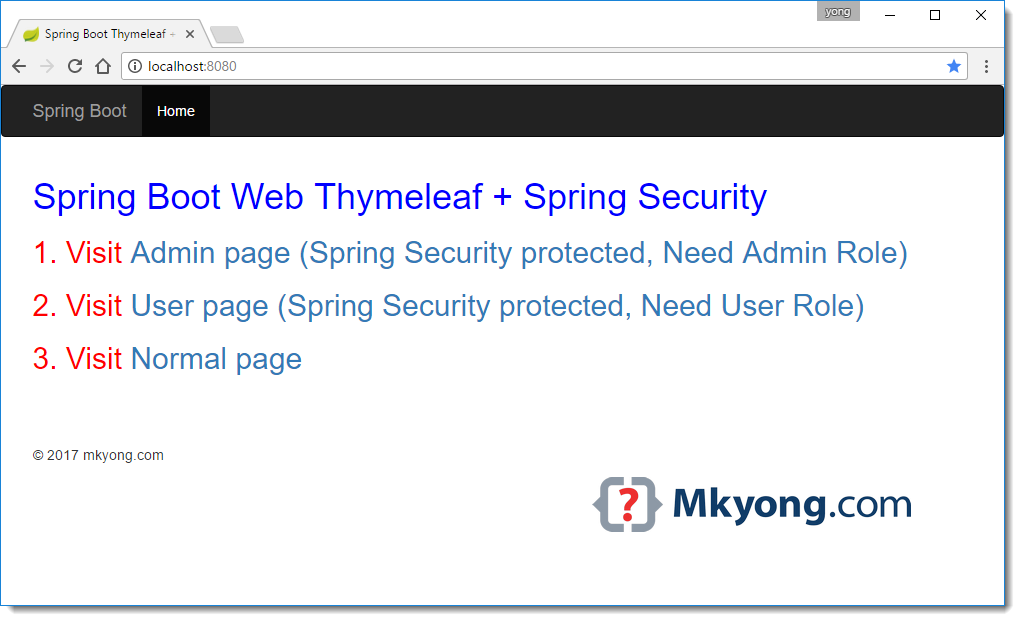
6.2 Access http://localhost:8080
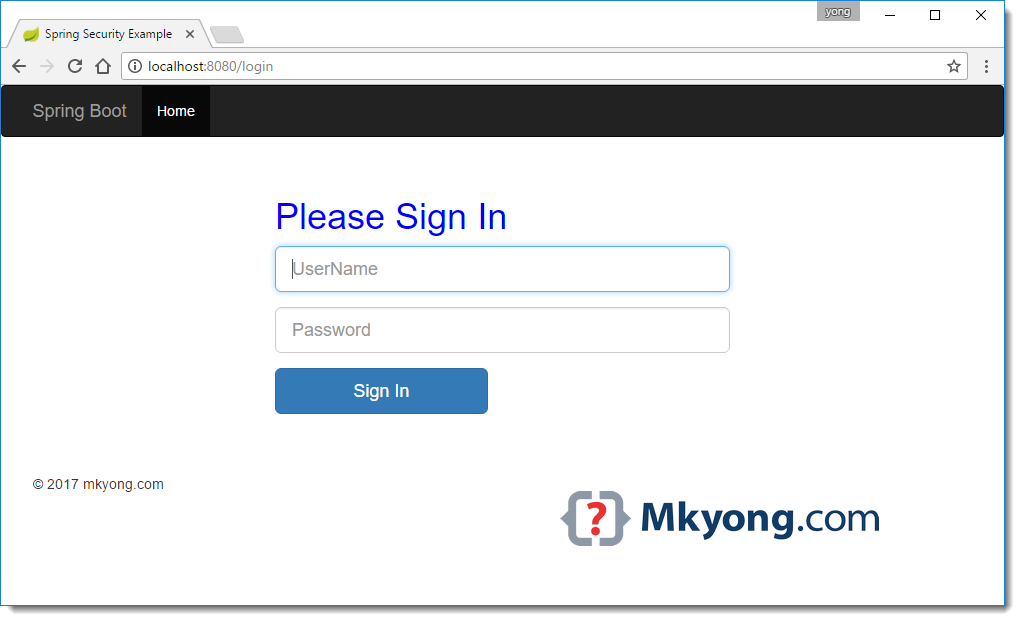
6.3 Access http://localhost:8080/admin, redirect to http://localhost:8080/login
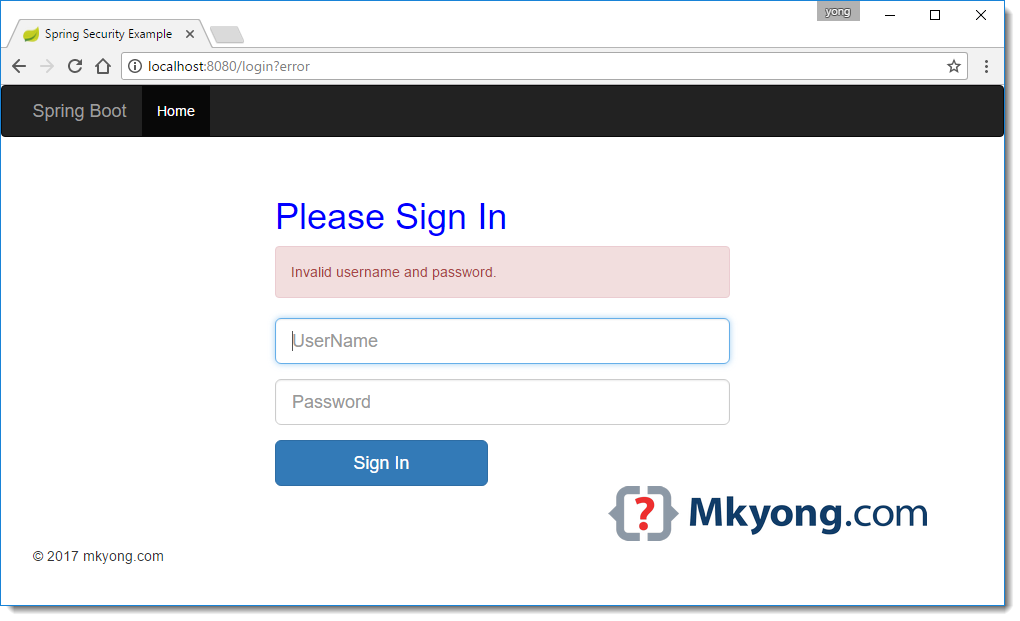
6.4 Invalid username or password http://localhost:8080/login
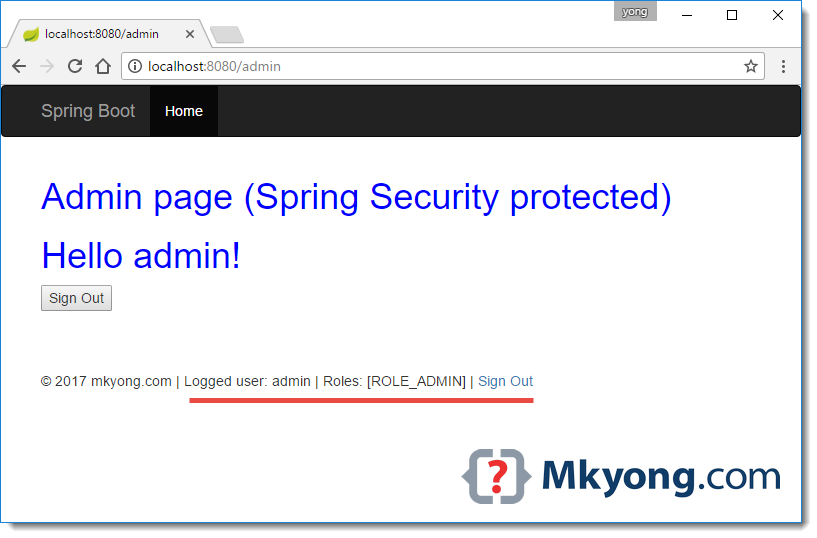
6.5 Login successful, redirect back to admin page http://localhost:8080/admin , review the footer section, the user info is displayed.
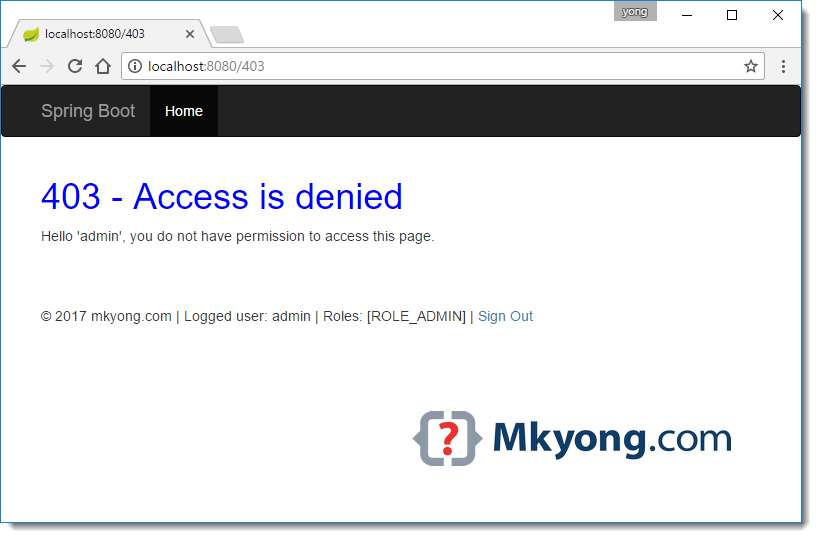
6.6 Access http://localhost:8080/user, redirect to http://localhost:8080/403
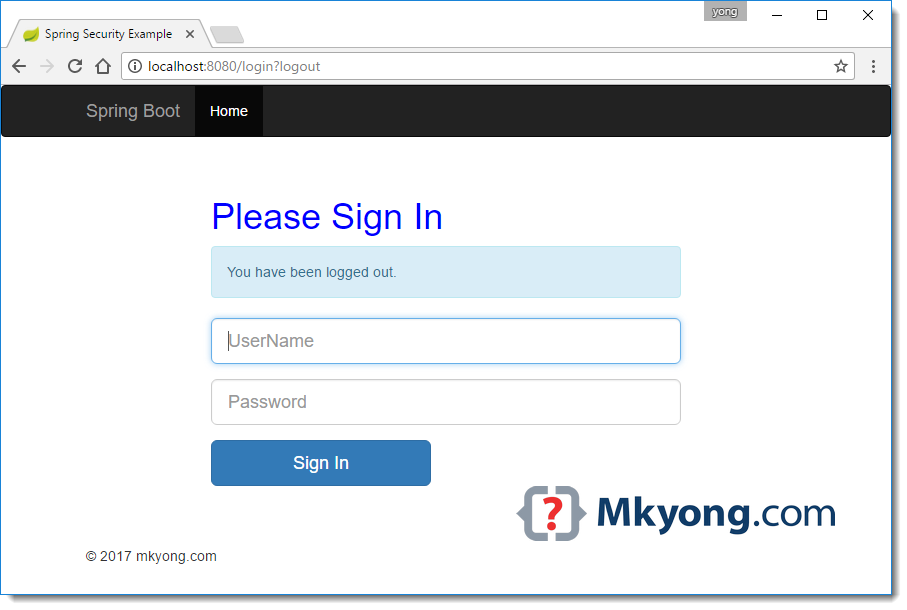
6.7 Clicks on the sign out link in the footer, redirect to http://localhost:8080/login?logout
Done. Try login with another username “user” and access the admin page.
Download Source Code
References
- Securing a Web Application
- Spring Security Reference
- Spring Boot Security features
- Spring Boot Hello World Example – Thymeleaf
- Spring Security Hello World Annotation Example
- Thymeleaf – Spring Security integration basics
- Thymeleaf extra – Spring Security integration basics
- Thymeleaf – Standard URL Syntax
- Spring Boot + Spring MVC + Spring Security + MySQL
- Spring Boot – Static content
- Spring MVC – Inlucde CSS file

Hello Young. a very good tutorial.
I compiled and and ran it, and found a small issue with loading the local /css/main.css file. I used Inspect in chrome browser and found the main.css is not getting loaded, with error message in the console:
“Refused to apply style from ‘http://localhost:8080/login’ because its MIME type (‘text/html’) is not a supported stylesheet MIME type, and strict MIME checking is enabled.”
Do you know why?
thank you. this post is really helped me.
In this project i am getting some issue when I login as admin/user it redirect me to http://localhost:8080/webjars/bootstrap/3.3.7/js/bootstrap.min.js ,which means it show me botstrap internal codeing, when remove all except localhost:8080 it show me actual home page. I code same as you but why am getting this type of issue
This is not working. After I enter username and password of admin, it again redirects me to login page.
Hi!
Why do you switch off @EnableWebSecurity in SpringSecurityConfig class? (in your zipped code)
When switching on, I can’t see styles in all html.
Why?
Good blog really helped me a lot.
what is spring boot?
Could you please explain where are the parameters param.error and param.logout variables come from in this project?
thanks mkyong.
where the variable ${param.error} come from ?
thanks
Great tutorial. Missing JQuery webjar. it is a bootstrap dependency. Still works
hello thank u so much for your tuto it’s so interesting i need your help i wnat know if i can change the content in application.properties with the habitual content(spring.datasource.url=jdbc:mysql://localhost:3306/database
spring.datasource.username=root
spring.datasource.password=
spring.datasource.driver-class-name=com.mysql.jdbc.Driver
spring.datasource.testWhileIdle=true
spring.datasource.validationQuery=SELECT
spring.jpa.hibernate.naming-strategy=org.hibernate.cfg.ImprovedNamingStrategy
spring.jpa.hibernate.ddl-auto=create
spring.jpa.show-sql=true
spring.jpa.properties.hibernate.dialect=org.hibernate.dialect.MySQL5Dialect
Hi, This is really useful.
I faced some issues when I tried this sample with my test application
@Controller
@RequestMapping(“/thyme”)
public class ThymeController {
@GetMapping(“/”)
public String home() {
return “/home”;
}
}
when I added this (“/thyme”) mapping I used to get only Access Denied Error page only.
After I removed it, everything is normal.
Should not I use any other mapping? Can someone give me some explanation on this?
Please add Password Encryption, I faced issue here.
I had to change from this
.withUser(“user”).password(“password”).roles(“USER”)
this
.withUser(“user”).password(“{noop}password”).roles(“USER”)
Thanks!
Hi, I always get access denied error page, I followed your code exactly but could not do anything
thanks for the post, i cant get the thymeleaf sec:authentication=”name” to work , its always blank . i am using spring boot 2.1.2 and spring security 5 with thymeleaf extras.
Add following dependency
groupId org.thymeleaf.extras
artifactId thymeleaf-extras-springsecurity5
i am getting Bad Credentials exception and login does not work with the code that i downloaded from here. Any help?
please check, if “SpringSecurityConfig” class has “@Configuration” annotation
I had the same problem and i was allowed to enter the homepage only using the generated security password, not the one set in the SpringSecurityConfig class (password)
I am authenticating the user using one of the post method in the controller. I am not using inMemoryAuthentication(). So in that case how do I proceed
Hi, nice post, as usual!
Do you have some material about testing Controllers with Thymeleaf and Security?
Hello!
I just followed your tutorial. Everything seems ok, I just a little problem. The static resources (css, js) were not loaded at first, untill I modify the SpringSecurityConfig, added /static and /webjars to be permitted in antMatchers. Now I think it has resolved the issue, but the main.css still not be loaded. When I see the javascript console log, it said that ‘Refused to apply style from ‘http:80801/login’ because it’s MIME type…’.
I’ve googled it but still haven’t found any fit answer.
Thanks.
Did you update to a newer version of the webjars in in your pom? If so, you will need to update the version references in your html files. I had the same problem and that fixed it for me.
Hi. I downloaded your project and import to Eclipse as Existing Maven Project. I build and started successfully but i got below error:
Whitelabel Error Page
This application has no explicit mapping for /error, so you are seeing this as a fallback.
Tue Mar 20 11:51:03 ICT 2018
There was an unexpected error (type=Internal Server Error, status=500).
Error resolving template “/login”, template might not exist or might not be accessible by any of the configured Template Resolvers
Can you please help?
Regards,
Long
I can’t run your example from GitHub, I’m getting this:
Whitelabel Error Page
This application has no explicit mapping for /error, so you are seeing this as a fallback.
Fri Mar 09 16:08:49 CET 2018
There was an unexpected error (type=Internal Server Error, status=500).
Error resolving template “/login”, template might not exist or might not be accessible by any of the configured Template Resolvers
org.thymeleaf.exceptions.TemplateInputException: Error resolving template “/home”, template might not exist or might not be accessible by any of the configured Template Resolvers
,
Check in DefaultController.java and remove the / from the return string
Nice tutorial, thank you for sharing !
In Chrome it did not work even after clearing browser cookies. Tried in Firefox, it worked as expected.
No, It did not work for me..! I tried http://localhost:8080/admin, it redirected me to http://localhost:8080/login page the I entered {admin : password} correctly. It still redirected me back to /home page instead of /admin page. I then tried http://localhost:8080/user, it redirected me to /login page; I explicitly tried to go to http://localhost:8080/admin it redirected me to /login page. Looks like I can’t get past /login page. Logs do not show any error / exception.
It’s same for me
use NoOpPasswordEncoder for inMemoryAuthentication :
auth.inMemoryAuthentication()
.withUser(“user”).password(“{noop}pwd”).roles(“USER”)
.and()
.withUser(“admin”).password(“{noop}pwd”).roles(“ADMIN”);
can u explain the code as well? I mean what is happening in here?
Thank you!! Very useful this example.
Hi All,
when i run using the executable jar i am getting
nested exception is org.thymeleaf.exceptions.TemplateInputException: Error resolving template “/login”, template might not exist or might not be accessible by any of the configured Template Resolvers] with root cause
Please can anyone help me out.
thank you!
thanks bro , from chile
Hi! I used you code and getting error ‘No beans of ‘AccessDeniedHandler’ type found.’ in
@Configuration
public class SecurityConfig extends WebSecurityConfigurerAdapter {
/**
*
*/
@Autowired
private AccessDeniedHandler accessDeniedHandler;
….
}
Add @Component annotation on the MyAccessDeniedHandler.java class
Hi,
I tried this project but getting below error:
Could not transfer artifact org.springframework.boot:spring-boot-starter-parent:pom:1.5.3.RELEASE from/to nexus (http://gec-maven-nexus.walmart.com/nexus/content/groups/public): gec-maven-nexus.walmart.com
Is this because of the parent tag:
org.springframework.boot
spring-boot-starter-parent
1.5.3.RELEASE
Could you please help?
Hi!
Thank you for great tutorial.
I have a question. Why do you set “csrf()” to “disable()”?
Hello Justyna,
I have just tried to look around the blogs related to Spring. In this moment I saw your comment. So let’s see my answer.
csrf().disable(); it’s intercept that spring security to disable csrf token. Normally we need to enable it for prevent CSRF. So when the browser request to web application, our web application will generate the csrf token to the browser for store in the cookie. So when the browser request again something like post our web server will check csrf token match or not!
Hello Justyna,
how do we know the csrf token is a match or not? is it handled by spring automatically? or that thing should be handled manually?
How does the Logout work ? There is no logout mapping ?
If u wanna show logout page, u should config on SpringSecurityConfig:
Example:
.logout().logoutRequestMatcher(new AntPathRequestMatcher(“/logout”)).logoutSuccessUrl(“/”)
Hi. Nice post. I want just to tell you were missing the dependendy for jquery which is mandatory for bootstrap. You should add it in the pom.xml
org.webjars
jquery
3.2.1
Thank you!
how is it getting redirected ?
Hi,
I need configuration which is in spring boot, jwt token security and thymeleaf, mysql with different userwise login success page. this project must run from java cmd by jar, without external tomcat….Please hepl us
I logged in as a USER but I can still browse http://localhost:8080/admin.html, how do I prevent this?
maybe, you should delete super method in configure method of SpringSecurity.class
What credentials for admin and user?
In the code above…
@Autowired
public void configureGlobal(AuthenticationManagerBuilder auth) throws Exception {
auth.inMemoryAuthentication()
.withUser(“user”).password(“password”).roles(“USER”)
.and()
.withUser(“admin”).password(“password”).roles(“ADMIN”);
}
Thank you for putting this together.
When I try to run this code from a command line I get an error:
org.thymeleaf.exceptions.TemplateInputException: Error resolving template “/login”, template might not exist or might not be accessible by any of the configured Template Resolvers
hey check templete folder structure
Add the following code to SpringSecurityConfig.java to be able to load CSS and “webjars/bootstrap/3.3.7/css/bootstrap.min.css” when not authenticate!
@Override
public void configure(WebSecurity web) throws Exception {
web.ignoring().antMatchers(“/webjars/**”);
web.ignoring().antMatchers(“/css/**”,”/fonts/**”,”/libs/**”);
}
Spring Boot added these by default.
Didn’t work for me without this code.
When authenticated load webjars perfectly, but when not authenticated, webjars is missing and breaks the layout.
I have the same problem – but When authenticated AND when not authenticated.
I noticed, in chrome works better but in IE almost perfectly – without blinking of subpage.
Nice blog very useful thanks for sharing this information keep up the good work.
I added your code to my login process, and it works very well. I have one semantic question.
In each of the Thymeleaf templates (about, index, admin … etc) the section has a element, although this works as you designed it, strictly speaking the head is just for meta data, is there another way of pointing to the header-css rather than using div ?