
This article shows how to start a Grizzly HTTP server to run a JAX-RS or Eclipse Jersey application.
Tested with
- Jersey 3.0.2
- Grizzly 3 HTTP server
- Java 8
- Maven
- JUnit 5
Table of contents
- 1. Project Directory
- 2. Jersey dependencies
- 3. Jersey and HK2 dependency injection
- 4. Jersey endpoints
- 5. Start Jersey application
- 6. Demo
- 7. Jersey and unit test
- 8. Download Source Code
- 9. References
Jersey basics
- Many Java-based HTTP servers deploy Jersey applications, for example, JDK HTTP Server, Grizzly, Simple, Jetty and Netty. Read this Jersey and HTTP servers.
- Jersey uses HK2 dependency injection framework.
- Jersey uses Java APIs logging, or JUL, or
java.util.logging.*.
1. Project Directory
A standard Maven project directory.
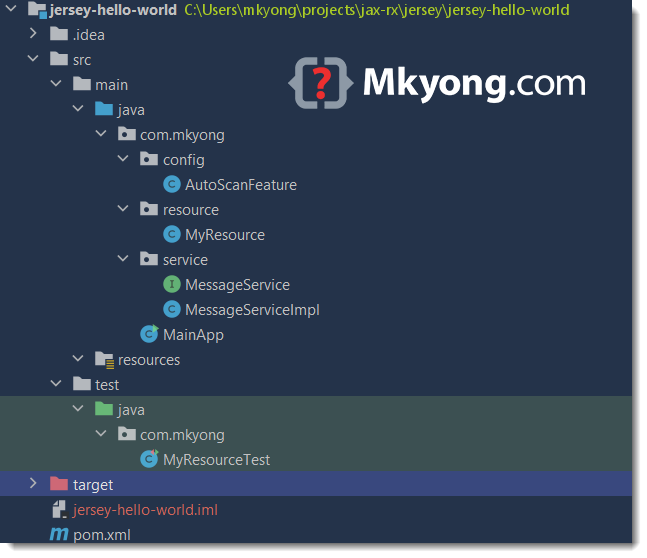
2. Jersey dependencies
The main Jersey dependencies are the jersey-bom and jersey-hk2, others are optional, read the comment for self-explanatory.
<project xmlns="http://maven.apache.org/POM/4.0.0"
    xmlns:xsi="http://www.w3.org/2001/XMLSchema-instance"
    xsi:schemaLocation="http://maven.apache.org/POM/4.0.0
      http://maven.apache.org/maven-v4_0_0.xsd">

    <modelVersion>4.0.0</modelVersion>

    <groupId>com.mkyong</groupId>
    <artifactId>jersey-hello-world</artifactId>
    <packaging>jar</packaging>
    <version>1.0</version>
    <name>jersey-hello-world</name>

    <properties>
        <project.build.sourceEncoding>UTF-8</project.build.sourceEncoding>
        <maven.compiler.source>1.8</maven.compiler.source>
        <maven.compiler.target>1.8</maven.compiler.target>
        <java.version>1.8</java.version>
        <junit.version>5.4.0</junit.version>
        <jsonassert.version>1.5.0</jsonassert.version>
        <jersey.version>3.0.2</jersey.version>
    </properties>

    <dependencyManagement>
        <dependencies>
            <dependency>
                <groupId>org.glassfish.jersey</groupId>
                <artifactId>jersey-bom</artifactId>
                <version>${jersey.version}</version>
                <type>pom</type>
                <scope>import</scope>
            </dependency>
        </dependencies>
    </dependencyManagement>

    <dependencies>

        <!-- Grizzly2 HTTP Server -->
        <dependency>
            <groupId>org.glassfish.jersey.containers</groupId>
            <artifactId>jersey-container-grizzly2-http</artifactId>
        </dependency>

        <!-- Jersey related and HK2 dependency injection -->
        <dependency>
            <groupId>org.glassfish.jersey.inject</groupId>
            <artifactId>jersey-hk2</artifactId>
        </dependency>

        <!-- add jackson for json conversion
        <dependency>
            <groupId>org.glassfish.jersey.media</groupId>
            <artifactId>jersey-media-json-jackson</artifactId>
        </dependency>
        -->

        <!-- generates the META-INF/hk2-locator/default files for auto scan and discovery -->
        <dependency>
            <groupId>org.glassfish.hk2</groupId>
            <artifactId>hk2-metadata-generator</artifactId>
            <version>3.0.2</version>
        </dependency>

        <!-- Need this to hide warning for jakarta.activation.DataSource -->
        <dependency>
            <groupId>jakarta.activation</groupId>
            <artifactId>jakarta.activation-api</artifactId>
            <version>2.0.1</version>
        </dependency>

        <!-- JUnit 5 -->
        <dependency>
            <groupId>org.junit.jupiter</groupId>
            <artifactId>junit-jupiter-params</artifactId>
            <version>${junit.version}</version>
            <scope>test</scope>
        </dependency>

    </dependencies>

    <build>
        <plugins>
            <plugin>
                <groupId>org.apache.maven.plugins</groupId>
                <artifactId>maven-compiler-plugin</artifactId>
                <version>3.8.1</version>
                <configuration>
                    <source>${java.version}</source>
                    <target>${java.version}</target>
                </configuration>
            </plugin>

            <!-- JUnit 5 need at least 2.22.0 to support -->
            <plugin>
                <groupId>org.apache.maven.plugins</groupId>
                <artifactId>maven-surefire-plugin</artifactId>
                <version>3.0.0-M5</version>
            </plugin>

            <!-- create a thin-jar -->
            <plugin>
                <groupId>org.apache.maven.plugins</groupId>
                <artifactId>maven-jar-plugin</artifactId>
                <version>3.2.0</version>
                <configuration>
                    <archive>
                        <manifest>
                            <addClasspath>true</addClasspath>
                            <classpathPrefix>lib/</classpathPrefix>
                            <mainClass>com.mkyong.MainApp</mainClass>
                        </manifest>
                    </archive>
                </configuration>
            </plugin>

            <!-- copy project dependencies -->
            <plugin>
                <groupId>org.apache.maven.plugins</groupId>
                <artifactId>maven-dependency-plugin</artifactId>
                <version>3.1.2</version>
                <executions>
                    <execution>
                        <id>copy-dependencies</id>
                        <phase>package</phase>
                        <goals>
                            <goal>copy-dependencies</goal>
                        </goals>
                        <configuration>
                            <!-- we need runtime dependency only -->
                            <includeScope>runtime</includeScope>
                            <outputDirectory>${project.build.directory}/lib/</outputDirectory>
                        </configuration>
                    </execution>
                </executions>
            </plugin>

        </plugins>
    </build>

</project>
Review the complete Jersey dependencies for a simple Jersey application.
$ mvn dependency:tree

[INFO] Scanning for projects...
[INFO]
[INFO] -------------------< com.mkyong:jersey-hello-world >--------------------
[INFO] Building jersey-hello-world 1.0
[INFO] --------------------------------[ jar ]---------------------------------
[INFO]
[INFO] --- maven-dependency-plugin:3.1.2:tree (default-cli) @ jersey-hello-world ---
[INFO] com.mkyong:jersey-hello-world:jar:1.0
[INFO] +- org.glassfish.jersey.containers:jersey-container-grizzly2-http:jar:3.0.2:compile
[INFO] |  +- jakarta.inject:jakarta.inject-api:jar:2.0.0:compile
[INFO] |  +- org.glassfish.grizzly:grizzly-http-server:jar:3.0.0:compile
[INFO] |  |  \- org.glassfish.grizzly:grizzly-http:jar:3.0.0:compile
[INFO] |  |     \- org.glassfish.grizzly:grizzly-framework:jar:3.0.0:compile
[INFO] |  +- org.glassfish.jersey.core:jersey-common:jar:3.0.2:compile
[INFO] |  |  \- org.glassfish.hk2:osgi-resource-locator:jar:1.0.3:compile
[INFO] |  +- org.glassfish.jersey.core:jersey-server:jar:3.0.2:compile
[INFO] |  |  +- org.glassfish.jersey.core:jersey-client:jar:3.0.2:compile
[INFO] |  |  \- jakarta.validation:jakarta.validation-api:jar:3.0.0:compile
[INFO] |  \- jakarta.ws.rs:jakarta.ws.rs-api:jar:3.0.0:compile
[INFO] +- org.glassfish.jersey.inject:jersey-hk2:jar:3.0.2:compile
[INFO] |  +- org.glassfish.hk2:hk2-locator:jar:3.0.1:compile
[INFO] |  |  \- org.glassfish.hk2.external:aopalliance-repackaged:jar:3.0.1:compile
[INFO] |  \- org.javassist:javassist:jar:3.25.0-GA:compile
[INFO] +- org.glassfish.hk2:hk2-metadata-generator:jar:3.0.2:compile
[INFO] |  +- org.glassfish.hk2:hk2-api:jar:3.0.2:compile
[INFO] |  +- org.glassfish.hk2:hk2-utils:jar:3.0.2:compile
[INFO] |  \- jakarta.annotation:jakarta.annotation-api:jar:2.0.0:compile
[INFO] +- jakarta.activation:jakarta.activation-api:jar:2.0.1:compile
[INFO] \- org.junit.jupiter:junit-jupiter-params:jar:5.4.0:test
[INFO]    +- org.apiguardian:apiguardian-api:jar:1.0.0:test
[INFO]    \- org.junit.jupiter:junit-jupiter-api:jar:5.4.0:test
[INFO]       +- org.opentest4j:opentest4j:jar:1.1.1:test
[INFO]       \- org.junit.platform:junit-platform-commons:jar:1.4.0:test
[INFO] ------------------------------------------------------------------------
[INFO] BUILD SUCCESS
[INFO] ------------------------------------------------------------------------
[INFO] Total time:  1.280 s
[INFO] Finished at: 2021-06-17T16:23:29+08:00
[INFO] ------------------------------------------------------------------------
3. Jersey and HK2 dependency injection
3.1 Jersey uses HK2 as the dependency injection framework. The below are @Contract and @Service components, and later we will inject them into the Jersey application.
package com.mkyong.service;

import org.jvnet.hk2.annotations.Contract;

@Contract
public interface MessageService {
  String getHello();
}
package com.mkyong.service;

import org.jvnet.hk2.annotations.Service;

@Service
public class MessageServiceImpl implements MessageService {

  @Override
  public String getHello() {
      return "Hello World Jersey from HK2";
  }

}
3.2 This Feature enables the auto-scanning components.
package com.mkyong.config;

import jakarta.inject.Inject;
import jakarta.ws.rs.core.Feature;
import jakarta.ws.rs.core.FeatureContext;
import org.glassfish.hk2.api.DynamicConfigurationService;
import org.glassfish.hk2.api.MultiException;
import org.glassfish.hk2.api.Populator;
import org.glassfish.hk2.api.ServiceLocator;
import org.glassfish.hk2.utilities.ClasspathDescriptorFileFinder;
import org.glassfish.hk2.utilities.DuplicatePostProcessor;

import java.io.IOException;
import java.util.logging.Level;
import java.util.logging.Logger;

/* Auto scan the JAX-RS @Contract and @Service  */
public class AutoScanFeature implements Feature {

  @Inject
  ServiceLocator serviceLocator;

  @Override
  public boolean configure(FeatureContext context) {

      DynamicConfigurationService dcs =
              serviceLocator.getService(DynamicConfigurationService.class);
      Populator populator = dcs.getPopulator();
      try {
          // Populator - populate HK2 service locators from inhabitants files
          // ClasspathDescriptorFileFinder - find files from META-INF/hk2-locator/default
          populator.populate(
                  new ClasspathDescriptorFileFinder(this.getClass().getClassLoader()),
                  new DuplicatePostProcessor());

      } catch (IOException | MultiException ex) {
          Logger.getLogger(AutoScanFeature.class.getName()).log(Level.SEVERE, null, ex);
      }
      return true;
  }
}
Note
More Jersey and HK2 examples.
4. Jersey endpoints
The below is a Jersey application that exposed a few endpoints to produce different output in text format.
package com.mkyong.resource;

import com.mkyong.service.MessageService;
import jakarta.inject.Inject;
import jakarta.ws.rs.GET;
import jakarta.ws.rs.Path;
import jakarta.ws.rs.PathParam;
import jakarta.ws.rs.Produces;
import jakarta.ws.rs.core.MediaType;

@Path("/hello")
public class MyResource {

  // DI via HK2
  @Inject
  private MessageService messageService;

  // output text
  @GET
  @Produces(MediaType.TEXT_PLAIN)
  public String hello() {
      return "Jersey hello world example.";
  }

  // output text with argument
  @Path("/{name}")
  @GET
  @Produces(MediaType.TEXT_PLAIN)
  public String hello(@PathParam("name") String name) {
      return "Jersey: hello " + name;
  }

  // for dependency injection
  @Path("/hk2")
  @GET
  @Produces(MediaType.TEXT_PLAIN)
  public String helloHK2() {
      return messageService.getHello();
  }

}
5. Start Jersey application
There is no magic here; we need to manually configure the HTTP server and start and end the HTTP Server and the Jersey application. Read the code comments for self-explanatory.
package com.mkyong;

import com.mkyong.config.AutoScanFeature;
import com.mkyong.resource.MyResource;
import org.glassfish.grizzly.http.server.HttpServer;
import org.glassfish.jersey.grizzly2.httpserver.GrizzlyHttpServerFactory;
import org.glassfish.jersey.server.ResourceConfig;

import java.net.URI;
import java.util.logging.Level;
import java.util.logging.Logger;

public class MainApp {

  private static final Logger LOGGER = Logger.getLogger(MainApp.class.getName());

  // we start at port 8080
  public static final String BASE_URI = "http://localhost:8080/";

  // Starts Grizzly HTTP server
  public static HttpServer startServer() {

      // scan packages
      final ResourceConfig config = new ResourceConfig();
      // config.packages(true, "com.mkyong");
      config.register(MyResource.class);

      // enable auto scan @Contract and @Service
      config.register(AutoScanFeature.class);

      LOGGER.info("Starting Server........");

      final HttpServer httpServer =
              GrizzlyHttpServerFactory.createHttpServer(URI.create(BASE_URI), config);

      return httpServer;

  }

  public static void main(String[] args) {

      try {

          final HttpServer httpServer = startServer();

          // add jvm shutdown hook
          Runtime.getRuntime().addShutdownHook(new Thread(() -> {
              try {
                  System.out.println("Shutting down the application...");

                  httpServer.shutdownNow();

                  System.out.println("Done, exit.");
              } catch (Exception e) {
                  Logger.getLogger(MainApp.class.getName()).log(Level.SEVERE, null, e);
              }
          }));

          System.out.println(String.format("Application started.%nStop the application using CTRL+C"));

          // block and wait shut down signal, like CTRL+C
          Thread.currentThread().join();

      } catch (InterruptedException ex) {
          Logger.getLogger(MainApp.class.getName()).log(Level.SEVERE, null, ex);
      }

  }
}
6. Demo
6.1 Start the MainApp directly, or pack it into a single jar and run it.
$ cd {project}

$ mvn package

$ java -jar target/jersey-hello-world-1.0.jar

Jun 17, 2021 3:34:56 PM com.mkyong.MainApp startServer
INFO: Starting Server........
Jun 17, 2021 3:34:57 PM org.glassfish.jersey.server.wadl.WadlFeature configure
WARNING: JAX-B API not found . WADL feature is disabled.
Jun 17, 2021 3:34:57 PM org.glassfish.grizzly.http.server.NetworkListener start
INFO: Started listener bound to [localhost:8080]
Jun 17, 2021 3:34:57 PM org.glassfish.grizzly.http.server.HttpServer start
INFO: [HttpServer] Started.
Application started.
Stop the application using CTRL+C
6.2 We can use a simple cURL to test the Jersey endpoints.
$ curl http://localhost:8080/hello
Jersey hello world example.

$ curl http://localhost:8080/hello/mkyong
Jersey: hello mkyong

$ curl http://localhost:8080/hello/hk2
Hello World Jersey from HK2

$ curl -v http://localhost:8080/hello/hk2
*   Trying ::1...
* TCP_NODELAY set
*   Trying 127.0.0.1...
* TCP_NODELAY set
* Connected to localhost (127.0.0.1) port 8080 (#0)
> GET /hello/hk2 HTTP/1.1
> Host: localhost:8080
> User-Agent: curl/7.55.1
> Accept: */*
>
< HTTP/1.1 200 OK
< Content-Type: text/plain
< Content-Length: 27
<
Hello World Jersey from HK2
7. Jersey and unit test
A JAX-RS standard Client and WebTarget class to test the Jersey endpoints.
package com.mkyong;

import jakarta.ws.rs.client.Client;
import jakarta.ws.rs.client.ClientBuilder;
import jakarta.ws.rs.client.WebTarget;

import org.glassfish.grizzly.http.server.HttpServer;
import org.junit.jupiter.api.AfterAll;
import org.junit.jupiter.api.BeforeAll;
import org.junit.jupiter.api.Test;

import static org.junit.jupiter.api.Assertions.assertEquals;

public class MyResourceTest {

  private static HttpServer httpServer;
  private static WebTarget target;

  @BeforeAll
  public static void beforeAllTests() {
      httpServer = MainApp.startServer();
      Client c = ClientBuilder.newClient();
      target = c.target(MainApp.BASE_URI);
  }

  @AfterAll
  public static void afterAllTests() {
      httpServer.stop();
  }

  @Test
  public void testHello() {
      String response = target.path("hello").request().get(String.class);
      assertEquals("Jersey hello world example.", response);
  }

  @Test
  public void testHelloName() {
      String response = target.path("hello/mkyong").request().get(String.class);
      assertEquals("Jersey: hello mkyong", response);
  }

  @Test
  public void testHelloHK2() {
      String response = target.path("hello/hk2").request().get(String.class);
      assertEquals("Hello World Jersey from HK2", response);
  }

}
8. Download Source Code
$ git clone https://github.com/mkyong/jax-rs
$ cd jax-rs/jersey/jersey-hello-world
$ mvn package
$ java -jar target/jersey-hello-world-1.0.jar

Hi Mkyong, is it possible to import library files into tomcat
Tried the code. Able to download. Added as a existing maven project. Created .war file from eclipse. Deployed on apache tomcat 9. Restart the server. by using
URL : http://localhost:8080/RESTfulExample/rest/hello/mkyong
I am able to print sysout on server.
Thanks. It worked for me.
how to config – open index.html ????? i’m break my head
Mkyong you save me again! Thank you!
Does not work !
How does this tutorial, not work with maven… please update it, so many people seem to have the same issue.
Many thanks for this clear demonstration
In the pom.xml file add the dependencies if you are using Java 11.
(https://stackoverflow.com/questions/43574426/how-to-resolve-java-lang-noclassdeffounderror-javax-xml-bind-jaxbexception-in-j)
javax.xml.bind
jaxb-api
2.2.11
com.sun.xml.bind
jaxb-core
2.2.11
com.sun.xml.bind
jaxb-impl
2.2.11
javax.activation
activation
1.1.1
for a complete example using Java 11, Jersey and VueJs for frontend checkout https://github.com/mrin9/Angular-SpringBoot-REST-JWT
Having issues with running the application on the Tomcat Server in IntelliJ. The exploded war is successfully created. Also, it gets successfully deployed on the server. But, no subset of the url seems to work (404 error for all). Any ideas?
IF you are using TOmcat 8.5 and Jersey 1.19 then you need to add the below 2 dependecies:
com.sun.jersey
jersey-server
1.19
com.sun.jersey
jersey-servlet
1.19
To run the demo, do as following steps: 1. Get a servlet container. I use eclipse jetty to do this, and of course tomcat is fine too. 2. cd into base dir of this example and run “mvn clean install”. If you are luck enough, you will get a file named as “RESTfulExample.war” in the target folder. 3. move this file into jetty_home/webapps, and start jetty using command ” java -jar start.jar”. 4 Now, you can access the url refered in author’s blog.
hi Mkyong, I am trying above sample in my weblogic server….i am facing some issue. Is there i need to add any new jars related to weblogic server.
Not work
Changing http://localhost:8080/RESTfulExample/rest/hello/mkyong to
http://localhost:8080/rest/hello/mkyong
made it work for me!
Thanks so much mkyong
If you download his project folder and try to run his, make sure that you spec’s match his, especially the jdk, Jersey and Tomcat version.
CORRECTION:
http://localhost:8080/RESTfulExample/rest/hello/mkyong
(returns a 404 for me)
SHOULD BE
http://localhost:8080/rest/hello/mkyong
(works fine)
This is what got mine to work.
Thanks so much mkyong!
Hi mkyong I had my XML which was generated using SOAP UI, where I am having some global parameters set. I am trying to execute that XML from maven using continuous integration process I am getting the following error GET – Request_GetAllUsers FailedSubmitException: com.eviware.soapui.model.iface.Request$SubmitException: com.eviware.soapui.impl.wsdl.submit.RequestTransportRegistry$MissingTransportException: Missing protocol in endpoint [${Endpoint}]
Can you help me to over come this
Hi mkyong,
I am getting the following exception. I am completely blocked can you please help me here.
com.sun.jersey.api.container.ContainerException: No WebApplication provider is present
com.sun.jersey.spi.container.WebApplicationFactory.createWebApplication(WebApplicationFactory.java:69)
com.sun.jersey.spi.container.servlet.ServletContainer.create(ServletContainer.java:412)
com.sun.jersey.spi.container.servlet.ServletContainer$InternalWebComponent.create(ServletContainer.java:327)
awesome ! thank you so much
When I am trying to run the same example. I am getting 404 error on server.
works for me, thanks
And I forgot to configure my server 🙁 Done it now and the example is working perfectly 🙂 … Big-ups to Mkyong
Hi, MK, Thanks for delivering such great work. I have been benefiting from your tutorials for a while now. I am currently trying to get this one to work and be able to understand thoroughly. If I may ask, where do we configure the port number? ‘8080’ in your example?
By default your server will be configured with 8080 port.
its a cool one..
Why are you all using this com.sun packages?? they are likely to be removed from api!!
For those of you having trouble:
1. Make sure you are not mixing jersey 1 with jersey 2.
2. The maven dependency for jersey 1 used in this tutorial INCLUDES
javax.ws.rs, so if you have this dependency below in your pom.xml,
you are in for trouble due to library collisions.
javax.ws.rs
javax.ws.rs-api
The error you get won’t be indicative that this is the problem.
More on stack overflow:
http://stackoverflow.com/questions/23277429/exception-in-rest-jersey
This was all I needed to get started in the right direction. Thanks!
This example to uses qith JBoss 6 I need to change the web.xml
jersey-serlvet
com.sun.jersey.spi.container.servlet.ServletContainer
com.sun.jersey.config.property.packages
mx.com.sia.tutorial.rest
1
jersey-serlvet
/*
resteasy.scan
false
resteasy.scan.providers
false
resteasy.scan.resources
false
Saludos!!!!
Good jersey tutorial
http://www.javaproficiency.com/2015/03/jersey-tutorial-for-beginners.html
Hi Sir, This is nagarjuna working for MNC, i have copied this project into my eclipse and converted into maven .
it is not working, am referring to different url. can you provide settings .xml for this project
I am getting this error when I try to run, HTTP Status 500 – Servlet.init() for servlet jersey-serlvet threw exception
The ResourceConfig instance does not contain any root resource classes.
Anyone can help me here to sort out the issue??.
very helpfull, thank you.
No provider classes found.
GRAVE: Servlet [jersey-serlvet] in web application [/restSample] threw load() exception
java.lang.ClassNotFoundException: com.sun.jersey.spi.container.servlet.ServletContainer
at org.apache.catalina.loader.WebappClassLoader.loadClass(WebappClassLoader.java:1720)
at org.apache.catalina.loader.WebappClassLoader.loadClass(WebappClassLoader.java:1571)
at org.apache.catalina.core.DefaultInstanceManager.loadClass(DefaultInstanceManager.java:506)
at org.apache.catalina.core.DefaultInstanceManager.loadClassMaybePrivileged(DefaultInstanceManager.java:488)
at org.apache.catalina.core.DefaultInstanceManager.newInstance(DefaultInstanceManager.java:115)
at org.apache.catalina.core.StandardWrapper.loadServlet(StandardWrapper.java:1148)
at org.apache.catalina.core.StandardWrapper.load(StandardWrapper.java:1087)
at org.apache.catalina.core.StandardContext.loadOnStartup(StandardContext.java:5266)
at org.apache.catalina.core.StandardContext.startInternal(StandardContext.java:5554)
at org.apache.catalina.util.LifecycleBase.start(LifecycleBase.java:150)
at org.apache.catalina.core.ContainerBase$StartChild.call(ContainerBase.java:1575)
at org.apache.catalina.core.ContainerBase$StartChild.call(ContainerBase.java:1565)
at java.util.concurrent.FutureTask.run(FutureTask.java:266)
at java.util.concurrent.ThreadPoolExecutor.runWorker(ThreadPoolExecutor.java:1142)
at java.util.concurrent.ThreadPoolExecutor$Worker.run(ThreadPoolExecutor.java:617)
at java.lang.Thread.run(Thread.java:745)
as usual an incomplete broken sample!
Not true
Hi, i am getting the below deployment exception when i deployed in websphere 8.0, but it works well in tomcat server. Could you please let me know what was the issue?
java.lang.NoSuchMethodError: javax/ws/rs/core/Application.getProperties()Ljava/util/Map;
at org.glassfish.jersey.server.ApplicationHandler.(
java.lang.NoSuchMethodError: javax/ws/rs/core/Application.getProperties()Ljava/util/Map;
at org.glassfish.jersey.server.ApplicationHandler.(
ApplicationHandler.java:287)
Hi everyone,
i just created this example in my machine, and when i tried to access it via the example URL mentioned below, i am getting Bad request 400 error in all the browsers.
http://localhost:8080/RESTfulExample/rest/hello/Raj
Did anyone faced this issue? If so, any help would be great.
Find below the request from browser:
Remote Address: [::1]:8080
Request URL: http://localhost:8080/RESTfulExample/rest/hello/Rajkumar
Request Method: GET
Status Code: 400 Bad Request
Thanks in advance…
Is it jersey-servlet or jersey-servlvet
Thanks!
Thank you! 🙂 This works.
this service runs perfectly on local server(localhost:8080).. but hen deployed on actual webserver(xyz.com) shows error
The requested URL “rest/hello/mkyong” was not found on this server.
Please help me out
Followed up the deployment process but still getting same error
Thanks Mkyong! unblocked me bigtime…
Dear Friends,Spring Boot vs Spring Web Services vs Jersey web services Which one is better to develop Web Services to develop application
Check on
1)Performance wise
2)Configuration wise
3)Writing Coding wise
Troubleshooting class not found:
you should have appropriate servlet container, param
For Jersey 1.x, example:
com.sun.jersey.spi.container.servlet.ServletContainer
com.sun.jersey.config.property.packages
sample.hello.resources
1
For Jersey 2.x, example:
org.glassfish.jersey.servlet.ServletContainer
and jersey.config.server.provider.packages
Troubleshooting 404 error:
-Make sure your jars are in webapp/lib
why if you are using maven???
Very good example; downloading and unzipping the attachment, then importing the resultant Eclipse project worked for me. Then I just added it to the Tomcat project in Eclipse and I was on my way. 🙂
Help me to create restful webservice with database in netbeans
This example is not working and doesn’t help on how all the defined software usage. May be this can be better enhanced
java.lang.ClassNotFoundException:com.sun.jersey.spi.container.servlet.ServletContainer
fix: add more dependencies
jersey-server, jersey-core, jersey-servlet, all 1.17.1 and it should work. Have fun.
add jersey-servlet-1.xx.jar
Hi
I take this code and run it, but without success.
The browser open with blank page. and if I look at the “edit component” I see “atatus: 404 not found”.
I use Intellij, I need to change something in the code?
Thank you
Good introduction to get started, and mess around. It takes a bit of messing around to get it working, but you should have basic j2ee / maven / eclipse experience before starting to use REST
Hi
I take this code and run it, but without success.
The browser open with blank page. and if I look at the “edit component” I see “atatus: 404 not found”.
I use Intellij, I need to change something in the code?
Thank you
In the context of a local test environment, it is not that easy to work out what exactly is wrong.
More than likely it is a configuration error.
Is the rest class on the build path?
Is it in the correct package? check: com.sun.jersey.config.property.packages param in web.xml
Have you initiated the request correctly from the browser?
Might be easier to build the project from a new intellij web project, maybe keep maven out while you try to get it working
Thanks Mkyong. Your blogs are very helpful.
This is very useful site for freshers.
thanks for a simple example to get me started.
Hi Mkyong,
Tried this example in RAD (with WebSphere App Server), when I try to access the url “*/rest/json/metallic/get”, I get “Error 404: Not Found”, below are the logs when the application is starting,
Scanning for root resource and provider classes in the packages:
org.kary.core
[7/17/13 14:19:07:226 SGT] 00000017 ScanningResou I Root resource classes found:
class org.kary.core.JSONService
[7/17/13 14:19:07:230 SGT] 00000017 ScanningResou I No provider classes found.
[7/17/13 14:19:07:347 SGT] 00000017 WebApplicatio I Initiating Jersey application, version ‘Jersey: 1.8 06/24/2011 12:17 PM’
Hi MKYONG & Other friends of this site:
I am using JDK 1.5. I have to use this version of JDK. Can you tell me from where to download JDK 1.5 compatible version of JERSEY?
Hi MK,
It was my wife,who heard about ur site from her office-java lecturer and initially (like every husband) I ignored her praise for ur site (u? 😉
But for the last 1 month I’m referring your site for setting intrvw qustns as well as giving intervws to top MNCs in d world..
I must say MK, u rock like MJ (Thriller!)
😉
Ayan
I just wanted to say that I find your website to be very helpful.
I have come to your site many times for help with various maven issues.
Thank you for doing this.
Cheers,
David
Hi mkyoung,
I want to expose restfull services which exist in more than one package. Please suggest the required web.xml configuration for it.
Hi, I am not able to figure out how to deploy this app. When I try mvn clean deploy I get the error: [ERROR] Failed to execute goal org.apache.maven.plugins:maven-deploy-plugin:2.5:deploy (default-deploy) on project parserclient: Deployment failed: repository element was not specified in the POM inside distributionManagement element or in -DaltDeploymentRepository=id::layout::url parameter -> [Help 1]
Will appreciate any hints on how to fix this one.
Thanks,
Pawan
you can deploy it on tomcat using command line type “mvn tomcat:run”
Note: if some service already run on port 8080 then first kill that process first.
Hi mkyong,
I see that your last reply is very old but I want to try ask you something abount Jersey implementation. First of all: thanks for this example.I succeded doing it,it’s work except when large string is passed as parameter.Is it possible to specify in a simple project like this some property like maxReceivedMessageSize? Whitout any specification server return 404 bad request. Can you (or anyone)help me , please?
Nice one… Thanks for this sample
command must be run in project’s path. Users might be type this command like
in user path.
and thanks so much for the example.
It works! Brilliant, as usual…
Thanks,
Luis
Read through the “How to use mkyong tutorial”, I am a newbe. I am getting the error when I run the above application with the url “http://localhost:8080/RESTfulExample/rest/hello/mkyong”, Manifest error. A more verbose content of that error follows; Any heads up appreciated.
——–
I have exactly same issue. Any suggestion on this?
Solve this issue: by adding @Produces
package com.mkyong.rest; import javax.ws.rs.GET; import javax.ws.rs.Path; import javax.ws.rs.PathParam; import javax.ws.rs.Produces; import javax.ws.rs.core.MediaType; import javax.ws.rs.core.Response; @Path("/hello") public class HelloWorldService { @GET @Path("/{param}") @Produces(MediaType.TEXT_PLAIN) public Response getMsg(@PathParam("param") String msg) { String output = "Jersey say : " + msg; return Response.status(200).entity(output).build(); } }adding @Produces worked for me too.
Added @Produces, working fine. Thanks.
its working by adding @Produces
I’m sorry, but this example is absolutely useless.
I mean, yes you could probably copy all the sources in files and get it wo work. But to me the point of a helloworld-example is getting useres to understand what they are doing and not just what cody to copy in what files (a bit of a ‘teach a man to fish’-thing). From this perspective this introduction really lacks some fundamental explaining of the used components (e.g.: why do i need the ‘web.xml’-file? what do the parameters in ‘pom.xml’ mean? what could be wrong if I’m still getting a 404?)
I still appreciate that you want to give something back to the community. Only when you do that, do it right.
code* (not cody)
Doesn’t work man, 404 error. Any hint?
I had this problem as well and it was related to how to deploy this app to your tomcat server.
My problem was fixed by adding a lib folder to the WEB-INF directory.
Then I copied three jar files into the lib folder:
asm-3.1
jersey-core-1.8
jersey-server-1.8
I got these jars from my local .m2 folder after I used maven to bring them down for Jersey.
I’m assuming that you can use google to find them directly, download them, then place them in this folder.
Remember this ‘lib’ folder is in the {tomcat-home}/webapps/your-app-folder/web-inf folder.
Another thing that mite seem obvious except for new Tomcat users is that you also have to include a classes folder that contains your class files. This folder is located at
tomcat-home}/webapps/your-app-folder/web-inf/classes.
After I added these this demo worked fine.
One way to really know that you’re on the right track is that after you start Tomcat you should see messages in the console indicating that the Jersey application is being initiated.
Thurman
Worthless example .It didn’t work..If you are reading that tutorial ..it seems good and simple but if you are just implementing this example ..it failed .Worthless .
I recommand to put the example on the site until it is in running stage .
Hi Mkyong
I am a great fan of you. Your examples are too good. I use lot of your examples while teaching JSF, Struts, Jax-ws, Jax-rs and all other technologies. You are a great help. Thank you for your service
……. Ramana
Thanks MKYONG………
Highly appreciate your this effort …
very useful for beginners like us……
go ahead…good luck…!!!
4.0.0
com.foo.fcm
server
war
1.0-SNAPSHOT
server Maven Webapp
http://maven.apache.org
junit
junit
3.8.1
test
com.sun.jersey
jersey-server
1.8
maven2-repository.java.net
Java.net Repository for Maven
http://download.java.net/maven/2/
default
server
[INFO] ————————————————————————
[ERROR] BUILD ERROR
[INFO] ————————————————————————
[INFO] Error building POM (may not be this project’s POM).
Project ID: null:jersey-server:bundle:null
Reason: Cannot find parent: com.sun.jersey:jersey-project for project: null:jersey-server:bundle:null for project null:jersey-server:bundle:null
Thanks,
I have gone through couple of Jersey tutorials,
but I have to admit that this is the best one.
Thanks again Mr. Yong
Thanks…
Does the above example can be deployed on JBoss server and works?
I have created JAXRS webservices using HTTPDispatcherServlet. what is the diff between ServletContainer & HTTPDispatcherServlet? JAX RS webservices servlet entry in web.xml vary based on application server?
why I run into ‘WARNING: EXCEPTION
java.lang.ClassNotFoundException: com.sun.jersey.spi.container.servlet.ServletContainer’ error in eclipse even though I added all jersey ans jaxb related jars under war/WEB-INF/lib and Project Properties / Libraries?
why I run into ‘WARNING: EXCEPTION
java.lang.ClassNotFoundException: com.sun.jersey.spi.container.servlet.ServletContainer’ error in eclipse even though I added all jersey and jaxb related jars under GAE war/WEB-INF/lib and Project Properties / Libraries?
if you use jersey1.13 version,you should add dependency
com.sun.jersey
jersey-bundle
1.13
in pom.xml?Or add jersey-bundle-1.13.jar in the/WEB-INF/lib
Hello Mr.Yong,
In recent days, I happen to get perfect answers from your site for most of my Google searches. This is just one of them! So I want to thank you for everything.
Thank you so much for providing such a great help.
Regards,
Ram.
Welcome, good to know it help 🙂 keep in touch.
hello and thanks for your articles.
a question: when I search for Jersey-Server in Maven Central Repo I get the latest version number of 1.3
http://search.maven.org/#search|ga|1|a%3A%22jersey-server%22
but in your example you are using 1.8? I am confused, could you please explain this a little bit.
Thanks.
Please let me know the procedure to test this.
I’m getting HTTP Status 404 – error
Great Work!!! and Thanks from heart
THANK YOU SO MUCH!!! First step-by-step to get this done in less than 5 minutes!!! Thanks… I tried a different site but it seems that the repository was missing. Thanks
Can you provide us a valuable example for creating a RESTFUL web service using Eclipse and Tomcat. I dont want to use third party tool like jersey that needs license as I dont want to pay annual fees.
Thank you so much, you made my day!
I could apply this for an endpoint in Mule-ESB (2.28). However I had a small problem, I got a class not found exception for “import com.sun.jersey.spi.service.ComponentProvider”.
However, in the pom, I changed the dependency to the following:
com.sun.jersey.contribs
jersey-simple-server
1.12
and it works nicely. Cheers mate
i have compiled and successfully installed the project but when i try to run it using mvn tomcat:run it doesn’t open any server and just ends .
Hi,
How can I use ant to build Jax-rs. Is it a simple war file or is there some wsgen tasks that I have to run as with Jax-ws. Please could you provide me with a sample as I do not want to start using Maven just now.
Thanks
I’m not sure what we could do without you. your tutorials are just perfect. I have never seen anyone on the web who has written such a good and perfect tutorial.
keep up the good work.
Took a while to get this to work. I noticed along the way that the latest Jersey release does not work like this, the servlet moved. Another great tutorial though, thank you.
Hello and thank you for this tutorial. I haven’t started it yet, because I’m not sure if Maven is required and I don’t want to learn it now. So, will I be able to complete this tutorial without using Maven? All I want is to create a web service (rest + json).
Waiting for your reply. Thank you in advance.
In this tutorial, Maven is nothing but a build tool, you can get all the dependencies manually and build it manually or via Ant.
Thanks Mr. Yong,
For your valuable WS-RS tutorials.I had been hunting such a nice WS-RS example since a long time.So thanks a lot.
your comment is motivated 🙂
Just so you know, your site is blocking it’s own images ‘Hotlinking detected’
Hi, could you explains it in detail? How to simulate it?
Hi mkyong,
I see that last reply is very old but I want to try ask you something abount Jersey implementation. Is it possible to specify in a simple project like this some property like maxReceivedMessageSize? I realized a simple project but with large data passed in input , server return 404 bad request. Can you help me , please?
Hi mkyong,
If param is a string too long I receive a server exception. For example if I read a String from a file and send it with the service and file is too big…