In Spring MVC, use <form:textarea /> to render a HTML textarea field. For example,
<form:textarea path="address" rows="5" cols="30" />
It will render the following HTML code
<textarea id="address" name="address" rows="5" cols="30"></textarea>
In this tutorial, we show you how to use Spring’s form tag “textarea” to render a HTML textarea to store the “address“. Additionally, add a validator to make sure the texarea is not empty while submitting the form.
1. Controller
A SimpleFormController to handle the form value.
File : TextAreaController.java
package com.mkyong.customer.controller;

import javax.servlet.http.HttpServletRequest;
import javax.servlet.http.HttpServletResponse;

import org.springframework.validation.BindException;
import org.springframework.web.servlet.ModelAndView;
import org.springframework.web.servlet.mvc.SimpleFormController;
import com.mkyong.customer.model.Customer;

public class TextAreaController extends SimpleFormController{

	public TextAreaController(){
		setCommandClass(Customer.class);
		setCommandName("customerForm");
	}

	@Override
	protected ModelAndView onSubmit(HttpServletRequest request,
		HttpServletResponse response, Object command, BindException errors)
		throws Exception {

		Customer customer = (Customer)command;
		return new ModelAndView("CustomerSuccess","customer",customer);

	}

}
2. Model
A Customer object to store the textarea value.
File : Customer.java
package com.mkyong.customer.model;

public class Customer{

	String address;
	//getter and setter methods for address
}
3. Form Validator
Create a form validator class and use the ValidationUtils class to make sure the “address” is not empty, Otherwise, get the “required.address” message from the corresponds resource bundle (properties file).
File : CustomerValidator.java
package com.mkyong.customer.validator;

import org.springframework.validation.Errors;
import org.springframework.validation.ValidationUtils;
import org.springframework.validation.Validator;

import com.mkyong.customer.model.Customer;

public class CustomerValidator implements Validator{

	@Override
	public boolean supports(Class clazz) {
		//just validate the Customer instances
		return Customer.class.isAssignableFrom(clazz);
	}

	@Override
	public void validate(Object target, Errors errors) {

		ValidationUtils.rejectIfEmptyOrWhitespace(errors, "address",
		     "required.address", "Field name is required.");

	}
}
File : message.properties
required.address = Address is required!
4. View
A JSP page to use the Spring’s form tag “textarea” to render a HTML textarea, and put some CSS styles to highlight the error message.
File : CustomerForm.jsp
<%@ taglib prefix="form" uri="http://www.springframework.org/tags/form"%>
<html>
<head>
<style>
.error {
	color: #ff0000;
}

.errorblock {
	color: #000;
	background-color: #ffEEEE;
	border: 3px solid #ff0000;
	padding: 8px;
	margin: 16px;
}
</style>
</head>

<body>
	<h2>Spring's form textarea example</h2>

	<form:form method="POST" commandName="customerForm">
		<form:errors path="*" cssClass="errorblock" element="div" />
		<table>
			<tr>
				<td>Address :</td>
				<td><form:textarea path="address" rows="5" cols="30" /></td>
				<td><form:errors path="address" cssClass="error" /></td>
			</tr>
			<tr>
				<td colspan="3"><input type="submit" /></td>
			</tr>
		</table>
	</form:form>

</body>
</html>
If the form is submitted, render the successful page and display the submitted textarea value.
File : CustomerSuccess.jsp
<html>
<body>
	<h2>Spring's form textarea example</h2>

	Address : ${customer.address}

</body>
</html>
5. Spring Bean Configuration
Link it all ~
<beans xmlns="http://www.springframework.org/schema/beans"
	xmlns:xsi="http://www.w3.org/2001/XMLSchema-instance"
	xsi:schemaLocation="http://www.springframework.org/schema/beans
	http://www.springframework.org/schema/beans/spring-beans-2.5.xsd">

  <bean
  class="org.springframework.web.servlet.mvc.support.ControllerClassNameHandlerMapping" />

	<bean class="com.mkyong.customer.controller.TextAreaController">
		<property name="formView" value="CustomerForm" />
		<property name="successView" value="CustomerSuccess" />

		<!-- Map a validator -->
		<property name="validator">
			<bean class="com.mkyong.customer.validator.CustomerValidator" />
		</property>
	</bean>

	<!-- Register the Customer.properties -->
	<bean id="messageSource"
		class="org.springframework.context.support.ResourceBundleMessageSource">
		<property name="basename" value="message" />
	</bean>

	<bean id="viewResolver"
		class="org.springframework.web.servlet.view.InternalResourceViewResolver">
		<property name="prefix">
			<value>/WEB-INF/pages/</value>
		</property>
		<property name="suffix">
			<value>.jsp</value>
		</property>
	</bean>

</beans>
6. Demo
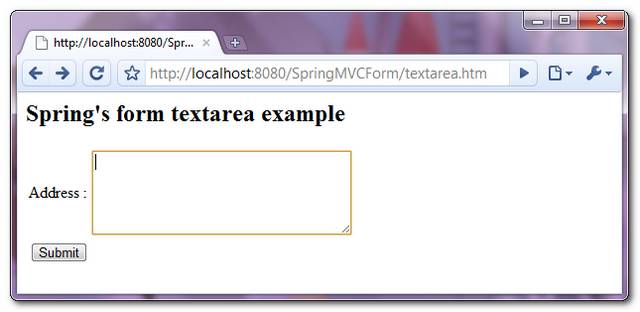
Access the page – http://localhost:8080/SpringMVCForm/textarea.htm
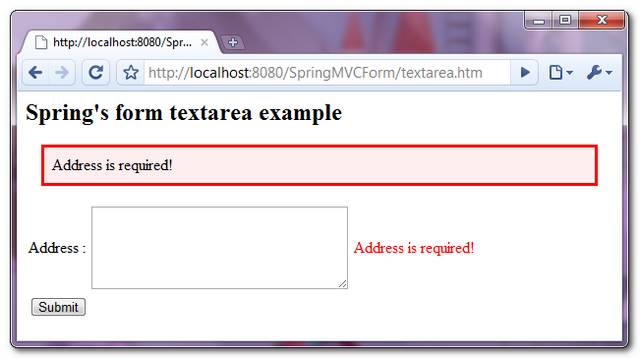
If the textarea value is empty while submitting the form, display and highlight the error message.
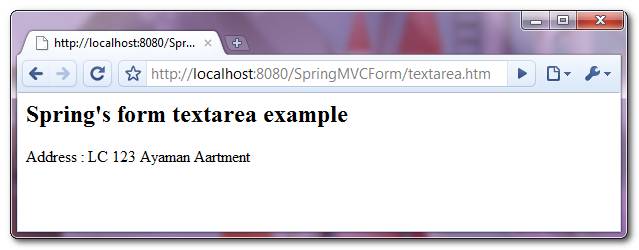
If the form is submitted successfully, just display the submitted textarea value.

.
how to handle if i wan display html tags with the help of ${customer.address}
lets consider i have ” Washington ” and i want to display it same without rendering.
can we insert default value in between tags?
like Abcdefghijklmnopqrstuvwxyz?
or may be ${xyz.name}?
can we insert default value in between tags?
like Abcdefghijklmnopqrstuvwxyz?
or may be ${xyz.name}
thank you for the example
I get this error message :::
Your article is very good butcher. I have to know more.