In this tutorial, we will show you how to setup slf4j and logback in a Spring MVC web application.
Technologies used :
- Spring 4.1.6.RELEASE
- Logback 1.1.3
- Maven 3 or Gradle 2.0
- Tomcat 7
- Eclipse 4.4
Note
By default, Spring is using the Jakarta Commons Logging API (JCL), read this.
By default, Spring is using the Jakarta Commons Logging API (JCL), read this.
To setup logback framework you need to :
- Exclude
commons-loggingfromspring-core - Bridge the Spring’s logging from JCL to SLF4j, via
jcl-over-slf4j - Include logback as dependency
- Create a
logback.xmlin thesrc/main/resourcesfolder - Done
1. Build Tools
1.1 For Maven
pom.xml
    <properties>
	<jdk.version>1.7</jdk.version>
	<spring.version>4.1.6.RELEASE</spring.version>
	<logback.version>1.1.3</logback.version>
	<jcl.slf4j.version>1.7.12</jcl.slf4j.version>
    </properties>

    <dependencies>

	<!-- 1. exclude commons-logging -->
	<dependency>
		<groupId>org.springframework</groupId>
		<artifactId>spring-core</artifactId>
		<version>${spring.version}</version>
		<exclusions>
		  <exclusion>
			<groupId>commons-logging</groupId>
			<artifactId>commons-logging</artifactId>
		  </exclusion>
		</exclusions>
	</dependency>

	<dependency>
		<groupId>org.springframework</groupId>
		<artifactId>spring-webmvc</artifactId>
		<version>${spring.version}</version>
	</dependency>

	<!- 2. Bridge logging from JCL to SLF4j-->
	<dependency>
		<groupId>org.slf4j</groupId>
		<artifactId>jcl-over-slf4j</artifactId>
		<version>${jcl.slf4j.version}</version>
	</dependency>

	<!-- 3. logback -->
	<dependency>
		<groupId>ch.qos.logback</groupId>
		<artifactId>logback-classic</artifactId>
		<version>${logback.version}</version>
	</dependency>

    <dependencies>
1.2 For Gradle
build.gradle
apply plugin: 'java'
apply plugin: 'war'
apply plugin: 'eclipse-wtp'

repositories {
    mavenCentral()
}

//1. exclude commons-logging
configurations.all {
   exclude group: "commons-logging", module: "commons-logging"
}

dependencies {
 	//2. bridge logging from JCL to SLF4j
 	compile 'org.slf4j:jcl-over-slf4j:1.7.12'

	//3. Logback
	compile 'ch.qos.logback:logback-classic:1.1.3'

	compile 'org.springframework:spring-webmvc:4.1.6.RELEASE'
}
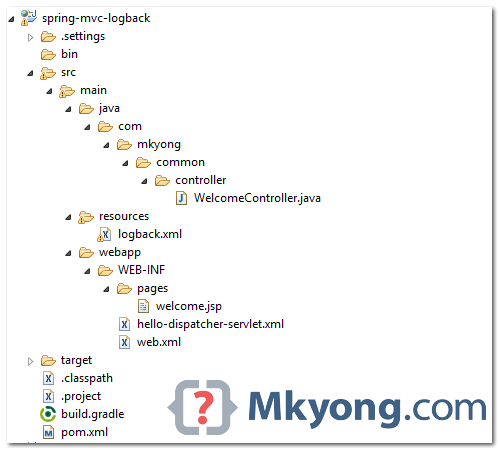
2. Project Directory
Create a logback.xml in the src/main/resources folder
3. logback.xml
This logback.xml will send all logs to console.
logback.xml
<?xml version="1.0" encoding="UTF-8"?>
<configuration>

	<appender name="STDOUT" class="ch.qos.logback.core.ConsoleAppender">
	    <layout class="ch.qos.logback.classic.PatternLayout">
		<Pattern>
			%d{yyyy-MM-dd HH:mm:ss} %-5level %logger{36} - %msg%n
		</Pattern>
	    </layout>
	</appender>

	<logger name="org.springframework" level="debug" additivity="false">
		<appender-ref ref="STDOUT" />
	</logger>

	<logger name="com.mkyong.helloworld" level="debug" additivity="false">
		<appender-ref ref="STDOUT" />
	</logger>

	<root level="error">
		<appender-ref ref="STDOUT" />
	</root>

</configuration>
For other appenders (log output), like logs to a file, please visit this log.xml examples, or this logback appender guide
4. Logback Example
WelcomeController.java
package com.mkyong.common.controller;

import org.slf4j.Logger;
import org.slf4j.LoggerFactory;
import org.springframework.stereotype.Controller;
import org.springframework.ui.Model;
import org.springframework.web.bind.annotation.RequestMapping;
import org.springframework.web.bind.annotation.RequestMethod;

@Controller
public class WelcomeController {

	private static final Logger logger =
		LoggerFactory.getLogger(WelcomeController.class);

	@RequestMapping(value = "/", method = RequestMethod.GET)
	public String welcome(Model model) {

		logger.debug("welcome() is executed, value {}", "mkyong");

		logger.error("This is Error message", new Exception("Testing"));

		model.addAttribute("msg", "Hello Spring MVC + Logback");
		return "welcome";

	}

}
5. Demo
Download the source code, and run it with Maven or Gradle.
5.1 Maven
mvn jetty:run
5.2 Gradle
gradle jettyRun
Access URL : http://localhost:8080/spring-mvc-logback
Console
...
2015-06-19 21:53:33 DEBUG o.s.web.servlet.DispatcherServlet - Initializing servlet 'hello-dispatcher'
2015-06-19 21:53:33 DEBUG o.s.w.c.s.StandardServletEnvironment - Adding [servletConfigInitParams] PropertySource with lowest search precedence
2015-06-19 21:53:33 DEBUG o.s.w.c.s.StandardServletEnvironment - Adding [servletContextInitParams] PropertySource with lowest search precedence
2015-06-19 21:53:33 DEBUG o.s.w.c.s.StandardServletEnvironment - Adding [jndiProperties] PropertySource with lowest search precedence
2015-06-19 21:53:33 DEBUG o.s.w.c.s.StandardServletEnvironment - Adding [systemProperties] PropertySource with lowest search precedence
2015-06-19 21:53:33 DEBUG o.s.w.c.s.StandardServletEnvironment - Adding [systemEnvironment] PropertySource with lowest search precedence
2015-06-19 21:53:33 DEBUG o.s.w.c.s.StandardServletEnvironment - Initialized StandardServletEnvironment with PropertySources

[servletConfigInitParams,servletContextInitParams,jndiProperties,systemProperties,systemEnvironment]
Jun 19, 2015 9:53:33 PM org.apache.catalina.core.ApplicationContext log
INFO: Initializing Spring FrameworkServlet 'hello-dispatcher'
20
...
2015-06-19 21:53:45 DEBUG o.s.b.f.s.DefaultListableBeanFactory - Returning cached instance of singleton bean 'welcomeController'
2015-06-19 21:53:45 DEBUG o.s.web.servlet.DispatcherServlet - Last-Modified value for [/spring-mvc-logback/] is: -1
2015-06-19 21:53:45 ERROR c.m.c.controller.WelcomeController - This is Error message
java.lang.Exception: Testing
	at com.mkyong.common.controller.WelcomeController.welcome(WelcomeController.java:21) [WelcomeController.class:na]
	at sun.reflect.NativeMethodAccessorImpl.invoke0(Native Method) ~[na:1.7.0_65]
	at sun.reflect.NativeMethodAccessorImpl.invoke(Unknown Source) ~[na:1.7.0_65]
	at sun.reflect.DelegatingMethodAccessorImpl.invoke(Unknown Source) ~[na:1.7.0_65]
	at java.lang.reflect.Method.invoke(Unknown Source) ~[na:1.7.0_65]
...
Both Spring and web application logging will be sent to the console.
Download Source Code
Download it – spring-mvc-logback-example.zip (6 KB)

ch.qos.logback
logback-core
${logback.version}
If commons-logging is brought in by other dependencies, does it have to be excluded everywhere?
Could you please provide maven version of project ?
See the step 1 – build tools, pom.xml example