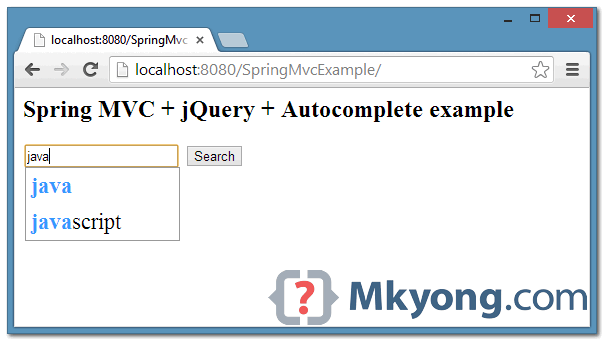
In this tutorial, we show you how to integrate jQuery autocomplete plugin with Spring MVC.
Tools and Libraries used :
- Spring MVC 3.2
- jQuery autocomplete plugin – github
- Maven 3
- Eclipse IDE
Review the tutorial’s flows :
- An HTML page, with a textbox.
- If the user is tying on the textbox, it will fire an Ajax request (via autocomplete plugin) to Spring controller.
- Spring process the user input and return the search result (in JSON format).
- The “autocomplete plugin” process the returned result and display the autocomplete suggestion box. See figure above.
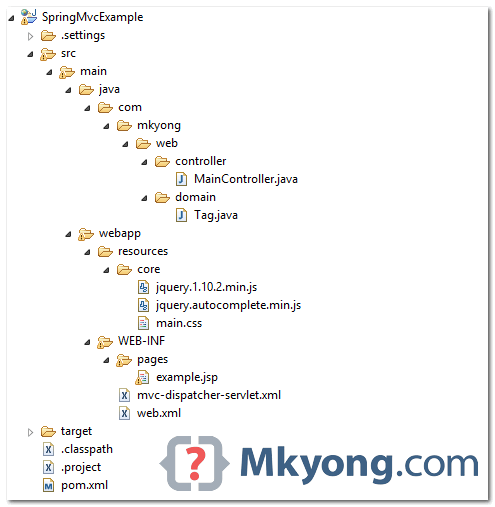
1. Project Directory
Review the final project directory structure, a standard Maven project.
2. Project Dependencies
Declares Spring, JSTL and Jackson(JSON result).
       <properties>
		<spring.version>3.2.2.RELEASE</spring.version>
		<jstl.version>1.2</jstl.version>
		<jackson.version>1.9.10</jackson.version>
	</properties>

	<dependencies>
		<!-- jstl -->
		<dependency>
			<groupId>jstl</groupId>
			<artifactId>jstl</artifactId>
			<version>${jstl.version}</version>
		</dependency>

		<!-- Spring Core -->
		<dependency>
			<groupId>org.springframework</groupId>
			<artifactId>spring-core</artifactId>
			<version>${spring.version}</version>
		</dependency>

		<!-- need this for @Configuration -->
		<dependency>
			<groupId>cglib</groupId>
			<artifactId>cglib</artifactId>
			<version>2.2.2</version>
		</dependency>

		<dependency>
			<groupId>org.springframework</groupId>
			<artifactId>spring-web</artifactId>
			<version>${spring.version}</version>
		</dependency>

		<dependency>
			<groupId>org.springframework</groupId>
			<artifactId>spring-webmvc</artifactId>
			<version>${spring.version}</version>
		</dependency>

		<!-- Jackson -->
		<dependency>
			<groupId>org.codehaus.jackson</groupId>
			<artifactId>jackson-mapper-asl</artifactId>
			<version>${jackson.version}</version>
		</dependency>

	</dependencies>
3. Spring MVC – Data Provider
A Spring controller, if user issue a “/getTags” request, Spring will filter out the result with user input and return it in JSON format.
package com.mkyong.web.controller;

import java.util.ArrayList;
import java.util.List;
import org.springframework.stereotype.Controller;
import org.springframework.web.bind.annotation.RequestMapping;
import org.springframework.web.bind.annotation.RequestMethod;
import org.springframework.web.bind.annotation.RequestParam;
import org.springframework.web.bind.annotation.ResponseBody;
import org.springframework.web.servlet.ModelAndView;

import com.mkyong.web.domain.Tag;

@Controller
public class MainController {

	List<Tag> data = new ArrayList<Tag>();

	MainController() {
		// init data for testing
		data.add(new Tag(1, "ruby"));
		data.add(new Tag(2, "rails"));
		data.add(new Tag(3, "c / c++"));
		data.add(new Tag(4, ".net"));
		data.add(new Tag(5, "python"));
		data.add(new Tag(6, "java"));
		data.add(new Tag(7, "javascript"));
		data.add(new Tag(8, "jscript"));

	}

	@RequestMapping(value = "/", method = RequestMethod.GET)
	public ModelAndView getPages() {

		ModelAndView model = new ModelAndView("example");
		return model;

	}

	@RequestMapping(value = "/getTags", method = RequestMethod.GET)
	public @ResponseBody
	List<Tag> getTags(@RequestParam String tagName) {

		return simulateSearchResult(tagName);

	}

	private List<Tag> simulateSearchResult(String tagName) {

		List<Tag> result = new ArrayList<Tag>();

		// iterate a list and filter by tagName
		for (Tag tag : data) {
			if (tag.getTagName().contains(tagName)) {
				result.add(tag);
			}
		}

		return result;
	}

}
package com.mkyong.web.domain;

public class Tag {

	public int id;
	public String tagName;

	//getter and setter methods

	public Tag(int id, String tagName) {
		this.id = id;
		this.tagName = tagName;
	}

}
<beans xmlns="http://www.springframework.org/schema/beans"
	xmlns:context="http://www.springframework.org/schema/context"
	xmlns:xsi="http://www.w3.org/2001/XMLSchema-instance"
	xmlns:mvc="http://www.springframework.org/schema/mvc"
	xsi:schemaLocation="
        http://www.springframework.org/schema/beans
        http://www.springframework.org/schema/beans/spring-beans-3.0.xsd
        http://www.springframework.org/schema/mvc
		http://www.springframework.org/schema/mvc/spring-mvc-3.0.xsd
        http://www.springframework.org/schema/context
        http://www.springframework.org/schema/context/spring-context-3.0.xsd">

	<context:component-scan base-package="com.mkyong" />

	<bean
		class="org.springframework.web.servlet.view.InternalResourceViewResolver">
		<property name="prefix">
			<value>/WEB-INF/pages/</value>
		</property>
		<property name="suffix">
			<value>.jsp</value>
		</property>
	</bean>

	<mvc:resources mapping="/resources/**" location="/resources/" />

	<mvc:annotation-driven />

</beans>
4. jQuery Automplete Plugin
The JSP page below should be self-explanatory.
<%@taglib prefix="c" uri="http://java.sun.com/jsp/jstl/core"%>
<html>
<head>
<script src="<c:url value="/resources/core/jquery.1.10.2.min.js" />"></script>
<script src="<c:url value="/resources/core/jquery.autocomplete.min.js" />"></script>
<link href="<c:url value="/resources/core/main.css" />" rel="stylesheet">
</head>
<body>
  <h2>Spring MVC + jQuery + Autocomplete example</h2>

  <div>
	<input type="text"  id="w-input-search" value="">
	<span>
	  <button id="button-id" type="button">Search</button>
	</span>
  </div>

  <script>
  $(document).ready(function() {

	$('#w-input-search').autocomplete({
		serviceUrl: '${pageContext.request.contextPath}/getTags',
		paramName: "tagName",
		delimiter: ",",
	   transformResult: function(response) {

		return {
		  //must convert json to javascript object before process
		  suggestions: $.map($.parseJSON(response), function(item) {

		      return { value: item.tagName, data: item.id };
		   })

		 };

            }

	 });

  });
  </script>

</body>
</html>
#1. The autocomplete plugin will generate the suggestions list with following HTML tags.
<div class="autocomplete-suggestions">
    <div class="autocomplete-suggestion autocomplete-selected">...</div>
    <div class="autocomplete-suggestion">...</div>
    <div class="autocomplete-suggestion">...</div>
</div>
So, you need to style it, for example :
.autocomplete-suggestions { border: 1px solid #999; background: #FFF; overflow: auto; }
.autocomplete-suggestion { padding: 5px 5px; white-space: nowrap; overflow: hidden; font-size:22px}
.autocomplete-selected { background: #F0F0F0; }
.autocomplete-suggestions strong { font-weight: bold; color: #3399FF; }
#2. Fro this “autocomplete plugin”, the response from the server must be a JSON formatted JavaScript object like this :
{
    suggestions: [
        { value: "Java",        data: "1001" },
        { value: "JavaScript",  data: "1002" },
        { value: "Ruby",        data: "1003" }
    ]
}
#3. Review the following Ajax request
  $('#w-input-search').autocomplete({
	serviceUrl: '${pageContext.request.contextPath}/getTags',
	paramName: "tagName", // ?tagName='user input'
	delimiter: ",",
	transformResult: function(response) {

	   return {

	      suggestions: $.map($.parseJSON(response), function(item) {
		 return { value: item.tagName, data: item.id };
	      })

	   };

	}
   });
- serviceUrl – Server side URL or callback function that returns the JSON data.
- paramName – In this case, it will generate
getTags?tagName=user input. Default is?query=user input. - delimiter – For multiple suggestions.
- $.parseJSON (response) – Java will return JSON formatted data, so, you need to convert it to a JavaScript object.
5. Demo
Start and access “http://localhost:8080/SpringMvcExample/“.
Type “java”
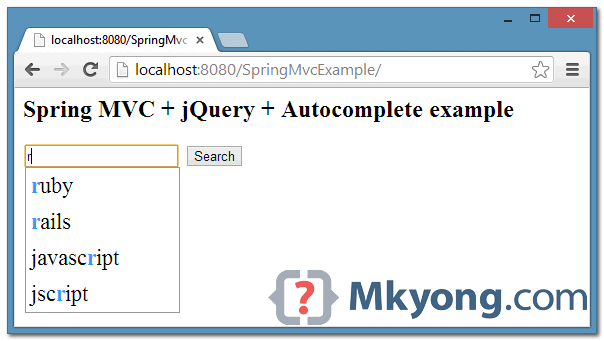
Type “r”

I got these errors…
Uncaught TypeError: Cannot read property ‘replace’ of undefined
at g.formatResult (jquery.autocomplete.min.js:11)
at Object. (jquery.autocomplete.min.js:20)
at Function.each (jquery.1.10.2.min.js:4)
at g.suggest (jquery.autocomplete.min.js:20)
at g.processResponse (jquery.autocomplete.min.js:21)
at Object. (jquery.autocomplete.min.js:19)
at c (jquery.1.10.2.min.js:4)
at Object.fireWith [as resolveWith] (jquery.1.10.2.min.js:4)
at k (jquery.1.10.2.min.js:6)
at XMLHttpRequest.r (jquery.1.10.2.min.js:6)
I think because of this statement : “#2. Fro this “autocomplete plugin”, the response from the server must be a JSON formatted JavaScript object like this :”
It help me so much and make me many time to refactor with my style because it’s not run when i rework, i have problem. I have fixed it. I have a notice that Be careful about version Java use in project. This project use Java 1.6, if you use java 1.8, it isn’t work.
Thanks mkyong very much!
Url should be http://localhost:8080/mitta-webapp/
I try this, but it response me a error 406:
El recurso identificado por este requerimiento sólo es capaz de generar respuestas con características no aceptables con arreglo a las cabeceras “accept” de requerimiento
Why?, thanks
when i try to running this example i got this error
java.lang.IllegalArgumentException: No converter found for return value of type: class java.util.ArrayList
how search from database
can you show me one to many mapping with dynamic from in spring mvc hibernate
Hi,
code is perfectly working. but the value selects from auto dropdown is not set to ng-model of angular. ng-model only taking whatever user types but not selected value.
can you pls help on that yong??
If you want case insensitive searches on the Java arrayList, you might want to modify the code to look like this: (tag.getTagName().toLowerCase().contains(tagName.toLowerCase()))
MainController() {
// init data for testing
data.add(new Tag(1, “ruby”));
data.add(new Tag(2, “rails”));
data.add(new Tag(3, “c / c++”));
data.add(new Tag(4, “.net”));
data.add(new Tag(5, “python”));
data.add(new Tag(6, “java”));
data.add(new Tag(7, “javascript”));
data.add(new Tag(8, “jscript”));
}
This part gives me compile error..
hi sir , can you please publish the spring xt ajax framework .
it will be so helpful to us.
Thanks in advance;
Great example, can run perfectly. But in my project is giving 406 error.
Hi All,
Thanks!! Can you please tell me how to get data: item.id value in hidden, for ex, if i select java from autocomplete then 1001 in hidden field.
Thanks
Anil
Hi All,
I want to insert the multiple row data into database dynamically. Please help me on this.
new row can be create by pressing a tab button & can be delete by select
a row then by pressing delete button. After that, I want to insert all the row into
database. Anyone know this scenario ,how to proceed with spring +
hibernate + ajax
vry nice article!
JQuery Bootstrap Tokenfield is a pretty jQuery plugin that takes advantage of jQuery and Twitter’s Bootstrap to manage
tags / tokens in an input field.
Bootstrap Tags Input is a jQuery plugin that allows you to add, remove, and categorize tags with Twitter Bootstrap user
interface.
Features:
1. Keyboard support (arrow keys, Backspace, delete, Ctrl + A, Cmd + A, Ctrl + C, Cmd + C, Ctrl + V and Cmd + V)Copy &
paste support
2. Copy & paste support
3. Validation states
4. jQuery UI Autocomplete support
It may help you understand this using sample :
http://www.mindstick.com/Articles/22623553-1837-49f3-a883-32716a120865/Bootstrap%20Tokenfield%20and%20autocomplete
http://sliptree.github.io/bootstrap-tokenfield/
it works fine .. thank you .. but i got one issue
1. i have multiple textbox with different ajax request url ;
2.All of them working working fine . if i use first textbox with ajax request then rest are not wortking .even its not hitting server
anyone Please answer how to solve this
how to add image in this example
any one please help me.
how can use select function in this code
how can get value of id to an hidden input
great post!
how could send an http url ?
Uncaught TypeError: Cannot call method ‘replace’ of undefined .
I am getting the above error in javascript console. How to resolve this error?
I am getting ‘http://localhost:8080/resource/personLookup.htm?term=Te 406 (Not Acceptable)’
This example is working properly,bt i want call select function after selecting item.
My code:its not working
******************************
$(‘#item_name’+item_rowno).autocomplete({
select: function (e, ui) {
alert(“hi123”);
$(“#item_name0”).val(ui.item.label);
return false;
},
serviceUrl: ‘${pageContext.request.contextPath}/forms/admin/addgpatty/getItemList’,
paramName: “tagName”,
delimiter: “,”,
transformResult: function(response) {
return {
suggestions: $.map($.parseJSON(response), function(item) {
$(“#item_id”+item_rowno).val(item.its_id)
return { value: item.its_name, data: item.its_id };
})
};
},
});
i have added this autocomplete in my project as it is but its is not working at service url please give me solution ,there is not going any call to getTags method
Hi Mkyong Thank you very much for all these tutorials. I have a suggestion : Why you don’t use gitHub to post your tutorials 🙂
thanks, I’m thinking of this also, put all source code in github.
I want how to taken data from database in these example
typo mistake
#2. Fro this “autocomplete plugin”,
Great post. I applied and successed. But, I’ve a question, how to use data as a variable in javascript? I want to use it as input to search.
very nice tutorial. Took less than 5 mins to implements in an existing project.
Very nice article. Thank you so much!
I like to work with Spring MVC, and jQuery Ajax is a good partner for it.
Thank you!
if we are using jquery in it ,we can use token input for the same output,,
http://loopj.com/jquery-tokeninput/demo.html
why to use this tough approach????
Very nice article. Thank you so much! In your opinion, jQuery (pure implementation) wins primefaces implementation?