In Spring MVC application, comes with few “LocaleResolver” to support the internationalization or multiple languages features. In this tutorial, it shows a simple welcome page, display the message from properties file, and change the locale based on the selected language link.
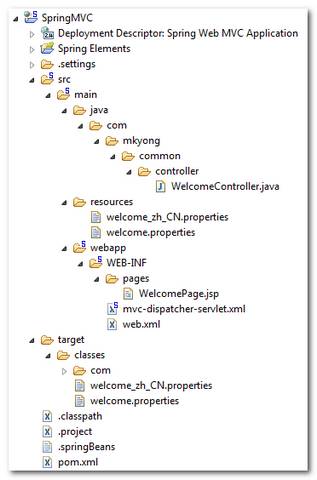
1. Project Folder
Directory structure of this example.
2. Properties file
Two properties files to store English and Chinese messages.
welcome.properties
welcome.springmvc = Happy learning Spring MVC
welcome_zh_CN.properties
welcome.springmvc = \u5feb\u4e50\u5b66\u4e60 Spring MVC
For UTF-8 or non-English characters , you can encode it with native2ascii tool.
3. Controller
Controller class, nothing special here, all the locale stuff is configure in the Spring’s bean configuration file later.
package com.mkyong.common.controller;

import javax.servlet.http.HttpServletRequest;
import javax.servlet.http.HttpServletResponse;
import org.springframework.web.servlet.ModelAndView;
import org.springframework.web.servlet.mvc.AbstractController;

public class WelcomeController extends AbstractController{

	@Override
	protected ModelAndView handleRequestInternal(HttpServletRequest request,
		HttpServletResponse response) throws Exception {

		ModelAndView model = new ModelAndView("WelcomePage");
		return model;
	}

}
4. Spring Configuration
To make Spring MVC application supports the internationalization, register two beans :
1. SessionLocaleResolver
Register a “SessionLocaleResolver” bean, named it exactly the same characters “localeResolver“. It resolves the locales by getting the predefined attribute from user’s session.
If you do not register any “localeResolver”, the default AcceptHeaderLocaleResolver will be used, which resolves the locale by checking the accept-language header in the HTTP request.
2. LocaleChangeInterceptor
Register a “LocaleChangeInterceptor” interceptor and reference it to any handler mapping that need to supports the multiple languages. The “paramName” is the parameter value that’s used to set the locale.
In this case,
- welcome.htm?language=en – Get the message from English properties file.
- welcome.htm?language=zh_CN – Get the message from Chinese properties file.
	<bean id="localeChangeInterceptor"
		class="org.springframework.web.servlet.i18n.LocaleChangeInterceptor">
		<property name="paramName" value="language" />
	</bean>

	<bean class="org.springframework.web.servlet.mvc.support.ControllerClassNameHandlerMapping" >
		<property name="interceptors">
		   <list>
			<ref bean="localeChangeInterceptor" />
		    </list>
		</property>
	</bean>
See full example below
mvc-dispatcher-servlet.xml
<beans xmlns="http://www.springframework.org/schema/beans"
	xmlns:xsi="http://www.w3.org/2001/XMLSchema-instance"
	xsi:schemaLocation="http://www.springframework.org/schema/beans
	http://www.springframework.org/schema/beans/spring-beans-2.5.xsd">

	<bean id="localeResolver"
		class="org.springframework.web.servlet.i18n.SessionLocaleResolver">
		<property name="defaultLocale" value="en" />
	</bean>

	<bean id="localeChangeInterceptor"
		class="org.springframework.web.servlet.i18n.LocaleChangeInterceptor">
		<property name="paramName" value="language" />
	</bean>

	<bean class="org.springframework.web.servlet.mvc.support.ControllerClassNameHandlerMapping" >
		<property name="interceptors">
		   <list>
			<ref bean="localeChangeInterceptor" />
		   </list>
		</property>
	</bean>

	<!-- Register the bean -->
	<bean class="com.mkyong.common.controller.WelcomeController" />

	<!-- Register the welcome.properties -->
	<bean id="messageSource"
		class="org.springframework.context.support.ResourceBundleMessageSource">
		<property name="basename" value="welcome" />
	</bean>

	<bean id="viewResolver"
    	class="org.springframework.web.servlet.view.InternalResourceViewResolver" >
        <property name="prefix">
            <value>/WEB-INF/pages/</value>
        </property>
        <property name="suffix">
            <value>.jsp</value>
        </property>
    </bean>

</beans>
5. JSP
A JSP page, contains two hyperlinks to change the locale manually, and use the spring:message to display the message from the corresponds properties file by checking the current user’s locale.
WelcomePage.jsp
<%@ page contentType="text/html;charset=UTF-8" %>
<%@ taglib prefix="spring" uri="http://www.springframework.org/tags" %>
<html>
<body>
<h1>Spring MVC internationalization example</h1>

Language : <a href="?language=en">English</a>|<a href="?language=zh_CN">Chinese</a>

<h2>
welcome.springmvc : <spring:message code="welcome.springmvc" text="default text" />
</h2>

Current Locale : ${pageContext.response.locale}

</body>
</html>
The ${pageContext.response.locale} can be used to display the current user’s locale.
Remember put the “<%@ page contentType=”text/html;charset=UTF-8″ %>” on top of the page, else the page may not able to display the UTF-8 (Chinese) characters properly.
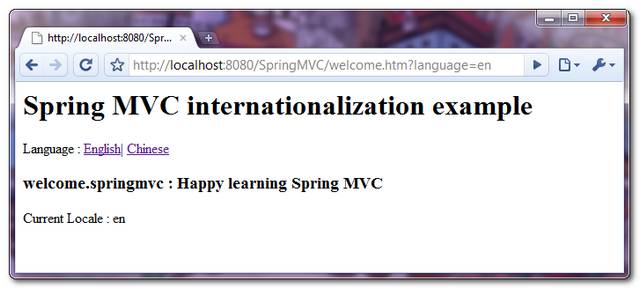
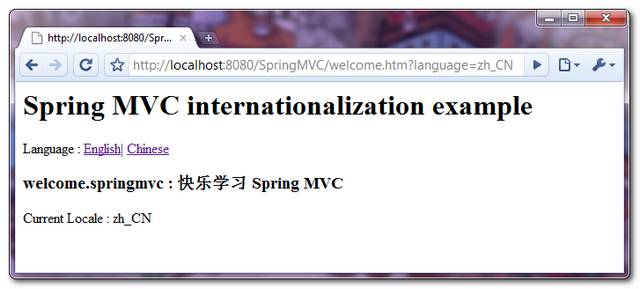
7. Demo
Access it via http://localhost:8080/SpringMVC/welcome.htm, change the locale by clicking on the language’s link.
1. English locale – http://localhost:8080/SpringMVC/welcome.htm?language=en
2. Chinese locale – http://localhost:8080/SpringMVC/welcome.htm?language=zh_CN

Don’t work.
I lost many time
I am seeing like this while trying this tutorial. I anything i am missing??
Seeing this à¤?à¥à¤¨à¤¾à¤¸à¥?à¤?à¥? शिरà¥à¤·à¤? while printing.
Set the locale when call the interface.
The code uses ControllerClassNameHandlerMapping which is deprecated. Perhaps it might be worth updating the example with annotation-based @EnableWebMvc config and overriding addInterceptors (inherited from WebMvcConfigurerAdapter).
How to do it, if my site dont allow GET requests, but only POST?
Where is 6 paragraph?
interceptors property is not List but Set.
Hi Yong, Here is my requirement. Ajax to Spring controller(vice versa). Example
Spring Controller : String jsonResp = “{“name”:”??????”}”;
AJax Success : success: function( data){ alert(data.name); }
in the alert i am getting the response as ????? symbols.
Can any one help me on this please. spent a lot of time on this with no use
hi mkyong
Its a very helpful tutorial.
I have developed as per tutorial but facing a problem the same line is displayed for both english and chinese
Happy learning Spring MVC
Please help me.
Thanks
Hi Mkyoung i want to be make a programe in spring where user can wirte into his wish language which they are selected will you please told me any suggestion or guidence?
you have not given defaultEncoding option with ResourceBundleMessageSource.It should be set to UTF-8.
May I ask you: When I type the link
http://localhost:8080/SpringMVC/welcomeghjkqwe.htm?language=en
it still displays the page
but if I type
http://localhost:8080/SpringMVC/welcom.htm?language=en
it won’t
is there any secret about that “welcome”, why just need “welcome” to display the page
I see you asked this a year ago but here is the reply:
The reason is that he uses ‘ControllerClassNameHandlerMapping’. What this class does is that it takes the controller classes and strip the Controller part to figure out the mapping URL.
So WelcomeController maps to: /welcome*
‘welcom’ doesn’t match that pattern.
I am also getting the junk char at UI (Using html 5 , added in html file)
I am using the ResourceBundleMessageSource class, properties file are nativetoascii converted. Kindly do let me know what all setting need to be done so that char at ui will come properly.
I have tried initialize the beans
Hi firnd,
all your articles in spring are very informative and practical.
sujith
?????????????????????????
session??????????????????????????
I downloaded your demo run , you can not switch the language , has been shown in Chinese , I would like to ask why
this lines of code totally screwed up with my dispatcher, i totally can’t see shit after adding it.
Lousy example, doesn’t show u how u integrate with existing internal view resolver, don’t follow.
I suggest anybody struggling to integrate with existing view resolvers to try out the example at http://viralpatel.net/blogs/spring-3-mvc-internationalization-i18n-localization-tutorial-example/
Hi young,
why your multi language example run on link welcome.htm rather than WelcomePage.htm which your made under jsp folder and reference at java file
plz tell me that is it will read UTF-8 encoding properties file????
hi yong, i am integrating spring web mvc with jforum , so that i have changed sso implementation in jforum as authenticated user property as follows
public String authenticateUser(RequestContext request) {
return (String) request.getSessionContext().getAttribute(“forumUser”);
}
public boolean isSessionValid(UserSession userSession, RequestContext request) {
return ((request.getSessionContext().getAttribute(“forumUser”) != null ) ? true:false);
}
but in my spring login application if i set @sessionAttributes({“forumUser”}), then the user becomes anonymous in jforum,
if i trie with the following
String userName = userDetails.getUsername();
if(getSession().getAttribute(“forumUser”) == null){
getSession().setAttribute(“forumUser”, userName);
}
in login() method it is working fine, instead of writing this code, is there any simple way to integrate both of them
hi ….
i am strugling with one problm in spring
how to get the query string vaue into contrloer
ex:-
Subject:——<a href='viewselectedposts.html?subject='>${post.subject}
plz send solution this mail:[email protected],[email protected]
Why that link, English and Chinese, We can select language in System Itself. What we have to if we want to support more then one language.
How to resolve HttpServletRequest and Response in i18n
In Spring MVC application, comes with few “LocaleResolver” to support the internationalization or multiple languages features. In this tutorial, it shows a simple welcome page, display the message from properties file, and change the locale based on the selected language link.
pls Spring MVC internationalization annotation example ?
IS this correct?
@Bean
public ControllerClassNameHandlerMapping handlerMapping() {
ControllerClassNameHandlerMapping ccnhm = new ControllerClassNameHandlerMapping();
Object[] interceptors = new Object[1];
interceptors[0] = localeChangeInterceptor();
ccnhm.setInterceptors(interceptors);
return ccnhm;
}