In this tutorial, we will show you how to configure a Spring Batch job to read data from a CSV file into a database.
Tools and libraries used :
- Maven 3
- Eclipse 4.2
- JDK 1.6
- Spring Core 3.2.2.RELEASE
- Spring Batch 2.2.0.RELEASE
- MySQL Java Driver 5.1.25
1. Java Project
Create a Java Project with Maven
$ mvn archetype:generate -DgroupId=com.mkyong -DartifactId=SpringBatchExample
  -DarchetypeArtifactId=maven-archetype-quickstart -DinteractiveMode=false
Convert to Eclipse project, and imports it into Eclipse IDE.
$ cd SpringBatchExample/
$ mvn eclipse:eclipse
2. Project Dependencies
Declares all project dependencies in pom.xml.
<project xmlns="http://maven.apache.org/POM/4.0.0"
	xmlns:xsi="http://www.w3.org/2001/XMLSchema-instance"
	xsi:schemaLocation="http://maven.apache.org/POM/4.0.0
	http://maven.apache.org/maven-v4_0_0.xsd">
	<modelVersion>4.0.0</modelVersion>
	<groupId>com.mkyong</groupId>
	<artifactId>SpringBatchExample</artifactId>
	<packaging>jar</packaging>
	<version>1.0-SNAPSHOT</version>
	<name>SpringBatchExample</name>
	<url>http://maven.apache.org</url>

	<properties>
		<jdk.version>1.6</jdk.version>
		<spring.version>3.2.2.RELEASE</spring.version>
		<spring.batch.version>2.2.0.RELEASE</spring.batch.version>
		<mysql.driver.version>5.1.25</mysql.driver.version>
	</properties>

	<dependencies>

		<!-- Spring Core -->
		<dependency>
			<groupId>org.springframework</groupId>
			<artifactId>spring-core</artifactId>
			<version>${spring.version}</version>
		</dependency>

		<!-- Spring jdbc, for database -->
		<dependency>
			<groupId>org.springframework</groupId>
			<artifactId>spring-jdbc</artifactId>
			<version>${spring.version}</version>
		</dependency>

		<!-- Spring Batch dependencies -->
		<dependency>
			<groupId>org.springframework.batch</groupId>
			<artifactId>spring-batch-core</artifactId>
			<version>${spring.batch.version}</version>
		</dependency>
		<dependency>
			<groupId>org.springframework.batch</groupId>
			<artifactId>spring-batch-infrastructure</artifactId>
			<version>${spring.batch.version}</version>
		</dependency>

		<!-- MySQL database driver -->
		<dependency>
			<groupId>mysql</groupId>
			<artifactId>mysql-connector-java</artifactId>
			<version>${mysql.driver.version}</version>
		</dependency>

	</dependencies>
	<build>
		<finalName>spring-batch</finalName>
		<plugins>
		  <plugin>
			<groupId>org.apache.maven.plugins</groupId>
			<artifactId>maven-eclipse-plugin</artifactId>
			<version>2.9</version>
			<configuration>
				<downloadSources>true</downloadSources>
				<downloadJavadocs>false</downloadJavadocs>
			</configuration>
		  </plugin>
		  <plugin>
			<groupId>org.apache.maven.plugins</groupId>
			<artifactId>maven-compiler-plugin</artifactId>
			<version>2.3.2</version>
			<configuration>
				<source>${jdk.version}</source>
				<target>${jdk.version}</target>
			</configuration>
		  </plugin>
		</plugins>
	</build>
</project>
3. Project Directory Structure
Review the final project structure.
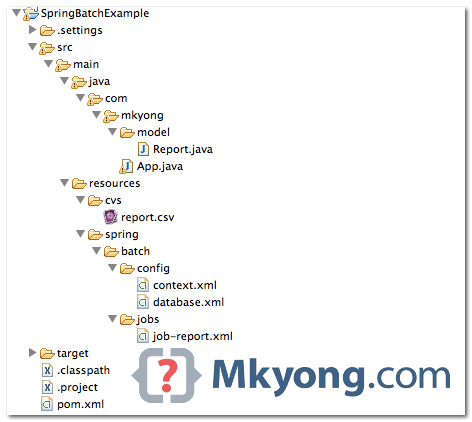
4. CSV File
This is the csv file in the resource folder.
Date,Impressions,Clicks,Earning
6/1/13,"139,237",37,227.21
6/2/13,"149,582",55,234.71
6/3/13,"457,425",132,211.48
6/4/13,"466,870",141,298.40
6/5/13,"472,385",194,281.35
......
5. MySQL Database
Defines a “dataSource” bean for MySQL database. The jdbc:initialize-database is used to create the metadata tables automatically, Spring Batch need it to store the job’s detail.
<beans xmlns="http://www.springframework.org/schema/beans"
	xmlns:jdbc="http://www.springframework.org/schema/jdbc"
	xmlns:xsi="http://www.w3.org/2001/XMLSchema-instance"
	xsi:schemaLocation="http://www.springframework.org/schema/beans
	http://www.springframework.org/schema/beans/spring-beans-3.2.xsd
	http://www.springframework.org/schema/jdbc
	http://www.springframework.org/schema/jdbc/spring-jdbc-3.2.xsd">

  <!-- connect to database -->
  <bean id="dataSource"
	class="org.springframework.jdbc.datasource.DriverManagerDataSource">
	<property name="driverClassName" value="com.mysql.jdbc.Driver" />
	<property name="url" value="jdbc:mysql://localhost:3306/test" />
	<property name="username" value="root" />
	<property name="password" value="" />
  </bean>

  <bean id="transactionManager"
	class="org.springframework.batch.support.transaction.ResourcelessTransactionManager" />

  <!-- create job-meta tables automatically -->
  <jdbc:initialize-database data-source="dataSource">
	<jdbc:script location="org/springframework/batch/core/schema-drop-mysql.sql" />
	<jdbc:script location="org/springframework/batch/core/schema-mysql.sql" />
  </jdbc:initialize-database>

</beans>
6. Spring Batch Core Setting
Defines jobRepository and jobLauncher.
<beans xmlns="http://www.springframework.org/schema/beans"
	xmlns:xsi="http://www.w3.org/2001/XMLSchema-instance"
	xsi:schemaLocation="
	http://www.springframework.org/schema/beans
	http://www.springframework.org/schema/beans/spring-beans-3.2.xsd">

  <!-- stored job-metadata in database -->
  <bean id="jobRepository"
	class="org.springframework.batch.core.repository.support.JobRepositoryFactoryBean">
	<property name="dataSource" ref="dataSource" />
	<property name="transactionManager" ref="transactionManager" />
	<property name="databaseType" value="mysql" />
  </bean>

  <!-- stored job-metadata in memory -->
  <!--
  <bean id="jobRepository"
	class="org.springframework.batch.core.repository.support.MapJobRepositoryFactoryBean">
	<property name="transactionManager" ref="transactionManager" />
  </bean>
   -->

  <bean id="jobLauncher"
	class="org.springframework.batch.core.launch.support.SimpleJobLauncher">
	<property name="jobRepository" ref="jobRepository" />
  </bean>

</beans>
7. Spring Batch Jobs
This is the main xml file to configure the Spring batch job. This job-report.xml file define a job to read a report.csv file, match it to report plain pojo and write the data into MySQL database.
Read the comment, it should be self-explanatory. Btw, remember create the “RAW_REPORT” table manually.
<beans xmlns="http://www.springframework.org/schema/beans"
	xmlns:batch="http://www.springframework.org/schema/batch"
	xmlns:task="http://www.springframework.org/schema/task"
	xmlns:xsi="http://www.w3.org/2001/XMLSchema-instance"
	xsi:schemaLocation="http://www.springframework.org/schema/batch
	http://www.springframework.org/schema/batch/spring-batch-2.2.xsd
	http://www.springframework.org/schema/beans
	http://www.springframework.org/schema/beans/spring-beans-3.2.xsd">

  <bean id="report" class="com.mkyong.model.Report" scope="prototype" />

  <batch:job id="reportJob">
	<batch:step id="step1">
	  <batch:tasklet>
		<batch:chunk reader="cvsFileItemReader" writer="mysqlItemWriter"
			commit-interval="2">
		</batch:chunk>
	  </batch:tasklet>
	</batch:step>
  </batch:job>

  <bean id="cvsFileItemReader" class="org.springframework.batch.item.file.FlatFileItemReader">

	<!-- Read a csv file -->
	<property name="resource" value="classpath:cvs/report.csv" />

	<property name="lineMapper">
		<bean class="org.springframework.batch.item.file.mapping.DefaultLineMapper">
		  <!-- split it -->
		  <property name="lineTokenizer">
		        <bean
			  class="org.springframework.batch.item.file.transform.DelimitedLineTokenizer">
				<property name="names" value="date,impressions,clicks,earning" />
			</bean>
		  </property>
		  <property name="fieldSetMapper">
		         <!-- return back to reader, rather than a mapped object. -->
		         <!--
			 <bean class="org.springframework.batch.item.file.mapping.PassThroughFieldSetMapper" />
		          -->
			  <!-- map to an object -->
			  <bean
			    class="org.springframework.batch.item.file.mapping.BeanWrapperFieldSetMapper">
				<property name="prototypeBeanName" value="report" />
			  </bean>
		  </property>

		  </bean>
	  </property>

  </bean>

  <bean id="mysqlItemWriter"
	class="org.springframework.batch.item.database.JdbcBatchItemWriter">
	<property name="dataSource" ref="dataSource" />
	<property name="sql">
	  <value>
            <![CDATA[
            	insert into RAW_REPORT(DATE,IMPRESSIONS,CLICKS,EARNING)
			values (:date, :impressions, :clicks, :earning)
            ]]>
	  </value>
	</property>
	<!-- It will take care matching between object property and sql name parameter -->
	<property name="itemSqlParameterSourceProvider">
		<bean
		class="org.springframework.batch.item.database.BeanPropertyItemSqlParameterSourceProvider" />
	</property>
  </bean>

</beans>
package com.mkyong.model;

public class Report {

	private String Date;
	private String Impressions;
	private String Clicks;
	private String Earning;

	//getter and setter methods


}
For detail explanation, please refer to this Spring batch references.
8. Run It
Loads everything and run it jobLauncher. This is the simplest way to start and test it, but, in real life, you may need to launch it with scheduler frameworks like Spring task, Quartz or system scheduler like “cron” command (I will show you in coming tutorials).
package com.mkyong;

import org.springframework.batch.core.Job;
import org.springframework.batch.core.JobExecution;
import org.springframework.batch.core.JobParameters;
import org.springframework.batch.core.launch.JobLauncher;
import org.springframework.context.ApplicationContext;
import org.springframework.context.support.ClassPathXmlApplicationContext;

public class App {
  public static void main(String[] args) {

	String[] springConfig  =
		{	"spring/batch/config/database.xml",
			"spring/batch/config/context.xml",
			"spring/batch/jobs/job-report.xml"
		};

	ApplicationContext context =
		new ClassPathXmlApplicationContext(springConfig);

	JobLauncher jobLauncher = (JobLauncher) context.getBean("jobLauncher");
	Job job = (Job) context.getBean("reportJob");

	try {

		JobExecution execution = jobLauncher.run(job, new JobParameters());
		System.out.println("Exit Status : " + execution.getStatus());

	} catch (Exception e) {
		e.printStackTrace();
	}

	System.out.println("Done");

  }
}
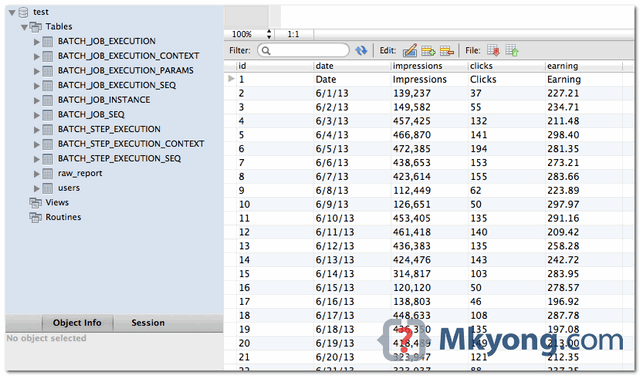
Output. The Spring Batch metadata tables are created, and the content of report.cvs is inserted into database table “RAW_REPORT“.
Done.

I have to read a file from sftp server which is getting closed after first chunk execution and getting pipe closed error. Does any one has done this before like setting the resource with sftp input stream and read the file.
Any help or sample snippet will be appreciated
How to increase batch perforamnce ..it is taking so much time to save data in db . Tried with increasing commit interval to 50000.Still it is taking 15min for 10 L records in db .
How to skip headers? Or One row in CSV
After property resource line add this <property name=”linetoSkip” value=”1″/>
<property name=”linestoSkip” value=”
Nov 12, 2019 12:48:56 PM org.springframework.batch.core.step.AbstractStep execute
SEVERE: Encountered an error executing the step
org.springframework.batch.item.ItemStreamException: Failed to initialize the reader
at org.springframework.batch.item.support.AbstractItemCountingItemStreamItemReader.open(AbstractItemCountingItemStreamItemReader.java:142)
at org.springframework.batch.item.support.CompositeItemStream.open(CompositeItemStream.java:96)
at org.springframework.batch.core.step.tasklet.TaskletStep.open(TaskletStep.java:306)
at org.springframework.batch.core.step.AbstractStep.execute(AbstractStep.java:192)
at org.springframework.batch.core.job.SimpleStepHandler.handleStep(SimpleStepHandler.java:137)
at org.springframework.batch.core.job.flow.JobFlowExecutor.executeStep(JobFlowExecutor.java:64)
at org.springframework.batch.core.job.flow.support.state.StepState.handle(StepState.java:60)
at org.springframework.batch.core.job.flow.support.SimpleFlow.resume(SimpleFlow.java:152)
at org.springframework.batch.core.job.flow.support.SimpleFlow.start(SimpleFlow.java:131)
at org.springframework.batch.core.job.flow.FlowJob.doExecute(FlowJob.java:135)
at org.springframework.batch.core.job.AbstractJob.execute(AbstractJob.java:301)
at org.springframework.batch.core.launch.support.SimpleJobLauncher$1.run(SimpleJobLauncher.java:134)
at org.springframework.core.task.SyncTaskExecutor.execute(SyncTaskExecutor.java:49)
at org.springframework.batch.core.launch.support.SimpleJobLauncher.run(SimpleJobLauncher.java:127)
at com.csvtodbdemo.model.Driver.main(Driver.java:25)
Caused by: java.lang.IllegalStateException: Input resource must exist (reader is in ‘strict’ mode): class path resource [cvs/report.csv]
at org.springframework.batch.item.file.FlatFileItemReader.doOpen(FlatFileItemReader.java:251)
at org.springframework.batch.item.support.AbstractItemCountingItemStreamItemReader.open(AbstractItemCountingItemStreamItemReader.java:139)
… 14 more
Nov 12, 2019 12:48:56 PM org.springframework.batch.core.launch.support.SimpleJobLauncher$1 run
INFO: Job: [FlowJob: [name=reportJob]] completed with the following parameters: [{}] and the following status: [FAILED]
Exit Status : FAILED
Hello.I have a problem when executing the program saying this error:
org.springframework.jdbc.BadSqlGrammarException: PreparedStatementCallback; bad SQL grammar [SELECT JOB_INSTANCE_ID, JOB_NAME from BATCH_JOB_INSTANCE where JOB_NAME = ? and JOB_KEY = ?]; nested exception is java.sql.SQLSyntaxErrorException: ORA-00942: table or view does not exist.
Hi i am the below error.can anyone tell me the solution
Feb 04, 2019 5:55:39 PM org.springframework.context.support.AbstractApplicationContext prepareRefresh
INFO: Refreshing org.springframework.context.support.ClassPathXmlApplicationContext@377dca04: startup date [Mon Feb 04 17:55:39 IST 2019]; root of context hierarchy
Feb 04, 2019 5:55:39 PM org.springframework.beans.factory.xml.XmlBeanDefinitionReader loadBeanDefinitions
INFO: Loading XML bean definitions from class path resource [spring/batch/config/database.xml]
Exception in thread “main” org.springframework.beans.factory.BeanDefinitionStoreException: IOException parsing XML document from class path resource [spring/batch/config/database.xml]; nested exception is java.io.FileNotFoundException: class path resource [spring/batch/config/database.xml] cannot be opened because it does not exist
at org.springframework.beans.factory.xml.XmlBeanDefinitionReader.loadBeanDefinitions(XmlBeanDefinitionReader.java:341)
at org.springframework.beans.factory.xml.XmlBeanDefinitionReader.loadBeanDefinitions(XmlBeanDefinitionReader.java:302)
at org.springframework.beans.factory.support.AbstractBeanDefinitionReader.loadBeanDefinitions(AbstractBeanDefinitionReader.java:174)
at org.springframework.beans.factory.support.AbstractBeanDefinitionReader.loadBeanDefinitions(AbstractBeanDefinitionReader.java:209)
at org.springframework.beans.factory.support.AbstractBeanDefinitionReader.loadBeanDefinitions(AbstractBeanDefinitionReader.java:180)
at org.springframework.beans.factory.support.AbstractBeanDefinitionReader.loadBeanDefinitions(AbstractBeanDefinitionReader.java:243)
at org.springframework.context.support.AbstractXmlApplicationContext.loadBeanDefinitions(AbstractXmlApplicationContext.java:127)
at org.springframework.context.support.AbstractXmlApplicationContext.loadBeanDefinitions(AbstractXmlApplicationContext.java:93)
at org.springframework.context.support.AbstractRefreshableApplicationContext.refreshBeanFactory(AbstractRefreshableApplicationContext.java:131)
at org.springframework.context.support.AbstractApplicationContext.obtainFreshBeanFactory(AbstractApplicationContext.java:537)
at org.springframework.context.support.AbstractApplicationContext.refresh(AbstractApplicationContext.java:451)
at org.springframework.context.support.ClassPathXmlApplicationContext.(ClassPathXmlApplicationContext.java:139)
at org.springframework.context.support.ClassPathXmlApplicationContext.(ClassPathXmlApplicationContext.java:93)
at com.bhar.ex.batch.App.main(App.java:25)
Caused by: java.io.FileNotFoundException: class path resource [spring/batch/config/database.xml] cannot be opened because it does not exist
at org.springframework.core.io.ClassPathResource.getInputStream(ClassPathResource.java:157)
at org.springframework.beans.factory.xml.XmlBeanDefinitionReader.loadBeanDefinitions(XmlBeanDefinitionReader.java:328)
… 13 more
Awesome post, I want to upload a CSV file using Spring MVC and then load the data into database using batch processing. Any help here?
are creating BATCH_JOB_ tables required? is it possible to run a job without creating the tables?
are meta tables are required? is it possible to run a job without creating the meta tables?
Hi,
Can anyone tell me how to delete table data before writing csv file data to table. I have tried using Lsiteners, but failed. It seems like lock was getting applied on table and no DML queries are allowed. Is there is a way to release the lock on table from Item Reader ?
Do you have a tutoriel with the opposite ?
how to read a file from file system instead of classpath
please tell me why need this block code?
I’m big fan of your as far as Spring Batch is concerned. Could you please also develop a code Spring Batch Example CSV to MongoDB ?
I am facing below error. Please guide whats is the issue?
nested exception is java.sql.BatchUpdateException: Table ‘test.raw_report’ doesn’t exist
21:53:00.876 [main] ERROR o.s.batch.core.step.AbstractStep – Encountered an error executing the step
org.springframework.jdbc.BadSqlGrammarException: PreparedStatementCallback; bad SQL grammar [
You have to create this table manually.
create table RAW_REPORT(
DATE VARCHAR(100) NOT NULL,
IMPRESSIONS VARCHAR(100) NOT NULL,
CLICKS VARCHAR(40) NOT NULL,
EARNING VARCHAR(40) NOT NULL
);
If we want to use excel as input, what can be used ? Can be excel with multiple tabs used to read data from different tabs ?
This article as all the other on this site are very helpful. I like the concise writing style used on this site.
I think people complaining in the comments that this sample did not work out of the box, they should read more carefully. Mkyong says in the article: “Read the comment, it should be self-explanatory. Btw, remember create the “RAW_REPORT” table manually.”
As Prasad said, the table can be created with following DDL:
create table RAW_REPORT(
DATE VARCHAR(100) NOT NULL,
IMPRESSIONS VARCHAR(100) NOT NULL,
CLICKS VARCHAR(40) NOT NULL,
EARNING VARCHAR(40) NOT NULL
);
Then build the app – for instance, from command line:
prj-top-folder> mvn clean install
Finally, run the app:
prj-top-folder> mvn exec:java -Dexec.mainClass=com.mkyong.App
Hope this helps.
How do you create the table manually. do you just add schema.sql file within the resource section?
how can we use the JdbcBatchItemWriter to set different sql for every record. I receive a flat file from a vendor which will have a flag indicating whether I need to insert/update that record in DB. Can I achieve this using JdbcBatchItemWriter?
Hello, where are the org/springframework/batch/core/schema-drop-mysql.sql and org/springframework/batch/core/schema-mysql.sql files in the source code? Could you please upload it ASAP?
Did you got those files? Are you able to resolved following error:
org.springframework.jdbc.BadSqlGrammarException: PreparedStatementCallback; bad SQL grammar [
insert into RAW_REPORT(DATE,IMPRESSIONS,CLICKS,EARNING) values (?, ?, ?, ?)
]; nested exception is java.sql.BatchUpdateException: Table ‘test.RAW_REPORT’ doesn’t exist
at org.springframework.jdbc.support.SQLErrorCodeSQLExceptionTranslator.doTranslate(SQLErrorCodeSQLExceptionTranslator.java:237)
at org.springframework.jdbc.support.AbstractFallbackSQLExceptionTranslator.translate(AbstractFallbackSQLExceptionTranslator.java:72)
at org.springframework.jdbc.core.JdbcTemplate.execute(JdbcTemplate.java:605)
at org.springframework.jdbc.core.JdbcTemplate.execute(JdbcTemplate.java:617)
at org.springframework.jdbc.core.JdbcTemplate.batchUpdate(JdbcTemplate.java:890)
at org.springframework.jdbc.core.namedparam.NamedParameterBatchUpdateUtils.executeBatchUpdateWithNamedParameters(NamedParameterBatchUpdateUtils.java:40)
at org.springframework.jdbc.core.namedparam.NamedParameterJdbcTemplate.batchUpdate(NamedParameterJdbcTemplate.java:324)
at org.springframework.batch.item.database.JdbcBatchItemWriter.write(JdbcBatchItemWriter.java:182)
at org.springframework.batch.core.step.item.SimpleChunkProcessor.writeItems(SimpleChunkProcessor.java:175)
at org.springframework.batch.core.step.item.SimpleChunkProcessor.doWrite(SimpleChunkProcessor.java:151)
at org.springframework.batch.core.step.item.SimpleChunkProcessor.write(SimpleChunkProcessor.java:274)
at org.springframework.batch.core.step.item.SimpleChunkProcessor.process(SimpleChunkProcessor.java:199)
at org.springframework.batch.core.step.item.ChunkOrientedTasklet.execute(ChunkOrientedTasklet.java:75)
at org.springframework.batch.core.step.tasklet.TaskletStep$ChunkTransactionCallback.doInTransaction(TaskletStep.java:395)
at org.springframework.transaction.support.TransactionTemplate.execute(TransactionTemplate.java:131)
at org.springframework.batch.core.step.tasklet.TaskletStep$2.doInChunkContext(TaskletStep.java:267)
at org.springframework.batch.core.scope.context.StepContextRepeatCallback.doInIteration(StepContextRepeatCallback.java:77)
at org.springframework.batch.repeat.support.RepeatTemplate.getNextResult(RepeatTemplate.java:368)
at org.springframework.batch.repeat.support.RepeatTemplate.executeInternal(RepeatTemplate.java:215)
at org.springframework.batch.repeat.support.RepeatTemplate.iterate(RepeatTemplate.java:144)
at org.springframework.batch.core.step.tasklet.TaskletStep.doExecute(TaskletStep.java:253)
at org.springframework.batch.core.step.AbstractStep.execute(AbstractStep.java:195)
at org.springframework.batch.core.job.SimpleStepHandler.handleStep(SimpleStepHandler.java:137)
at org.springframework.batch.core.job.flow.JobFlowExecutor.executeStep(JobFlowExecutor.java:64)
at org.springframework.batch.core.job.flow.support.state.StepState.handle(StepState.java:60)
at org.springframework.batch.core.job.flow.support.SimpleFlow.resume(SimpleFlow.java:152)
at org.springframework.batch.core.job.flow.support.SimpleFlow.start(SimpleFlow.java:131)
at org.springframework.batch.core.job.flow.FlowJob.doExecute(FlowJob.java:135)
at org.springframework.batch.core.job.AbstractJob.execute(AbstractJob.java:301)
at org.springframework.batch.core.launch.support.SimpleJobLauncher$1.run(SimpleJobLauncher.java:134)
at org.springframework.core.task.SyncTaskExecutor.execute(SyncTaskExecutor.java:49)
at org.springframework.batch.core.launch.support.SimpleJobLauncher.run(SimpleJobLauncher.java:127)
at com.mkyong.App.main(App.java:27)
Caused by: java.sql.BatchUpdateException: Table ‘test.RAW_REPORT’ doesn’t exist
at com.mysql.jdbc.PreparedStatement.executeBatchSerially(PreparedStatement.java:2054)
at com.mysql.jdbc.PreparedStatement.executeBatch(PreparedStatement.java:1467)
at org.springframework.jdbc.core.JdbcTemplate$4.doInPreparedStatement(JdbcTemplate.java:905)
at org.springframework.jdbc.core.JdbcTemplate$4.doInPreparedStatement(JdbcTemplate.java:890)
at org.springframework.jdbc.core.JdbcTemplate.execute(JdbcTemplate.java:589)
… 30 more
Hi there, I was wondering why are you using ResourcelessTransactionManager for job repository’s data source? I gave it a quick try and it seems it gets nothing committed into the job repository (unless there is auto-commit somewhere; might also differ based on db type). Why not to use e.g. DataSourceTransactionManager?
because this example will not work with DataSourceTransactionManager. You will get a ‘A job instance already exists and is complete for parameters={}’ message. A ‘feature’ of JSR 352
I can not use maven .. could you please provide jar list with versions or example without maven
How can I pass the parameters to sql in spring batch?
@mkyoung – I see your source code is missing for “schema-drop-mysql.sql” & “schema-mysql.sql” & that’s why following error is coming
org.springframework.jdbc.BadSqlGrammarException: PreparedStatementCallback; bad SQL grammar [
insert into RAW_REPORT(DATE,IMPRESSIONS,CLICKS,EARNING) values (?, ?, ?, ?)
];
The files are not missing. They come from the Spring Batch libraries.
The following SQL script will be run to create metadata tables when the JDBC connection is initialized.
See: https://github.com/spring-projects/spring-batch/blob/master/spring-batch-core/src/main/resources/org/springframework/batch/core/schema-mysql.sql
@mkyong – I am facing the same error that from this link.
http://stackoverflow.com/questions/29497577/org-springframework-jdbc-badsqlgrammarexception-preparedstatementcallback-bad
I expect metadata should be created by spring automatically and not by us.
Please help me to solve the error ASAP. Please do the needful.
org.springframework.jdbc.BadSqlGrammarException: PreparedStatementCallback; bad SQL grammar [
insert into RAW_REPORT(DATE,IMPRESSIONS,CLICKS,EARNING) values (?, ?, ?, ?)
]; nested exception is java.sql.BatchUpdateException: Table ‘test.raw_report’ doesn’t exist
Create this table, It will run and insert records in the table
create table RAW_REPORT(
DATE VARCHAR(100) NOT NULL,
IMPRESSIONS VARCHAR(100) NOT NULL,
CLICKS VARCHAR(40) NOT NULL,
EARNING VARCHAR(40) NOT NULL
);
thanks!! all problems are solved!!
working thanks
Well this example is not working…i created the DB on my own but even after that it’s not working.
EVERE: Encountered an error executing the step
org.springframework.dao.DataIntegrityViolationException: PreparedStatementCallback; SQL [
insert into RAW_REPORT(DATE,IMPRESSIONS,CLICKS,EARNING) values (?, ?, ?, ?)
]; Data truncation: Incorrect date value: ‘Date’ for column ‘DATE’ at row 1; nested exception is java.sql.BatchUpdateException: Data truncation: Incorrect date value: ‘Date’ for column ‘DATE’ at row 1
at org.springframework.jdbc.support.SQLStateSQLExceptionTranslator.doTranslate(SQLStateSQLExceptionTranslator.java:101)
at org.springframework.jdbc.support.AbstractFallbackSQLExceptionTranslator.translate(AbstractFallbackSQLExceptionTranslator.java:72)
at org.springframework.jdbc.support.AbstractFallbackSQLExceptionTranslator.translate(AbstractFallbackSQLExceptionTranslator.java:80)
at org.springframework.jdbc.core.JdbcTemplate.execute(JdbcTemplate.java:605)
at org.springframework.jdbc.core.JdbcTemplate.execute(JdbcTemplate.java:617)
at org.springframework.jdbc.core.JdbcTemplate.batchUpdate(JdbcTemplate.java:890)
at org.springframework.jdbc.core.namedparam.NamedParameterBatchUpdateUtils.executeBatchUpdateWithNamedParameters(NamedParameterBatchUpdateUtils.java:40)
at org.springframework.jdbc.core.namedparam.NamedParameterJdbcTemplate.batchUpdate(NamedParameterJdbcTemplate.java:324)
at org.springframework.batch.item.database.JdbcBatchItemWriter.write(JdbcBatchItemWriter.java:182)
at org.springframework.batch.core.step.item.SimpleChunkProcessor.writeItems(SimpleChunkProcessor.java:175)
Hi Ashutosh – Are you able to resolved this? I’m also facing same error. Please update me ASAP.
and From txt file?
have you tried reading from a file and inserting into Cassandra database
Hi Sir… getting this error after running the main file
Exception in thread “main” org.springframework.beans.factory.parsing.BeanDefinitionParsingException: Configuration problem: Cannot locate BeanDefinitionDecorator for element [initialize-database]
Offending resource: class path resource [spring/batch/config/database.xml]
at org.springframework.beans.factory.parsing.FailFastProblemReporter.fatal(FailFastProblemReporter.java:59)
Not getting the reason why it is giving error
i meet the same problem.
I tried to use driver postgresql but the log give me :
PreparedStatementCallback; bad SQL grammar [
insert into raw_report(mydate,myimpressions,myclicks,myearning)
values (?, ?, ?, ?)
]; nested exception is org.postgresql.util.PSQLException: ERROR: column “mydate” is of type timestamp without time zone but expression is of type character varying.
It seems that don’t use the Report Bean to convert the field type. I put it in job-report.xml like in the example.
Hi Frank – I am also facing the same issue. Are you able to resolved this? Your earliest input is much appreciated.
org.springframework.dao.DataAccessResourceFailureException: Could not obtain last_insert_id(); this is the error i’m getting my data base is llg and im using schema-oracle10g.sql is this a problem Thanks in advance
If you are using oracle change the database type to oracle in jobrepository declaration
I want to read application log file using spring batch to find exception and track it in database. But on the next run, I don’t want to read(baically track) the previously tracked exception.
Thank you Mkyong, helpful post, I would like to know the simplest way to prevent the first line headers (date,impressions,clicks,earning) to be inserted into the table. Thanks again.
One of the simplest ways would be to set the ‘linesToSkip’ property of the FlatFileItemReader in the job-report.xml.
Wanted to try to build/run this tutorial but getting this issue:
ClassNotFoundException: org.springframework.retry.policy.RetryContextCache
Wondering why it is looking for the class in this package:
org.springframework.retry.policy
..instead of this package (I am able to find the missing class here)?
org.springframework.batch.retry.policy
Fyi I am not using Maven, just downloaded the following releases manually:
Spring Core 3.2.2.RELEASE
Spring Batch 2.2.0.RELEASE
Appreciate any help.. Thanks!
“documentation gap”:
https://jira.springsource.org/browse/BATCH-2055
Thank you very much. You’re post are a great inspiration for me
I will be very enjoyed for this blog site. Its an informative topic. This help me a lot to solve a few problems. Their opportunity are very fantastic and style so speedy. I think it may be aid all of you. Cheers.
Keep up ab muscles good work.
This is really good example .Thanks a lot .