To uninstall Oracle database on Windows, we have to delete the all the related Ora* registry keys, files and folders manually.
P.S Tested with Oracle database 19c on Windows 10
Note
I can’t find any uninstaller to uninstall the Oracle database automatically?
I can’t find any uninstaller to uninstall the Oracle database automatically?
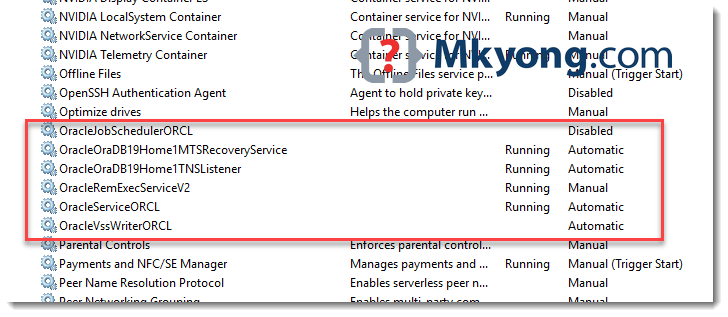
1. Stop Oracle* services
Press Windows key, type services, stop all Oracle related services.
2. Delete Oracle* registry keys
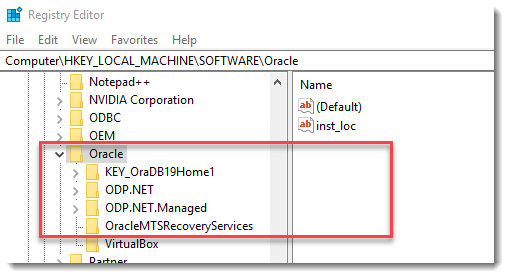
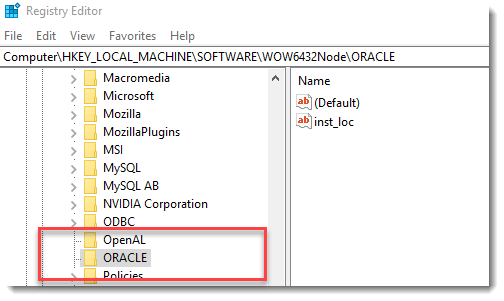
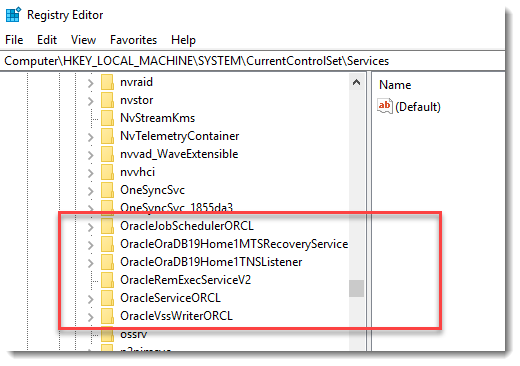
Press Windows key, type regedit, delete the following Windows registry keys if it exists. :
2.1 HKEY_LOCAL_MACHINE/SOFTWARE/Oracle*
2.2 HKEY_LOCAL_MACHINE/SOFTWARE/Wow6432Node/Oracle* (64-bits Windows)
2.3 HKEY_LOCAL_MACHINE/SYSTEM/CurrentControlSet/Services/Oracle*
Reboot Windows.
3. Delete Oracle* folders.
Delete the following Oracle* folders and files if it exists.
C:\OracleorORACLE_BASEC:\Program Files\OracleC:\Program Files (x86)\OracleC:\ProgramData\Microsoft\Windows\Start Menu\Programs\Oracle-related folders.C:\UsersOracle-related folders.
Empty C:\temp and recycle bin.
Done. The Oracle database is uninstalled from the Windows completely.

After rebooting my windows laptop, it got crashed🥲 , pls help me to restore everything back.
Best tutorial i have ever meet on uninstalling oracle
thanks man!!
Yo tuve que borrar C:\Windows\ServiceProfiles\Oracle*
Saludos.
Again delete all oracle local groups. From windows 10, into cmd as administrator, run “net local group”.
This list all local groups, then execute a “net localgroup <ORACLE_****> /delete” for each oracle local group listed.
Saludos!
Excellent walk through my friend! One to rule them all. I enjoyed your instructions very much and laughed at this part:
“Empty
C:\tempand recycle bin.Done. The Oracle database is uninstalled from the Windows completely.”
—Seems like, now beat the horse again. Make sure it’s dead.
Thanks for the post it really helped me after several days of trying to uninstall. Can you please suggest any database that is better and user friendly than oracle?
This is a very useful guide, thanks for sharing this.
There is also the
deinstallcommand (https://docs.oracle.com/en/database/oracle/oracle-database/19/cwlin/oracle-deinstallation-tool-deinstall.htm) however you might still need to delete some entries from the registry.Just one concern though : I don’t think it’s a good idea to just delete every Ora* file, especially if you have more oracle products installed, like e.g. a standalone db client. In any case, it might be better to highlight the need to backup the registry before deleting all these files. It might be a non-brainer standard practice for most users, but I am sure some less experienced devs will use this guide and end up editing their registry without knowing there is no warning, no ‘undo’ option, no automatic backups.
Thank you for this post!!! Oracle Database is a big SHIT and absolutely NOT user friendly!!!
jajajaja bro me dio mucha risa lo siento XD
Try MS Access, that should work better for you.