You can use mvn test to run unit test in Maven. Few examples :
# Run all the unit test classes.
$ mvn test

# Run a single test class.
$ mvn -Dtest=TestApp1 test

# Run multiple test classes.
$ mvn -Dtest=TestApp1,TestApp2 test

# Run a single test method from a test class.
$ mvn -Dtest=TestApp1#methodname test

# Run all test methods that match pattern 'testHello*' from a test class.
$ mvn -Dtest=TestApp1#testHello* test

# Run all test methods match pattern 'testHello*' and 'testMagic*' from a test class.
$ mvn -Dtest=TestApp1#testHello*+testMagic* test
The default maven-surefire-plugin is outdated, make sure update to the latest to support new features, like pattern matching or run a single test method, and etc.
pom.xml
	<build>
        <plugins>

            <plugin>
                <groupId>org.apache.maven.plugins</groupId>
                <artifactId>maven-surefire-plugin</artifactId>
                <version>2.22.0</version>
            </plugin>

        </plugins>
    </build>
1. Maven Java Project
Review a simple Java project how to run the unit test classes in Maven.
1.1 Directory Structure.
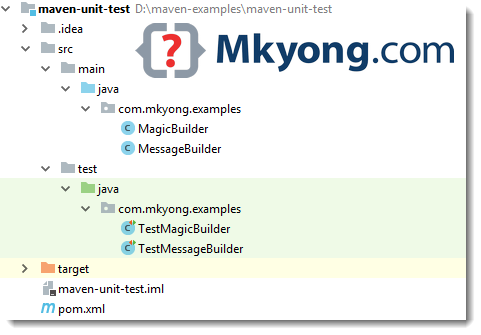
1.2 Maven + JUnit 5 examples.
pom.xml
<?xml version="1.0" encoding="UTF-8"?>
<project xmlns="http://maven.apache.org/POM/4.0.0"
         xmlns:xsi="http://www.w3.org/2001/XMLSchema-instance"
         xsi:schemaLocation="http://maven.apache.org/POM/4.0.0
		 http://maven.apache.org/xsd/maven-4.0.0.xsd">

    <modelVersion>4.0.0</modelVersion>
    <groupId>com.mkyong.examples</groupId>
    <artifactId>maven-unit-test</artifactId>
    <packaging>jar</packaging>
    <version>1.0-SNAPSHOT</version>

    <properties>
        <!-- https://maven.apache.org/general.html#encoding-warning -->
        <project.build.sourceEncoding>UTF-8</project.build.sourceEncoding>
        <maven.compiler.source>1.8</maven.compiler.source>
        <maven.compiler.target>1.8</maven.compiler.target>
    </properties>

    <dependencies>

        <!-- junit 5, unit test -->
        <dependency>
            <groupId>org.junit.jupiter</groupId>
            <artifactId>junit-jupiter-engine</artifactId>
            <version>5.3.1</version>
            <scope>test</scope>
        </dependency>

    </dependencies>
    <build>
        <finalName>maven-unit-test</finalName>
        <plugins>

            <plugin>
                <groupId>org.apache.maven.plugins</groupId>
                <artifactId>maven-surefire-plugin</artifactId>
                <version>2.22.0</version>
            </plugin>

        </plugins>
    </build>

</project>
1.3 Two Java classes, later we will create unit test classes for it.
MagicBuilder.java
package com.mkyong.examples;

public class MagicBuilder {

    public static int getLucky() {
        return 7;
    }

}
MessageBuilder.java
package com.mkyong.examples;

public class MessageBuilder {

    public static String getHelloWorld(){
        return "hello world";
    }

    public static int getNumber10(){
        return 10;
    }

}
1.4 Test class for MagicBuilder
TestMagicBuilder.java
package com.mkyong.examples;

import org.junit.jupiter.api.Test;

import static org.junit.jupiter.api.Assertions.assertEquals;

public class TestMagicBuilder {

    @Test
    public void testLucky() {
        assertEquals(7, MagicBuilder.getLucky());
    }

}
1.5 Test class for MessageBuilder
pom.xml
package com.mkyong.examples;

import org.junit.jupiter.api.Test;

import static org.junit.jupiter.api.Assertions.assertEquals;

public class TestMessageBuilder {

    @Test
    public void testHelloWorld() {
        assertEquals("hello world", MessageBuilder.getHelloWorld());
    }

    @Test
    public void testNumber10() {
        assertEquals(10, MessageBuilder.getNumber10());
    }

}
2. Maven Test
2.1 Run all test classes.
Terminal
$ mvn test

[INFO] -------------------------------------------------------
[INFO]  T E S T S
[INFO] -------------------------------------------------------
[INFO] Running com.mkyong.examples.TestMagicBuilder
[INFO] Tests run: 1, Failures: 0, Errors: 0, Skipped: 0, Time elapsed: 0.004 s - in com.mkyong.examples.TestMagicBuilder
[INFO] Running com.mkyong.examples.TestMessageBuilder
[INFO] Tests run: 2, Failures: 0, Errors: 0, Skipped: 0, Time elapsed: 0.001 s - in com.mkyong.examples.TestMessageBuilder
[INFO]
2.2 Run a single test class TestMessageBuilder
Terminal
$ mvn -Dtest=TestMessageBuilder test

[INFO] -------------------------------------------------------
[INFO]  T E S T S
[INFO] -------------------------------------------------------
[INFO] Running com.mkyong.examples.TestMessageBuilder
[INFO] Tests run: 2, Failures: 0, Errors: 0, Skipped: 0, Time elapsed: 0.004 s - in com.mkyong.examples.TestMessageBuilder
[INFO]
2.3 Run a single test method testHelloWorld() from the test class TestMessageBuilder
Terminal
$ mvn -Dtest=TestMessageBuilder#testHelloWorld test

[INFO] -------------------------------------------------------
[INFO]  T E S T S
[INFO] -------------------------------------------------------
[INFO] Running com.mkyong.examples.TestMessageBuilder
[INFO] Tests run: 1, Failures: 0, Errors: 0, Skipped: 0, Time elapsed: 0.004 s - in com.mkyong.examples.TestMessageBuilder
[INFO]
Download Source Code
$ git clone https://github.com/mkyong/maven-examples.git
$ cd maven-unit-test
$ mvn test
$ mvn -Dtest=TestMessageBuilder test
$ mvn -Dtest=TestMessageBuilder#testHelloWorld test
$ cd maven-unit-test
$ mvn test
$ mvn -Dtest=TestMessageBuilder test
$ mvn -Dtest=TestMessageBuilder#testHelloWorld test

I have a testng.xml with specific groups to be executed , when I execute via mvn , all the test cases are getting executed , it is not getting executed specific group.
Any idea how this can be achieved
Thank youu! 😀
I have different project structure how can I run my unit test using maven mvn clean install. All test are running fine with mvn test.
Any recommendations on how to fail maven build when I have errors in test
Ex: [INFO] Tests run: 2, Failures: 0, Errors: 1, Skipped: 0
Currently maven reports the build as success
Thank you very much!
Could you tell me please. How I can run “one test method” if my test class (TestApp1.java) have more one test methods?
This command “mvn -Dtest=TestApp1 test” execute test class
Thanks.. 🙂
$ mvn -Dtest=TestApp1#onetestmethod test
When i trying run the single test by using maven, getting this error
Ex: mvn -Dtest=Reports test
where, Reports is class
[ERROR] Failed to execute goal org.apache.maven.plugins:maven-surefire-plugin:2.
12:test (default-test) on project TestNGReports: No tests were executed! (Set –
DfailIfNoTests=false to ignore this error.) -> [Help 1]
I am getting the same, is your problem resolved?
actually i don’t know any thing about this maven ,i know only Ant and how can i run my project from ant to maven,please me help me to out.
Just to note, mvn test will check tests on “test.java” package, by default.
Earlier my projects were having Junit test in source code only as I am using ant.
Now we have shifted to Maven. Can you tell me how can i run the junit test which are not test test dir but in main dir?
it is really wonderfull. but i have a problem
[INFO] Reactor Summary:
[INFO]
[INFO] TestParent …………………………………. SUCCESS [0.012s]
[INFO] Test1 ……………………………………… SUCCESS [4.910s]
[INFO] Test2 ……………………………………… SUCCESS [0.571s]
cd/\TestParent> mvn test
result Tests run: 1, Failures: 0, Errors: 0, Skipped: 0
but i have
more test functions,
test1 class i have more than 3 funtions tests
and Test class2 I hve 6 Tests,
when I do like this , cd parent/cd test1/ mvn test.
only 1 Function run, other 5 not,
when i do with spesific class like this
mvn -Dtest=test3 test ( 6 funtions)
it is ok,., it runs all functions
can u explain more please ;
please
how to use the Maven in Spring MVC 3.0, Hibernate 3.0 project? what’s the main need to use Maven in string mvc + hibernate based project?
I have tried to run single unit test case using below command but it is not working
mvn -Dtest=TestApp2 test
Is it works for only Maven 2.0 ? I am using Maven 3.0.4 .
Appreciate your help.
Thanks ,
Uma.
Thanks a lot. The example with the syntax saved my time..
I would like to know if i can import Maven 3 projects and run goals in the community version of intellij or do I need to use Maven 2 for this?
I would appreciate some advise on the most recommended way to use Maven within Intellij. Thanks for all your insightful tutorials.
Sorry, never use Intellij. Since Intellij is a paid product, why not just drop an email to their support team?
Was a paid product. Most Eclipse featuered were copy cats of Idea:
http://www.jetbrains.com/idea/free_java_ide.html I found two good links to my question btw: http://blogs.jetbrains.com/idea/2008/03/opening-maven-projects-is-easy-as-pie/
and http://wiki.jetbrains.net/intellij/Creating_and_importing_Maven_projects
Thanks Mkyong
Thanks for your correction, and nice links sharing 🙂
According to the assertEquals() API (http://www.junit.org/apidocs/org/junit/Assert.html) the first argument is an expected value, the second is an actual one.
The example has incorrect arguments order.
Article is updated to JUnit 5.