In this tutorial, we will show you how to use Maven to manage a Java web project. At the end, we will create a Spring MVC web application, display a current date on a JSP page.
Technologies used :
- Maven 3.5.3
- JDK 8
- Spring 5.1.0.RELEASE
- JUnit 5
- Logback 1.2.3
- Jetty 9.4.x or Tomcat 8.5
1. Create a web project from Maven Template
Create a web project from Maven template maven-archetype-webapp
mvn archetype:generate
	-DgroupId={project-packaging}
	-DartifactId={project-name}
	-DarchetypeArtifactId={maven-template}
	-DinteractiveMode=false
For example,
D:\>mvn archetype:generate -DgroupId=com.mkyong.web -DartifactId=java-web-project -DarchetypeArtifactId=maven-archetype-webapp -DinteractiveMode=false

[INFO] Scanning for projects...
[INFO]
[INFO] ------------------< org.apache.maven:standalone-pom >-------------------
[INFO] Building Maven Stub Project (No POM) 1
[INFO] --------------------------------[ pom ]---------------------------------
[INFO]
[INFO] >>> maven-archetype-plugin:3.0.1:generate (default-cli) > generate-sources @ standalone-pom >>>
[INFO]
[INFO] <<< maven-archetype-plugin:3.0.1:generate (default-cli) < generate-sources @ standalone-pom <<<
[INFO]
[INFO]
[INFO] --- maven-archetype-plugin:3.0.1:generate (default-cli) @ standalone-pom ---
[INFO] Generating project in Batch mode
[INFO] ----------------------------------------------------------------------------
[INFO] Using following parameters for creating project from Old (1.x) Archetype: maven-archetype-webapp:1.0
[INFO] ----------------------------------------------------------------------------
[INFO] Parameter: basedir, Value: D:\
[INFO] Parameter: package, Value: com.mkyong.web
[INFO] Parameter: groupId, Value: com.mkyong.web
[INFO] Parameter: artifactId, Value: java-web-project
[INFO] Parameter: packageName, Value: com.mkyong.web
[INFO] Parameter: version, Value: 1.0-SNAPSHOT
[INFO] project created from Old (1.x) Archetype in dir: D:\java-web-project
[INFO] ------------------------------------------------------------------------
[INFO] BUILD SUCCESS
[INFO] ------------------------------------------------------------------------
[INFO] Total time: 6.509 s
[INFO] Finished at: 2018-10-04T15:25:16+08:00
[INFO] ------------------------------------------------------------------------
Actually, this is optional to generate a web project from a Maven web template. You can always generate those folders with the classic
mkdir command manually.
2. Maven Template
2.1 The following project directory structure will be created.
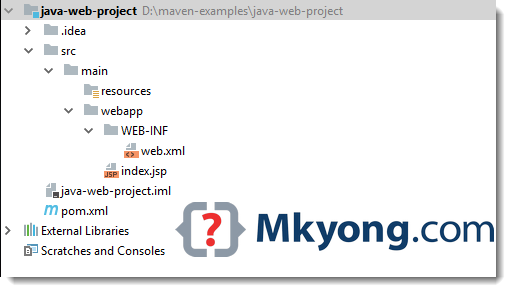
P.S Above figure is captured from IntelliJ IDEA, just ignore those IDE folders like .idea and java-web-project.iml
2.2 Review the generated pom.xml.
<project xmlns="http://maven.apache.org/POM/4.0.0"
	xmlns:xsi="http://www.w3.org/2001/XMLSchema-instance"
	xsi:schemaLocation="http://maven.apache.org/POM/4.0.0
	http://maven.apache.org/maven-v4_0_0.xsd">
  <modelVersion>4.0.0</modelVersion>
  <groupId>com.mkyong.web</groupId>
  <artifactId>java-web-project</artifactId>
  <packaging>war</packaging>
  <version>1.0-SNAPSHOT</version>
  <name>java-web-project Maven Webapp</name>
  <url>http://maven.apache.org</url>
  <dependencies>
    <dependency>
      <groupId>junit</groupId>
      <artifactId>junit</artifactId>
      <version>3.8.1</version>
      <scope>test</scope>
    </dependency>
  </dependencies>
  <build>
    <finalName>java-web-project</finalName>
  </build>
</project>
P.S The generated files are not much value, we will update all of them later. First, delete the web.xml, we don’t need this.
3. Update POM
3.1 Update the pom.xml file, add dependencies for Spring MVC for web framework, JUnit for unit test, Jetty server to test the web project, and also some Maven configuration.
<project xmlns="http://maven.apache.org/POM/4.0.0"
         xmlns:xsi="http://www.w3.org/2001/XMLSchema-instance"
         xsi:schemaLocation="http://maven.apache.org/POM/4.0.0
		 http://maven.apache.org/maven-v4_0_0.xsd">
    <modelVersion>4.0.0</modelVersion>
    <groupId>com.mkyong.web</groupId>
    <artifactId>java-web-project</artifactId>
    <packaging>war</packaging>
    <version>1.0-SNAPSHOT</version>
    <name>java-web-project Maven Webapp</name>
    <url>http://maven.apache.org</url>
    <properties>
        <!-- https://maven.apache.org/general.html#encoding-warning -->
        <project.build.sourceEncoding>UTF-8</project.build.sourceEncoding>
        <maven.compiler.source>1.8</maven.compiler.source>
        <maven.compiler.target>1.8</maven.compiler.target>
        <spring.version>5.1.0.RELEASE</spring.version>
    </properties>

    <dependencies>

        <dependency>
            <groupId>org.springframework</groupId>
            <artifactId>spring-webmvc</artifactId>
            <version>${spring.version}</version>
        </dependency>

        <dependency>
            <groupId>org.springframework</groupId>
            <artifactId>spring-test</artifactId>
            <version>${spring.version}</version>
        </dependency>

        <!-- logging , spring 5 no more bridge, thanks spring-jcl -->
        <dependency>
            <groupId>ch.qos.logback</groupId>
            <artifactId>logback-classic</artifactId>
            <version>1.2.3</version>
        </dependency>

        <!-- junit 5, unit test -->
        <dependency>
            <groupId>org.junit.jupiter</groupId>
            <artifactId>junit-jupiter-engine</artifactId>
            <version>5.3.1</version>
            <scope>test</scope>
        </dependency>

        <!-- unit test -->
        <dependency>
            <groupId>org.hamcrest</groupId>
            <artifactId>hamcrest-library</artifactId>
            <version>1.3</version>
            <scope>test</scope>
        </dependency>

        <!-- for web servlet -->
        <dependency>
            <groupId>javax.servlet</groupId>
            <artifactId>javax.servlet-api</artifactId>
            <version>3.1.0</version>
            <scope>provided</scope>
        </dependency>

        <!-- Some containers like Tomcat don't have jstl library -->
        <dependency>
            <groupId>javax.servlet</groupId>
            <artifactId>jstl</artifactId>
            <version>1.2</version>
            <scope>provided</scope>
        </dependency>

    </dependencies>
    <build>
        <finalName>java-web-project</finalName>
        <plugins>
            <!-- http://www.eclipse.org/jetty/documentation/current/jetty-maven-plugin.html -->
            <plugin>
                <groupId>org.eclipse.jetty</groupId>
                <artifactId>jetty-maven-plugin</artifactId>
                <version>9.4.12.v20180830</version>
            </plugin>

            <!-- Default is too old, update to latest to run the latest Spring 5 + jUnit 5 -->
            <plugin>
                <groupId>org.apache.maven.plugins</groupId>
                <artifactId>maven-surefire-plugin</artifactId>
                <version>2.22.0</version>
            </plugin>

            <!-- Default 2.2 is too old, update to latest -->
            <plugin>
                <groupId>org.apache.maven.plugins</groupId>
                <artifactId>maven-war-plugin</artifactId>
                <version>3.2.2</version>
            </plugin>

        </plugins>
    </build>

</project>
3.2 Display the project dependencies.
D:\> mvn dependency:tree

...
[INFO] --- maven-dependency-plugin:2.8:tree (default-cli) @ java-web-project ---
[INFO] com.mkyong.web:java-web-project:war:1.0-SNAPSHOT
[INFO] +- org.springframework:spring-webmvc:jar:5.1.0.RELEASE:compile
[INFO] |  +- org.springframework:spring-aop:jar:5.1.0.RELEASE:compile
[INFO] |  +- org.springframework:spring-beans:jar:5.1.0.RELEASE:compile
[INFO] |  +- org.springframework:spring-context:jar:5.1.0.RELEASE:compile
[INFO] |  +- org.springframework:spring-core:jar:5.1.0.RELEASE:compile
[INFO] |  |  \- org.springframework:spring-jcl:jar:5.1.0.RELEASE:compile
[INFO] |  +- org.springframework:spring-expression:jar:5.1.0.RELEASE:compile
[INFO] |  \- org.springframework:spring-web:jar:5.1.0.RELEASE:compile
[INFO] +- org.springframework:spring-test:jar:5.1.0.RELEASE:compile
[INFO] +- ch.qos.logback:logback-classic:jar:1.2.3:compile
[INFO] |  +- ch.qos.logback:logback-core:jar:1.2.3:compile
[INFO] |  \- org.slf4j:slf4j-api:jar:1.7.25:compile
[INFO] +- org.junit.jupiter:junit-jupiter-engine:jar:5.3.1:test
[INFO] |  +- org.apiguardian:apiguardian-api:jar:1.0.0:test
[INFO] |  +- org.junit.platform:junit-platform-engine:jar:1.3.1:test
[INFO] |  |  +- org.junit.platform:junit-platform-commons:jar:1.3.1:test
[INFO] |  |  \- org.opentest4j:opentest4j:jar:1.1.1:test
[INFO] |  \- org.junit.jupiter:junit-jupiter-api:jar:5.3.1:test
[INFO] +- org.hamcrest:hamcrest-library:jar:1.3:test
[INFO] |  \- org.hamcrest:hamcrest-core:jar:1.3:test
[INFO] +- javax.servlet:javax.servlet-api:jar:3.1.0:provided
[INFO] \- javax.servlet:jstl:jar:1.2:provided
[INFO] ------------------------------------------------------------------------
[INFO] BUILD SUCCESS
[INFO] ------------------------------------------------------------------------
[INFO] Total time: 0.931 s
[INFO] Finished at: 2018-10-08T15:55:08+08:00
[INFO] ------------------------------------------------------------------------
4. Spring MVC + JSP + LogBack
4.1 Create a few files to bootstrap Spring MVC web project.
package com.mkyong.web.config;

import org.springframework.context.annotation.Bean;
import org.springframework.context.annotation.ComponentScan;
import org.springframework.context.annotation.Configuration;
import org.springframework.web.servlet.config.annotation.EnableWebMvc;
import org.springframework.web.servlet.config.annotation.ResourceHandlerRegistry;
import org.springframework.web.servlet.config.annotation.WebMvcConfigurer;
import org.springframework.web.servlet.view.InternalResourceViewResolver;
import org.springframework.web.servlet.view.JstlView;

@EnableWebMvc
@Configuration
@ComponentScan({"com.mkyong.web"})
public class SpringConfig implements WebMvcConfigurer {

    @Override
    public void addResourceHandlers(ResourceHandlerRegistry registry) {
        registry.addResourceHandler("/resources/**")
                .addResourceLocations("/resources/");
    }

    @Bean
    public InternalResourceViewResolver viewResolver() {
        InternalResourceViewResolver viewResolver
                = new InternalResourceViewResolver();
        viewResolver.setViewClass(JstlView.class);
        viewResolver.setPrefix("/WEB-INF/views/");
        viewResolver.setSuffix(".jsp");
        return viewResolver;
    }
}
package com.mkyong.web;

import com.mkyong.web.config.SpringConfig;
import org.springframework.web.servlet.support.AbstractAnnotationConfigDispatcherServletInitializer;

public class WebInitializer extends AbstractAnnotationConfigDispatcherServletInitializer {

    @Override
    protected Class<?>[] getRootConfigClasses() {
        return null;
    }

    @Override
    protected Class<?>[] getServletConfigClasses() {
        return new Class[]{SpringConfig.class};
    }

    @Override
    protected String[] getServletMappings() {
        return new String[]{"/"};
    }

}
package com.mkyong.web.controller;

import org.slf4j.Logger;
import org.slf4j.LoggerFactory;
import org.springframework.stereotype.Controller;
import org.springframework.ui.Model;
import org.springframework.web.bind.annotation.GetMapping;

import java.util.Date;

@Controller
public class WelcomeController {

    private final Logger logger = LoggerFactory.getLogger(WelcomeController.class);

    @GetMapping("/")
    public String index(Model model) {
        logger.debug("Welcome to mkyong.com...");
        model.addAttribute("msg", getMessage());
        model.addAttribute("today", new Date());
        return "index";

    }

    private String getMessage() {
        return "Hello World";
    }

}
4.2 Move the index.jsp file into the WEB-INF folder, and update it
<%@ taglib prefix="fmt" uri="http://java.sun.com/jsp/jstl/fmt"%>
<html>
<body>
<h1>${msg}</h1>
<h2>Today is <fmt:formatDate value="${today}" pattern="yyy-MM-dd" /></h2>
</body>
</html>
4.3 Logs to console.
<?xml version="1.0" encoding="UTF-8"?>
<configuration>

    <appender name="STDOUT" class="ch.qos.logback.core.ConsoleAppender">
        <layout class="ch.qos.logback.classic.PatternLayout">

            <Pattern>
                %d{yyyy-MM-dd HH:mm:ss} [%thread] %-5level %logger{36} - %msg%n
            </Pattern>

        </layout>
    </appender>

    <logger name="com.mkyong.web" level="debug"
            additivity="false">
        <appender-ref ref="STDOUT"/>
    </logger>

    <root level="error">
        <appender-ref ref="STDOUT"/>
    </root>

</configuration>
5. Unit Test
A simple Spring MVC 5 + JUnit 5 example.
package com.mkyong.web;

import com.mkyong.web.config.SpringConfig;
import org.junit.jupiter.api.BeforeEach;
import org.junit.jupiter.api.Test;
import org.springframework.beans.factory.annotation.Autowired;
import org.springframework.test.context.junit.jupiter.web.SpringJUnitWebConfig;
import org.springframework.test.web.servlet.MockMvc;
import org.springframework.test.web.servlet.setup.MockMvcBuilders;
import org.springframework.web.context.WebApplicationContext;

import static org.springframework.test.web.servlet.request.MockMvcRequestBuilders.get;
import static org.springframework.test.web.servlet.result.MockMvcResultHandlers.print;
import static org.springframework.test.web.servlet.result.MockMvcResultMatchers.*;

@SpringJUnitWebConfig(SpringConfig.class)
public class TestWelcome {

    private MockMvc mockMvc;

    @Autowired
    private WebApplicationContext webAppContext;

    @BeforeEach
    public void setup() {
        mockMvc = MockMvcBuilders.webAppContextSetup(webAppContext).build();
    }

    @Test
    public void testWelcome() throws Exception {

        this.mockMvc.perform(
                get("/"))
                .andDo(print())
                .andExpect(status().isOk())
                .andExpect(view().name("index"))
                .andExpect(forwardedUrl("/WEB-INF/views/index.jsp"))
                .andExpect(model().attribute("msg", "Hello World"));
    }

}
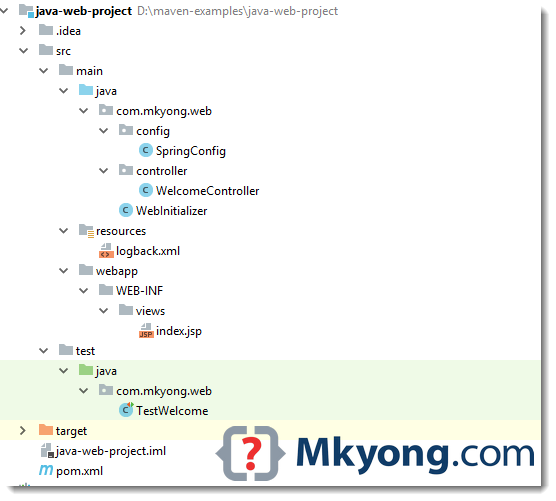
6. Directory Structure
Review the final files and directory structure.
Read this Maven Standard Directory Layout.
7. Demo
7.1 Test the web project with Jetty web server – mvn jetty:run
D:\> mvn jetty:run

[INFO] webAppSourceDirectory not set. Trying src\main\webapp
[INFO] Reload Mechanic: automatic
[INFO] nonBlocking:false
[INFO] Classes = D:\java-web-project\target\classes
[INFO] Configuring Jetty for project: java-web-project Maven Webapp
[INFO] Logging initialized @4821ms to org.eclipse.jetty.util.log.Slf4jLog
[INFO] Context path = /
[INFO] Tmp directory = D:\java-web-project\target\tmp
[INFO] Web defaults = org/eclipse/jetty/webapp/webdefault.xml
[INFO] Web overrides =  none
[INFO] web.xml file = null
[INFO] Webapp directory = D:\java-web-project\src\main\webapp
[INFO] jetty-9.4.12.v20180830; built: 2018-08-30T13:59:14.071Z; git: 27208684755d94a92186989f695db2d7b21ebc51; jvm 10.0.1+10

...

[INFO] 1 Spring WebApplicationInitializers detected on classpath
2018-10-08 15:11:50 [main] DEBUG com.mkyong.web.WebInitializer - No ContextLoaderListener registered, as createRootApplicationContext() did not return an application context
[INFO] DefaultSessionIdManager workerName=node0
[INFO] No SessionScavenger set, using defaults
[INFO] node0 Scavenging every 660000ms
[INFO] Initializing Spring DispatcherServlet 'dispatcher'
[INFO] Started o.e.j.m.p.JettyWebAppContext@68a78f3c{/,file:///D:/java-web-project/src/main/webapp/,AVAILABLE}{file:///D:/java-web-project/src/main/webapp/}
[INFO] Started ServerConnector@3355168{HTTP/1.1,[http/1.1]}{0.0.0.0:8080}
[INFO] Started @6271ms
[INFO] Started Jetty Server
2018-10-08 15:12:01 [qtp1373051324-19] DEBUG c.m.web.controller.WelcomeController - Welcome to mkyong.com...
7.2 Access it via http://localhost:8080/
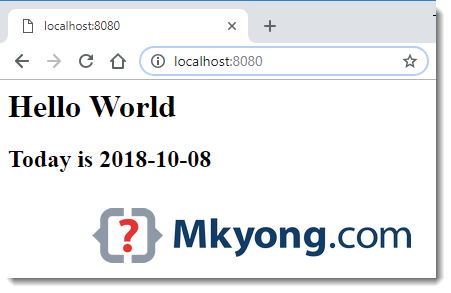
P.S CTRL + C to stop the Jetty web server.
8. Deployment
8.1 mvn package to generate a WAR file for deployment.
D:\> mvn package

...

[INFO] Packaging webapp
[INFO] Assembling webapp [java-web-project] in [D:\java-web-project\target\java-web-project]
[INFO] Processing war project
[INFO] Copying webapp resources [D:\java-web-project\src\main\webapp]
[INFO] Webapp assembled in [89 msecs]
[INFO] Building war: D:\java-web-project\target\java-web-project.war
[INFO] ------------------------------------------------------------------------
[INFO] BUILD SUCCESS
[INFO] ------------------------------------------------------------------------
[INFO] Total time: 3.844 s
[INFO] Finished at: 2018-10-08T15:31:12+08:00
[INFO] ------------------------------------------------------------------------
The default directory for the generated WAR is target/finalName. Done.
Download Source Code
$ cd java-web-project
$ mvn jetty:run
http://localhost:8080

I think this example is now dated and no longer works properly. I spent a lot of time trying to get it working but eventually gave up. 🙁
hi guys
Changes (step by step) for running the project on Tomcat:
[1] “mvn tomcat:run” – “Apache Tomcat/6.0.29” could not start because “address already in use” error happened for default port 8080
[2] “mvn tomcat:run -Dmaven.tomcat.port=9999” – “Apache Tomcat/6.0.29” started, but “war” running on “http://localhost:9999/java-web-project” caused the error “HTTP Status 404 – /java-web-project/” with description “The requested resource (/java-web-project/) is not available.”
[3] “mvn tomcat7:run -Dmaven.tomcat.port=9999” – “Apache Tomcat/7.0.47” started after adding plugin in POM’s plugins section:
<plugin>
<groupId>org.apache.tomcat.maven</groupId>
<artifactId>tomcat7-maven-plugin</artifactId>
<version>2.2</version>
</plugin>
but “war” running on “http://localhost:9999/java-web-project” caused the error:
“HTTP Status 500 – Handler processing failed; nested exception is java.lang.NoClassDefFoundError: javax/servlet/jsp/jstl/core/Config” with description “The server encountered an internal error that prevented it from fulfilling this request.”
[4] “mvn tomcat7:run -Dmaven.tomcat.port=9999” – “Apache Tomcat/7.0.47” started after commenting out “provided” scope in “jstl” dependency:
<dependency>
<groupId>javax.servlet</groupId>
<artifactId>jstl</artifactId>
<version>1.2</version>
<!– <scope>provided</scope> –>
</dependency>
according to the remark above it “<!– Some containers like Tomcat don’t have jstl library –>”
and finally “war” running on “http://localhost:9999/java-web-project” displayed:
Hello WorldToday is 2021-07-11
BTW#1, I have used the following environment settings: “Apache Maven 3.8.1″, “Java version: 1.8.0_202”, “OS name: windows 10” and “Eclipse 2020-12”.
BTW#2…
“config/SpringConfig.java” file is missing in GitHub repository:
“https://github.com/mkyong/maven-examples/tree/master/java-web-project/src/main/java/com/mkyong/web”
the above maven web application is not compatible with Tomcat 10 but it is perfectly running on tomcat 9.
any solution for that?
I am having the most hardest time getting this war onto a Dockerfile based on Jetty. The result being INFO:oejshC.root:main: No Spring WebApplicationInitializer types detected on classpath
There’s a lot of helpful material on this forum. Thanks Mykong
If you’re getting an error of
“unable to convert string [${today}] to class [java.util.Date] for attribute [value]: [Property Editor not registered with the PropertyEditorManager]”
then the solution is to edit your web.xml as follows:
1) Remove the doctype line at the top.
2) Add the following
(Note this is inside the web-app tag)
[INFO] ————————————————————-
[ERROR] COMPILATION ERROR :
[INFO] ————————————————————-
[ERROR] /Users/i844276/Downloads/LINUX-CODING-VIEW/JavaProgram/mvnProjectExample/maven-examples/java-web-project/src/main/java/com/mkyong/web/WebInitializer.java:[3,29] package com.mkyong.web.config does not exist
[ERROR] /Users/i844276/Downloads/LINUX-CODING-VIEW/JavaProgram/mvnProjectExample/maven-examples/java-web-project/src/main/java/com/mkyong/web/WebInitializer.java:[15,28] cannot find symbol
symbol: class SpringConfig
location: class com.mkyong.web.WebInitializer
[INFO] 2 errors
Hello mkyong, I am getting the below error when trying to generate the project structure.
[ERROR] Failed to execute goal org.apache.maven.plugins:maven-archetype-plugin:3.0.1:generate (default-cli) on project standalone-pom: Execution default-cli of goal org.apache.maven.plugins:maven-archetype-plugin:3.0.1:generate failed: A required class was missing while executing org.apache.maven.plugins:maven-archetype-plugin:3.0.1:generate: org/apache/commons/lang/StringUtils
Failed to execute goal org.apache.maven.plugins:maven-archetype-plugin:3.0.1:generate class not foundStringUtils
really awesome, please do add some extra things for the next time
Wonderful! my first runnable spring mvc
Worked perfectly in 2017. Thank you sir!
Firstly I would like to thank you for sharing the knowledge. I have a doubt here after updating the pom.xml with the required dependencies and plugin i ran the command “mvn eclipse:eclipse” ideally it should create all the folders and the required xmls(logback,mvc dispacther etc) in the folders path. But it is not happening for me. Kindly provide your help here.
Hi,
I had a run compilation error due the “mvn tomcat:run” started Tomcat 6 but the classes are in Java 7.
A quick fix: use tomcat7:run
It could happen because I have installed tomcat6 and 7.
FYI this the error if you need to use “mvn tomcat7:run” instead of “mvn tomcat:run”:
org.apache.jasper.JasperException: Unable to compile class for JSP:
An error occurred at line: 1 in the generated java file
The type java.io.ObjectInputStream cannot be resolved. It is indirectly referenced from required .class files
Stacktrace:
org.apache.jasper.compiler.DefaultErrorHandler.javacError(DefaultErrorHandler.java:92)
Thank you Rafael!
Hi,
I am seeing this error once i imported this project in to my eclipse in mvc-dispatcherservlet(even after doing updatemavenproject.
The errors below were detected when validating the file “spring-beans.xsd” via the file “mvc-dispatcher-servlet.xml”. In most cases these errors can be detected by validating “spring-beans.xsd” directly. However it is possible that errors will only occur when spring-beans.xsd is validated in the context of mvc-dispatcher-servlet.xml.
Thank You so much…this is the best beginner tutorial I have come across till now to create a simple web application. Thanks again to help me get started.
Please, don’t confuse “Web application projects” with “Web apps” that can be created with services as http://www.socialcreator.com 😉
Hi,
I get Could not create JSR-77 WebModule: MySpringMVCTutorial.war: javax.management.InstanceAlreadyExistsException: jboss.management.local:j2eeType=WebModule,J2EEServer=Local,J2EEApplication=null,name=MySpringMVCTutorial.war already registered. and a 404 page whenever I try to run my app
Imported project into Spring Tools Suite and index.jsp has the following error notification.
Multiple annotations found at this line:
– The superclass “javax.servlet.http.HttpServlet” was not found on the Java Build
Path
– The superclass “javax.servlet.http.HttpServlet” was not found on the Java Build
Path
I see that the javax jars are under referenced libraries – jstl-1.2.jar.
why does index not see these dependencies?
I too have the same error. How to solve this? Please help me I am new to Maven
i have a doubt..hot deployment will happen when we run using maven right?
Just downloaded your code and got an error about missing ddl in the config file for logback.
See this for suggestions: http://stackoverflow.com/questions/5731162/xml-schema-or-dtd-for-logback-xml
BTW: Thanks for the concise and illustrative example.
how to develop a maven web project without using spring sir.
ITs really helpful blog.
Hi Mkyong , thanks for the tutorial but it has that missing dependency in pom.xml
org.apache.tomcat
tomcat-servlet-api
7.0.30
provided
or it can run on eclipse by adding tomcat 7 runtime.
Thanks a lot. Mkyong rocks!
counter is not working help
Thanks for your advice.
Pls do not type command directly to your command prompt if you want a maven webapp
you will need to specified the archetype as webapp i had few issue with the example given on top that said type mvn archetype:generate -DgroupId={project-packaging} -DartifactId={project-name} -DarchetypeArtifactId=maven-archetype-webapp -DinteractiveMode=false
*** Again change the archetype to webapp if you want a web application or will wind up with a jar files
We have same problem here, but I still don’t understand your solution. Where should I change the archetype again?
I got it! Thank you for short explanation 😀
Decided to finally say ‘thank you’ as well.
This is sooo what I searched for. The most useful starter guide ever.
Thank you very much for this part of work, as well as for all other great articles.
Hi,
I’ve followed this tutorial and looked at other related tutorials you’ve posted all of which have been very helpful in getting me started. However I have an error in tomcat. The startup of the server and deploy using maven runs without errors and I have no errors on my tomcat logs but when trying to access my project I receive a 404 status from tomcat. Do you have any suggestions please?
Regards,
Lisa Young
Thanks so much for these awesome guides. Your tutorials over spring, jdbc, maven, and now tomcat have helped me a tremendous amount.
I create web with this tutorial but i have problem:
apr 25, 2014 5:59:47 PM org.springframework.web.servlet.DispatcherServlet noHandlerFound
WARNING: No mapping found for HTTP request with URI [/grafweb] in DispatcherServlet with name ‘mvc-dispatcher’
Screen: http://share.adamjak.net/obrazky/web_err.png
Where we can make mistakes?? Thanks
Review your controller class, Spring can’t find the mapping for your /grafweb. Or you don’t have the valid view resource (jsp page)
Article is updated, please download the attached source code and compare with yours.
i am newer to maven…i am facing a problem while creating new maven
project it throws an below error….
CoreException: Could not calculate build plan: Plugin org.apache.maven.plugins:maven-compiler-plugin:2.3.2 or one of its dependencies could not be resolved: Failed to read artifact descriptor for org.apache.maven.plugins:maven-compiler-plugin:jar:2.3.2: ArtifactResolutionException: Failure to transfer org.apache.maven.plugins:maven-compiler-plugin:pom:2.3.2 from http://repo.maven.apache.org/maven2 was cached in the local repository, resolution will not be reattempted until the update interval of central has elapsed or updates are forced. Original error: Could not transfer artifact org.apache.maven.plugins:maven-compiler-plugin:pom:2.3.2 from/to central (http://repo.maven.apache.org/maven2): null to http://repo.maven.apache.org/maven2/org/apache/maven/plugins/maven-compiler-plugin/2.3.2/maven-compiler-plugin-2.3.2.pom
kindly reply as soon as possible……
Regards,
Sunil HR
i am newer to maven…i am facing a problem while creating new maven
project it throws an below error….i am using eclipse 4.3(kepler),
apache-maven 3.2.1 and i am installed maven integration for eclipse from
eclipse market place…
CoreException: Could not calculate build plan: Plugin org.apache.maven.plugins:maven-compiler-plugin:2.3.2 or one of its dependencies could not be resolved: Failed to read artifact descriptor for org.apache.maven.plugins:maven-compiler-plugin:jar:2.3.2: ArtifactResolutionException: Failure to transfer org.apache.maven.plugins:maven-compiler-plugin:pom:2.3.2 from http://repo.maven.apache.org/maven2 was cached in the local repository, resolution will not be reattempted until the update interval of central has elapsed or updates are forced. Original error: Could not transfer artifact org.apache.maven.plugins:maven-compiler-plugin:pom:2.3.2 from/to central (http://repo.maven.apache.org/maven2): null to http://repo.maven.apache.org/maven2/org/apache/maven/plugins/maven-compiler-plugin/2.3.2/maven-compiler-plugin-2.3.2.pom
kindly reply as soon as possible……
Regards,
Sunil HR
hello sir..
this is sunil
i am newer to maven…i am facing a problem while creating new maven
project it throws an below error….i am using eclipse 4.3(kepler),
apache-maven 3.2.1 and i am installed maven integration for eclipse from
eclipse market place…
Errors occurred during the build.
Errors running builder ‘Maven Project Builder’ on project ‘Helloworld’.
Could not calculate build plan: Plugin org.apache.maven.plugins:maven-resources-plugin:2.5 or one of its dependencies could not be resolved: Failed to read artifact descriptor for org.apache.maven.plugins:maven-resources-plugin:jar:2.5
Plugin org.apache.maven.plugins:maven-resources-plugin:2.5 or one of its dependencies could not be resolved: Failed to read artifact descriptor for org.apache.maven.plugins:maven-resources-plugin:jar:2.5
Could not calculate build plan: Plugin org.apache.maven.plugins:maven-resources-plugin:2.5 or one of its dependencies could not be resolved: Failed to read artifact descriptor for org.apache.maven.plugins:maven-resources-plugin:jar:2.5
Plugin org.apache.maven.plugins:maven-resources-plugin:2.5 or one of its dependencies could not be resolved: Failed to read artifact descriptor for org.apache.maven.plugins:maven-resources-plugin:jar:2.5
kindly reply as soon as possible……
Regards,
Sunil HR
I am seeing
Message : ${message}
When I run this application. I don’t see the text in place of ${message}.
I followed every step in this tutorial
If anyone comes across this issue, just recheck your web.xml file. Remove the line with !DOCTYPE web-app PUBLIC….
i have removed this but steel can’t see message
Great tutorial !!!
only add this snippet in your pom.xml
org.apache.tomcat.maven
tomcat7-maven-plugin
2.2
and issue command
mvn tomcat7:run
no need to copy paste
you can also use jetty plugin
thanks for useful quick runner.. small error — code snipped does not have PathVariable in import, which is correctly done in the zip file.
Hi,
Any help /suggestions how to solve this error
I downloaded the sample and followed the tutorial
but got the error: Error configuring application listener of class
SEVERE: Error configuring application listener of class org.springframework.web.context.ContextLoaderListener
java.lang.ClassNotFoundException: org.springframework.web.context.ContextLoaderListener
at org.apache.catalina.loader.WebappClassLoader.loadClass(WebappClassLoader.java:1702)
at org.apache.catalina.loader.WebappClassLoader.loadClass(WebappClassLoader.java:1547)
at org.apache.catalina.core.DefaultInstanceManager.loadClass(DefaultInstanceManager.java:532)
at org.apache.catalina.core.DefaultInstanceManager.loadClassMaybePrivileged(DefaultInstanceManager.java:514)
at org.apache.catalina.core.DefaultInstanceManager.newInstance(DefaultInstanceManager.java:142)
at org.apache.catalina.core.StandardContext.listenerStart(StandardContext.java:4876)
at org.apache.catalina.core.StandardContext.startInternal(StandardContext.java:5455)
at org.apache.catalina.util.LifecycleBase.start(LifecycleBase.java:150)
at org.apache.catalina.core.ContainerBase$StartChild.call(ContainerBase.java:1559)
at org.apache.catalina.core.ContainerBase$StartChild.call(ContainerBase.java:1549)
at java.util.concurrent.FutureTask.run(FutureTask.java:262)
at java.util.concurrent.ThreadPoolExecutor.runWorker(ThreadPoolExecutor.java:1145)
at java.util.concurrent.ThreadPoolExecutor$Worker.run(ThreadPoolExecutor.java:615)
at java.lang.Thread.run(Thread.java:744)
Spring dependencies are not loaded or deployed. Article is updated with more steps to avoid this.
1. Make sure maven-eclipse-plugin is declared with wtp option, and build the project with
mvn eclipse:eclipse2. If you don’t like maven-eclipse-plugin, build the project like this :
mvn eclipse:eclipse -Dwtpversion=2.0Fix for 404 issues in your localhost:
* Check for controller class package class path after adding and in your dispatcherservlet.xml file
* Please modify the InternalResourceViewResolver prefix property to / or add a index.jsp in the mentioned path in dispatcher xml file.
MK, really great tutorial. One thing though, I keep getting error “Unsupported IClasspathEntry kind=4” after I import the project into Eclipse Kepler, then try to convert to Maven project.
Thx MK. Great tutorial
Nice tutorial ^^
Is it against the conventios of maven to use a non standar project structure?
Is’n it be better to use a plugin inside eclipse like m3eclipse ?
I am very new to maven
Thanks
org.springframework.beans.factory.BeanDefinitionStoreException: IOException parsing XML document from ServletContext resource [/WEB-INF/mvc-dispatch-servlet.xml]; nested exception is java.io.FileNotFoundException: Could not open ServletContext resource [/WEB-INF/mvc-dispatch-servlet.xml]
org.springframework.beans.factory.xml.XmlBeanDefinitionReader.loadBeanDefinitions(XmlBeanDefinitionReader.java:341)
org.springframework.beans.factory.xml.XmlBeanDefinitionReader.loadBeanDefinitions(XmlBeanDefinitionReader.java:302)
org.springframework.beans.factory.support.AbstractBeanDefinitionReader.loadBeanDefinitions(AbstractBeanDefinitionReader.java:143)
org.springframework.beans.factory.support.AbstractBeanDefinitionReader.loadBeanDefinitions(AbstractBeanDefinitionReader.java:178)
org.springframework.beans.factory.support.AbstractBeanDefinitionReader.loadBeanDefinitions(AbstractBeanDefinitionReader.java:149)
org.springframework.web.context.support.XmlWebApplicationContext.loadBeanDefinitions(XmlWebApplicationContext.java:124)
org.springframework.web.context.support.XmlWebApplicationContext.loadBeanDefinitions(XmlWebApplicationContext.java:93)
org.springframework.context.support.AbstractRefreshableApplicationContext.refreshBeanFactory(AbstractRefreshableApplicationContext.java:130)
org.springframework.context.support.AbstractApplicationContext.obtainFreshBeanFactory(AbstractApplicationContext.java:458)
org.springframework.context.support.AbstractApplicationContext.refresh(AbstractApplicationContext.java:388)
org.springframework.web.servlet.FrameworkServlet.createWebApplicationContext(FrameworkServlet.java:308)
org.springframework.web.servlet.FrameworkServlet.initWebApplicationContext(FrameworkServlet.java:252)
org.springframework.web.servlet.FrameworkServlet.initServletBean(FrameworkServlet.java:221)
org.springframework.web.servlet.HttpServletBean.init(HttpServletBean.java:115)
javax.servlet.GenericServlet.init(GenericServlet.java:160)
org.apache.catalina.authenticator.AuthenticatorBase.invoke(AuthenticatorBase.java:472)
org.apache.catalina.valves.ErrorReportValve.invoke(ErrorReportValve.java:98)
org.apache.catalina.valves.AccessLogValve.invoke(AccessLogValve.java:927)
org.apache.catalina.connector.CoyoteAdapter.service(CoyoteAdapter.java:407)
org.apache.coyote.http11.AbstractHttp11Processor.process(AbstractHttp11Processor.java:987)
org.apache.coyote.AbstractProtocol$AbstractConnectionHandler.process(AbstractProtocol.java:579)
org.apache.tomcat.util.net.JIoEndpoint$SocketProcessor.run(JIoEndpoint.java:307)
java.util.concurrent.ThreadPoolExecutor$Worker.runTask(ThreadPoolExecutor.java:886)
java.util.concurrent.ThreadPoolExecutor$Worker.run(ThreadPoolExecutor.java:908)
java.lang.Thread.run(Thread.java:662)
how to solution the question
I got error message after clckiing on run on server:
Aug 25, 2013 11:05:03 AM org.springframework.web.servlet.DispatcherServlet noHandlerFound
WARNING: No mapping found for HTTP request with URI [/CounterWebApp/] in DispatcherServlet with name ‘mvc-dispatcher’
Please hep me..
I did’t create pages folder, now it works perfectly..
How to add directory for unit tests? I would like to have junit directory like following: src/test/java. I added it manually and included src/main/test in my pom file. Then I execute ‘mvn clean install’ command in project directory but no tests are run… Is there archetype to create web maven project with test directory?
??????!
I want to know how you got the project structure, because whenever i do this command I get only src>main>resources and src>main>webapp. I don’t get src>main>java. Do you have to do it by hand or maven generates for you.
create “srcmainjava” manually.
Hi mkyong,
I have followed the way to create the Eclipse web project,
and I god the Eclipse web project ready to import in Eclipse, but I wanna know that
Am I suppose to import this project as General project or Maven project?
if I have to import it as maven project then tell me how to get “add maven project option” in eclipse, it is not coming in my case.
Note:- I am using Eclipse Galileo.
looking forward for your reply.
Thanks
kittu
Hi MK,
I am new to the tech. I have a problem for recognise the path of the spring source for my eclipse. It always say for example the C:/THE/PATH/TO/sping-aop-3.2.3.RELEASE.jar cannot be read or is not valid ZIP file. But I have see the file is existing in the folder.
Thanks
Yan
Thanks MK for all these tutorials, they’ve been a great help on my path to JAVA programming proficiency (which I still haven’t quite reached). I will recommend you and your site anytime I talk to a beginner JAVA developer seeking a jumpstart!
Hi,
Though I have read your blogs/examples many times before but it is the first time I am posting here to ‘Thank You’ for saving me so much of time. Please accept my apologies for not doing so earlier. Infact it is not just the time saving part but the clarity of steps also helped me grasp some concepts which otherwise could have taken a long time to understand.
Taking a mental note to go through your other notes as well.
Keep up the good work. 🙂
Regards,
Ravikant Bhargava
Thanks.
You are genius! I was fighting with eclipse, maven and spring for 10 hours and then found this page. 10 minutes and its working 😀
Hey MK,
Great tutorials!
when i came to this one, as soon as i do step-1, creating the mvn project, i get this error:
“The desired archetype does not exist (org.apache.maven.archetypes:maven-archetype-webapp:1.0)”
did anybody else got this? i am trying to find what’s the issue here, but surely some help would be great!
Hi mkyoung! Very good post. In “BaseController.java” you forgot to add “import org.springframework.web.bind.annotation.PathVariable;”
Hi MK,
This is an excelent one. Thanks for that.
I just wanted to ask one querry.
I could find a jetty-maven-plugin in you POM which is not mentioned anywhere here.
Could you explain that too. That would be helpful.
to add: my jsp page was not loading before that. Worked fine after the addition
Hi Mk, great tutorial 😀
but i faced a problem that i can solve.
I run the command generate-sources eclipse:eclipse, and after that when i refresh the project eclipse give the error:
/teste12/gen already exists but is not a source folder. Convert to a source folder or rename it.
————————————————
I have a folder named WSDL with the devicemgmt.wsdl and onvif.xsd
——————————
The mvn -version:
Apache Maven 3.0.5 (r01de14724cdef164cd33c7c8c2fe155faf9602da; 2013-02-19 13:51:
28+0000)
Maven home: C:\apachemaven3
Java version: 1.6.0_45, vendor: Sun Microsystems Inc.
Java home: C:\Program Files\Java\jdk1.6.0_45\jre
Default locale: pt_PT, platform encoding: Cp1252
OS name: “windows 7”, version: “6.1”, arch: “x86”, family: “windows”
—————————–
My pom file:
4.0.0
fr.norsys.asoape.it
teste12
1.0-SNAPSHOT
jar
1.1
fr.norsys.asoape
runtime-library
${asoape.version}
com.google.android
android
1.6_r2
provided
${project.artifactId}
src
fr.norsys.asoape
asoape-maven-plugin
${asoape.version}
generate-soap-stub
generate-sources
C:\Users\pc\workspace2\teste12\wsdl
com.jayway.maven.plugins.android.generation2
android-maven-plugin
3.0.0
true
target
${env.ANDROID_HOME}
17
true
true
alignApk
package
zipalign
org.apache.maven.plugins
maven-compiler-plugin
2.3.2
1.6
1.6
org.apache.maven.plugins
maven-eclipse-plugin
2.8
com.android.ide.eclipse.adt.ResourceManagerBuilder
com.android.ide.eclipse.adt.PreCompilerBuilder
com.android.ide.eclipse.adt.ApkBuilder
com.android.ide.eclipse.adt.AndroidNature
com.android.ide.eclipse.adt.ANDROID_FRAMEWORK
org.eclipse.jdt.launching.JRE_CONTAINER
true
com.google.android:android
commons-logging:commons-logging
org.apache.httpcomponents:httpclient
org.apache.httpcomponents:httpcore
commons-codec:commons-codec
org.khronos:opengl-api
xerces:xmlParserAPIs
xpp3:xpp3
—————————————–
Can you help me???
Thanks in advance
Everything was working until the last part of the tutorial. I tried to access http://localhost:8080/CounterWebApp/welcome/mkyong
Then i got :
HTTP Status 500 – Request processing failed; nested exception is org.springframework.web.bind.annotation.support.HandlerMethodInvocationException: Failed to invoke handler method [public java.lang.String com.mkyong.controller.BaseController.welcomeName(java.lang.String,org.springframework.ui.ModelMap)]; nested exception is java.lang.IllegalStateException: No parameter name specified for argument of type [java.lang.String], and no parameter name information found in class file either.
Strange, i was able to access http://localhost:8080/CounterWebApp/welcome/mkyong after rebooting my laptop the next day.
Hi Can you tell me how can you access the war version name in index.jsp??
Suppose the war i create is like appName-1.1.2.war.
I want to print the version i.e. “1.1.2” in my index.jsp.
How is that possible?
The tutorial is awesome, it saves me lots of time on troubleshooting. Thank you so much.
BTW, I encountered error of “Java compiler level does not match the version of the installed Java project facet” when I tried the step 1 for the first time. I was still able to run the project, but had a red cross on the project. The solution can be found here, http://stackoverflow.com/questions/7715260/java-compiler-level-does-not-match-the-version-of-the-installed-java-project-fac
I am using Maven 3.0.5, jdk 1.7.0_10, Eclipse Java EE Juno. But later I was not able to reproduce it.
Super useful article! Saved me hours, very nicely done MK!
Hi, are you using Java EE for this example or just Java SE ?
I have learn several just right stuff here. Definitely worth bookmarking for revisiting.
I surprise how a lot effort you put to make such a excellent informative web site.
Hi ,
Can you let me know how to import a web project in eclipse ?I am not able to do it.
Regards
Chinmay
Hello,
if you want to import other project into eclipse just Right click on your project explorer and select import –> General—->Existing Projects into workspace, in this window you need to browse for the actual path where your project has to imported
you are a cool guy MK, your tutorial really helped me getting started with Maven… all this XML is a nightmare anyway. I am looking for alternatives because all that XML visual noise drives me crazy.
Hello,
I’m a newbie for eclipse and java. my background was Delphi and VB. now I’m learning java and eclipse. it is quite interesting to build web application using maven. but what if I want to create java project using maven, what archetype should I use, while in eclipse when I choose the maven project a lot of maven archetype can we select, and what if I separate the front end project (web application) and back end project (i.e for connecting to database) what should I do then.
thank you
when i am trying to run the mvn package from eclipse i am gettin the error as mentioned below, but when i am runningfrom command prompt, its working fine can you please suggest how we can run through eclipse.
Error getting default plugin information: for project org.apache.maven.project.ProjectBuildingException: Error getting default plugin information: for project
at org.apache.maven.project.DefaultProjectBuilder.build(DefaultProjectBuilder.java:141)
at org.apache.maven.project.DefaultProjectBuilder.build(DefaultProjectBuilder.java:81)
at org.apache.maven.DefaultMaven.collectProjects(DefaultMaven.java:293)
at org.apache.maven.DefaultMaven.getProjectsForMavenReactor(DefaultMaven.java:241)
at org.apache.maven.DefaultMaven.execute(DefaultMaven.java:109)
at org.apache.maven.embedder.MavenEmbedder.execute(MavenEmbedder.java:534)
at org.apache.maven.cli.MavenCli.doMain(MavenCli.java:167)
at org.apache.maven.cli.MavenCli.main(MavenCli.java:61)
at sun.reflect.NativeMethodAccessorImpl.invoke0(Native Method)
at sun.reflect.NativeMethodAccessorImpl.invoke(NativeMethodAccessorImpl.java:39)
at sun.reflect.DelegatingMethodAccessorImpl.invoke(DelegatingMethodAccessorImpl.java:37)
at java.lang.reflect.Method.invoke(Method.java:599)
at org.codehaus.plexus.classworlds.launcher.Launcher.launchEnhanced(Launcher.java:289)
at org.codehaus.plexus.classworlds.launcher.Launcher.launch(Launcher.java:229)
at org.codehaus.plexus.classworlds.launcher.Launcher.mainWithExitCode(Launcher.java:408)
at org.codehaus.plexus.classworlds.launcher.Launcher.main(Launcher.java:351)
at org.codehaus.classworlds.Launcher.main(Launcher.java:31)
Caused by: org.apache.maven.lifecycle.LifecycleExecutionException: Error getting default plugin information:
at org.apache.maven.lifecycle.DefaultLifecycleExecutor.getDefaultPluginConfiguration(DefaultLifecycleExecutor.java:914)
at org.apache.maven.lifecycle.DefaultLifecycleExecutor.populateDefaultConfigurationForPlugin(DefaultLifecycleExecutor.java:884)
at org.apache.maven.lifecycle.DefaultLifecycleExecutor.populateDefaultConfigurationForPlugins(DefaultLifecycleExecutor.java:895)
at org.apache.maven.project.DefaultProjectBuilder.build(DefaultProjectBuilder.java:136)
… 16 more
Caused by: org.apache.maven.plugin.PluginResolutionException: Plugin could not be resolved: Missing:
———-
1) org.apache.maven.plugins:maven-jar-plugin:maven-plugin:2.2
Try downloading the file manually from the project website.
Then, install it using the command:
mvn install:install-file -DgroupId=org.apache.maven.plugins -DartifactId=maven-jar-plugin -Dversion=2.2 -Dpackaging=maven-plugin -Dfile=/path/to/file
Alternatively, if you host your own repository you can deploy the file there:
mvn deploy:deploy-file -DgroupId=org.apache.maven.plugins -DartifactId=maven-jar-plugin -Dversion=2.2 -Dpackaging=maven-plugin -Dfile=/path/to/file -Durl=[url] -DrepositoryId=[id]
———-
1 required artifact is missing.
for artifact:
org.apache.maven.plugins:maven-jar-plugin:maven-plugin:2.2
from the specified remote repositories:
central (http://repo1.maven.org/maven2, releases=true, snapshots=false)
org.apache.maven.plugins:maven-jar-plugin:maven-plugin:2.2
from the specified remote repositories:
central (http://repo1.maven.org/maven2, releases=true, snapshots=false)
at org.apache.maven.plugin.DefaultPluginManager.loadPlugin(DefaultPluginManager.java:145)
at org.apache.maven.plugin.DefaultPluginManager.getMojoDescriptor(DefaultPluginManager.java:672)
at org.apache.maven.lifecycle.DefaultLifecycleExecutor.getDefaultPluginConfiguration(DefaultLifecycleExecutor.java:906)
… 19 more
Hi, I do believe this is an excellent web site. I stumbledupon it 😉
I am going to revisit yet again since I bookmarked it.
Money and freedom is the greatest way to change, may you be rich and continue to guide other people.
I know this if off topic but I’m looking into starting my own weblog and was wondering what all is needed to get setup? I’m assuming having a blog
like yours would cost a pretty penny? I’m not very internet smart so I’m not 100% positive. Any recommendations or advice would be greatly appreciated. Thanks
I’m really enjoying the theme/design of your site. Do you ever run into any internet browser compatibility issues? A couple of my blog audience have complained about my blog not operating correctly in Explorer but looks great in Chrome. Do you have any ideas to help fix this problem?
Hi there is a little mistake in your project:
please add this line in your dispatcher xml file
otherwise controller is not being found…
Above example is working without . I guess in above example is sufficient.
context:component-scan is sufficient, project is still working with the latest Spring 4.1
Hi , when I download your source zip folder and try to deploy it displays an error in console”
I suppose in mvc-dispatcher-servlet.xml there should be this line:
can you please help me?
i’m having the same issue. how do i fix this?? thanks!
See Igor’s problem below. You need to make sure your controller is in src/main/java and not in src/main/resources.
thank you thank you
I have a maven web project and defined tomcat7 as web server in eclipse. But I couldn’t add this project to tomcat server because it is not in the available list.
How could I add a maven web project to eclipse tomcat server?
Many Thanks.
Hi MK for me .class and .project file is not created please help to resolve this problem asap
Hello sir, how can I create a Maven Java Application with Netbeans ?
For convenience, we can declare maven-eclipse-plugin in file pom.xml to avoid typing the parameter “-Dwtpversion=2.0” when use command
mvn eclipse:eclipse.Thanks for your invaluable input 🙂
I tried this, when I tried to import it into Eclipse, eclipse bailed out with an internal error.
I then attempted to repeat the procedure from within eclipse, following the instructions from https://docs.sonatype.org/display/M2ECLIPSE/WTP+mini+howto, which is the offical support site for the maven plugin used in this demo.
[Also includes instructions on how to create a java source folder]
Result Eclipse did not die and I can correctly configured eclipse/maven web project.
Hi MK,
maven-archetype-webapp creates directory structure without standard src/main/java folder. In this tutorial i can’t find part where src/main/resources is renamed to src/main/java.
Thanks,
Igor
Create the folder structure manually 🙂
this should be done, else the target has the java file not the class files. In ‘basecontroller’ also import import org.springframework.web.bind.annotation.PathVariable;
for a new bee every thing should be same else we need to spend hours in making the project work.
thanks for your work, mkyong
create it manually in main folder
Use maven-archetype-quickstart to get that structure. The thing is different templates are used for different kinds of projects, and this page is for webapp project. For your need you can refer https://mkyong.com/maven/how-to-create-a-java-project-with-maven/
thank you very much very nice and usful lesson .i bookmark this site ,i love it coz i want learn programming .. thanks alot
Hi mkyong,
I have a maven3/jpa2/tomcat7/eclipse project, which has these jpa related dependencies in its pom.xml:
<dependency>
        	<groupId>org.hibernate</groupId>
        	<artifactId>hibernate-entitymanager</artifactId>
        	<version>3.6.5.Final</version>
        	<scope>provided</scope>
        </dependency>
        <dependency>
    		<groupId>org.hibernate.javax.persistence</groupId>
    		<artifactId>hibernate-jpa-2.0-api</artifactId>
    		<version>1.0.0.Final</version>
	</dependency>
	<dependency>
		<groupId>org.hibernate</groupId>
		<artifactId>hibernate-core</artifactId>
		<version>3.6.7.Final</version>
	</dependency>
After running ‘mvn eclipse:eclipse’ command, I could see hiberante-entitymanager-3.6.5.Final.jar in the project. But after running ‘mvn package’ commeand, this jar file did not go $my_project\target\my_project\WEB-INF\lib fold. When I deply the war file to tomcat, I need to manually copy/paste this jar file to tomcat to run it.
Do you know why this issue happened? Any idea is greatly appreciated.
Thank you so much.
Delete the “scope” tag, “provided” means your container will provide this jar, so it will not package into the war file.
<dependency> <groupId>org.hibernate</groupId> <artifactId>hibernate-entitymanager</artifactId> <version>3.6.5.Final</version> </dependency>Your way works perfect!
Thank you so much!
thanks for your posting, this is very detailed and helpful. thanks again.
Hi Mkyong, this is cool! Thanks for a very detailed (and working) solution. 🙂
Hi, will you please explain the details of running in tomcat?
>In Eclipse, create a server instance, add above “primefaces” web project and start it.
i did same what you have written in the above but the directory mkyongweb-core is created but in that folder webapp->WEB-INF-> web.xml is not created.
why is not created ?
How can i resolve this problem?
Thanks,
Pradeep
Just tested the command again, and the web.xml is created successful. May be you can try the command again, or send me your command.
The command is right. But you need to remove the invisible NL char between the second and first line.
using the -DgroupId=com.store.controllers here.. was needless since it didn’t create the package although the webApp was successfully created.
I would say .. that the project folder structure was partially created ..
well but at least I am happy that I am learning maven no matter if in parts.. haha..
But thanks .. mkyong!!! you are the best when it comes to practising technologies.
Agreed with you, Maven should generate the packaging folder as well.
Hi Mkyong
can you please tell me how can i generate package structure with web project
Hey MK you are awesome. Thanks for these tutorials they have saved me so much time!