In this tutorial, we will show you how to use Logback Mapped Diagnostic Context (MDC) and SiftingAppender to create a separate log file for each thread.
P.S Tested with Logback 1.1.2, should work in earlier version.
Note
More info, refer to this Logback MDC documentation
More info, refer to this Logback MDC documentation
1. logback.xml example
A logback.xml file to show you how to declare and configure SiftingAppender and MDC.
logback.xml
<?xml version="1.0" encoding="UTF-8"?>
<configuration>

	<property name="USER_HOME" value="C:\\logs\\analyzer" />

	<appender name="FILE-THREAD" class="ch.qos.logback.classic.sift.SiftingAppender">

		<!-- This is MDC value -->
		<!-- We will assign a value to 'logFileName' via Java code -->
		<discriminator>
			<key>logFileName</key>
			<defaultValue>head0</defaultValue>
		</discriminator>

		<sift>

		  <!-- A standard RollingFileAppender, the log file is based on 'logFileName' at runtime  -->
		  <appender name="FILE-${logFileName}"
			class="ch.qos.logback.core.rolling.RollingFileAppender">
			<file>${USER_HOME}/${logFileName}.log</file>

			<encoder class="ch.qos.logback.classic.encoder.PatternLayoutEncoder">
				<Pattern>
					%d{yyyy-MM-dd HH:mm:ss} %mdc [%thread] %level %logger{35} - %msg%n
				</Pattern>
			</encoder>

			<rollingPolicy
				class="ch.qos.logback.core.rolling.FixedWindowRollingPolicy">
				<FileNamePattern>${USER_HOME}/${logFileName}.%i.log.zip
				</FileNamePattern>
				<MinIndex>1</MinIndex>
				<MaxIndex>10</MaxIndex>
			</rollingPolicy>

			<triggeringPolicy
				class="ch.qos.logback.core.rolling.SizeBasedTriggeringPolicy">
				<MaxFileSize>10MB</MaxFileSize>
			</triggeringPolicy>

		  </appender>

		</sift>
	</appender>

	<appender name="STDOUT" class="ch.qos.logback.core.ConsoleAppender">
		<layout class="ch.qos.logback.classic.PatternLayout">
			<Pattern>
				%-5level %logger{36} - %msg%n
			</Pattern>
		</layout>
	</appender>

	<logger name="com.mkyong.analyzer.core" level="debug"
		additivity="false">
		<appender-ref ref="FILE-THREAD" />
		<appender-ref ref="STDOUT" />
	</logger>

	<root level="error">
		<appender-ref ref="STDOUT" />
	</root>

</configuration>
2. Java Threads Example
A simple thread example, declared the ‘logFileName’ value via MDC.put
Head.java
package com.mkyong.analyzer.core;

import java.util.List;

import org.slf4j.Logger;
import org.slf4j.LoggerFactory;
import org.slf4j.MDC;

public class Head implements Runnable {

	static Logger logger = LoggerFactory.getLogger(Head.class);

	private String name;

	@Override
	public void run() {

		MDC.put('logFileName', getName());

		logger.debug("hello");

		//remember remove this
		MDC.remove('logFileName');

	}

	public String getName() {
		return name;
	}

	public void setName(String name) {
		this.name = name;
	}

}
Start 10 threads
	int count = 1;
	while(count<=10){
		Head head = new Head();
		head.setName("head-" + count);
		threadPools.execute(head);
		count++;
	}
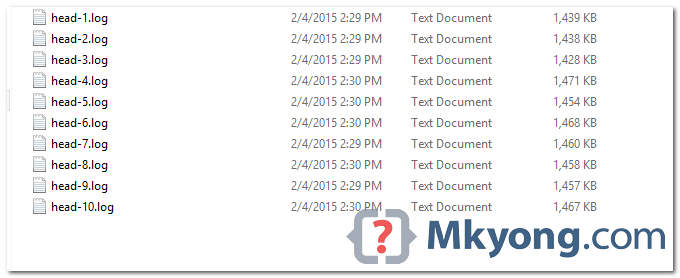
Output : 10 separate log files for 10 threads.
Note
With this MDC feature, you can even log output to a separate log file for each login user, each URI request, each remote host and etc.
With this MDC feature, you can even log output to a separate log file for each login user, each URI request, each remote host and etc.

This needs to be updated, certain ways of doing things here are deprecated
its works for child thead …?
Hi , Can you please tell me if I have multiple modules – module A and Module B in a project and inside module A- src/main/resources I have logback.xml file. How can I use this logback.xml for Module B? I have tried adding dependency of Module A into module B pom. It didn’t worked and giving me – “Logging system failed to initialize configuration from null”. I request to kindly help me
please provide me full code of this
Thanks!! can we configure SiftingAppender through application.yml
what about if a second thread in concurrent racing place a new key value before the first one rmeove your key ?
Works beautifully. I had unit tests that needed separate logging to files for assertions. This solved it – thank you.
Just a bit confused that your examples sometimes delimit strings with single quotes – eg: MDC.put(‘logFileName’, getName());
Surely this would never compile?
If you add dependencies for both slf4j-api and slf4j-simple it works.
It works… Thanks!
this is not working. Can you share the source code?
hi Mkyong,
can you please post spring boot + logback with MDC Feature for request(url) base separate log files
Hey Mykong thanks for that implementation example… It really works and as you said the below one is very important:
//remember remove this
MDC.remove(‘logFileName’);
remove the single quotes too :-\
Replace with doubles
Dear Friend,
is it possible to add multiple descriminator and use to separate the files. Use case is, based on the client, need to put log file into separate folder.
Can you provide complete code? Don’t work this example for me…
can you give the project github location so that we can understand how this is working
It works in glassfish?
Can you provide complete code? All classes. Where does this threadpool coming from..?
Have to Create log file based on current Logged in user