A JDBC example to show you how to connect to a PostgreSQL database with a JDBC driver.
Tested with:
- Java 8
- PostgreSQL 11
- PostgreSQL JDBC driver 42.2.5
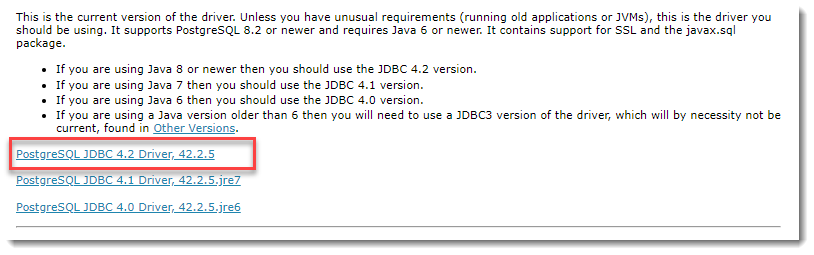
1. Download PostgreSQL JDBC Driver
Visit http://jdbc.postgresql.org/download.html to download the latest PostgreSQL JDBC Driver.
2. JDBC Connection
2.1 Make a connection to the PostgreSQL database.
JDBCExample.java
import java.sql.Connection;
import java.sql.DriverManager;
import java.sql.SQLException;

public class JDBCExample {

    public static void main(String[] args) {

		// https://docs.oracle.com/javase/8/docs/api/java/sql/package-summary.html#package.description
        // auto java.sql.Driver discovery -- no longer need to load a java.sql.Driver class via Class.forName

        // register JDBC driver, optional, since java 1.6
        /*try {
            Class.forName("org.postgresql.Driver");
        } catch (ClassNotFoundException e) {
            e.printStackTrace();
        }*/

        // auto close connection
        try (Connection conn = DriverManager.getConnection(
                "jdbc:postgresql://127.0.0.1:5432/test", "postgres", "password")) {

            if (conn != null) {
                System.out.println("Connected to the database!");
            } else {
                System.out.println("Failed to make connection!");
            }

        } catch (SQLException e) {
            System.err.format("SQL State: %s\n%s", e.getSQLState(), e.getMessage());
        } catch (Exception e) {
            e.printStackTrace();
        }

    }
}
Output, No driver?
> javac JDBCExample.java

> java JDBCExample
SQL State: 08001
No suitable driver found for jdbc:postgresql://127.0.0.1:5432/test
To run it with java command, we need to load the PostgreSQL JDBC driver manually. Assume everything is stored in the c:\db folder, run it again with -cp option.
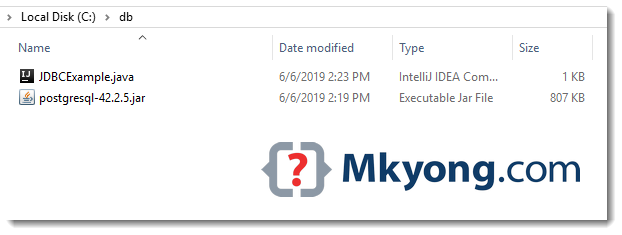
> java -cp "c:\db\postgresql-42.2.5.jar;c:\db" JDBCExample
Connected to the database!
3. Maven
The PostgreSQL JDBC driver is available in the Maven central repository.
pom.xml
	<dependency>
		<groupId>org.postgresql</groupId>
		<artifactId>postgresql</artifactId>
		<version>42.2.5</version>
	</dependency>
4. JDBC Select
4.1 Another JDBC example to get all rows from a table.
JDBCExample2.java
package com.mkyong.jdbc;

import com.mkyong.jdbc.model.Employee;

import java.math.BigDecimal;
import java.sql.*;
import java.util.ArrayList;
import java.util.List;

public class JDBCExample2 {

    public static void main(String[] args) {

        List<Employee> result = new ArrayList<>();

        String SQL_SELECT = "Select * from EMPLOYEE";

        // auto close connection and preparedStatement
        try (Connection conn = DriverManager.getConnection(
                "jdbc:postgresql://127.0.0.1:5432/test", "postgres", "password");
             PreparedStatement preparedStatement = conn.prepareStatement(SQL_SELECT)) {

            ResultSet resultSet = preparedStatement.executeQuery();

            while (resultSet.next()) {

                long id = resultSet.getLong("ID");
                String name = resultSet.getString("NAME");
                BigDecimal salary = resultSet.getBigDecimal("SALARY");
                Timestamp createdDate = resultSet.getTimestamp("CREATED_DATE");

                Employee obj = new Employee();
                obj.setId(id);
                obj.setName(name);
                obj.setSalary(salary);
                // Timestamp -> LocalDateTime
                obj.setCreatedDate(createdDate.toLocalDateTime());

                result.add(obj);

            }
            result.forEach(x -> System.out.println(x));

        } catch (SQLException e) {
            System.err.format("SQL State: %s\n%s", e.getSQLState(), e.getMessage());
        } catch (Exception e) {
            e.printStackTrace();
        }

    }

}
Employee.java
package com.mkyong.jdbc.model;

import java.math.BigDecimal;
import java.time.LocalDateTime;

public class Employee {

    private Long id;
    private String name;
    private BigDecimal salary;
    private LocalDateTime createdDate;

    //...
}
Table definition.
CREATE TABLE EMPLOYEE
(
    ID serial,
    NAME varchar(100) NOT NULL,
    SALARY numeric(15, 2) NOT NULL,
    CREATED_DATE timestamp with time zone NOT NULL DEFAULT CURRENT_TIMESTAMP
    PRIMARY KEY (ID)
);
Download Source Code
$ git clone https://github.com/mkyong/java-jdbc.git

When the Java application is deployed as a JAR in the Linux environment then the error is showing below, however, the same code is working in Windows machine and giving the correct data from the books table.
SQL State: 42P01
ERROR: relation “myschema.books” does not exist
please provide the solution.
my query string is:
String SQL_SELECT = “SELECT * FROM myschema.books”;
Good article, thanks
If I run TransactionExample.java I get error “org.postgresql.util.PSQLException: No value specified for parameter 1.” what I have to do?
what is meaning of this error exception in thread “main” org.postgresql.util.PSQLException :error: relation “movie” does not exist
I am getting below error while running in intellij.
SQL State: 08001
No suitable driver found for jdbc:postgresql
Missing dependency, for example:
Maven:
https://mvnrepository.com/artifact/org.postgresql/postgresql/42.2.18
Add it in pom.xml file
top
Hello Mkyong,
Hope you are doing well.
Here I am working on one of the android application which connects database without any API.
I successfully connected connection with database as per your code explanation.
Sample works proper on android 8.0 and newer versions but It is not working on lower versions. I also added compile options to JAVA 1.8 but still I am getting below error in lower devices.
Error:
Caused by: java.lang.ClassNotFoundException: Didn’t find class “java.time.Duration” on path: DexPathList[[zip file “/data/app/com.capermint.appnavdemo-2/base.apk”],nativeLibraryDirectories=[/data/app/com.capermint.appnavdemo-2/lib/arm64, /vendor/lib64, /system/lib64]]
Caused by: java.lang.NoClassDefFoundError: Class not found using the boot class loader; no stack trace available
Android Code:
launch {
var retval = “”
try {
Class.forName(“org.postgresql.Driver”)
} catch (e: ClassNotFoundException) {
e.printStackTrace()
retval = e.toString()
}
var conn: Connection? = null
val url = “jdbc:postgresql://myip:port/dbname”
val user = “username”
val password = “password”
try {
DriverManager.setLoginTimeout(5)
conn = DriverManager.getConnection(url, user, password)
Logger.d(“Connected to the PostgreSQL server successfully.”)
connectionToLiveData.postValue(true)
conn.close()
} catch (e: SQLException) {
e.printStackTrace()
Logger.d(“PostgreSQL sqlState : ” + e.sqlState)
Logger.d(“PostgreSQL errorCode : ” + e.errorCode)
connectionToLiveData.postValue(false)
}
}
Thanks
Thanks!!
Thanks! A very clear tutorial for a beginner!
Thanks!
Thanks for sharing this example
Have added postgreSQL JDBC driver, and also in PostGreSQL.app running in the background and createdb mkyong, but it is still reporting error of:
org.postgresql.util.PSQLException: FATAL: role “mkyong” does not exist
at org.postgresql.core.v3.ConnectionFactoryImpl.readStartupMessages(ConnectionFactoryImpl.java:691)
at org.postgresql.core.v3.ConnectionFactoryImpl.openConnectionImpl(ConnectionFactoryImpl.java:207)
at org.postgresql.core.ConnectionFactory.openConnection(ConnectionFactory.java:65)
at org.postgresql.jdbc2.AbstractJdbc2Connection.(AbstractJdbc2Connection.java:156)
at org.postgresql.jdbc3.AbstractJdbc3Connection.(AbstractJdbc3Connection.java:35)
at org.postgresql.jdbc3g.AbstractJdbc3gConnection.(AbstractJdbc3gConnection.java:22)
at org.postgresql.jdbc4.AbstractJdbc4Connection.(AbstractJdbc4Connection.java:47)
at org.postgresql.jdbc4.Jdbc4Connection.(Jdbc4Connection.java:30)
at org.postgresql.Driver.makeConnection(Driver.java:414)
at org.postgresql.Driver.connect(Driver.java:282)
at java.sql.DriverManager.getConnection(DriverManager.java:664)
at java.sql.DriverManager.getConnection(DriverManager.java:247)
at JDBCExample.main(JDBCExample.java:31)
Yes, you need to create the table manually.
Please add PostgreSQL JDBC Driver in your Classpath
how to get solution for this??
Please add PostgreSQL JDBC Driver in your Classpath
how to solve this?/
Please add PostgreSQL JDBC Driver in your Classpath
how to give -cp in ubuntu….????
Thanks men, your info help me more than another pages.
Excellent Work .. thanks much.. Keep up..
Anyone help me! I cannot query some data from table.
I have a table named FOO in PostgrelSQL. In java I qurey: select * from FOO. Then it make error “ERROR: relation “FOO” does not exist”. Sorry for my English
thank to much for your article.
Hi Mkyong. I’m building web service java using server tomcat and apache axis 2. But when i connect to postgresql database, so it has an error: “java.lang.NoClassDefFoundError: org/postgresql/Driver” although i have built path jdbc postgresql library.
Could you tell me an advise to solve this error.
Thanks you so much!
Thank you so much. This is a very quick and easy tutorial. Thank you 🙂
This is possibly the best guide for connecting to Postgresql with JDBC.
If I can suggest a few things before this tutorial begins, a few lines on the setup within postgresql itself that are needed first but not obvious how to do them. I will also include how I did each step, but I did it a crude way — sorry!
-create user with password (I created the user, then altered it to add a password)
-create database with user access (I created the database with owner = user)
-configure postgresql to allow user access through the localhost (I edited pg_hba.conf in the postgresql data folder. There, I changed the ‘host’ line entry: ‘ident’ to ‘md5’)
Much thanks and hope these first steps are useful to get you started!
Muchas Gracias, Bendiciones 🙂
Thanks a lot, Blessings on you 🙂
Thanks!
Mr mkyong, I have an android app that will connect to the Postgresql and when i try your code it says that my jdbc driver is registered but when i connect it to the postgre database, it can’t connect ..why?? Please help
im using eclipse. Is it about the connection?
thank you very much!
Nice and simple explaination, thanks!
Awesome. Thanks! Plain and simple, unlike all the other Spring tutorials out there! Please carry on the great work sir! 🙂
Thank a lot
Great description how to connect to a postgre-database using JDBC!
I found JdbcTemplate from Spring (e.g. here http://www.dzone.com/tutorials/java/spring/spring-jdbc-tutorial-1.html) less bulky
sorry for typo: correct URL is as follows http://www.dzone.com/tutorials/java/spring/spring-jdbc-tutorial-1.html
It was really helpful! Thank you a lot!
Hi. Thanks, your site has helped me quite a lot (Just stating with Java).
Now I’m trying yo connect to a remote DB located in my school’s server that i usually connect through putty’s SSH/Ubuntu 12.04 and I have the task of connecting to that DB from a java program. I have this code
 import java.sql.DriverManager;
import java.sql.Connection;
import java.sql.SQLException;

public class JDBCExample {

	public static void main(String[] argv) {

		System.out.println("-------- PostgreSQL "
				+ "JDBC Connection Testing ------------");

		try {

			Class.forName("org.postgresql.Driver");

		} catch (ClassNotFoundException e) {
			e.printStackTrace();
			return;

		}

		System.out.println("PostgreSQL JDBC Driver Registered!");

		Connection connection = null;

		try {

			connection = DriverManager.getConnection(
					"jdbc:postgresql://200.13.89.8:22/Proyecto_agencia_automotriz", "USER",
					"PASSWORD");

		} catch (SQLException e) {

			System.out.println("Connection Failed! Check output console");
			e.printStackTrace();
			return;

		}

		if (connection != null) {
			System.out.println("You made it, take control your database now!");
		} else {
			System.out.println("Failed to make connection!");
		}
	}

}

When i try to run it i get the next error: (i saw the above responses but couldn't manage it to work)
C:\Users\Sâga Macaro\Desktop\dbcon>java JDBCExample -------- PostgreSQL JDBC Connection Testing ------------ java.lang.ClassNotFoundException: org.postgresql.Driver at java.net.URLClassLoader$1.run(Unknown Source) at java.net.URLClassLoader$1.run(Unknown Source) at java.security.AccessController.doPrivileged(Native Method) at java.net.URLClassLoader.findClass(Unknown Source) at java.lang.ClassLoader.loadClass(Unknown Source) at sun.misc.Launcher$AppClassLoader.loadClass(Unknown Source) at java.lang.ClassLoader.loadClass(Unknown Source) at java.lang.Class.forName0(Native Method) at java.lang.Class.forName(Unknown Source) at JDBCExample.main(JDBCExample.java:14) I'ld like to know how can i solve it, if any1 here can tell me, Also when one of the solution adds a classpath from jdk, should it be the bin from jdk or jre works?. ThanksHope you have solved it but the problem is your JDBC isn’t located at the specified path or you have downloaded the JDBC driver.
Also, it says “.driver” it should be “.JDBC”
when i run it using the cmd it gives the following error:
could not find or load main class for JDBCExample
and when i use JCreator to run it, it gives the following error:
Usage: java [-options] class [args…]
(to execute a class)
or java [-options] -jar jarfile [args…]
(to execute a jar file)…
…………………..
You need to compile your java file to get a class file. Use javac from JDK to do so.
Assume .java and the jdbc driver are stored in
c:\dbCompile
javac c:\db\JDBCExample.javaRun
java -cp "c:\db\postgresql-42.2.5.jar;c:\db" JDBCExampleset the classpath
NB:
I use the default database provided by the software. it is called: DREBY. openbravo pos version is 2.30.2.
or knowing anything java or linux I prefer to entrust an expert like you.
I’ve entered data into the database. if you agree I will pass. thank you
A Mr. Kyong.
First of all, congratulations for the work you do. I would like to request your assistance to modify a software point of sale pos openbarvo call. I’d like to make a few changes to adapt to my commercce. I am convinced that you know you should do it. The changes I want are:
– Turn the A5 ticket (because I use a laser printer hp 1020)
– Make a statement of my profits over
– Change the state of my products (enlarge the column name products, drop the column taxes)
and finally to another state with just my product (the reference, name, and the selling price of the products.)
If you interested my project I am ready to listen to your suggestions.
thank you
hi..
i am use netbeans 7.2
and my database cannectin is pgadmin of postgresql..
i have ready classes for the database….
so how can i direct make table in pgadmin by using of persistance classes…??
plzz sir rpl me…
Dear Sir,
I am using openjdk 1.6, netbeans 6.5.1(having postgres8.3 jdbc driver), postgres8.4 on centOS6.0.
pg_hba.conf is having an entry
host all all 127.0.0.1/32 md5
postmaster (pid 1466) is running…
also added port 5432 protocol tcp to permit by SELinux.
I am getting error
“Unable to add connection. Cannot establish connection to jdbc:postgresql://127.0.0.1:5432/postgres using org.postgresql.Driver(connection refused.Check that the host name and port name are correct and that the postmaster is accepting TCP/IP connections”)
Please help me!
Thanks and Regards
Can you solve it?
What was the problem?
Check that the host name and port name are correct and that the postmaster is accepting TCP/IP connections
Thank you. it works
Thank’s!
Thanks for this post. Really useful.
One item I couldn’t find yet anywhere is how would you go about detecting database connection afterwards? I mean, true database connection issues, not SQL errors.
Thanks for replying,
D.
many many thanks to mkyong…its working fine…
I can connect to the database when I use the code
I modidified the classpath as
and then I use the command.
java Example1
I get the following error.
java.lang.ClassNotFoundException: org.postgresql.Driver at java.net.URLClassLoader$1.run(Unknown Source) at java.security.AccessController.doPrivileged(N at java.net.URLClassLoader.findClass(Unknown Sou at java.lang.ClassLoader.loadClass(Unknown Sourc at sun.misc.Launcher$AppClassLoader.loadClass(Un at java.lang.ClassLoader.loadClass(Unknown Sourc at java.lang.Class.forName0(Native Method) at java.lang.Class.forName(Unknown Source) at Example1.main(Example1.java:10)Make sure
postgresql-9.1-901.jdbc3.jaris configured correctly and able to locate in your class path.Suppose you are in Windows environment, make sure the “PATH” variable contains value of “
c:\test\postgresql-9.1-901.jdbc3.jar“.It still gives the error that driver not found.
I dont know where am i doing it wrong
Hey I followed Surinders comment given below and it worked!!!!
thanks mkyong for ur reply
In Ubuntu, where to set the classpath and where to copy .jar file? because i am also getting the error as ClassNotFoundException: ..for Driver
Hi, I have a same problem as yours, and finally I solved it. It does help if you only change the classpath ot the environment variable. Try this:
1.go to your project fold in the eclipse, right click, and then choose “run as”, click “run configurations”.
2. go to class path tab, choose “add external jar”, then choose the “postgresql-9.1-901.jdbc3.jar” you have download.
3. run it again!
This works for me, and I hope it will help you.
PS: reference
Finally, thanks mkyong, this is a great start tutorial for gostgis on java!
THX A LOT
Hi, I got a warning:
SQL exception: java.sql.SQLException: No suitable driver found for jdbc:postgresql://127.0.0.1:5432/fundb
Please replay, my boss gonna kill me 😀
set your class path variable as follow
goto my computer-> properties->Advanced->Environment Variable
Click New
Variable Name=CLASSPATH
Variable Value=C:\tomcat4\common\lib\servlet-api.jar;C:\tomcat4\common\lib\commons-lang-2.4.jar; c:\jdk1.6\bin;C:\Test\postgresql-8.3-603.jdbc4.jar;
click Ok
and same as do for follow window.
click ok
click ok.
open cmd and type
java JDBCExample
It’s works.
Thanks!
i still have the error class not found..where can i find the tomcat folder in the above code?
PLEASE HELP
does the codes above work on eclipse?
Sure it works…Eclipse is just an IDE
Which jre version is compatible with these code? jre1.4/1.5/1.6 which one???
I found bad version number in .class file error.
Please reply soon.
Thank in advance.
any version will do, and your error message is telling you the conflict of different Java JDK at compile time and runtime, see below article
https://mkyong.com/java/javalangunsupportedclassversionerror-bad-version-number-in-class-file/
Cannot concur a lot more with this, incredibly attractive article. Thanks A Lot.
Newbie here,
where do i put the postgresql.jre file?
You can put it anywhere u want, and compile with -cp option for the classpath location. e.g
thanks boss :beer:
Thank’s for the article
Is there a way to connect to Postgres using javascript ?
interesting topic, i’ve seen some examples in MsAccess. May i know why you want to connect database in client side? it’s just doesn’t make sense to me, unless your database is store in client side as well.
If you really want to do it, i will suggest you use Ajax to call your code in server side to connect database in server side.
Nice work, thanx for the article.
} catch (SQLException e) {
System.out.println(“Connection Failed! Check output console”);
e.printStackTrace();
return;
}
I canvot get what this part of the code does ,do you mind explain it in more detail for me to understand
it just print any SQL exception error messages…
hi i got the code in your side… how to run the code……and any other class path is there please send it my mail id…[email protected]….class path means any rar file
Hi!
Your code return this line to me:
“If you reach this line, please email me by telling how you do it?”
I just chage the address to:
jdbc:postgresql://192.168.0.1:6000/comecont”,”xgest”, “qwerty”
and that return the error…
Connection refused. Check that the hostname and port are correct and that the postmaster is accepting TCP/IP connections.
Please reply to my email. Thanks!
Postgres is telling you that you are trying to connect to database that is not there or is connecting to a database you are not allowed to. Check these things…
Posgres database is running, i.e. you have started the service and
Does the database comecont exist?
Does 192.168.0.1 exist?
Does 192.168.0.1 accept requests via TCP/IP (the net) on port 6000?
Has the firewall has accepted you as a trusted zone? (e.g. the portmaster)
Why don’t people “READ” error messages these days… ?